Can MITSUBISHI OUTLANDER 2014 3.G Display Audio Manual
[x] Cancel search | Manufacturer: MITSUBISHI, Model Year: 2014, Model line: OUTLANDER, Model: MITSUBISHI OUTLANDER 2014 3.GPages: 88, PDF Size: 11.63 MB
Page 26 of 88
26 Listen to Radio
Display Contents
FM Radio Broadcast Information Screen
3)
4) 1)
8)
6)
5)
2)
9)7)10) 16)
11),12)
13)
14)
17)
15)
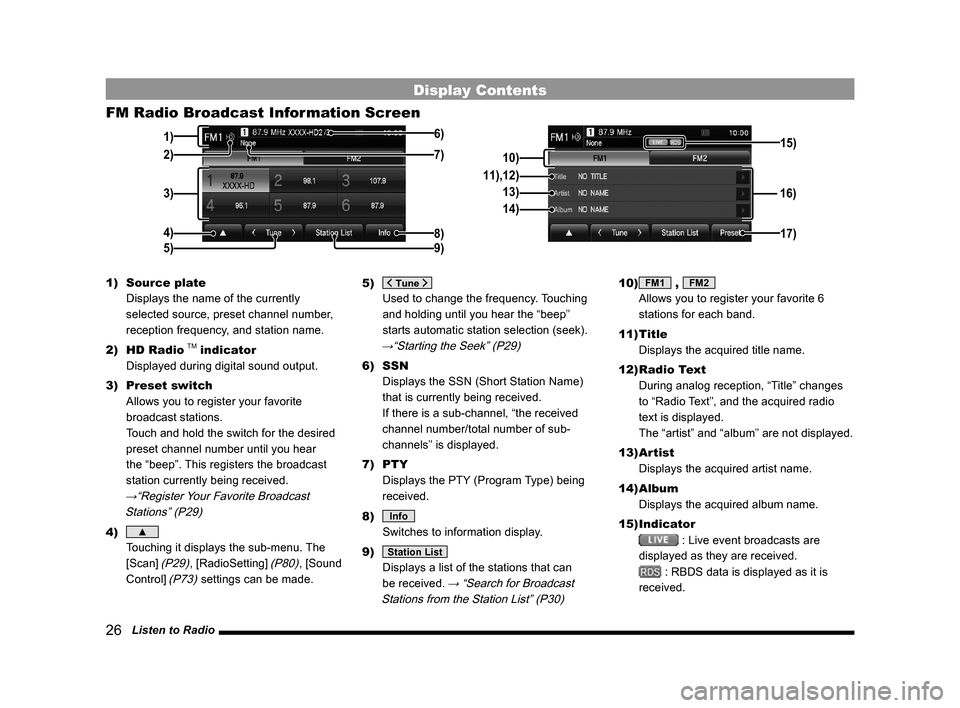
1) Source plate
Displays the name of the currently
selected source, preset channel number,
reception frequency, and station name.
2) HD Radio
TM indicator
Displayed during digital sound output.
3) Preset switch
Allows you to register your favorite
broadcast stations.
Touch and hold the switch for the desired
preset channel number until you hear
the “beep”. This registers the broadcast
station currently being received.
→“Register Your Favorite Broadcast
Stations” (P29)
4) ▲
Touching it displays the sub-menu. The
[Scan]
(P29), [RadioSetting] (P80), [Sound
Control]
(P73) settings can be made. 5)
Used to change the frequency. Touching
and holding until you hear the “beep”
starts automatic station selection (seek).
→“Starting the Seek” (P29)
6) SSN
Displays the SSN (Short Station Name)
that is currently being received.
If there is a sub-channel, “the received
channel number/total number of sub-
channels” is displayed.
7) PTY
Displays the PTY (Program Type) being
received.
8)
Info
Switches to information display.
9)
Station List
Displays a list of the stations that can
be received.
→ “Search for Broadcast
Stations from the Station List” (P30)
10) FM1 , FM2
Allows you to register your favorite 6
stations for each band.
11) Title
Displays the acquired title name.
12) Radio Text
During analog reception, “Title” changes
to “Radio Text”, and the acquired radio
text is displayed.
The “artist” and “album” are not displayed.
13) Artist
Displays the acquired artist name.
14) Album
Displays the acquired album name.
15) Indicator
: Live event broadcasts are
displayed as they are received.
: RBDS data is displayed as it is
received.
13MY_AVC(NAS).indb 262013/02/14 10:57:31
Page 27 of 88
Listen to Radio 27
AVRadio
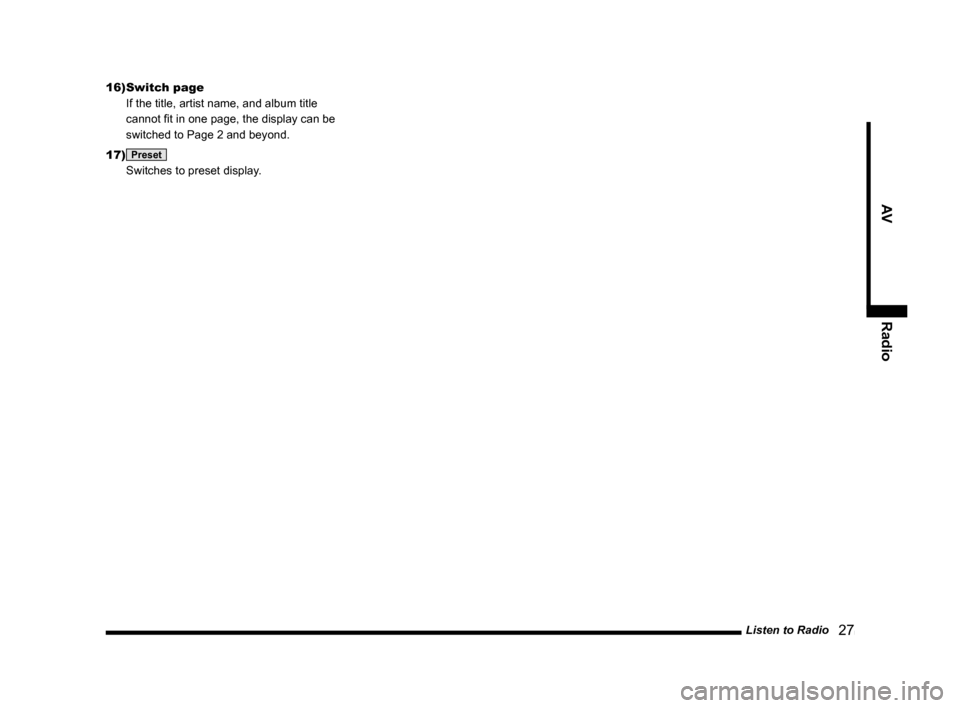
16) Switch page
If the title, artist name, and album title
cannot fit in one page, the display can be
switched to Page 2 and beyond.
17)
Preset
Switches to preset display.
13MY_AVC(NAS).indb 272013/02/14 10:57:31
Page 28 of 88
28 Listen to Radio
AM Radio Broadcast Information Screen
3)
4) 1)
8)
6)
5)
2)9)7)
14)
10)
11)
12)
15)
13)
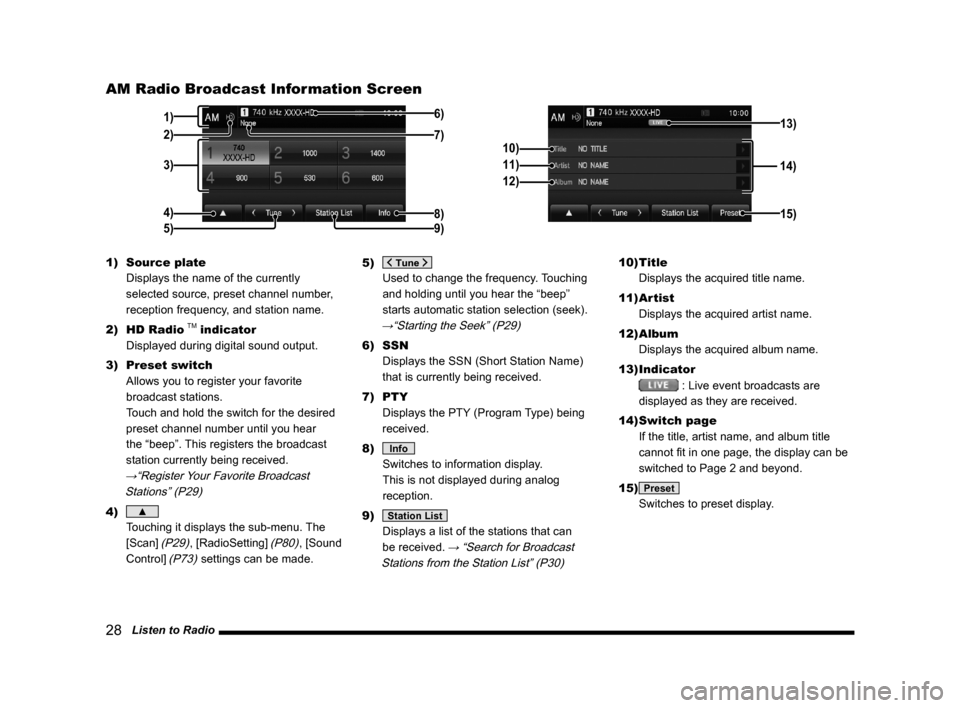
1) Source plate
Displays the name of the currently
selected source, preset channel number,
reception frequency, and station name.
2) HD Radio
TM indicator
Displayed during digital sound output.
3) Preset switch
Allows you to register your favorite
broadcast stations.
Touch and hold the switch for the desired
preset channel number until you hear
the “beep”. This registers the broadcast
station currently being received.
→“Register Your Favorite Broadcast
Stations” (P29)
4) ▲
Touching it displays the sub-menu. The
[Scan]
(P29), [RadioSetting] (P80), [Sound
Control]
(P73) settings can be made. 5)
Used to change the frequency. Touching
and holding until you hear the “beep”
starts automatic station selection (seek).
→“Starting the Seek” (P29)
6) SSN
Displays the SSN (Short Station Name)
that is currently being received.
7) PTY
Displays the PTY (Program Type) being
received.
8)
Info
Switches to information display.
This is not displayed during analog
reception.
9)
Station List
Displays a list of the stations that can
be received.
→ “Search for Broadcast
Stations from the Station List” (P30)
10) Title
Displays the acquired title name.
11) Artist
Displays the acquired artist name.
12) Album
Displays the acquired album name.
13) Indicator
: Live event broadcasts are
displayed as they are received.
14) Switch page
If the title, artist name, and album title
cannot fit in one page, the display can be
switched to Page 2 and beyond.
15)
Preset
Switches to preset display.
13MY_AVC(NAS).indb 282013/02/14 10:57:32
Page 29 of 88
Listen to Radio 29
AVRadio
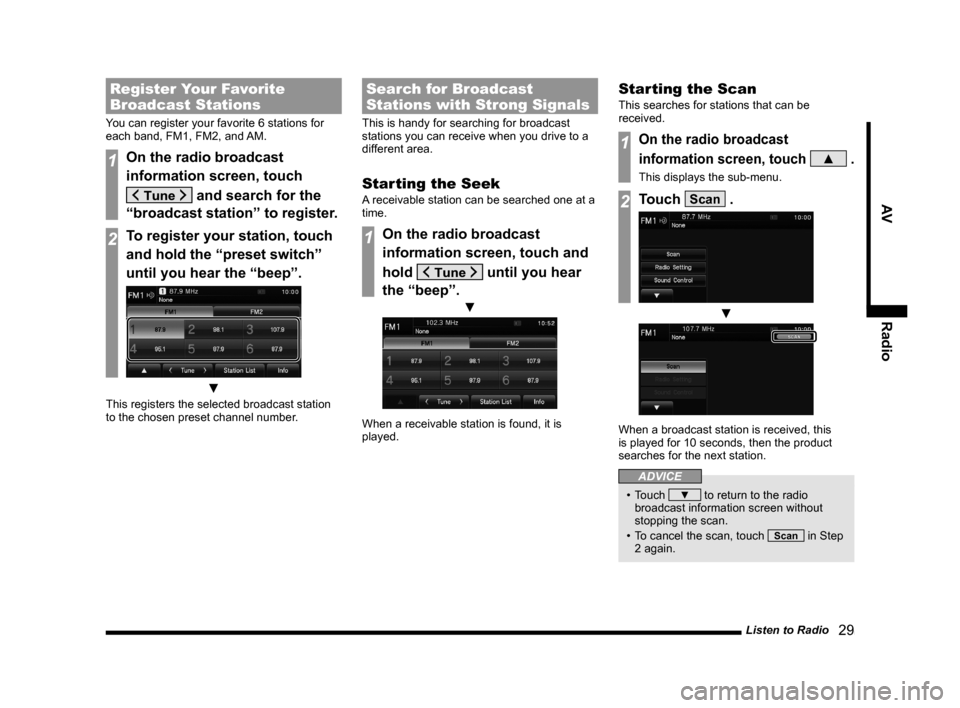
Register Your Favorite
Broadcast Stations
You can register your favorite 6 stations for
each band, FM1, FM2, and AM.
1On the radio broadcast
information screen, touch
and search for the
“broadcast station” to register.
2To register your station, touch
and hold the “preset switch”
until you hear the “beep”.
▼
This registers the selected broadcast station
to the chosen preset channel number.
Search for Broadcast
Stations with Strong Signals
This is handy for searching for broadcast
stations you can receive when you drive to a
different area.
Starting the Seek
A receivable station can be searched one at a
time.
1On the radio broadcast
information screen, touch and
hold
until you hear
the “beep”.
▼
When a receivable station is found, it is
played.
Starting the Scan
This searches for stations that can be
received.
1On the radio broadcast
information screen, touch
▲ .
This displays the sub-menu.
2Touch Scan .
▼
When a broadcast station is received, this
is played for 10 seconds, then the product
searches for the next station.
ADVICE
• Touch ▼ to return to the radio
broadcast information screen without
stopping the scan.
• To cancel the scan, touch
Scan in Step
2 again.
13MY_AVC(NAS).indb 292013/02/14 10:57:33
Page 30 of 88
30 Listen to Radio
Search for Broadcast
Stations from the Station List
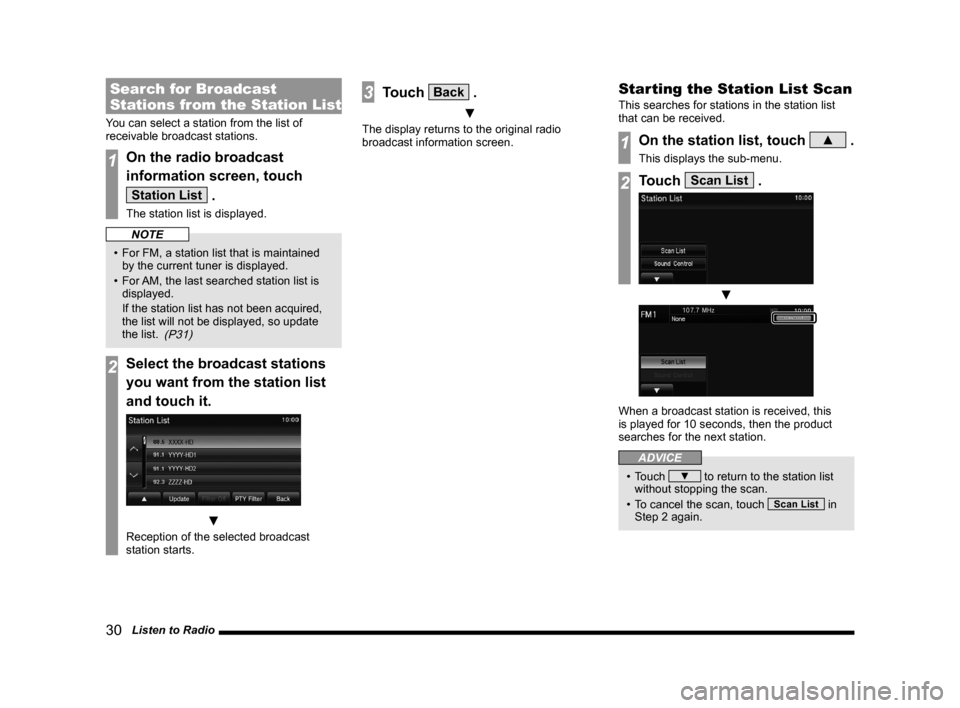
You can select a station from the list of
receivable broadcast stations.
1On the radio broadcast
information screen, touch
Station List .
The station list is displayed.
NOTE
• For FM, a station list that is maintained by the current tuner is displayed.
• For AM, the last searched station list is
displayed.
If the station list has not been acquired,
the list will not be displayed, so update
the list.
(P31)
2Select the broadcast stations
you want from the station list
and touch it.
▼
Reception of the selected broadcast
station starts.
3Touch Back .
▼
The display returns to the original radio
broadcast information screen.
Starting the Station List Scan
This searches for stations in the station list
that can be received.
1On the station list, touch ▲ .
This displays the sub-menu.
2Touch Scan List .
▼
When a broadcast station is received, this
is played for 10 seconds, then the product
searches for the next station.
ADVICE
• Touch ▼ to return to the station list
without stopping the scan.
• To cancel the scan, touch
Scan List in
Step 2 again.
13MY_AVC(NAS).indb 302013/02/14 10:57:34
Page 31 of 88
Listen to Radio 31
AVRadio
Narrowing Down the Station
List
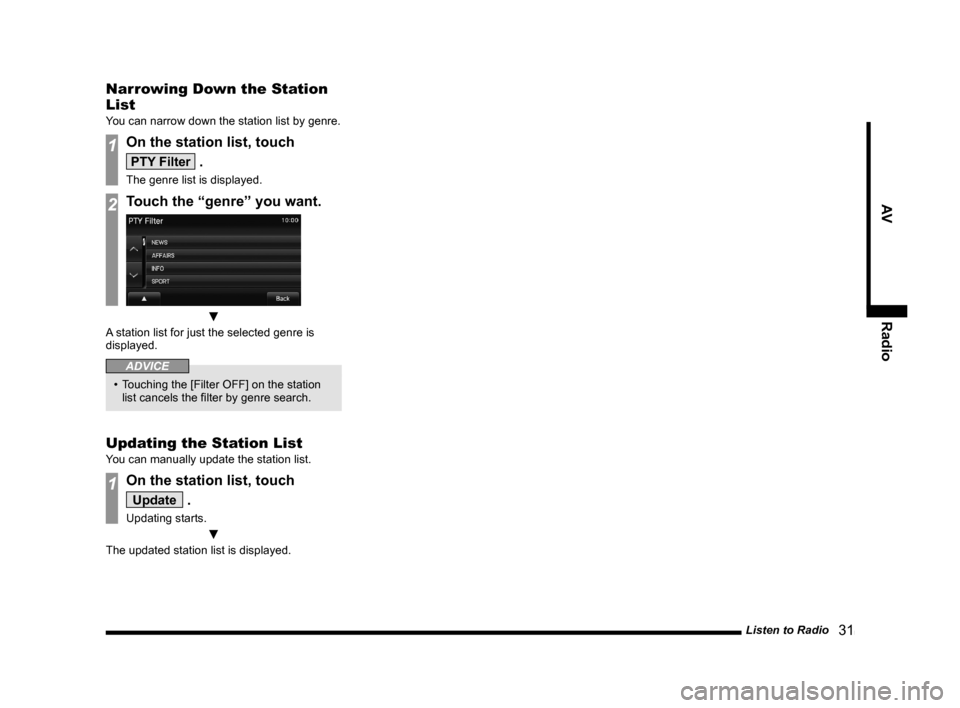
You can narrow down the station list by genre.
1On the station list, touch
PTY Filter .
The genre list is displayed.
2Touch the “genre” you want.
▼
A station list for just the selected genre is
displayed.
ADVICE
• Touching the [Filter OFF] on the station
list cancels the filter by genre search.
Updating the Station List
You can manually update the station list.
1On the station list, touch
Update .
Updating starts.
▼
The updated station list is displayed.
13MY_AVC(NAS).indb 312013/02/14 10:57:34
Page 33 of 88
Listen to Satellite Radio 33
AVRadio
Display Contents
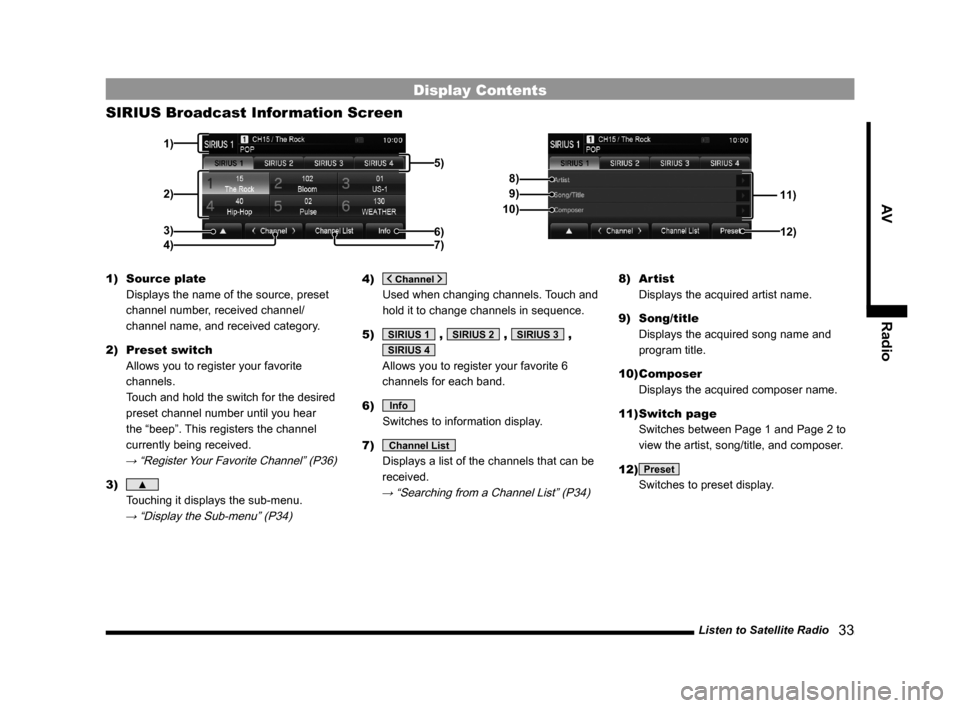
SIRIUS Broadcast Information Screen
11)
8)
9)
10)
12)
2)
3) 1)
5)
6)4) 7)
1) Source plate
Displays the name of the source, preset
channel number, received channel/
channel name, and received category.
2) Preset switch
Allows you to register your favorite
channels.
Touch and hold the switch for the desired
preset channel number until you hear
the “beep”. This registers the channel
currently being received.
→ “Register Your Favorite Channel” (P36)
3) ▲
Touching it displays the sub-menu.
→ “Display the Sub-menu” (P34)
4)
Used when changing channels. Touch and
hold it to change channels in sequence.
5)
SIRIUS 1 , SIRIUS 2 , SIRIUS 3 ,
SIRIUS 4
Allows you to register your favorite 6
channels for each band.
6)
Info
Switches to information display.
7)
Channel List
Displays a list of the channels that can be
received.
→ “Searching from a Channel List” (P34)
8) Artist
Displays the acquired artist name.
9) Song/title
Displays the acquired song name and
program title.
10) Composer
Displays the acquired composer name.
11) Switch page
Switches between Page 1 and Page 2 to
view the artist, song/title, and composer.
12)
Preset
Switches to preset display.
13MY_AVC(NAS).indb 332013/02/14 10:57:35
Page 34 of 88
34 Listen to Satellite Radio
Display the Sub-menu
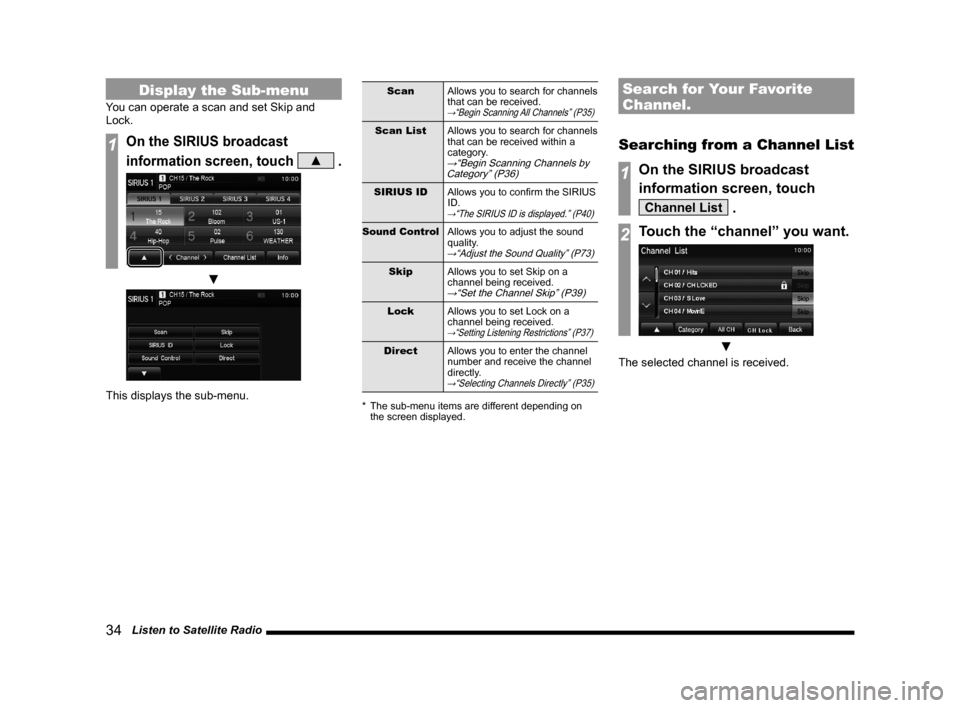
You can operate a scan and set Skip and
Lock.
1On the SIRIUS broadcast
information screen, touch
▲ .
▼
This displays the sub-menu.
ScanAllows you to search for channels
that can be received.
→“Begin Scanning All Channels” (P35)
Scan ListAllows you to search for channels
that can be received within a
category.
→“Begin Scanning Channels by
Category” (P36)
SIRIUS ID Allows you to confirm the SIRIUS
ID.
→“The SIRIUS ID is displayed.” (P40)
Sound Control Allows you to adjust the sound
quality.
→“Adjust the Sound Quality” (P73)
SkipAllows you to set Skip on a
channel being received.
→“Set the Channel Skip” (P39)
Lock Allows you to set Lock on a
channel being received.
→“Setting Listening Restrictions” (P37)
Direct Allows you to enter the channel
number and receive the channel
directly.
→“Selecting Channels Directly” (P35)
* The sub-menu items are different depending on
the screen displayed.
Search for Your Favorite
Channel.
Searching from a Channel List
1On the SIRIUS broadcast
information screen, touch
Channel List .
2Touch the “channel” you want.
▼
The selected channel is received.
13MY_AVC(NAS).indb 342013/02/14 10:57:36
Page 35 of 88
Listen to Satellite Radio 35
AVRadio
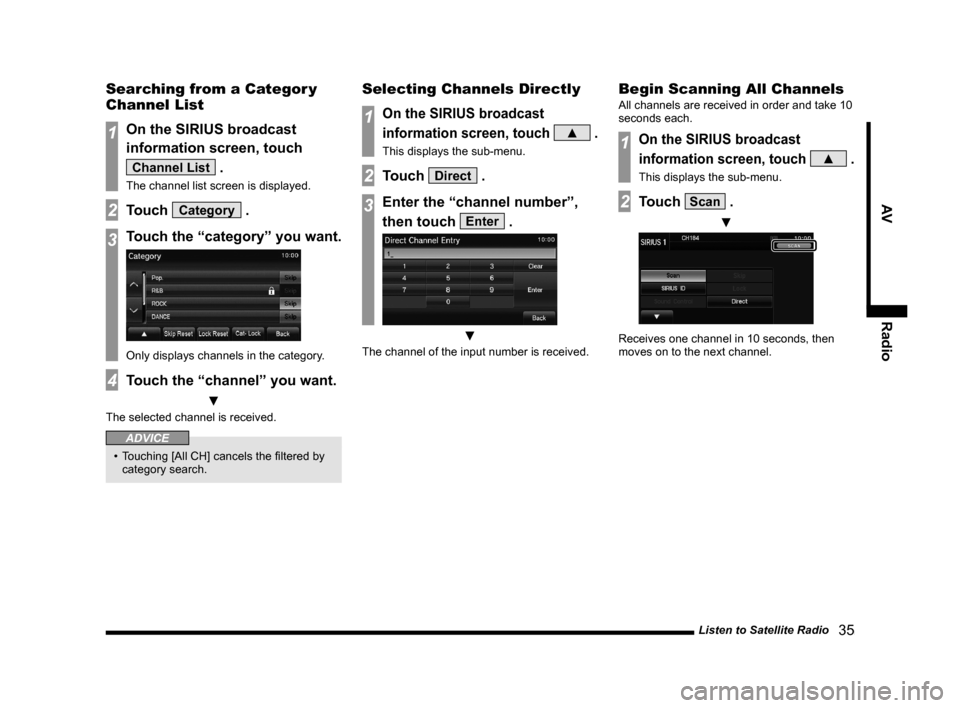
Searching from a Categor y
Channel List
1On the SIRIUS broadcast
information screen, touch
Channel List .
The channel list screen is displayed.
2Touch Category .
3Touch the “category” you want.
Only displays channels in the category.
4Touch the “channel” you want.
▼
The selected channel is received.
ADVICE
• Touching [All CH] cancels the filtered by
category search.
Selecting Channels Directly
1On the SIRIUS broadcast
information screen, touch
▲ .
This displays the sub-menu.
2Touch Direct .
3Enter the “channel number”,
then touch
Enter .
▼
The channel of the input number is received.
Begin Scanning All Channels
All channels are received in order and take 10
seconds each.
1On the SIRIUS broadcast
information screen, touch
▲ .
This displays the sub-menu.
2Touch Scan .
▼
Receives one channel in 10 seconds, then
moves on to the next channel.
13MY_AVC(NAS).indb 352013/02/14 10:57:36
Page 36 of 88
36 Listen to Satellite Radio
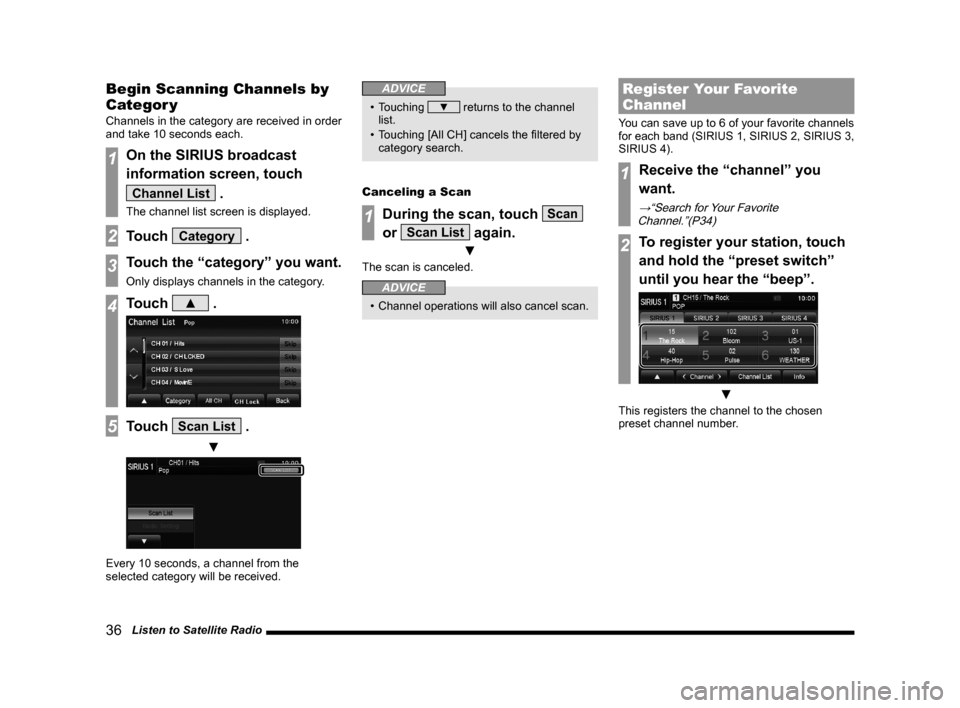
Begin Scanning Channels by
Categor y
Channels in the category are received in order
and take 10 seconds each.
1On the SIRIUS broadcast
information screen, touch
Channel List .
The channel list screen is displayed.
2Touch Category .
3Touch the “category” you want.
Only displays channels in the category.
4Touch ▲ .
5Touch Scan List .
▼
Every 10 seconds, a channel from the
selected category will be received.
ADVICE
• Touching ▼ returns to the channel
list.
• Touching [All CH] cancels the filtered by category search.
Canceling a Scan
1During the scan, touch Scan
or
Scan List again.
▼
The scan is canceled.
ADVICE
• Channel operations will also cancel scan.
Register Your Favorite
Channel
You can save up to 6 of your favorite channels
for each band (SIRIUS 1, SIRIUS 2, SIRIUS 3,
SIRIUS 4).
1Receive the “channel” you
want.
→“Search for Your Favorite
Channel.”(P34)
2To register your station, touch
and hold the “preset switch”
until you hear the “beep”.
▼
This registers the channel to the chosen
preset channel number.
13MY_AVC(NAS).indb 362013/02/14 10:57:37