Navi settings MITSUBISHI OUTLANDER 2014 3.G MMCS Manual
[x] Cancel search | Manufacturer: MITSUBISHI, Model Year: 2014, Model line: OUTLANDER, Model: MITSUBISHI OUTLANDER 2014 3.GPages: 226, PDF Size: 31.21 MB
Page 165 of 226
Voice Control 165
INFO/SETTINGS Voice Operation
Voice Operation
Voice Control
You can perform telephone, audio,
navigation, and other operations by voice
command.
There are two types of voice control
functions: the function from this product
and the function used in a Bluetooth
® 2.0
interface.
1Press the “SPEECH” key on
the steering wheel. After you
hear the “beep”, say “Voice
commands”.
→“Steering Remote Control Switch Operation”(P82)
The telop and guide screen is displayed.
When speaking, use the details displayed
on the guide screen as reference.
ADVICE
• You can check the usage for voice
control, a list of voice commands, etc.
→ “Check the Voice Control Help” (P194)
• The voice control function cannot be
used right after the navigation starts up.
Please wait for a while before using.
• Depending on the status of the
navigation, voice control may not be
possible.
• Depending on the combination of devices
and modes, voice commands may not be
recognized.
• The guide screen will be displayed while
the vehicle is moving. You can choose
to not display the guide screen.
→“Voice
control settings” (P212)
• If you use other functions during voice
command (including during phone
dialing), the operation by voice command
will be canceled.
NOTE
The voice control function may have
difficulty in some environments and with
the way some people speak.
The followings will help you make the best
use of the voice control function.
• Speak loud and clear. This makes voice
recognition easier.
• When making a call, avoid saying things
such as “uh”, “um, uh”, “aah”, etc. These
may be mistaken for other words.
• Close the windows. Noise from the
outside can cause recognition mistakes.
• Ask everyone else in the vehicle to
please be quiet while you voice-dial a
call. The voices of others in the vehicle
can cause recognition mistakes.
• Words are sometimes mistaken for other
words with a similar pronunciation.
• If there is too much ambient noise,
recognition mistakes may occur.
Example: Driving through a tunnel,
driving with chains on the tires
• Strong air flow from the air conditioner
or heater may make recognition more
difficult.
• In the following cases, voice commands
are not accepted.
- Speaking too slow (too fast)
- Speaking too loud (too softly)
- Not saying anything or pronunciation is
unclear
- Spoke before the “beep”
• The system cannot recognize voice data
that is not recorded.
Page 167 of 226
Navigation Function Operation 167
INFO/SETTINGSVoice Operation
Navigation Function
Operation
Operating the Map
Basic map operations are done through voice
control.
Scrolling the Map
1Press the “SPEECH” key on
the steering wheel.
After you hear the “beep”, say “Voice
commands”.
2Say“Scroll Down”
▼
ADVICE
• You can scroll in 8 directions.
(Up, Upper Right, Right, Lower Right,
Down, Lower Left, Left, Upper Left) Scroll
Changing the Map Scale
1Press the “SPEECH” key on
the steering wheel.
After you hear the “beep”, say “Voice
commands”.
2Say“Zoom Out”
▼
ADVICE
• You can change the scale by saying a
particular measurement.
(25 m to 1000 km) scale
(1/64 mile to 600 mile) scale
• May sometimes not be displayed
depending on the navigation conditions.
Change the Two-screen Map
Scale
1Press the “SPEECH” key on
the steering wheel.
After you hear the “beep”, say “Voice
commands”.
2Say“Left Screen 500m”
▼
ADVICE
• There are several types of scale change.
Zoom In/Zoom Out, Left Screen (Zoom
In/Zoom Out), Urban Map, Left Screen
Urban Map, (10 m to 100 km) Scale, Left
Screen (10 m to 100 km) Scale
Page 169 of 226
Navigation Function Operation 169
INFO/SETTINGSVoice Operation
Creating a Route to Your
Home
1Press the “SPEECH” key on
the steering wheel.
After you hear the “beep”, say “Voice
commands”.
2Say“Go home”
▼
ADVICE
• You cannot do this operation if your home
is not registered. →“Register a Home
Location” (P67)
Creating a Waypoint
1Search for a Location
Operates the navigation and performs a
search. →“Search for a Location” (P48)
2Press the “SPEECH” key on
the steering wheel.
After you hear the “beep”, say “Voice
commands”.
3Say“Set Waypoint”
▼
ADVICE
• You cannot set waypoints without setting
a destination.
Registering a Location
1Search for a Location
Operates the navigation and performs a
search. →“Search for a Location” (P48)
2Press the “SPEECH” key on
the steering wheel.
After you hear the “beep”, say “Voice
commands”.
3Say“Address Book Setting”
▼
ADVICE
• The address book mark becomes (pin
mark).
• You can edit your address book
information.
→“Change Address Book
Information” (P73)
Page 171 of 226
Navigation Function Operation 171
INFO/SETTINGSVoice Operation
4After you hear the beep, say
“212XXXX1XX”.
▼
5After you hear the beep, say
“Search”.
▼
Displays the map of the surrounding area if
the corresponding establishment is found.
ADVICE
• If the number continues, continue saying
the number.
• To re-enter the number, say “Re-enter”.
Searching by Postal Code
1Press the “SPEECH” key on
the steering wheel.
After you hear the “beep”, say “Voice
commands”.
2Say“Search by Zip code”
▼
3After you hear the beep, say
“New York”.
▼
4After you hear the beep, say
“10466”.
▼
5After you hear the beep, say
“Search”.
▼
Displays the map of the surrounding area if
the corresponding postal code is found.
ADVICE
• To re-enter the number, say “Re-enter”.
Page 175 of 226
List of Audio Commands 175
INFO/SETTINGSVoice Operation
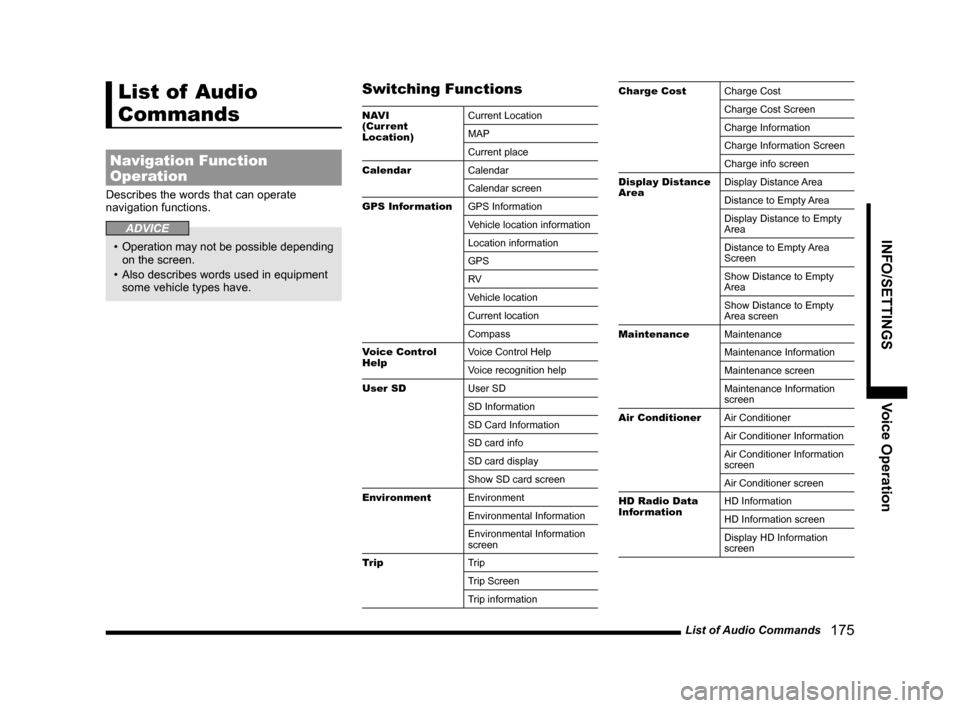
List of Audio
Commands
Navigation Function
Operation
Describes the words that can operate
navigation functions.
ADVICE
• Operation may not be possible depending
on the screen.
• Also describes words used in equipment
some vehicle types have.
Switching Functions
NAV I
(Current
Location) Current Location
MAP
Current place
Calendar Calendar
Calendar screen
GPS Information GPS Information
Vehicle location information
Location information
GPS
RV
Vehicle location
Current location
Compass
Voice Control
Help Voice Control Help
Voice recognition help
User SD User SD
SD Information
SD Card Information
SD card info
SD card display
Show SD card screen
Environment Environment
Environmental Information
Environmental Information
screen
Trip Trip
Trip Screen
Trip information
Charge CostCharge Cost
Charge Cost Screen
Charge Information
Charge Information Screen
Charge info screen
Display Distance
Area Display Distance Area
Distance to Empty Area
Display Distance to Empty
Area
Distance to Empty Area
Screen
Show Distance to Empty
Area
Show Distance to Empty
Area screen
Maintenance Maintenance
Maintenance Information
Maintenance screen
Maintenance Information
screen
Air Conditioner Air Conditioner
Air Conditioner Information
Air Conditioner Information
screen
Air Conditioner screen
HD Radio Data
Information HD Information
HD Information screen
Display HD Information
screen
Page 183 of 226
List of Audio Commands 183
INFO/SETTINGSVoice Operation
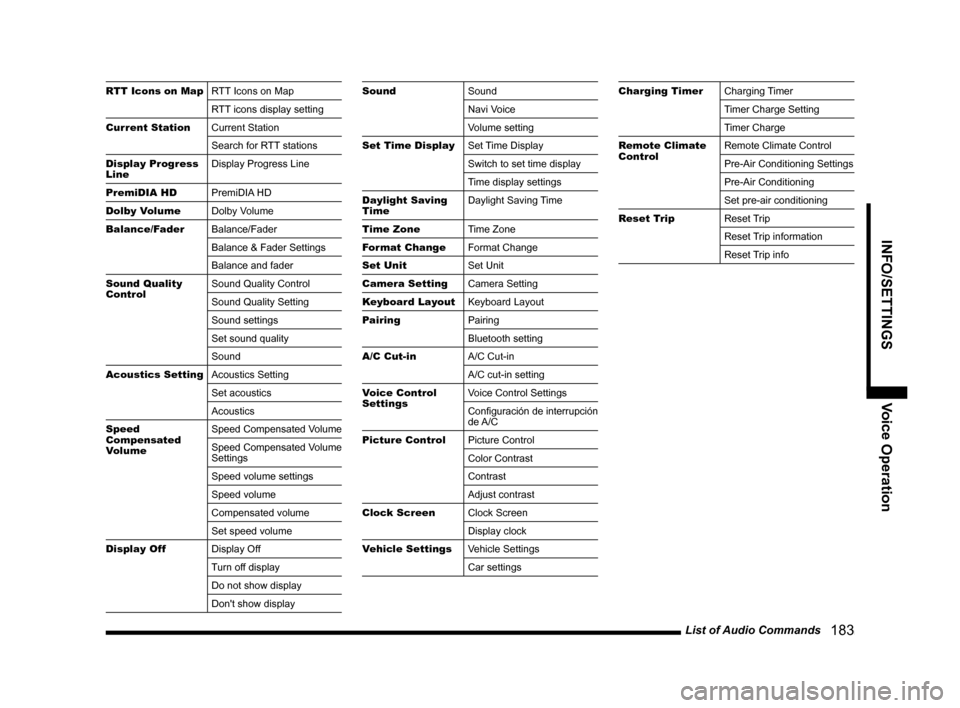
RTT Icons on MapRTT Icons on Map
RTT icons display setting
Current Station Current Station
Search for RTT stations
Display Progress
Line Display Progress Line
PremiDIA HD PremiDIA HD
Dolby Volume Dolby Volume
Balance/Fader Balance/Fader
Balance & Fader Settings
Balance and fader
Sound Quality
Control Sound Quality Control
Sound Quality Setting
Sound settings
Set sound quality
Sound
Acoustics Setting Acoustics Setting
Set acoustics
Acoustics
Speed
Compensated
Volume Speed Compensated Volume
Speed Compensated Volume
Settings
Speed volume settings
Speed volume
Compensated volume
Set speed volume
Display Off Display Off
Turn off display
Do not show display
Don't show displaySoundSound
Navi Voice
Volume setting
Set Time Display Set Time Display
Switch to set time display
Time display settings
Daylight Saving
Time Daylight Saving Time
Time Zone Time Zone
Format Change Format Change
Set Unit Set Unit
Camera Setting Camera Setting
Keyboard Layout Keyboard Layout
Pairing Pairing
Bluetooth setting
A/C Cut-in A/C Cut-in
A/C cut-in setting
Voice Control
Settings Voice Control Settings
Configuración de interrupción
de A/C
Picture Control Picture Control
Color Contrast
Contrast
Adjust contrast
Clock Screen Clock Screen
Display clock
Vehicle Settings Vehicle Settings
Car settingsCharging TimerCharging Timer
Timer Charge Setting
Timer Charge
Remote Climate
Control Remote Climate Control
Pre-Air Conditioning Settings
Pre-Air Conditioning
Set pre-air conditioning
Reset Trip Reset Trip
Reset Trip information
Reset Trip info
Page 187 of 226
List of Audio Commands 187
INFO/SETTINGSVoice Operation
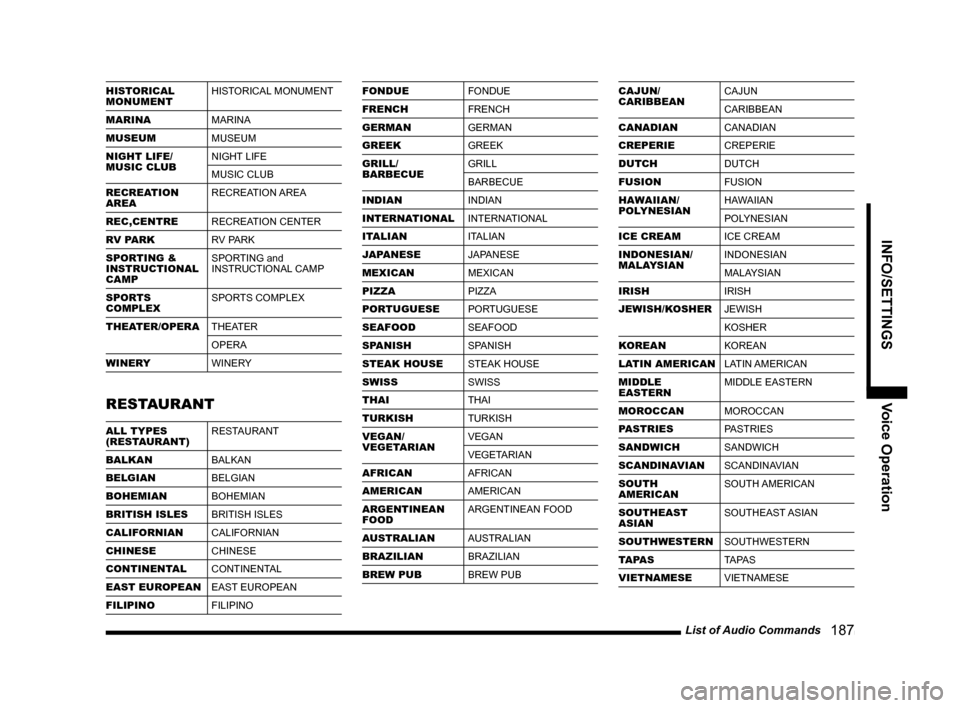
HISTORICAL
MONUMENTHISTORICAL MONUMENT
MARINA MARINA
MUSEUM MUSEUM
NIGHT LIFE/
MUSIC CLUB NIGHT LIFE
MUSIC CLUB
RECREATION
AREA RECREATION AREA
REC,CENTRE RECREATION CENTER
RV PARK RV PARK
SPORTING &
INSTRUCTIONAL
CAMP SPORTING and
INSTRUCTIONAL CAMP
SPORTS
COMPLEX SPORTS COMPLEX
THEATER/OPERA THEATER
OPERA
WINERY WINERY
RESTAURANT
ALL TYPES
(RESTAURANT)RESTAURANT
BALKAN BALKAN
BELGIAN BELGIAN
BOHEMIAN BOHEMIAN
BRITISH ISLES BRITISH ISLES
CALIFORNIAN CALIFORNIAN
CHINESE CHINESE
CONTINENTAL CONTINENTAL
EAST EUROPEAN EAST EUROPEAN
FILIPINO FILIPINO
FONDUEFONDUE
FRENCH FRENCH
GERMAN GERMAN
GREEK GREEK
GRILL/
BARBECUE GRILL
BARBECUE
INDIAN INDIAN
INTERNATIONAL INTERNATIONAL
ITALIAN ITALIAN
JAPANESE JAPANESE
MEXICAN MEXICAN
PIZZA PIZZA
PORTUGUESE PORTUGUESE
SEAFOOD SEAFOOD
SPANISH SPANISH
STEAK HOUSE STEAK HOUSE
SWISS SWISS
THAI THAI
TURKISH TURKISH
VEGAN/
VEGETARIAN VEGAN
VEGETARIAN
AFRICAN AFRICAN
AMERICAN AMERICAN
ARGENTINEAN
FOOD ARGENTINEAN FOOD
AUSTRALIAN AUSTRALIAN
BRAZILIAN BRAZILIAN
BREW PUB BREW PUBCAJUN/
CARIBBEANCAJUN
CARIBBEAN
CANADIAN CANADIAN
CREPERIE CREPERIE
DUTCH DUTCH
FUSION FUSION
HAWAIIAN/
POLYNESIAN HAWAIIAN
POLYNESIAN
ICE CREAM ICE CREAM
INDONESIAN/
MALAYSIAN INDONESIAN
MALAYSIAN
IRISH IRISH
JEWISH/KOSHER JEWISH
KOSHER
KOREAN KOREAN
LATIN AMERICAN LATIN AMERICAN
MIDDLE
EASTERN MIDDLE EASTERN
MOROCCAN MOROCCAN
PASTRIES PASTRIES
SANDWICH SANDWICH
SCANDINAVIAN SCANDINAVIAN
SOUTH
AMERICAN SOUTH AMERICAN
SOUTHEAST
ASIAN SOUTHEAST ASIAN
SOUTHWESTERN SOUTHWESTERN
TAPAS TA PA S
VIETNAMESE VIETNAMESE
Page 195 of 226
Navi Settings 195
INFO/SETTINGS SETTINGS
SETTINGS
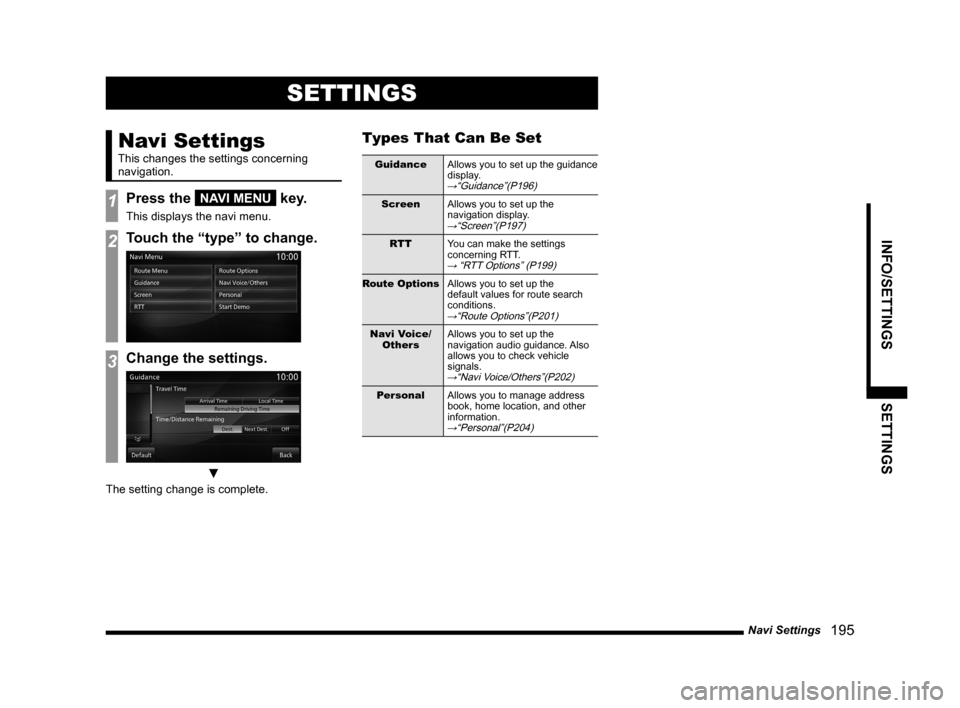
Navi Settings
This changes the settings concerning
navigation.
1Press the NAVI MENU key.
This displays the navi menu.
2Touch the “type” to change.
3Change the settings.
▼
The setting change is complete.
Types That Can Be Set
GuidanceAllows you to set up the guidance
display.
→“Guidance”(P196)
ScreenAllows you to set up the
navigation display.
→“Screen”(P197)
RTTYou can make the settings
concerning RTT.
→ “RTT Options” (P199)
Route Options Allows you to set up the
default values for route search
conditions.
→“Route Options”(P201)
Navi Voice/
Others Allows you to set up the
navigation audio guidance. Also
allows you to check vehicle
signals.
→“Navi Voice/Others”(P202)
Personal
Allows you to manage address
book, home location, and other
information.
→“Personal”(P204)
Page 196 of 226
196 Navi Settings
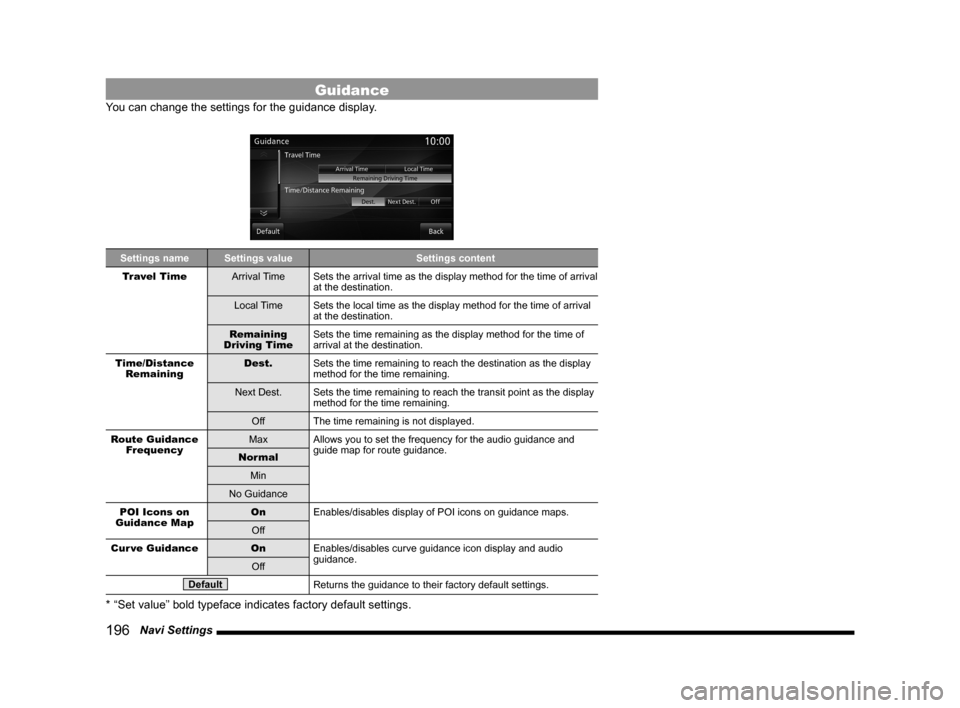
Guidance
You can change the settings for the guidance display.
Settings name Settings value Settings content
Travel Time Arrival TimeSets the arrival time as the display method for the time of arrival
at the destination.
Local Time Sets the local time as the display method for the time of arrival
at the destination.
Remaining
Driving Time Sets the time remaining as the display method for the time of
arrival at the destination.
Time/Distance Remaining Dest.
Sets the time remaining to reach the destination as the display
method for the time remaining.
Next Dest. Sets the time remaining to reach the transit point as the display
method for the time remaining.
Off The time remaining is not displayed.
Route Guidance Frequency Max
Allows you to set the frequency for the audio guidance and
guide map for route guidance.
Normal
Min
No Guidance
POI Icons on
Guidance Map On
Enables/disables display of POI icons on guidance maps.
Off
Cur ve Guidance OnEnables/disables curve guidance icon display and audio
guidance.
Off
DefaultReturns the guidance to their factory default settings.
* “Set value” bold typeface indicates factory default settings.
Page 197 of 226
Navi Settings 197
INFO/SETTINGS SETTINGS
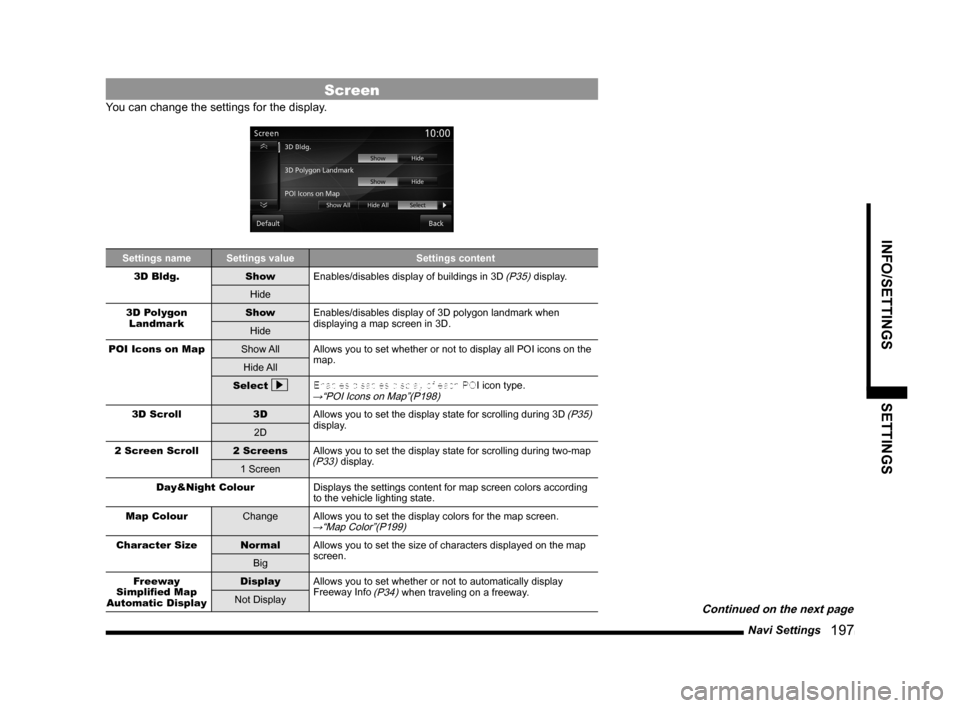
Screen
You can change the settings for the display.
Settings nameSettings value Settings content
3D Bldg. ShowEnables/disables display of buildings in 3D
(P35) display.
Hide
3D Polygon Landmark Show
Enables/disables display of 3D polygon landmark when
displaying a map screen in 3D.
Hide
POI Icons on Map Show AllAllows you to set whether or not to display all POI icons on the
map.
Hide All
Select
Enables/disables display of each POI icon type.→“POI Icons on Map”(P198)
3D Scroll
3DAllows you to set the display state for scrolling during 3D (P35)
display.
2D
2 Screen Scroll 2 ScreensAllows you to set the display state for scrolling during two-map
(P33) display.
1 Screen
Day&Night Colour Displays the settings content for map screen colors according
to the vehicle lighting state.
Map Colour ChangeAllows you to set the display colors for the map screen.
→“Map Color”(P199)
Character Size NormalAllows you to set the size of characters displayed on the map
screen.
Big
Freeway
Simplified Map
Automatic Display Display
Allows you to set whether or not to automatically display
Freeway Info
(P34) when traveling on a freeway.
Not Display
Continued on the next page