USB MITSUBISHI OUTLANDER 2014 3.G User Guide
[x] Cancel search | Manufacturer: MITSUBISHI, Model Year: 2014, Model line: OUTLANDER, Model: MITSUBISHI OUTLANDER 2014 3.GPages: 451, PDF Size: 49.08 MB
Page 338 of 451
Audio Files (MP3/WMA/AAC) 7-22 Comfort controls
7
N00715900020
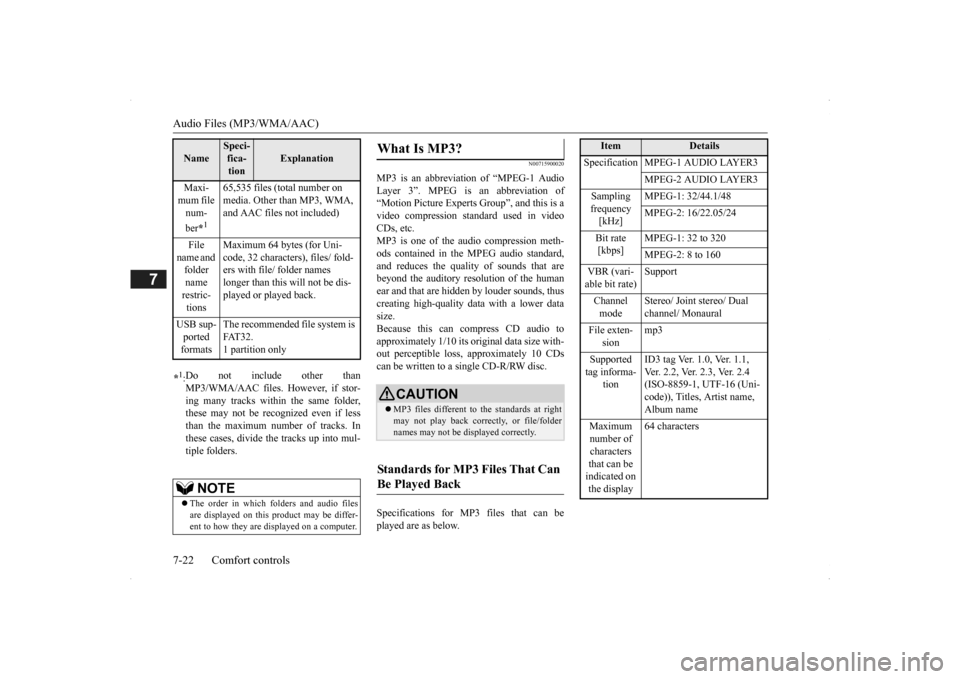
MP3 is an abbreviation of “MPEG-1 Audio Layer 3”. MPEG is an abbreviation of “Motion Picture Experts Group”, and this is avideo compression standard used in video CDs, etc. MP3 is one of the audio compression meth-ods contained in the MPEG audio standard, and reduces the quality
of sounds that are
beyond the auditory resolution of the human ear and that are hidden by louder sounds, thus creating high-qua
lity data with a lower data
size. Because this can co
mpress CD audio to
approximately 1/10 its orig
inal data size with-
out perceptible loss, approximately 10 CDs can be written to a single CD-R/RW disc. Specifications for MP3 files that can be played are as below.
Maxi- mum file num- ber
*1
65,535 files (total number on media. Other than MP3, WMA, and AAC files not included)
File
name and folder name restric-tions
Maximum 64 bytes (for Uni- code, 32 characters), files/ fold-ers with file/ folder names longer than this will not be dis- played or played back.
USB sup- ported formats
The recommended file system is FAT32. 1 partition only
*1: Do not include other than MP3/WMA/AAC files. However, if stor- ing many tracks within the same folder,these may not be recognized even if less than the maximum number of tracks. In these cases, divide the tracks up into mul-tiple folders.
NOTE
The order in which folders and audio files are displayed on this product may be differ- ent to how they are displayed on a computer.Name
Speci- fica- tion
Explanation
What Is MP3?
CAUTION MP3 files different to the standards at right may not play back corr
ectly, or file/folder
names may not be di
splayed correctly.
Standards for MP3 Files That Can Be Played Back
Item
Details
Specification MPEG-1 AUDIO LAYER3
MPEG-2 AUDIO LAYER3
Sampling frequency [kHz]
MPEG-1: 32/44.1/48 MPEG-2: 16/22.05/24
Bit rate [kbps]
MPEG-1: 32 to 320 MPEG-2: 8 to 160
VBR (vari- able bit rate)
Support
Channel mode
Stereo/ Joint stereo/ Dual channel/ Monaural
File exten-
sion
mp3
Supported tag informa-
tion
ID3 tag Ver. 1.0, Ver. 1.1, Ver. 2.2, Ver. 2.3, Ver. 2.4 (ISO-8859-1, UTF-16 (Uni-code)), Titles, Artist name, Album name
Maximum number of characters that can be indicated on the display
64 characters
BK0200500US.book 22 ページ 2013年2月12日 火曜日 午前9時46分
Page 343 of 451
Operation Keys
Comfort controls 7-27
7
N00716800042
13-
5 key Play/Pause Bluetooth Audio
*2, and use
as preset key 5 for radio.
14-
6 key Return during audio track search, and stop Bluetooth Audio
*2.
For radio, use as preset key 6.
15-
key/ key
For audio, select a
udio track/file; for
radio, perform auto
matic station selec-
tion. Select channels in the satellite radio*
1.
16- MENU key
Switch to Menu mode.
17- /SEL key
Adjust audio quality
and select items.
For radio, manually select stations. Select channels in the satellite radio*
1.
*1: Requires a satellite
tuner connection.
*2: Requires a separately
-purchased Blue-
tooth-capable audio
device in equip-
ment by type (vehicles with a Bluetooth
® 2.0 interface).
Steering wheel audio remote control switch 1- Vol + key, - key
Adjust audio functions and the mobile phone function volume.
2-
CH key, key Select CD and other
audio source tracks
and radio stations. Hold down to skip up and down through tracks.Hold down to switch the satellite radio band during satellit
e radio reception.
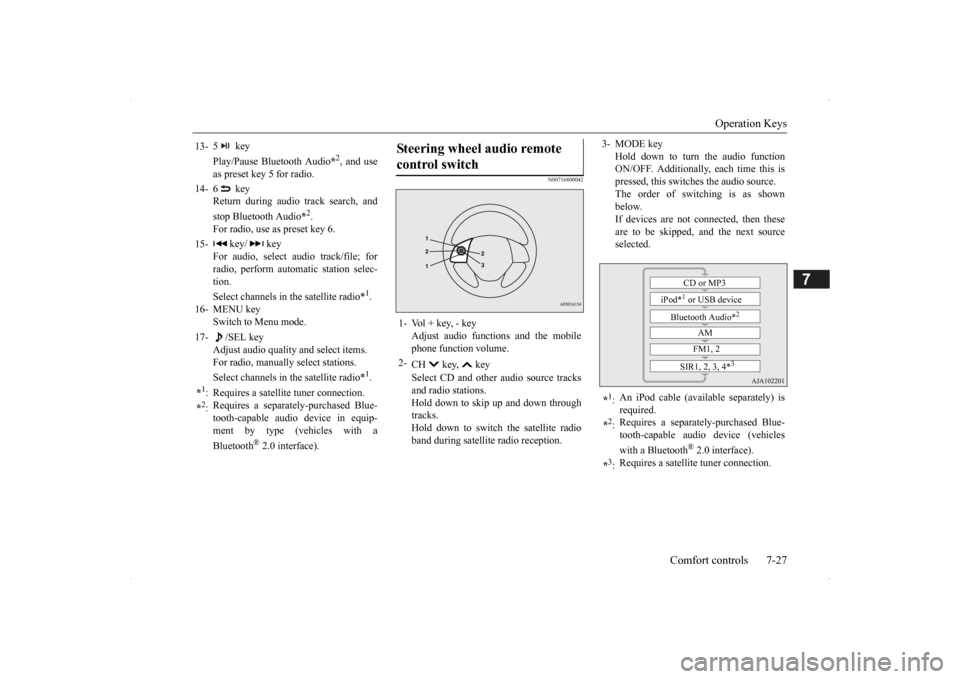
3- MODE key
Hold down to turn the audio function ON/OFF. Additionally, each time this ispressed, this switches the audio source. The order of switching is as shown below.If devices are not connected, then these are to be skipped, and the next source selected.
*1: An iPod cable (availa
ble separately) is
required.
*2: Requires a separately
-purchased Blue-
tooth-capable audio device (vehicles with a Bluetooth
® 2.0 interface).
*3: Requires a satellit
e tuner connection.CD or MP3
iPod*
1 or USB device
Bluetooth Audio*
2
AM FM1, 2
SIR1, 2, 3, 4*
3
BK0200500US.book 27 ページ 2013年2月12日 火曜日 午前9時46分
Page 351 of 451
Listen to Audio Files on a USB Device
Comfort controls 7-35
7
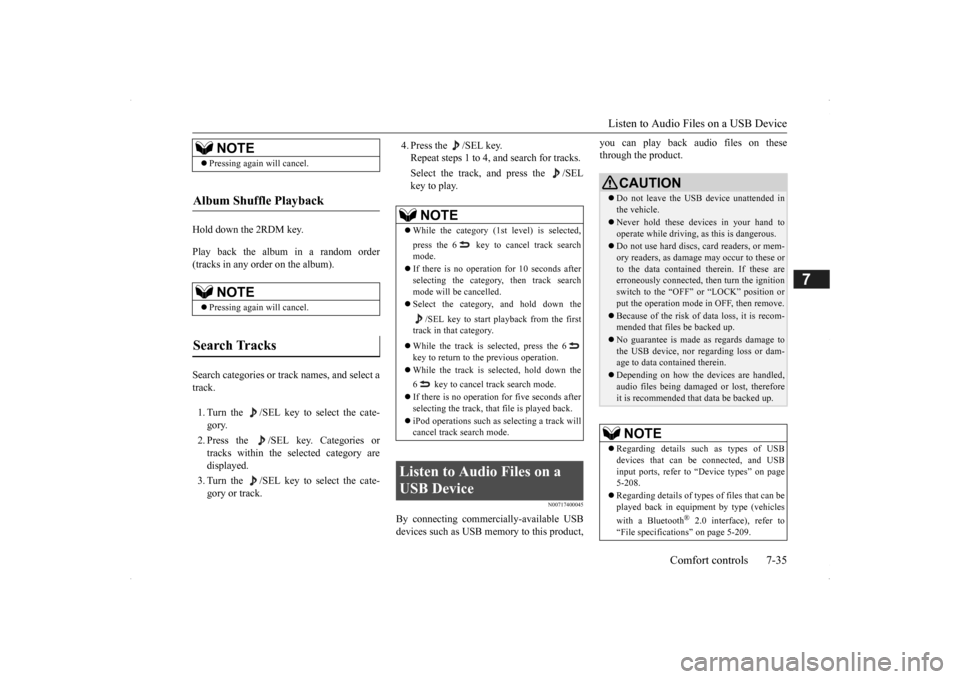
Hold down the 2RDM key. Play back the album in a random order (tracks in any order on the album). Search categories or trac
k names, and select a
track. 1. Turn the /SEL key to select the cate- gory. 2. Press the /SEL key. Categories or tracks within the selected category are displayed. 3. Turn the /SEL key to select the cate- gory or track.
4. Press the /SEL key. Repeat steps 1 to 4,
and search for tracks.
Select the track, and press the /SEL key to play.
N00717400045
By connecting commerci
ally-available USB
devices such as USB memory to this product,
you can play back audio files on these through the product.
NOTE
Pressing again will cancel.
Album Shuffle Playback
NOTE
Pressing again will cancel.
Search Tracks
NOTE
While the category (1st level) is selected, press the 6 key to
cancel track search
mode. If there is no operation for 10 seconds after selecting the category, then track search mode will be cancelled. Select the category, and hold down the
/SEL key to start playback from the first
track in that category. While the track is selected, press the 6 key to return to th
e previous operation.
While the track is selected, hold down the 6 key to cancel track search mode. If there is no operation for five seconds after selecting the track, that file is played back. iPod operations such as
selecting a track will
cancel track search mode.
Listen to Audio Files on a USB Device
CAUTION Do not leave the USB device unattended in the vehicle. Never hold these devices in your hand to operate while driving,
as this is dangerous.
Do not use hard discs, card readers, or mem- ory readers, as damage may occur to these or to the data contained
therein. If these are
erroneously connected, then turn the ignitionswitch to the “OFF” or “LOCK” position or put the operation mode in OFF, then remove. Because of the risk of data loss, it is recom- mended that file
s be backed up.
No guarantee is made as regards damage to the USB device, nor regarding loss or dam- age to data contained therein. Depending on how the de
vices are handled,
audio files being damage
d or lost, therefore
it is recommended that
data be backed up.
NOTE
Regarding details such
as types of USB
devices that can be
connected, and USB
input ports, refer to
“Device types” on page
5-208. Regarding details of type
s of files that can be
played back in equipment by type (vehicles with a Bluetooth
® 2.0 interface), refer to
“File specificati
ons” on page 5-209.
BK0200500US.book 35 ページ 2013年2月12日 火曜日 午前9時46分
Page 352 of 451

Listen to Audio Files on a USB Device 7-36 Comfort controls
7
Press the MEDIA key to set USB as the source. The selected source is
indicated on the dis-
play. Press the key or key to select the track. This enables selection of the next or previous track.
Hold down the 3 key or the 4 key. Fast forward/rewind is possible. Repeat playback, random
playback, and scan
playback are possible. Press the 1RPT key. Repeat playback of th
e track currently being
played. Hold down the 1RPT key.
Regarding how to c
onnect USB devices,
refer to “How to
connect a USB memory
device” on page 5-207. When connecting a US
B device, use a con-
nection cable. Failure to use a connectioncable when connecti
ng may place undue load
on, or damage th
e USB connector.
Set up the device in order that no unsafe actions, such as pluggi
ng in the connection
cable are taken while driving. When inserting and removing the USB device, for safety’s sa
ke first stop the vehi-
cle. Do not insert other than audio devices into the USB port. Damage
to the device or
equipment may result. Depending on the status
of the USB device,
it may take some time
until the device is rec-
ognized, or playback starts. Depending on USB device
s, buttons on the
product will not operate while the USBdevice is connected. USB device specificati
ons and settings may
mean that connection
is not possible, or
result in differences in
operation or display.
Depending on audio data
in the USB device,
track information may
not be displayed cor-
rectly. Depending on the status of the vehicle and device, the iPod/iPhone
may not play back
after starting
the engine.
Data containing copyri
ght information may
not play back.NOTE
This product can play
back MP3, WMA, and
AAC format audio files. Depending on the type of USB device, usage may not be possible, or
functions that can be
used may be restricted. The recommended file system for USB memory is FAT32. The maximum supported capacity for USB memory is 32GB. Operate the USB device containing recorded audio files while conne
cted to this product.
Play Back of Audio Files on a USB Device Select the Track (File)
NOTE
Fast Forward or Rewind Switch Playback Mode Repeat Playback (RPT)
NOTE
Pressing again will cancel. Selecting a file will cancel this. However, it will not be
cancelled in vehicles
with a Bluetooth
® 2.0 interface.
Folder Repeat Playback
BK0200500US.book 36 ページ 2013年2月12日 火曜日 午前9時46分
Page 353 of 451

Listen to Audio Files on a USB Device
Comfort controls 7-37
7
Repeat playback of the tracks within the folder currently being played. Press the 2RDM key. Play tracks in the folder currently being played in a random order. Hold down the 2RDM key.
Play the tracks in all folders in a random order. Press the SCAN key. Play the first 10 seconds of each of the tracks on the whole USB device in order. Hold down the SCAN key. Play the first 10 seconds of the first track in each folder on the USB device in order.
Search folders and files, and select a track. 1. Turn the /SEL key to select the folder. 2. Press the /SEL key. Files within the selected folder are dis- played. 3. Turn the /SEL key to select the file.4. Press the /SEL key. This plays the selected file (track).
NOTE
Pressing again will cancel. Selecting a folder will cancel this. Cycling up/down thr
ough files will cancel
this. Even if the file is selected, folder repeat playback will not
be cancelled.
Folder Random Playback (RDM)
NOTE
Pressing again will cancel. Selecting a folder will cancel this. Cycling up/down thr
ough files will cancel
this. Even if the file is selected, folder random playback will not
be cancelled.
All Folder Random Playback
NOTE
Pressing again will cancel. Selecting a folder will cancel this. Cycling up/down through files will cancel this. Even if the file is se
lected, all folder random
playback will not
be cancelled.
Scan Playback (SCAN)
NOTE
Press this button again during playback if you wish to hear that track, and that track will play normally.
Folder Scan Playback
NOTE
Press this button again during playback if you wish to hear that track, and that trackwill play normally.
Search Tracks
NOTE
While the folder is selected, press the 6 key to cancel track search mode. If there is no operation for 10 seconds after selecting the folder, then track search modewill be cancelled. Select the folder, and hold down the /SEL key to start playback from the first track in that folder.
BK0200500US.book 37 ページ 2013年2月12日 火曜日 午前9時46分
Page 357 of 451
Audio Quality and Volume Balance Adjustment
Comfort controls 7-41
7
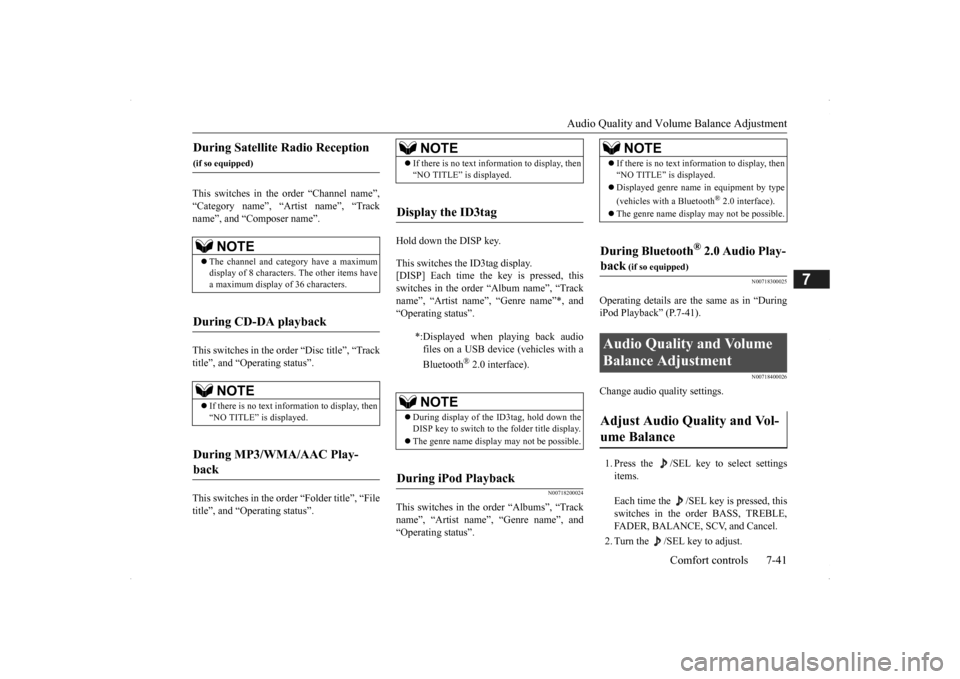
This switches in the order “Channel name”, “Category name”, “Artist name”, “Track name”, and “C
omposer name”.
This switches in the order “Disc title”, “Track title”, and “Operating status”. This switches in the order “Folder title”, “File title”, and “Operating status”.
Hold down the DISP key. This switches the ID3tag display. [DISP] Each time the key is pressed, thisswitches in the order “Album name”, “Track name”, “Artist name”, “Genre name”*, and “Operating status”.
N00718200024
This switches in the order “Albums”, “Track name”, “Artist name”, “Genre name”, and “Operating status”.
N00718300025
Operating details are the same as in “DuringiPod Playback” (P.7-41).
N00718400026
Change audio
quality settings.
1. Press the /SEL key to select settings items. Each time the /SEL
key is pressed, this
switches in the order BASS, TREBLE, FADER, BALANCE,
SCV, and Cancel.
2. Turn the /SEL key to adjust.
During Satellite Radio Reception
(if so equipped)
NOTE
The channel and cate
gory have a maximum
display of 8 characters
. The other items have
a maximum display
of 36 characters.
During CD-DA playback
NOTE
If there is no text information to display, then “NO TITLE” is displayed.
During MP3/WMA/AAC Play- back
NOTE
If there is no text information to display, then “NO TITLE” is displayed.
Display the ID3tag
*:Displayed when playing back audio files on a USB device
(vehicles with a
Bluetooth
® 2.0 interface).
NOTE
During display of the ID3tag, hold down the DISP key to switch to the folder title display. The genre name displa
y may not be possible.
During iPod Playback
NOTE
If there is no text information to display, then “NO TITLE” is displayed. Displayed genre name
in equipment by type
(vehicles with a Bluetooth
® 2.0 interface).
The genre name displa
y may not be possible.
During Bluetooth
® 2.0 Audio Play-
back
(if so equipped)
Audio Quality and Volume Balance Adjustment Adjust Audio Quality and Vol- ume Balance
BK0200500US.book 41 ページ 2013年2月12日 火曜日 午前9時46分
Page 362 of 451

Troubleshooting 7-46 Comfort controls
7
Mode
Message
Cause
Response
CD CHECK DISC The disc is inserted upsid
e down. Insert with the label side up.
The disc has condensati
on on it. Wait a while be
fore inserting again.
DISC ERROR The disc is damaged. Cl
ean the read surface of the disc.
The disc is dirty.
INTERNAL E The drive has malfunctione
d for some reason. Check that there is no problem with the disc, and
insert the disc again. If the problem persists, con- sult an authorized Mitsubi
shi Motors dealer or a
repair facility
of your choice.
HEAT ERROR The temperature inside
the product is high. Remove the disc,
and wait for the internal tempera-
ture to return to normal.
USB FILE ERROR Files that cannot be played are selected. Select files that can be played.
“Audio Files (MP3/WMA/AAC)” (P.7-20)
USB BUS PWR There is high or low electr
ical current or voltage. Turn the powe
r OFF and wait a short while. If the
problem persists, consult
an authorized Mitsubishi
Motors dealer or a repair
facility of your choice.
LSI ERROR There is an intern
al malfunction for some reason.
UNSUPPORTED
FORMAT
Unsupported audio files have been played. C
onfirm audio files th
at can be played.
“Audio Files (MP3/WMA/AAC)” (P.7-20)
UNSUPPORTED
DEVICE
An unsupported USB device has
been connected. Please conne
ct a USB memory device.
iPod NO SONG An iPod/iPhone not c
ontaining any tracks has been
connected.
Connect an iPod/iPhone containing tracks.
VER ERROR This iPod/iPhone soft
ware version is not supported. Please ch
ange to a supporte
d software version.
Other ERROR DC An abnorma
l direct voltage has been sent to the
speakers.
Turn the power OFF and wait a short while. If the problem persists, consult
an authorized Mitsubishi
Motors dealer or a repair
facility of your choice.
BK0200500US.book 46 ページ 2013年2月12日 火曜日 午前9時46分
Page 447 of 451

Alphabetical index
12-5
12
5-53 Wheel lock
............................
5-22
, 5-58
Stop lights
Bulb capacity
.................................
9-30
Replacement
..................................
9-37
Storage spaces
..................................
5-215
Sun visors
........................................
5-210
Sunroof
..............................................
5-50
Super-all wheel control (S-AWC)
S-AWC control mode display
..........
5-79
S-AWC control mode switch
...........
5-79
S-AWC operation display
................
5-80
Supplemental Re
straint System
............
4-33
How the Supplemental Restraint System works
..........................................
4-36
Maintenance service
........................
4-48
T
Tail light
Bulb capacity
.................................
9-30
Replacement
..................................
9-37
Tank capacity
.....................................
11-7
Theft-alarm system
.............................
5-44
Time Setting
.......................................
7-44
Timing belt
........................................
9-24
Tire
...................................................
9-14
Inflation pressure
............................
9-18
Maintenance
...................................
9-19
Quality grading
...............................
10-2
Replacing tires and wheels
..............
9-19
Rotation
........................................
9-20
Size (tire and wheel)
.......................
11-7
Snow tires
.....................................
9-20
Tire and loading information placard 11-3Tire chains
.....................................
9-21
To change a tire
................................
8-6
Tread wear indicator
.......................
9-19
Tire pressure monitoring system
.........
5-114
Tools
...................................................
8-6
Storage
............................................
8-5
Towing
..............................................
8-14
Trailer towing
....................................
6-11
Transfer oil
................................
9-11
, 11-7
Turn signal light
Indicators
.....................................
5-166
Lever
...........................................
5-176
U
USB input terminal
............................
5-207
How to connect a USB memory device
....
5-207 How to connect an iPod
.................
5-208
V
Vanity mirror
....................................
5-210
Vanity mirror lights
Bulb capacity
.................................
9-32
Vehicle care precautions
.....................
9-39
Vehicle dimensions
.............................
11-4
Vehicle labeling
..................................
11-2
Vehicle preparation before driving
..........
6-4
Vehicle weights
..................................
11-5
Vents
...................................................
7-2
W
Warning lights
..................................
5-167
Washer
Fluid
.....................................
9-12
, 11-7
Rear window washer
.....................
5-183
Switch
.........................................
5-182
Washing
.............................................
9-41
Waxing
..............................................
9-42
Weights
.............................................
11-5
Wheel
Covers
...........................................
8-13
Specification
..................................
11-7
Wiper
Rear window wiper
.......................
5-183
Switch
.........................................
5-179
Wiper blades
..................................
9-21
BK0200500US.book 5 ページ 2013年2月12日 火曜日 午前9時46分