ECU MITSUBISHI OUTLANDER 2014 3.G Workshop Manual
[x] Cancel search | Manufacturer: MITSUBISHI, Model Year: 2014, Model line: OUTLANDER, Model: MITSUBISHI OUTLANDER 2014 3.GPages: 451, PDF Size: 49.08 MB
Page 196 of 451
Rear-view camera (if so equipped) 5-118 Features and controls
5
N00533001233
Your tire pressure monitoring system oper- ates on a radio frequenc
y subject to Federal
Communications Commission (FCC) Rules (For vehicles sold in U.S.A.) and IndustryCanada Rules (For vehi
cles sold in Canada).
This device complies with part 15 of FCC Rules and Industry Canada licence-exemptRSS standard(s). Operation is subject to the following two con- ditions. This device may not
cause harmful inter-
ference. This device must ac
cept any interference
received, including interference that maycause undesired operation.
N00546201170
When the selector lever is in the “R”(REVERSE) position with
the ignition switch
in the “ON” position, or the operation mode is put in ON, the rear-view image will be dis- played on the screen of the Mitsubishi Multi-Communication System or the DISPLAY AUDIO-AM/FM radio/CD player with touch panel. When the selector lever is shifted out of the “R” (REVERSE) positi
on, the rear-view
image will go off.
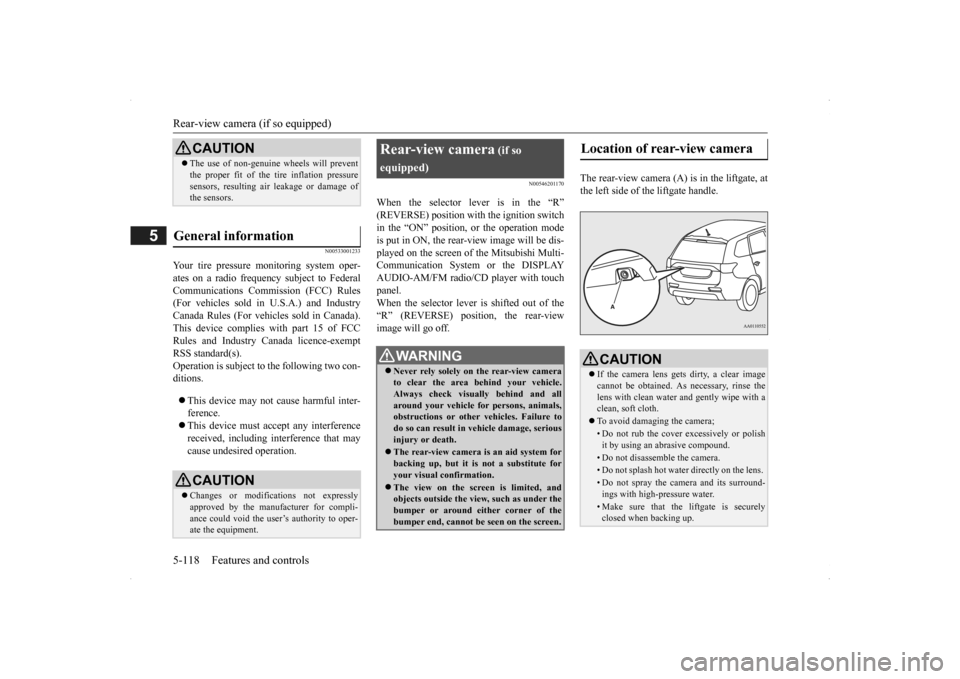
The rear-view camera (A)
is in the liftgate, at
the left side of the liftgate handle.
CAUTION The use of non-genuine wheels will prevent the proper fit of the tire inflation pressuresensors, resulting air
leakage or damage of
the sensors.
General information
CAUTION Changes or modifica
tions not expressly
approved by the manufacturer for compli-ance could void the user’s authority to oper- ate the equipment.
Rear-view camera
(if so
equipped)
WA R N I N G Never rely solely on the rear-view camera to clear the area behind your vehicle. Always check visually behind and all around your vehicle fo
r persons, animals,
obstructions or other vehicles. Failure to do so can result in
vehicle damage, serious
injury or death. The rear-view camera is an aid system for backing up, but it is not a substitute foryour visual confirmation. The view on the screen is limited, and objects outside the view, such as under the bumper or around either corner of the bumper end, cannot be seen on the screen.
Location of rear-view camera
CAUTION If the camera lens gets
dirty, a clear image
cannot be obtained. As
necessary, rinse the
lens with clean water a
nd gently wipe with a
clean, soft cloth. To avoid damaging the camera;• Do not rub the cover excessively or polish it by using an abrasive compound. • Do not disassemble the camera.• Do not splash hot wate
r directly on the lens.
• Do not spray the camera and its surround- ings with high-pressure water.• Make sure that the liftgate is securely closed when backing up.
BK0200500US.book 118 ページ 2013年2月12日 火曜日 午前9時46分
Page 229 of 451
Indicator light, warning light, and information screen display list (multi information display - Type 1)
Features and controls 5-151
5
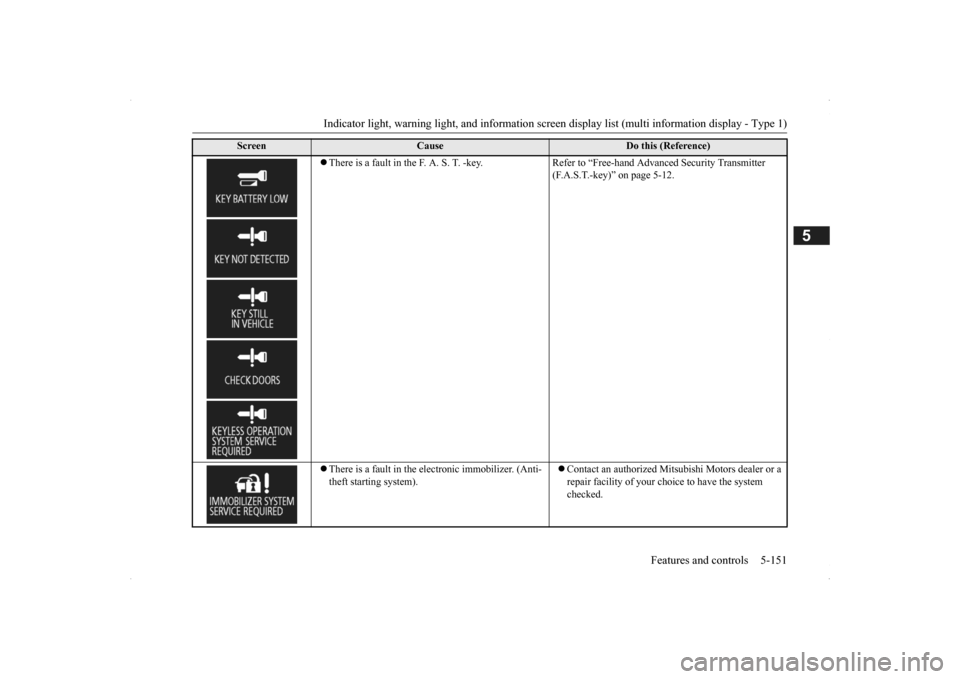
There is a fault in the F. A. S. T. -key. Refer to “Free-hand Advanced Security Transmitter
(F.A.S.T.-key)” on page 5-12.
There is a fault in the electronic immobilizer. (Anti- theft starting system).
Contact an authorized Mitsubishi Motors dealer or a repair facility of your choi
ce to have the system
checked.
Screen
Cause
Do this (Reference)
BK0200500US.book 151 ページ 2013年2月12日 火曜日 午前9時46分
Page 267 of 451

Bluetooth® 2.0 interface (if so equipped)
Features and controls 5-189
5
N00564200016 N00564301027
The Bluetooth
® 2.0 interface is equipped
with a help function. If you say “Help” when the system is waitingfor a voice command input, the system will tell you a list of the commands that can be used under the circumstances.
N00564400018
There are 2 cancel functions.If you are at the main menu, say “Cancel” to exit from the Bluetooth
® 2.0 interface.
If you are anywhere else within the system,say “Cancel” to return to the main menu.
N00564501032
The Bluetooth
® 2.0 interface is equipped
with a confirmation function. With the confirmation function activated, you are given more opportunities than normal toconfirm a command when making various settings to the Bluetooth
® 2.0 interface. This
allows you to decrease the possibility that a setting is accidentally changed. The confirmation function can be turned on or off by following the steps below. 1. Press the SPEECH button (except for vehicles with Mitsubishi Multi-Commu-nication System) or
PICK-UP button (for
vehicles with Mitsubishi Multi-Commu- nication System).2. Say “Setup.” 3. Say “Confirmation prompts.” 4. The voice guide will say “Confirmation prompts are
N00564601105
It is possible to use a passcode as a securityfunction by setting a passcode of your choice for the Bluetooth
® 2.0 interface.
When the security function is turned on, it is necessary to make a vo
ice input of a 4-digit
passcode in order to use all functions of the Bluetooth
® 2.0 interface, except for recep-
tion.
Use the following procedure to turn on the security function by setting a passcode. 1. Press the SPEECH button (except for vehicles with Mitsubishi Multi-Commu- nication System) or PICK-UP button (for vehicles with Mitsubishi Multi-Commu-nication System). 2. Say “Setup.” 3. Say “Passcode.” 4. The voice guide will
say “Passcode is dis-
abled. Would you like to enable it?”Answer “Yes.” Answer “No” to cancel the setting of the passcode and return
to the main menu.
5. The voice guide will
say “Please say a 4-
digit passcode
. Remember this passcode.
It will be required to
use this system.”
Say a 4-digit number which you want to set as a passcode. 6. For confirmation purposes, the voiceguide will say “Pa
sscode <4-digit pass-
code>. Is this correct?” Answer “Yes.” Answer “No” to return to the passcodeinput in Step 5. 7. When the registration of the passcode is completed, the voice
guide will say “Pass-
code is enabled” and the system will return to the main menu.
Useful voice commands
Help function
Canceling
Confirmation function setting
Security function
Setting the passcode
BK0200500US.book 189 ページ 2013年2月12日 火曜日 午前9時46分
Page 268 of 451

Bluetooth® 2.0 interface (if so equipped) 5-190 Features and controls
5
If a passcode has been set and the security function is enabled, the voice guide will say “Hands-free system is lo
cked. State the pass-
code to continue” when the SPEECH button (except for vehicles with Mitsubishi Multi- Communication System) or PICK-UP button(for vehicles with Mi
tsubishi Multi-Commu-
nication System) is pre
ssed to enter voice rec-
ognition mode. Say th
e 4-digit passcode
number to enter the passcode. If the entered passcode
is wrong, the voice
guide will say “<4-digi
t passcode>, Incorrect
passcode. Please try again.” Enter the correctpasscode.
Use the following procedure to turn off the security function by di
sabling the passcode.
1. Press the SPEECH button (except for vehicles with Mitsubishi Multi-Commu-nication System) or PICK-UP button (for vehicles with Mitsubishi Multi-Commu- nication System).2. Say “Setup.” 3. Say “Passcode.” 4. The voice guide w
ill say “Passcode is
enabled. Would you like to disable it?” Answer “Yes.” Answer “No” to cancel the disabling ofthe passcode and return to the main menu.
5. When the disabling of the passcode is completed, the voice
guide will say “Pass-
code is disabled” and the system will return to the main menu.
N00564700011
The Bluetooth
® 2.0 interface can use the
speaker enrollment func
tion to create a voice
model for one person per language. This makes it easier for the Bluetooth
® 2.0
interface to recognise
voice commands said
by you. You can turn a voice model registered with the speaker enrollment function on and offwhenever you want.
N00564801110
It takes about 2 to 3 minutes to complete thespeaker enrollment process. To ensure the best results, run through the process while in the driver’s seat, in an envi-ronment that is as qu
iet as possible (when
there is no rain or strong winds and the vehi- cle windows are closed). Please turn off yourphone while in speaker enrollment to prevent interruption of the process. Use the following procedure for speakerenrollment.
NOTE
Passcode will be require
d to access the sys-
tem after the next
ignition cycle.
It is required for a little time after engine stop that the entered passcode is actually recorded in the system.If the ignition switch
or the operation mode
is made to ACC or ON or the engine is started immediately afte
r engine stop, there
is a case when the entered passcode is not recorded in the system. At this time, please try to enter the passcode again.
Entering the passcode
NOTE
You can reenter the pa
sscode as many times
as you want. If you have forgot
ten your passcode, say
“Cancel” to quit the voice input mode and then check with an authorized MitsubishiMotors dealer.
Disabling the passcode
NOTE
System must be unlocke
d to disable the pass-
code.
Speaker enrollment function
Speaker enrollment
BK0200500US.book 190 ページ 2013年2月12日 火曜日 午前9時46分
Page 281 of 451

Bluetooth® 2.0 interface (if so equipped)
Features and controls 5-203
5
8. Once the telephone number is registered, the voice guide will say “Number saved”and then the system will return to the main menu.
N00580100055
1. Press the SPEECH button (except forvehicles with Mitsubishi Multi-Commu- nication System) or PICK-UP button (forvehicles with Mitsubishi Multi-Commu- nication System). 2. Say “Phonebook.”3. The voice guide will
say “Select one of
the following: new entry, edit number, edit name, list names, delete, erase all, orimport contact.”
Say “Edit name.”
4. The voice guide will say “Please say the name of the entry you would like to edit,or say list names.”
Say the name you want
to edit. 5. The voice guide
will say “Changing
say “Name please.”
Say the new name you want to register.7. The registered name will be changed. When the change is complete, the system will return to the main menu.
N00580200043
1. Press the SPEECH button (except forvehicles with Mitsubishi Multi-Commu-nication System) or
PICK-UP button (for
vehicles with Mitsubishi Multi-Commu- nication System).
2. Say “Phonebook.” 3. The voice guide will
say “Select one of
the following: new entry, edit number, edit name, list names, delete, erase all, or import contact.” Sa
y “List names.”
4. Bluetooth
® 2.0 interface will read out the
entries in the phonebook in order. 5. When the voice guide
is done reading the
list, it will say “End
of list, would you like
to start from the beginning?” When you want to check the list again from the beginning, answer “Yes.” When you are done, answer “No” toreturn to the previous or main menu.
NOTE
If the location where a telephone number was already registered
has been overwritten
with a new number, the
voice guide will say
“Number changed” and
then the system will
return to the main menu.
Editing a name
NOTE
Say “List names,” and the names registered in the phonebook are read out in order. Referto “Vehicle phonebook: Listening to the list of registered na
mes” on page 5-203.
Listening to the list of registered names
NOTE
You can call, edit or delete a name that is being read out. Press the SPEECH butt
on and say “Call” to
call the name, “Edit name” to edit it, or “Delete” to delete it. The system will beep and then execute yourcommand. If you press the SPEECH button and say “Continue” or “Previous” while the list is being read, the system will advance or rewind the list. Say “C
ontinue” to proceed to
the next entry or “Previous” to return to the previous entry.
BK0200500US.book 203 ページ 2013年2月12日 火曜日 午前9時46分
Page 296 of 451
Cup holders 5-218 Features and controls
5
N00527301417
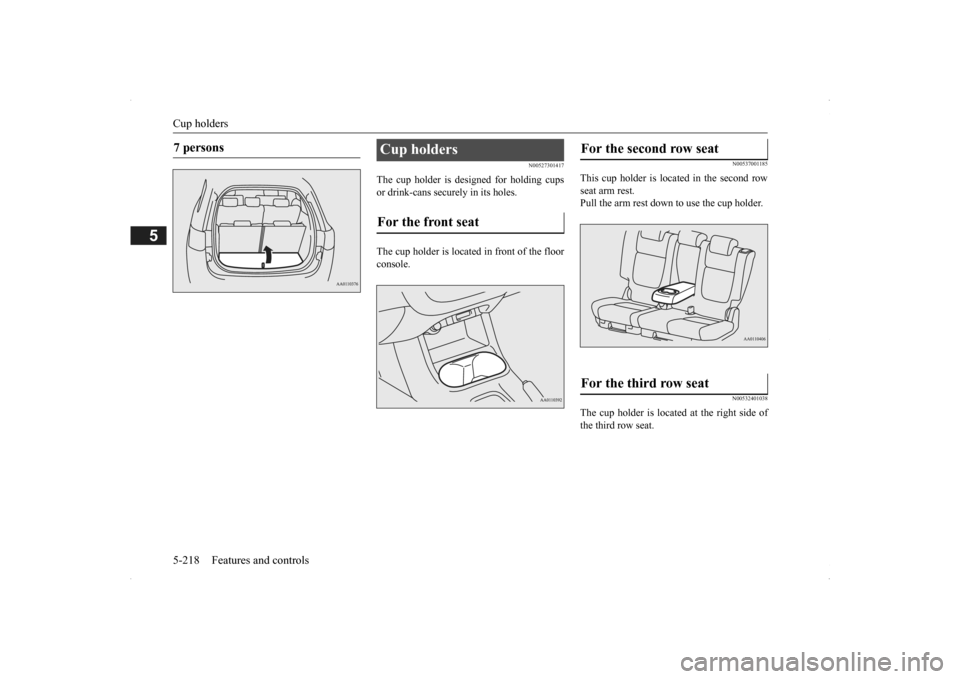
The cup holder is designed for holding cups or drink-cans secu
rely in its holes.
The cup holder is located in front of the floor console.
N00537001185
This cup holder is located in the second rowseat arm rest. Pull the arm rest down to use the cup holder.
N00532401038
The cup holder is located at the right side of the third row seat.
7 persons
Cup holders For the front seat
For the second row seat For the third row seat
BK0200500US.book 218 ページ 2013年2月12日 火曜日 午前9時46分
Page 298 of 451
Cargo area cover (if so equipped) 5-220 Features and controls
5
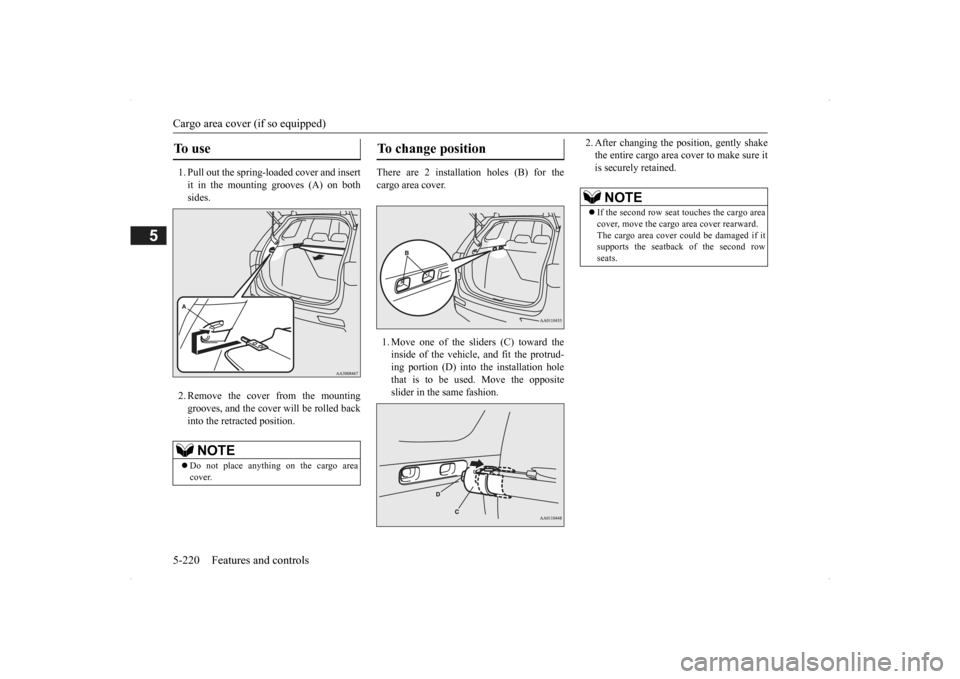
1. Pull out the spring-loaded cover and insert it in the mounting grooves (A) on both sides. 2. Remove the cover from the mounting grooves, and the cover will be rolled back into the retracted position.
There are 2 installation holes (B) for the cargo area cover. 1. Move one of the sliders (C) toward the inside of the vehicle, and fit the protrud- ing portion (D) into the installation hole that is to be used. Move the oppositeslider in the same fashion.
2. After changing the position, gently shake the entire cargo area cover to make sure itis securely retained.
To u s e
NOTE
Do not place anything on the cargo area cover.
To change position
NOTE
If the second row seat
touches the cargo area
cover, move the cargo
area cover rearward.
The cargo area cover co
uld be damaged if it
supports the seatback of the second row seats.
BK0200500US.book 220 ページ 2013年2月12日 火曜日 午前9時46分
Page 299 of 451
Assist grips
Features and controls 5-221
5
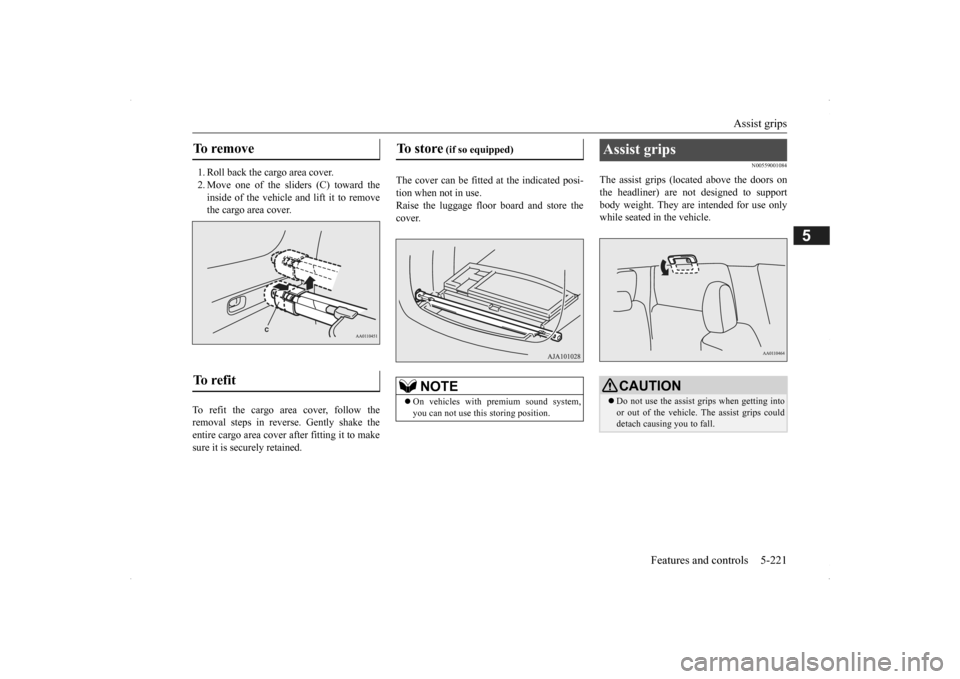
1. Roll back the cargo area cover. 2. Move one of the sliders (C) toward the inside of the vehicle and lift it to remove the cargo area cover.
To refit the cargo area cover, follow the removal steps in reverse. Gently shake theentire cargo area cover after fitting it to make sure it is securely retained.
The cover can be fitted
at the indicated posi-
tion when not in use.Raise the luggage floor board and store the cover.
N00559001084
The assist grips (located above the doors onthe headliner) are not designed to support body weight. They are intended for use onlywhile seated in the vehicle.
To remove To refit
To store
(if so equipped)
NOTE
On vehicles with premium sound system, you can not use this storing position.
Assist grips
CAUTION Do not use the assist grips when getting into or out of the vehicle.
The assist grips could
detach causing you to fall.
BK0200500US.book 221 ページ 2013年2月12日 火曜日 午前9時46分
Page 300 of 451
Coat hooks 5-222 Features and controls
5
N00553601163
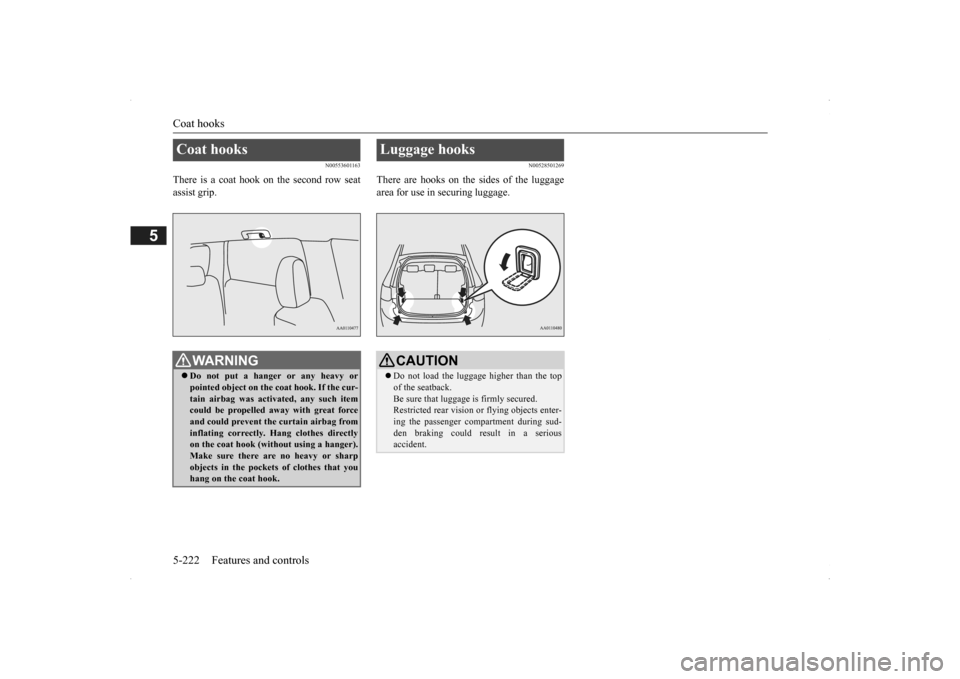
There is a coat hook on the second row seat assist grip.
N00528501269
There are hooks on the sides of the luggagearea for use in securing luggage.
Coat hooks
WA R N I N G Do not put a hanger or any heavy or pointed object on the coat hook. If the cur-tain airbag was activated, any such item could be propelled aw
ay with great force
and could prevent th
e curtain airbag from
inflating correctly. Hang clothes directly on the coat hook (without using a hanger). Make sure there are no heavy or sharpobjects in the pocket
s of clothes that you
hang on the coat hook.
Luggage hooks
CAUTION Do not load the luggage higher than the top of the seatback.Be sure that luggage
is firmly secured.
Restricted rear vision
or flying objects enter-
ing the passenger compartment during sud-den braking could result in a serious accident.
BK0200500US.book 222 ページ 2013年2月12日 火曜日 午前9時46分
Page 303 of 451
Floor mat
Driving safety 6-3
6
N00628600033
The original equipment floor mat provided with your vehicle was
specifically designed
for your vehicle.Always properly positio
n the floor mat and
assure it does not inte
rfere with operation of
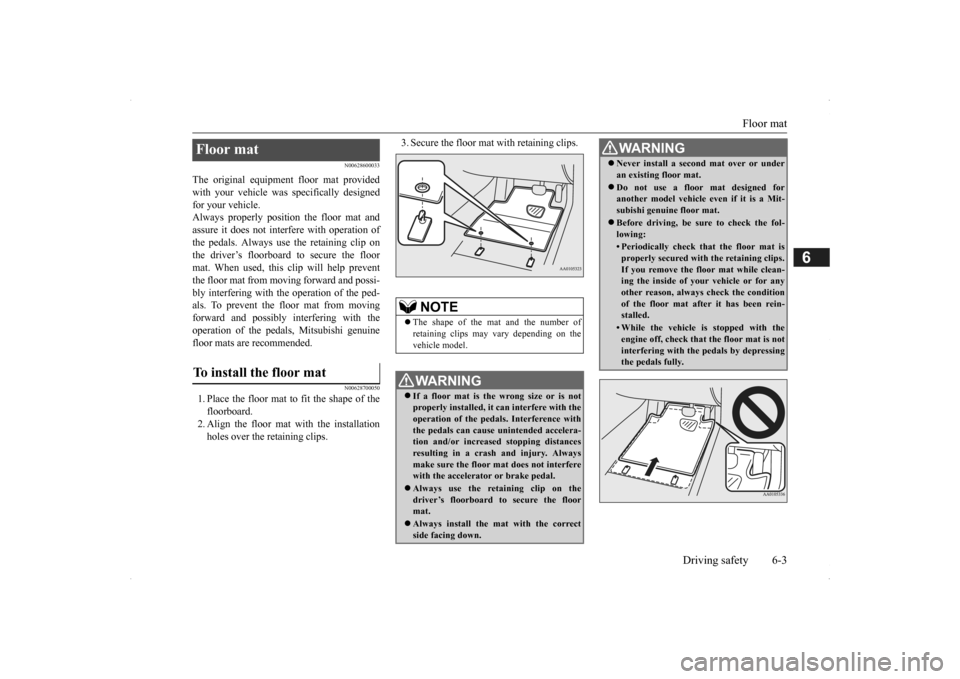
the pedals. Always use the retaining clip onthe driver’s floorboard to secure the floor mat. When used, this clip will help prevent the floor mat from moving forward and possi- bly interfering with the operation of the ped- als. To prevent the floor mat from movingforward and possibly interfering with the operation of the pedals, Mitsubishi genuine floor mats are recommended.
N00628700050
1. Place the floor mat to fit the shape of thefloorboard.2. Align the floor mat with the installation holes over the retaining clips.
3. Secure the floor mat with retaining clips.
Floor mat To install the floor mat
NOTE
The shape of the mat and the number of retaining clips may vary depending on the vehicle model.WA R N I N G If a floor mat is the
wrong size or is not
properly installed, it can interfere with the operation of the pedals. Interference withthe pedals can cause unintended accelera- tion and/or increased stopping distances resulting in a cras
h and injury. Always
make sure the floor mat does not interfere with the accelerator or brake pedal. Always use the reta
ining clip on the
driver’s floorboard to secure the floor mat. Always install the mat with the correct side facing down.
Never install a second mat over or under an existing floor mat. Do not use a floor mat designed for another model vehicle ev
en if it is a Mit-
subishi genuine floor mat. Before driving, be sure to check the fol- lowing:• Periodically check that the floor mat isproperly secured with the retaining clips.If you remove the fl
oor mat while clean-
ing the inside of you
r vehicle or for any
other reason, always
check the condition
of the floor mat afte
r it has been rein-
stalled.• While the vehicle is stopped with theengine off, check that
the floor mat is not
interfering with the pedals by depressingthe pedals fully.WA R N I N G
BK0200500US.book 3 ページ 2013年2月12日 火曜日 午前9時46分