change time MITSUBISHI OUTLANDER 2014 3.G Workshop Manual
[x] Cancel search | Manufacturer: MITSUBISHI, Model Year: 2014, Model line: OUTLANDER, Model: MITSUBISHI OUTLANDER 2014 3.GPages: 451, PDF Size: 49.08 MB
Page 356 of 451
Display Indicator 7-40 Comfort controls
7
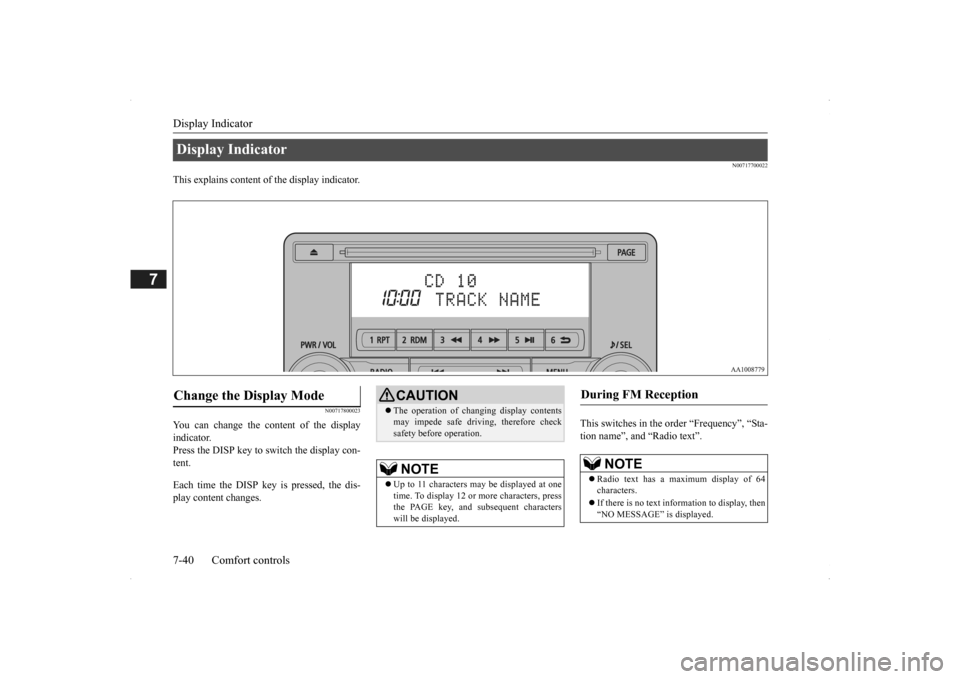
N00717700022
This explains content of the display indicator.
N00717800023
You can change the content of the display indicator. Press the DISP key to switch the display con-tent. Each time the DISP ke
y is pressed, the dis-
play content changes.
This switches in the order “Frequency”, “Sta- tion name”, and “Radio text”.
Display Indicator Change the Display Mode
CAUTION The operation of changing display contents may impede safe driving, therefore checksafety before operation.NOTE
Up to 11 characters
may be displayed at one
time. To display 12 or more characters, press the PAGE key, and s
ubsequent characters
will be displayed.
During FM Reception
NOTE
Radio text has a ma
ximum display of 64
characters. If there is no text information to display, then “NO MESSAGE” is displayed.
BK0200500US.book 40 ページ 2013年2月12日 火曜日 午前9時46分
Page 357 of 451
Audio Quality and Volume Balance Adjustment
Comfort controls 7-41
7
This switches in the order “Channel name”, “Category name”, “Artist name”, “Track name”, and “C
omposer name”.
This switches in the order “Disc title”, “Track title”, and “Operating status”. This switches in the order “Folder title”, “File title”, and “Operating status”.
Hold down the DISP key. This switches the ID3tag display. [DISP] Each time the key is pressed, thisswitches in the order “Album name”, “Track name”, “Artist name”, “Genre name”*, and “Operating status”.
N00718200024
This switches in the order “Albums”, “Track name”, “Artist name”, “Genre name”, and “Operating status”.
N00718300025
Operating details are the same as in “DuringiPod Playback” (P.7-41).
N00718400026
Change audio
quality settings.
1. Press the /SEL key to select settings items. Each time the /SEL
key is pressed, this
switches in the order BASS, TREBLE, FADER, BALANCE,
SCV, and Cancel.
2. Turn the /SEL key to adjust.
During Satellite Radio Reception
(if so equipped)
NOTE
The channel and cate
gory have a maximum
display of 8 characters
. The other items have
a maximum display
of 36 characters.
During CD-DA playback
NOTE
If there is no text information to display, then “NO TITLE” is displayed.
During MP3/WMA/AAC Play- back
NOTE
If there is no text information to display, then “NO TITLE” is displayed.
Display the ID3tag
*:Displayed when playing back audio files on a USB device
(vehicles with a
Bluetooth
® 2.0 interface).
NOTE
During display of the ID3tag, hold down the DISP key to switch to the folder title display. The genre name displa
y may not be possible.
During iPod Playback
NOTE
If there is no text information to display, then “NO TITLE” is displayed. Displayed genre name
in equipment by type
(vehicles with a Bluetooth
® 2.0 interface).
The genre name displa
y may not be possible.
During Bluetooth
® 2.0 Audio Play-
back
(if so equipped)
Audio Quality and Volume Balance Adjustment Adjust Audio Quality and Vol- ume Balance
BK0200500US.book 41 ページ 2013年2月12日 火曜日 午前9時46分
Page 358 of 451
System Settings 7-42 Comfort controls
7
N00718500043
Change system settings
such as product time.
1. Press the MENU key.
2. Press the /SEL key to select settings items. Each time the /SEL key is pressed, this switches in the order Satellite radio set- tings*
1, Gracenote DB*
2, PHONE set-
tings, Adjust time, and Cancel. 3. Turn the /SEL key to set.4. Press the /SEL key to determine. This completes settings, and displays the next setti
ngs item.
Adjust- ment items
Turn counter- clockwise
Turn clockwise
BASS -6 to 0
(low low-pass volume)
0 to +6 (high low-pass volume)
TRE- BLE
-6 to 0 (Low high-pass volume)
0 to +6 (High high-pass volume)
FADER CENTER to
REAR 11 (emphasize REAR)
FRONT 11 to CENTER (emphasize FRONT)
BAL- ANCE
LEFT 11 to CENTER (emphasize LEFT)
CENTER to RIGHT 11 (emphasize RIGHT)
SCV OFF, LOW
(Low vehicle compensated volume effect)
MID, HIGH (High vehicle compensated volume effect)
System Settings
*1: Displayed when a sate
llite tuner is con-
nected.
*2: Displayed when playi
ng back audio files
(vehicles with a Bluetooth
® 2.0 interface).
BK0200500US.book 42 ページ 2013年2月12日 火曜日 午前9時46分
Page 359 of 451
System Settings
Comfort controls 7-43
7
Change each satel
lite radio setting.
Satellite Radio Settings
(if so equipped)
Settings name
Settings item
Settings value
Settings content
SIRIUS ID — — This displays the SIRIUS ID. SKIP SETTING SKIP SETTING
SELECT CH*
1
ON SKIP can be set for each channel. Channels for which SKIP is set are excluded
from the search during up/down
channel selecting and scanning.
They can be received when selecting chan
nels using the preset keys or searching
for a station.
OFF
SKIP SETTING ALL RESET
— When “YES” is selected, the SKIP sett
ings for all channels are turned off.
LOCK SETTING LOCK SETTING
SELECT CH*
2
ON LOCK can be set for each channel.
Channels for which LOCK is set are
excluded from the search during up/dow
n channel selecting and scanning.
If a channel for which LOCK is set is sele
cted when selecting
channels using the
preset keys or searching for a station,
“CH LCKED” is displayed within about 2
seconds after the channel text is
displayed. The sound is muted.
OFF
LOCK SETTING ALL RESET
— When “YES” is selected and the CODE fo
r settings is input
, the LOCK settings
for all channels are turned off.
LOCK SETTING EDIT CODE
— The CODE required for the LOCK settings
is changed. (The
factory setting is
“1111”.) If the input code is incorrect, “L
OCK SETTING WRG LC
” is displayed.
*1: Each time the /SET key is pressed, this switches in the orde
r Settings channel select, Change SKIP settings, and Complete setti
ngs.
To return to “each channel SK
IP setting”, press the 6 key.
BK0200500US.book 43 ページ 2013年2月12日 火曜日 午前9時46分
Page 360 of 451
System Settings 7-44 Comfort controls
7
Set the time manually. 1. Select “YES” at the “Adjust time” screen, and press the /SEL key. The hour can be adjusted. Press the
/SEL key again to adjust the minutes.
2. Turn the /SEL key to adjust the time.3. Press the /SEL key. This completes the adjustment.
Change the mobile phone voice cut- in set- tings and the Bluetooth
® 2.0 interface lan-
guage.
Depending on the vehi
cle, PHONE settings
may not be possible.
Supported profiles A hands-free kit (available separately) is required. (“Set value” bold typefa
ce indicates factory
default settings.)
*2:Once the CODE (passcode) of your
choice is entered, each time th
e /SET key is pressed, this swit
ches in the order Settings chan
nel select,
Change LOCK settings, a
nd Complete settings.
To return to “each channel LOCK setting”, press the
6 key. Input the CODE from the 1 RPT key to the 6 key.
Time Setting
NOTE
In order to finish ad
justing the time, hold
down the /SEL key unt
il the seconds are
reset to “00”.
PHONE Settings
NOTE
Cancel functions such as the mobile phone “dial lock”, and connect while on thestandby screen. While connected, mobile phone (receiving calls, etc.) operations
may not function cor-
rectly. Depending on the distance between the prod- uct and the mobile
phone, the conditions
within the vehicle, and types of screening,connection may not be
possible. In these
cases, situate the mobile phone as close as possible to the product. Even though a Bluet
ooth-capable mobile
phone, characteristics a
nd specifications may
mean that correct ope
ration may not be pos-
sible. For safety’s sake, do
not operate the mobile
phone while driving.
When operating the
mobile phone, first stop the vehicle in a safelocation. Even though a Bluet
ooth-capable mobile
phone, phone specifications
and settings may
result in differences in display, or prevent correct operation.
Some models may not
be confirmed as con-
nected, or may not connect.Hands-free
HFP(v1.5)
Phonebook transfer
OPP(v1.1), PBAP(v1.0)
Vehicles without a Bluetooth
® 2.0 Inter-
faceSettings value
Settings content
PHONE OFF
Do not use mobile phone voice cut-in.
PHONE MUTE
During mobile phone voice cut- in, mute the audio.
PHONE AT T
During mobile phone voice cut- in, output audio from all speak- ers.
NOTE
BK0200500US.book 44 ページ 2013年2月12日 火曜日 午前9時46分
Page 373 of 451
How to change a tire
For emergencies 8-7
8
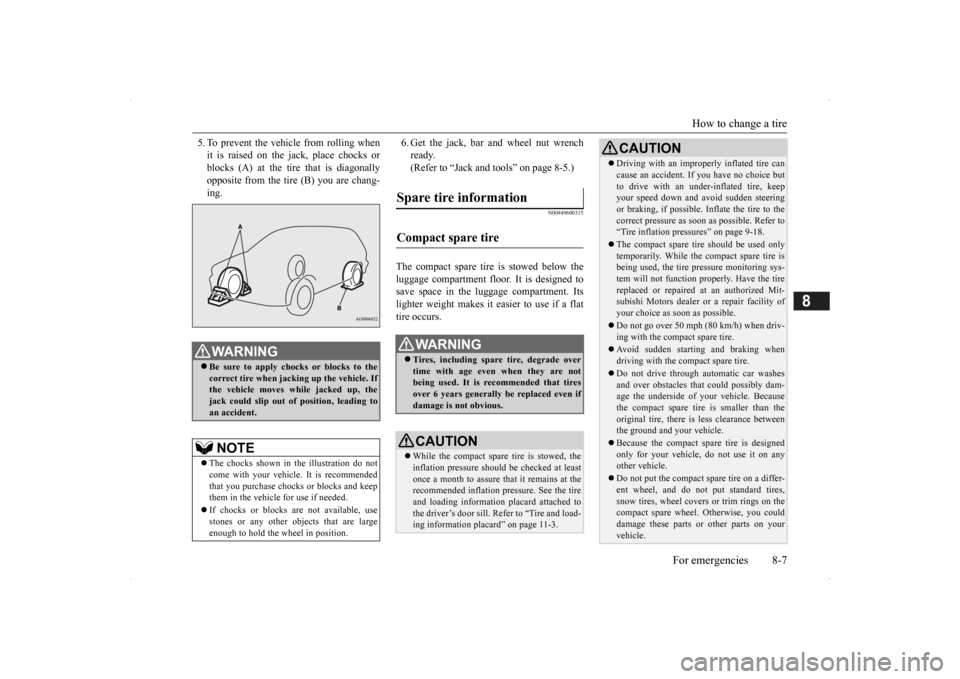
5. To prevent the vehicle from rolling when it is raised on the jack, place chocks orblocks (A) at the tire that is diagonally opposite from the tire (B) you are chang- ing.
6. Get the jack, bar and wheel nut wrench ready.(Refer to “Jack and tools” on page 8-5.)
N00849600315
The compact spare tire is stowed below the luggage compartment fl
oor. It is designed to
save space in the luggage compartment. Itslighter weight makes it easier to use if a flat tire occurs.
WA R N I N G Be sure to apply choc
ks or blocks to the
correct tire when jacking up the vehicle. If the vehicle moves while jacked up, the jack could slip out of
position, leading to
an accident.NOTE
The chocks shown in the illustration do not come with your vehicl
e. It is recommended
that you purchase chocks or blocks and keep them in the vehicle for use if needed. If chocks or blocks
are not available, use
stones or any other obj
ects that are large
enough to hold the wheel in position.
Spare tire information Compact spare tire
WA R N I N G Tires, including spar
e tire, degrade over
time with age even when they are notbeing used. It is recommended that tires over 6 years generally
be replaced even if
damage is not obvious.CAUTION While the compact spare tire is stowed, the inflation pressure shoul
d be checked at least
once a month to assure that it remains at the recommended inflation pressure. See the tire and loading informati
on placard attached to
the driver’s door sill. Refer to “Tire and load- ing information placard” on page 11-3.
Driving with an imprope
rly inflated tire can
cause an accident. If
you have no choice but
to drive with an under-inflated tire, keepyour speed down and avoid sudden steering or braking, if possible. Inflate the tire to the correct pressure as s
oon as possible. Refer to
“Tire inflation pressures” on page 9-18. The compact spare tire should be used only temporarily. While the compact spare tire is being used, the tire pr
essure monitoring sys-
tem will not function pr
operly. Have the tire
replaced or repaired at an authorized Mit- subishi Motors dealer or
a repair facility of
your choice as soon as possible. Do not go over 50 mph (80 km/h) when driv- ing with the compact spare tire. Avoid sudden starting and braking when driving with the compact spare tire. Do not drive through automatic car washes and over obstacles that
could possibly dam-
age the underside of your vehicle. Because the compact spare tire is smaller than the original tire, there is less clearance betweenthe ground and your vehicle. Because the compact spare tire is designed only for your vehicle, do not use it on any other vehicle. Do not put the compact spare tire on a differ- ent wheel, and do not put standard tires, snow tires, wheel covers
or trim rings on the
compact spare wheel. Otherwise, you could damage these parts or other parts on your vehicle.CAUTION
BK0200500US.book 7 ページ 2013年2月12日 火曜日 午前9時46分
Page 376 of 451
How to change a tire 8-10 For emergencies
8
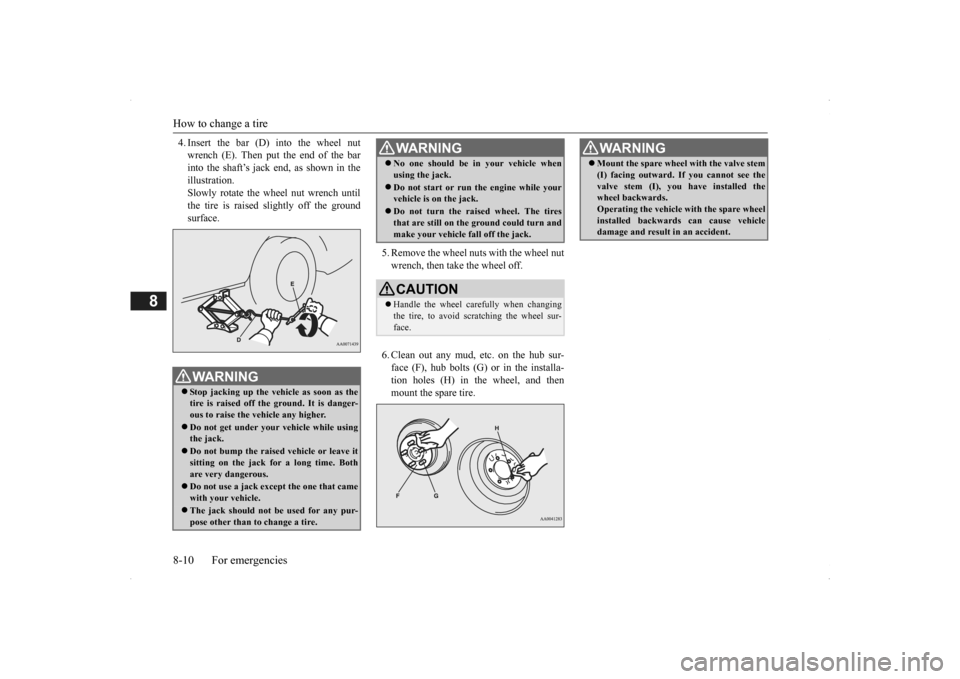
4. Insert the bar (D) into the wheel nut wrench (E). Then put the end of the barinto the shaft’s jack end, as shown in the illustration. Slowly rotate the wheel nut wrench untilthe tire is raised slightly off the ground surface.
5. Remove the wheel nuts with the wheel nut wrench, then take the wheel off. 6. Clean out any mud, etc. on the hub sur- face (F), hub bolts (G)
or in the installa-
tion holes (H) in the wheel, and then mount the spare tire.
WA R N I N G Stop jacking up the ve
hicle as soon as the
tire is raised off the ground. It is danger- ous to raise the vehicle any higher. Do not get under your vehicle while using the jack. Do not bump the raised vehicle or leave it sitting on the jack for a long time. Bothare very dangerous. Do not use a jack except the one that came with your vehicle. The jack should not be used for any pur- pose other than to
change a tire.
No one should be
in your vehicle when
using the jack. Do not start or run
the engine while your
vehicle is on the jack. Do not turn the raised wheel. The tires that are still on the ground could turn and make your vehicle fall off the jack.CAUTION Handle the wheel carefully when changing the tire, to avoid scratching the wheel sur-face.WA R N I N G
WA R N I N G Mount the spare wheel with the valve stem (I) facing outward. If
you cannot see the
valve stem (I), you
have installed the
wheel backwards. Operating the vehicle with the spare wheel installed backwards can cause vehicledamage and result
in an ac
cident.
BK0200500US.book 10 ページ 2013年2月12日 火曜日 午前9時46分
Page 397 of 451
Battery
Vehicle care and maintenance 9-13
9
N00939101940
The condition of the batte
ry is very important
for quick starting and to keep the vehicle’selectrical system working properly. Check the battery regularly. If battery performance
is suspect, have the
battery and charging
system tested by an
authorized Mitsubishi Motors dealer or a repair facility
of your choice.
The electrolyte level
must be between the
limits shown on the outside
of the battery. Fill
it with distilled water
as needed. The inside of
the battery is divided into several compart- ments. Take the cap off of each compartmentand fill to the mark. Do not fill above the t
op line because a spill
during driving could cause damage. The battery is weaker in cold temperatures. This has to do with its chemical and physicalproperties and is why a very cold battery, especially one with a lo
w charge, will have a
hard time starting your vehicle.It is recommended that you have your battery and charging system checked by an autho- rized Mitsubishi Motors dealer or a repair
facility of your choice
before the start of cold
weather. If necessary, have it charged. Thiswill provide more reliab
le starting, and longer
battery life. To disconnect the battery cable, stop the engine. Disconne
ct the negative (-) terminal
first, then the positive
(+) terminal. To recon-
nect the battery, first
connect the positive (+)
terminal and then the negative (-) terminal,before starting the vehicle.
CAUTION Do not let any petrol
eum-based fluid touch,
mix with, or get into the brake fluid. Thiswill damage the seals. Be careful when handling brake fluid. It can damage painted surfaces. Use only the listed brake fluid. Different brands of brake fluid have different addi-tives, and these can cause a chemical reac- tion. Do not mix brands of brake fluid. Keep the reservoir ta
nk cap closed to keep
the brake fluid from evaporating.
Battery
NOTE
After replacing the battery, the electronic control system data for the automatic trans-axle, etc., will be erased.As a result, shifting may be rough. Shifting will become smoother after several changes in speed.
Checking battery electrolyte level During cold weather
Disconnection and connection
NOTE
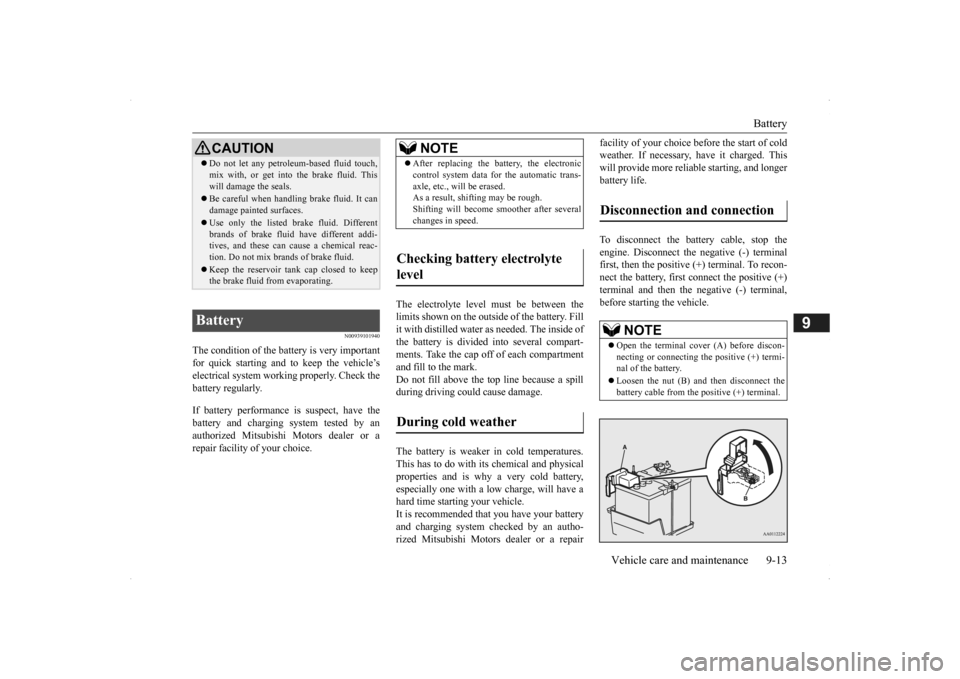
Open the terminal cover (A) before discon- necting or connecting the positive (+) termi- nal of the battery. Loosen the nut (B) and then disconnect the battery cable from the positive (+) terminal.
BK0200500US.book 13 ページ 2013年2月12日 火曜日 午前9時46分
Page 402 of 451
Tires 9-18 Vehicle care and maintenance
9
The temperature grades are A (the highest), B and C, representing the tire’s resistance to thegeneration of heat and
its ability to dissipate
heat when tested under controlled conditions on a specified indoor la
boratory test wheel.
Sustained high temper
ature can cause the
material of the tire to
degenerate and reduce
tire life, and excessive temperature can leadto sudden tire failure. The grade C corre- sponds to a level of performance which all passenger car tires must meet under the Fed- eral Motor Vehicle Safety Standard No. 109. Grades B and A represent higher levels ofperformance on the labora
tory test wheel than
the minimum required by law.
N00939300815
Proper tire inflation pres
sure is essential for
the safe and satisfactory operation of your vehicle. The wrong tire
pressure will cause
problems in three major areas: Safety Too little pressure increases flexing in the tire and can cause tire failure. Too muchpressure can cause a tire to lose its ability to cushion shock. Objects on the road and potholes could then cause tire damage thatmay result in tire failure.
Economy The wrong tire pressu
re can cause uneven
wear patterns in the tire tread. These abnormal wear patter
ns will reduce the
tread life, and the tire will have to bereplaced sooner. Too little pressure also
makes it harder for
the tire to roll, and this uses up more fuel. Ride comfort and vehicle stability The superior riding e
xperience built into
your vehicle partly depends on the correct tire pressure. Too much pressure gives an uncomfortable and ja
rring ride. Too little
pressure feels as if
your vehicle is slow to
respond. Unequal tire pressure
s can make steering
your vehicle uneven and unpredictable.
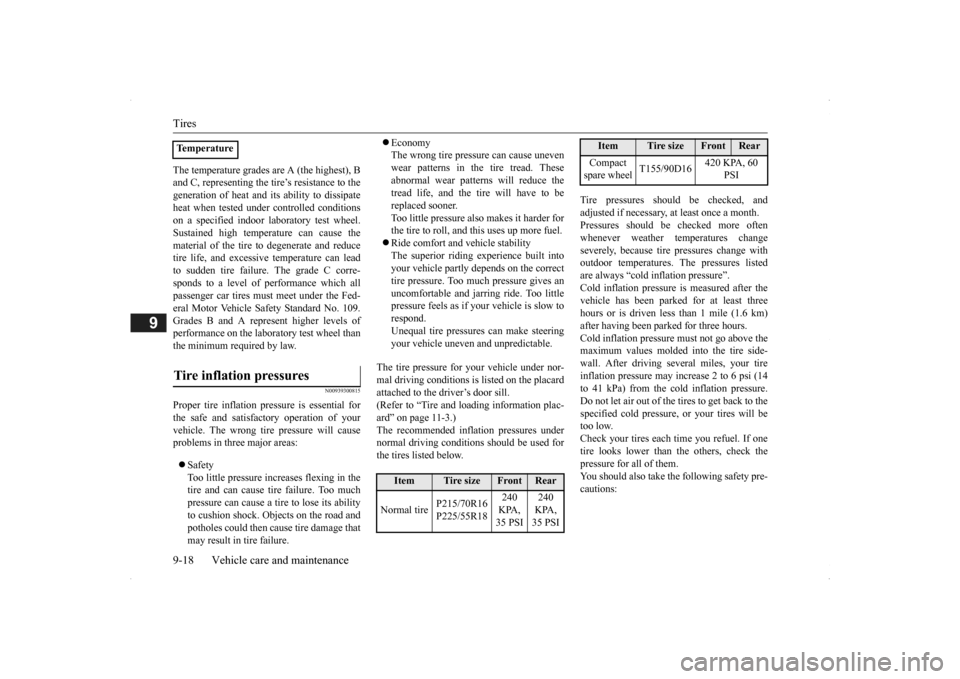
The tire pressure for your vehicle under nor- mal driving conditions is listed on the placard attached to the driver’s door sill.(Refer to “Tire and loading information plac- ard” on page 11-3.) The recommended infl
ation pressures under
normal driving conditions should be used for the tires listed below.
Tire pressures should be checked, and adjusted if necessary, at least once a month.Pressures should be checked more often whenever weather temperatures change severely, becaus
e tire pressures change with
outdoor temperatures. The pressures listed are always “cold in
flation pressure”.
Cold inflation pressure is measured after thevehicle has been parked
for at least three
hours or is driven less than 1 mile (1.6 km) after having been parked for three hours. Cold inflation pressure must not go above the maximum values molded into the tire side-wall. After driving seve
ral miles, your tire
inflation pressure may increase 2 to 6 psi (14 to 41 kPa) from the cold inflation pressure.Do not let air out of the tires to get back to the specified cold pressure, or your tires will be too low.Check your tires each time you refuel. If one tire looks lower than the others, check the pressure for all of them.You should also take the following safety pre- cautions:
TemperatureTire inflation pressures
Item
Tire size
Front
Rear
Normal tire
P215/70R16 P225/55R18
240 KPA, 35 PSI
240 KPA, 35 PSI
Compact spare wheel
T155/90D16
420 KPA, 60
PSI
Item
Tire size
Front
Rear
BK0200500US.book 18 ページ 2013年2月12日 火曜日 午前9時46分
Page 408 of 451
For cold and snowy weather 9-24 Vehicle care and maintenance
9
N00942201118
The best way to keep carbon monoxide gas from entering inside your
vehicle is to have
the engine exhaust syst
em properly serviced.
Have a competent mechanic inspect the com- plete exhaust system
and nearby body areas
for broken, damaged, deteriorated, or mispo- sitioned parts if you no
tice any of the follow-
ing: A change in the sound of the exhaust sys- tem The smell of exhaust fumes inside the vehicle The underside or rear of the vehicle is damaged
Also check the exhaust system each time the vehicle is raised for l
ubrication, oil changes,
or required service. A
ny open seams or loose
connections could le
t dangerous exhaust
fumes seep into the
luggage and passenger
compartments.
Check for holes or exhaust gas leaks caused by corrosion or damage. Check the joints and connections for looseness or exhaust gas leaks. Check the rubber hangers and brackets for damage.
N00942300079
The timing belt should be replaced with a new one at the mileage listed in the “WAR- RANTY AND MAINTENANCE MAN-UAL”.
N00942501124
The hood lock release mechanism and hood safety catch should be
checked, cleaned, and
oiled when needed for easy movement and toprevent rust and wear. Use Multipurpose Grease NLGI Grade 2 sp
aringly for all sliding
parts of the hood latc
h and release lever.
Work the grease into the hood lock mecha- nism until all the mo
vable surfaces are cov-
ered.
Also, put a light coat
of the same grease on
the safety catch wherever moving parts touch.
N00942600102
The ventilation slots in
front of the wind-
shield should be brushed clear after a heavy snowfall so that the operation of the heating and ventilation
systems will not be impaired.
To prevent freezing of the weatherstripping on the doors, engine hood, etc., they shouldbe treated with silicone grease. It is a good idea to carry a shovel or a short- handled spade in the vehicle during the win-ter so that you can clear away snow if you get stranded. A small hand-brush for sweeping snow off the vehicle a
nd a plastic scraper for
Exhaust system
WA R N I N GCarbon monoxide gas
from your vehicle’s
exhaust is poisonous. Breathing thesefumes can cause unconsciousness or death.
Check for any of the following conditions: Timing belt Hood lock release mechanism and safety catch
For cold and snowy weather Ventilation slots Weatherstripping Additional equipment (For regions where snow is encoun- tered)
BK0200500US.book 24 ページ 2013年2月12日 火曜日 午前9時46分