CD player MITSUBISHI OUTLANDER 2014 3.G Owners Manual
[x] Cancel search | Manufacturer: MITSUBISHI, Model Year: 2014, Model line: OUTLANDER, Model: MITSUBISHI OUTLANDER 2014 3.GPages: 451, PDF Size: 49.08 MB
Page 196 of 451
Rear-view camera (if so equipped) 5-118 Features and controls
5
N00533001233
Your tire pressure monitoring system oper- ates on a radio frequenc
y subject to Federal
Communications Commission (FCC) Rules (For vehicles sold in U.S.A.) and IndustryCanada Rules (For vehi
cles sold in Canada).
This device complies with part 15 of FCC Rules and Industry Canada licence-exemptRSS standard(s). Operation is subject to the following two con- ditions. This device may not
cause harmful inter-
ference. This device must ac
cept any interference
received, including interference that maycause undesired operation.
N00546201170
When the selector lever is in the “R”(REVERSE) position with
the ignition switch
in the “ON” position, or the operation mode is put in ON, the rear-view image will be dis- played on the screen of the Mitsubishi Multi-Communication System or the DISPLAY AUDIO-AM/FM radio/CD player with touch panel. When the selector lever is shifted out of the “R” (REVERSE) positi
on, the rear-view
image will go off.
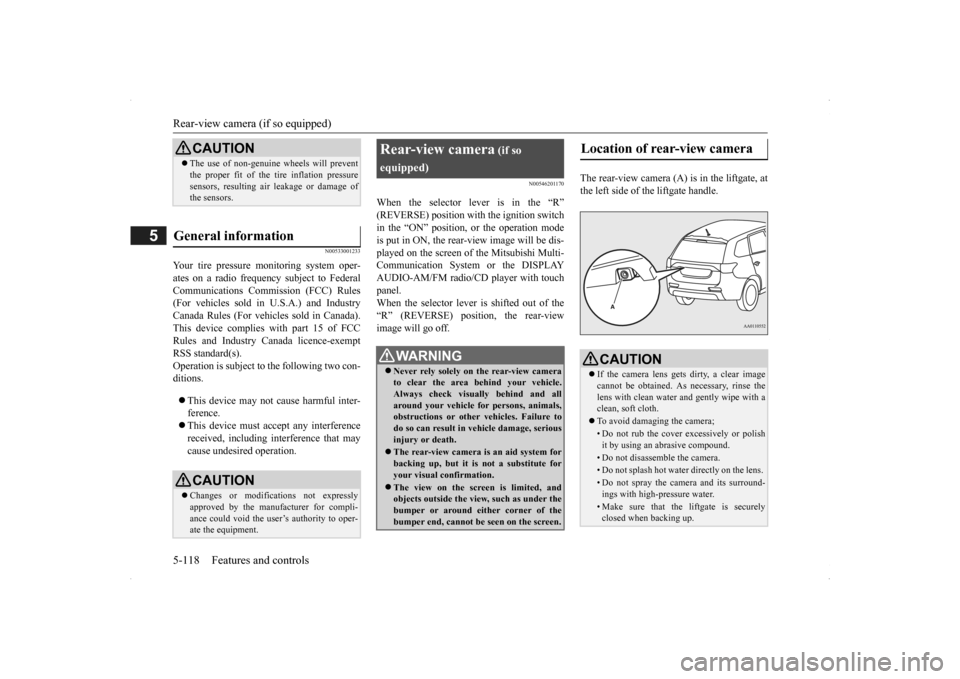
The rear-view camera (A)
is in the liftgate, at
the left side of the liftgate handle.
CAUTION The use of non-genuine wheels will prevent the proper fit of the tire inflation pressuresensors, resulting air
leakage or damage of
the sensors.
General information
CAUTION Changes or modifica
tions not expressly
approved by the manufacturer for compli-ance could void the user’s authority to oper- ate the equipment.
Rear-view camera
(if so
equipped)
WA R N I N G Never rely solely on the rear-view camera to clear the area behind your vehicle. Always check visually behind and all around your vehicle fo
r persons, animals,
obstructions or other vehicles. Failure to do so can result in
vehicle damage, serious
injury or death. The rear-view camera is an aid system for backing up, but it is not a substitute foryour visual confirmation. The view on the screen is limited, and objects outside the view, such as under the bumper or around either corner of the bumper end, cannot be seen on the screen.
Location of rear-view camera
CAUTION If the camera lens gets
dirty, a clear image
cannot be obtained. As
necessary, rinse the
lens with clean water a
nd gently wipe with a
clean, soft cloth. To avoid damaging the camera;• Do not rub the cover excessively or polish it by using an abrasive compound. • Do not disassemble the camera.• Do not splash hot wate
r directly on the lens.
• Do not spray the camera and its surround- ings with high-pressure water.• Make sure that the liftgate is securely closed when backing up.
BK0200500US.book 118 ページ 2013年2月12日 火曜日 午前9時46分
Page 263 of 451
Link System (if so equipped) Features and controls 5-185
5
N00563701066
The Link System takes control of the devices connected via the USB i
nput terminal or the
Bluetooth
® 2.0 interface; the system allows
the connected device to be operated by using the switches in the vehicle or voice com- mands.See the following section for details on how to operate. Refer to “Bluetooth
® 2.0 interface” on page
5-185.Refer to “USB input terminal” on page 5-207. Bluetooth
® is a registered trademark of
BLUETOOTH SIG, INC.
N00563801025
You have acquired a device
that includes soft-
ware licensed to Mitsubishi Motors Corpora-tion from JOHNSON CONTROLS Inc (the automotive experience business unit), and their subsequent 3rd party suppliers. For acomplete list of these
3rd party products and
their end user license agreements, please go to the following website. http://www.jciblueconn
ect.com/faq/fulldis-
closure.pdf
N00563901198
The Bluetooth
® 2.0 interface allows for mak-
ing/receiving hands-free
calls in the vehicle
using a Bluetooth
® compatible cellular
phone. It also allows the user to play music, saved in a Bluetooth
® music player, from the
vehicle’s speakers. The system is equipped
with a voice recogni-
tion function, which allows you to make hands-free calls by simple switch operations and voice command operations using adefined voice tree.
The Bluetooth
® 2.0 interface can be used
when the ignition switch or the operationmode is in ON or ACC. Before you can use the Bluetooth
® 2.0 inter-
face, you must pair the Bluetooth
® device
and Bluetooth
® 2.0 interface. Refer to “Con-
necting the Bluetooth
® 2.0 interface and
Bluetooth
® device” on page 5-192.
Bluetooth
® is a registered trademark of
BLUETOOTH SIG, INC.
Link System
(if so equipped)
Link System End User License Agreement
Bluetooth
® 2.0 interface
(if so
equipped)
WA R N I N G Although the Bluetooth
® 2.0 interface
allows you to make hands-free calls, if youchoose to use the cellular phone while driving, you must not allow yourself to be distracted from the sa
fe operation of your
vehicle. Anything, including cellularphone usage, that distracts you from the safe operation of you
r vehicle increases
your risk of an accident. Refer to and comply
with all state and
local laws in your area regarding cellularphone usage while driving.
BK0200500US.book 185 ページ 2013年2月12日 火曜日 午前9時46分
Page 264 of 451
Bluetooth® 2.0 interface (if so equipped) 5-186 Features and controls
5
Steering control switch and microphone
P.5-186Voice recognition function
P.5-188
Useful voice commands
P.5-189
Speaker enrollment function
P.5-190
Connecting the Bluetooth
® 2.0 interface and
the Bluetooth
® device
P.5-192
Operating a music player connected via Blue- tooth
® P.5-196
How to make or receive hands-free calls
P.5-196Phonebook function
P.5-199
N00564001109
Press this button to increase the volume.
NOTE
If the ignition switch
or the operation mode
is left in ACC, the accessory power willautomatically turn off after a certain periodof time and you will no longer be able to use the Bluetooth
® 2.0 interface. The accessory
power comes on again if
the ignition switch
or the engine switch is operated. Refer to“ACC power auto-cut
out function” on page
5-18 and 5-57. The Bluetooth
® 2.0 interface cannot be used
if the Bluetooth
® device has a dead battery
or the device power is turned off. Hands-free calls
will not be possible if your
phone does not have
service available.
If you place the Bluetooth
® device in the
vehicle’s third seat or
luggage compartment,
you may not be able to
use the Bluetooth
®
2.0 interface. Some Bluetooth
® devices are not compatible
with the Bluetooth
® 2.0 interface.
You can confirm the Link System software version by pressing the HANG-UP button 3times (press and hold 2 times and then press briefly) within 10 seconds.
For detail of the Bluetooth
® 2.0 interface,
refer to the following web site: [For vehicles sold in U.S.A.] You can access the MITSUBISHI MOTORSNORTH AMERICA web site. [For vehicles sold in Canada and Mexico] You can access the MITSUBISHI MOTORSweb site. Please read and agree to the “Warning about Links to the Web Sites of Other Companies”,the websites mentioned above may connect you to websites other
than the MITSUBISHI
MOTORS web site.http://www.mitsubishi-motors.com/en/prod- ucts/index.html Software updates by ce
llular phone/digital
audio device manufacturers may change/alter devi
ce connectivity.
NOTE
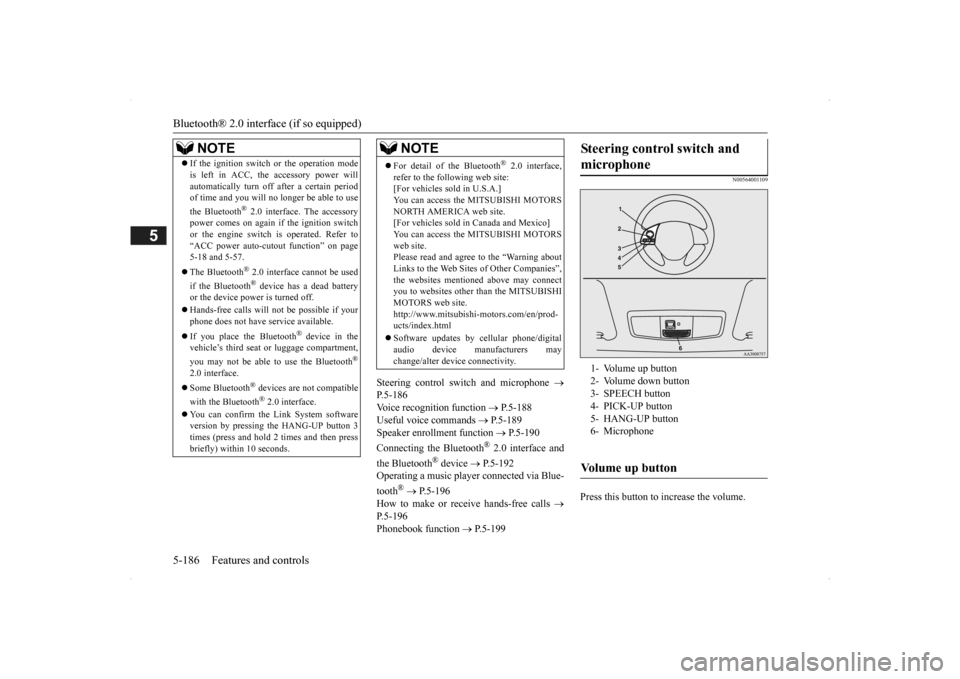
Steering control switch and microphone
1- Volume up button 2- Volume down button 3- SPEECH button4- PICK-UP button 5- HANG-UP button 6- MicrophoneVolume up button
BK0200500US.book 186 ページ 2013年2月12日 火曜日 午前9時46分
Page 270 of 451

Bluetooth® 2.0 interface (if so equipped) 5-192 Features and controls
5
N00564901078
You can turn a voice model registered with the speaker enrollment function on and off whenever you want. You can also retrain the system.Use the following procedure to perform these actions. 1. Press the SPEECH button (except for vehicles with Mitsubishi Multi-Commu- nication System) or
PICK-UP button (for
vehicles with Mitsubishi Multi-Commu-nication System). 2. Say “Voice training.” 3. If you have completed a speaker enroll-ment process once already, the voice guide will say eith
er “Enrollment is
enabled. Would you like to disable orretrain?” or “Enrol
lment is disabled.
Would you like to enable or retrain?” 4. When enrollment is
“enabled,” the voice
model is on; when enrollment is “dis- abled,” the voice model is off. Say the command that fi
ts your needs.
Say “Retrain” to start the speaker enroll- ment process and recreate a new voice model. (Refer to “Speaker enrollment” onpage 5-190.)
N00565001180
Before you can make
or receive hands-free
calls or play music using the Bluetooth
® 2.0
interface function, you must pair the Blue- tooth
® device and Bluetooth
® 2.0 interface.
Up to 7 Bluetooth
® devices can be paired
with the Bluetooth
® 2.0 interface.
If multiple paired Bluetooth
® devices are
available in the vehicle, the cellular phone or music player most recent
ly connected is auto-
matically connected
to the Bluetooth
® 2.0
interface. You can also change a Bluetooth
® device to
be connected.
To pair a Bluetooth
® device with the Blue-
tooth
® 2.0 interface, foll
ow the steps below.
1. Stop your vehicle in a safe area, put the selector lever in the “P” (PARK) positionand pull the parking brake lever. 2. Press the SPEECH button (except for vehicles with Mitsubishi Multi-Commu- nication System) or
PICK-UP button (for
vehicles with Mitsubishi Multi-Commu- nication System). 3. Say “Setup.”4. Say “Pairing Options.”
Enabling and disabling the voice model and retraining
Connecting the Bluetooth
® 2.0
interface and Bluetooth
® device
NOTE
Pairing is required only when the device is used for the first time. Once the device has been paired with the Bluetooth
® 2.0 inter-
face, all you need is to bring the device intothe vehicle next time
and the device will
connect to the Bluetooth
® 2.0 interface auto-
matically (if supported
by the device). The
device must have Bluetooth
® turned ON to
connect.
To p a i r
NOTE
You cannot pair any Bluetooth
® device with
the Bluetooth
® 2.0 interface unless the vehi-
cle is parked. Before pairing a Bluetooth
®
device with the Bluetooth
® 2.0 interface,
confirm that the vehicle is parked in a safe location.
BK0200500US.book 192 ページ 2013年2月12日 火曜日 午前9時46分
Page 271 of 451

Bluetooth® 2.0 interface (if so equipped)
Features and controls 5-193
5
5. The voice guide will
say “Select one of
the following: pair, edit, delete, or list.”Say “Pair.” 6. The voice guide will
say “Please say a 4-
digit pairing code.” Say a 4-digit number.When the confirmation function is on, the system will confirm
whether the number
said is acceptable. Answer “Yes.”Answer “No” to return to pairing code selection.
7. The voice guide will say “Start pairing procedure on the device. See the device manual for instructions.” Enter in the Bluetooth
® device the 4-digit number you
have registered in Step 6.
8. The voice guide will say “Please say the name of the device after the beep.” Youcan assign a desired name for the Blue- tooth
® device and register it as a device
tag. Say the name you want to registerafter the beep. 9. The voice guide will say “Pairing com- plete,” after which a
beep will be played
and the pairing process will end.
N00565101080
If multiple paired Bluetooth
® devices are
available in the vehicl
e, the cellular phone or
music player most recent
ly connected is auto-
NOTE
If 7 devices have alre
ady been paired, the
voice guide will sa
y “Maximum devices
paired” and then the system will end the pairing process. To re
gister a ne
w device,
delete one device and th
en repeat the pairing
process. (Refer to “Selecting a device: Deleting adevice” on page 5-195.)NOTE
Some Bluetooth
® devices requi
re a specific
pairing code. Please re
fer to the device man-
ual for pairing code requirements.
The pairing code entered here is only used for the Bluetooth
® connection ce
rtification.
It is any 4-digit numbe
r the user would like
to select.Remember the pairing c
ode as it needs to be
keyed into the Bluetooth
® device later in the
pairing process. Depending on the connecti
on settings of the
Bluetooth
® device, this code may have to be
entered each time you connect the Blue- tooth
® device to the Bluetooth
® 2.0 inter-
face. For the default
connection settings,
refer to the instructions for the device.NOTE
Depending on the Bluetooth
® device, it may
take a few minutes to pair it with the Blue- tooth
® 2.0 interface.
If the Bluetooth
® 2.0 interface
cannot recog-
nize the Bluetooth
® device, the voice guide
will say “Pairi
ng has timed out” and the pair-
ing process will
be cancelled.
Confirm that the devi
ce you are pairing sup-
ports Bluetooth
®, and try pairing it again.
NOTE
If you enter the wrong number, the voice guide will say “Pairing
failed” and the pair-
ing process will be cancelled.Confirm the number is right, and try pairing it again.NOTE
When the confirmation f
unction is on, after
repeating the device
tag you have said, the
voice guide will ask
“Is this correct?”
Answer “Yes.” To change the device
tag, answer “No” and
then say the device tag again.
Selecting a device
NOTE
BK0200500US.book 193 ページ 2013年2月12日 火曜日 午前9時46分
Page 272 of 451

Bluetooth® 2.0 interface (if so equipped) 5-194 Features and controls
5
matically connected to the Bluetooth
® 2.0
interface.You can connect to the
other paired cellular
phone or music player by following setting change procedures.
N00582200034
1. Press the SPEECH button (except for vehicles with Mitsubishi Multi-Commu- nication System) or
PICK-UP button (for
vehicles with Mitsubishi Multi-Commu- nication System).2. Say “Setup.” 3. Say “Select phone.”
4. After the voice guide
says “Please say,”
the numbers of the cellular phones anddevice tags of corresponding cellular phones will be read out in order, starting with the cellular phone that has been mostrecently connected. Say the number of the cellular phone that you want to connect to.When the confirmation function is on, the system will ask you again whether the phone that you want to connect to is cor- rect. Answer “Yes” to continue and con- nect to the cellular phone.Answer “No,” and th
e voice guide will
say “Please say.” Say the number of the phone that you want to connect to. 5. The selected phone will be connected to the Bluetooth
® 2.0 interface. The voice
guide will say “
and then the system will return to themain menu.
N00582300035
1. Press the SPEECH button (except forvehicles with Mitsubishi Multi-Commu- nication System) or
PICK-UP button (for
vehicles with Mitsubishi Multi-Commu-nication System). 2. Say “Setup.” 3. Say “Select music player.”4. After the voice guide says “Please say,” the numbers of the music players and device tags of corresponding music play- ers will be read out in order, starting with the music player that has been mostrecently connected. Say the number of the music player that you want to connect to.When the confirmation function is on, the system will ask you again whether the music player that you want to connect tois correct. Answer “Yes” to continue and connect to the music player. Answer “No,” and the voice guide willsay “Please say.” Say the number of the music player that you want to connect to.
To select a cellular phone
NOTE
You can connect to a
phone at any time by
pressing the SPEECH button and saying thenumber, even before all of the paired num- bers and device tags
of corresponding cellu-
lar phones are read out by the system.
To select a music player NOTE
You can connect to a music player at any time by pressing the SPEECH button and saying the number, even before all of the paired numbers and device tags of corre-sponding music players are read out by the system.
BK0200500US.book 194 ページ 2013年2月12日 火曜日 午前9時46分
Page 273 of 451

Bluetooth® 2.0 interface (if so equipped)
Features and controls 5-195
5
5. The selected music player will be con- nected to the Bluetooth
® 2.0 interface.
The voice guide will
say “
selected” and then the system will return to the main menu.
N00582400036
Use the following procedure to delete a paired Bluetooth
® device from the Blue-
tooth
® 2.0 interface.
1. Press the SPEECH button (except for vehicles with Mitsubishi Multi-Commu- nication System) or PICK-UP button (forvehicles with Mitsubishi Multi-Commu- nication System). 2. Say “Setup.”3. Say “Pairing Options.” 4. The voice guide will
say “Select one of
the following: pair, edit, delete, or list.”Say “Delete.”
5. After the voice guide says “Please say,” the numbers of the devices and devicetags of corresponding de
vices will be read
out in order, starting with the device that has been most recent
ly connected. After it
completes reading all pairs, the voice guide will say “or all.” Say the number of the device that youwant to delete from the system. If you want to delete
all paired phones
from the system, say “All.” 6. For confirmation purposes, the voice guide will say “Del
eting
rrect?” or “Deleting
all devices. Is this correct?” Answer “Yes” to delete the phone(s).Answer “No,” the system will return to Step 4. 7. The voice guide will say “Deleted,” andthen the system will
end the device dele-
tion process.
N00565201036
You can check a paired Bluetooth
® device by
following the steps below. 1. Press the SPEECH button (except for vehicles with Mitsubishi Multi-Commu- nication System) or PICK-UP button (forvehicles with Mitsubishi Multi-Commu- nication System). 2. Say “Setup.” 3. Say “Pairing Options.” 4. The voice guide will
say “Select one of
the following: pair, edit, delete, or list.” Say “List.” 5. The voice guide will read out device tagsof corresponding devices in order, starting with the Bluetooth
® device that has been
most recently connected.6. After the device tags of all paired Blue- tooth
® devices have been read, the system
will say “End of list,
would you like to
start from the beginning?” To hear the list again from the beginning, answer “Yes.” When you are done, answer “No” to return to the main menu.
Deleting a device
NOTE
If the device deletion
process fails for some
reason, the voice guide
will say “Delete
failed” and then the system will cancel delet- ing the device.
To check a paired Bluetooth
®
device
BK0200500US.book 195 ページ 2013年2月12日 火曜日 午前9時46分
Page 274 of 451

Bluetooth® 2.0 interface (if so equipped) 5-196 Features and controls
5
N00565301037
You can change the device tag of a paired cel- lular phone or music player. Follow the steps below to change a device tag.
1. Press the SPEECH button (except for vehicles with Mitsubishi Multi-Commu-nication System) or PICK-UP button (for vehicles with Mitsubishi Multi-Commu- nication System).2. Say “Setup.” 3. Say “Pairing Options.” 4. The voice guide will
say “Select one of
the following: pair, ed
it, delete, or list.”
Say “Edit.” 5. The voice guide will say “Please say,” and read out the numbers of the Bluetooth
®
devices and device
tags of corresponding
devices in order, starting with the Blue- tooth
® that has been most recently con-
nected.After all paired devi
ce tags have been
read, the voice guide
will say “Which
device, please?” Say the number of thedevice tag you want to change.
6. The voice guide will say “New name, please.” Say the name
you want to regis-
ter as a new device tag. When the confirmation function is on, the voice guide will say
“
Is this correct?” Answer “Yes.” Answer “No,” you can say the new device tag you want to register again.7. The device tag is changed. When the change is complete, the voice guide will say “New
name saved” and
then the system will return to the main menu.
N00565401041
For the operation of a mu
sic player connected
via Bluetooth
®, refer to separate owner’s
manual for audio.
N00565501097
You can make or receive hands-free calls using a Bluetooth
® compatible cellular phone
connected to the Bluetooth
® 2.0 interface.
You can also use the phonebooks in the Blue- tooth
® 2.0 interface to make calls without
dialing telephone numbers.
NOTE
If you press and release the SPEECH button and say “Continue” or “Previous” while thelist is being read, the
system will advance or
rewind the list. Say “Continue” to procee
d to the device with
the next highest num
ber or “Previous” to
return to the phone with the previous num- ber. You can change the device tag by pressing and releasing the SP
EECH button and then
saying “Edit” while the
list is being read.
You can change the
phone to be connected
by pressing and releasing the SPEECH but-ton and then saying “S
elect phone” while the
list is being read. You can change the music player to be con- nected by pressing and releasing the SPEECH button and then saying “Selectmusic player” while the list is being read.
Changing a device tag
NOTE
You can press and release the SPEECH but- ton while the list is
being read, and immedi-
ately say the number of the device tag youwant to change.
Operating a music player con- nected via Bluetooth
®
How to make or receive hands-free calls
BK0200500US.book 196 ページ 2013年2月12日 火曜日 午前9時46分
Page 277 of 451

Bluetooth® 2.0 interface (if so equipped)
Features and controls 5-199
5
“
a call you need to sim-
ulate the pressing of a phone button as a response to an automated system, press theSPEECH button and speak “1 2 3 4 pound send” and the 1234# will be sent via your cel- lular phone.
N00565801045
If an incoming phone call is received whilethe ignition switch or
the operation mode is in
ON or ACC, the audio sy
stem will be auto-
matically turned on and switched to theincoming call, even when the audio system was originally off. The voice guide announcement for theincoming call will be output from the front passenger’s seat speaker. If the CD player or radio was playing whenthe incoming call was received, the audio sys- tem will mute the sound from the CD player or radio and output only the incoming call. To receive the call, press the PICK-UP button on the steering wheel control switch. When the call is over, the audio system willreturn to its previous state.
N00565900010
At any time during a ca
ll, you can mute the
vehicle microphone. Pressing the SPEECH button and then saying“Mute” during a call will turn ON the mute function and mute the microphone. Saying “Mute off” in the same way will turnoff the mute function and cancel the mute on the microphone.
N00566600014
The Bluetooth
® 2.0 interface
can switch
between hands-free mode
(hands-free calls)
and private mode (calls
using cellular phone).
If you press the SPEECH button and say “Transfer call” during a hands-free call, you can stop the hands-free mode and talk in pri-vate mode. To return to hands-free mode, press the SPEECH button again and say “Transfercall.”
N00566000018
The Bluetooth
® 2.0 interface
has 2 types of
unique phonebooks that are different from the phonebook stored in the cellular phone. They
are the vehicle phonebook and the mobile phonebook.These phonebooks are used to register tele- phone numbers and make
calls to desired
numbers via voice recognition function.
N00566101120
This phonebook is used when making callswith the voice re
cognition function.
Up to 32 names can be registered in the vehi- cle phonebook per language. Also, each entry has 4 locations associatedwith: home, work, mobile
and other. You can
register one telephone number for each loca- tion. You can register a desire
d name as a name for
any phonebook entry register
ed in the vehicle
phonebook. Names and telephone numbers can bechanged later on. The vehicle phonebook ca
n be used with all
paired cellular phones.
Receiving calls
Mute function
Switching between hands-free mode and private mode
Phonebook function
NOTE
Disconnecting the batt
ery cable will not
delete information regi
stered in the phone-
book.
Vehicle phonebook
BK0200500US.book 199 ページ 2013年2月12日 火曜日 午前9時46分
Page 287 of 451
USB input terminal (if so equipped)
Features and controls 5-209
5
* : “iPod,” “iPod classic,” “iPod nano,” “iPod touch,” and “iPhone”
are registered trade-
marks of Apple Inc. in the United States and other countries.
N00567201030
You can play music files of the followingspecifications that are saved in a USB mem- ory device or other
device supporting mass
storage class. When
you connect your iPod,
playable file specif
ications depend on the
connected iPod.
iPod nano*
first gener- ation
F/W Ver.1.3.1 or later
second generation
F/W Ver.1.1.3 or later
third gen- eration
F/W Ver.1.1.3 or later
fourth gen- eration
F/W Ver.1.0.4 or later
fifth gener- ation
F/W Ver.1.0.2 or later
sixth gen- eration
F/W Ver.1.0 or later
iPod touch*
first gener- ation
F/W Ver.3.1.3 or later
second generation
F/W Ver.4.2.1 or later
third gen- eration
F/W Ver.4.3.1 or later
fourth gen- eration
F/W Ver.4.3.1 or later
Model name
Condition
iPhone*
iPhone
F/W Ver.3.1.3 or later
iPhone 3G
F/W Ver.4.2.1 or later
iPhone 3GS
F/W Ver.4.3.1 or later
iPhone 4
F/W Ver.4.3.1 or later
iPhone 4S
F/W Ver.5.0.1 or later
Models other than USB memory devices and iPods
Digital audio player support-ing mass stor- age class
NOTE
Depending on the type of the USB memory device or other devi
ce connected, the con-
nected device may not
function properly or
the available functi
ons may be limited.
It is recommended to use an iPod with firm- ware updated to th
e latest version.
Model name
Condition
You can charge your iP
od by connecting it to
the USB input terminal
when the ignition
switch or the operation mode is in ON orACC. Do not keep your USB memory device or iPod in your vehicle. It is recommended that you back up the files in case of data damage. Do not connect to the USB input terminal any device (hard disk
, card reader, memory
reader, etc.) other
than the connectable
devices specified in the previous section.The device and/or data
may be damaged. If
any of these devices
was connected by mis-
take, remove it after turning the ignitionswitch to the “LOCK” position or putting the operation mode in OFF.
File specifications
Item
Condition
File format MP3, WMA, AAC
NOTE
BK0200500US.book 209 ページ 2013年2月12日 火曜日 午前9時46分