horn MITSUBISHI OUTLANDER 2014 3.G Owners Manual
[x] Cancel search | Manufacturer: MITSUBISHI, Model Year: 2014, Model line: OUTLANDER, Model: MITSUBISHI OUTLANDER 2014 3.GPages: 451, PDF Size: 49.08 MB
Page 3 of 451
Instruments and controls 1-1
1
Overview
N00100202557
Instruments and controls
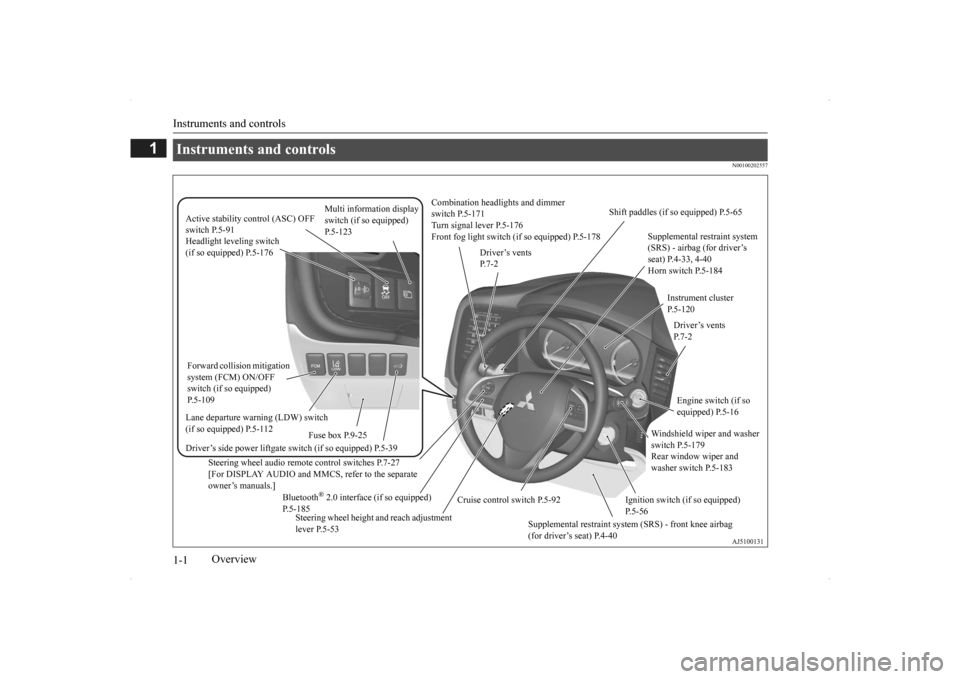
Combination headlights and dimmer switch P.5-171 Turn signal lever P.5-176 Front fog light switch (if so equipped) P.5-178
Steering wheel audio remote control switches P.7-27 [For DISPLAY AUDIO and MMCS, refer to the separateowner’s manuals.]
Active stability control (ASC) OFF switch P.5-91
Supplemental restraint system (SRS) - airbag (for driver’s seat) P.4-33, 4-40 Horn switch P.5-184
Instrument cluster P.5-120
Windshield wiper and washer switch P.5-179 Rear window wiper and washer switch P.5-183
Cruise control switch P.5-92
Steering wheel height and reach adjustment lever P.5-53
Engine switch (if so equipped) P.5-16
Bluetooth
® 2.0 interface (if so equipped)
P.5-185
Driver’s vents P. 7 - 2
Shift paddles (if so equipped) P.5-65
Driver’s vents P. 7 - 2
Multi information display switch (if so equipped) P.5-123
Headlight leveling switch (if so equipped) P.5-176 Driver’s side power liftgate switch (if so equipped) P.5-39
Fuse box P.9-25
Lane departure warning (LDW) switch (if so equipped) P.5-112 Forward collision mitigation system (FCM) ON/OFF switch (if so equipped) P.5-109
Supplemental restraint system (SRS) - front knee airbag (for driver’s seat) P.4-40
Ignition switch (if so equipped) P.5-56
BK0200500US.book 1 ページ 2013年2月12日 火曜日 午前9時46分
Page 15 of 451
If this problem occurs... 2-6 Quick index
2
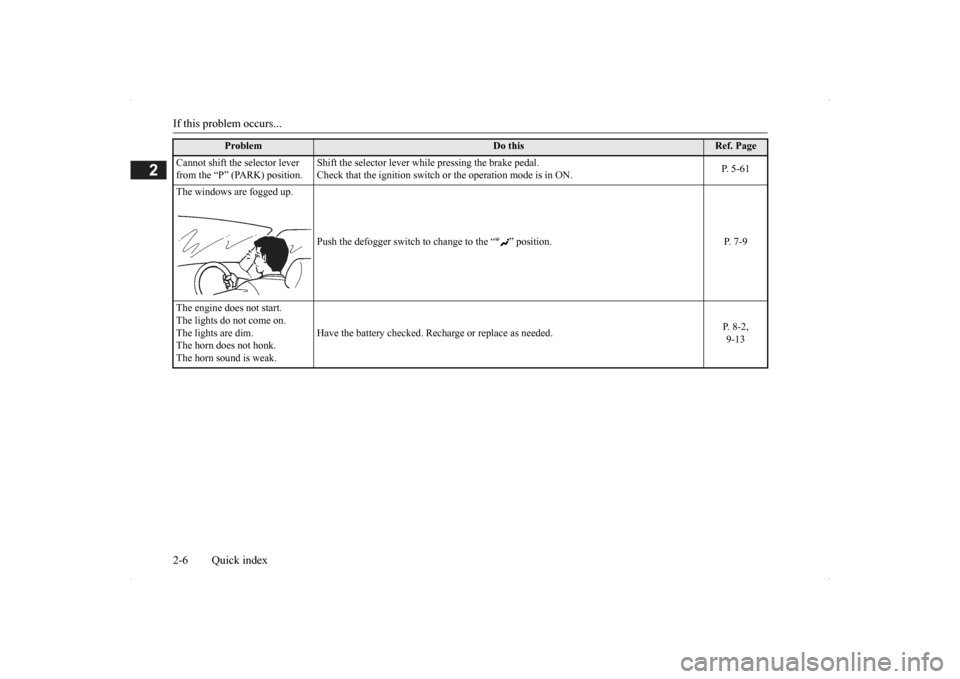
Cannot shift the selector lever from the “P” (PARK) position.
Shift the selector lever while pressing the brake pedal. Check that the ignition switch
or the operation mode is in ON.
P. 5-61
The windows are fogged up.
Push the defogger switch to
change to the “ ” position.
P. 7-9
The engine does not start. The lights do not come on. The lights are dim.The horn does not honk. The horn sound is weak.
Have the battery checked. Rech
arge or replace as needed.
P. 8-2, 9-13
Problem
Do this
Ref. Page
BK0200500US.book 6 ページ 2013年2月12日 火曜日 午前9時46分
Page 80 of 451
5
Features and controlsECO mode switch......................................................................... 5-178 Front fog light switch (if so equipped) ......................................... 5-178 Wiper and washer switch ............................................................ 5-179Electric rear window def
ogger switch.........
...........
.........
............. 5-184
Horn switch .................................................................................. 5-184 Link System (if so equipped) ....................................................... 5-185 Bluetooth
® 2.0 interface (if so equipped) .................................... 5-185
USB input terminal (if so equipped) ............................................ 5-207 Sun visors ..................................................................................... 5-21012 V power outlets ....................................................................... 5-211 Interior lights ................................................................................ 5-212 Storage spaces .............................................................................. 5-215Cup holders .................................................................................. 5-218 Bottle holders ............................................................................... 5-219 Cargo area cover (if so equipped) ................................................ 5-219Assist grips ................................................................................... 5-221 Coat hooks .................................................................................... 5-222 Luggage hooks ............................................................................. 5-222BK0200500US.book 2 ページ 2013年2月12日 火曜日 午前9時46分
Page 85 of 451
Keyless entry system (if so equipped)
Features and controls 5-7
5
N00562301094
Your electronic immo
bilizer operates on a
radio frequency subject to Federal Communi- cations Commission (FCC)
Rules (For vehi-
cles sold in U.S.A.
) and Industry Canada
Rules (For vehicles so
ld in Canada). This
device complies with part 15 of FCC Rulesand Industry Canada
licence-exempt RSS
standard(s). Operation is subject to the following two con- ditions. This device may not
cause harmful inter-
ference. This device must ac
cept any interference
received, including interference that may cause undesired operation.
N00509001920
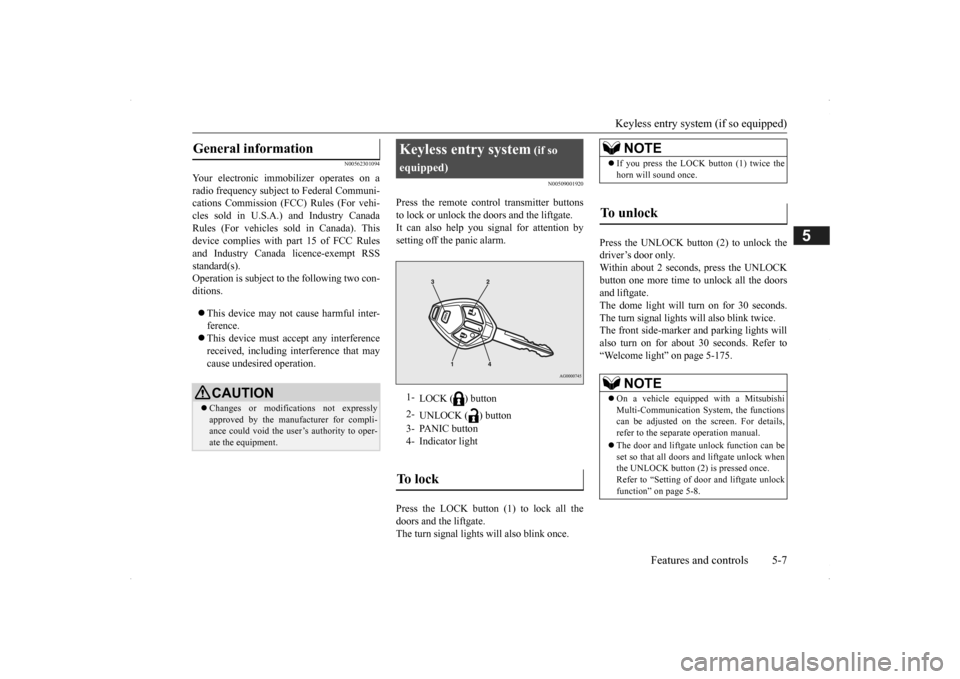
Press the remote control transmitter buttonsto lock or unlock the doors and the liftgate.It can also help you signal for attention by setting off the panic alarm. Press the LOCK button (1) to lock all the doors and the liftgate. The turn signal lights will also blink once.
Press the UNLOCK button (2) to unlock the driver’s door only.Within about 2 seconds, press the UNLOCK button one more time to unlock all the doors and liftgate.The dome light will turn on for 30 seconds. The turn signal lights will also blink twice. The front side-marker
and parking lights will
also turn on for about 30 seconds. Refer to “Welcome light” on page 5-175.
General information
CAUTION Changes or modifica
tions not expressly
approved by the manufacturer for compli- ance could void the user’s authority to oper-ate the equipment.
Keyless entry system
(if so
equipped)1-
LOCK ( ) button
2-
UNLOCK ( ) button
3- PANIC button 4- Indicator lightTo l o c k
NOTE
If you press the LOCK button (1) twice the horn will sound once.
To unlock
NOTE
On a vehicle equipped with a Mitsubishi Multi-Communication System, the functionscan be adjusted on the screen. For details, refer to the separa
te operation manual.
The door and liftgate unlock function can be set so that all doors and liftgate unlock when the UNLOCK button (2) is pressed once. Refer to “Setting of door
and liftgate unlock
function” on page 5-8.
BK0200500US.book 7 ページ 2013年2月12日 火曜日 午前9時46分
Page 86 of 451
Keyless entry system (if so equipped) 5-8 Features and controls
5
The horn and turn signal lights of the keyless entry system answerback function can be changed as required. This is done with thekey removed from the ignition switch. The answerback function can be set in the following three ways. Each time the answerba
ck function is set, a
chime will sound to tell you the condition of the answerback function. 1. Remove the key from
the ignition switch.
2. Open the driver’s door and turn the com-bination headlights and dimmer switch to the “OFF” position.
3. Press the LOCK button (1) for 4 to 10 sec- onds and press the UNLOCK button (2)during this time. 4. Release in sequence the UNLOCK and LOCK buttons within 5 seconds of press-ing the UNLOCK button in step 3.
The answerback function can be turned ON or OFF separately. 1. Remove the key from the ignition switch. 2. Open the driver’s door and turn the com- bination headlights and dimmer switch tothe “OFF” position. 3. Press the UNLOCK button (2) for 4 to 10 seconds and press the LOCK button (1)during this time.
4. Release in sequence the UNLOCK and LOCK buttons within 5 seconds of press-ing the LOCK button in step 3.
N00543601115
The door and liftgate
unlock function can be
set to the following two conditions. Each time the door and
liftgate unlock func-
tion is set, a chime wi
ll sound to tell you the
Answerback function
NOTE
The answerback functi
on will not operate if
any of the doors are open.
Horn deactivation/reactivation
One chime: The horn will not sound. Two chimes: The horn will sound. Four chimes: The hor
n will sound if the
LOCK button is pressed twice within 1 second.
NOTE
On a vehicle equippe
d with a Mitsubishi
Multi-Communication System, the functions can be adjusted on the screen. For details, refer to the separa
te operation manual.
Turn signal lights deactiva- tion/reactivation
Number of chimes
To l o c k
To u n l o c k
One chime One flash Two flashes Two chimes One flash No flash Three chimes No flash Two flashes Four chimes Two flashes One flash Five chimes No flash One flash Six chimes Two flashes No flash Seven chimes
No flash No flash
NOTE
On a vehicle equippe
d with a Mitsubishi
Multi-Communication System, the functionscan be adjusted on the screen. For details, refer to the separate operation manual.
Setting of door and liftgate unlock function
BK0200500US.book 8 ページ 2013年2月12日 火曜日 午前9時46分
Page 87 of 451
Keyless entry system (if so equipped)
Features and controls 5-9
5
condition of the door and liftgate unlock function. 1. Remove the key from the ignition switch. 2. Open the driver’s door and turn the com- bination headlights and dimmer switch to the “OFF” position.3. Press the LOCK button (1) for 4 to 10 sec- onds and press the UNLOCK button (2) during this time.4. Release in sequence the LOCK and UNLOCK buttons within 5 seconds of pressing the LOCK button in step 3.
N00543701060
If you are near your vehicle and feel threat- ened, you may activate the alarm to call atten- tion as follows: 1. Press the PANIC button (3) for more than 1 second. 2. The headlights will blink on and off and the horn will sound intermittently for about 3 minutes. 3. To turn off the alarm, press any button onthe remote control transmitter.
N00543801087
Only remote control transmitters pro- grammed with the vehicle’s electronics can lock or unlock all doors and the liftgate. If you lose the remote control transmitter, you can order a remote c
ontrol transmitter from
your authorized Mitsubi
shi Motors dealer by
referring to the key number.To prevent vehicle theft, the ID code for the remote control transmitter must be changed. Take your vehicle and all remote controltransmitters to your authorized Mitsubishi Motors dealer to have your ID code changed.
N00543900049
To add a remote control transmitter, you must already have 1 regist
ered remote control
transmitter. Registering the ID code can be done by your- self or by your authorized Mitsubishi Motorsdealer. For you to regist
er the ID code your-
self, follow the “Customer remote control transmitter programming” procedure below. If you choose to have your authorized Mitsubishi Motors dealer register the IDcode, take your vehi
cle and any remaining
keys to your authorized Mitsubishi Motors dealer.
N00544001103
You can program new remote control trans-mitters to the system if you have one valid(already registered) remote control transmit- ter by doing the following:
Number of chimes
Condition
One chime
All doors and the liftgate unlock
Two chimes Driver’s door unlock only
NOTE
On a vehicle equippe
d with a Mitsubishi
Multi-Communication System, the functions can be adjusted on the screen. For details,refer to the separa
te operation manual.
Using the panic alarm
Replacement remote control transmitters
Additional remote control transmitters
NOTE
You are provided with 2 remote control transmitters, but you may register up to 8 remote control transmitters.
Customer remote control trans- mitter programming
BK0200500US.book 9 ページ 2013年2月12日 火曜日 午前9時46分
Page 106 of 451
Free-hand Advanced
Security Transmitter (F.A.S
.T.-key) (if so equipped)
5-28 Features and controls
5
7. Release in sequence the LOCK and UNLOCK buttons within 10 seconds ofpressing the LOCK button in step 6. The immobilizer display on the information screen in the multi-information displaywill blink. When registration of ID
code is complete,
the buzzer will sound 3 times and the immobilizer display will come on for 30seconds. If an error occurs, F.A.S.T.-key program- ming will be terminated and the buzzerwill sound for 3 seconds. 8. If you wish to register another F.A.S.T.- key, repeat the process from step 1 after the operation mode is put in OFF.
N00515501210
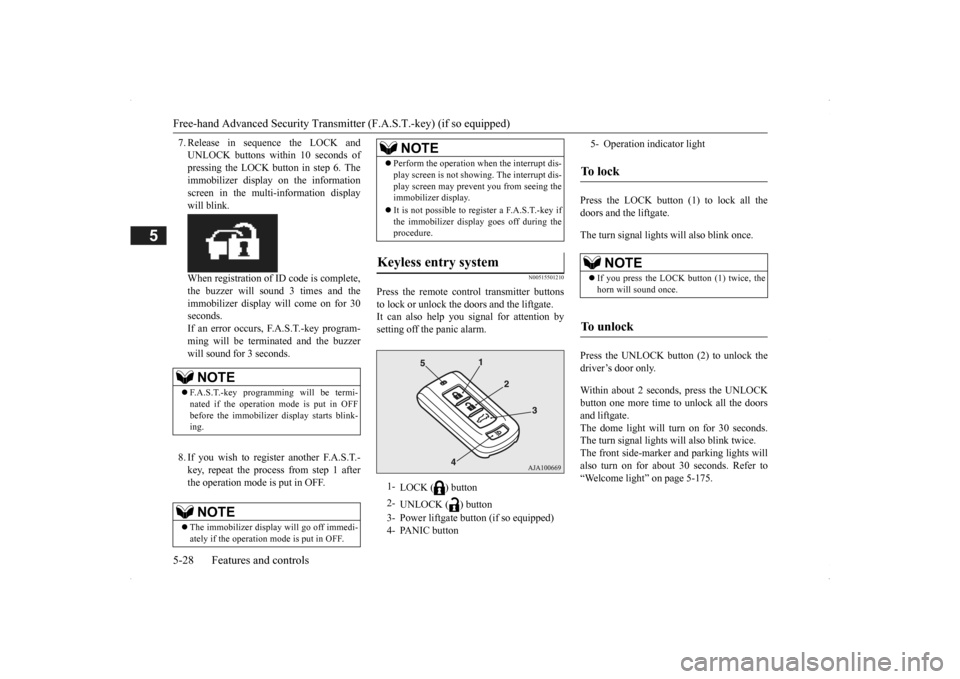
Press the remote control transmitter buttons to lock or unlock the doors and the liftgate. It can also help you
signal for attention by
setting off the panic alarm.
Press the LOCK button (1) to lock all the doors and the liftgate. The turn signal lights will also blink once. Press the UNLOCK button (2) to unlock the driver’s door only. Within about 2 seconds, press the UNLOCK button one more time to unlock all the doors and liftgate. The dome light will turn on for 30 seconds.The turn signal lights will also blink twice. The front side-marker and parking lights will also turn on for about 30 seconds. Refer to“Welcome light” on page 5-175.
NOTE
F.A.S.T.-key programming will be termi- nated if the operation
mode is put in OFF
before the immobilizer
display starts blink-
ing.NOTE
The immobilizer displa
y will go off immedi-
ately if the operation
mode is put in OFF.
Perform the operation when the interrupt dis- play screen is not show
ing. The interrupt dis-
play screen may prevent you from seeing theimmobilizer display. It is not possible to re
gister a F.A.S.T.-key if
the immobilizer displa
y goes off during the
procedure.
Keyless entry system
1-
LOCK ( ) button
2-
UNLOCK ( ) button
3- Power liftgate button (if so equipped) 4- PANIC button
NOTE
5- Operation indicator lightTo l o c k
NOTE
If you press the LOCK button (1) twice, the horn will sound once.
To unlock
BK0200500US.book 28 ページ 2013年2月12日 火曜日 午前9時46分
Page 107 of 451
Free-hand Advanced Securi
ty Transmitter (F.A.S.T.-key) (if so equipped)
Features and controls 5-29
5
The horn and turn signal lights of the keyless entry system answerback function can be changed as required. This is done with the key removed from the ignition switch. The answerback function can be set in the following three ways. 1. Put the operation mode in OFF.
2. Open the driver’s door and turn the com- bination headlights a
nd dimmer switch to
the “OFF” position. 3. Press the LOCK button (1) for 4 to 10 sec- onds and press the UNLOCK button (2)during this time. 4. Release in sequence the UNLOCK and LOCK buttons within 10 seconds ofpressing the UNLOCK button in step 3.
The answerback function from the turn signal lights can be turned ON or OFF separately. 1. Put the operation mode in OFF. 2. Open the driver’s door and turn the com-bination headlights a
nd dimmer switch to
the “OFF” position. 3. Press the UNLOCK button (2) for 4 to 10seconds and press the LOCK button (1) during this time.
4. Release in sequence the UNLOCK and LOCK buttons within 10 seconds ofpressing the LOCK button in step 3.
The buzzer answerback function can be turned ON or OFF as required.
NOTE
On a vehicle equippe
d with a Mitsubishi
Multi-Communication System, the functionscan be adjusted on the screen. For details,refer to the separa
te operation manual.
The door and liftgate unlock function can be set so that all doors and liftgate unlock when the UNLOCK button (2) is pressed once. Refer to “Setting of door
and liftgate unlock
function” on page 5-30.
Answerback function
Horn deactivation/reactivation One chime: The horn will not sound. Two chimes: The horn will sound. Four chimes: The horn will sound if the
LOCK button is pressed twicewithin 1 second.
NOTE
On a vehicle equippe
d with a Mitsubishi
Multi-Communication System, the functions can be adjusted on the screen. For details, refer to the separate operation manual.
Turn signal light
deactivation/reactiva-
tion
Number of chimes
To l o c k
To u n l o c k
One chime One flash Two flashes Two chimes One flash No flash Three chimes No flash Two flashes Four chimes Two flashes One flash Five chimes No flash One flash Six chimes Two flashes No flash Seven chimes No flash No flash
NOTE
On a vehicle equipped with a Mitsubishi Multi-Communication System, the functions can be adjusted on the screen. For details, refer to the separa
te operation manual.
Buzzer deactivation/reactivation
BK0200500US.book 29 ページ 2013年2月12日 火曜日 午前9時46分
Page 108 of 451
Free-hand Advanced
Security Transmitter (F.A.S
.T.-key) (if so equipped)
5-30 Features and controls
5
N00544601095
The door and liftgate
unlock function can be
set to the following two conditions.Each time the door and
liftgate unlock func-
tion is set, a chime wi
ll sound to tell you the
condition of the door and liftgate unlockfunction. 1. Put the operation mode in OFF. 2. Open the driver’s door and turn the com-bination headlights and dimmer switch to the “OFF” position. 3. Press the LOCK button (1) for 4 to 10 sec-onds and press the UNLOCK button (2) during this time.
4. Release in sequence the LOCK and UNLOCK buttons within 10 seconds ofpressing the LOCK button in step 3.
N00579500020
After unlocking the doors and the liftgate, thepower liftgate
can be operated
by pressing the
power liftgate button (3). Refer to “Power li
ftgate” on page 5-37.
N00544701067
If you are near your vehicle and feel threat- ened, you can activate the alarm to call atten- tion as follows: 1. Press the PANIC button (4) for more than 1 second. 2. The headlights will blink on and off and the horn will sound intermittently forabout 3 minutes. 3. To turn off the alarm, press any button on the remote control transmitter.
NOTE
On a vehicle equippe
d with a Mitsubishi
Multi-Communication System, the functionscan be adjusted on the screen. For details,refer to a separa
te operation manual.
Setting of door and liftgate unlock function
Number of chimes
Condition
One chime
All doors and the liftgate unlock
Tw o chimes
Driver’s door unlock only
NOTE
On a vehicle equippe
d with a Mitsubishi
Multi-Communication System, the functionscan be adjusted on the screen. For details, refer to the separa
te operation manual.
Operating the power liftgate
Using the panic alarm
NOTE
The indicator light (5) comes on each time a button is pressed. The F.A.S.T.-key can be used from about 40 feet (12 m) away. However, this distance may change if your vehicle is near a TVtransmitting tower, a power station, or a radio station. If the UNLOCK button (2) is pressed when all doors and the liftgate are locked and no doors or the liftgate
are opened within about
30 seconds, the doors a
nd the liftgate will
automatically re-lock. On a vehicle equippe
d with a Mitsubishi
Multi-Communication System, the functions can be adjusted on the screen. For details, refer to the separate operation manual. If the following conditi
ons are observed after
pressing the LOCK (1) or UNLOCK (2) but-ton on the remote control transmitter, the battery in the F.A.S.T.-key may need to be replaced. • The doors and the lift
gate cannot be locked
or unlocked. • The panic alarm
cannot be operated.
• The indicator light
(5) is dim or does not
come on.
If you lose your F.A.S.T.
-key, please contact
an authorized Mitsubish
i Motors dealer for a
replacement. If you wish to obtain an
additional F.A.S.T.-
key, please contact an
authorized Mitsubishi
Motors dealer. A maximu
m of four F.A.S.T.-
key can be programmed for your vehicle.
BK0200500US.book 30 ページ 2013年2月12日 火曜日 午前9時46分
Page 124 of 451
Theft-alarm system 5-46 Features and controls
5
N00510401214
The alarm will be activated if any of the fol- lowing occur while the vehicle is parked and the system is armed. One of the doors and the liftgate is opened without using the keyless entry system orthe F.A.S.T.-key operation. The engine hood is opened.
Also, for vehicles equi
pped with the interior
alarm sensor, the alarm will be activated ifany of the following occur.
Attempt an unauthorized moving of the vehicle. (the
vehicle inclinat
ion detection
function) Detect a motion in the vehicle. (the inte- rior intrusion detection function) Disconnect the battery terminal.
N00582500024
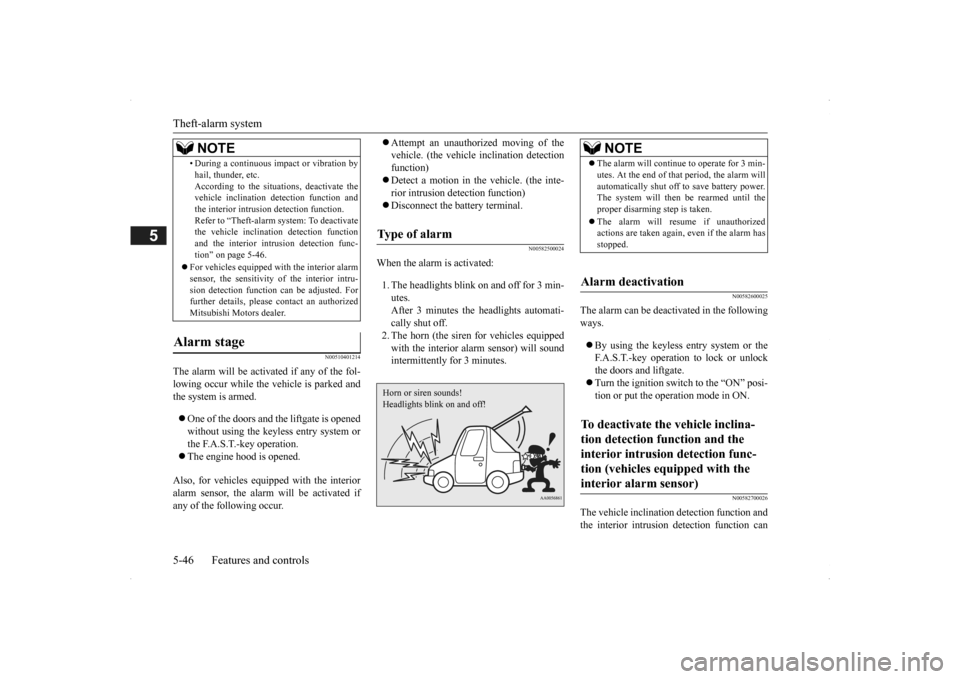
When the alarm is activated: 1. The headlights blink on and off for 3 min- utes. After 3 minutes the headlights automati-cally shut off. 2. The horn (the siren
for vehicles equipped
with the interior alarm sensor) will soundintermittently for 3 minutes.
N00582600025
The alarm can be deactivated in the following ways. By using the keyless entry system or the F.A.S.T.-key operation to lock or unlockthe doors and liftgate. Turn the ignition switch to the “ON” posi- tion or put the operation mode in ON.
N00582700026
The vehicle inclination
detection function and
the interior intrusion detection function can
• During a continuous im
pact or vibration by
hail, thunder, etc.According to the situations, deactivate thevehicle inclination de
tection function and
the interior intrusion detection function. Refer to “Theft-alarm system: To deactivatethe vehicle inclinati
on detection function
and the interior intr
usion detection func-
tion” on page 5-46.
For vehicles equipped wi
th the interior alarm
sensor, the sensitivity of the interior intru-sion detection function can be adjusted. For further details, please
contact an authorized
Mitsubishi Motors dealer.
Alarm stage
NOTE
Type of alarm Horn or siren sounds!Headlights blink on and off!
NOTE
The alarm will continue
to operate for 3 min-
utes. At the end of that
period, the alarm will
automatically shut off
to save battery power.
The system will then be rearmed until the proper disarming step is taken. The alarm will resu
me if unauthorized
actions are taken again, even if the alarm has stopped.
Alarm deactivation To deactivate the vehicle inclina- tion detection function and the interior intrusion detection func-tion (vehicles equipped with the interior alarm sensor)
BK0200500US.book 46 ページ 2013年2月12日 火曜日 午前9時46分