language MITSUBISHI OUTLANDER 2014 3.G Rear Entertainment
[x] Cancel search | Manufacturer: MITSUBISHI, Model Year: 2014, Model line: OUTLANDER, Model: MITSUBISHI OUTLANDER 2014 3.GPages: 56, PDF Size: 9.69 MB
Page 39 of 56
DVD video/DVD-VR41
DVD video/DVD-VR
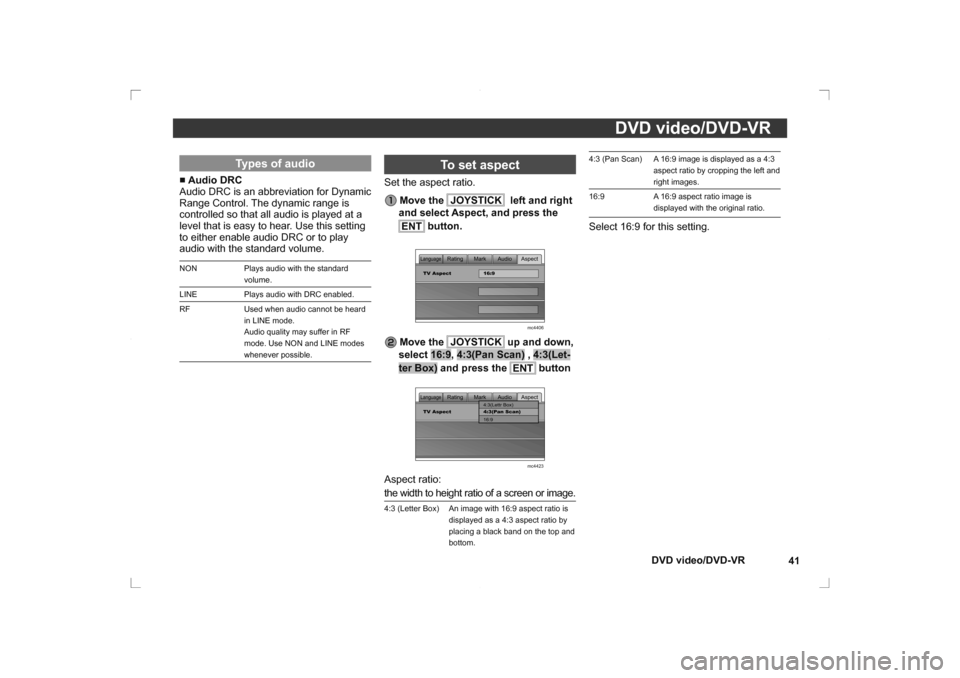
4:3 (Pan Scan) A 16:9 image is displayed as a 4:3
aspect ratio by cropping the left and
right images.
16:9 A 16:9 aspect ratio image is displayed with the original ratio.Select 16:9 for this setting.
Types of audio
■ Audio DRC
Audio DRC is an abbreviation for Dynamic
Range Control. The dynamic range is
controlled so that all audio is played at a
level that is easy to hear. Use this setting
to either enable audio DRC or to play
audio with the standard volume. NON Plays audio with the standard
volume.
LINE Plays audio with DRC enabled.
RF Used when audio cannot be heard in LINE mode.
Audio quality may suffer in RF
mode. Use NON and LINE modes
whenever possible.
To set aspect
Set the aspect ratio.
Move the JOYSTICK
left and right
and select Aspect, and press the
ENT
button.
Mark Audio Aspect
Rating
LanguageTV Aspect 16:9
mc4406
Move the JOYSTICK
up and down,
select 16:9, 4:3(Pan Scan) , 4:3(Let-
ter Box) and press the ENT
button
Mark Audio Aspect
Rating
LanguageTV Aspect 4:3(Pan Scan)
16:9 4:3(Lettr Box)
mc4423Aspect ratio:
the width to height ratio of a screen or image.4:3 (Letter Box) An image with 16:9 aspect ratio is displayed as a 4:3 aspect ratio by
placing a black band on the top and
bottom.
Page 40 of 56
DVD video/DVD-VR
42
DVD video/DVD-VR
Language
Malay May
Maltese Mlt
Burmese Bur
Nauru Nau
Nepali Nep
Norwegian Nor
Occtian Oci
Oromo Orm
Oriya Ori
Panjabi Pan
Polish Pol
Pashto, Pushto Pus
Portuguese Por
Quechua Que
Rhaeto-Romance Roh
Kirundi Run
Romanian Rum
Kinyarwanda Kin
SanSkrit San
Sindhi Snd
Sangho Sag
Serbo-Croatian Srb
Singhalese Sin
Slovak Slo
Slovenian Slv
Samoan Smo
Shona Sna
Language
Catalan Cat
Breton Bre
Catalan Cat
Corsican Cos
Czech Cze
Welsh Wel
Danish Dan
Bhutani Dzo
Esperanto Epo
Estonian Est
Basque Baq
Persian Per
Finnish Fin
Fiji Fij
Faroese Fao
Friesian Fry
Irish Gle
Scots-Gaelic Gla
Galician Glg
Guarani Grn
Gujarati Guj
Hausa Hau
Hindi Hin
Croatian Hrv
Hungarian Hun
Armenian Arm
Interlingua Ina
Language
Japanese Jpn
English Eng
French Fre
German Ger
Italian Ita
Spanish Spa
Dutch Dut
Russian Rus
Chinese Chi
Korean Kor
Greek Gre
Afar Aar
Abkhazian Abk
Afrekaans Afr
Amharic Amh
Arabic Ara
Assamase Asm
Aymara Aym
Azerbaijani Aze
Bashkir Bak
Byelorussian Bel
Bulgarian Bul
Bihari Bih
Bislama Bis
Bengali Ben
Tibetan Tib
Breton Bre
Language
Interlingue Ile
Inupiak Ipk
Indonesian Ind
Icelandic Ice
Hebrew Heb
Yiddish Yid
Javanese Jav
Gorgian Geo
Kazakh Kaz
Greenlandic Kal
Cambodian Khm
Kannada Kan
Kashmiri Kas
Kurdish Kur
Kirghiz Kir
Latin Lat
Lingala Lin
Laothian Lao
Lithuanian Lit
Latvian Lav
Malagasy Mlg
Maori Mao
Macedonian Mac
Malayalam Mal
Mongolian Mon
Moldavian Mol
Marathi Mar
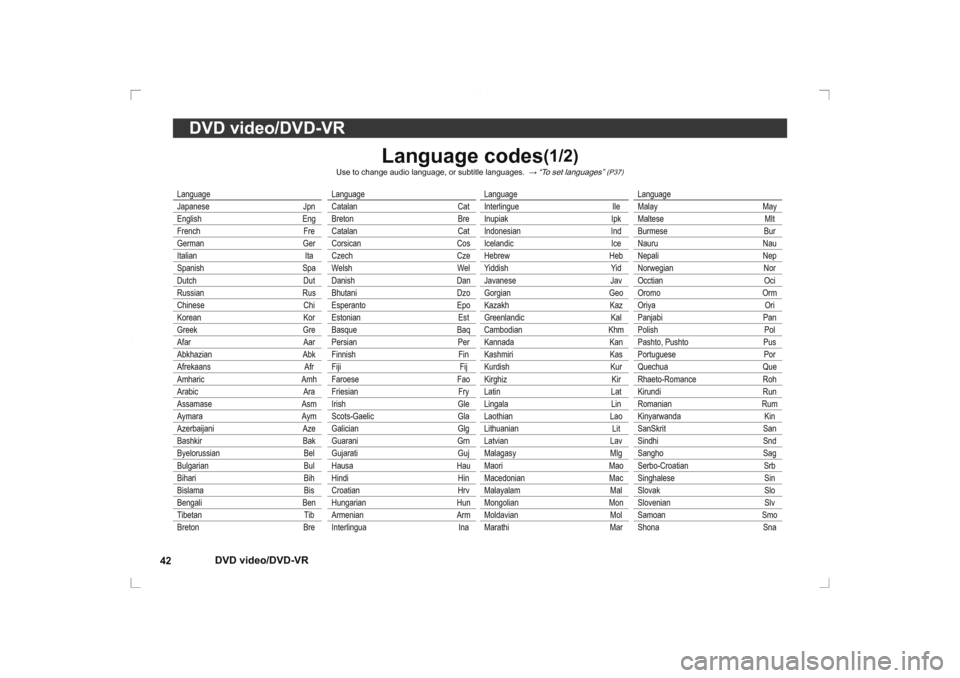
Language codes
(1/2)
Use to change audio language, or subtitle languages.
→ “To set languages”
(P37)
Page 41 of 56
DVD video/DVD-VR43
DVD video/DVD-VR
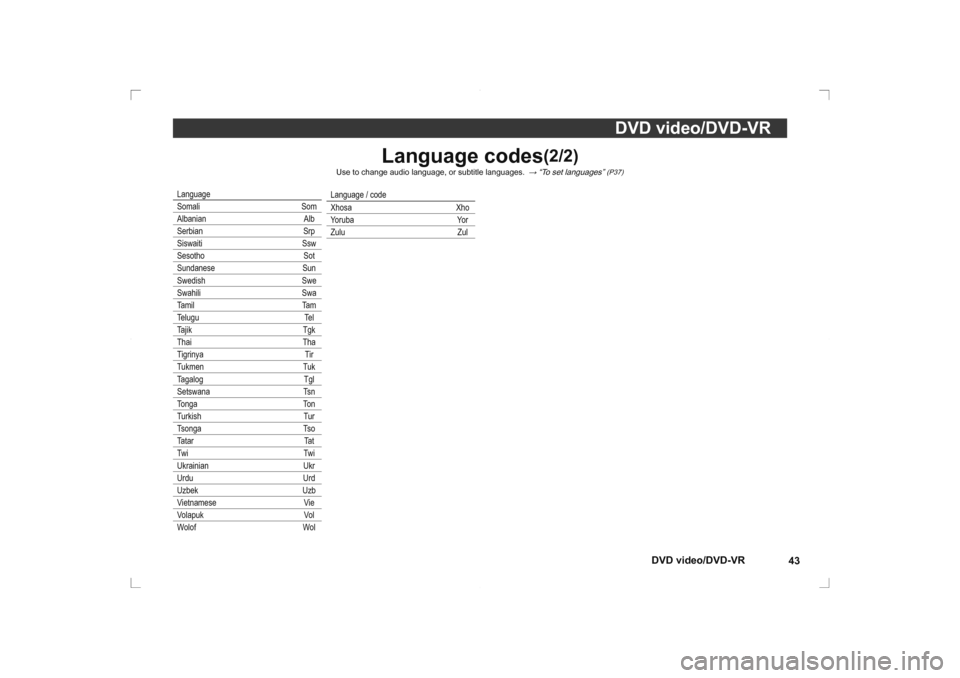
Language codes
(2/2)
Use to change audio language, or subtitle languages.
→ “To set languages”
(P37)
Language
Somali Som
Albanian Alb
Serbian Srp
Siswaiti Ssw
Sesotho Sot
Sundanese Sun
Swedish Swe
Swahili Swa
Tamil Tam
Telugu Tel
Tajik Tgk
Thai Tha
Tigrinya Tir
Tukmen Tuk
Tagalog Tgl
Setswana Tsn
Tonga Ton
Turkish Tur
Tsonga Tso
Tatar Tat
Twi Twi
Ukrainian Ukr
Urdu Urd
Uzbek Uzb
Vietnamese Vie
Volapuk Vol
Wolof Wol
Language / code
Xhosa Xho
Yoruba Yor
Zulu Zul
Page 51 of 56
Troubleshooting53
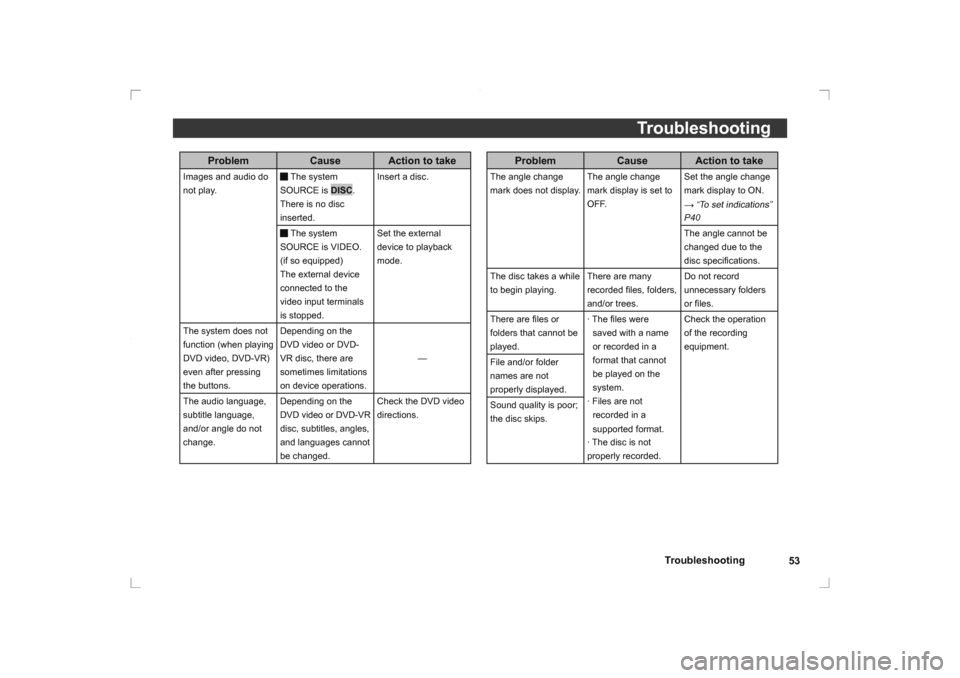
Troubleshooting
ProblemCause Action to take
The angle change
mark does not display. The angle change
mark display is set to
OFF.Set the angle change
mark display to ON.
→ “To set indications”
P40
The angle cannot be
changed due to the
disc speci
fi cations.
The disc takes a while
to begin playing. There are many
recorded
fi les, folders,
and/or trees. Do not record
unnecessary folders
or fi
les.
There are fi les or
folders that cannot be
played. · The
fi les were
saved with a name
or recorded in a
format that cannot
be played on the
system.
· Files are not recorded in a
supported format.
· The disc is not
properly recorded. Check the operation
of the recording
equipment.
File and/or folder
names are not
properly displayed.
Sound quality is poor;
the disc skips.
Problem Cause Action to take
Images and audio do
not play.
The system
SOURCE is DISC.
There is no disc
inserted. Insert a disc. The system SOURCE is VIDEO.
(if so equipped)
The external device
connected to the
video input terminals
is stopped.Set the external
device to playback
mode.
The system does not
function (when playing
DVD video, DVD-VR)
even after pressing
the buttons. Depending on the
DVD video or DVD-
VR disc, there are
sometimes limitations
on device operations.
—
The audio language,
subtitle language,
and/or angle do not
change. Depending on the
DVD video or DVD-VR
disc, subtitles, angles,
and languages cannot
be changed.Check the DVD video
directions.
Page 54 of 56
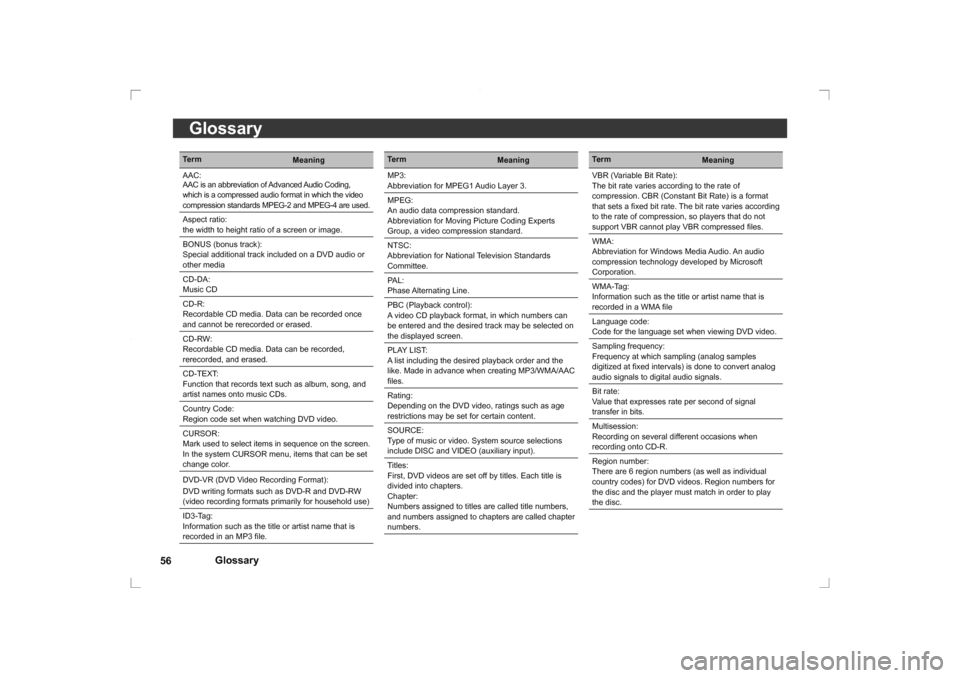
Glossary
56
Glossary
Term
Meaning
VBR (Variable Bit Rate):
The bit rate varies according to the rate of
compression. CBR (Constant Bit Rate) is a format
that sets a fi xed bit rate. The bit rate varies according
to the rate of compression, so players that do not
support VBR cannot play VBR compressed fi les.
WMA:
Abbreviation for Windows Media Audio. An audio
compression technology developed by Microsoft
Corporation.
WMA-Tag:
Information such as the title or artist name that is
recorded in a WMA fi le
Language code:
Code for the language set when viewing DVD video.
Sampling frequency:
Frequency at which sampling (analog samples
digitized at fi xed intervals) is done to convert analog
audio signals to digital audio signals.
Bit rate:
Value that expresses rate per second of signal
transfer in bits.
Multisession:
Recording on several different occasions when
recording onto CD-R.
Region number:
There are 6 region numbers (as well as individual
country codes) for DVD videos. Region numbers for
the disc and the player must match in order to play
the disc.
Term Meaning
AAC:
AAC is an abbreviation of Advanced Audio Coding,
which is a compressed audio format in which the video
compression standards MPEG-2 and MPEG-4 are used.
Aspect ratio:
the width to height ratio of a screen or image.
BONUS (bonus track):
Special additional track included on a DVD audio or
other media
CD-DA:
Music CD
CD-R:
Recordable CD media. Data can be recorded once
and cannot be rerecorded or erased.
CD-RW:
Recordable CD media. Data can be recorded,
rerecorded, and erased.
CD-TEXT:
Function that records text such as album, song, and
artist names onto music CDs.
Country Code:
Region code set when watching DVD video.
CURSOR:
Mark used to select items in sequence on the screen.
In the system CURSOR menu, items that can be set
change color.
DVD-VR (DVD Video Recording Format):
DVD writing formats such as DVD-R and DVD-RW
(video recording formats primarily for household use)
ID3-Tag:
Information such as the title or artist name that is
recorded in an MP3 fi le.
Term
Meaning
MP3:
Abbreviation for MPEG1 Audio Layer 3.
MPEG:
An audio data compression standard.
Abbreviation for Moving Picture Coding Experts
Group, a video compression standard.
NTSC:
Abbreviation for National Television Standards
Committee.
PAL:
Phase Alternating Line.
PBC (Playback control):
A video CD playback format, in which numbers can
be entered and the desired track may be selected on
the displayed screen.
PLAY LIST:
A list including the desired playback order and the
like. Made in advance when creating MP3/WMA/AAC
fi les.
Rating:
Depending on the DVD video, ratings such as age
restrictions may be set for certain content.
SOURCE:
Type of music or video. System source selections
include DISC and VIDEO (auxiliary input).
Titles:
First, DVD videos are set off by titles. Each title is
divided into chapters.
Chapter:
Numbers assigned to titles are called title numbers,
and numbers assigned to chapters are called chapter
numbers.
Page 55 of 56
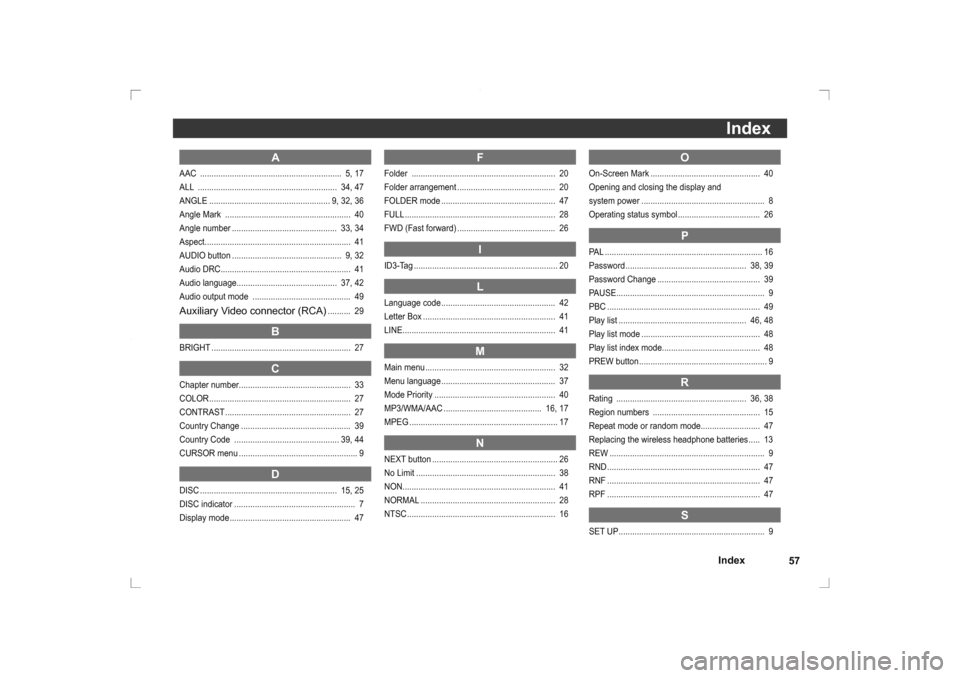
Index57Index
O
On-Screen Mark ................................................ 40
Opening and closing the display and
system power ...................................................... 8
Operating status symbol .................................... 26
P
PAL ..................................................................... 16
Password ..................................................... 38, 39
Password Change ............................................. 39
PAUSE ................................................................. 9
PBC ................................................................... 49
Play list ........................................................ 46, 48
Play list mode .................................................... 48
Play list index mode........................................... 48
PREW button ........................................................ 9
R
Rating ......................................................... 36, 38
Region numbers ............................................... 15
Repeat mode or random mode.......................... 47
Replacing the wireless headphone batteries ..... 13
REW .................................................................... 9
RND ................................................................... 47
RNF ................................................................... 47
RPF ................................................................... 47
S
SET UP ................................................................ 9
A
AAC .............................................................. 5, 17
ALL ............................................................. 34, 47
ANGLE ..................................................... 9, 32, 36
Angle Mark ....................................................... 40
Angle number .............................................. 33, 34
Aspect................................................................ 41
AUDIO button ................................................ 9, 32
Audio DRC......................................................... 41
Audio language............................................ 37, 42
Audio output mode ........................................... 49Auxiliary Video connector (RCA)
.......... 29
B
BRIGHT ............................................................. 27
C
Chapter number................................................. 33
COLOR .............................................................. 27
CONTRAST ....................................................... 27
Country Change ................................................ 39
Country Code .............................................. 39, 44
CURSOR menu .................................................... 9
D
DISC ............................................................ 15, 25
DISC indicator ..................................................... 7
Display mode ..................................................... 47
F
Folder ............................................................... 20
Folder arrangement ........................................... 20
FOLDER mode .................................................. 47
FULL .................................................................. 28
FWD (Fast forward) ........................................... 26
I
ID3-Tag ............................................................... 20
L
Language code .................................................. 42
Letter Box .......................................................... 41
LINE................................................................... 41
M
Main menu ......................................................... 32
Menu language .................................................. 37
Mode Priority ..................................................... 40
MP3/WMA/AAC ........................................... 16, 17
MPEG ................................................................. 17
N
NEXT button ....................................................... 26
No Limit ............................................................. 38
NON ................................................................... 41
NORMAL ........................................................... 28
NTSC ................................................................. 16
Page 56 of 56
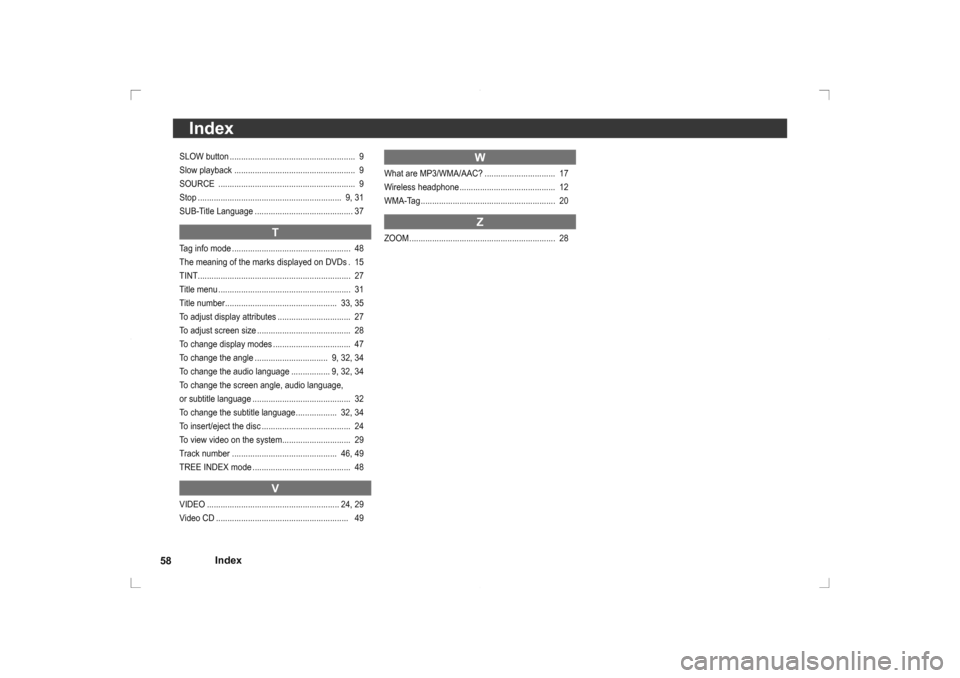
Index
58
IndexSLOW button ....................................................... 9
Slow playback ..................................................... 9
SOURCE ............................................................ 9
Stop ............................................................... 9, 31
SUB-Title Language ........................................... 37
T
Tag info mode .................................................... 48
The meaning of the marks displayed on DVDs . 15
TINT ................................................................... 27
Title menu .......................................................... 31
Title number ................................................. 33, 35
To adjust display attributes ................................ 27
To adjust screen size ......................................... 28
To change display modes .................................. 47
To change the angle ................................ 9, 32, 34
To change the audio language ................. 9, 32, 34
To change the screen angle, audio language,
or subtitle language ........................................... 32
To change the subtitle language .................. 32, 34
To insert/eject the disc ....................................... 24
To view video on the system.............................. 29
Track number .............................................. 46, 49
TREE INDEX mode ........................................... 48
V
VIDEO .......................................................... 24, 29
Video CD .......................................................... 49
W
What are MP3/WMA/AAC? ............................... 17
Wireless headphone .......................................... 12
WMA-Tag ........................................................... 20
Z
ZOOM ................................................................ 28