media MITSUBISHI OUTLANDER 2017 3.G Service Manual
[x] Cancel search | Manufacturer: MITSUBISHI, Model Year: 2017, Model line: OUTLANDER, Model: MITSUBISHI OUTLANDER 2017 3.GPages: 521, PDF Size: 14.91 MB
Page 287 of 521
Indicator light, warning light, and information screen display list (multi information display - Type 1)
5
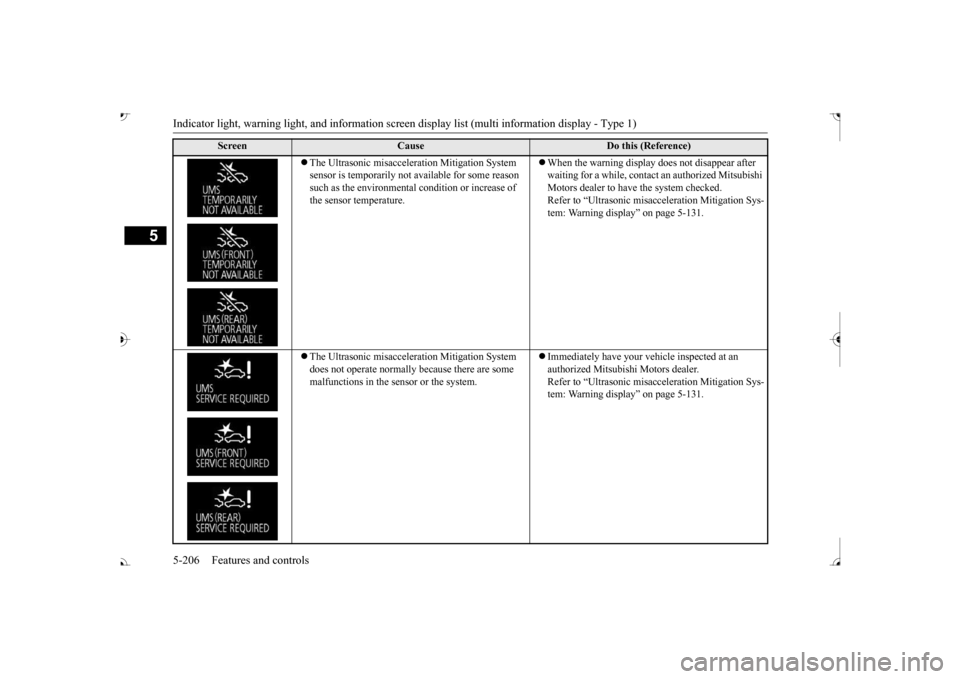
The Ultrasonic misacceler
ation Mitiga
tion System
sensor is temporarily not available for some reason such as the environmental
condition or increase of
the sensor temperature.
When the warning display does not disappear after waiting for a while, contac
t an authorized Mitsubishi
Motors dealer to have the system checked. Refer to “Ultrasonic misacc
eleration Mitigation Sys-
tem: Warning display” on page 5-131.
The Ultrasonic misacceler
ation Mitiga
tion System
does not operate normally because there are some malfunctions in the se
nsor or the system.
Immediately have your ve
hicle inspected at an
authorized Mitsubishi Motors dealer. Refer to “Ultrasonic misacc
eleration Mitigation Sys-
tem: Warning display” on page 5-131.
Screen
Cause
Do this (Reference)
BK0239700US.book 206 ページ 2016年6月16日 木曜日 午前10時58分
Page 288 of 521
Indicator light, warning light, and information screen display list (multi information display - Type 1)
Features and controls 5-207
5
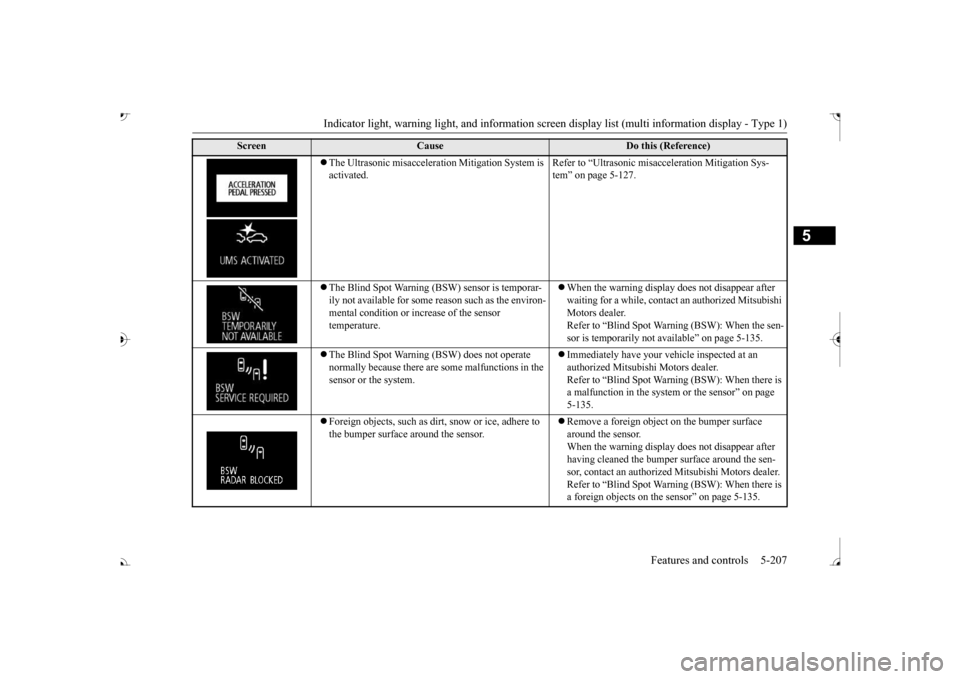
The Ultrasonic misacceleration Mitigation System is activated.
Refer to “Ultrasonic misacceleration Mitigation Sys- tem” on page 5-127.
The Blind Spot Warning (BSW) sensor is temporar- ily not available for some
reason such as the environ-
mental condition or incr
ease of the sensor
temperature.
When the warning display does not disappear after waiting for a while, contact an authorized Mitsubishi Motors dealer.Refer to “Blind Spot Warning (BSW): When the sen- sor is temporarily not available” on page 5-135.
The Blind Spot Warning (BSW) does not operate normally because there are
some malfunctions in the
sensor or the system.
Immediately have your ve
hicle inspected at an
authorized Mitsubishi Motors dealer. Refer to “Blind Spot Warni
ng (BSW): When there is
a malfunction in the system
or the sensor” on page
5-135.
Foreign objects, such as dirt
, snow or ice, adhere to
the bumper surface around the sensor.
Remove a foreign object on the bumper surface around the sensor. When the warning display does not disappear after having cleaned the bumper
surface around the sen-
sor, contact an authorized
Mitsubishi Motors dealer.
Refer to “Blind Spot Warni
ng (BSW): When there is
a foreign objects on the
sensor” on page 5-135.
Screen
Cause
Do this (Reference)
BK0239700US.book 207 ページ 2016年6月16日 木曜日 午前10時58分
Page 290 of 521
Indicator light, warning light, and information screen display list (multi information display - Type 1)
Features and controls 5-209
5
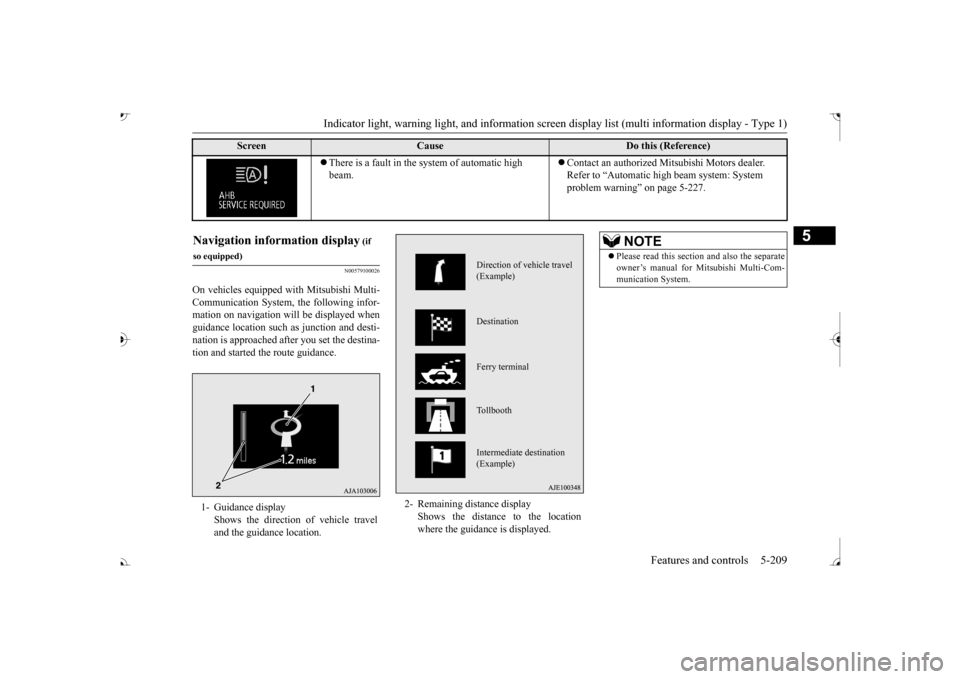
N00579100026
On vehicles equipped with Mitsubishi Multi- Communication System, the following infor- mation on navigation will be displayed whenguidance location such
as junction and desti-
nation is approached after you set the destina- tion and started the route guidance.
There is a fault in the system of automatic high beam.
Contact an authorized Mitsubishi Motors dealer. Refer to “Automatic hi
gh beam system: System
problem warning” on page 5-227.
Screen
Cause
Do this (Reference)
(if
so equipped)1- Guidance display
Shows the direction of vehicle travel and the guidance location.
2- Remaining di
stance display
Shows the distance to the location where the guidance is displayed.
Direction of vehicle travel (Example) Destination Ferry terminal Tollbooth Intermediate destination (Example)
NOTE
Please read this section and also the separate owner’s manual for Mi
tsubishi Multi-Com-
munication System.
BK0239700US.book 209 ページ 2016年6月16日 木曜日 午前10時58分
Page 298 of 521
Warning lights
Features and controls 5-217
5
N00520501814
This indicator is a part
of the onboard diag-
nostic (OBD) system which monitors the emissions, engine control system or auto- matic transaxle cont
rol system/continuously
variable transmission
(CVT) control system.
If a problem is detected in one of these sys- tems, this indicator illuminates or flashes.When the ignition switch is turned to the “ON” position or the operation mode is put in ON, this indicator
normally comes on and
goes off after the engine has started.
This indicator will come on if the fuel tank filler cap is not properly tightened. If thisindicator comes on and stays on after refuel- ing, stop the engine and check that the cap is properly tightened. (Turn the cap clockwiseuntil you hear clicking sounds.) If this indicator does not go off after several seconds or lights up whil
e driving, have the
system checked as s
oon as possible at an
authorized Mitsubishi Motors dealer or a repair facility of your choice.
N00520601323
This light comes on in the event of a malfunc-tion in the charging system or when the igni-
CAUTION When the warning light remains on or does not come on, there is the possibility that theparking brake cannot be operated orreleased. Immediately contact the nearest authorized Mitsubishi Motors dealer. When the warning light comes on during driving,immediately stop the vehi
cle in a safe place,
and contact an authorized Mitsubishi Motors dealer. If you inevitably have to park, parkthe vehicle on level and stable ground, shift the selector lever in
Page 307 of 521

Combination headlights and dimmer switch 5-226 Features and controls
5
The sensitivity of the se
nsor can be temporar-
ily lowering in the following ways. 1. Park your vehicle in a safe place and the ignition switch is turned to the “OFF” or “LOCK” position or the operation mode is put in OFF.2. Press the automatic high beam system switch more than 15 times within 5 sec- onds after operation mode is turned on.
• A vehicle in front
or oncoming vehicle is
hindered by any object
such as continuous
bends, elevated median/i
sland, traffic signs,
roadside trees. • Your vehicle passes
an oncoming vehicle
suddenly on a bend with poor visibility. • Another vehicle crosse
s ahead of your vehi-
cle.
The headlights may remain at low beam (or be switched from high beam to low beam) when a reflective object (e.g. street light, traffic signal, noticeboard and signboard) Any of the following factors may influence the headlight beam switching timing: • How brightly the exteri
or lights of a vehicle
in front or oncoming
vehicle il
luminate.
• Movement or direction
of a vehicle in front
or oncoming vehicle. • Only right or left exte
rior light of a vehicle
in front or oncoming
vehicle is illuminat-
ing. • A vehicle in front or
oncoming vehicle is a
motorcycle. • Road conditions (gradient, bends and road surface). • The number of occupa
nts and luggage load.
The automatic high beam
system recognises
environmental conditi
ons by sensing a light
source ahead of your ve
hicle. Therefore, you
may feel like someth
ing is not quite right
when the headlight beams are switched auto- matically.NOTE
The system may not de
tect a light vehicle
such as a bicycle. The system may not detect an ambient brightness precisely. Th
is causes the traffic
to be dazzled by high beam or the low beamto be maintained. In such cases, you should switch the headli
ght beams manually.
• In bad weather (heavy
rain, fog, snow or
sandstorm). • The windshield is dirty or fogged up. • The windshield is cracked or broken.• The sensor is deformed or dirty. • A light, which is simila
r to the headlights or
tail lights, is shining around your vehicle. • A vehicle in front
or oncoming vehicle is
driven without lights, the exterior lights are dirty or discoloured, or the direction of theheadlight beams is adjusted improperly. • It becomes dark and bright suddenly and continuously around your vehicle. • Your vehicle is driven on uneven surfaces.• Your vehicle is driven on a winding road. • A reflective object such as a noticeboard or a mirror reflects a li
ght ahead of your vehi-
cle. • When lights of the vehicle in front or head- lights of an oncoming ve
hicle blend into the
other lights. • The rear end of a vehicle in front (such as a container truck) re
flect a strong light.
• Your vehicle's headlight
is broken or dirty.
NOTE
• Your vehicle is inclined due to a flat tire or towing. • The warning display appears. (Refer to “System
problem warning” on
page 5-227.)
Observe the precautions below to maintain good usage conditions: • Do not attempt to di
sassemble the sensor.
• Do not affix a sticker or label on the wind- shield near the sensor. • Avoid overload. • Do not modify your vehicle.• When the windshield is replaced, use the Mitsubishi Motors
genuine parts.
To adjust the sensitivity of the sensor
NOTE
BK0239700US.book 226 ページ 2016年6月16日 木曜日 午前10時58分
Page 319 of 521
Electric rear window defogger switch 5-238 Features and controls
5
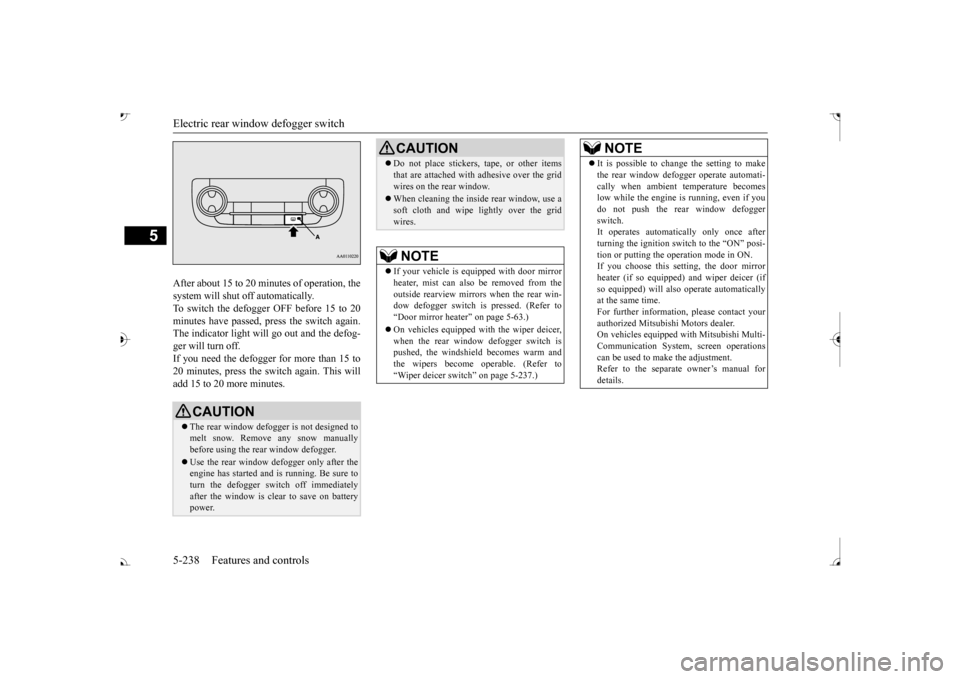
After about 15 to 20 minutes of operation, the system will shut off automatically.To switch the defogger OFF before 15 to 20 minutes have passed,
press the switch again.
The indicator light will
go out and the defog-
ger will turn off. If you need the defogger for more than 15 to 20 minutes, press the switch again. This willadd 15 to 20 more minutes.
CAUTION The rear window defogge
r is not designed to
melt snow. Remove any snow manually before using the rear window defogger. Use the rear window defogger only after the engine has started and
is running. Be sure to
turn the defogger switch off immediatelyafter the window is clea
r to save on battery
power.
Do not place stickers,
tape, or other items
that are attached with adhesive over the gridwires on the rear window. When cleaning the inside
rear window, use a
soft cloth and wipe lightly over the gridwires.NOTE
If your vehicle is e
quipped with door mirror
heater, mist can also be removed from the outside rearview mirror
s when the rear win-
dow defogger switch is
pressed. (Refer to
Page 320 of 521
Heated steering wheel switch (if so equipped)
Features and controls 5-239
5
N00589100032
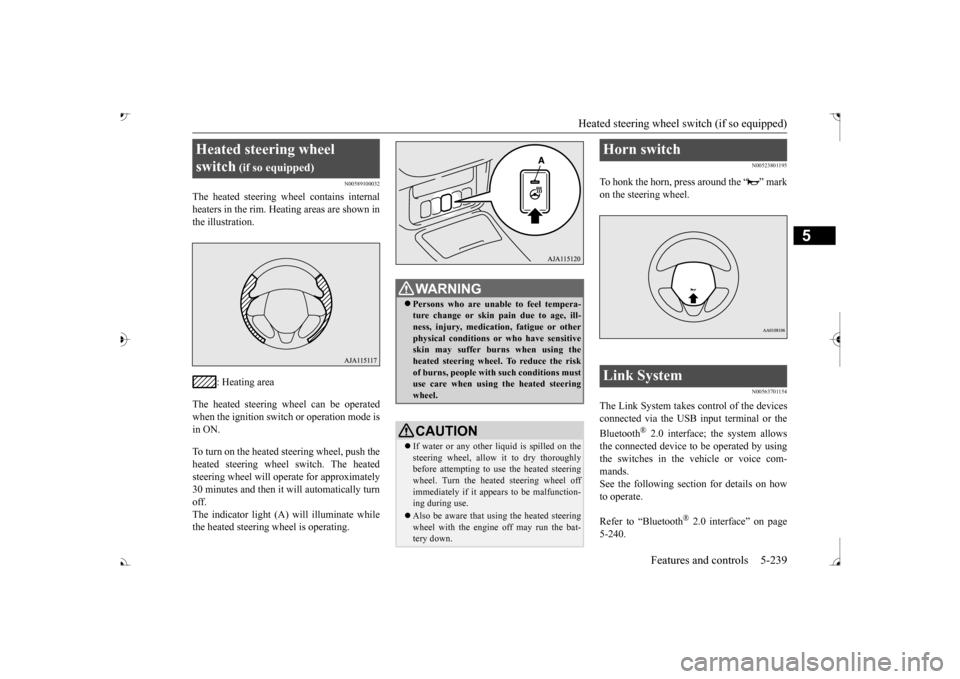
The heated steering wh
eel contains internal
heaters in the rim. Heating areas are shown in the illustration.
: Heating area
The heated steering wheel can be operated when the ignition switch or operation mode is in ON. To turn on the heated steering wheel, push the heated steering wheel switch. The heated steering wheel will ope
rate for approximately
30 minutes and then it
will automatically turn
off. The indicator light (A) will illuminate while the heated steering wheel is operating.
N00523801195
To honk the horn, press around the “ ” markon the steering wheel.
N00563701154
The Link System takes control of the devicesconnected via the USB input terminal or the Bluetooth
® 2.0 interface; the system allows
the connected device to be operated by using the switches in the vehicle or voice com-mands. See the following section for details on how to operate. Refer to “Bluetooth
® 2.0 interface” on page
5-240.
Heated steering wheel switch
(if so equipped)
Persons who are unable
to feel tempera-
ture change or skin
pain due to age, ill-
ness, injury, medicati
on, fatigue or other
physical conditions or
who have sensitive
skin may suffer burns when using theheated steering wheel. To reduce the risk of burns, people with such conditions must use care when using the heated steeringwheel.CAUTION If water or any other li
quid is spilled on the
steering wheel, allow it to dry thoroughly before attempting to use the heated steering wheel. Turn the heated steering wheel offimmediately if it appe
ars to be malfunction-
ing during use. Also be aware that us
ing the heated steering
wheel with the engine off may run the bat- tery down.
Horn switch Link System
BK0239700US.book 239 ページ 2016年6月16日 木曜日 午前10時58分
Page 326 of 521

Bluetooth® 2.0 interface
Features and controls 5-245
5
7. When the registration of the passcode is completed, the voice
guide will say “Pass-
code is enabled” and the system will return to the main menu.
If a passcode has been
set and the security
function is enabled, the voice guide will say “Hands-free system is
locked. State the pass-
code to continue” when the SPEECH button (except for vehicles with Mitsubishi Multi- Communication System) or PICK-UP button(for vehicles with Mitsubishi Multi-Commu- nication System) is pres
sed to enter voice rec-
ognition mode. Say th
e 4-digit passcode
number to enter the passcode. If the entered passcode is wrong, the voice guide will say “<4-digit passcode>, Incorrect
passcode. Please try again.” Enter the correct passcode. Use the following procedure to turn off the security function by di
sabling the passcode.
1. Press the SPEECH button (except for vehicles with Mitsubishi Multi-Commu- nication System) or
PICK-UP button (for
vehicles with Mitsubishi Multi-Commu-nication System). 2. Say “Setup.” 3. Say “Passcode.”4. The voice guide will say “Passcode is enabled. Would you like to disable it?” Answer “Yes.” the passcode and return to the main menu.
5. When the disabling of the passcode is completed, the voice
guide will say “Pass-
code is disabled”
and the system will
return to the main menu.
N00564700011
The Bluetooth
® 2.0 interface can use the
speaker enrollment function to create a voice model for one person per language. This makes it easier for the Bluetooth
® 2.0
interface to recognise
voice commands said
by you. You can turn a voice model registered with the speaker enrollment function on and offwhenever you want.
N00564801181
It takes about 2 to 3 mi
nutes to complete the
speaker enrollment process. To ensure the best results, run through the process while in the driver’s seat, in an envi-ronment that is as quiet as possible (when there is no rain or strong winds and the vehi- cle windows are closed).
Please turn off your
phone while in speaker enrollment to prevent interruption of the process. Use the following procedure for speakerenrollment.
NOTE
Passcode will be requi
red to access the sys-
tem after the next ignition cycle. It is required for a little time after engine stop that the entered
passcode is actually
recorded in the system.If the ignition switch
or the operation mode
is made to ACC or
ON or the engine is
started immediately afte
r engine stop, there
is a case when the entered passcode is not recorded in the system. At this time, please try to enter the passcode again.
Entering the passcode
NOTE
You can reenter the passcode as many times as you want. If you have forgotten your passcode, say “Cancel” to quit the voice input mode and then check with an authorized Mitsubishi Motors dealer.
Disabling the passcode
NOTE
System must be unlocked to disable the pass- code.
Speaker enrollment function Speaker enrollment
BK0239700US.book 245 ページ 2016年6月16日 木曜日 午前10時58分
Page 354 of 521
Interior lights
Features and controls 5-273
5
This equipment complies with FCC radiation exposure limits set fo
rth for an uncontrolled
environment. End Users must follow the spe- cific operating instruct
ions for satisfying RF
exposure compliance. This transmitter must be at least 12 inches (20 cm) from the user and must not be co-loc
ated or operating in
conjunction with any other antenna or trans- mitter. The term “IC:” before the certification/regis-tration number only si
gnifies that Industry
Canada technical specifications were met.
N00525301660
N00525401528
CAUTION The transmitter has been tested and complies with FCC and IC rules.Changes or modifica
tions not expressly
approved by the party responsible for com- pliance could void the user’s authority to operate the device.
Interior lights
NOTE
Be aware that leaving the light illuminated with the engine off may run the batterydown. Never leave the vehi
cle without checking
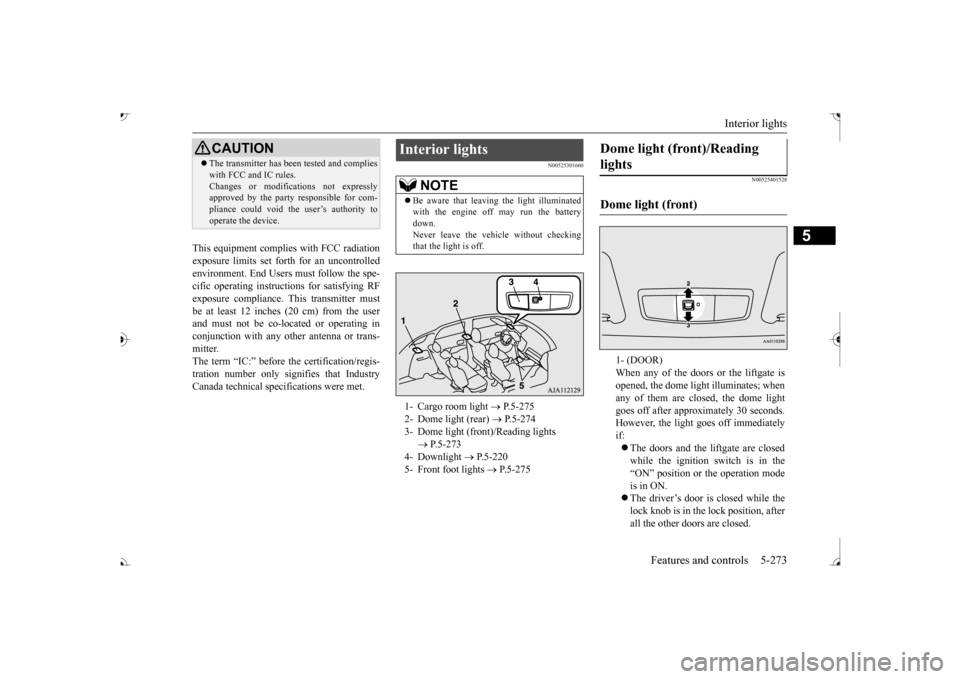
that the light is off.1- Cargo room light
P.5-275
2- Dome light (rear)
P.5-274
3- Dome light (front)/Reading lights
P.5-273
4- Downlight
P.5-220
5- Front foot lights
P.5-275
Dome light (front)/Reading lights Dome light (front)
1- (DOOR) When any of the doors or the liftgate isopened, the dome light
illuminates; when
any of them are closed, the dome light goes off after approxi
mately 30 seconds.
However, the light go
es off immediately
if: The doors and the liftgate are closed while the ignition switch is in the “ON” position or the operation mode is in ON. The driver’s door is closed while the lock knob is in the lock position, after all the other doors are closed.
BK0239700US.book 273 ページ 2016年6月16日 木曜日 午前10時58分
Page 370 of 521
Driving during cold weather
Driving safety 6-5
6
you give extra attention to the following areas, you can better protect yourself andyour passengers: Drive defensively. Be aware of traffic, road and weather c
onditions. Leave plenty
of stopping distance
between your vehicle
and the vehicle ahead. Before changing lanes, check your mir- rors, blind spots, a
nd use your turn-signal
light. While driving, watch the behavior of other drivers, bicycl
ists, and pedestrians.
Always obey applicab
le laws and regula-
tions. Be a polite and alert driver. Alwaysleave room for unexpected events, such as sudden braking. If you plan to drive in another country, obey their vehicle re
gistration laws and
make sure you will be able to get the right fuel.
N00629400445
Check the battery. At the same time, check the terminals and wiring. Duringextremely cold weather, the battery will not be as strong. Also, the battery power level may drop beca
use more power is
used for cold starting and driving.
Before driving the vehicle, check to see if the engine runs at the proper speed and ifthe headlights are as bright as normally. Charge or replace the battery if necessary. During extreme cold weather, it is possi-ble that a very low battery could freeze. Warm the engine sufficiently. After start- ing the engine, allow a short warm-up time to distribute oil to all cylinders. Then drive your vehicle slowly.Stay at low speeds at first so that the transaxle, transfer case and rear axle oil have time to spread to all lubricationpoints. Check the engine antifreeze. If there is not enough coolant because of aleak or from engine
overheating, add Mit-
subishi Motors Genuine Super Long Life Coolant Premium or equivalent.Please read this section in conjunction with the “Engine coolant” on page 9-8.
N00629501528
All the parts of the brake system are criticalto safety. Have the
vehicle serviced by an
authorized Mitsubishi Motors dealer or arepair facility of your
choice at regular inter-
vals according to the “WARRANTY AND MAINTENANCE MANUAL”. Check the brake system while driving at a low speed immediately
after starting, espe-
cially when the brakes are wet, to confirm they work normally. A film of water can be formed on the brakediscs and prevent normal braking after driv- ing in heavy rain or through large puddles, or after the vehicle is washed. If this occurs, drythe brakes out by drivi
ng slowly while lightly
depressing the brake pedal.
Driving during cold weather
WA R N I N G The battery gives off explosive hydrogen gas. Any spark or flame can cause the bat- tery to explode, which could cause serious injury or death.Always wear protecti
ve clothes and a face
mask when working with your battery, or let a skilled mechanic do it.
WA R N I N G Never open the radiator cap when the radiator is hot. You could be seriouslyburned.
Braking When brakes are wet
BK0239700US.book 5 ページ 2016年6月16日 木曜日 午前10時58分