media MITSUBISHI OUTLANDER 2017 3.G Workshop Manual
[x] Cancel search | Manufacturer: MITSUBISHI, Model Year: 2017, Model line: OUTLANDER, Model: MITSUBISHI OUTLANDER 2017 3.GPages: 521, PDF Size: 14.91 MB
Page 380 of 521
Trailer towing
Driving safety 6-15
6
You’ll need more passing distance up ahead when you’re towing a trailer. And, because you’re a good deal longer, you’ll need to gomuch farther beyond the passed vehicle before you can return to your lane. Hold the bottom of the steering wheel with one hand. Then, to move the trailer to the left,just move that hand to the left. To move the trailer to the right, move your hand to the right. Always back up sl
owly and, if possible,
have someone guide you. When you’re turning with a trailer, make wider than normal turns to help prevent the trailer from striking shoulders, curbs, roadsigns, trees or other objects.
Avoid jerky or sudden maneuvers. Signal well in advance. Towing a trailer puts additional burden on the engine and transaxle,
which may cause over-
heating. Following ar
e some suggestions to
reduce overheating: When towing at high al
titudes, engine coolant
and automatic transaxle oil will overheat at a lower temperature than at normal altitudes. If you turn your engine off immediately aftertowing at high altitude
on steep uphill grades,
your vehicle may show
signs similar to over-
heating. To avoid this
, let the engine run
while parked (preferably on level ground) with the automatic transaxle in the “P”turning the engine off.
If the engine coolant temperature indica- tor flashes on the information screen in the multi-information display or the engine power drops suddenly, refer to “Engine overheati
ng” on page 8-4.
If the warning display or warning display illuminates, re
fer to “Warning dis-
play” on page 5-70, 5-78.
Reduce speed and downshift before you start down a long or steep downgrade. If you don’t downshift, over using the brakes can cause reduced brake efficiency. You can tow in “D” (DRIVE) position. You may want to shift the selector lever to the 3rd or a lower position, under heavy loads or hilly conditions. Always place chocks or blocks under both the vehicle and trailer wheels when parking. Besure that the parking brake is firmly set and that the selector lever is in the “P” (PARK) position. Avoid parki
ng on a hill with a
trailer, but if it cannot be avoided, do so only after performing the following:
Passing Backing up Making turns
CAUTION Making sharp turns while towing a trailer could cause the
trailer to come in contact
with the vehicle. Your
vehicle could be dam-
aged. Avoid making sharp turns while tow- ing a trailer.
Overheating Cause of overheating
Solution
Air conditioning on Turn off Highway speeds Reduce speed Going up hills Select lower gear posi-
tion
Stop-and-go city traf- fic
With the vehicle stopped, shift to the “N” (NEUTRAL) position and idle the engine at high idle.
Driving on hills Parking
BK0239700US.book 15 ページ 2016年6月16日 木曜日 午前10時58分
Page 397 of 521
Air purifier 7-14 Comfort controls
7
The air conditioner shoul
d be operated for at
least five minutes each week, even in cold weather. This includes the quick defrostingmode. Operating the
air condition system
weekly maintains lubrication of the compres- sor internal parts to keep the air conditionerin the best operating condition.
N00733801190
The air conditioning system is equipped withan air filter to re
move pollen
and dust.
The air filter’s ability to collect pollen and dirt is reduced as it be
comes dirty, so replace
it periodically. For the
maintenance interval,
refer to the “WARRANTY AND MAINTE- NANCE MANUAL”.
N00734302102
The audio system can only be used when theignition switch or th
e operation mode is in
ON or ACC.
CAUTION The air conditioning system in your vehicle must be charged with the refrigerant HFC-134a and the lubricant SUN-PAG56.Use of any other refrige
rant or lubricant will
cause severe da
mage and may re
quire replac-
ing your vehicle’s entire air conditioningsystem. The release of refrigerant into the atmo- sphere is not recommended.The new refrigerant HFC-134a in your vehi- cle is designed not to harm the earth’s ozone layer. However, it ma
y contribute slightly to
global warming. It is recommended that
the old refrigerant be
saved and recycled for future use.
During a long period of disuse Air purifier
NOTE
Operation in certain conditions such as driv- ing on a dusty road and frequent use of the air conditioner can lead
to reduction of ser-
vice life of the filter. When you feel that theair flow is lower than normal or when the windshield or windows st
art to fog up easily,
replace the air filter.Contact your Mitsubishi
Motors dealer or a
repair facility of your
choice for assistance.
AM/FM radio/CD player
(if
so equipped)
NOTE
To listen to the audio system while the engine is not running, turn the ignitionswitch to the “ACC” ation mode in ACC. If the ignition switch
or the operation mode
is left in ACC, the accessory power willautomatically turn off after a certain period of time and you will no
longer be able to use
the audio system. The accessory powercomes on again if the ignition switch or the engine switch is opera
ted with it in the
“ACC” position. Refer to “ACC power auto-cutout function” on page 5-20 and 5-64. If a cellular phone is used inside the vehicle, it may create noise in
the audio equipment.
This does not mean that anything is wrong with your audio equipment. In such a case,use the cellular phone at a place as far away as possible from the audio equipment. If foreign objects or wa
ter get into the audio
equipment, or if smoke or a strange odor comes from it, immediately turn off theaudio system and have it checked at an authorized Mitsubishi Motors dealer or a repair facility of your
choice. Never try to
repair it yourself. Avoid using the audio sys- tem until it is insp
ected by a qualified per-
son. If the audio system is damaged by foreign objects, water, or fi
re, have the system
checked by a qualified Mitsubishi Motors technician.
BK0239700US.book 14 ページ 2016年6月16日 木曜日 午前10時58分
Page 401 of 521
Handling of Discs 7-18 Comfort controls
7
N00715400038
This explains care that should be taken in the handling of discs. Fingerprints or other marks on the read surface of the disc may result in its con-tent being more difficult to read. When holding the disc, grip both edges, or one edge and the center hol
e, in order that the
read surface is not touched. Do not affix paper or stickers, or other- wise damage the disc. Do not forcefully insert a disc if another is already within the de
vice. This can result
in damage to discs, or malfunction. Periodically clean the read surface of the disc. When cleaning,
do not wipe in a cir-
cular motion. Instead, wipe gently out-wards from the center of the disc to the outer edge. New discs may have burring around the outer edge or in the hole in the center. Ensure you check for these. If there are burrs, these may lead to faulty operation,therefore ensure these are removed.
When not using discs, ensure these are kept in cases, and stor
ed out of direct sun-
light. If discs are not going to be used for a long period of time, remove these from theproduct.
In cold environments such as in mid-winter when the interior of the vehicle is cold, turn-ing the heater on and immediately trying to use the product may cause condensation (water droplets) to form on the disc and inter-nal optical components, and this may prevent the product from operating correctly. In these conditions, remo
ve the disc, and wait
a short time before use. Actions such as una
uthorized reproduction,
broadcast, public perfo
rmance, or rental of
discs that comprise other than personal useare prohibited by law.
N00715500026
The following marks are printed on the disclabel, package, or jacket. Playback of discs other than those described in “Types of Disc That Can BePlayed Back” is not guaranteed.
Handling of Discs Important Points on Handling Cleaning
Important Points on Storage Disc Playback Environment Copyright
Types of Disc That Can Be Played Back
Ty p e
Size
Maxi- mum playback time
Com-ments
CD-DA 5 inches
(12 cm)
74 minutes —
(12 cm)
74 minutes —
(12 cm)
—•Disc
contain- ing MP3 files
Discs That May Not Be Played Back
BK0239700US.book 18 ページ 2016年6月16日 木曜日 午前10時58分
Page 402 of 521
Audio Files (MP3/WMA/AAC)
Comfort controls 7-19
7
3 inches (8 cm) discs may not be used. Do not insert irregularly-shaped discs (for example, heart-shaped), as these may result in malfunction.
Additionally, discs
that have transparent portions may not beplayed back. Discs that have not
been finalized cannot
be played back. Even if recorded using the correct format on a recorder or computer, application software settings a
nd environments; disc
peculiarities, damage,
or marking; or dirt
or condensation on the lens inside theproduct may render th
e disc unplayable.
Depending on the disc, some functions may not be used, or the disc may not playback. Do not use discs with cracks or warps. If the disc has sticke
rs affixed, remains
from removed stickers
, or affixed adhe-
sive, then do not use the disc. Discs that have decora
tive labels or stick-
ers may not be used.
This product will play
back audio CDs, how-
ever please be aware of the following points regarding CD standards. Ensure that you use discs with on the label surface.
Playback of other than standard CDs is not guaranteed. Even
if the audio can be
played back, the audio quality cannot be guaranteed. When playing back other than standard CDs, the following may occur. • There may be noise during playback. • There may be jumping in the audio.• The disc may not be recognized. • The first track may not be played back. • It may take longer than usual until start of playback of tracks. • Playback may start from within thetrack. • Some parts may not be played back. • Tracks may freeze
during playback.
• Tracks may be displayed erroneously.
N00715600027
This product can play back MP3/WMA/AACformat audio files recorded on CD-ROM, CD-R/RW, and USB devices. There are limitations on the files and media that can be used, therefore read the followingprior to recording MP3/WMA/AAC format audio files on discs or USB devices.
Additionally, ensure y
ou read the user manu-
als for your CD-R/RW drive and the writingsoftware, and ensure these are used correctly. If the MP3/WMA/AAC
format audio files
includes title informati
on or other data, then
this can be displayed.
Nonstandard CDs
Audio Files (MP3/WMA/AAC)
CAUTION CD-ROM and CD-R/R
W media can only
play back MP3 format audio files. Actions such as copyi
ng audio CDs or files
and either distributing th
ese to others for free
or for charge, or uploading files via the Inter- net or other means to se
rvers is an infringe-
ment of the law. Do not append the file extensions “.mp3”,MP3/WMA/AAC format
files. Playing back
discs with these types of files recorded upon them may cause the files to be incorrectlyidentified for playba
ck, which may lead to
loud noise, resulting in
speaker damage or
accident.NOTE
Depending on the condition of the disc recorder or recording software used, correctplayback may not be pos
sible. In these cases,
refer to the user manual for your product or software.
BK0239700US.book 19 ページ 2016年6月16日 木曜日 午前10時58分
Page 404 of 521
Audio Files (MP3/WMA/AAC)
Comfort controls 7-21
7
N00715900020
MP3 is an abbreviation of “MPEG-1 Audio Layer 3”. MPEG is
an abbreviation of
“Motion Picture Experts
Group”, and this is a
video compression sta
ndard used in video
CDs, etc. MP3 is one of the audio compression meth-ods contained in the
MPEG audio standard,
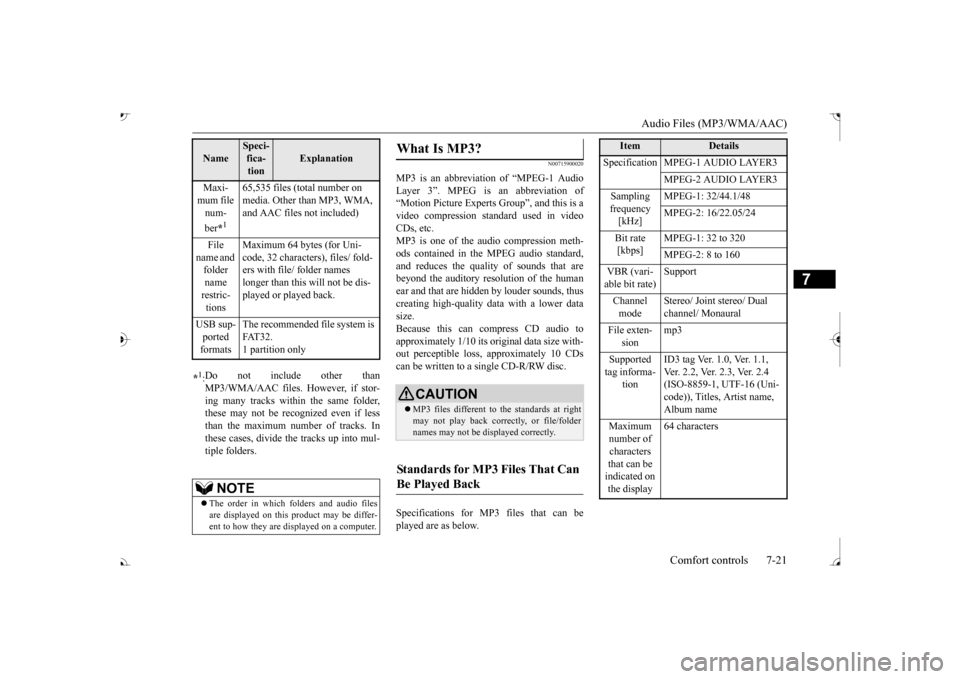
and reduces the quality of sounds that are beyond the auditory resolution of the human ear and that are hidden by louder sounds, thus creating high-quality data with a lower datasize. Because this can compress CD audio to approximately 1/10 its original data size with-out perceptible loss, approximately 10 CDs can be written to a single CD-R/RW disc. Specifications for MP
3 files that can be
played are as below.
Maxi- mum file num- ber
*1
65,535 files (total number on media. Other than MP3, WMA, and AAC files not included)
File
name and folder name restric-tions
Maximum 64 bytes (for Uni- code, 32 characters), files/ fold-ers with file/ folder names longer than this will not be dis- played or played back.
USB sup- ported formats
The recommended fi
le system is
FAT32. 1 partition only
*1: Do not include other than MP3/WMA/AAC files. However, if stor- ing many tracks within the same folder,these may not be recognized even if less than the maximum number of tracks. In these cases, divide the tracks up into mul-tiple folders.
NOTE
The order in which fo
lders and audio files
are displayed on this product may be differ- ent to how they are displayed on a computer.Name
Speci- fica- tion
Explanation
What Is MP3?
CAUTION MP3 files different to the standards at right may not play back corre
ctly, or file/folder
names may not be di
splayed correctly.
Standards for MP3 Files That Can Be Played Back
Item
Details
Specification MPEG-1 AUDIO LAYER3
MPEG-2 AUDIO LAYER3
Sampling frequency [kHz]
MPEG-1: 32/44.1/48 MPEG-2: 16/22.05/24
Bit rate [kbps]
MPEG-1: 32 to 320 MPEG-2: 8 to 160
VBR (vari- able bit rate) Channel mode
Stereo/ Joint stereo/ Dual channel/ Monaural
File exten-
sion
mp3
Supported tag informa-
tion
ID3 tag Ver. 1.0, Ver. 1.1, Ver. 2.2, Ver. 2.3, Ver. 2.4 (ISO-8859-1, UTF-16 (Uni-code)), Titles, Artist name, Album name
Maximum number of characters that can be indicated on the display
64 characters
BK0239700US.book 21 ページ 2016年6月16日 木曜日 午前10時58分
Page 405 of 521
Audio Files (MP3/WMA/AAC) 7-22 Comfort controls
7
N00716000028
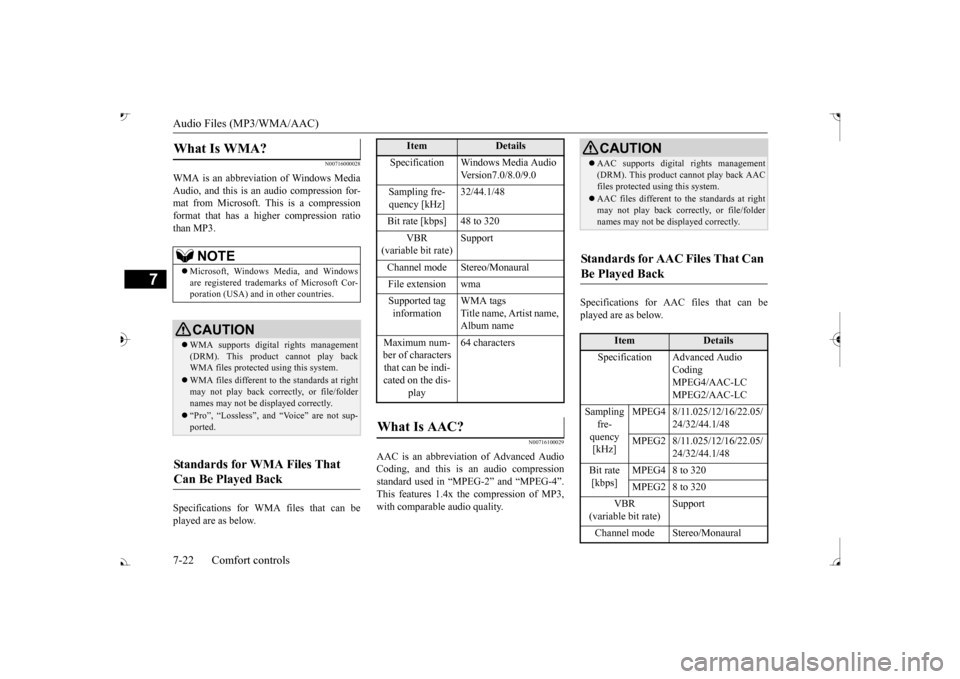
WMA is an abbreviation of Windows Media Audio, and this is an audio compression for- mat from Microsoft. This is a compressionformat that has a higher compression ratio than MP3. Specifications for WMA files that can be played are as below.
N00716100029
AAC is an abbreviation of Advanced Audio Coding, and this is an audio compressionstandard used in “MPEG-2” and “MPEG-4”. This features 1.4x the compression of MP3, with comparable audio quality.
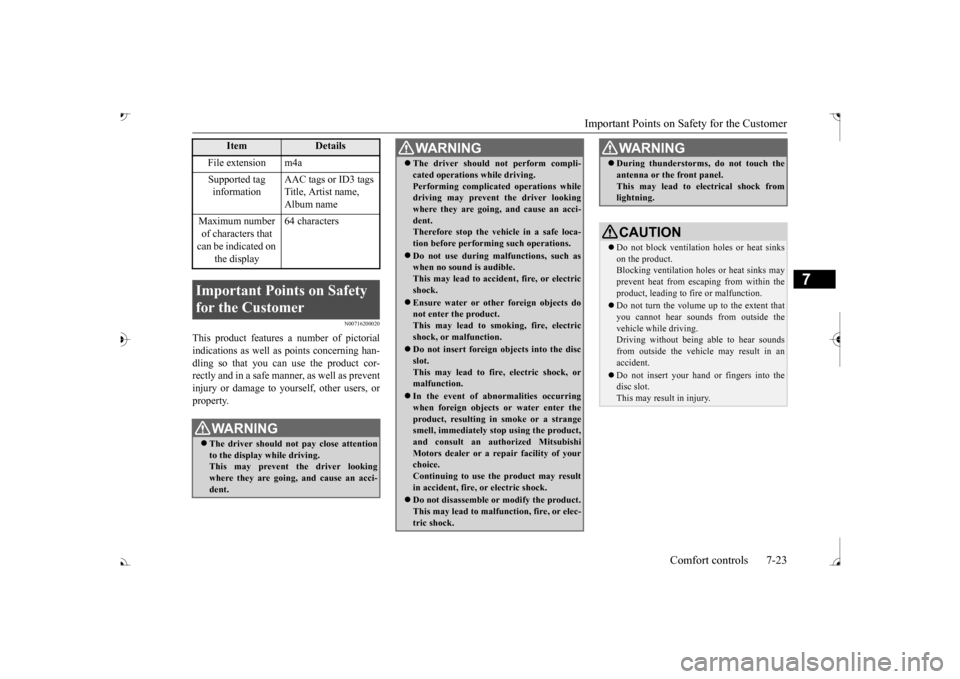
Specifications for AAC files that can be played are as below.
What Is WMA?
NOTE
Microsoft, Windows Media, and Windows are registered trademarks of Microsoft Cor- poration (USA) and in other countries.CAUTION WMA supports digita
l rights management
(DRM). This product cannot play back WMA files protected using this system. WMA files different to the standards at right may not play back corre
ctly, or file/folder
names may not be di
splayed correctly.
“Pro”, “Lossless”, and “Voice” are not sup- ported.
Standards for WMA Files That Can Be Played Back
Item
Details
Specification Windows Media Audio
Version7.0/8.0/9.0
Sampling fre- quency [kHz]
32/44.1/48
Bit rate [kbps] 48 to 320
VBR
(variable bit rate)
Support
Channel mode Stereo/Monaural File extension wma Supported tag information
WMA tags Title name, Artist name, Album name
Maximum num- ber of characters that can be indi- cated on the dis-
play
64 characters
What Is AAC?
CAUTION AAC supports digita
l rights management
(DRM). This product ca
nnot play back AAC
files protected using this system. AAC files different to the standards at right may not play back corre
ctly, or file/folder
names may not be di
splayed correctly.
Standards for AAC Files That Can Be Played Back
Item
Details
Specification Advanced Audio
CodingMPEG4/AAC-LC MPEG2/AAC-LC
Sampling
fre- quency [kHz]
MPEG4 8/11.025/12/16/22.05/
24/32/44.1/48
MPEG2 8/11.025/12/16/22.05/
24/32/44.1/48
Bit rate [kbps]
MPEG4 8 to 320 MPEG2 8 to 320
VBR
(variable bit rate) Channel mode Stereo/Monaural
BK0239700US.book 22 ページ 2016年6月16日 木曜日 午前10時58分
Page 406 of 521
Important Points on Safety for the Customer
Comfort controls 7-23
7
N00716200020
This product features
a number of pictorial
indications as well as
points concerning han-
dling so that you can use the product cor- rectly and in a safe manner, as well as preventinjury or damage to yourself, other users, or property.
File extension m4a Supported tag information
AAC tags or ID3 tags Title, Artist name, Album name
Maximum number of characters that can be indicated on
the display
64 characters
Important Points on Safety for the Customer
WA R N I N G The driver should not pay close attention to the display while driving.This may prevent the driver looking where they are going, and cause an acci- dent.
Item
Details
The driver should not perform compli- cated operations while driving.Performing complicated
operations while
driving may prevent
the driver looking
where they are going, and cause an acci- dent.Therefore stop the vehicle in a safe loca- tion before performi
ng such operations.
Do not use during malfunctions, such as when no sound is audible. This may lead to acci
dent, fire, or electric
shock. Ensure water or othe
r foreign objects do
not enter the product. This may lead to sm
oking, fire, electric
shock, or malfunction. Do not insert foreign objects into the disc slot.This may lead to fire
, electric shock, or
malfunction. In the event of abnormalities occurring when foreign objects or water enter the product, resulting in smoke or a strangesmell, immediately st
op using the product,
and consult an auth
orized Mitsubishi
Motors dealer or a re
pair facility of your
choice. Continuing to use the product may result in accident, fire, or electric shock. Do not disassemble or modify the product. This may lead to malf
unction, fire, or elec-
tric shock.WA R N I N G
During thunderstorms, do not touch the antenna or the front panel.This may lead to el
ectrical shock from
lightning.CAUTION Do not block ventilati
on holes or heat sinks
on the product. Blocking ventilation holes
or heat sinks may
prevent heat from escaping from within theproduct, leading to fire or malfunction. Do not turn the volume up to the extent that you cannot hear sounds from outside the vehicle while driving. Driving without being able to hear soundsfrom outside the vehi
cle may result in an
accident. Do not insert your hand or fingers into the disc slot. This may result in injury.WA R N I N G
BK0239700US.book 23 ページ 2016年6月16日 木曜日 午前10時58分
Page 408 of 521
Operation Keys
Comfort controls 7-25
7
N00716700113
This explains names and
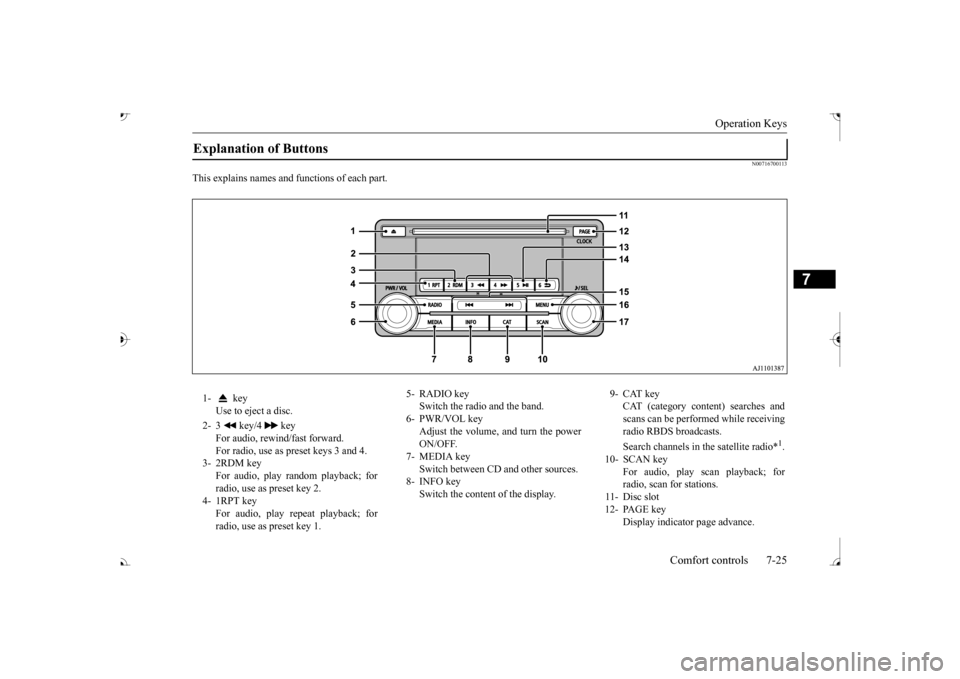
functions of each part.
Explanation of Buttons 1- key
Use to eject a disc.
2- 3 key/4 key
For audio, rewind/fast forward. For radio, use as preset keys 3 and 4.
3- 2RDM key
For audio, play random playback; for radio, use as preset key 2.
4- 1RPT key
For audio, play repeat playback; for radio, use as preset key 1.
5- RADIO key
Switch the radio and the band.
6- PWR/VOL key
Adjust the volume, and turn the powerON/OFF.
7- MEDIA key
Switch between CD and other sources.
8- INFO key
Switch the content of the display.
9- CAT key
CAT (category content) searches and scans can be performed while receiving radio RBDS broadcasts. Search channels in the satellite radio*
1.
10- SCAN key
For audio, play scan playback; forradio, scan for stations.
11- Disc slot 12- PAGE key
Display indicato
r page advance.
BK0239700US.book 25 ページ 2016年6月16日 木曜日 午前10時58分
Page 414 of 521
Listen to MP3s
Comfort controls 7-31
7
Press the SCAN key. Play the first 10 seconds of each of the tracks on the whole disc in order.
N00717200027
This explains how to list
en to audio files on a
disc. Insert the disc. Insert a disc to automa
tically start playback.
“Insert/Eject Discs” (P.7-24)
If a disc is already within the product, press the MEDIA key to switch to CD as thesource. Press the key or key to select the track. This enables selection of
the next or previous
track. Hold down the 3 key or the 4 key. Fast forward/rewind is possible. Repeat playback, random
playback, and scan
playback are possible.
Press the 1RPT key. Repeat playback of the track currently being played. Hold down the 1RPT key. Repeat playback of the tracks within the folder currently being played. Press the 2RDM key.
Scan Playback (SCAN)
NOTE
Press this button again during playback if you wish to hear that track, and that track will play normally.
Listen to MP3s
CAUTION CD-ROM and CD-R/R
W media can only
play back MP3 format audio files.
To Listen to MP3s
NOTE
Depending on the file st
ructure, it may take
some time to read the contents of the disc.
Select the Track (File) Fast Forward or Rewind Switch Playback Mode
Repeat Playback (RPT)
NOTE
Pressing again will cancel. Selecting a file, ejecti
ng, fast forwarding, or
rewinding will cancel.
Folder Repeat Playback
NOTE
Pressing again will cancel. Even if the file is selected, folder repeat playback will not
be cancelled.
Random Playback (RDM)
BK0239700US.book 31 ページ 2016年6月16日 木曜日 午前10時58分
Page 416 of 521

Listen to an iPod
Comfort controls 7-33
7
Press the MEDIA key to set the iPod as the source. The selected source is indicated on the dis- play.
Press the key or key to select the track. This enables selection of the next or previous track. Hold down the 3 key or the 4 key. Fast forward/rewind is possible. Repeat playback and
shuffle playback are
possible. Press the 1RPT key. Repeat playback of the track currently being played.
The types of devices
that can be connected
may vary.[For vehicles sold in U.S.A.]For details, access the Mitsubishi Motors North America website. [For vehicles sold in Canada and Mexico]For details, access the Mitsubishi Motors website. Please read and agree to the “Warn- ing about Links to the Web Sites of OtherCompanies”. The webs
ites mentioned above
may connect you to websites other than the Mitsubishi Motors website.http://www.mitsubishi-motors.com/en/prod- ucts/index.html Regarding how to connect the iPod/iPhone, refer to “How to connect an iPod” on page 5-264. When connecting the iPod/iPhone, use a commercially-availab
le iPod connection
cable. Set up the device in
order that no unsafe
actions, such as plugging in the connection cable are taken while driving. When inserting and removing the iPod/iPhone, for safety’s
sake first stop the
vehicle. Depending on the status of the iPod/iPhone, it may take some time unt
il the device is rec-
ognized, or playback starts. Buttons on the product will not operate while iPod/iPhone is
connected.
NOTE
iPod/iPhone spec
ifications and settings may
mean that connection
is not possible, or
result in differences
in operation or display.
Depending on audio data
in the iPod/iPhone,
track information may
not be displayed cor-
rectly. Depending on the status of the vehicle and device, the iPod/iPhone
may not play back
after starting
the engine.
Data containing copyri
ght information may
not play back. It is recommended that the iPod/iPhone equalizer settings be set to flat. Operate the iPod/iPhone
while connected to
this product. If the iPod/iPhone is c
onnected via Bluetooth
as a Bluetooth-capable
audio device, then do
not connect the iPod/
iPhone using an iPod
cable. Connection us
ing both methods will
result in err
oneous operation.
If an iPod/iPhone does not
operate correctly,
then remove the iPod/iPhone from the prod- uct, reset, then reconnect.
Play iPod
NOTE
Select the Track (File) Fast Forward or Rewind Switch Playback Mode Repeat Playback (RPT)
NOTE
Pressing again will cancel.
BK0239700US.book 33 ページ 2016年6月16日 木曜日 午前10時58分