media MITSUBISHI OUTLANDER 2017 3.G Repair Manual
[x] Cancel search | Manufacturer: MITSUBISHI, Model Year: 2017, Model line: OUTLANDER, Model: MITSUBISHI OUTLANDER 2017 3.GPages: 521, PDF Size: 14.91 MB
Page 418 of 521

Listen to Audio Files on a USB Device
Comfort controls 7-35
7
Press the MEDIA key to set USB as the source. The selected source is indicated on the dis- play.
Press the key or key to select the track. This enables selection of the next or previous track. Hold down the 3 key or the 4 key. Fast forward/rewind is possible. Repeat playback, random
playback, and scan
playback are possible. Press the 1RPT key. Repeat playback of the track currently being played.
NOTE
Digital audio players
that support the mass
storage class specific
ations can be con-
nected. For details regarding the types of USB devices that can be c
onnected and the types
of files that can be
played back, refer to
“Types of connectable
devices and supported
file specifications” on page 5-265. Regarding how to c
onnect USB devices,
refer to “How to connect a USB memorydevice” on page 5-263. When connecting a US
B device, use a con-
nection cable. Failur
e to use a connection
cable when connecti
ng may place undue load
on, or damage the USB connector. Set up the device in
order that no unsafe
actions, such as plugging in the connectioncable are taken while driving. When inserting and removing the USB device, for safety’s sa
ke first stop the vehi-
cle. Do not insert other than audio devices into the USB port. Damage to the device or equipment may result. Depending on the status of the USB device, it may take some time unt
il the device is rec-
ognized, or playback starts. Depending on USB device
s, buttons on the
product will not opera
te while the USB
device is connected. USB device specificati
ons and settings may
mean that connection is not possible, or result in differences
in operation or display.
Depending on audio data
in the USB device,
track information may
not be displayed cor-
rectly. Depending on the status of the vehicle and device, the iPod/iPhone
may not play back
after starting
the engine.
Data containing copyri
ght information may
not play back. This product can play back MP3, WMA, and AAC format audio files. Depending on the type of
USB device, usage
may not be possible, or functions that can be used may be restricted. The recommended file system for USB memory is FAT32. The maximum supported capacity for USB memory is 32GB. Operate the USB device containing recorded audio files while conne
cted to this product.
Play Back of Audio Files on a USB Device
NOTE
Select the Track (File) Fast Forward or Rewind Switch Playback Mode Repeat Playback (RPT)
NOTE
Pressing again will cancel.
BK0239700US.book 35 ページ 2016年6月16日 木曜日 午前10時58分
Page 423 of 521
Listen to Bluetooth Audio 7-40 Comfort controls
7
6. After the voice gui
de says “Playing
N00717500062
This product can play back tracks on com-mercially-available Bl
uetooth-capable audio
devices.
Regarding how to connect your Bluetooth device, refer to “Conne
cting the Bluetooth
®
2.0 interface and Blue
tooth device” on page
5-247. Operation methods belo
w describe situations
once connection has been completed. 1. Press the MEDIA key to set Bluetooth Audio as the source. The selected source is indicated on the display.
NOTE
If you say “No” to three
or all genres uttered
by the system, the voice guide will say“Genre not found, please try again” and thesystem returns to step 2.NOTE
If the confirmation function is active, the voice guide confirms if the genre is correct. If the genre is correct, say “Yes”. If not, say“No”. After the voice
guide says “Genre not
found, please try again,” the system returns to step 2. Refer to
“Confirmation function
setting” on page 5-244.
Listen to Bluetooth Audio
CAUTION Never hold these devices in your hand to operate while driving,
as this is dangerous.
Do not leave the Bluetooth audio device unattended in the vehicle. Depending on how the de
vices are handled,
audio files being damage
d or lost, therefore
it is recommended that data be backed up.NOTE
Depending on the type of
Bluetooth-capable
audio devices, usage ma
y not be possible, or
functions that can be us
ed may be restricted.
Confirm together with the user manuals for the commercially-availab
le Bluetooth-capa-
ble audio devices. Depending on the type of
Bluetooth-capable
audio devices, volume
levels may differ.
There is the danger of loud volumes, so prior to use, it is recommended that you turn the volume down. “Adjust Volume” (P.7-24)
Depending on the status of the Bluetooth audio device, it may ta
ke some time until the
device is recognized,
or playback starts.
Bluetooth audio device
specifications and
settings may mean th
at connection is not
possible, or result in
differences in operation
or display. Depending on audio data in the Bluetooth audio device, track in
formation may not be
displayed correctly.
Depending on the status of the vehicle and device, the iPod/iPhone
may not play back
after starting
the engine.
Connect a Bluetooth-capable Audio Device
NOTE
If the iPod/iPhone is c
onnected via Bluetooth
as a Bluetooth-capable
audio device, then do
not connect the iPod/
iPhone using an iPod
cable. Connection us
ing both methods will
result in err
oneous operation.
Play Bluetooth Audio
NOTE
BK0239700US.book 40 ページ 2016年6月16日 木曜日 午前10時58分
Page 439 of 521
Engine overheating 8-4 For emergencies
8
If you drive your vehicl
e with a low battery
charge after the engine has been started byusing jumper cables, th
e engine may misfire.
This can cause the anti-lock braking system warning light to blink on
and off. This is only
due to the low battery voltage. It is not a problem with the brake system. If this hap- pens, fully charge the battery and ensure the charging system is operating properly.
N00836501375
When the engine is overheating, the warningwill be displayed in th
e instrument cluster as
follows. The information screen in the multi infor- mation display will be interrupted and the engine coolant temp
erature warning dis-
play will appear. Also “ ” will blink. (Color liquid crystal display type) lamp will illuminate.
(Mono-color liquid
crystal display type)
If these warnings are displayed:
1. Stop the vehicle in a safe place. Turn on the hazard warning flashers.2. With the engine st
ill running, carefully
raise the engine hood to vent the engine compartment.3. Check that the cooling fan is running. If the fan is not turn
ing, stop the engine
immediately and cont
act an authorized
Mitsubishi Motors dealer or a repair facil- ity of your choice for assistance. 4. If you see steam or spray coming from under the hood, turn off the engine.5. If you do not see steam or spray coming from under the hood, leave the engine on until the high coolant
temperature warn-
ing goes off. After the high coolant tem- perature warning has gone off, you can start driving again. If the high coolanttemperature warning stays on, turn off the engine.
Charging the battery by using an external battery charger
WA R N I N G Always remove the
battery from your
vehicle when the battery is charged by an external battery charger. Keep sparks, cigarette
s, and flames away
from the battery because the battery couldexplode. Keep your work area well vented when charging or using
the battery in an
enclosed space. Remove all the caps before charging the battery. Electrolyte (battery acid) is made of corro- sive diluted sulfuric acid. If electrolyte comes in contact with your hands, eyes,clothes, or the pain
ted surface of your
vehicle, thoroughly
flush with water. If
electrolyte gets in your eyes, flush themimmediately and thor
oughly with water,
and get prompt medical attention. Always wear protective clothing and gog- gles when working near the battery. Keep the battery out of the reach of chil- dren.
As your vehicle has anti-lock brakes Engine overheating
WA R N I N G To avoid personal injury, keep hands, hair, jewelry and clothes aw
ay from the cooling
fan. The cooling fan ca
n start at any time.
BK0239700US.book 4 ページ 2016年6月16日 木曜日 午前10時58分
Page 456 of 521
Engine hood
Vehicle care and maintenance 9-3
9
Normally, the catalyti
c converter does not
require maintenance. However, it is importantto keep the engine properly tuned for the con- verter to continue to work properly. To reduce the possibili
ty of catalytic con-
verter damage: Use UNLEADED GASOLINE ONLY of the type of recommended in the “Fuel selection”. Do not drive with an extremely low fuel level. Running out of gas could damage the catalytic converter.
Do not try to start the engine by pushing or towing the vehicle. If the battery isweak or run down, use jumper cables to properly start the engine. Do not idle the engine with any spark plug wires disconnected or removed, such as when performing
diagnosti
c tests.
Do not idle the engine
for a long time if it
is idling roughly or otherwise obviously malfunctioning. To prevent the catalytic converter from being damaged from unburned gas, do not race the engine when turning off the igni-tion switch. Stop driving the vehicle if you think the performance is noticeably low, or theengine has a malfunction such as with the ignition, etc. If you are not able to stop driving immediately,
slow down and drive
for only a short time. Have your vehicle checked at an authorized Mitsubishi Motors dealer or a repair facility of yourchoice as soon
as possible.
In unusual situations involving major engine problems, a burning odor mayindicate severe and abnormal catalytic converter overheating.
If this occurs, stop
in a safe place, shut the engine off and letthe vehicle cool. Once
the engine is cool,
immediately take
your vehicle to an
authorized Mitsubishi
Motors dealer or a
repair facility of your choice for service.
N00937501588
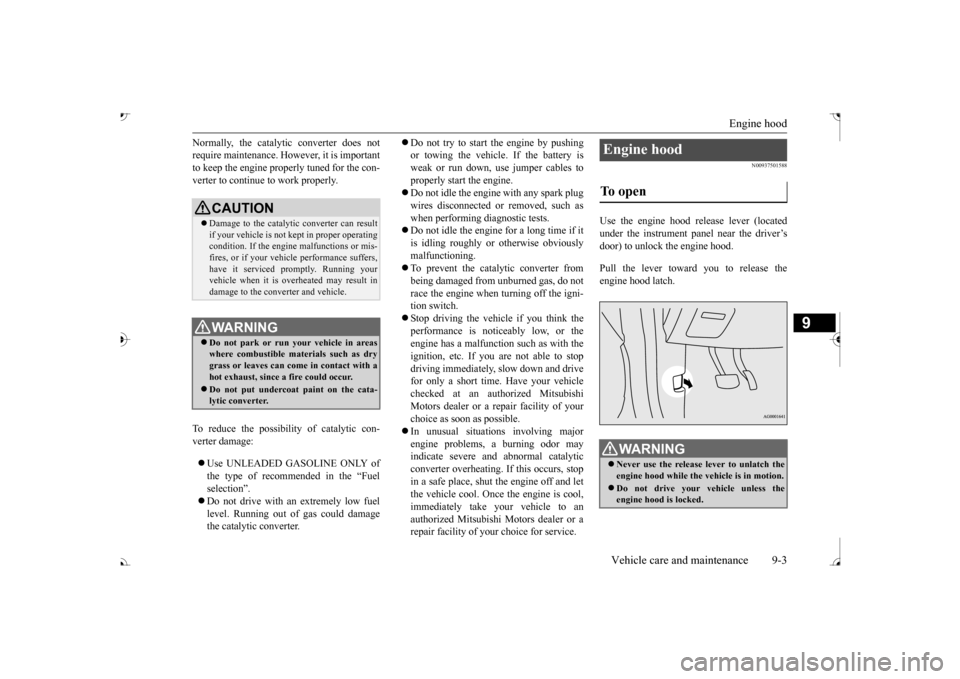
Use the engine hood release lever (located under the instrument panel near the driver’s door) to unlock the engine hood. Pull the lever toward you to release the engine hood latch.
CAUTION Damage to the catalyti
c converter can result
if your vehicle is not
kept in proper operating
condition. If the engine
malfunctions or mis-
fires, or if your vehi
cle performance suffers,
have it serviced promptly. Running your vehicle when it is
overheated may result in
damage to the converter and vehicle.WA R N I N G Do not park or run your vehicle in areas where combustible materials such as dry grass or leaves can come
in contact with a
hot exhaust, since a fire could occur. Do not put undercoat paint on the cata- lytic converter.
Engine hood To open
WA R N I N G Never use the release lever to unlatch the engine hood while the
vehicle is in motion.
Do not drive your vehicle unless the engine hood is locked.
BK0239700US.book 3 ページ 2016年6月16日 木曜日 午前10時58分
Page 467 of 521
Battery 9-14 Vehicle care and maintenance
9
facility of your choice before the start of cold weather. If necessary, have it charged. Thiswill provide more relia
ble starting, and longer
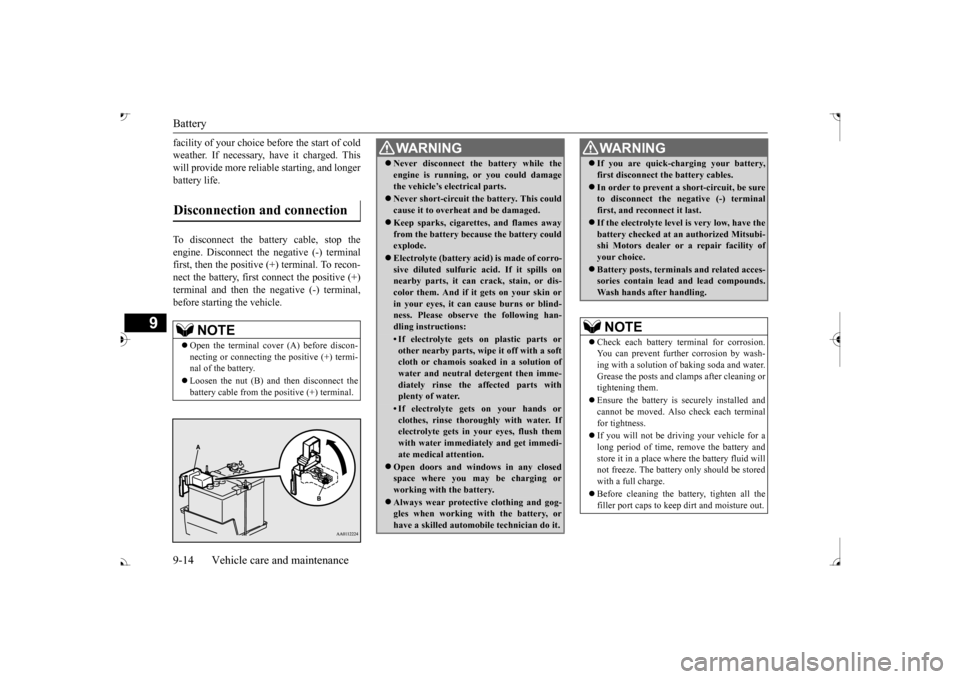
battery life. To disconnect the battery cable, stop the engine. Disconnect the
negative (-) terminal
first, then the positive (+) terminal. To recon- nect the battery, first
connect the positive (+)
terminal and then the negative (-) terminal,before starting the vehicle.Disconnection and connection
NOTE
Open the terminal cover (A) before discon- necting or connecting
the positive (+) termi-
nal of the battery. Loosen the nut (B) a
nd then disconnect the
battery cable from the positive (+) terminal.
WA R N I N G Never disconnect the battery while the engine is running, or you could damagethe vehicle’s electrical parts. Never short-circuit the battery. This could cause it to overheat and be damaged. Keep sparks, cigarettes, and flames away from the battery because the battery couldexplode. Electrolyte (battery acid) is made of corro- sive diluted sulfuric acid. If it spills on nearby parts, it can crack, stain, or dis- color them. And if it gets on your skin orin your eyes, it can cause burns or blind- ness. Please observe the following han- dling instructions:• If electrolyte gets on plastic parts orother nearby parts, wipe it off with a softcloth or chamois soak
ed in a solution of
water and neutral detergent then imme- diately rinse the affected parts withplenty of water.• If electrolyte gets on your hands orclothes, rinse thoroughly with water. If electrolyte gets in your eyes, flush them with water immediately and get immedi-ate medical attention.
Open doors and wind
ows in any closed
space where you may be charging or working with the battery. Always wear protecti
ve clothing and gog-
gles when working with the battery, or have a skilled automobi
le technician do it.
If you are quick-ch
arging your battery,
first disconnect the battery cables. In order to prevent a
short-circuit, be sure
to disconnect the negative (-) terminal first, and reconnect it last. If the electrolyte level
is very low, have the
battery checked at an
authorized Mitsubi-
shi Motors dealer or
a repair facility of
your choice. Battery posts, terminals and related acces- sories contain lead
and lead compounds.
Wash hands after handling.NOTE
Check each battery terminal for corrosion. You can prevent further corrosion by wash-ing with a solution of baking soda and water. Grease the posts and cl
amps after cleaning or
tightening them. Ensure the battery is securely installed and cannot be moved. Also
check each terminal
for tightness. If you will not be driving your vehicle for a long period of time, remove the battery andstore it in a place where the battery fluid will not freeze. The battery only should be stored with a full charge. Before cleaning the battery, tighten all the filler port caps to keep
dirt and moisture out.
WA R N I N G
BK0239700US.book 14 ページ 2016年6月16日 木曜日 午前10時58分
Page 476 of 521
General maintenance
Vehicle care and maintenance 9-23
9
N00940900231
Spark plugs must fire properly to ensure proper engine performance and emission- control.Do not reuse spark plugs by cleaning or regapping. Spark plugs
should be replaced at
the mileage specified in the “WARRANTYAND MAINTENANCE MANUAL”.
N00941000040
Check the hose surfaces for any heat and mechanical damage, ha
rd and brittle rubber,
cracking, tears, cuts and abrasions. Pay spe-cial attention to the hos
es closest to high heat
sources such as the exhaust manifold. Check all the hose connections, such as clamps andcouplings, to make sure they are secure and that there are no leaks. If you see any wear or damage, replace the
hoses immediately.
N00950100050
Have the valve clea
rance checked at an
authorized Mitsubishi Motors dealer at the mileage specified in the “WARRANTY AND MAINTENANCE MANUAL”.If the engine sounds ab
normally loud, have
adjustments made by an authorized Mitsubishi Motors dealer.
N00941300173
Check these regularly for damage or leaks in the fuel lines and conne
ctions. Check the fuel
tank filler cap for dama
ge or looseness. Pay
special attention to the fuel lines closest to
high heat sources such
as the exhaust mani-
fold.
N00941400187
If the fuel-vapor vent line is clogged or dam-aged, the fuel-vapor mixture will escape, pol- luting the air. Have the system checked at an authorizedMitsubishi Motors dealer at the mileage spec- ified in the “WARRANTY AND MAINTE- NANCE MANUAL”.
N00941501299
The next pages list th
e maintenance service
recommended by Mitsubishi Motors Corpo-ration. In addition to the general maintenance that needs to be performed at the times listed,
NOTE
To meet government
regulations and pro-
mote cleaner air, your
vehicle is equipped
with an onboard diagnostic system (OBD).The engine electroni
c control module that
controls OBD functions
stores various data
(especially about th
e exhaust emissions).
This data will be erased if the battery cable is disconnected, which c
ould make a rapid
diagnosis difficult. Do not disconnect thebattery cable when th
e engine malfunction
indicator (“SERVIC
E ENGINE SOON” or
“Check engine light”) is ON.
Spark plugs
NOTE
Use the recommended or
equivalent spark
plugs listed under “Engi
ne specifications” on
page 11-6. Use of other plugs could cause engine damage, loss of
performance or radio
noise.
Fuel hoses Intake valve clearance Fuel system (tank, pipe line and connection, and fuel tank filler cap)
WA R N I N G If you see a fuel leak
or if you smell fuel,
do not run the engine. Any spark (includ- ing from the ignition
), flame or smoking
material could cause an explosion or fire.Call an authorized Mitsubishi Motors dealer or a repair fa
cility of your choice
for assistance.
Evaporative emission control system (except evaporative emission canister) General maintenance
BK0239700US.book 23 ページ 2016年6月16日 木曜日 午前10時58分
Page 484 of 521
Replacement of light bulbs
Vehicle care and maintenance 9-31
9
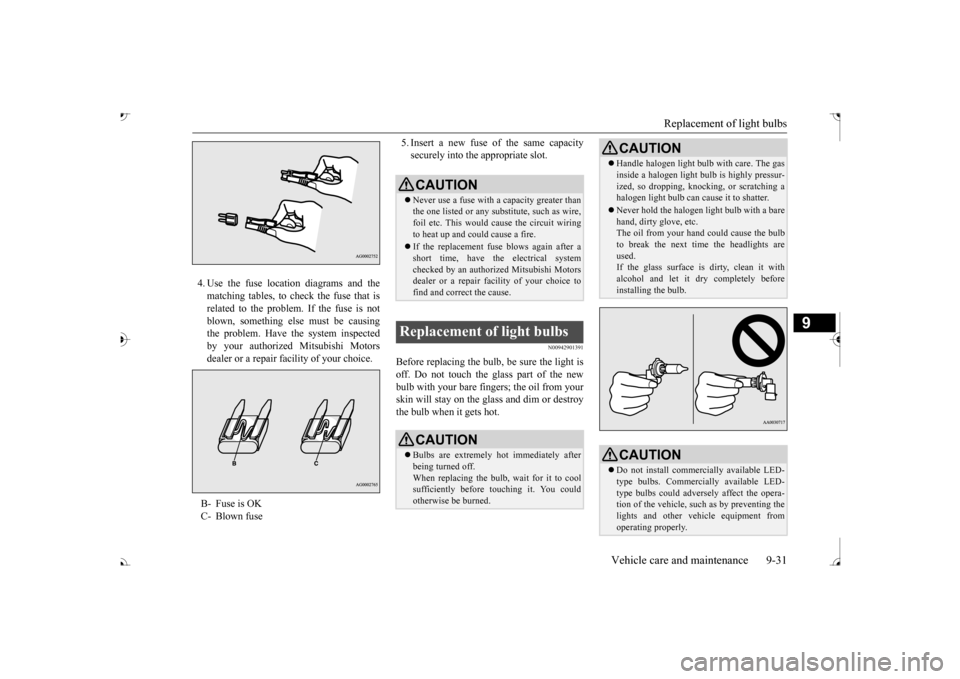
4. Use the fuse location diagrams and the matching tables, to check the fuse that isrelated to the problem. If the fuse is not blown, something else must be causing the problem. Have the system inspectedby your authorized Mitsubishi Motors dealer or a repair facility of your choice.
5. Insert a new fuse
of the same capacity
securely into the appropriate slot.
N00942901391
Before replacing the bulb, be sure the light is off. Do not touch the glass part of the new bulb with your bare fingers; the oil from yourskin will stay on the glass and dim or destroy the bulb when it gets hot.
B- Fuse is OK C- Blown fuse
CAUTION Never use a fuse with a capacity greater than the one listed or any s
ubstitute, such as wire,
foil etc. This would
cause the circuit wiring
to heat up and could cause a fire. If the replacement fuse blows again after a short time, have the electrical systemchecked by an authorized Mitsubishi Motors dealer or a repair faci
lity of your choice to
find and correct
the cause.
Replacement of light bulbs
CAUTIONBulbs are extremely hot immediately after being turned off. When replacing the bulb, wait for it to coolsufficiently before
touching it. You could
otherwise be burned.
Handle halogen light bul
b with care. The gas
inside a halogen light
bulb is highly pressur-
ized, so dropping, knocki
ng, or scratching a
halogen light bulb can
cause it to shatter.
Never hold the halogen
light bulb with a bare
hand, dirty glove, etc. The oil from your hand could cause the bulb to break the next time the headlights areused. If the glass surface is dirty, clean it with alcohol and let it dry completely beforeinstalling the bulb.CAUTION Do not install commercially available LED- type bulbs. Commercia
lly available LED-
type bulbs could adversely affect the opera- tion of the vehicle, such as by preventing thelights and other vehicle equipment from operating properly.CAUTION
BK0239700US.book 31 ページ 2016年6月16日 木曜日 午前10時58分
Page 494 of 521
Cleaning the outside of your vehicle Vehicle care and maintenance 9-41
9
N00945600187
1. To clean, lightly wi
pe the leather with a
soft cloth soaked in a 5% solution of gen- tle soap and water.2. To rinse, dip the cloth in fresh water, wring it out well, and wipe off all the soap.3. To preserve and protect, use a leather pro- tecting agent on the genuine leather sur- face.
N00945700058
To protect your vehicle’s
finish, wash it often
and thoroughly. If desired, you may wax your vehicle using a nonabrasive automobile wax.
N00945800033
Industrial pollution, road tar, bird droppings,tree sap, insect remain
s, sea water and other
foreign matters can damage the finish on yourvehicle. Generally, the longer any foreign material stays on the finish, the worse the damage.Wash your vehicle as soon as possible when- ever the finish gets soiled.
N00945901679
Chemicals contained in the dirt and dustpicked up from air, rain, snow, or road sur- faces can damage the paint and body of yourvehicle if left on. Frequent washing and wa
xing is the best way
to protect your vehicle from this damage.Do not wash the vehicl
e in direct sunlight.
Park the vehicle in the shade and spray it with water to remove dust.
Next, using plenty of
clean water and a car
washing mitt or sponge,
wash the vehicle from top to bottom.Use a mild car washing soap if necessary. Rinse thoroughly and wipe
dry with a cham-
ois or soft cloth. Af
ter washing the vehicle,
carefully clean the join
ts and flanges of the
doors, hood, etc., wher
e dirt is likely to
remain.
NOTE
If fuzzing is difficult to remove from the seat upholstery, draw a suitable defuzzing brushover the surface in
one direction.
Genuine leather
(if so equipped)
NOTE
If genuine leather is we
t with water, wipe it
with a dry, soft cloth. If left damp, mildew may grow. The genuine leather su
rface can be damaged
if brushed with a nylon or synthetic fiberbrush. Organic solvents such as benzine, kerosene, alcohol, gasoline, or acid
or alkaline solvents
can discolor the genuine
leather surface and
should not be used. Genuine leather can
mildew if not kept
clean. Clean up any o
il stains immediately.
The genuine leather surface may harden and shrink if it is exposed to the direct sunlightfor long hours. When your vehicle is parked,place it in the shade as much as possible. When the temperature of the vehicle interior rises in summer, vinyl products left on the genuine leather seat
may deteriorate and
stick to the seat.
Cleaning the outside of your vehicle Foreign material
NOTE
Wa s h i n g
CAUTION When washing the underside of your vehicle or the wheels, wear a pair of gloves to pro- tect your hands. If your vehicle is equipped with the rain sen- sor, place the wiper switch lever in the“OFF” position to
deactivate the rain sensor
before washing the vehi
cle. Otherwise, the
wipers will operate in
the presence of water
spray on the windshield and may get dam- aged as a result.
BK0239700US.book 41 ページ 2016年6月16日 木曜日 午前10時58分
Page 496 of 521
Cleaning the outside of your vehicle Vehicle care and maintenance 9-43
9
N00946100046
If painted surfaces ha
ve been severely dam-
aged and lost their original luster and color tone, polish the surface lightly with a finepolishing compound. Avoid limiting your polishing to the damage
d surface only; polish
a somewhat wider area, moving the polishingcloth in one direction.
After polishing, flush
the compound from the surface and apply a coat of wax to regain a beautiful luster.
N00946201099
Small cracks and scratches in the paint coat should be touched up as soon as possible with touch-up paint to prevent corrosion.Check body areas facing the road or the tires carefully for damage to the paint caused by flying stones, etc. The paint code number foryour vehicle can be found on the vehicle information code plate located on the front passenger door sill.
N00946301221
Use a sponge or chamoi
s to clean these parts.
If the vehicle wax sticks to a gray or black rough surface of the bumper, molding or lights, the surface may appear white in color.In this case, wipe it off using lukewarm water and a soft cloth or chamois.
N00946400052
To prevent spots and corrosion of chrome parts, wash with water, dry thoroughly, and apply a nonabrasive automotive wax. If the chrome is severely damaged or pitted, use acommercially available chrome polish.
N00946500183
1. Remove dirt using a wet sponge.2. Use a mild detergent
on any dirt that can-
not be removed easily with water. Rinse off the detergent after washing thewheel. 3. Dry the wheel thoroughly using a chamois leather or a soft cloth.
Do not use gasoline, benzine, kerosene or paint thinners to remove road tar or other dirtfrom the vehicle surface. Do not put wax on the areas having black matte coating because
it can cause uneven
discoloration, patches, bl
urs, etc. If these get
wax on them, wipe the wax off right away with a soft clot
h and warm water.
On vehicles with sunr
oof, be careful not to
apply any wax on the
weatherstrip (black
rubber) when waxing the area around the sunroof opening. If stained with wax,
the weatherstrip cannot
maintain a weatherproof seal with the sun- roof.
Polishing
CAUTION
Damaged paint Cleaning plastic parts
CAUTION Do not use a scrubbing brush or other rough scrubber as these may damage the plasticsurface. Do not use wax containing compounds (pol- ishing powder) which ma
y damage the plas-
tic surface.
Do not let plastic parts
get soiled with gaso-
line, oil, brake fluids, engine oils, greases,paint thinner, and sulfuric acid (battery elec-trolyte), as such substa
nces will cause stains,
cracks, or discoloration. If any of these get on a plastic part, wipethem up with a soft cloth or chamois and a mild solution of soap and water. Then rinse them immediately with water.
Chrome parts Aluminum wheels
(if so equipped)
CAUTION
BK0239700US.book 43 ページ 2016年6月16日 木曜日 午前10時58分
Page 497 of 521
Cleaning the outside of your vehicle 9-44 Vehicle care and maintenance
9
N00946600054
The window glass can
usually be cleaned
using only a sponge and
water. Glass cleaner
can be used to remove
wax, oil, grease, dead
insects, etc. After washing the glass, wipe it dry with a clean, dry, soft cloth.
N00946700068
Use a soft cloth and glass cleaner to removegrease, dead insects,
etc., from the wiper
blades. Replace the wiper blades when they no longer clean the windshield a
nd rear window prop-
erly.
N00946800069
Clean the inside of the sunroof with a softcloth. Hard deposits
should be wiped away
with a cloth dipped in
warm, neutral deter-
gent solution. Wipe away the solution with a sponge dipped in fresh water.
N00947000071
Never spray or splash
water on the electrical
accessories in the engine compartment. Thisputs the engine at ri
sk of being damaged.
Do not bring the circum
ferential parts, the
plastic parts and so on in
to contact with sulfu-
ric acid (battery electrolyte) which may crack, stain or discolor them. If they are in contact, wipe off with soft cloth,chamois or the like and an aqueous solution of neutral detergent then immediately rinse the affected parts with plenty of water.
CAUTION Do not use a brush or other hard implement on the wheels. Do not use any cleaner th
at contains an abra-
sive substance or is ac
idic or alkaline. Doing
so could cause the coating on the wheels topeel or become disc
olored or stained.
Do not directly apply
hot water using a steam
cleaner or by any other means. Contact with seawater or road salt used for de-icing can cause corro
sion. Rinse off such
substances as s
oon as possible.
Window glass Wiper blades
Cleaning the sunroof (if so equipped)
NOTE
The surface treatment on the inside of the glass may be removed
if a hard cloth or
organic solvent is used.
Engine compartment
BK0239700US.book 44 ページ 2016年6月16日 木曜日 午前10時58分