ECO mode MITSUBISHI OUTLANDER III 2018 Owners Manual
[x] Cancel search | Manufacturer: MITSUBISHI, Model Year: 2018, Model line: OUTLANDER III, Model: MITSUBISHI OUTLANDER III 2018Pages: 441, PDF Size: 13.71 MB
Page 318 of 441
Interior lights
Features and controls 5-237
5
2- (OFF)The dome light stays off regardless of anydoor or the liftgate being opened or closed.
N00537601165
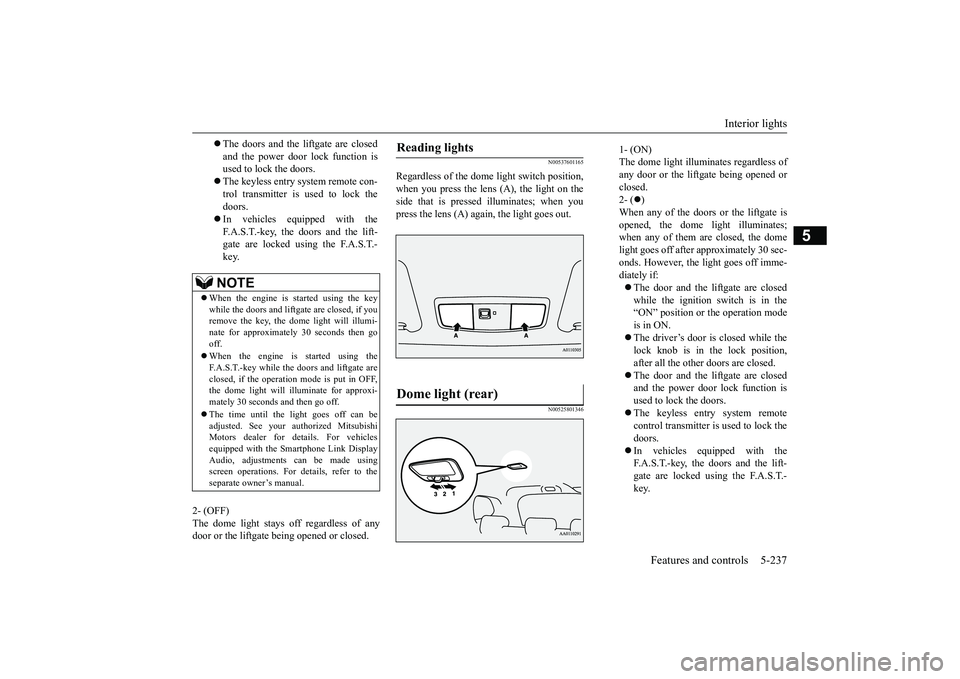
Regardless of the dome light switch position,when you press the lens (A), the light on theside that is pressed illuminates; when youpress the lens (A) agai
n, the light goes out.
N00525801346
The doors and the liftgate are closedand the power door lock function isused to lock the doors.The keyless entry system remote con-trol transmitter is used to lock thedoors.In vehicles equipped with theF.A.S.T.-key, the doors and the lift-gate are locked using the F.A.S.T.-key.NOTE
When the engine is
started using the key
while the doors and liftgate are closed, if youremove the key, the dom
e light will illumi-
nate for approximately 30 seconds then gooff.When the engine is started using theF.A.S.T.-key while the doors and liftgate areclosed, if the operation
mode is put in OFF,
the dome light will illuminate for approxi-mately 30 seconds and then go off.The time until the light goes off can beadjusted. See your authorized MitsubishiMotors dealer for details. For vehiclesequipped with the Smar
tphone Link Display
Audio, adjustments can be made usingscreen operations. For details, refer to theseparate owner’s manual.
Reading lights Dome light (rear)
1- (ON)The dome light illumin
ates regardless of
any door or the liftgate being opened orclosed.2- (
)
When any of the doors or the liftgate isopened, the dome li
ght illuminates;
when any of them are closed, the domelight goes off after approximately 30 sec-onds. However, the li
ght goes off imme-
diately if:The door and the liftgate are closedwhile the ignition switch is in the“ON” position or the operation modeis in ON.The driver’s door is closed while thelock knob is in the lock position,after all the other doors are closed.The door and the liftgate are closedand the power door lock function isused to lock the doors.The keyless entry system remotecontrol transmitter is used to lock thedoors.In vehicles equipped with theF.A.S.T.-key, the doors and the lift-gate are locked using the F.A.S.T.-key.
BK0249100US.book 237 ページ 2017年5月10日 水曜日 午前8時49分
Page 319 of 441
Interior lights5-238 Features and controls
5
3- (OFF)The dome light stays off regardless of anydoor or the liftgate being opened or closed.
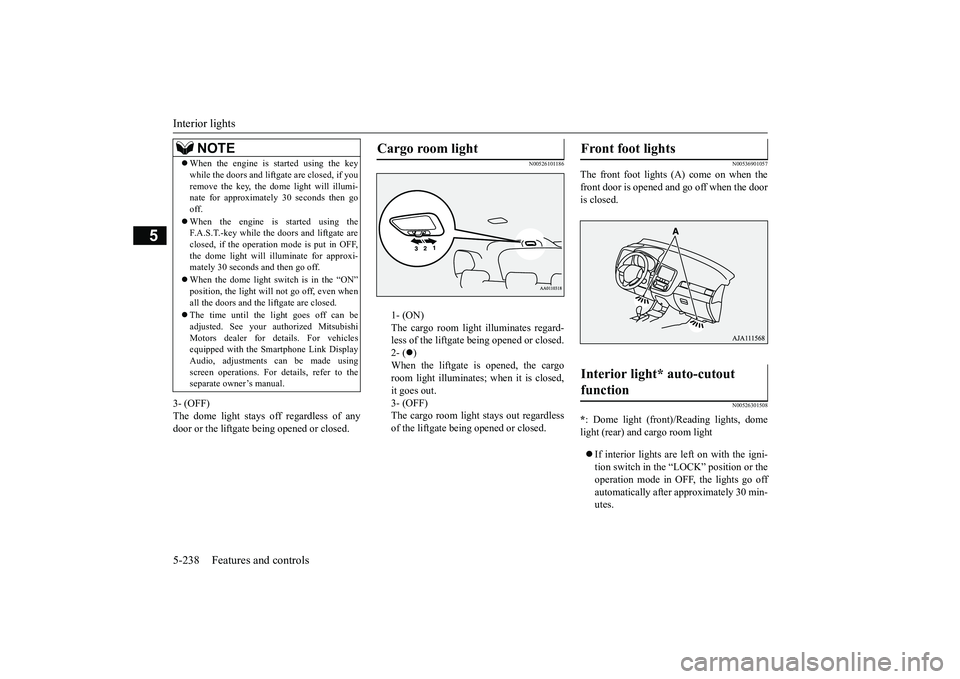
N00526101186
1- (ON)The cargo room light illuminates regard-less of the liftgate being opened or closed.2- (
)
When the liftgate is opened, the cargoroom light illuminates;
when it is closed,
it goes out.3- (OFF)The cargo room light
stays out regardless
of the liftgate bei
ng opened or closed.
N00536901057
The front foot lights (A) come on when thefront door is opened and go off when the dooris closed.
N00526301508
*: Dome light (front)/
Reading lights, dome
light (rear) and cargo room lightIf interior lights are left on with the igni-tion switch in the “LOCK” position or theoperation mode in OFF, the lights go offautomatically after approximately 30 min-utes.
NOTE
When the engine is started using the keywhile the doors and liftga
te are closed, if you
remove the key, the do
me light will illumi-
nate for approximately 30 seconds then gooff.When the engine is started using theF.A.S.T.-key while the doors and liftgate areclosed, if the operation mode is put in OFF,the dome light will il
luminate for approxi-
mately 30 seconds and then go off.When the dome light switch is in the “ON”position, the light will not go off, even whenall the doors and the liftgate are closed.The time until the light goes off can beadjusted. See your authorized MitsubishiMotors dealer for details. For vehiclesequipped with the Sm
artphone Link Display
Audio, adjustments can be made usingscreen operations. For details, refer to theseparate owner’s manual.
Cargo room light
Front foot lights Interior light* auto-cutout function
BK0249100US.book 238 ページ 2017年5月10日 水曜日 午前8時49分
Page 331 of 441
Driving precaution6-2 Driving safety
6
N00629301092
Your vehicle has been designed for both nor-mal and occasional off-road use. However,avoid driving the vehicle through areas wherethe tires may get stuck in deep sand or mud asyour vehicle is designe
d primarily for use on
pavement, unlike a conventional off-roadvehicle.Keep in mind that 2-wheel drive vehicles areless capable than 4-wh
eel drive vehicles for
driving on muddy, slippery, wet or snow-cov-ered roads.Utility vehicles have
higher ground clearance
and a narrower track, which enables them toperform in a wide variety of off-road situa-tions. Because of the higher ground clear-ance, these vehicles have a higher center ofgravity, which makes them handle differentlythan ordinary vehicles when driving on pave-ment. They are not designed to maneuver orcorner at the same speed on pavement as con-ventional 2-wheel driv
e passenger cars any
more than low-slung sports cars are designed
to perform satisfactorily in off-road condi-tions.Always drive safely
and steer the vehicle
carefully. Avoid operating the vehicle in amanner that might require sharp turns orabrupt maneuvers. As wi
th other vehicles of
this type, failure to operate this vehicle cor-rectly can result in lo
ss of control or vehicle
rollover.In a rollover crash, an unbelted person is sig-nificantly more likely to die than a personwearing a seat belt. Be
fore starting the vehi-
cle, always make cert
ain that you and all your
passengers are properly wearing their seatbelts (with children in the rear seat, in appro-priate restraints).
N00628801191
Fuel economy is depe
ndent on many factors.
Your personal driving habits can have a sig-nificant effect on your fuel consumption.Several recommendations
for achieving the
greatest fuel economy are listed below.Whenever accelerating from a stop,always accelerate
slowly and smoothly.
When parked for even a short period, donot idle the engine. Shut it off.Plan your trips to avoid unnecessarystops.
Keep your tires inflated to the recom-mended pressures.When driving a 4-wheel drive vehicle onhighways or dry improved roads, set thedrive mode to “4WD ECO” or “4WDAUTO” (Electronically controlled 4WD),or “AWC ECO” or “NORMAL” (S-AW C ) .For freeway driving, maintain a speed ofapproximately 50 mph (80 km/h) whentraffic, roadway and weather conditionssafely permit.Keep your air filter clean and your vehiclelubricated according
to the recommenda-
tions in this manual.Always keep your ve
hicle well main-
tained. A poorly maintained enginewastes fuel and costs money.Never overload your vehicle.
N00628900049
Drunk driving is one of the most frequentcauses of accidents.Your driving ability ca
n be seriously impaired
even with blood alcohol levels far below thelegal minimum. If you
have been drinking,
don’t drive. Ride with a designated non-drinking driver, call a cab or a friend, or usepublic transportation. Drinking coffee or tak-ing a cold shower will not make you sober.
Driving precaution
WA R N I N GUtility vehicles have
a significantly higher
rollover rate than othe
r types of vehicles.
Avoid abrupt maneuvers and excessivespeed. Always buckle up.
Fuel economy
Driving, alcohol and drugs
BK0249100US.book 2 ページ 2017年5月10日 水曜日 午前8時49分
Page 332 of 441
Floor mat
Driving safety 6-3
6
Similarly, prescription and nonprescriptiondrugs affect your alertness, perception andreaction time. Consu
lt with your doctor or
pharmacist before driving while under theinfluence of any of these medications.
N00628600033
The original equipment floor mat providedwith your vehicle was
specifically designed
for your vehicle.Always properly positio
n the floor mat and
assure it does not inte
rfere with operation of
the pedals. Always use the retaining clip onthe driver’s floorboard to secure the floormat. When used, this clip will help preventthe floor mat from moving forward and possi-bly interfering with the operation of the ped-als. To prevent the floor mat from movingforward and possibly interfering with theoperation of the pedals, Mitsubishi genuinefloor mats are recommended.
N00628700050
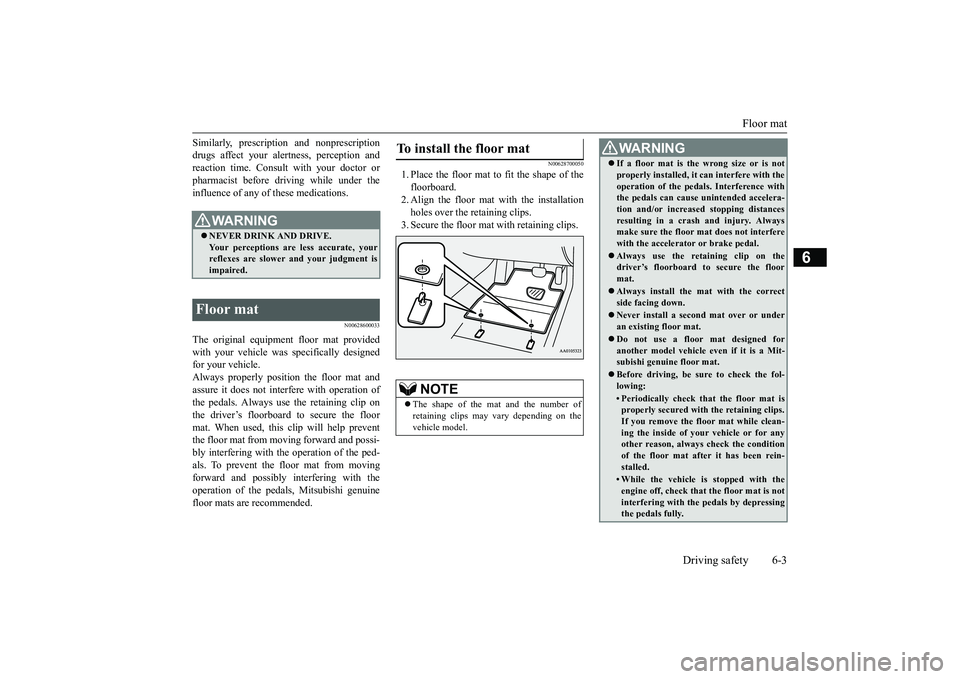
1. Place the floor mat to fit the shape of thefloorboard.2. Align the floor mat with the installationholes over the retaining clips.3. Secure the floor mat with retaining clips.
WA R N I N GNEVER DRINK AND DRIVE.Your perceptions are
less accurate, your
reflexes are slower and your judgment isimpaired.
Floor mat
To install the floor mat
NOTE
The shape of the mat and the number ofretaining clips may vary depending on thevehicle model.
WA R N I N GIf a floor mat is the wrong size or is notproperly installed, it can interfere with theoperation of the pedals. Interference withthe pedals can cause unintended accelera-tion and/or increase
d stopping distances
resulting in a cras
h and injury. Always
make sure the floor mat does not interferewith the accelerator or brake pedal.Always use the retaining clip on thedriver’s floorboard to secure the floormat.Always install the mat with the correctside facing down.Never install a second mat over or underan existing floor mat.Do not use a floor mat designed foranother model vehicle ev
en if it is a Mit-
subishi genuine floor mat.Before driving, be sure to check the fol-lowing:• Periodically check that the floor mat isproperly secured with the retaining clips.If you remove the fl
oor mat while clean-
ing the inside of you
r vehicle or for any
other reason, always
check the condition
of the floor mat afte
r it has been rein-
stalled.• While the vehicle is stopped with theengine off, check that
the floor mat is not
interfering with the pedals by depressingthe pedals fully.
BK0249100US.book 3 ページ 2017年5月10日 水曜日 午前8時49分
Page 341 of 441
Trailer towing6-12 Driving safety
6
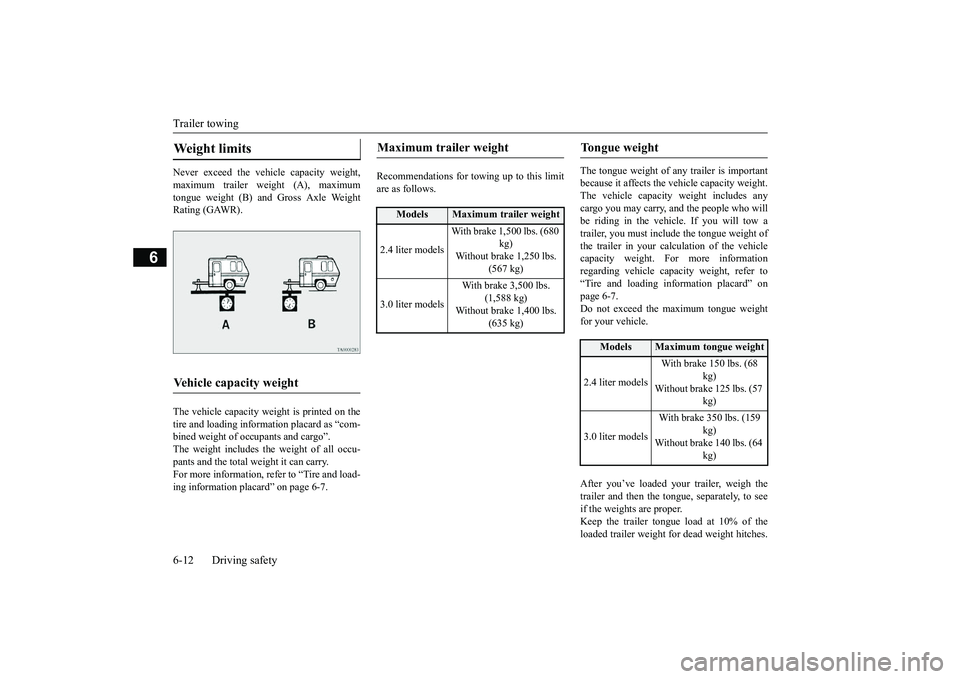
Never exceed the vehicle capacity weight,maximum trailer weight (A), maximumtongue weight (B) and Gross Axle WeightRating (GAWR).The vehicle capacity weight is printed on thetire and loading inform
ation placard as “com-
bined weight of oc
cupants and cargo”.
The weight includes the weight of all occu-pants and the total weight it can carry.For more information, refer to “Tire and load-ing information plac
ard” on page 6-7.
Recommendations for to
wing up to this limit
are as follows.
The tongue weight of a
ny trailer is important
because it affects the ve
hicle capacity weight.
The vehicle capacity weight includes anycargo you may carry, a
nd the people who will
be riding in the vehi
cle. If you will tow a
trailer, you must include the tongue weight ofthe trailer in your calculation of the vehiclecapacity weight. For more informationregarding vehicle capa
city weight, refer to
“Tire and loading information placard” onpage 6-7.Do not exceed the maximum tongue weightfor your vehicle.After you’ve loaded your trailer, weigh thetrailer and then the to
ngue, separately, to see
if the weights are proper.Keep the trailer tongue load at 10% of theloaded trailer weight fo
r dead weight hitches.
Weight limits Vehicle capacity weight
Maximum trailer weight
Models
Maximum trailer weight
2.4 liter models
With brake 1,500 lbs. (680
kg)
Without brake 1,250 lbs.
(567 kg)
3.0 liter models
With brake 3,500 lbs.
(1,588 kg)
Without brake 1,400 lbs.
(635 kg)
Tongue weight
Models
Maximum tongue weight
2.4 liter models
With brake 150 lbs. (68
kg)
Without brake 125 lbs. (57
kg)
3.0 liter models
With brake 350 lbs. (159
kg)
Without brake 140 lbs. (64
kg)
BK0249100US.book 12 ページ 2017年5月10日 水曜日 午前8時49分
Page 342 of 441
Trailer towing
Driving safety 6-13
6
Tongue loads can be adjusted by proper dis-tribution of the load in the trailer. This can bechecked by separately
weighing the loaded
trailer and then the tongue.The GAWRs are printed on the certificationlabel which is riveted on the door sill on thedriver’s side.Refer to “Vehicle labeling” on page 11-2.Choose a proper hitch and ball, and makesure it is installed at a height that is compati-ble with the trailer.Use a good equalizing hitch which uniformlydistributes the trailer tongue load throughoutthe frame.
A safety chain must al
ways be used between
the towing vehicle and the trailer. Leave suf-ficient slack in the chain for turns. The chainshould cross under the trailer tongue to pre-vent the tongue from dropping to the groundin case it becomes damaged or separated.For correct safety chai
n procedures, consult
your authorized Mitsub
ishi Motors dealer.
Your vehicle will need service more oftenwhen you’re towing a trailer. Refer to “WAR-RANTY AND MAINTENANCE MAN-UAL”. Especially important in traileroperation are automatic transaxle fluid,engine oil, rear axle
oil, belt, c
ooling system
and brake system. Each
of these is covered in
this manual.For details, please refer to the “Vehicle careand maintenance” section.Check periodically to see that all hitch nutsand bolts are tight.Mitsubishi Motors recommends that anytrailer having a total we
ight of 1,250 lbs (567
kg) or more (2400 models), 1,400 lbs (635kg) or more (3000 mode
ls) be equipped with
its own electric or surge-type brakes.If you choose electric br
akes, be sure they are
electrically actuated. Do not attempt to tapinto your vehicle’s hydraulic system. No mat-ter how successful it
may seem, any attempt
to attach trailer brakes to your vehicle’shydraulic system will lower braking effec-tiveness and create a potential hazard.
Gross axle weight rating (GAWR) Trailer hitches
WA R N I N GIf you make any holes in the body of yourvehicle for installing
a trailer hitch, be
sure to seal the holes later when youremove the hitch. If
you don’t seal them,
deadly carbon monoxide (CO) from yourexhaust can enter your vehicle. Refer to“Exhaust system” on page 9-24.
NOTE
Mitsubishi Motors recommends that swaycontrol be used whenever you are towing, toimprove towing stability.For further informati
on, please contact your
authorized Mitsubishi Motors dealer.
Safety chains
CAUTIONNever tow a trailer wi
thout using a safety
chain securely attached to both the trailerand the vehicle. If the
coupling unit or hitch
ball experiences a probl
em, the trailer may
separate from
your vehicle.
Maintenance when trailer tow-ing Trailer brakes
BK0249100US.book 13 ページ 2017年5月10日 水曜日 午前8時49分
Page 348 of 441
Vents
Comfort controls 7-3
7
N00736401692
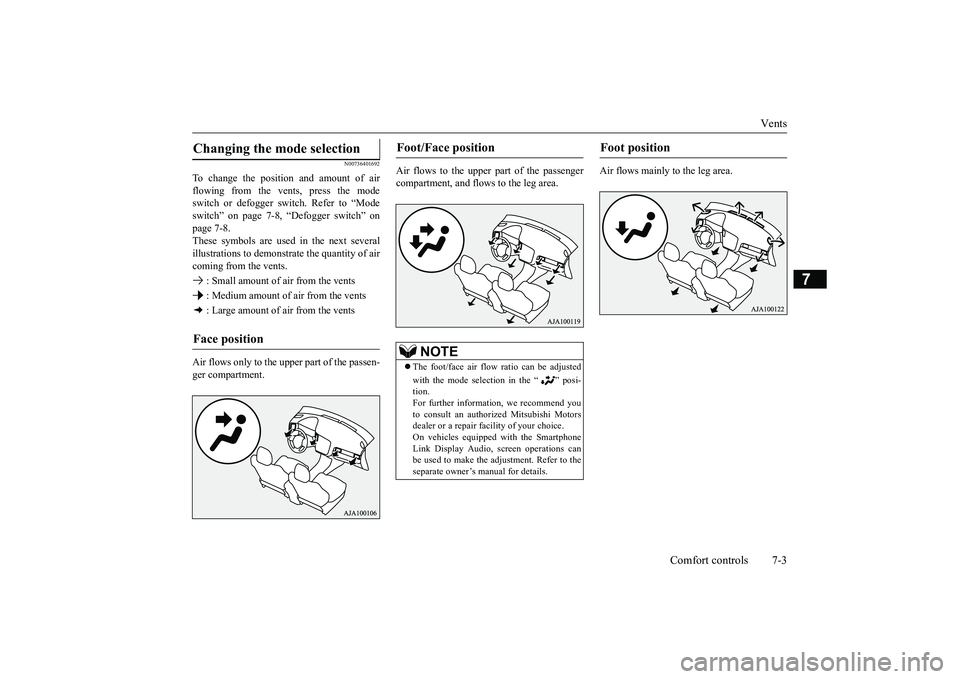
To change the position and amount of airflowing from the vents, press the modeswitch or defogger switch. Refer to “Modeswitch” on page 7-8, “Defogger switch” onpage 7-8.These symbols are used in the next severalillustrations to demonstr
ate the quantity of air
coming from the vents. : Small amount of air from the vents : Medium amount of air from the vents : Large amount of air from the ventsAir flows only to the upper part of the passen-ger compartment.
Air flows to the upper part of the passengercompartment, and flows to the leg area.
Air flows mainly to the leg area.
Changing the mode selection Face position
Foot/Face position
NOTE
The foot/face air flow ratio can be adjustedwith the mode selection in the “ ” posi-tion.For further information, we recommend youto consult an authorized Mitsubishi Motorsdealer or a repair fa
cility of your choice.
On vehicles equippe
d with the Smartphone
Link Display Audio, sc
reen operations can
be used to make the ad
justment. Refer to the
separate owner’s
manual for details.
Foot position
BK0249100US.book 3 ページ 2017年5月10日 水曜日 午前8時49分
Page 349 of 441
Vents7-4 Comfort controls
7
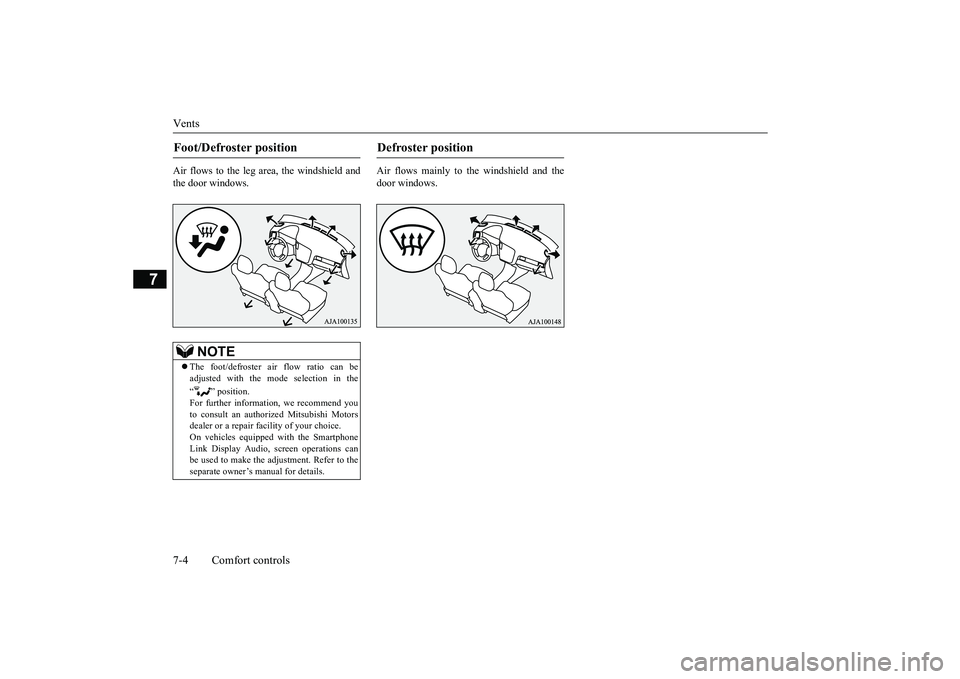
Air flows to the leg area, the windshield andthe door windows.
Air flows mainly to the windshield and thedoor windows.
Foot/Defroster position
NOTE
The foot/defroster air flow ratio can beadjusted with the mode selection in the“ ” position.For further information, we recommend youto consult an authorized Mitsubishi Motorsdealer or a repair fa
cility of your choice.
On vehicles equippe
d with the Smartphone
Link Display Audio, sc
reen operations can
be used to make the adjustment. Refer to theseparate owner’s
manual for details.
Defroster position
BK0249100US.book 4 ページ 2017年5月10日 水曜日 午前8時49分
Page 351 of 441
Dual-zone automatic climate
control air conditioner
7-6 Comfort controls
7
N00736901206
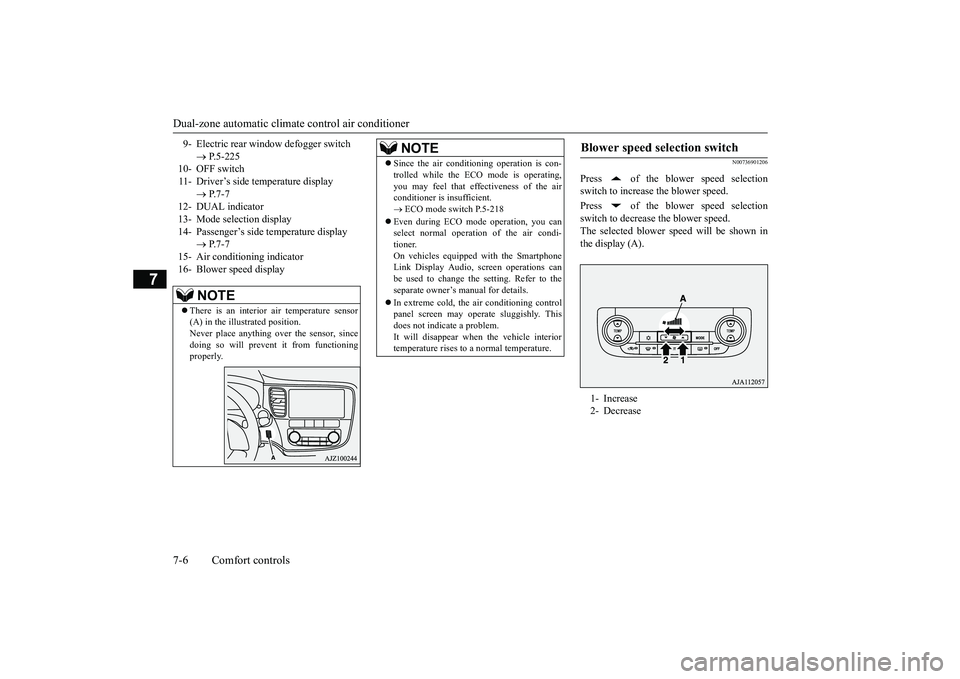
Press of the blower speed selectionswitch to increase the blower speed.Press of the blower speed selectionswitch to decrease the blower speed.The selected blower sp
eed will be shown in
the display (A).
9- Electric rear window
defogger switch
P.5-225
10- OFF switch11- Driver’s side temperature display
P.7-7
12- DUAL indicator13- Mode selection display14- Passenger’s side temperature display
P.7-7
15- Air conditioning indicator16- Blower speed display
NOTE
There is an interior air temperature sensor(A) in the illustrated position.Never place anything ove
r the sensor, since
doing so will prevent it from functioningproperly.
NOTE
Since the air conditi
oning operation is con-
trolled while the ECO mode is operating,you may feel that effectiveness of the airconditioner is insufficient. ECO mode switch P.5-218
Even during ECO mode operation, you canselect normal operati
on of the air condi-
tioner.On vehicles equipped with the SmartphoneLink Display Audio, sc
reen operations can
be used to change the setting. Refer to theseparate owner’s manual for details.In extreme cold, the air conditioning controlpanel screen may ope
rate sluggishly. This
does not indicate a problem.It will disappear when the vehicle interiortemperature rises to a normal temperature.
Blower speed selection switch 1- Increase2- Decrease
BK0249100US.book 6 ページ 2017年5月10日 水曜日 午前8時49分
Page 352 of 441
Dual-zone automatic climat
e control air conditionerComfort controls 7-7
7
N00737001448
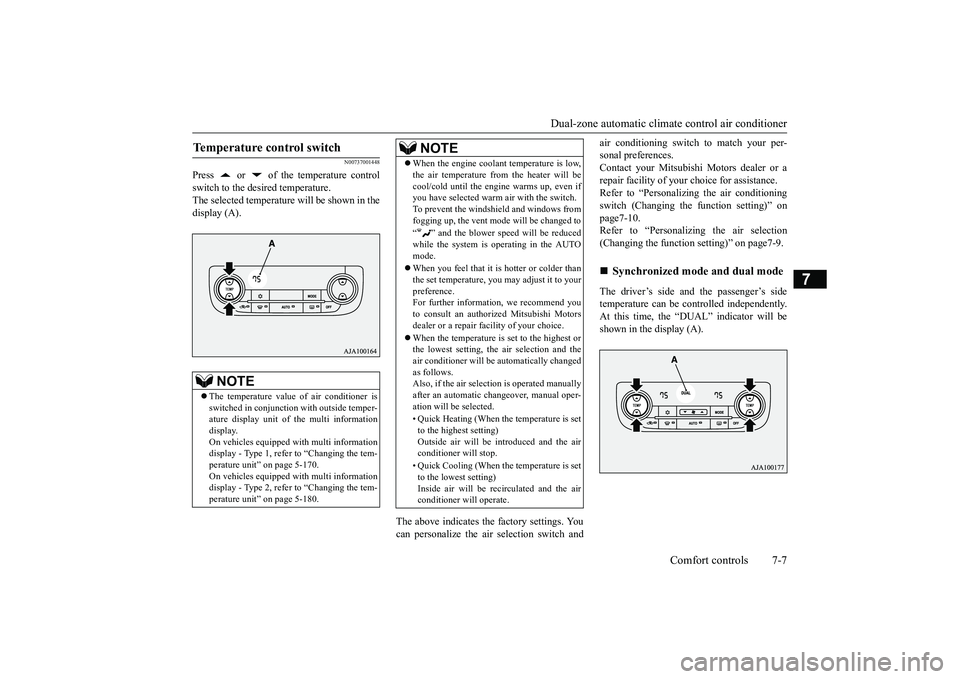
Press or of the temperature controlswitch to the desired temperature.The selected temperature will be shown in thedisplay (A).
The above indicates the
factory settings. You
can personalize the air
selection switch and
air conditioning switch to match your per-sonal preferences.Contact your Mitsubishi
Motors dealer or a
repair facility of your
choice for assistance.
Refer to “Personalizi
ng the air conditioning
switch (Changing the function setting)” onpage7-10.Refer to “Personalizing the air selection(Changing the function setting)” on page7-9.The driver’s side and the passenger’s sidetemperature can be controlled independently.At this time, the “
DUAL” indicato
r will be
shown in the display (A).
Temperature control switch
NOTE
The temperature value
of air conditioner is
switched in conjunction
with outside temper-
ature display unit of the multi informationdisplay.On vehicles equipped with multi informationdisplay - Type 1, refer to “Changing the tem-perature unit” on page 5-170.On vehicles equipped with multi informationdisplay - Type 2, refer to “Changing the tem-perature unit” on page 5-180.
When the engine coolan
t temperature is low,
the air temperature from the heater will becool/cold until the engi
ne warms up, even if
you have selected warm
air with the switch.
To prevent the windshield and windows fromfogging up, the vent mode will be changed to“ ” and the blower speed will be reducedwhile the system is operating in the AUTOmode.When you feel that it is hotter or colder thanthe set temperature, you may adjust it to yourpreference.For further information, we recommend youto consult an authorized Mitsubishi Motorsdealer or a repair fa
cility of your choice.
When the temperature is set to the highest orthe lowest setting, the air selection and theair conditioner will be automatically changedas follows.Also, if the air select
ion is operated manually
after an automatic ch
angeover, manual oper-
ation will be selected.• Quick Heating (When th
e temperature is set
to the highest setting)Outside air will be introduced and the airconditioner will stop.• Quick Cooling (When the temperature is setto the lowest setting)Inside air will be reci
rculated and the air
conditioner wi
ll operate.
NOTE
Synchronized mode and dual mode
BK0249100US.book 7 ページ 2017年5月10日 水曜日 午前8時49分