power steering MITSUBISHI OUTLANDER SPORT 2014 3.G Owners Manual
[x] Cancel search | Manufacturer: MITSUBISHI, Model Year: 2014, Model line: OUTLANDER SPORT, Model: MITSUBISHI OUTLANDER SPORT 2014 3.GPages: 384, PDF Size: 46.94 MB
Page 24 of 384
Front seats
Seat and restraint systems 4-3
4
Safety equipment cannot prevent injury or death in all motor vehicle accidents. You can help reduce the risk of injury or death, how- ever, by following the
instructions in this
manual.
N00401800399
Position the driver’s seat
as far back as possi-
ble while maintaining a position that stillenables you to fully apply the pedals, easily control the steering wheel and safely operate the vehicle.
N00401900228
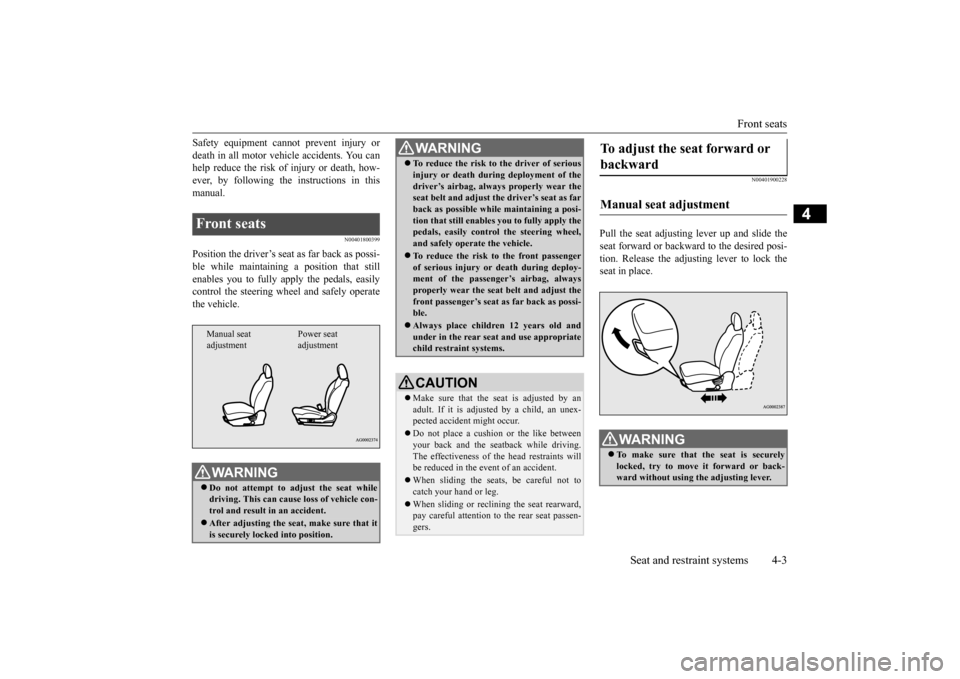
Pull the seat adjusting lever up and slide theseat forward or backward to the desired posi- tion. Release the adjusting lever to lock the seat in place.
Front seats
WA R N I N G Do not attempt to adjust the seat while driving. This can cause loss of vehicle con- trol and result in an accident. After adjusting the seat, make sure that it is securely locked into position.Manual seat adjustment
Power seat adjustment
To reduce the risk to the driver of serious injury or death during deployment of the driver’s airbag, always properly wear the seat belt and adjust th
e driver’s seat as far
back as possible while maintaining a posi-tion that still enables
you to fully apply the
pedals, easily control the steering wheel, and safely operate the vehicle. To reduce the risk to the front passenger of serious injury or death during deploy-ment of the passenger’s airbag, always properly wear the seat belt and adjust the front passenger’s seat as far back as possi-ble. Always place children 12 years old and under in the rear seat and use appropriate child restraint systems.CAUTION Make sure that the seat is adjusted by an adult. If it is adjusted by a child, an unex-pected accident might occur. Do not place a cushion or the like between your back and the seatback while driving. The effectiveness of the head restraints will be reduced in the event of an accident. When sliding the seats, be careful not to catch your hand or leg. When sliding or reclining the seat rearward, pay careful attention to the rear seat passen- gers.WA R N I N G
To adjust the seat forward or backward Manual seat adjustment
WA R N I N G To make sure that the seat is securely locked, try to move it forward or back- ward without using the adjusting lever.
BK0202700US.bo
ok 3 ページ 2013年3月28日 木曜日 午前11時54分
Page 64 of 384
5
Features and controlsBreak-in recommendation
s ...............................................................5-3
Keys .....................................................
.............................................5-3
Electronic immobilizer (Anti-theft starting system) .........................5-4 Keyless entry system (if so equipped) ..............................................5-7Free-hand Advanced Security Tran
smitter (F.A.S.T.-key) (if so
equipped)................................
..................................................... 5-11
Door locks........................
...............................................................5-28
Power door locks .............
...............................................................5-30
Child safety locks for r
ear door ....................
..................................5-31
Liftgate.......................................
.....................................................5-32
Inside liftgate releas
e ..............................................
........................5-33
Theft-alarm system ..........
...............................................................5-33
Power window control
............................................
........................5-36
Sunshade (if so equi
pped)..............................................................5-39
Parking brake ...................
...............................................................5-40
Steering wheel height and reach adjustment...................................5-41Inside rearview mirro
r ............................................
........................5-41
Outside rearview mirr
ors ................................................................5-43
Ignition switch .................
...............................................................5-44
Starting the engine .
.................................................
........................5-45
Manual transaxle (if so equipped) .................................................5-47 Continuously variable transmission
(CVT) (if so equipped).........5-49
Electronically controlled 4WD system (if so equipped)................5-554-wheel drive operation
..........................................
........................5-58
Inspection and maintenance following rough road operation.........5-60 Cautions on the handling of 4-wheel drive vehicles.......................5-60Service brake ...................
...............................................................5-61
Hill start assist........
.................................................
........................5-62
Brake assist system
................................................
......................... 5-64
Anti-lock braking syst
em ......................................
......................... 5-64
Electric power steering syst
em (EPS) ........................................... 5-66
Active stability control
(ASC) .....................
................................... 5-67
Cruise control (if so eq
uipped) ....................................................... 5-70
Tire pressure monitoring
system .................................................... 5-75
Rear-view camera (if so
equipped)..............
................................... 5-79
Instrument cluster .
.................................................
......................... 5-81
Multi-information disp
lay .....................................
......................... 5-82
Indicator light, warning light, and information screen display list
.................................................................
................................. 5-104
Indicators ..................................
.................................................... 5-116
Warning lights...........................
.................................................... 5-117
Information screen disp
lay .......................................................... 5-118
Combination headlights and dimmer switch ............................... 5-120 Headlight leveling switch (if so equipped).................................. 5-125Turn signal lever ...
.................................................
....................... 5-126
Hazard warning flasher
switch ..................................................... 5-127
Front fog light switch (if
so equipped) ........................................ 5-127
Wiper and washer swit
ch ......................................
....................... 5-127
Electric rear window def
ogger switch .......................................... 5-132
Horn switch ..............................
.................................................... 5-133
Link System (if so equi
pped) .....................
................................. 5-133
Bluetooth
® 2.0 interface (if so
equipped)..................................... 5-134
USB input terminal (if so
equipped) ........................................... 5-155
Sun visors .................................
.................................................... 5-158
12 V power outlets..........
.................................................
............. 5-159
Interior lights ..................
.................................................
............. 5-159
BK0202700US.bo
ok 1 ページ 2013年3月28日 木曜日 午前11時54分
Page 84 of 384
Free-hand Advanced Security Transmitt
er (F.A.S.T.-key) (if so equipped)
Features and controls 5-21
5
Wait a few seconds, and then press the engine switch to crank the engine again while depressing the brake pedal (CVT) or the clutch pedal (manual transaxle), butdo not push the accelerator pedal. If the engine fails to start, repeat these proce- dures. If the engine still will not start, con-tact your local Mitsubishi Motors dealer or a repair facility of your choice for assistance.
Startability of continuously variable trans- mission (CVT) vehicles with an ambienttemperature of
-22 °F (-30 °C) or lower
When the ambient temperature is -22 °F (-30 °C) or lower, it may not be possible to startfrom a standstill even with the selector lever in the “D” (DRIVE) position. This phenomenon occurs because the trans-axle has not warmed up sufficiently; it does not indicate a problem. If this occurs, place the selector lever in the “P” (PARK) positionand let the engine idle for at least 10 minutes. The transaxle will warm up, and you will be able to start normally.Do not leave the vehicle during warm-up operation.
N00568200014
1. Stop the vehicle.
2. Fully engage the parking brake while depressing the brake pedal. 3. On vehicles with a manual transaxle, press the engine switch to stop the engine,and then move the gearshift lever to the 1st (on a uphill) or “R” (Reverse) (on a downhill) position.On vehicles equipped with continuously variable transmission (CVT), move the selector lever to the “P” (PARK) position,and then press the engine switch to stopthe engine.
N00568300028
Insert the F.A.S.T.-key into the key slot in the glove box. Starting the engine and changing the operation mode should be now possible. Remove the F.A.S.T.-key from the key slot after starting the engine
or changing the oper-
ation mode.
Stopping the engine
WA R N I N G Do not operate the engine switch while driving except in an emergency. If the engine is stopped while driving, the brake servomechanism will cease to function andbraking efficiency will deteriorate. Also, the power steering system will not func- tion and it will require greater manualeffort to operate the steering. This could result in a serious accident.NOTE
If you have to bring the engine to an emer- gency stop while driving, press and hold the engine switch for 3 seconds or more, or press it quickly 3 times or more. The engine willstop and the operation mode will go to ACC. On vehicles equipped with continuously variable transmission (CVT), do not stop the engine with the selector lever in any position other than the “P” (PARK) position. If theengine is stopped with the selector lever in any position other than the “P” (PARK) posi- tion, the operation mode will go to ACC rather than OFF. Put the operation mode in OFF after placingthe selector lever in the “P” (PARK) posi- tion.
If the F.A.S.T.-key is not operat- ing properly
BK0202700US.bo
ok 21 ページ 2013年3月28日 木曜日 午前11時54分
Page 108 of 384
Starting the engine
Features and controls 5-45
5
Engages the starter. Release the key when the engine starts.It will auto
matically back to the
“ON” position.
N00539601084
After about 30 minutes has elapsed with the ignition switch in the “ACC” position, the function automatically cuts out the power forthe audio system and other electric devices that can be operated with that position. When the ignition switch is turned from the“ACC” position, the power is supplied again to those devices.
N00550900197
1. Set the selector lever to the “P” (PARK)position {continuously variable transmis- sion (CVT)}.2. Turn the key to the “OFF” position and remove it.
N00512600776
[For vehicles equipped with the Free-hand Advanced Security Transmitter (F.A.S.T.-key)] For information on operation for vehicles equipped with the Free-hand Advanced Secu-rity Transmitter (F.A.S.T.-key), refer to “Free-hand Advanced Security Transmitter (F.A.S.T.-key): Starting and stopping theengine” on page 5-19. [Except for vehicles equipped with the Free-hand Advanced Security Transmitter (F.A.S.T.-key)]
START
NOTE
Your vehicle is equipped with an electronic immobilizer. To start the engine, the ID code which the transponder inside the key sendsmust match the one registered to the immobi- lizer computer. (Refer to “Electronic immo- bilizer” on page 5-23.)
ACC power auto-cutout func- tion
NOTE
It is possible to modify functions as follows:
• The time until the power cuts out can be changed to about 60 minutes. • The ACC power auto-cutout function can be deactivated. For details, we recommend you to consult an authorized MITSUBISHI MOTORS dealer.
To remove the key
NOTE
CAUTION If the engine is stopped while driving, the brake servomechanism will cease to function and braking efficiency will deteriorate. Also, the power steering system will not function and it will require greater manual effort tooperate the steering. Do not leave the key in the “ON” position for a long time when the engine is not running, doing so will cause the battery to be dis- charged. Do not turn the key to the “START” position when the engine is running, doing so coulddamage the starter motor.
Starting the engine
BK0202700US.bo
ok 45 ページ 2013年3月28日 木曜日 午前11時54分
Page 129 of 384
Electric power steering system (EPS) 5-66 Features and controls
5
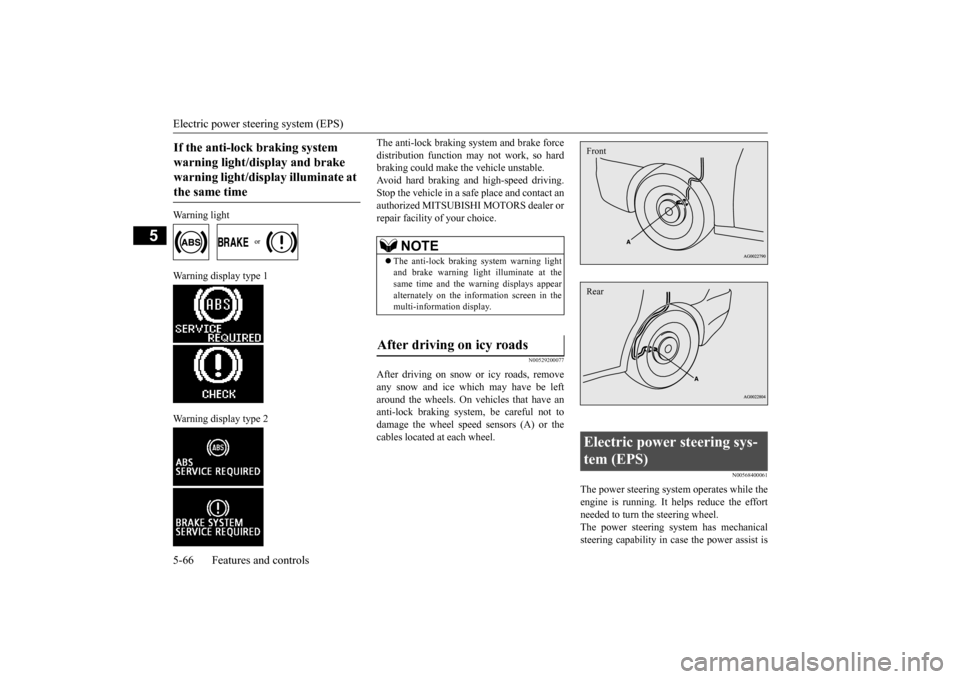
Warning light
Warning display type 1 Warning display type 2
The anti-lock braking system and brake force distribution function may not work, so hard braking could make the vehicle unstable. Avoid hard braking and high-speed driving.Stop the vehicle in a safe place and contact an authorized MITSUBISHI MOTORS dealer or repair facility of your choice.
N00529200077
After driving on snow or icy roads, removeany snow and ice which may have be left around the wheels. On vehicles that have an anti-lock braking system, be careful not todamage the wheel speed sensors (A) or the cables located at each wheel.
N00568400061
The power steering system operates while the engine is running. It helps reduce the effortneeded to turn the steering wheel. The power steering system has mechanical steering capability in case the power assist is
If the anti-lock braking system warning light/display and brake warning light/display illuminate at the same time
NOTE
The anti-lock braking system warning light and brake warning light illuminate at thesame time and the warning displays appear alternately on the information screen in the multi-information display.
After driving on icy roads
Electric power steering sys- tem (EPS) FrontRear
BK0202700US.bo
ok 66 ページ 2013年3月28日 木曜日 午前11時54分
Page 130 of 384
Active stability control (ASC) Features and controls 5-67
5
lost. If the power assist is lost for some rea- son, you will still be able to steer your vehi- cle, but you will notice it takes much more effort to steer. If this happens, have your vehi-cle inspected at an authorized Mitsubishi Motors dealer or a repair facility of your choice.
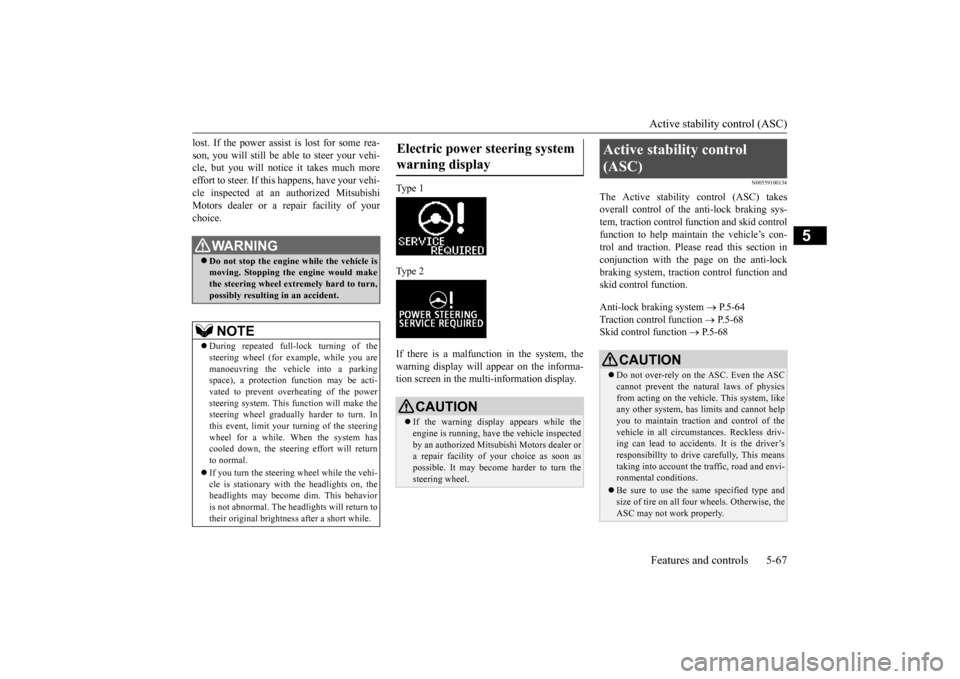
Type 1 Type 2 If there is a malfunction in the system, the warning display will appear on the informa-tion screen in the multi-information display.
N00559100134
The Active stability control (ASC) takesoverall control of the anti-lock braking sys-tem, traction control function and skid control function to help maintain the vehicle’s con- trol and traction. Please read this section inconjunction with the page on the anti-lock braking system, traction control function and skid control function. Anti-lock braking system
P.5-64
Traction control function
P.5-68
Skid control function
P.5-68
WA R N I N GDo not stop the engine while the vehicle is moving. Stopping the engine would makethe steering wheel extremely hard to turn, possibly resulting in an accident.NOTE
During repeated full-lock turning of the steering wheel (for example, while you are manoeuvring the vehicle into a parking space), a protection function may be acti-vated to prevent overheating of the power steering system. This function will make the steering wheel gradually harder to turn. Inthis event, limit your tu
rning of the steering
wheel for a while. When the system has cooled down, the steering effort will return to normal. If you turn the steering wheel while the vehi- cle is stationary with the headlights on, the headlights may become dim. This behavioris not abnormal. The headlights will return to their original brightness after a short while.
Electric power steering system warning display
CAUTION If the warning display appears while the engine is running, have the vehicle inspected by an authorized Mitsubishi Motors dealer ora repair facility of your choice as soon as possible. It may become harder to turn the steering wheel.
Active stability control (ASC)
CAUTION Do not over-rely on the ASC. Even the ASC cannot prevent the natural laws of physics from acting on the vehicle. This system, like any other system, has limits and cannot helpyou to maintain traction and control of the vehicle in all circumstances. Reckless driv- ing can lead to accidents. It is the driver’sresponsibillty to drive carefully, This means taking into account the traffic, road and envi- ronmental conditions. Be sure to use the same specified type and size of tire on all four wheels. Otherwise, the ASC may not work properly.
BK0202700US.bo
ok 67 ページ 2013年3月28日 木曜日 午前11時54分
Page 171 of 384
Indicator light, warning light, an
d information screen display list
5-108 Features and controls
5
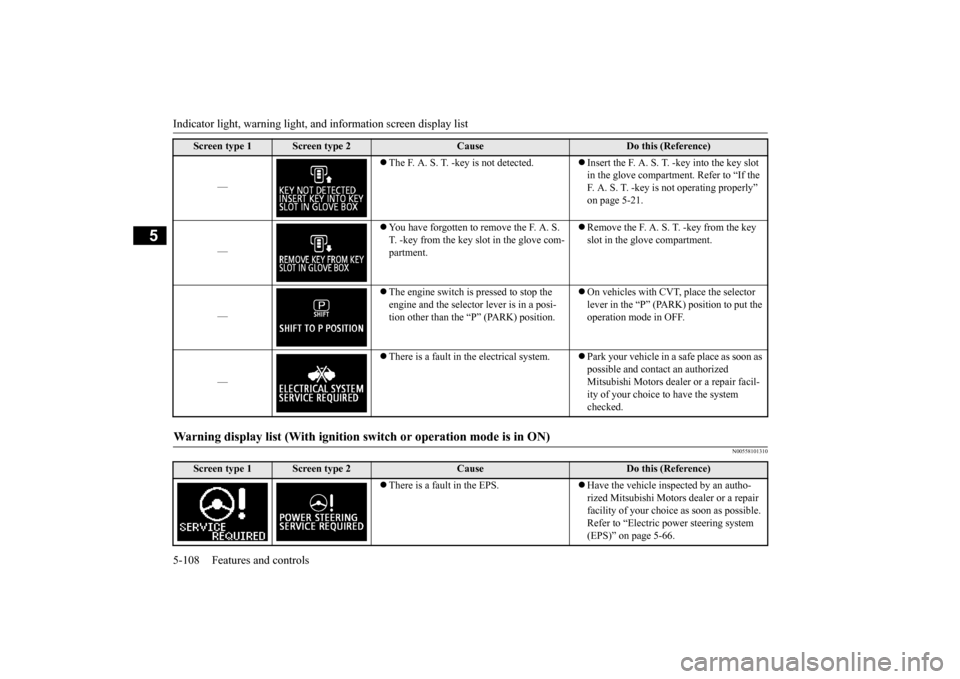
N00558101310
—
The F. A. S. T. -key is not detected.
Insert the F. A. S. T.
-key into the key slot
in the glove compartment. Refer to “If the F. A. S. T. -key is not operating properly” on page 5-21.
—
You have forgotten to remove the F. A. S. T. -key from the key slot in the glove com-partment.
Remove the F. A. S. T. -key from the key slot in the glove compartment.
—
The engine switch is pressed to stop the engine and the selector lever is in a posi-tion other than the “P” (PARK) position.
On vehicles with CVT, place the selector lever in the “P” (PARK) position to put the operation mode in OFF.
—
There is a fault in the electrical system.
Park your vehicle in a safe place as soon as possible and contact an authorized Mitsubishi Motors dealer or a repair facil- ity of your choice to have the system checked.
Warning display list (With ignition sw
itch or operation mode is in ON)
Screen type 1
Screen type 2
Cause
Do this (Reference)
There is a fault in the EPS.
Have the vehicle inspected by an autho- rized Mitsubishi Motors dealer or a repair facility of your choice as soon as possible. Refer to “Electric power steering system (EPS)” on page 5-66.
Screen type 1
Screen type 2
Cause
Do this (Reference)
BK0202700US.book
108 ページ 2013年3月28日 木曜日 午前11時54分
Page 196 of 384
Horn switch
Features and controls 5-133
5
After about 20 minutes of operation, the sys- tem will shut off automatically. To switch the defogger OFF before 20 min-utes have passed, press the switch again. The indicator light will go out and the defogger will turn off.If you need the defogger for more than 20minutes, press the switch
again. This will add
20 more minutes.
N00523801209
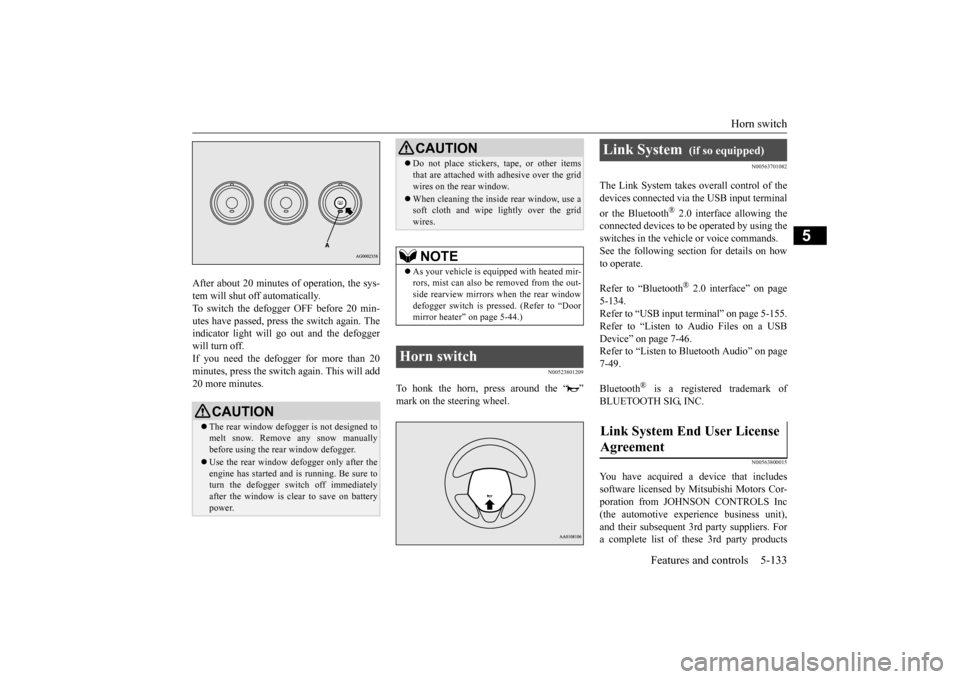
To honk the horn, press around the “ ” mark on the steering wheel.
N00563701082
The Link System takes overall control of thedevices connected via the USB input terminal or the Bluetooth
® 2.0 interface allowing the
connected devices to be operated by using theswitches in the vehicle or voice commands. See the following section for details on how to operate. Refer to “Bluetooth
® 2.0 interface” on page
5-134.Refer to “USB input terminal” on page 5-155. Refer to “Listen to Audio Files on a USB Device” on page 7-46.Refer to “Listen to Bluetooth Audio” on page 7-49. Bluetooth
® is a registered trademark of
BLUETOOTH SIG, INC.
N00563800015
You have acquired a device that includessoftware licensed by Mitsubishi Motors Cor- poration from JOHNSON CONTROLS Inc (the automotive experience business unit),and their subsequent 3rd party suppliers. For a complete list of these 3rd party products
CAUTION The rear window defogger is not designed to melt snow. Remove any snow manuallybefore using the rear window defogger. Use the rear window defogger only after the engine has started and is running. Be sure to turn the defogger switch off immediately after the window is clear to save on batterypower.
Do not place stickers, tape, or other items that are attached with adhesive over the grid wires on the rear window. When cleaning the inside rear window, use a soft cloth and wipe lightly over the grid wires.NOTE
As your vehicle is equipped with heated mir- rors, mist can also be removed from the out-side rearview mirrors when the rear window defogger switch is pressed. (Refer to “Door mirror heater” on page 5-44.)
Horn switch
CAUTION
Link System
(if so equipped)
Link System End User License Agreement
BK0202700US.book
133 ページ 2013年3月28日 木曜日 午前11時54分
Page 197 of 384
Bluetooth® 2.0 interface (if so equipped) 5-134 Features and controls
5
and their end user license agreements, please go to the following website. http://www.jciblueconnect.com/faq/fulldis- closure.pdf
N00563901215
The Bluetooth
® 2.0 interface allows for mak-
ing/receiving hands-free calls in the vehicle using a Bluetooth
® compatible cellular phone
based on the wireless communication tech- nology commonly known as Bluetooth
®. It
also allows the user to
play music, saved in a
Bluetooth
® music player, from the vehicle’s
speakers. The system is equipped with a voice recogni-tion function, which allows you to make hands-free calls by simple switch operations and voice command operations using adefined voice tree. The Bluetooth
® 2.0 interface can be used
when the ignition switch or the operation mode is in ON or ACC. Before you can use the Bluetooth
® 2.0 inter-
face, you must pair the Bluetooth
® device
and Bluetooth
® 2.0 interface. Refer to “Con-
necting the Bluetooth
® 2.0 interface and
Bluetooth
® device” on page 5-140.
Bluetooth
® is a registered trademark of
BLUETOOTH SIG, INC.
Steering control switch and microphone
P.5-135 Voice recognition function
P.5-136
Bluetooth
® 2.0 interface (if
so equipped)
WA R N I N G Although the Bluetooth
® 2.0 interface
allows you to make hands-free calls, if you choose to use the cellular phone whiledriving, you must not allow yourself to be distracted from the safe operation of your vehicle. Anything, including cellularphone usage, that distracts you from the safe operation of your vehicle increases your risk of an accident. Refer to and comply with all state and local laws in your area regarding cellularphone usage while driving.NOTE
If the ignition switch or the operation mode is left in ACC, the accessory power will automatically turn off after a certain period of time and you will no l
onger be able to use
the Bluetooth
® 2.0 interface. The accessory
power comes on again if the ignition switch or the engine switch is operated. Refer to“ACC power auto-cutout function” on page 5-45. The Bluetooth
® 2.0 interface cannot be used
if the Bluetooth
® device has a dead battery
or the device power is turned off.
Hands-free calls will not be possible if your phone does not have service available. If you place the Bluetooth
® device in the
luggage compartment, you may not be able to use the Bluetooth
® 2.0 interface.
Some Bluetooth
® devices are not compatible
with the Bluetooth
® 2.0 interface.
You can confirm the Link System software version by pressing the HANG-UP button 3 times (press and hold 2 times and then pressbriefly) within 10 seconds. For detail of the Bluetooth
® 2.0 interface,
refer to the following web site: [For vehicles sold in U.S.A.]You can see to access the MITSUBISHI MOTORS NORTH AMERICA web site. [For vehicles sold in Canada and MEXICO]You can see to access via the MITSUBISHI MOTORS web site. Please read and agree the “Warning aboutLinks to the Web Site
s of Other Companies”
because it connects other than MITSUBISHI MOTORS web site.http://www.mitsubishi-motors.com/en/prod- ucts/index.html Software updates by cellular phone/digital audio device manufacturers may change/alter device connectivity.NOTE
BK0202700US.book
134 ページ 2013年3月28日 木曜日 午前11時54分
Page 238 of 384
Loading information Driving safety 6-7
6
More effort could be required to turn the steering wheel.Refer to “Electric power steering system (EPS)” on page 5-66. Always remove the key from the ignition switch and lock all doors and the liftgate when leaving the vehicle unattended.Always try to park your vehicle in a well lit area.
N00629900408
It is very importan
t to know how much
weight your vehicle can carry. This weight is called the vehicle capacity weight andincludes the weight of all occupants, cargo (including the roof load), non-factory-
installed options, if any, being towed. The tire and loading information placard located on the driver’s door sill of your vehicle will show how much weight it may properly carry. It is important to fami
liarize yourself with the
following terms before loading your vehicle: Vehicle maximum load on the tire: load on an individual tire that is determined by distributing to each axle its share of the maximum loaded vehicle weight anddividing by two. Vehicle normal load on the tire: load on an individual tire that is determined bydistributing to each axle its share of the curb weight, accessory weight, and nor- mal occupant weight and dividing by two. Maximum loaded vehicle weight: the sum of - (a) Curb weight;(b) Accessory weight; (c) Vehicle capacity weight; and (d) Production options weight.
Curb weight: the weight of a motor vehi- cle with standard equipment including the maximum capacity of fuel, oil, and cool- ant. Accessory weight: the combined weight (in excess of those standard items which may be replaced) of automatic transmis-sion, power steering, power brakes, power windows, power seats, radio, and heater, to the extent that these items are availableas factory- installed equipment (whetherinstalled or not). Vehicle capacity weight: the rated cargo and luggage load plus 150 lbs (68 kg)
*
times the vehicle’s designated seating capacity. Production options weight: the combined weight of those installed regular produc- tion options weighing over 5 lbs (2.3 kg) in excess of those standard items whichthey replace, not previously considered in curb weight or accessory weight, includ- ing heavy duty brakes, ride levelers, roofrack, heavy duty battery, and special trim. Normal occupant weight: 150 lbs (68 kg)
* times the number of specified
occupants. (In your vehicle the number is 3)
WA R N I N G Do not park your vehicle in areas where combustible materials such as dry grass or leaves can come in contact with a hot exhaust, since a fire could occur.
Do not keep the steering wheel fully turned for a long time When leaving the vehicle Loading information
WA R N I N G Never overload your vehicle. Overloading can damage your vehicle, adversely affectvehicle performance, including handling and braking, cause tire failure, and result in an accident.
BK0202700US.bo
ok 7 ページ 2013年3月28日 木曜日 午前11時54分