warning light MITSUBISHI PAJERO IV 2011 Owner's Manual
[x] Cancel search | Manufacturer: MITSUBISHI, Model Year: 2011, Model line: PAJERO IV, Model: MITSUBISHI PAJERO IV 2011Pages: 377, PDF Size: 29.43 MB
Page 163 of 377

When driving downhill
It is
important
to take advantage of the engine brak-
ing by shifting to a lower shift position while driv-
ing on steep downhill roads in order to prevent the
brakes from overheating. WARNING
l Do not
leave
any objects near the brake
pedal or let a floor mat slide under it; do-
ing so could prevent the full pedal stroke
that would be necessary in an emergency.
Make sure that the pedal can be operated
freely at all times. Make sure the floor
mat is securely held in place.
Brake pads l Avoid hard braking situations.
New
brakes need
to be broken-in by moder-
ate use for the first 200 km (125 miles).
l The disc brakes are provided with a warning
device which emits a shrieking metallic
sound while braking if the brake pads have
reached their wear limit.
If you hear this sound, have the brake pads re-
placed immediately. WARNING
l Driving with worn
brake pads will make
it harder to stop, and can cause an acci-
dent. Brake assist system
E00627000376
The brake assist system is a device assisting drivers
who cannot depress
the brake pedal firmly when it
is necessary to do so (such as in emergency stop sit-
uations) and provides greater braking force.
If the brake pedal is depressed suddenly, the brakes
will be applied with more force than usual. CAUTION
l
The brake
assist
system is not a device de-
signed to exercise braking force greater
than its capacity. Make sure to always
keep a sufficient distance between vehi-
cles in front of you without relying too
much on the brake assist system.
NOTE l Once
the brake
assist system is operational,
it maintains great braking force even if the
brake pedal is lightly released.
To stop its operation, completely remove
your foot from the brake pedal.
l When the brake assist system is in use while
driving, you may feel the brake pedal at-
tempt to resist, the pedal moves in small mo-
tions in conjunction with the operation noise,
or the vehicle body and the steering wheel vi-
brate. This occurs when the brake assist sys-
tem is operating normally and does not indi-
cate faulty operation. Continue to firmly de-
press the brake pedal. l
When
the
anti-lock
brake system warning
lamp is illuminated, the brake assist system
is not functioning. Starting and driving
4-38
4
OBKE12E1
Page 165 of 377
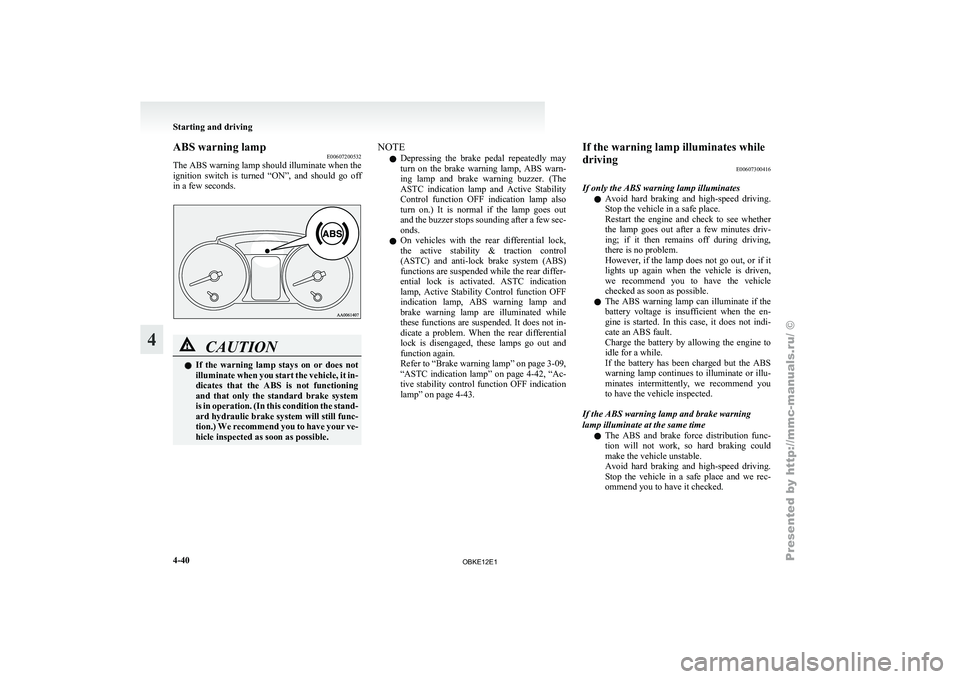
ABS warning lamp
E00607200532
The ABS warning
lamp should illuminate when the
ignition switch is turned “ON”, and should go off
in a few seconds. CAUTION
l
If the
warning
lamp stays on or does not
illuminate when you start the vehicle, it in-
dicates that the ABS is not functioning
and that only the standard brake system
is in operation. (In this condition the stand-
ard hydraulic brake system will still func-
tion.) We recommend you to have your ve-
hicle inspected as soon as possible. NOTE
l Depressing
the brake
pedal repeatedly may
turn on the brake warning lamp, ABS warn-
ing lamp and brake warning buzzer. (The
ASTC indication lamp and Active Stability
Control function OFF indication lamp also
turn on.) It is normal if the lamp goes out
and the buzzer stops sounding after a few sec-
onds.
l On vehicles with the rear differential lock,
the active stability & traction control
(ASTC) and anti-lock brake system (ABS)
functions are suspended while the rear differ-
ential lock is activated. ASTC indication
lamp, Active Stability Control function OFF
indication lamp, ABS warning lamp and
brake warning lamp are illuminated while
these functions are suspended. It does not in-
dicate a problem. When the rear differential
lock is disengaged, these lamps go out and
function again.
Refer to “Brake warning lamp” on page 3-09,
“ASTC indication lamp” on page 4-42, “Ac-
tive stability control function OFF indication
lamp” on page 4-43. If the warning lamp illuminates while
driving
E00607300416
If only the ABS warning lamp illuminates l Avoid
hard
braking
and high-speed driving.
Stop the vehicle in a safe place.
Restart the engine and check to see whether
the lamp goes out after a few minutes driv-
ing; if it then remains off during driving,
there is no problem.
However, if the lamp does not go out, or if it
lights up again when the vehicle is driven,
we recommend you to have the vehicle
checked as soon as possible.
l The ABS warning lamp can illuminate if the
battery voltage is insufficient when the en-
gine is started. In this case, it does not indi-
cate an ABS fault.
Charge the battery by allowing the engine to
idle for a while.
If the battery has been charged but the ABS
warning lamp continues to illuminate or illu-
minates intermittently, we recommend you
to have the vehicle inspected.
If the ABS warning lamp and brake warning
lamp illuminate at the same time l The ABS and brake force distribution func-
tion will not work, so hard braking could
make the vehicle unstable.
Avoid hard braking and high-speed driving.
Stop the vehicle in a safe place and we rec-
ommend you to have it checked. Starting and driving
4-40
4
OBKE12E1
Page 184 of 377
Ventilators
.................................................................................... 5-02
Front automatic air conditioning ..................................................5-03
Rear air conditioning* .................................................................. 5-10
Important operation tips for the air conditioning.......................... 5-11
Air purifier (with deodorizing function) .......................................5-12
LW/MW/FM electronic tuning radio with CD player* ................5-12
LW/MW/FM electronic tuning radio with CD autoch- anger*
....................................................................................... 5-26
To play tracks from USB device* ................................................5-43
To play tracks from a Bluetooth ®
device (vehicles with
Bluetooth ®
2.0 interface).......................................................... 5-53
To use the external audio input function* ....................................5-56
To listen to a disc in the rear-seat display (vehicles with rear-seat display) .............................................................. 5-57
Steering wheel remote control switch* ........................................5-57
Error codes.................................................................................... 5-59
Error codes (iPod)......................................................................... 5-61
Error codes (USB memory device) ..............................................5-63
Handling of compact discs ........................................................... 5-65
Antenna......................................................................................... 5-66
Link System* ................................................................................ 5-67
Bluetooth ®
2.0 interface* ............................................................. 5-67
USB input terminal* ..................................................................... 5-82
Sun visors..................................................................................... 5-84
Ashtray*........................................................................................ 5-85
Cigarette lighter* .......................................................................... 5-86
Accessory socket.......................................................................... 5-86
Interior lamps ................................................................................5-87
Storage spaces............................................................................... 5-91
Cup holder.................................................................................... 5-94 Rear shelf (3-door models)*
......................................................... 5-95
Cargo area cover (5-door models)* ..............................................5-96
Convenient hooks (5-door models)* ............................................5-96
Luggage hooks.............................................................................. 5-97
Coat hooks.................................................................................... 5-97
Installation position for warning triangle .....................................5-98For pleasant driving
5
OBKE12E1
Page 293 of 377
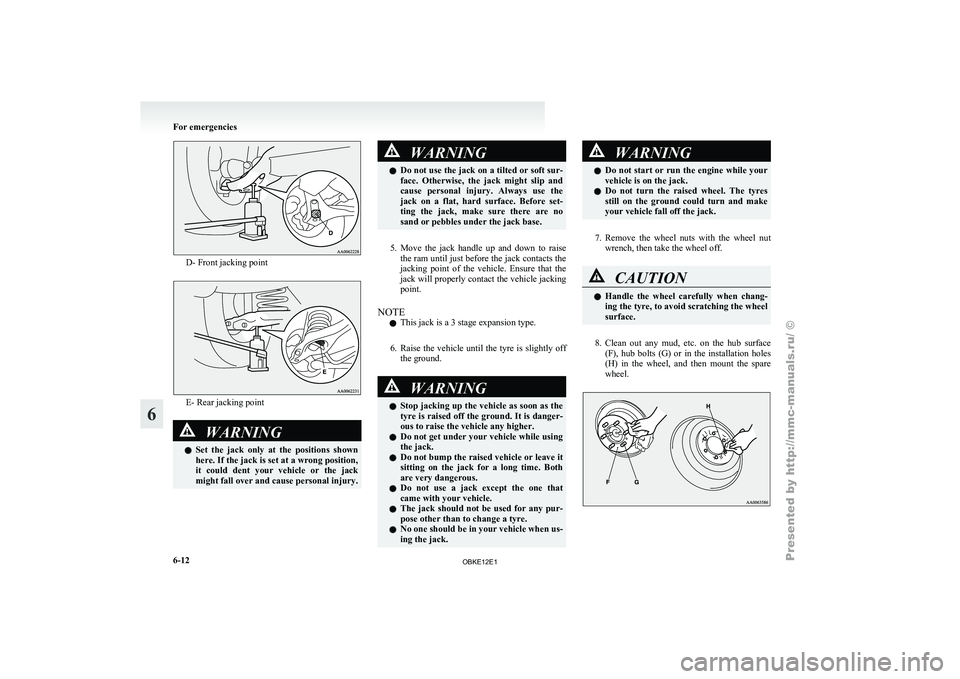
D- Front jacking point
E- Rear jacking point
WARNING
l Set the
jack only at the positions shown
here. If the jack is set at a wrong position,
it could dent your vehicle or the jack
might fall over and cause personal injury. WARNING
l Do not use
the jack on a tilted or soft sur-
face. Otherwise, the jack might slip and
cause personal injury. Always use the
jack on a flat, hard surface. Before set-
ting the jack, make sure there are no
sand or pebbles under the jack base.
5. Move the jack handle up and down to raise
the ram
until just before the jack contacts the
jacking point of the vehicle. Ensure that the
jack will properly contact the vehicle jacking
point.
NOTE l This jack is a 3 stage expansion type.
6. Raise the vehicle until the tyre is slightly off the ground. WARNING
l Stop jacking
up
the vehicle as soon as the
tyre is raised off the ground. It is danger-
ous to raise the vehicle any higher.
l Do not get under your vehicle while using
the jack.
l Do not bump the raised vehicle or leave it
sitting on the jack for a long time. Both
are very dangerous.
l Do not use a jack except the one that
came with your vehicle.
l The jack should not be used for any pur-
pose other than to change a tyre.
l No one should be in your vehicle when us-
ing the jack. WARNING
l Do not start
or run the engine while your
vehicle is on the jack.
l Do not turn the raised wheel. The tyres
still on the ground could turn and make
your vehicle fall off the jack.
7. Remove the wheel nuts with the wheel nut
wrench, then take the wheel off. CAUTION
l
Handle the
wheel
carefully when chang-
ing the tyre, to avoid scratching the wheel
surface.
8. Clean out any mud, etc. on the hub surface
(F), hub
bolts (G) or in the installation holes
(H) in the wheel, and then mount the spare
wheel. For emergencies
6-12
6
OBKE12E1
Page 294 of 377
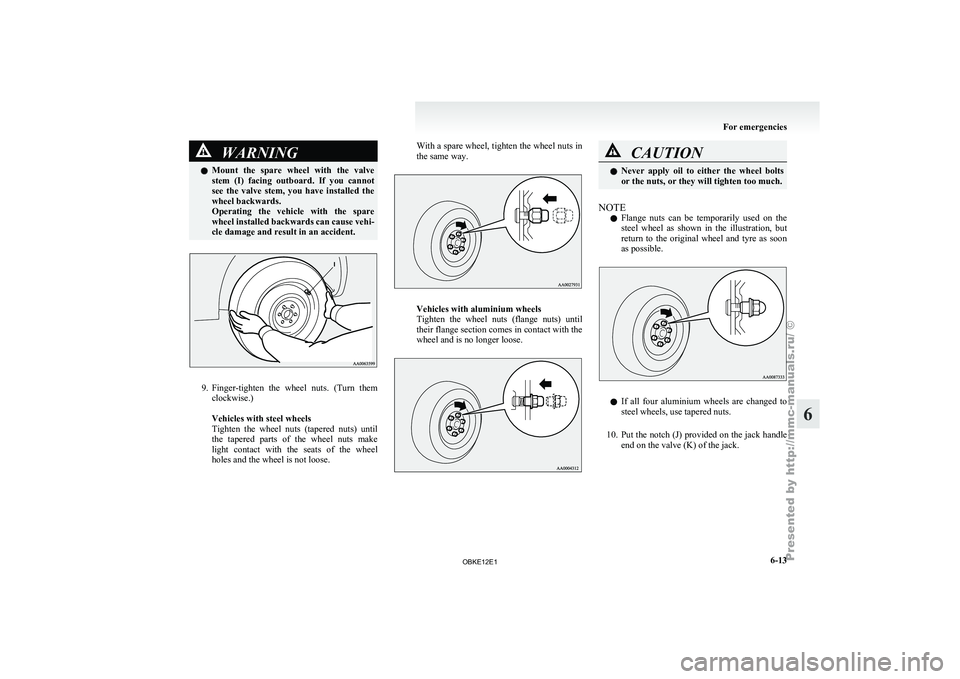
WARNING
l Mount the spare wheel with the valve
stem (I) facing outboard. If you cannot
see the valve stem, you have installed the
wheel backwards.
Operating the vehicle with the spare
wheel installed backwards can cause vehi-
cle damage and result in an accident. 9. Finger-tighten the
wheel
nuts. (Turn them
clockwise.)
Vehicles with steel wheels
Tighten the wheel nuts (tapered nuts) until
the tapered parts of the wheel nuts make
light contact with the seats of the wheel
holes and the wheel is not loose. With a spare wheel, tighten the wheel nuts in
the same way.
Vehicles with aluminium wheels
Tighten the
wheel
nuts (flange nuts) until
their flange section comes in contact with the
wheel and is no longer loose. CAUTION
l
Never apply oil
to either the wheel bolts
or the nuts, or they will tighten too much.
NOTE l Flange
nuts can
be temporarily used on the
steel wheel as shown in the illustration, but
return to the original wheel and tyre as soon
as possible. l
If all
four
aluminium wheels are changed to
steel wheels, use tapered nuts.
10. Put the notch (J) provided on the jack handle end on the valve (K) of the jack. For emergencies
6-13 6
OBKE12E1
Page 315 of 377
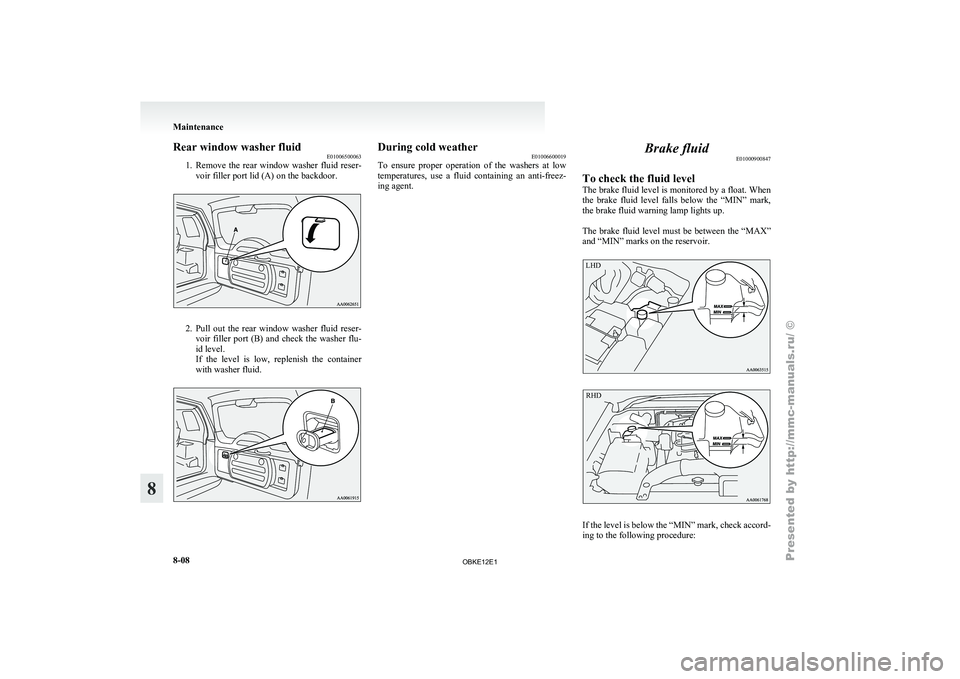
Rear window washer fluid
E01006500063
1. Remove the rear
window washer fluid reser-
voir filler port lid (A) on the backdoor. 2. Pull out the rear window washer fluid reser-
voir filler
port (B) and check the washer flu-
id level.
If the level is low, replenish the container
with washer fluid. During cold weather
E01006600019
To ensure proper
operation of the washers at low
temperatures, use a fluid containing an anti-freez-
ing agent. Brake fluid
E01000900847
To check the fluid level
The brake fluid
level is monitored by a float. When
the brake fluid level falls below the “MIN” mark,
the brake fluid warning lamp lights up.
The brake fluid level must be between the “MAX”
and “MIN” marks on the reservoir.
LHD
RHD If the level is below the “MIN” mark, check accord-
ing to the following procedure:Maintenance
8-08
8
OBKE12E1
Page 328 of 377
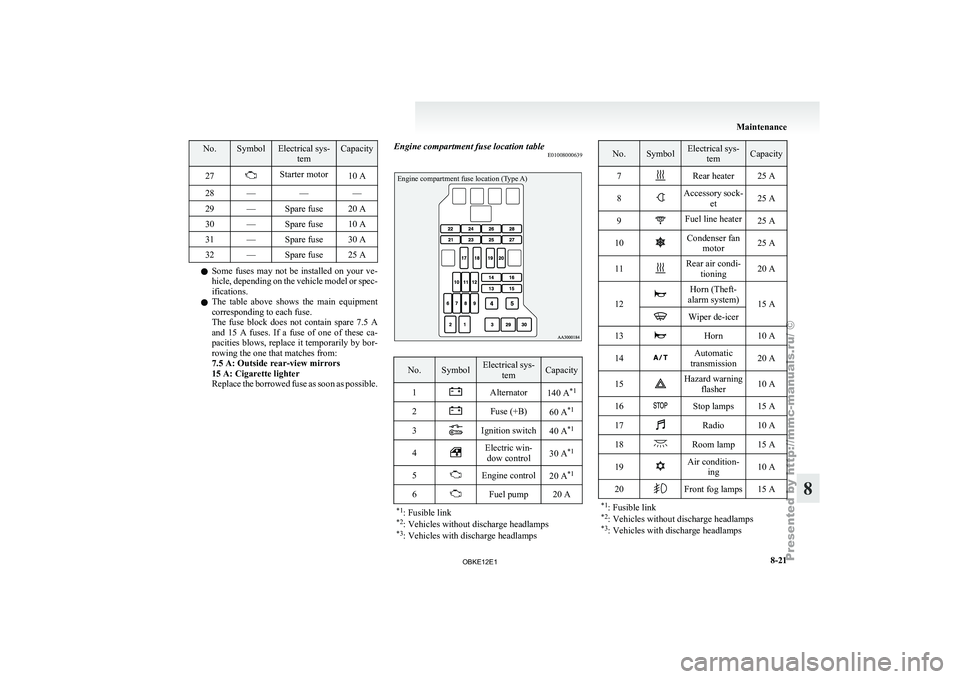
No. Symbol Electrical sys-
tem Capacity
27 Starter motor
10 A
28 — — —
29 — Spare fuse 20 A
30 — Spare fuse 10 A
31 — Spare fuse 30 A
32 — Spare fuse 25 A l
Some fuses
may not be installed on your ve-
hicle, depending on the vehicle model or spec-
ifications.
l The table above shows the main equipment
corresponding to each fuse.
The fuse block does not contain spare 7.5 A
and 15 A fuses. If a fuse of one of these ca-
pacities blows, replace it temporarily by bor-
rowing the one that matches from:
7.5 A: Outside rear-view mirrors
15 A: Cigarette lighter
Replace the borrowed fuse as soon as possible. Engine compartment fuse location table
E01008000639
Engine compartment fuse location (Type A) No. Symbol Electrical sys-
tem Capacity
1 Alternator
140 A*1
2 Fuse (+B)
60 A*1
3 Ignition switch
40 A*1
4 Electric win-
dow control 30 A
*1
5 Engine control
20 A*1
6 Fuel pump 20 A
*1 : Fusible link
*2 : Vehicles without discharge headlamps
*3 : Vehicles with discharge headlamps No. Symbol Electrical sys-
tem Capacity
7 Rear heater 25 A
8 Accessory sock-
et 25 A
9 Fuel line heater
25 A
10 Condenser fan
motor 25 A
11 Rear air condi-
tioning 20 A
12 Horn (Theft-
alarm system) 15 A Wiper de-icer
13 Horn 10 A
14 Automatic
transmission 20 A
15 Hazard warning
flasher 10 A
16 Stop lamps 15 A
17 Radio 10 A
18 Room lamp 15 A
19 Air condition-
ing 10 A
20 Front fog lamps 15 A
*1 : Fusible link
*2 : Vehicles without discharge headlamps
*3 : Vehicles with discharge headlamps Maintenance
8-21 8
OBKE12E1
Page 358 of 377
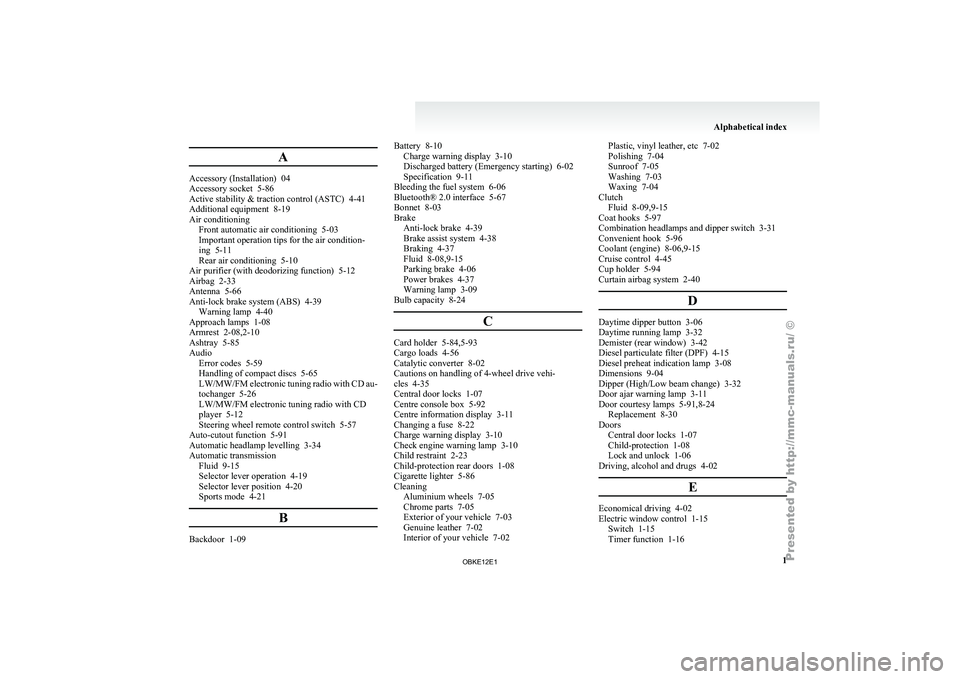
A
Accessory (Installation) 04
Accessory socket 5-86
Active stability & traction control (ASTC) 4-41
Additional equipment
8-19
Air conditioning Front automatic air conditioning
5-03
Important operation tips for the air condition-
ing 5-11
Rear air conditioning 5-10
Air purifier (with deodorizing function) 5-12
Airbag 2-33
Antenna 5-66
Anti-lock brake system (ABS) 4-39 Warning lamp 4-40
Approach lamps 1-08
Armrest 2-08,2-10
Ashtray 5-85
Audio Error codes 5-59
Handling of compact discs 5-65
LW/MW/FM electronic tuning radio with CD au-
tochanger 5-26
LW/MW/FM electronic tuning radio with CD
player 5-12
Steering wheel remote control switch 5-57
Auto-cutout function 5-91
Automatic headlamp levelling 3-34
Automatic transmission Fluid 9-15
Selector lever operation 4-19
Selector lever position 4-20
Sports mode 4-21
BBackdoor 1-09 Battery 8-10
Charge warning display 3-10
Discharged battery (Emergency starting) 6-02
Specification 9-11
Bleeding the fuel system
6-06
Bluetooth® 2.0 interface 5-67
Bonnet 8-03
Brake Anti-lock brake 4-39
Brake assist system 4-38
Braking 4-37
Fluid 8-08,9-15
Parking brake 4-06
Power brakes 4-37
Warning lamp 3-09
Bulb capacity 8-24
C Card holder 5-84,5-93
Cargo loads 4-56
Catalytic converter 8-02
Cautions on handling of 4-wheel drive vehi-
cles 4-35
Central door locks 1-07
Centre console box 5-92
Centre information display
3-11
Changing a fuse 8-22
Charge warning display 3-10
Check engine warning lamp
3-10
Child restraint 2-23
Child-protection rear doors 1-08
Cigarette lighter 5-86
Cleaning Aluminium wheels 7-05
Chrome parts 7-05
Exterior of your vehicle 7-03
Genuine leather 7-02
Interior of your vehicle 7-02 Plastic, vinyl leather, etc 7-02
Polishing 7-04
Sunroof 7-05
Washing 7-03
Waxing 7-04
Clutch Fluid 8-09,9-15
Coat hooks 5-97
Combination headlamps and dipper switch 3-31
Convenient hook 5-96
Coolant (engine) 8-06,9-15
Cruise control 4-45
Cup holder 5-94
Curtain airbag system 2-40
D Daytime dipper button 3-06
Daytime running lamp 3-32
Demister (rear window) 3-42
Diesel particulate filter (DPF)
4-15
Diesel preheat indication lamp
3-08
Dimensions 9-04
Dipper (High/Low beam change) 3-32
Door ajar warning lamp 3-11
Door courtesy lamps 5-91,8-24 Replacement 8-30
Doors Central door locks 1-07
Child-protection 1-08
Lock and unlock 1-06
Driving, alcohol and drugs 4-02
E Economical driving 4-02
Electric window control 1-15
Switch 1-15
Timer function 1-16 Alphabetical index
1
OBKE12E1