change time MITSUBISHI PAJERO IV 2011 Service Manual
[x] Cancel search | Manufacturer: MITSUBISHI, Model Year: 2011, Model line: PAJERO IV, Model: MITSUBISHI PAJERO IV 2011Pages: 377, PDF Size: 29.43 MB
Page 263 of 377

6. The voice guide will say “Please wait, eras-
ing the handsfree system phone book” and
then the system will delete all data in the
phone book.
When the deletion is complete, the voice
guide will say “Hands-free system phone
book erased” and then the system will return
to the main menu.
Mobile phone book E00763900048
All entries in the phone book stored in the cellular
phone can be
transferred in a batch and registered
in the mobile phone book.
Up to 7 mobile phone books, each containing up to
1,000 names, can be registered.
The Bluetooth ®
2.0 interface automatically con-
verts from text to voice the names registered in the
transferred phone book entries, and creates names.
NOTE
l Only the mobile phone book transferred
from the connected cellular phone can be
used with that cellular phone.
l You cannot change the names and telephone
numbers in the phone book entries registered
in the mobile phone book. You cannot select
and delete specific phone book entries, either.
To change or delete any of the above, change
the applicable information in the source
phone book of the cellular phone and then
transfer the phone book again.
To import a devices phone book
Follow the steps below to transfer to the mobile
phone book the phone book stored in the cellular
phone. NOTE
l Transfer should be completed while the vehi-
cle is parked.
Before
transferring, make
sure that the vehi-
cle is parked in a safe location.
l The already stored phone book in the mobile
phone book is overwritten by the stored
phone book in the cellular phone.
l All or part of data may not be transferred,
even when the cellular phone supports Blue-
tooth ®
, depending on the compatibility of the
device.
l Only a home, a work, and a mobile number
can be imported.
l The maximum supported telephone number
length is 19 digits. Any telephone number of
20 digits or more will be truncated to the
first 19 digits.
l If telephone numbers contain characters oth-
er than 0 to 9, *, # or +, these characters are
deleted before the transfer.
l For the connection settings on the cellular
phone side, refer to the instructions for the
cellular phone.
1. Press the SPEECH button.
2. Say “Phone book.”
3. The voice guide will say “Select one of the following: new entry, edit number, edit
name, list names, delete, erase all, or import
contact.” Say “Import contact.”
4. The voice guide will say “Would you like to import a single entry or all contacts?” Say
“All contacts.”
5. The voice guide will say “Importing the con- tact list from the mobile phone book. This
may take several minutes to complete.
Would you like to continue?” Answer “Yes,”
transferring to the mobile phone book the phone book stored in the cellular phone will
start.
Answer “No,” to return to the main menu.
NOTE l The transfer
may
take some time to complete
depending on the number of contacts.
l If the Bluetooth ®
2.0 interface could not be
connected to the Bluetooth ®
compatible cel-
lular phone, the voice guide will say “Unable
to transfer contact list from phone” and then
the system will return to the main menu.
l If you press the HANG-UP button or press
and hold the SPEECH button during the data
transfer, the transfer will be cancelled and
the system will return to the main menu.
l If an error occurs during the data transfer, all
transfer will be cancelled and the voice guide
will say “Unable to complete the phone book
import” and then the system will return to
the main menu.
l If there are no contacts in the phone book,
the voice guide will say “There are no con-
tacts on the connected phone.”
6. When the transfer is complete, the voice guide will say “Import complete” and then
the system will return to the main menu. For pleasant driving
5-80
5
OBKE12E1
Page 290 of 377

To use the jack handle
E00802400023
1. While pushing the
snap pin (A), remove the
inside handle (B). 2. With the snap pin (C) pushed, insert the in-
side handle until it is locked. How to change a tyre
E00801201601
Before changing a
tyre, first stop your vehicle in a
safe, flat location. 1. Park the vehicle on level and stable ground.
2. Set the parking brake firmly.
3. On vehicles with M/T, turn the ignitionswitch to the “LOCK” position, move the
gearshift lever to the “R” (Reverse) position.
On vehicles with A/T, move the selector lev-
er to the “P” (PARK) position, turn the igni-
tion key to the “LOCK” position.
4. Turn on the hazard warning flashers and set up a warning triangle, flashing signal lamp,
etc., at an adequate distance from the vehi-
cle, and have all your passengers leave the ve-
hicle.
5. To prevent the vehicle from rolling when it is raised on the jack, place chocks or blocks
(A) at the tyre that is diagonally opposite
from the tyre (B) you are changing. WARNING
l Be sure to
apply chocks or blocks to the
correct tyre when jacking up the vehicle.
If the vehicle moves while jacked up, the
jack could slip out of position, leading to
an accident.
NOTE l The
chocks shown
in the illustration do not
come with your vehicle. It is recommended
that you keep one in the vehicle for use if nee-
ded.
l If chocks are not available, use stones or any
other objects that are large enough to hold
the wheel in position.
6. Get the spare wheel, jack, jack handle and wheel nut wrench ready. Refer to “Tool, jack
and jack handle” on page 6-07.
Spare wheel information E00803600266
Check the air pressure of the spare tyre frequently
and make sure
it is ready for emergency use at any
time.
Maintaining the spare wheel at the highest speci-
fied air pressure will ensure that it can always be
used under any conditions (city/high-speed driving,
varying load weight, etc.). For emergencies
6-09 6
OBKE12E1
Page 293 of 377
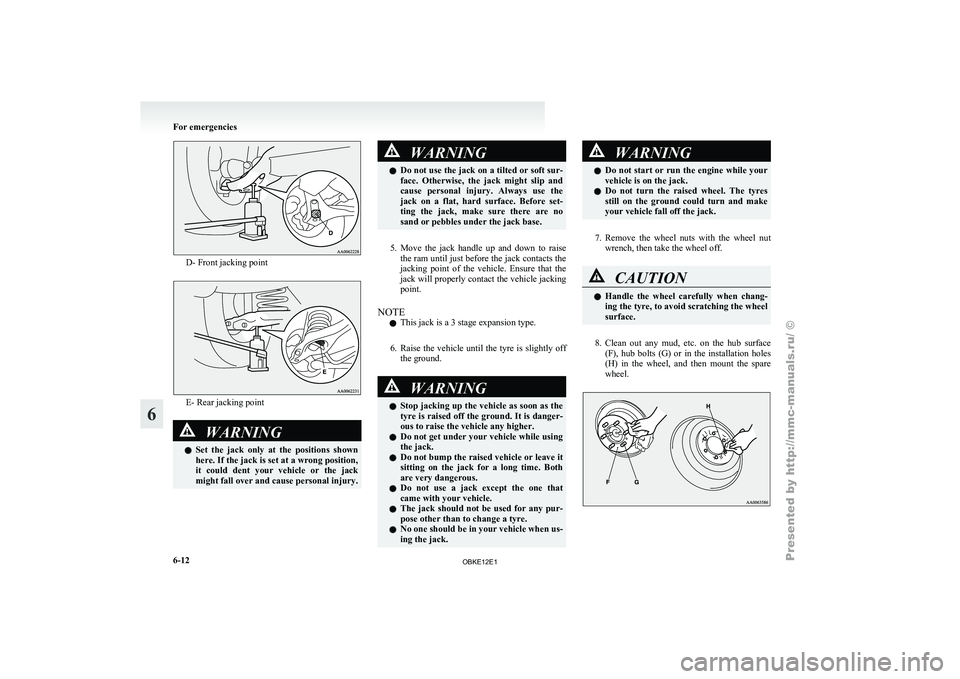
D- Front jacking point
E- Rear jacking point
WARNING
l Set the
jack only at the positions shown
here. If the jack is set at a wrong position,
it could dent your vehicle or the jack
might fall over and cause personal injury. WARNING
l Do not use
the jack on a tilted or soft sur-
face. Otherwise, the jack might slip and
cause personal injury. Always use the
jack on a flat, hard surface. Before set-
ting the jack, make sure there are no
sand or pebbles under the jack base.
5. Move the jack handle up and down to raise
the ram
until just before the jack contacts the
jacking point of the vehicle. Ensure that the
jack will properly contact the vehicle jacking
point.
NOTE l This jack is a 3 stage expansion type.
6. Raise the vehicle until the tyre is slightly off the ground. WARNING
l Stop jacking
up
the vehicle as soon as the
tyre is raised off the ground. It is danger-
ous to raise the vehicle any higher.
l Do not get under your vehicle while using
the jack.
l Do not bump the raised vehicle or leave it
sitting on the jack for a long time. Both
are very dangerous.
l Do not use a jack except the one that
came with your vehicle.
l The jack should not be used for any pur-
pose other than to change a tyre.
l No one should be in your vehicle when us-
ing the jack. WARNING
l Do not start
or run the engine while your
vehicle is on the jack.
l Do not turn the raised wheel. The tyres
still on the ground could turn and make
your vehicle fall off the jack.
7. Remove the wheel nuts with the wheel nut
wrench, then take the wheel off. CAUTION
l
Handle the
wheel
carefully when chang-
ing the tyre, to avoid scratching the wheel
surface.
8. Clean out any mud, etc. on the hub surface
(F), hub
bolts (G) or in the installation holes
(H) in the wheel, and then mount the spare
wheel. For emergencies
6-12
6
OBKE12E1
Page 358 of 377
A
Accessory (Installation) 04
Accessory socket 5-86
Active stability & traction control (ASTC) 4-41
Additional equipment
8-19
Air conditioning Front automatic air conditioning
5-03
Important operation tips for the air condition-
ing 5-11
Rear air conditioning 5-10
Air purifier (with deodorizing function) 5-12
Airbag 2-33
Antenna 5-66
Anti-lock brake system (ABS) 4-39 Warning lamp 4-40
Approach lamps 1-08
Armrest 2-08,2-10
Ashtray 5-85
Audio Error codes 5-59
Handling of compact discs 5-65
LW/MW/FM electronic tuning radio with CD au-
tochanger 5-26
LW/MW/FM electronic tuning radio with CD
player 5-12
Steering wheel remote control switch 5-57
Auto-cutout function 5-91
Automatic headlamp levelling 3-34
Automatic transmission Fluid 9-15
Selector lever operation 4-19
Selector lever position 4-20
Sports mode 4-21
BBackdoor 1-09 Battery 8-10
Charge warning display 3-10
Discharged battery (Emergency starting) 6-02
Specification 9-11
Bleeding the fuel system
6-06
Bluetooth® 2.0 interface 5-67
Bonnet 8-03
Brake Anti-lock brake 4-39
Brake assist system 4-38
Braking 4-37
Fluid 8-08,9-15
Parking brake 4-06
Power brakes 4-37
Warning lamp 3-09
Bulb capacity 8-24
C Card holder 5-84,5-93
Cargo loads 4-56
Catalytic converter 8-02
Cautions on handling of 4-wheel drive vehi-
cles 4-35
Central door locks 1-07
Centre console box 5-92
Centre information display
3-11
Changing a fuse 8-22
Charge warning display 3-10
Check engine warning lamp
3-10
Child restraint 2-23
Child-protection rear doors 1-08
Cigarette lighter 5-86
Cleaning Aluminium wheels 7-05
Chrome parts 7-05
Exterior of your vehicle 7-03
Genuine leather 7-02
Interior of your vehicle 7-02 Plastic, vinyl leather, etc 7-02
Polishing 7-04
Sunroof 7-05
Washing 7-03
Waxing 7-04
Clutch Fluid 8-09,9-15
Coat hooks 5-97
Combination headlamps and dipper switch 3-31
Convenient hook 5-96
Coolant (engine) 8-06,9-15
Cruise control 4-45
Cup holder 5-94
Curtain airbag system 2-40
D Daytime dipper button 3-06
Daytime running lamp 3-32
Demister (rear window) 3-42
Diesel particulate filter (DPF)
4-15
Diesel preheat indication lamp
3-08
Dimensions 9-04
Dipper (High/Low beam change) 3-32
Door ajar warning lamp 3-11
Door courtesy lamps 5-91,8-24 Replacement 8-30
Doors Central door locks 1-07
Child-protection 1-08
Lock and unlock 1-06
Driving, alcohol and drugs 4-02
E Economical driving 4-02
Electric window control 1-15
Switch 1-15
Timer function 1-16 Alphabetical index
1
OBKE12E1