display MITSUBISHI PAJERO IV 2011 Repair Manual
[x] Cancel search | Manufacturer: MITSUBISHI, Model Year: 2011, Model line: PAJERO IV, Model: MITSUBISHI PAJERO IV 2011Pages: 377, PDF Size: 29.43 MB
Page 224 of 377
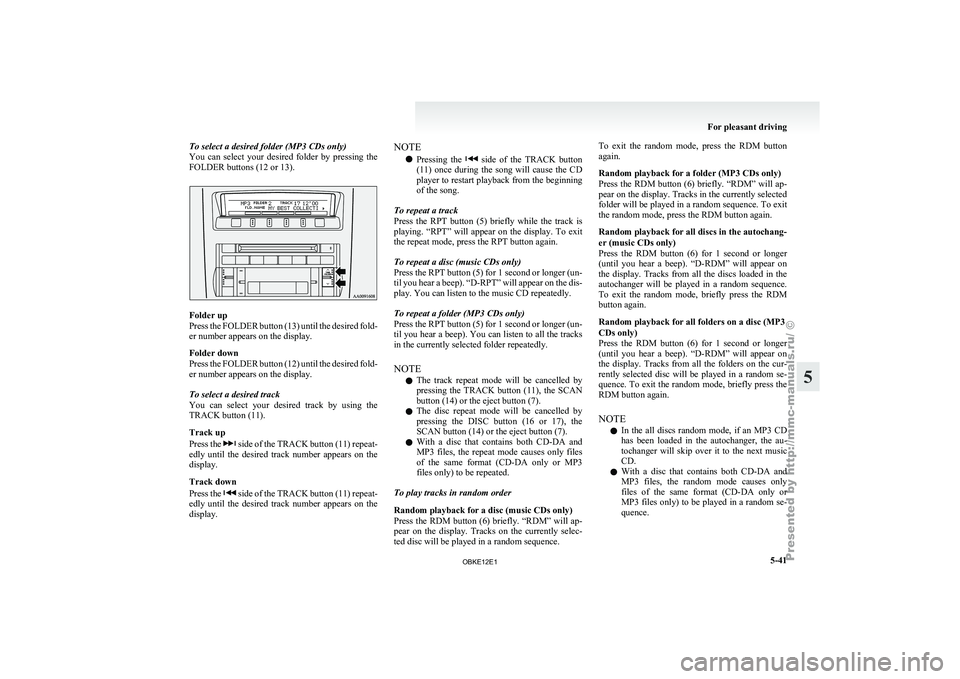
To select a desired folder (MP3 CDs only)
You can select
your desired folder by pressing the
FOLDER buttons (12 or 13). Folder up
Press the
FOLDER
button (13) until the desired fold-
er number appears on the display.
Folder down
Press the FOLDER button (12) until the desired fold-
er number appears on the display.
To select a desired track
You can select your desired track by using the
TRACK button (11).
Track up
Press the side of the TRACK button (11) repeat-
edly until the
desired track number appears on the
display.
Track down
Press the side of the TRACK button (11) repeat-
edly until the
desired track number appears on the
display. NOTE
l Pressing
the side of the TRACK button
(11) once during
the song will cause the CD
player to restart playback from the beginning
of the song.
To repeat a track
Press the RPT button (5) briefly while the track is
playing. “RPT” will appear on the display. To exit
the repeat mode, press the RPT button again.
To repeat a disc (music CDs only)
Press the RPT button (5) for 1 second or longer (un-
til you hear a beep). “D-RPT” will appear on the dis-
play. You can listen to the music CD repeatedly.
To repeat a folder (MP3 CDs only)
Press the RPT button (5) for 1 second or longer (un-
til you hear a beep). You can listen to all the tracks
in the currently selected folder repeatedly.
NOTE l The track repeat mode will be cancelled by
pressing the TRACK button (11), the SCAN
button (14) or the eject button (7).
l The disc repeat mode will be cancelled by
pressing the DISC button (16 or 17), the
SCAN button (14) or the eject button (7).
l With a disc that contains both CD-DA and
MP3 files, the repeat mode causes only files
of the same format (CD-DA only or MP3
files only) to be repeated.
To play tracks in random order
Random playback for a disc (music CDs only)
Press the RDM button (6) briefly. “RDM” will ap-
pear on the display. Tracks on the currently selec-
ted disc will be played in a random sequence. To exit the random mode, press the RDM button
again.
Random playback for a folder (MP3 CDs only)
Press
the RDM
button (6) briefly. “RDM” will ap-
pear on the display. Tracks in the currently selected
folder will be played in a random sequence. To exit
the random mode, press the RDM button again.
Random playback for all discs in the autochang-
er (music CDs only)
Press the RDM button (6) for 1 second or longer
(until you hear a beep). “D-RDM” will appear on
the display. Tracks from all the discs loaded in the
autochanger will be played in a random sequence.
To exit the random mode, briefly press the RDM
button again.
Random playback for all folders on a disc (MP3
CDs only)
Press the RDM button (6) for 1 second or longer
(until you hear a beep). “D-RDM” will appear on
the display. Tracks from all the folders on the cur-
rently selected disc will be played in a random se-
quence. To exit the random mode, briefly press the
RDM button again.
NOTE
l In the all discs random mode, if an MP3 CD
has been loaded in the autochanger, the au-
tochanger will skip over it to the next music
CD.
l With a disc that contains both CD-DA and
MP3 files, the random mode causes only
files of the same format (CD-DA only or
MP3 files only) to be played in a random se-
quence. For pleasant driving
5-41 5
OBKE12E1
Page 225 of 377

To find the start of each track on a disc for playback
Press the SCAN
button (14). “SCAN” will appear
on the display and the autochanger will play back
the first 10 seconds of each track on the selected disc.
The track number will blink while the scan mode is
selected. To exit the scan mode, press the SCAN
button again.
NOTE
l Once all tracks on the disc have been scan-
ned, playback of the disc will restart from the
beginning of the track that was playing when
scanning started.
l The scan mode will be cancelled when radio
or CD operation is selected.
l With a disc that contains both CD-DA and
MP3 files, the scan mode causes only files of
the same format (CD-DA only or MP3 files
only) to be played.
CD text and MP3 title display E00725000520
This autochanger can display CD text and MP3 ti-
tles including ID3 tag information. CD text
The autochanger can
display disc and track titles
for discs with converted disc and track title informa-
tion. Press the DISP button (3) repeatedly to make
selections in the following sequence: disc name →
track name → normal display mode.
Example
Disc
name
Track
name NOTE
l The
display can
show up to 16 characters. If
a disc name or track name has more than 16
characters, press the PAGE button (10) to
view the next 16 characters.
l When there is no title information to be dis-
played, the display shows “NO TITLE”.
l Characters that the autochanger cannot dis-
play are shown as “ ”. MP3 titles
The
autochanger
can
display folder and track titles
for discs with converted folder and track informa-
tion. Press the DISP button (7) repeatedly to make
selections in the following sequence: folder name
→ track name → normal display mode.
Track
name Folder
name Example ID3 tag information
The autochanger can
display ID3 tag information
for files that have been recorded with ID3 tag infor-
mation. 1. Press the DISP button (3) for 2 seconds or lon-ger to switch to the ID3 tag information. The
“TAG” indicator will appear on the display.
2. Then press the DISP button for less than 1 second repeatedly to make selections in the
following sequence: album name → track
name → artist name → normal display mode.
NOTE l To return from ID3 tag information to the
folder name, press the DISP button (3) again
for 2 seconds or longer.
l When there is no title information to be dis-
played, the display shows “NO TITLE”. For pleasant driving
5-42
5
OBKE12E1
Page 226 of 377
l
The display
can show up to 16 characters. If
a folder name, track name, or item of ID3 tag
information has more than 16 characters,
press the PAGE button (10) to view the next
16 characters.
l Folder names and track names can each be
displayed up to a length of 32 characters.
Items of ID3 tag information can each be dis-
played up to a length of 30 characters.
l Characters that the autochanger cannot dis-
play are shown as “ ”. To play tracks from USB device*
E00756100149
You can connect
your iPod or USB memory device
to the USB input terminal and play music files stor-
ed in the iPod or USB memory device.
See the following section for the types of connecta-
ble devices and supported files.
Refer to “Types of connectable devices and suppor-
ted file specifications” on page 5-83.
See the following sections for the connecting meth-
ods, “How to connect an iPod” on page 5-82 and
“How to connect a USB memory device” on page
5-82.
If your vehicle is equipped with a Bluetooth ®
2.0
interface, you can play music files in your iPod or
USB memory device via voice operation.
Refer to “To play iPod tracks via voice operation”
on page 5-46 and “To play USB memory device
tracks via voice operation” on page 5-52.
NOTE
l The protected file by copyright might not be
able to start playback.
l It is recommended to adjust the equalizer of
the connected device is flat. For pleasant driving
5-43 5
OBKE12E1
Page 227 of 377
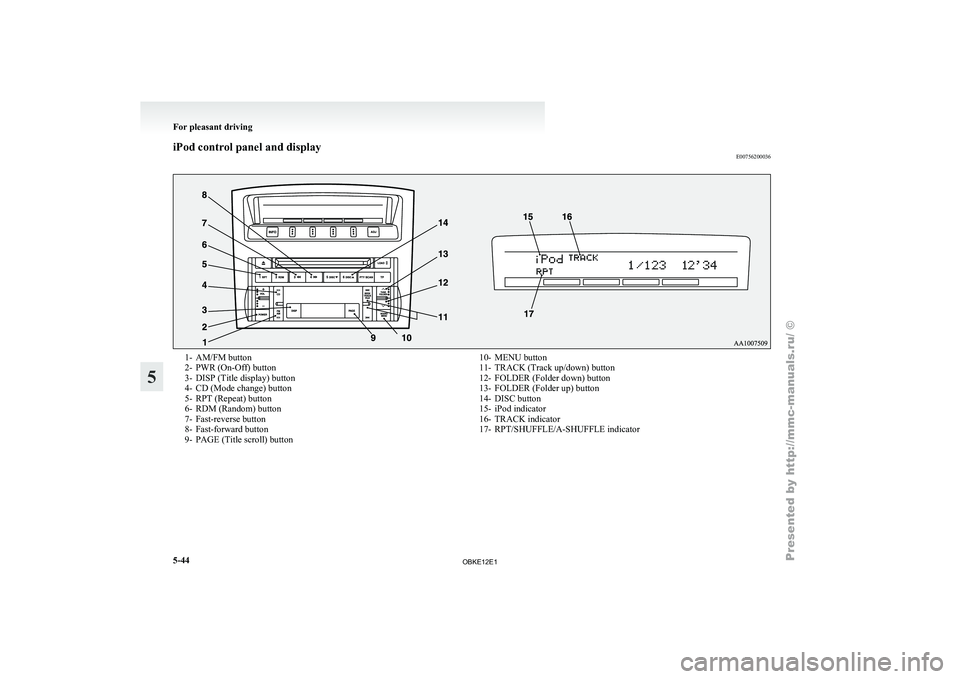
iPod control panel and display
E007562000361- AM/FM button
2-
PWR (On-Off) button
3- DISP (Title display) button
4-
CD (Mode change) button
5- RPT (Repeat) button
6- RDM (Random) button
7- Fast-reverse button
8- Fast-forward button
9- PAGE (Title scroll) button 10- MENU button
11- TRACK (Track up/down) button
12- FOLDER (Folder down) button
13-
FOLDER (Folder up) button
14- DISC button
15- iPod indicator
16- TRACK indicator
17- RPT/SHUFFLE/A-SHUFFLE indicator For pleasant driving
5-44
5
OBKE12E1
Page 228 of 377

To play from an iPod
E00756300226
1. Press the PWR
button (2) to turn on the au-
dio system. The system turns on in the last
mode used.
2. Connect your iPod to the USB input termi- nal. Refer to “How to connect an iPod” on
page 5-82.
3. Press the CD button (4) several times to switch to the iPod mode. The input mode
changes every time the CD button is pressed.
CD mode → iPod mode → Bluetooth ®
mode* → Rear-seat display mode*
NOTE l If your vehicle is equipped with audio/video
input RCA terminals, pressing and holding
the CD button for 2 seconds or more
switches the system to the AUX mode.
4. Once the device is selected, playback starts and “iPod” appears on the display.
NOTE l Depending on the condition of your iPod, it
may take a longer time before the playback
starts.
5. To stop the playback, press the AM/FM but- ton (1) or CD button (4) to switch to a differ-
ent mode.
NOTE l Buttons on the iPod are disabled while the
iPod is connected to the audio system. l
To
adjust the volume and tone, refer to “To
adjust the volume” on pages 5-13, 5-27 and
“To adjust the tone” on pages 5-13, 5-27.
To fast-forward/reverse the track E00756400012
To fast-forward/reverse the current track, press the
fast-forward (8) or fast-reverse (7) button.
Fast-forward
To fast-forward the current track, press the fast-for-
ward (8) button.
While the button is pressed, the
track will be fast-forwarded.
Fast-reverse
To fast-reverse the current track, press the fast-re-
verse (7) button. While the button is pressed, the
track will be fast-reversed.
To select a desired track E00756500013
Press the TRACK button (11) to select the desired
track number.
Press : The track number increases by
one.
Press : The track number decreases by
one.
Press for a
long period (ap- prox. 2 seconds
or more) :
The track number increases con-
tinuously while the button is
pressed.
Press for a
long period (ap-
prox. 2 seconds
or more) :
The track number decreases con-
tinuouslywhile the button is
pressed. If the side of the button is pressed once while a
track is playing,
playback returns to the start of that
track.
NOTE
l Every time the track selection button is press-
ed, the track number in the display changes.
To find a track from the iPod menu E00756600014
You can select desired tracks from the “Playlists”,
“Artists”, “Albums”, “Songs”
or “Genre” (vehicles
with Bluetooth ®
2.0 interface) menus on your iPod.
Press the following buttons to select desired tracks.
The selected menu or category or track is shown in
the display.
FOLDER but-
ton (12 or 13) : To show the menu or category
or track.
MENU button
(10) : To select the menu or category
or track.
NOTE l To
cancel the
selection, press the DISC but-
ton (14) to return to the previous step.
l If no operation is performed for 10 seconds
or more or other button is operated after the
FOLDER button has been pressed, searching
of the desired tracks is cancelled.
l If no operation is performed for 5 seconds or
more after the track is displayed, playback
starts.
To play the same track repeatedly E00756700015
Press the RPT button (5) during playback to show
“RPT” in the display. For pleasant driving
5-45 5
OBKE12E1
Page 229 of 377
To exit this mode, press the button again.
To play tracks in random order
E00756900017
Press the RDM button (6) to show “SHUFFLE” in
the display.
The iPod randomly
selects tracks from the current
category and plays the selected tracks.
To exit this mode, press the button again.
To play tracks in each album in random order E00757000015
Press and hold the RDM button (6) until you hear a
beep to show “A-SHUFFLE” in the display.
The iPod randomly
selects tracks in the album
from the current category and play the selected
tracks.
To exit this mode, press the button again.
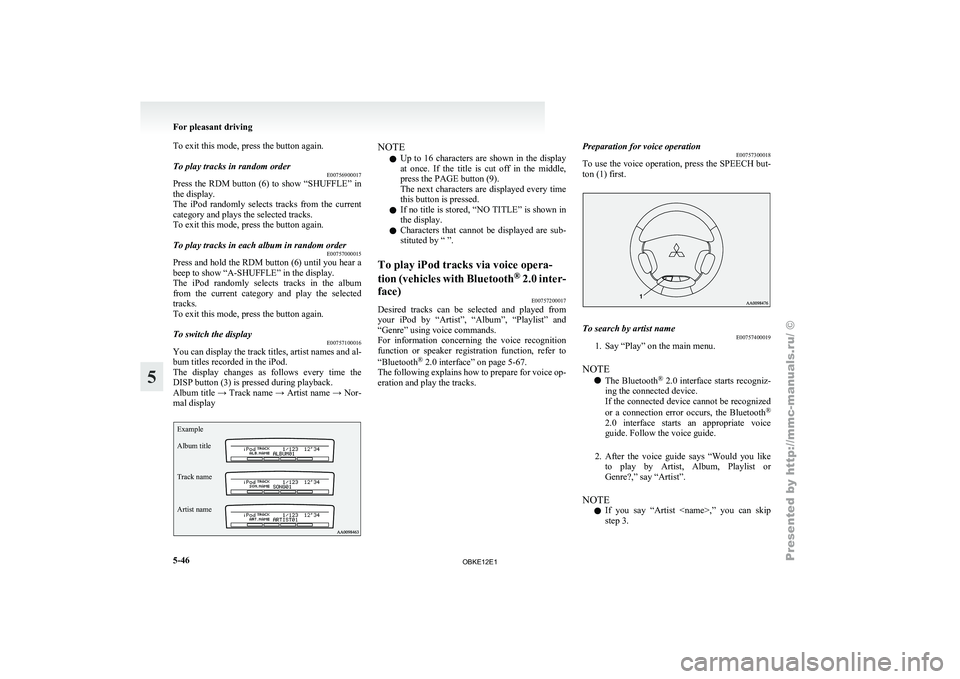
To switch the display E00757100016
You can display the track titles, artist names and al-
bum titles recorded in the iPod.
The display changes
as follows every time the
DISP button (3) is pressed during playback.
Album title → Track name → Artist name → Nor-
mal display
Example
Album title
Track name
Artist name NOTE
l Up
to 16
characters are shown in the display
at once. If the title is cut off in the middle,
press the PAGE button (9).
The next characters are displayed every time
this button is pressed.
l If no title is stored, “NO TITLE” is shown in
the display.
l Characters that cannot be displayed are sub-
stituted by “ ”.
To play iPod tracks via voice opera-
tion (vehicles with
Bluetooth®
2.0 inter-
face) E00757200017
Desired tracks can be selected and played from
your iPod by
“Artist”, “Album”, “Playlist” and
“Genre” using voice commands.
For information concerning the voice recognition
function or speaker registration function, refer to
“Bluetooth ®
2.0 interface” on page 5-67.
The following explains how to prepare for voice op-
eration and play the tracks. Preparation for voice operation
E00757300018
To use
the
voice operation, press the SPEECH but-
ton (1) first. To search by artist name
E00757400019
1. Say “Play” on the main menu.
NOTE l The Bluetooth ®
2.0
interface starts recogniz-
ing the connected device.
If the connected device cannot be recognized
or a connection error occurs, the Bluetooth ®
2.0 interface starts an appropriate voice
guide. Follow the voice guide.
2. After the voice guide says “Would you like to play by Artist, Album, Playlist or
Genre?,” say “Artist”.
NOTE l If you say “Artist
step 3. For pleasant driving
5-46
5
OBKE12E1
Page 232 of 377
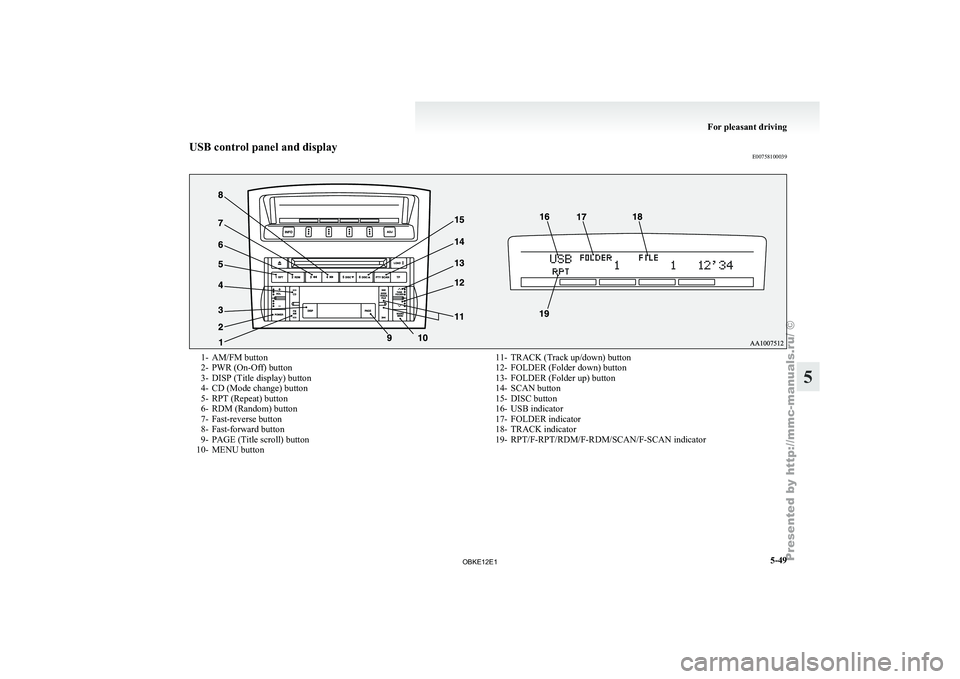
USB control panel and display
E007581000391- AM/FM button
2-
PWR (On-Off) button
3- DISP (Title display) button
4-
CD (Mode change) button
5- RPT (Repeat) button
6- RDM (Random) button
7- Fast-reverse button
8- Fast-forward button
9- PAGE (Title scroll) button
10- MENU button 11- TRACK (Track up/down) button
12- FOLDER (Folder down) button
13- FOLDER (Folder up) button
14-
SCAN button
15- DISC button
16- USB indicator
17- FOLDER indicator
18- TRACK indicator
19- RPT/F-RPT/RDM/F-RDM/SCAN/F-SCAN indicator For pleasant driving
5-49 5
OBKE12E1
Page 233 of 377
To play from a USB memory device
E00762500210
1. Press the PWR
button (2) to turn on the au-
dio system. The system turns on in the last
mode used.
2. Connect your USB memory device to the USB input terminal. Refer to “How to con-
nect a USB memory device” on page 5-82.
3. Press the CD button (4) several times to switch to the USB mode. The input mode
changes as follows every time the CD button
is pressed.
CD mode → USB mode → Bluetooth ®
mode* → Rear-seat display mode*
NOTE l If your vehicle is equipped with audio/video
input RCA terminals, pressing and holding
the CD button for 2 seconds or more
switches the system to the AUX mode.
4. Once the device is selected, playback starts and “USB” appears on the display.
NOTE l Depending on the condition of your USB de-
vice, it may take a longer time before the play-
back starts.
5. To stop the playback, press the AM/FM but- ton (1) or CD button (4) to switch to a differ-
ent mode. NOTE
l To
adjust the
volume and tone, refer to “To
adjust the volume” on pages 5-13, 5-27 and
“To adjust the tone” on pages 5-13, 5-27.
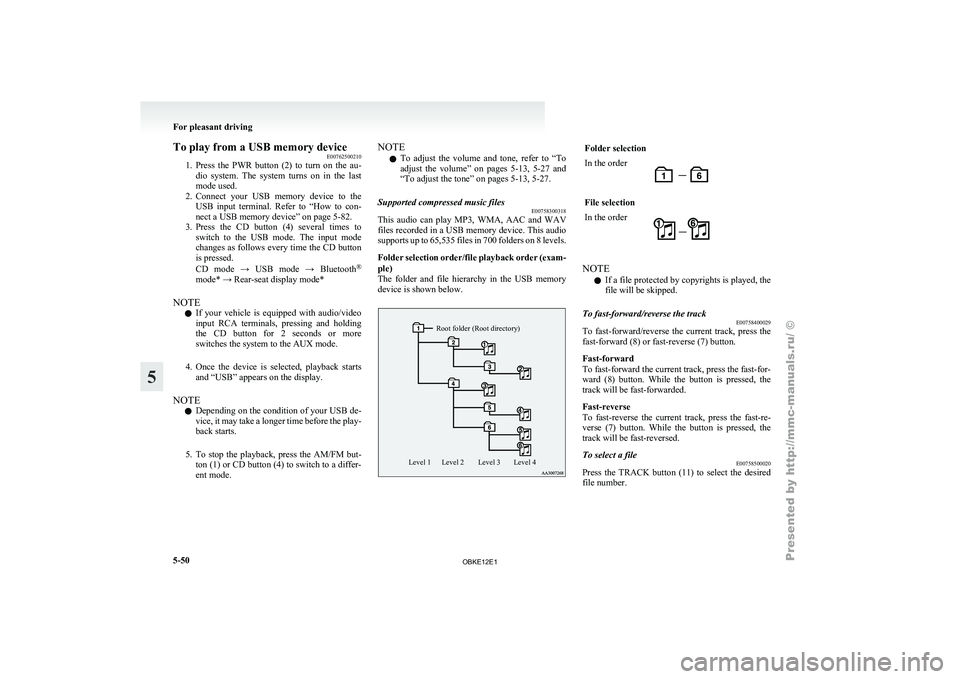
Supported compressed music files E00758300318
This audio can play MP3, WMA, AAC and WAV
files recorded
in
a USB memory device. This audio
supports up to 65,535 files in 700 folders on 8 levels.
Folder selection order/file playback order (exam-
ple)
The folder and file hierarchy in the USB memory
device is shown below.
Root folder (Root directory)
Level 4
Level 3
Level 2
Level 1 Folder selection
In the order
File selection
In the order
NOTE
l If a file protected by copyrights is played, the
file will be skipped.
To fast-forward/reverse the track E00758400029
To fast-forward/reverse the current track, press the
fast-forward (8) or fast-reverse (7) button.
Fast-forward
To fast-forward the current track, press the fast-for-
ward (8) button.
While the button is pressed, the
track will be fast-forwarded.
Fast-reverse
To fast-reverse the current track, press the fast-re-
verse (7) button. While the button is pressed, the
track will be fast-reversed.
To select a file E00758500020
Press the TRACK button (11) to select the desired
file number. For pleasant driving
5-50
5
OBKE12E1
Page 234 of 377
Press : The track number increases by
one.
Press : The track number decreases by
one.
Press for a
long period
(approx. 2 sec-
onds or more) : The track number increases
continuously while the button
is pressed.
Press for a
long period
(approx. 2 sec-
onds or more) : The track number decreases
continuouslywhile the button
is pressed.
If the side of the button is pressed once after a
few seconds, playback
returns to the start of that
track.
NOTE
l Every time the TRACK button (11) is press-
ed, the file number in the display changes.
To find a track E00758600223
You can select a folder to find a desired track.
1. Press the FOLDER button (12 or 13) to showthe desired folder in the display.
NOTE l If
no
operation is performed for 10 seconds
or more or other button is operated after the
FOLDER button has been pressed, the selec-
ted track becomes unselected and the display
returns to the playback display.
2. Press the MENU button (10) to select the fold- er. NOTE
l When
the DISC
button (15) is pressed, the
track find mode will be cancelled.
3. Press the FOLDER button (12 or 13) to show the desired track in the display.
NOTE l When the DISC button (15) is pressed, the se-
lection is cancelled and returned to the previ-
ous step.
l If no operation is performed for 5 seconds or
more after the FOLDER button (12 or 13) is
pressed, the displayed track is played.
4. Press the MENU button (10) to select the file.
To play the same file repeatedly E00758700022
Press the RPT button (5) to show “RPT” in the dis-
play. To cancel this mode, press the button again.
To play the files in the same folder repeatedly E00758800023
Press and hold the RPT button (5) until you hear a
beep to show “F-RPT” in the display.
All tracks
in
the current folder are played repeatedly.
To exit this mode, press the button again.
To play a folder in random order E00758900024
Press the RDM button (6) to show “RDM” in the
display.
The audio randomly
selects tracks from the current
folder and plays the selected tracks.
To exit this mode, press the button again. To play all folders in random order
E00759000022
Press and hold
the RDM button (6) until you hear a
beep to show “F-RDM” in the display.
The audio randomly selects tracks from all folders
and plays the selected tracks.
To exit this mode, press the button again.
To find the start of each track in a folder for play-
back (vehicles without Bluetooth ®
2.0 interface)
E00759100111
Press the SCAN button (14). “SCAN” is shown in
the display and
the tracks in the current folder are
played for several seconds from the beginning.
The file number will blink while the scan mode is
selected.
To exit this mode, press the button again.
NOTE
l Once all tracks in the folder have been cued
playback will restart from the beginning of
the track that was playing when cueing started.
To find the start of each track in all folders for
playback (vehicles with Bluetooth ®
2.0 interface)
E00765800038
Press the SCAN button (14). “SCAN” is shown in
the display and
all tracks in all folders are played
for several seconds from the beginning.
The file number will blink while the scan mode is
selected.
To exit this mode, press the button again.
To find the start of first tracks in all folders for
playback E00759200112
Press and hold the SCAN button (14) until you
hear a beep to show “F-SCAN” in the display.
The first tracks
in all folders are played for several
seconds from the beginning. For pleasant driving
5-51 5
OBKE12E1
Page 235 of 377
Playback starts from the folder next to the one cur-
rently playing.
The folder number
will blink while the scan mode
is selected.
To exit this mode, press the button again.
NOTE
l Once the cueing playback ends, playback
will start from the track at the beginning of
the folder next to the one that was playing
when the cueing started.
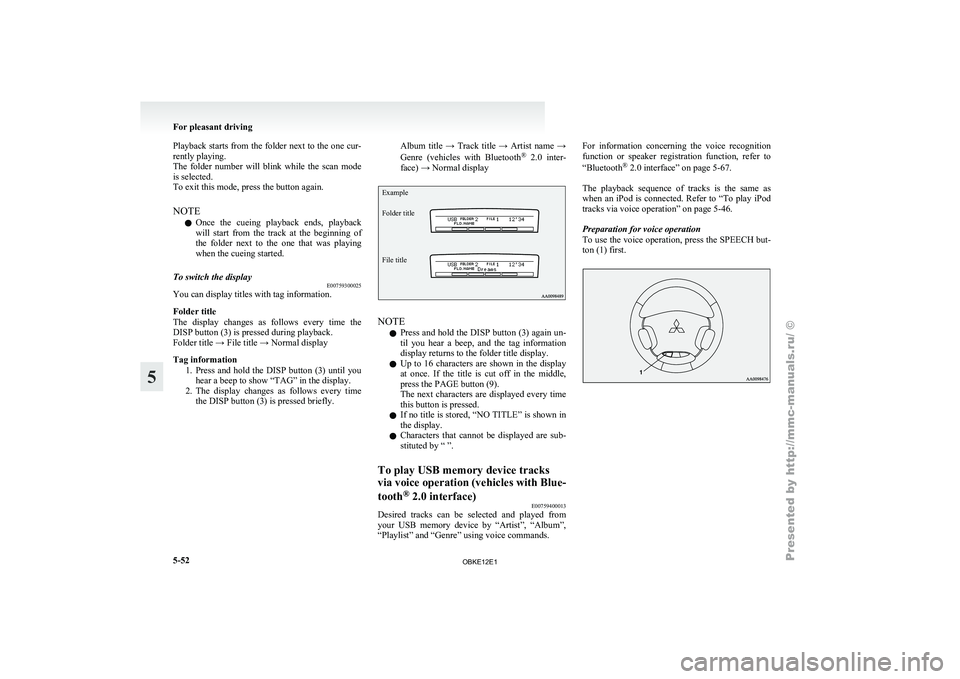
To switch the display E00759300025
You can display titles with tag information.
Folder title
The display changes
as follows every time the
DISP button (3) is pressed during playback.
Folder title → File title → Normal display
Tag information
1. Press and hold the DISP button (3) until youhear a beep to show “TAG” in the display.
2. The display changes as follows every time the DISP button (3) is pressed briefly. Album title → Track title → Artist name →
Genre
(vehicles with
Bluetooth®
2.0 inter-
face) → Normal display
Example
Folder title
File title NOTE
l Press
and hold
the DISP button (3) again un-
til you hear a beep, and the tag information
display returns to the folder title display.
l Up to 16 characters are shown in the display
at once. If the title is cut off in the middle,
press the PAGE button (9).
The next characters are displayed every time
this button is pressed.
l If no title is stored, “NO TITLE” is shown in
the display.
l Characters that cannot be displayed are sub-
stituted by “ ”.
To play USB memory device tracks
via voice operation
(vehicles with Blue-
tooth ®
2.0 interface)
E00759400013
Desired tracks can be selected and played from
your USB memory
device by “Artist”, “Album”,
“Playlist” and “Genre” using voice commands. For information concerning the voice recognition
function or
speaker
registration function, refer to
“Bluetooth ®
2.0 interface” on page 5-67.
The playback sequence of tracks is the same as
when an iPod is connected. Refer to “To play iPod
tracks via voice operation” on page 5-46.
Preparation for voice operation
To use the voice operation, press the SPEECH but-
ton (1) first. For pleasant driving
5-52
5
OBKE12E1