warning MITSUBISHI PAJERO IV 2011 Manual PDF
[x] Cancel search | Manufacturer: MITSUBISHI, Model Year: 2011, Model line: PAJERO IV, Model: MITSUBISHI PAJERO IV 2011Pages: 377, PDF Size: 29.43 MB
Page 173 of 377
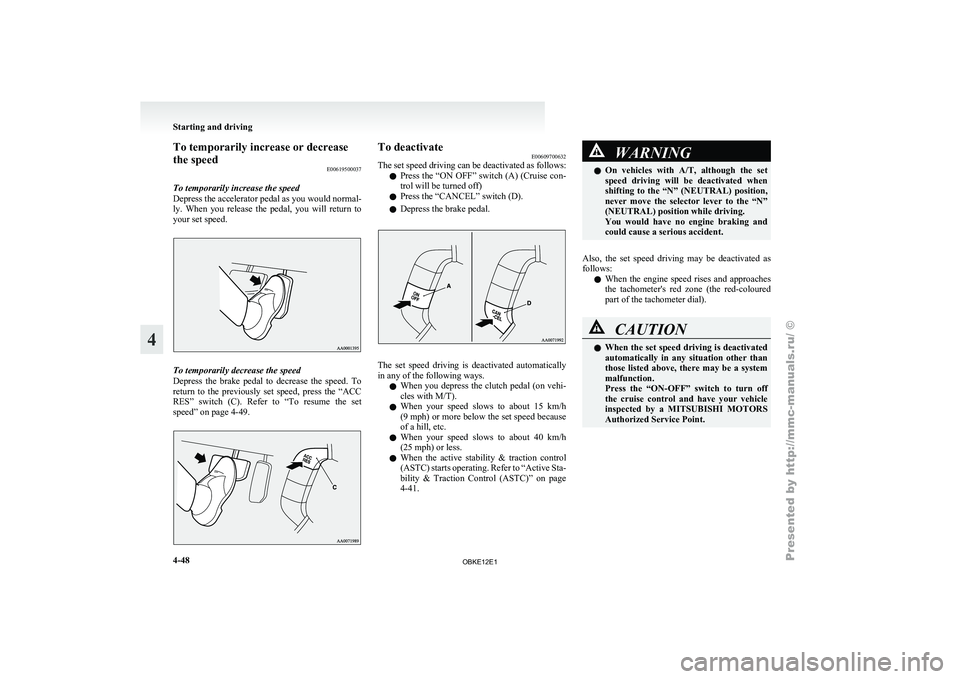
To temporarily increase or decrease
the speed
E00619500037
To temporarily increase the speed
Depress the accelerator
pedal as you would normal-
ly. When you release the pedal, you will return to
your set speed. To temporarily decrease the speed
Depress the
brake
pedal to decrease the speed. To
return to the previously set speed, press the “ACC
RES” switch (C). Refer to “To resume the set
speed” on page 4-49. To deactivate
E00609700632
The set speed
driving can be deactivated as follows:
l Press the “ON OFF” switch (A) (Cruise con-
trol will be turned off)
l Press the “CANCEL” switch (D).
l Depress the brake pedal. The set speed driving is deactivated automatically
in any of the following ways.
l When you
depress
the clutch pedal (on vehi-
cles with M/T).
l When your speed slows to about 15 km/h
(9 mph) or more below the set speed because
of a hill, etc.
l When your speed slows to about 40 km/h
(25 mph) or less.
l When the active stability & traction control
(ASTC) starts operating. Refer to “Active Sta-
bility & Traction Control (ASTC)” on page
4-41. WARNING
l On vehicles with
A/T, although the set
speed driving will be deactivated when
shifting to the “N” (NEUTRAL) position,
never move the selector lever to the “N”
(NEUTRAL) position while driving.
You would have no engine braking and
could cause a serious accident.
Also, the set speed driving may be deactivated as
follows: l When
the engine
speed rises and approaches
the tachometer's red zone (the red-coloured
part of the tachometer dial). CAUTION
l
When the set
speed driving is deactivated
automatically in any situation other than
those listed above, there may be a system
malfunction.
Press the “ON-OFF” switch to turn off
the cruise control and have your vehicle
inspected by a MITSUBISHI MOTORS
Authorized Service Point. Starting and driving
4-48
4
OBKE12E1
Page 175 of 377
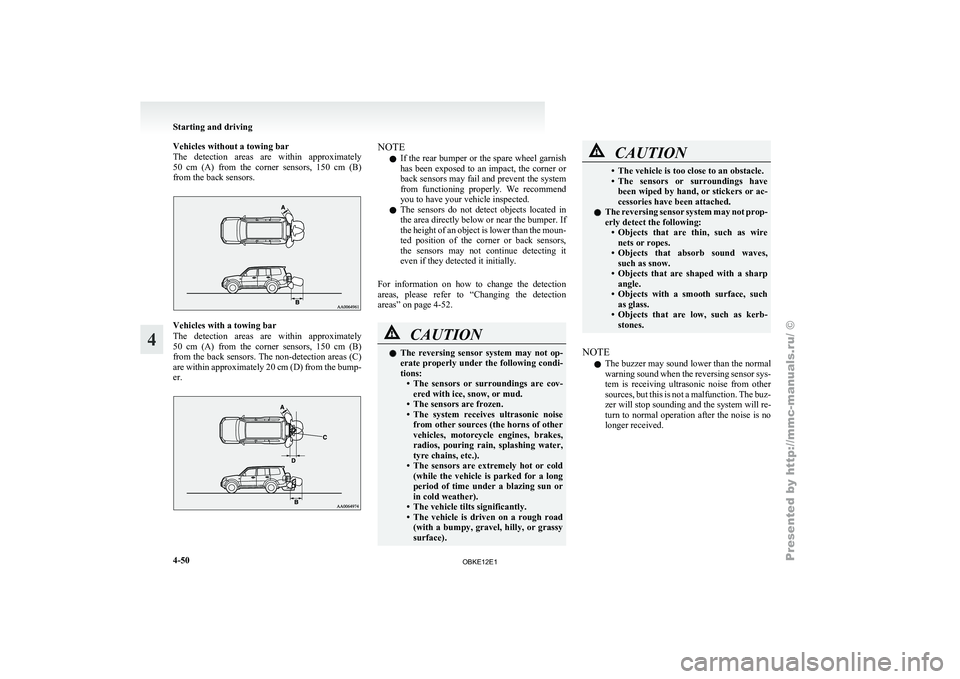
Vehicles without a towing bar
The detection areas
are within approximately
50 cm (A) from the corner sensors, 150 cm (B)
from the back sensors. Vehicles with a towing bar
The detection
areas
are within approximately
50 cm (A) from the corner sensors, 150 cm (B)
from the back sensors. The non-detection areas (C)
are within approximately 20 cm (D) from the bump-
er. NOTE
l If
the rear
bumper or the spare wheel garnish
has been exposed to an impact, the corner or
back sensors may fail and prevent the system
from functioning properly. We recommend
you to have your vehicle inspected.
l The sensors do not detect objects located in
the area directly below or near the bumper. If
the height of an object is lower than the moun-
ted position of the corner or back sensors,
the sensors may not continue detecting it
even if they detected it initially.
For information on how to change the detection
areas, please refer to “Changing the detection
areas” on page 4-52. CAUTION
l
The reversing
sensor
system may not op-
erate properly under the following condi-
tions: • The sensors or surroundings are cov-ered with ice, snow, or mud.
• The sensors are frozen.
• The system receives ultrasonic noise from other sources (the horns of other
vehicles, motorcycle engines, brakes,
radios, pouring rain, splashing water,
tyre chains, etc.).
• The sensors are extremely hot or cold (while the vehicle is parked for a long
period of time under a blazing sun or
in cold weather).
• The vehicle tilts significantly.
• The vehicle is driven on a rough road (with a bumpy, gravel, hilly, or grassy
surface). CAUTION
• The vehicle is too close to an obstacle.
• The sensors
or
surroundings have
been wiped by hand, or stickers or ac-
cessories have been attached.
l The reversing sensor system may not prop-
erly detect the following:
• Objects that are thin, such as wirenets or ropes.
• Objects that absorb sound waves, such as snow.
• Objects that are shaped with a sharp angle.
• Objects with a smooth surface, such as glass.
• Objects that are low, such as kerb- stones.
NOTE l The
buzzer may
sound lower than the normal
warning sound when the reversing sensor sys-
tem is receiving ultrasonic noise from other
sources, but this is not a malfunction. The buz-
zer will stop sounding and the system will re-
turn to normal operation after the noise is no
longer received. Starting and driving
4-50
4
OBKE12E1
Page 176 of 377
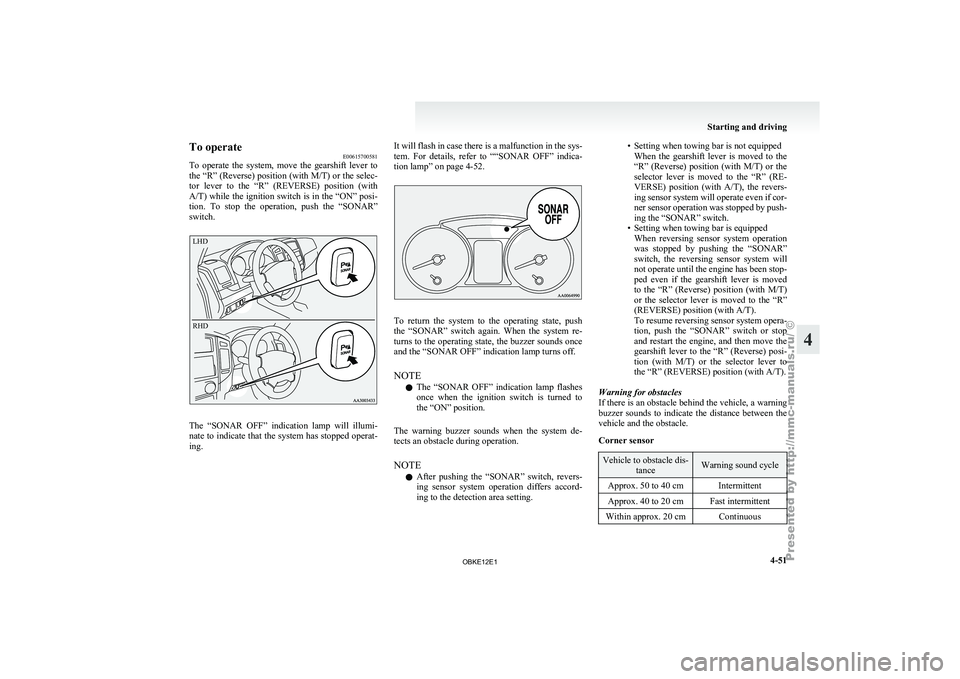
To operate
E00615700581
To operate the
system, move the gearshift lever to
the “R” (Reverse) position (with M/T) or the selec-
tor lever to the “R” (REVERSE) position (with
A/T) while the ignition switch is in the “ON” posi-
tion. To stop the operation, push the “SONAR”
switch.
LHD
RHD The “SONAR OFF” indication lamp will illumi-
nate to
indicate
that the system has stopped operat-
ing. It will flash in case there is a malfunction in the sys-
tem. For
details,
refer to ““SONAR OFF” indica-
tion lamp” on page 4-52. To return the system to the operating state, push
the “SONAR” switch
again. When the system re-
turns to the operating state, the buzzer sounds once
and the “SONAR OFF” indication lamp turns off.
NOTE
l The “SONAR OFF” indication lamp flashes
once when the ignition switch is turned to
the “ON” position.
The warning buzzer sounds when the system de-
tects an obstacle during operation.
NOTE l After pushing the “SONAR” switch, revers-
ing sensor system operation differs accord-
ing to the detection area setting. • Setting when towing bar is not equipped
When the gearshift
lever is moved to the
“R” (Reverse) position (with M/T) or the
selector lever is moved to the “R” (RE-
VERSE) position (with A/T), the revers-
ing sensor system will operate even if cor-
ner sensor operation was stopped by push-
ing the “SONAR” switch.
• Setting when towing bar is equipped When reversing sensor system operation
was stopped by pushing the “SONAR”
switch, the reversing sensor system will
not operate until the engine has been stop-
ped even if the gearshift lever is moved
to the “R” (Reverse) position (with M/T)
or the selector lever is moved to the “R”
(REVERSE) position (with A/T).
To resume reversing sensor system opera-
tion, push the “SONAR” switch or stop
and restart the engine, and then move the
gearshift lever to the “R” (Reverse) posi-
tion (with M/T) or the selector lever to
the “R” (REVERSE) position (with A/T).
Warning for obstacles
If there is an obstacle behind the vehicle, a warning
buzzer sounds to indicate the distance between the
vehicle and the obstacle.
Corner sensor Vehicle to obstacle dis-
tance Warning sound cycle
Approx. 50 to 40 cm Intermittent
Approx. 40 to 20 cm Fast intermittent
Within approx. 20 cm Continuous Starting and driving
4-51 4
OBKE12E1
Page 177 of 377
Back sensor (vehicles without a towing bar)
Vehicle to obstacle dis-
tance Warning sound cycle
Approx. 150 to 80 cm Intermittent Approx. 80 to 40 cm Fast intermittent
Within approx. 40 cm Continuous Back sensor (vehicles with a towing bar)
Vehicle to obstacle dis-
tance Warning sound cycle
Approx. 150 to 120 cm Intermittent Approx. 120 to 60 cm Fast intermittentWithin approx. 60 cm Continuous CAUTION
l
The distances given are to be used for ref-
erence
only, as
errors may be caused by
various factors, such as temperature, hu-
midity, or the shape of the obstacles.
Changing the detection areas E00615800032
The detection areas can be changed as follows:
Vehicles with a towing bar
While the operation
of the system is stopped at the
“SONAR” switch, push the “SONAR” switch ap-
proximately 3 seconds or more, and release it. The
buzzer sounds twice to indicate that the detection
area has been changed. Vehicles without a towing bar
While the
operation
of the system is stopped at the
“SONAR” switch, push the “SONAR” switch ap-
proximately 3 seconds or more, and release it. The
buzzer sounds once to indicate that the detection
area has been changed.
NOTE
l The detection area will not change if you
keep the “SONAR” switch pushed for 10 sec-
onds or more.
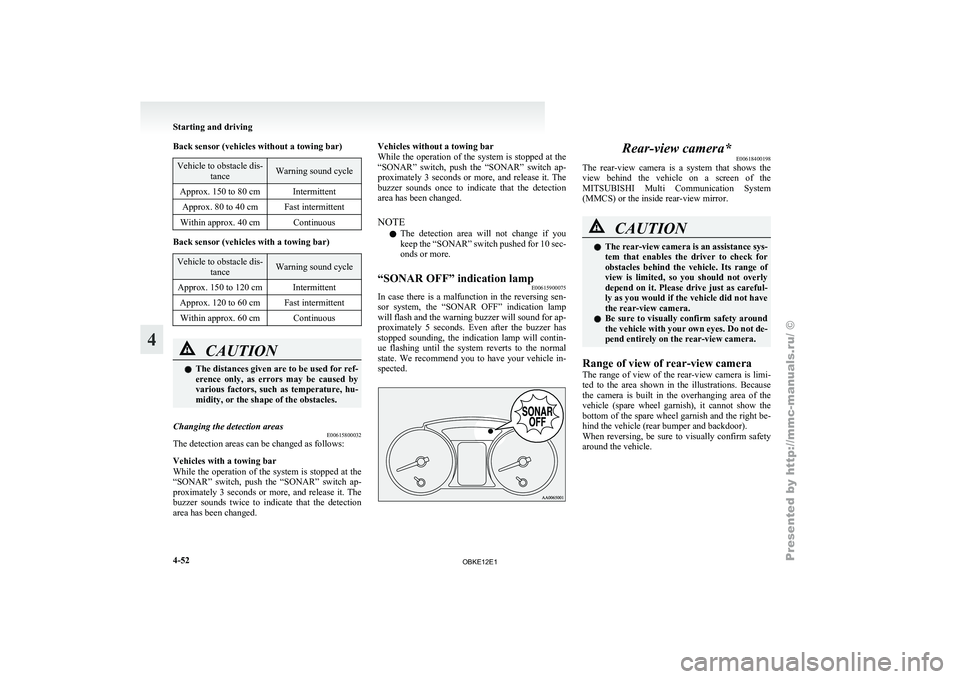
“SONAR OFF” indication lamp E00615900075
In case there is a malfunction in the reversing sen-
sor system, the
“SONAR OFF” indication lamp
will flash and the warning buzzer will sound for ap-
proximately 5 seconds. Even after the buzzer has
stopped sounding, the indication lamp will contin-
ue flashing until the system reverts to the normal
state. We recommend you to have your vehicle in-
spected. Rear-view camera*
E00618400198
The rear-view camera
is a system that shows the
view behind the vehicle on a screen of the
MITSUBISHI Multi Communication System
(MMCS) or the inside rear-view mirror. CAUTION
l
The rear-view
camera
is an assistance sys-
tem that enables the driver to check for
obstacles behind the vehicle. Its range of
view is limited, so you should not overly
depend on it. Please drive just as careful-
ly as you would if the vehicle did not have
the rear-view camera.
l Be sure to visually confirm safety around
the vehicle with your own eyes. Do not de-
pend entirely on the rear-view camera.
Range of view of rear-view camera
The range of
view of the rear-view camera is limi-
ted to the area shown in the illustrations. Because
the camera is built in the overhanging area of the
vehicle (spare wheel garnish), it cannot show the
bottom of the spare wheel garnish and the right be-
hind the vehicle (rear bumper and backdoor).
When reversing, be sure to visually confirm safety
around the vehicle. Starting and driving
4-52
4
OBKE12E1
Page 180 of 377
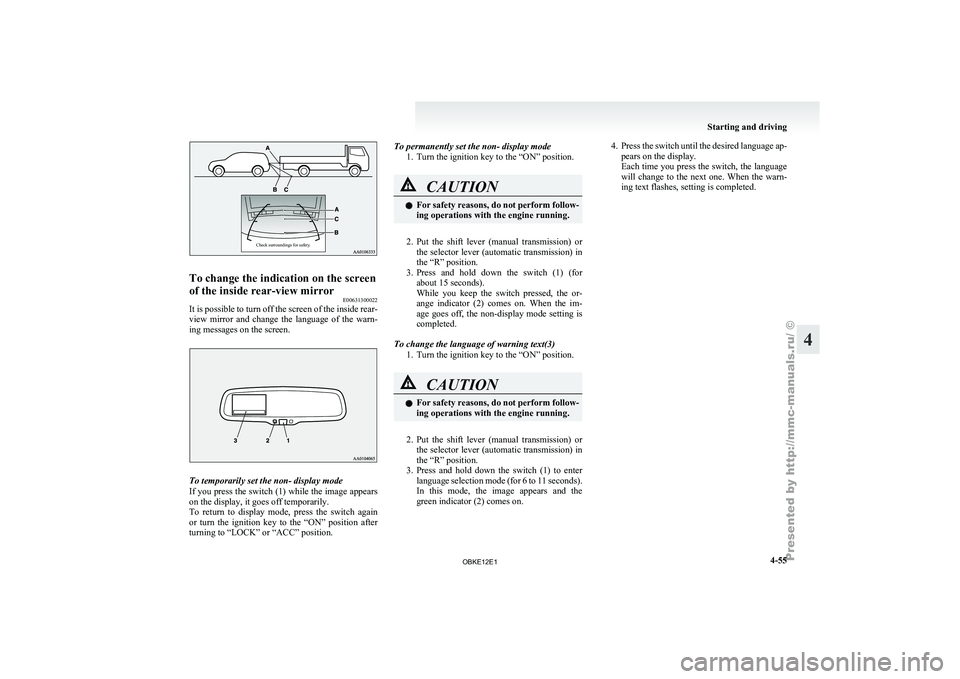
Check surroundings for safety.To change the indication on the screen
of the inside rear-view mirror
E00631300022
It is possible to turn off the screen of the inside rear-
view mirror and
change the language of the warn-
ing messages on the screen. To temporarily set the non- display mode
If you
press
the switch (1) while the image appears
on the display, it goes off temporarily.
To return to display mode, press the switch again
or turn the ignition key to the “ON” position after
turning to “LOCK” or “ACC” position. To permanently set the non- display mode
1. Turn the ignition key to the “ON” position. CAUTION
l
For safety
reasons,
do not perform follow-
ing operations with the engine running.
2. Put the shift lever (manual transmission) or
the selector
lever (automatic transmission) in
the “R” position.
3. Press and hold down the switch (1) (for about 15 seconds).
While you keep the switch pressed, the or-
ange indicator (2) comes on. When the im-
age goes off, the non-display mode setting is
completed.
To change the language of warning text(3) 1. Turn the ignition key to the “ON” position. CAUTION
l
For safety
reasons,
do not perform follow-
ing operations with the engine running.
2. Put the shift lever (manual transmission) or
the selector
lever (automatic transmission) in
the “R” position.
3. Press and hold down the switch (1) to enter language selection mode (for 6 to 11 seconds).
In this mode, the image appears and the
green indicator (2) comes on. 4. Press the switch until the desired language ap-
pears on the display.
Each time
you press the switch, the language
will change to the next one. When the warn-
ing text flashes, setting is completed. Starting and driving
4-55 4
OBKE12E1
Page 184 of 377
Ventilators
.................................................................................... 5-02
Front automatic air conditioning ..................................................5-03
Rear air conditioning* .................................................................. 5-10
Important operation tips for the air conditioning.......................... 5-11
Air purifier (with deodorizing function) .......................................5-12
LW/MW/FM electronic tuning radio with CD player* ................5-12
LW/MW/FM electronic tuning radio with CD autoch- anger*
....................................................................................... 5-26
To play tracks from USB device* ................................................5-43
To play tracks from a Bluetooth ®
device (vehicles with
Bluetooth ®
2.0 interface).......................................................... 5-53
To use the external audio input function* ....................................5-56
To listen to a disc in the rear-seat display (vehicles with rear-seat display) .............................................................. 5-57
Steering wheel remote control switch* ........................................5-57
Error codes.................................................................................... 5-59
Error codes (iPod)......................................................................... 5-61
Error codes (USB memory device) ..............................................5-63
Handling of compact discs ........................................................... 5-65
Antenna......................................................................................... 5-66
Link System* ................................................................................ 5-67
Bluetooth ®
2.0 interface* ............................................................. 5-67
USB input terminal* ..................................................................... 5-82
Sun visors..................................................................................... 5-84
Ashtray*........................................................................................ 5-85
Cigarette lighter* .......................................................................... 5-86
Accessory socket.......................................................................... 5-86
Interior lamps ................................................................................5-87
Storage spaces............................................................................... 5-91
Cup holder.................................................................................... 5-94 Rear shelf (3-door models)*
......................................................... 5-95
Cargo area cover (5-door models)* ..............................................5-96
Convenient hooks (5-door models)* ............................................5-96
Luggage hooks.............................................................................. 5-97
Coat hooks.................................................................................... 5-97
Installation position for warning triangle .....................................5-98For pleasant driving
5
OBKE12E1
Page 249 of 377

ing properly and you may not be able to eject
the compact disc.
Notes on CD-Rs/RWs
E00725100026
l You may
have trouble playing back some
CD-R/RW discs recorded on CD recorders
(CD-R/RW drives), either due to their record-
ing characteristics or dirt, fingerprints,
scratches, etc. on the disc surface.
l CD-R/RW discs are less resistant to high tem-
peratures and high humidity than ordinary mu-
sic CDs. Leaving them inside a vehicle for ex-
tended periods may damage them and make
playback impossible.
l The unit may not successfully play back a
CD-R/RW that was made by the combina-
tion of writing software, a CD recorder
(CD-R/RW drive) and a disc if they are in-
compatible with one another.
l This player cannot play the CD-R/RW discs
if the session is not closed.
l This player cannot play CD-R/RW discs
which contain other than CD-DA or MP3 da-
ta (Video CD, etc.). l
Be sure
to
observe the handling instructions
for the CD-R/RW disc. WARNING
l Operating the
CD
player in a manner oth-
er than specifically instructed herein may
result in hazardous radiation exposure.
Do not remove the cover and attempt to
repair the CD player by yourself. There
are no user serviceable parts inside. In
case of malfunction, we recommend you
to have it checked. Antenna
E00710500455
Glass antenna
Antenna leads (1)
are printed on the left-hand side
of inside of the rear side window (3-door models)/
quarter window (5-door models) glass. NOTE
l When
the rear
side/quarter window glass is
cleaned, wipe the glass with a soft cloth by
moving the cloth along the antenna so as not
to damage it. For pleasant driving
5-66
5
OBKE12E1
Page 250 of 377

Link System*
E00764500012
The Link System
takes overall control of the devi-
ces connected via the USB input terminal or the
Bluetooth ®
2.0 interface allowing the connected de-
vices to be operated by using the switches in the ve-
hicle or voice commands.
See the following section for details on how to op-
erate.
Refer to “Bluetooth ®
2.0 interface” on page 5-67.
Refer to “USB input terminal” on page 5-82.
Refer to “To play tracks from USB device” on
page 5-43.
Refer to “To play tracks from a Bluetooth ®
device”
on page 5-53.
Refer to “To use the external audio input function”
on page 5-56.
Bluetooth ®
is a registered trademark of BLUE-
TOOTH SIG, INC.
Link System End User Licence Agree-
ment E00764600013
You have acquired a device that includes software
licensed by MITSUBISHI
MOTORS CORPORA-
TION from JOHNSON CONTROLS Inc (the auto-
motive experience business unit), and their subse-
quent 3 rd
party suppliers. For a complete list of
these 3 rd
party products and their end user licence
agreements, please go to the following website.
http://www.jciblueconnect.com/faq/fulldisclo-
sure.pdf Bluetooth
®
2.0 interface*
E00726000572
The Bluetooth ®
2.0 interface
allows for making/re-
ceiving hands-free calls in the vehicle using a Blue-
tooth ®
compatible cellular phone based on the wire-
less communication technology commonly known
as Bluetooth ®
. It also allows the user to play mu-
sic, saved in a Bluetooth ®
music player, from the
vehicle’s speakers.
The system is equipped with a voice recognition
function, which allows you to make hands-free
calls by simple switch operations and voice com-
mand operations using a defined voice tree.
The Bluetooth ®
2.0 interface can be used when the
ignition switch is in the “ON” or “ACC” position.
Before you can use the Bluetooth ®
2.0 interface,
you must pair the Bluetooth ®
device and Blue-
tooth ®
2.0 interface. Refer to “Connecting the Blue-
tooth® 2.0 interface and Bluetooth® device” on
page 5-71.
Bluetooth ®
is a registered trademark of BLUE-
TOOTH SIG, INC. WARNING
l Although the
Bluetooth®
2.0 interface al-
lows you to make hands-free calls, if you
choose to use the cellular phone while driv-
ing, you must not allow yourself to be dis-
tracted from the safe operation of your ve-
hicle. Anything, including cellular phone
usage, that distracts you from the safe op-
eration of your vehicle increases your
risk of an accident. WARNING
l Refer to and
comply with all state and lo-
cal laws in your area regarding cellular
phone usage while driving.
NOTE l The Bluetooth ®
2.0
interface cannot be used
if the Bluetooth ®
device has a flat battery or
the device power is turned off.
l Hands-free calls will not be possible if your
phone does not have service available.
l If you place the Bluetooth ®
device in the ve-
hicle’s third seat or luggage compartment,
you may not be able to use the Bluetooth ®
2.0 interface.
l Some Bluetooth ®
devices are not compatible
with the Bluetooth ®
2.0 interface.
l For details on the Bluetooth ®
2.0 interface,
you can see them by accessing the
MITSUBISHI MOTORS website.
Please read and agree on the “Warning about
Links to the Web Sites of Other Companies”
because it connects to other than
MITSUBISHI MOTORS website.
http://www.mitsubishi-motors.com/en/prod-
ucts/index.html
Steering control switch ® p. 5-68
Voice recognition function ® p. 5-68
Useful voice commands ® p. 5-69
Speaker enrollment function ® p. 5-70
Connecting the Bluetooth® 2.0 interface and Blue-
tooth® device ® p. 5-71
Operating a music player connected via Blue-
tooth® ® p. 5-74 For pleasant driving
5-67 5
OBKE12E1
Page 280 of 377
Luggage hooks
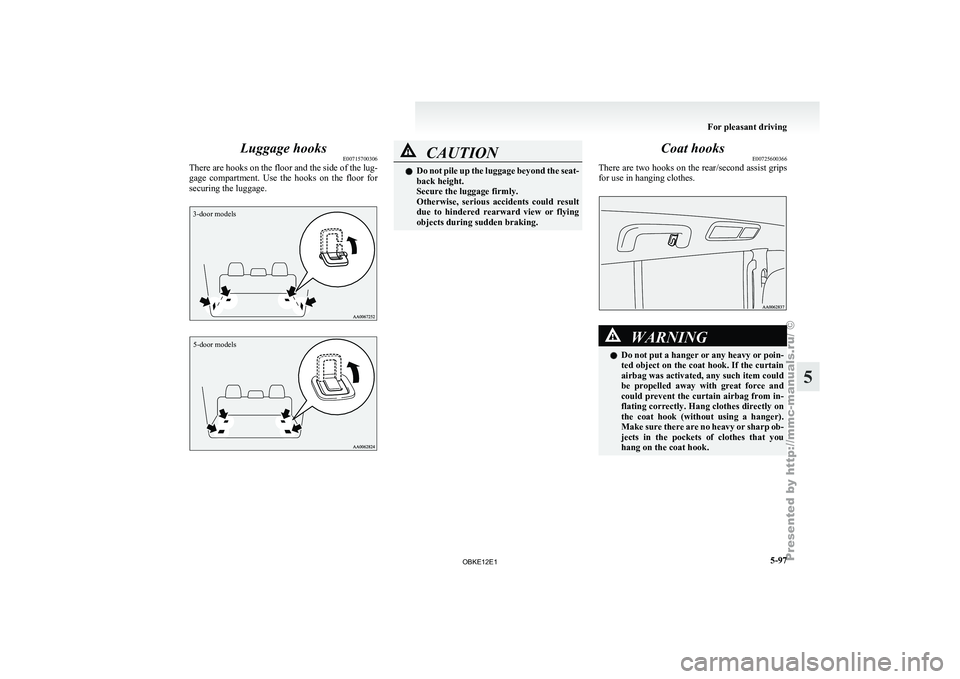
E00715700306
There are hooks
on the floor and the side of the lug-
gage compartment. Use the hooks on the floor for
securing the luggage.
3-door models
5-door models CAUTION
l
Do not pile
up the luggage beyond the seat-
back height.
Secure the luggage firmly.
Otherwise, serious accidents could result
due to hindered rearward view or flying
objects during sudden braking. Coat hooks
E00725600366
There are two
hooks on the rear/second assist grips
for use in hanging clothes. WARNING
l Do not
put
a hanger or any heavy or poin-
ted object on the coat hook. If the curtain
airbag was activated, any such item could
be propelled away with great force and
could prevent the curtain airbag from in-
flating correctly. Hang clothes directly on
the coat hook (without using a hanger).
Make sure there are no heavy or sharp ob-
jects in the pockets of clothes that you
hang on the coat hook. For pleasant driving
5-97 5
OBKE12E1
Page 281 of 377
Installation position for warning
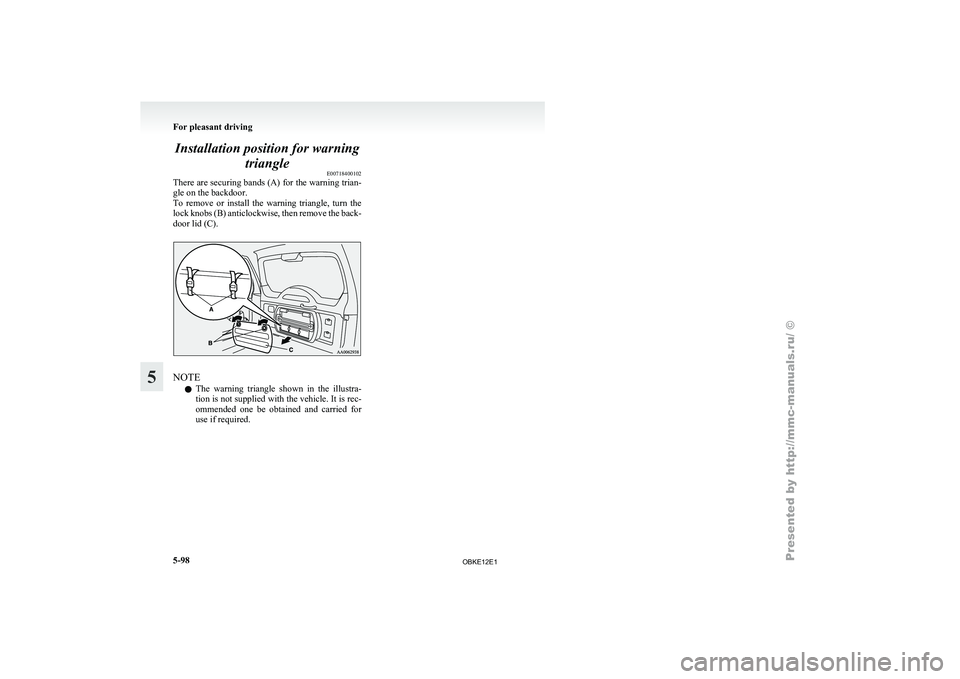
triangle E00718400102
There are securing
bands (A) for the warning trian-
gle on the backdoor.
To remove or install the warning triangle, turn the
lock knobs (B) anticlockwise, then remove the back-
door lid (C). NOTE
l The
warning triangle
shown in the illustra-
tion is not supplied with the vehicle. It is rec-
ommended one be obtained and carried for
use if required. For pleasant driving
5-98
5
OBKE12E1