warning MITSUBISHI PAJERO IV 2011 Service Manual
[x] Cancel search | Manufacturer: MITSUBISHI, Model Year: 2011, Model line: PAJERO IV, Model: MITSUBISHI PAJERO IV 2011Pages: 377, PDF Size: 29.43 MB
Page 91 of 377
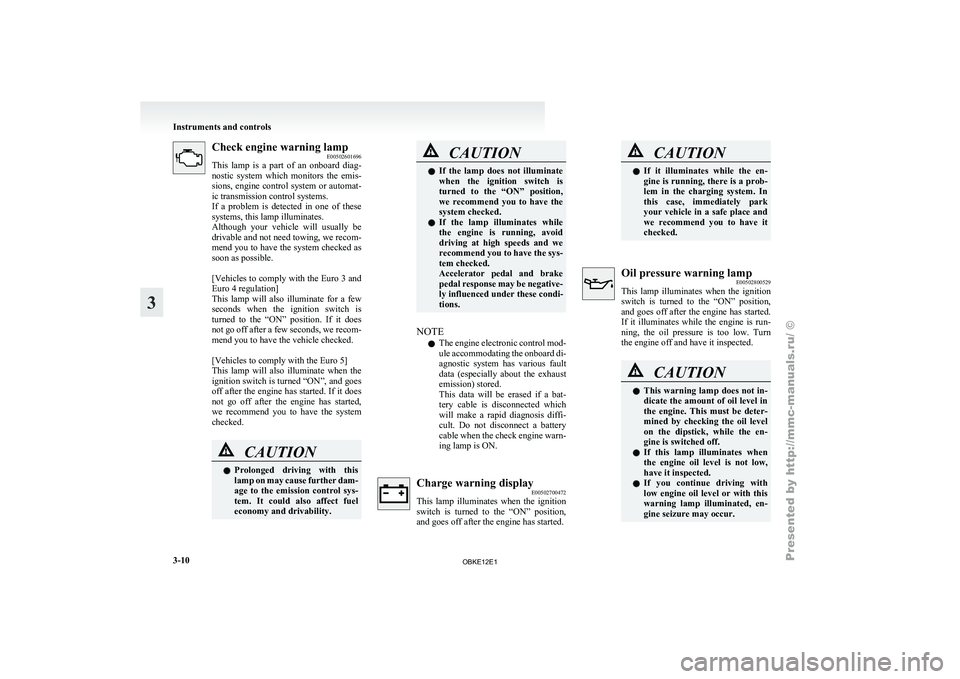
Check engine warning lamp
E00502601696
This lamp is
a part of an onboard diag-
nostic system which monitors the emis-
sions, engine control system or automat-
ic transmission control systems.
If a problem is detected in one of these
systems, this lamp illuminates.
Although your vehicle will usually be
drivable and not need towing, we recom-
mend you to have the system checked as
soon as possible.
[Vehicles to comply with the Euro 3 and
Euro 4 regulation]
This lamp will also illuminate for a few
seconds when the ignition switch is
turned to the “ON” position. If it does
not go off after a few seconds, we recom-
mend you to have the vehicle checked.
[Vehicles to comply with the Euro 5]
This lamp will also illuminate when the
ignition switch is turned “ON”, and goes
off after the engine has started. If it does
not go off after the engine has started,
we recommend you to have the system
checked. CAUTION
l
Prolonged driving
with
this
lamp on may cause further dam-
age to the emission control sys-
tem. It could also affect fuel
economy and drivability. CAUTION
l
If the lamp
does not illuminate
when the ignition switch is
turned to the “ON” position,
we recommend you to have the
system checked.
l If the lamp illuminates while
the engine is running, avoid
driving at high speeds and we
recommend you to have the sys-
tem checked.
Accelerator pedal and brake
pedal response may be negative-
ly influenced under these condi-
tions.
NOTE l The
engine electronic
control mod-
ule accommodating the onboard di-
agnostic system has various fault
data (especially about the exhaust
emission) stored.
This data will be erased if a bat-
tery cable is disconnected which
will make a rapid diagnosis diffi-
cult. Do not disconnect a battery
cable when the check engine warn-
ing lamp is ON. Charge warning display
E00502700472
This lamp illuminates
when the ignition
switch is turned to the “ON” position,
and goes off after the engine has started. CAUTION
l
If it illuminates
while the en-
gine is running, there is a prob-
lem in the charging system. In
this case, immediately park
your vehicle in a safe place and
we recommend you to have it
checked. Oil pressure warning lamp
E00502800529
This lamp illuminates
when the ignition
switch is turned to the “ON” position,
and goes off after the engine has started.
If it illuminates while the engine is run-
ning, the oil pressure is too low. Turn
the engine off and have it inspected. CAUTION
l
This warning
lamp
does not in-
dicate the amount of oil level in
the engine. This must be deter-
mined by checking the oil level
on the dipstick, while the en-
gine is switched off.
l If this lamp illuminates when
the engine oil level is not low,
have it inspected.
l If you continue driving with
low engine oil level or with this
warning lamp illuminated, en-
gine seizure may occur. Instruments and controls
3-10
3
OBKE12E1
Page 92 of 377
Door ajar warning lamp
E00503300635
This lamp illuminates
when a door or
the backdoor is either open or incomplete-
ly closed.
If the vehicle speed reaches approximate-
ly 8 km/h (5 mph) with a door or the back-
door open or incompletely closed, the
warning lamp flashes 8 times and a buz-
zer simultaneously sounds 8 times as a
warning. CAUTION
l
Before moving
your
vehicle,
check that the warning lamp is
OFF.
NOTE l On
vehicles with
keyless entry sys-
tem, the lamp remains illuminated
for a certain period and then goes
out automatically.
l Buzzer settings can be changed at
a your MITSUBISHI MOTORS
Authorized Service Point to:
• No buzzer operation (buzzerdisabled)
• Continuous buzzer operation Centre information display*
E00517800295 CAUTION
l
The driver
should
not operate the display
while the vehicle is in motion.
When the ignition switch is turned to the “ACC” po-
sition, the screen switches on automatically.
NOTE l Placing
a cellular
phone in the monitor’s
small storage compartment may weaken the
phone’s reception. This does not indicate a
fault with the system.
l Use of wireless devices such as transceivers
or a cellular phone near the monitor may
make the following condition on the display.
This does not indicate a fault with the system.
• The screen goes dark temporarily.
• The compass may not show the correct di-rection.
l Depending on the angle of view, you may
see reddish horizontal lines on the monitor.
The lines are a characteristic of the vacuum
fluorescent display (VFD) used in the moni-
tor. They do not indicate a fault. Instruments and controls
3-11 3
OBKE12E1
Page 93 of 377
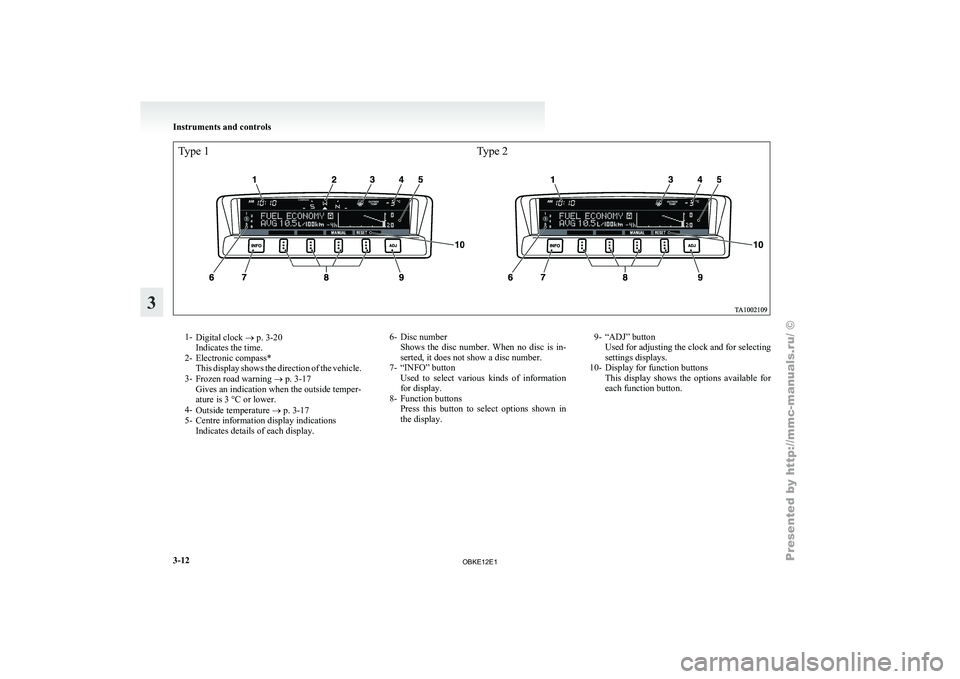
Type 1Type 21-
Digital clock ®
p. 3-20
Indicates the time.
2- Electronic compass* This display shows the direction of the vehicle.
3- Frozen road warning ® p. 3-17
Gives an indication when the outside temper-
ature is 3 °C or lower.
4- Outside temperature ® p. 3-17
5- Centre information display indications Indicates details of each display. 6- Disc number
Shows the disc
number. When no disc is in-
serted, it does not show a disc number.
7- “INFO” button Used to select various kinds of information
for display.
8- Function buttons Press this button to select options shown in
the display. 9- “ADJ” button
Used for adjusting the clock and for selecting
settings displays.
10- Display for function buttons This display
shows the options available for
each function button. Instruments and controls
3-12
3
OBKE12E1
Page 98 of 377
NOTE
l The
average speed
can be reset separately for
the auto reset mode and for the manual reset
mode.
l When you turn the ignition switch to the
“ON” position about 4 hours (or more) after
turning it from the “ON” position to the
“ACC” or “LOCK” position in the auto reset
mode, the average speed indication will auto-
matically be reset.
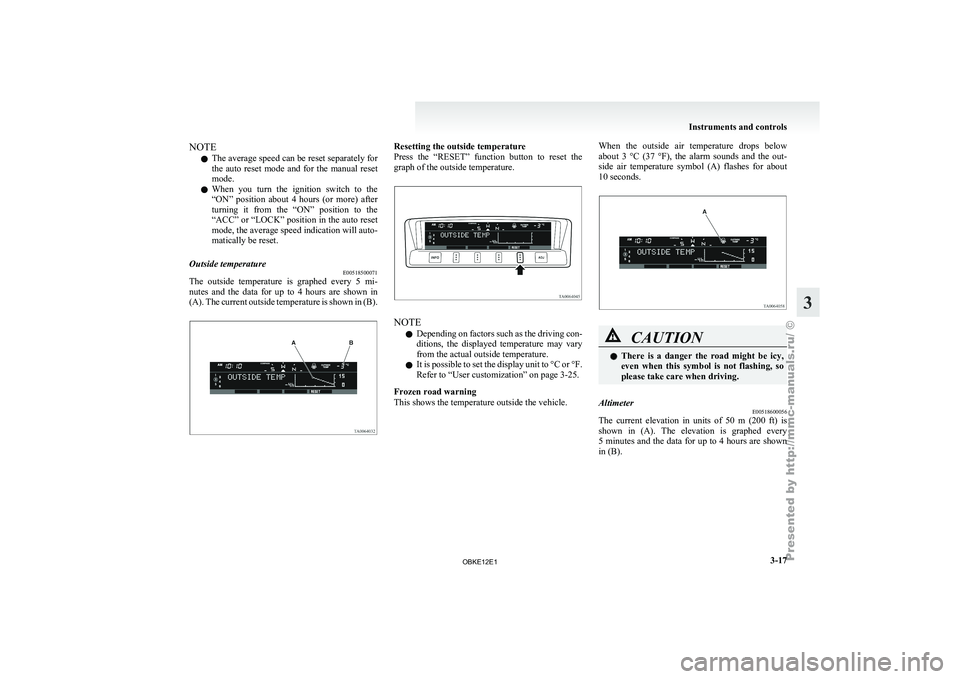
Outside temperature E00518500071
The outside temperature is graphed every 5 mi-
nutes and
the
data for up to 4 hours are shown in
(A). The current outside temperature is shown in (B). Resetting the outside temperature
Press the “RESET”
function button to reset the
graph of the outside temperature. NOTE
l Depending
on factors
such as the driving con-
ditions, the displayed temperature may vary
from the actual outside temperature.
l It is possible to set the display unit to °C or °F.
Refer to “User customization” on page 3-25.
Frozen road warning
This shows the temperature outside the vehicle. When the outside air temperature drops below
about 3
°C
(37 °F), the alarm sounds and the out-
side air temperature symbol (A) flashes for about
10 seconds. CAUTION
l
There is
a
danger the road might be icy,
even when this symbol is not flashing, so
please take care when driving.
Altimeter E00518600056
The current elevation in units of 50 m (200 ft) is
shown in (A).
The elevation is graphed every
5 minutes and the data for up to 4 hours are shown
in (B). Instruments and controls
3-17 3
OBKE12E1
Page 115 of 377
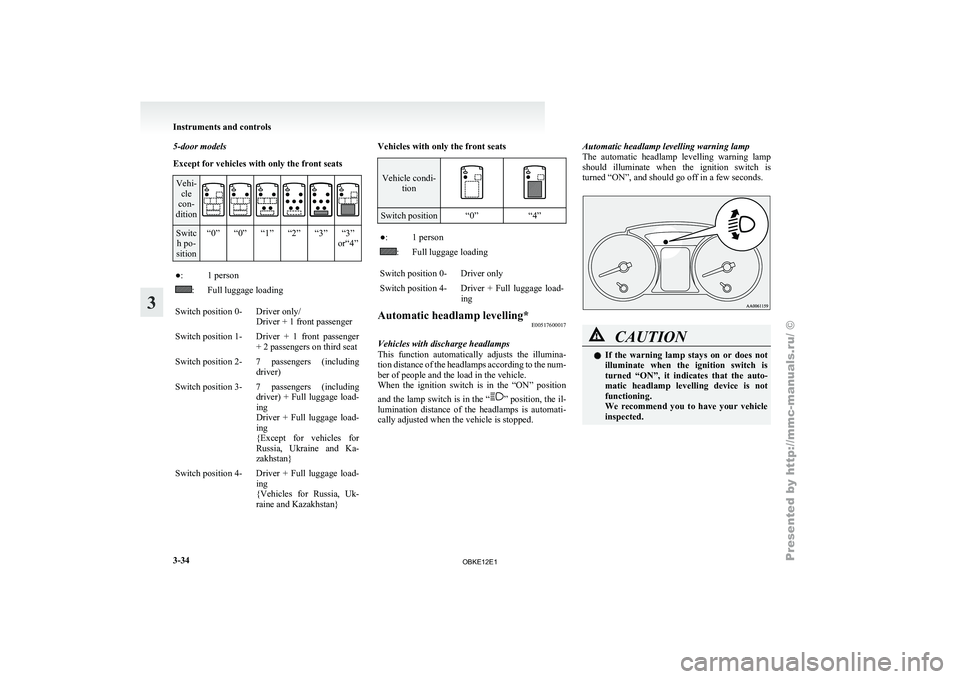
5-door models
Except for vehicles with only the front seats
Vehi-
cle
con-
dition Switc
h po-
sition “0” “0” “1” “2” “3” “3”
or“4”●: 1 person
: Full luggage loading
Switch position 0- Driver only/ Driver + 1 front passenger
Switch position 1- Driver + 1 front passenger + 2 passengers on third seat
Switch position 2- 7 passengers (including driver)
Switch position 3- 7 passengers (including driver) + Full
luggage load-
ing
Driver + Full luggage load-
ing
{Except for vehicles for
Russia, Ukraine and Ka-
zakhstan}
Switch position 4- Driver + Full luggage load- ing
{Vehicles for Russia,
Uk-
raine and Kazakhstan} Vehicles with only the front seats Vehicle condi-
tion Switch position “0”
“4” ●: 1 person
: Full luggage loading
Switch position 0- Driver only
Switch position 4- Driver + Full luggage load- ing
Automatic headlamp levelling* E00517600017
Vehicles with discharge headlamps
This function automatically
adjusts the illumina-
tion distance of the headlamps according to the num-
ber of people and the load in the vehicle.
When the ignition switch is in the “ON” position
and the lamp switch is in the “ ” position, the il-
lumination distance
of the headlamps is automati-
cally adjusted when the vehicle is stopped. Automatic headlamp levelling warning lamp
The automatic
headlamp
levelling warning lamp
should illuminate when the ignition switch is
turned “ON”, and should go off in a few seconds. CAUTION
l
If the
warning
lamp stays on or does not
illuminate when the ignition switch is
turned “ON”, it indicates that the auto-
matic headlamp levelling device is not
functioning.
We recommend you to have your vehicle
inspected. Instruments and controls
3-34
3
OBKE12E1
Page 116 of 377
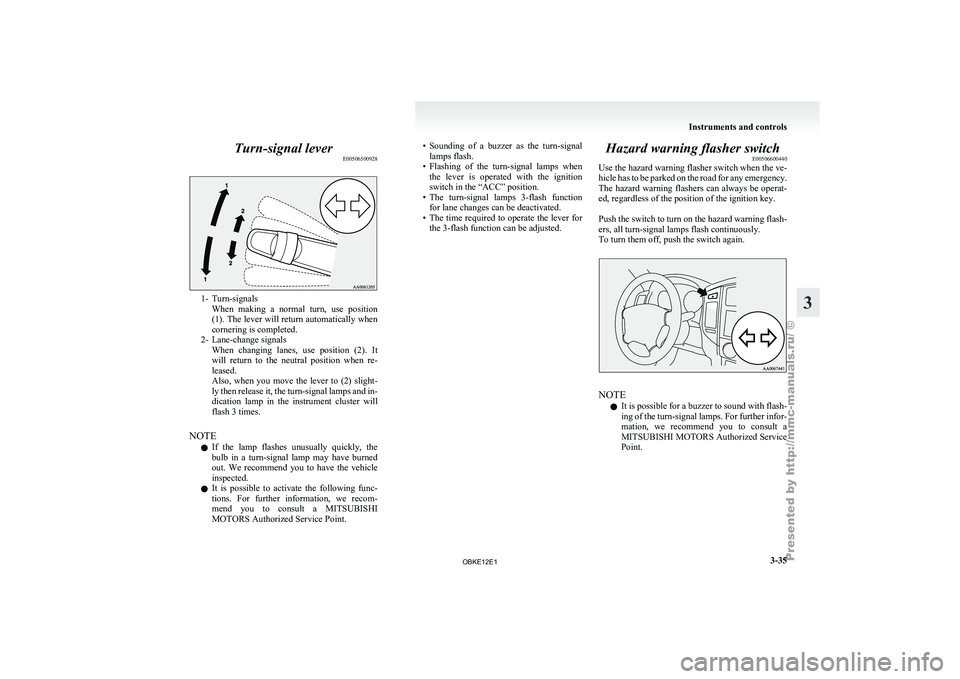
Turn-signal lever
E005065009281- Turn-signals
When making a
normal turn, use position
(1). The lever will return automatically when
cornering is completed.
2- Lane-change signals When changing lanes, use position (2). It
will return to the neutral position when re-
leased.
Also, when you move the lever to (2) slight-
ly then release it, the turn-signal lamps and in-
dication lamp in the instrument cluster will
flash 3 times.
NOTE l If the lamp flashes unusually quickly, the
bulb in a turn-signal lamp may have burned
out. We recommend you to have the vehicle
inspected.
l It is possible to activate the following func-
tions. For further information, we recom-
mend you to consult a MITSUBISHI
MOTORS Authorized Service Point. • Sounding
of a buzzer as the turn-signal
lamps flash.
• Flashing
of the turn-signal lamps when
the lever is operated with the ignition
switch in the “ACC” position.
• The turn-signal lamps 3-flash function for lane changes can be deactivated.
• The time required to operate the lever for the 3-flash function can be adjusted. Hazard warning flasher switch
E00506600440
Use the hazard
warning flasher switch when the ve-
hicle has to be parked on the road for any emergency.
The hazard warning flashers can always be operat-
ed, regardless of the position of the ignition key.
Push the switch to turn on the hazard warning flash-
ers, all turn-signal lamps flash continuously.
To turn them off, push the switch again. NOTE
l It
is possible
for a buzzer to sound with flash-
ing of the turn-signal lamps. For further infor-
mation, we recommend you to consult a
MITSUBISHI MOTORS Authorized Service
Point. Instruments and controls
3-35 3
OBKE12E1
Page 127 of 377
Economical driving
E00600100561
For economical driving,
there are some technical re-
quirements that have to be met. The prerequisite
for low fuel consumption is a properly adjusted en-
gine. In order to achieve longer life of the vehicle
and the most economical operation, we recommend
you to have the vehicle checked at regular intervals
in accordance with the service standards.
Fuel economy and generation of exhaust gas and
noise are highly influenced by personal driving hab-
its as well as the particular operating conditions.
The following points should be observed in order
to minimize wear of brakes, tyres and engine as
well as to reduce environmental pollution.
Starting
Avoid rapid acceleration and sudden starts; such op-
eration will result in higher fuel consumption.
Shifting
Shift only at an appropriate speed and engine
speed. Always use the highest gear possible.
The transfer shift lever should be set to “2H” when
driving on normal roads and express ways to obtain
best possible fuel economy.
City traffic
Frequent starting and stopping increases the aver-
age fuel consumption. Use roads with smooth traf-
fic flow whenever possible. When driving on con-
gested roads, avoid use of a low gear at high en-
gine speeds.
Idling
The vehicle consumes fuel even during idling.
Avoid extended idling whenever possible. Speed
At higher
vehicle
speed, more fuel is consumed.
Avoid driving at full speed. Even a slight release of
the accelerator pedal will save a significant amount
of fuel.
Tyre inflation pressure
Check the tyre inflation pressures at regular inter-
vals. Low tyre inflation pressure increases road re-
sistance and fuel consumption. In addition, low
tyre pressures adversely affect tyre wear and driv-
ing stability.
Load
Do not drive with unnecessary articles in the lug-
gage compartment. Especially during city driving
where frequent starting and stopping is necessary,
the increased weight of the vehicle will greatly af-
fect fuel consumption. Also avoid driving with un-
necessary luggage or carriers, etc., on the roof; the
increased air resistance will increase fuel consump-
tion.
Cold engine starting
Starting of a cold engine consumes more fuel.
Unnecessary fuel consumption is also caused by
keeping a hot engine running. After the engine is
started, commence driving as soon as possible.
Air conditioning
The use of the air conditioning will increase the
fuel consumption. Driving, alcohol and drugs
E00600200067
Driving after drinking
alcohol is one of the most fre-
quent causes of accidents.
Your driving ability can be seriously impaired even
with blood alcohol levels far below the legal mini-
mum. If you have been drinking, don’t drive. Ride
with a designated non-drinking driver, call a cab or
a friend, or use public transportation. Drinking cof-
fee or taking a cold shower will not make you sober.
Similarly, prescription and nonprescription drugs af-
fect your alertness, perception and reaction time.
Consult with your doctor or pharmacist before driv-
ing while under the influence of any of these medi-
cations. WARNING
l NEVER DRINK AND DRIVE.
Your perceptions
are
less accurate, your
reflexes are slower and your judgment is
impaired. Starting and driving
4-02
4
OBKE12E1
Page 128 of 377
Safe driving techniques
E00600300488
Driving safety and
protection against injury cannot
be fully ensured. However, we recommend that
you pay extra attention to the following:
Seat belts
Before starting the vehicle, make sure that you and
your passengers have fastened your seat belts.
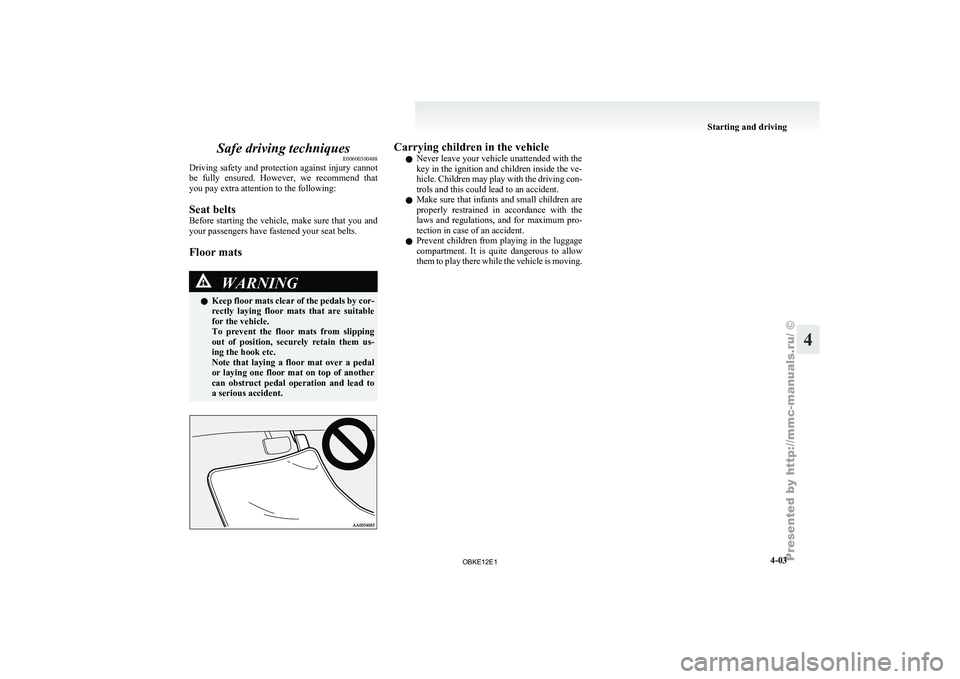
Floor mats WARNING
l Keep
floor
mats
clear of the pedals by cor-
rectly laying floor mats that are suitable
for the vehicle.
To prevent the floor mats from slipping
out of position, securely retain them us-
ing the hook etc.
Note that laying a floor mat over a pedal
or laying one floor mat on top of another
can obstruct pedal operation and lead to
a serious accident. Carrying children in the vehicle
l Never leave your vehicle unattended with the
key in the ignition and children inside the ve-
hicle. Children
may
play with the driving con-
trols and this could lead to an accident.
l Make sure that infants and small children are
properly restrained in accordance with the
laws and regulations, and for maximum pro-
tection in case of an accident.
l Prevent children from playing in the luggage
compartment. It is quite dangerous to allow
them to play there while the vehicle is moving. Starting and driving
4-03 4
OBKE12E1
Page 131 of 377
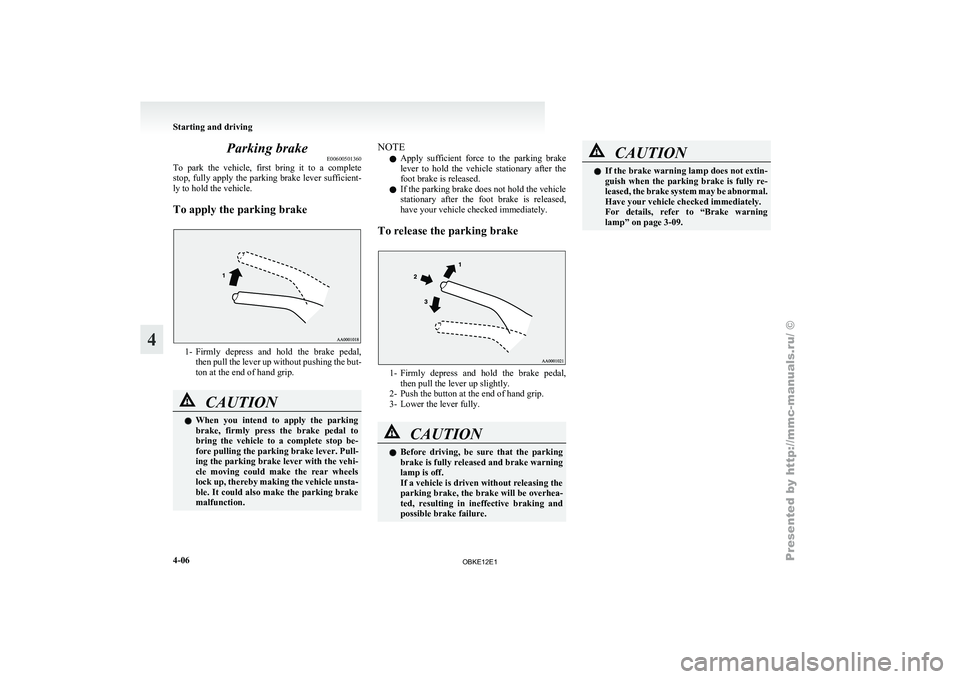
Parking brake
E00600501360
To park the
vehicle, first bring it to a complete
stop, fully apply the parking brake lever sufficient-
ly to hold the vehicle.
To apply the parking brake 1- Firmly depress and hold the brake pedal,
then pull
the lever up without pushing the but-
ton at the end of hand grip. CAUTION
l
When you
intend
to apply the parking
brake, firmly press the brake pedal to
bring the vehicle to a complete stop be-
fore pulling the parking brake lever. Pull-
ing the parking brake lever with the vehi-
cle moving could make the rear wheels
lock up, thereby making the vehicle unsta-
ble. It could also make the parking brake
malfunction. NOTE
l Apply
sufficient force
to the parking brake
lever to hold the vehicle stationary after the
foot brake is released.
l If the parking brake does not hold the vehicle
stationary after the foot brake is released,
have your vehicle checked immediately.
To release the parking brake 1- Firmly depress and hold the brake pedal,
then pull the lever up slightly.
2- Push the button at the end of hand grip.
3-
Lower the lever fully. CAUTION
l
Before driving,
be
sure that the parking
brake is fully released and brake warning
lamp is off.
If a vehicle is driven without releasing the
parking brake, the brake will be overhea-
ted, resulting in ineffective braking and
possible brake failure. CAUTION
l
If the brake
warning lamp does not extin-
guish when the parking brake is fully re-
leased, the brake system may be abnormal.
Have your vehicle checked immediately.
For details, refer to “Brake warning
lamp” on page 3-09. Starting and driving
4-06
4
OBKE12E1
Page 132 of 377

Parking
E00600601097
To park the
vehicle, fully engage the parking
brake, and then move the gearshift lever to 1 st
or
“R” (Reverse) position for vehicles with M/T, or
set the selector lever to “P” (PARK) position on
A/T vehicles.
Parking on a hill
To prevent the vehicle from rolling, follow these
procedures:
Parking on a downhill slope
Turn the front wheels towards the kerb and move
the vehicle forward until the kerb side wheel gently
touches the kerb.
Apply the parking brake and place the gearshift lev-
er into the “R” (Reverse) position (with M/T) or
the selector lever into the “P” (PARK) position
(with A/T).
If necessary, apply chocks to wheels.
Parking on an uphill slope
Turn the front wheels away from the kerb and
move the vehicle back until the kerb side wheel gen-
tly touches the kerb.
Apply the parking brake and place the gearshift lev-
er into the 1 st
position (with M/T) or the selector lev-
er into the “P” (PARK) position (with A/T).
If necessary, apply chocks to wheels. NOTE
l If
your vehicle
is equipped with A/T, be sure
to apply the parking brake before moving the
selector lever to the “P” (PARK) position. If
you move the selector lever to the “P”
(PARK) position before applying the parking
brake, it may be difficult to disengage the se-
lector lever from the “P” (PARK) position
when next you drive the vehicle, requiring ap-
plication of a strong force to the selector lev-
er to move from the “P” (PARK) position.
Parking with the engine running
Never leave the engine running while you take a
short sleep/rest, or you open or close a gate or ga-
rage door, etc. Also, never leave the engine run-
ning in a closed or poorly ventilated place. WARNING
l Leaving
the
engine
running risks injury
or death from accidentally moving the
gearshift lever (on M/T vehicles) or the se-
lector lever (on A/T vehicles) or the accu-
mulation of toxic exhaust fumes in the pas-
senger compartment.
Where you park WARNING
l Do not
park
your vehicle in areas where
combustible materials such as dry grass
or leaves can come in contact with a hot
exhaust, since a fire could occur. When leaving the vehicle
Always remove
the
key from the ignition switch
and lock all doors (including the backdoor) when
leaving the vehicle unattended.
Always try to park your vehicle in a well lit area. Starting and driving
4-07 4
OBKE12E1