use box, MITSUBISHI PAJERO IV 2011 Owners Manual
[x] Cancel search | Manufacturer: MITSUBISHI, Model Year: 2011, Model line: PAJERO IV, Model: MITSUBISHI PAJERO IV 2011Pages: 377, PDF Size: 29.43 MB
Page 265 of 377

USB input terminal*
E00761900015
You can connect
your USB memory device or
iPod* to play music files stored in the USB memo-
ry device or iPod.
The following explains how to connect and remove
a USB memory device or iPod.
Refer to the following sections for details on how
to play music files:
Refer to “To play tracks from USB device” on
page 5-43.
*: “iPod” is a registered trademark of Apple Inc. in
the United States and other countries.
How to connect a USB memory device E00762000273
1. Park your vehicle in a safe place and turn the
ignition switch to the “LOCK” position.
2. Open
the USB input terminal cover (A) in
the glove box. 3. Connect the connector cable (C) to the USB
memory device (B). 4. Connect the connector cable (C) to the USB
input terminal (D). CAUTION
l
Keep the lid
of the glove box closed while
driving the vehicle. A lid or the contents
of the glove box could otherwise cause in-
juries.
NOTE l Do
not connect
the USB memory device to
the USB input terminal directly.
The USB memory device may be damaged.
l When closing the glove box, be careful not
to trap the connector cable.
5. To remove the connector cable, turn the igni- tion switch to the “LOCK” position first and
perform the installation steps in reverse.
How to connect an iPod E00762100014
1. Park your vehicle in a safe place and turn the
ignition switch to the “LOCK” position.
2. Open
the USB input terminal cover (A) in
the glove box. For pleasant driving
5-82
5
OBKE12E1
Page 266 of 377
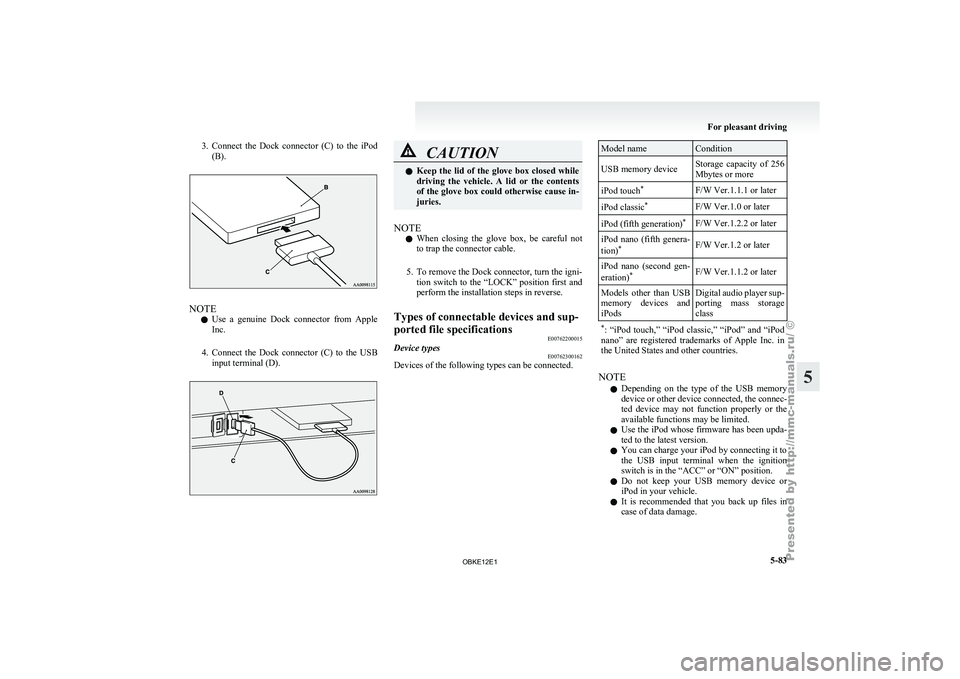
3. Connect the Dock connector (C) to the iPod
(B). NOTE
l Use
a genuine
Dock connector from Apple
Inc.
4. Connect the Dock connector (C) to the USB input terminal (D). CAUTION
l
Keep the lid
of the glove box closed while
driving the vehicle. A lid or the contents
of the glove box could otherwise cause in-
juries.
NOTE l When
closing the
glove box, be careful not
to trap the connector cable.
5. To remove the Dock connector, turn the igni- tion switch to the “LOCK” position first and
perform the installation steps in reverse.
Types of connectable devices and sup-
ported file specifications E00762200015
Device types E00762300162
Devices of the following types can be connected. Model name Condition
USB memory device Storage capacity of 256
Mbytes or more
iPod touch *
F/W Ver.1.1.1 or later
iPod classic *
F/W Ver.1.0 or later
iPod (fifth generation) *
F/W Ver.1.2.2 or later
iPod nano (fifth genera-
tion) *
F/W Ver.1.2 or later
iPod nano (second gen-
eration) *
F/W Ver.1.1.2 or later
Models other than USB
memory devices
and
iPods Digital
audio player sup-
porting mass storage
class
* : “iPod touch,”
“iPod classic,” “iPod” and “iPod
nano” are registered trademarks of Apple Inc. in
the United States and other countries. NOTE
l Depending
on the
type of the USB memory
device or other device connected, the connec-
ted device may not function properly or the
available functions may be limited.
l Use the iPod whose firmware has been upda-
ted to the latest version.
l You can charge your iPod by connecting it to
the USB input terminal when the ignition
switch is in the “ACC” or “ON” position.
l Do not keep your USB memory device or
iPod in your vehicle.
l It is recommended that you back up files in
case of data damage. For pleasant driving
5-83 5
OBKE12E1
Page 275 of 377

1- Sunglasses holder*
2- Glove box
3-
Accessory box*
4-
Centre console box
5- Side box*
6- Luggage floor box
Glove box E00717601162
The glove box can be locked and unlocked using
the key. 1- To lock
2- To unlock
3-
To open, pull the lever NOTE
l When
the lamp
switch is in the “ ” or
“ ” position, the lower glove box lamp illu-
minates.
l The Auxiliary
Audio connector (RCA) (A)
or the Auxiliary Video connector (RCA) (A)
is located in the glove box (if so equipped).
For details, refer to “To use the external au-
dio input function” on page 5-56.
l The USB input terminal (B) is located in the
glove box (if so equipped). For details, refer
to “USB input terminal” on page 5-82.
l Small articles can be stored in the upper area
(C) of the glove box. Centre console box
E00722600105
Upper and lower boxes are located inside the cen-
tre console box. The centre console box can also be used as an arm-
rest. Refer to “Armrest” on page 2-08.
1- Upper box
2- Lower box
Upper box
To open
the upper box, lift the left upper release lev-
er (A) and raise the lid. For pleasant driving
5-92
5
OBKE12E1
Page 277 of 377
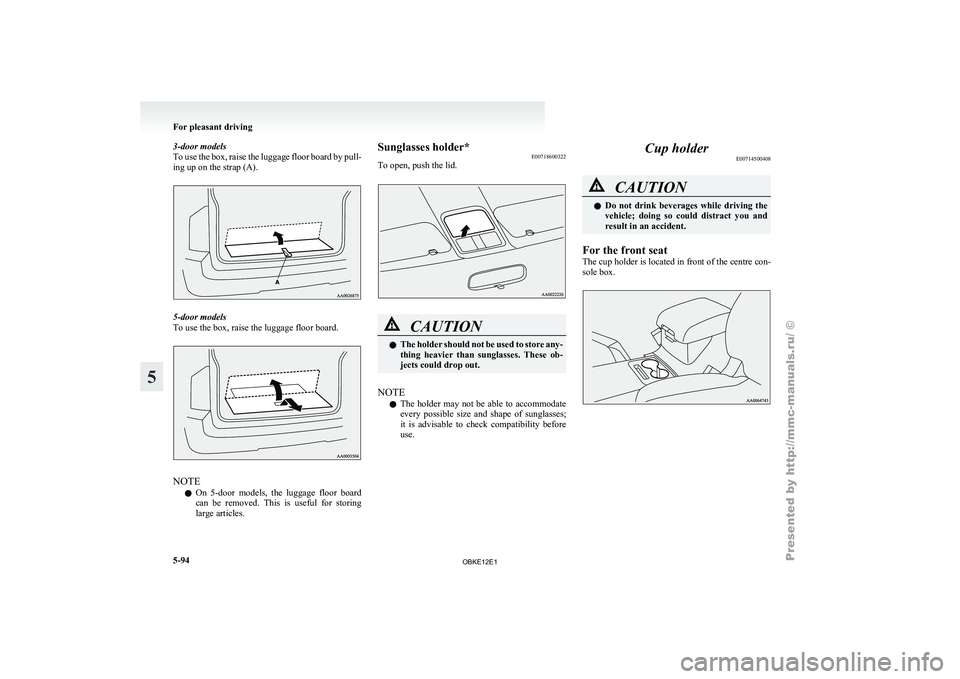
3-door models
To use the
box, raise the luggage floor board by pull-
ing up on the strap (A). 5-door models
To use the box, raise the luggage floor board.
NOTE
l On 5-door
models, the
luggage floor board
can be removed. This is useful for storing
large articles. Sunglasses holder*
E00718600322
To open, push the lid. CAUTION
l
The holder
should
not be used to store any-
thing heavier than sunglasses. These ob-
jects could drop out.
NOTE l The
holder may
not be able to accommodate
every possible size and shape of sunglasses;
it is advisable to check compatibility before
use. Cup holder
E00714500408 CAUTION
l
Do not
drink
beverages while driving the
vehicle; doing so could distract you and
result in an accident.
For the front seat
The cup holder
is located in front of the centre con-
sole box. For pleasant driving
5-94
5
OBKE12E1