lock MITSUBISHI TRITON 2011 Owners Manual
[x] Cancel search | Manufacturer: MITSUBISHI, Model Year: 2011, Model line: TRITON, Model: MITSUBISHI TRITON 2011Pages: 369, PDF Size: 26.15 MB
Page 251 of 369
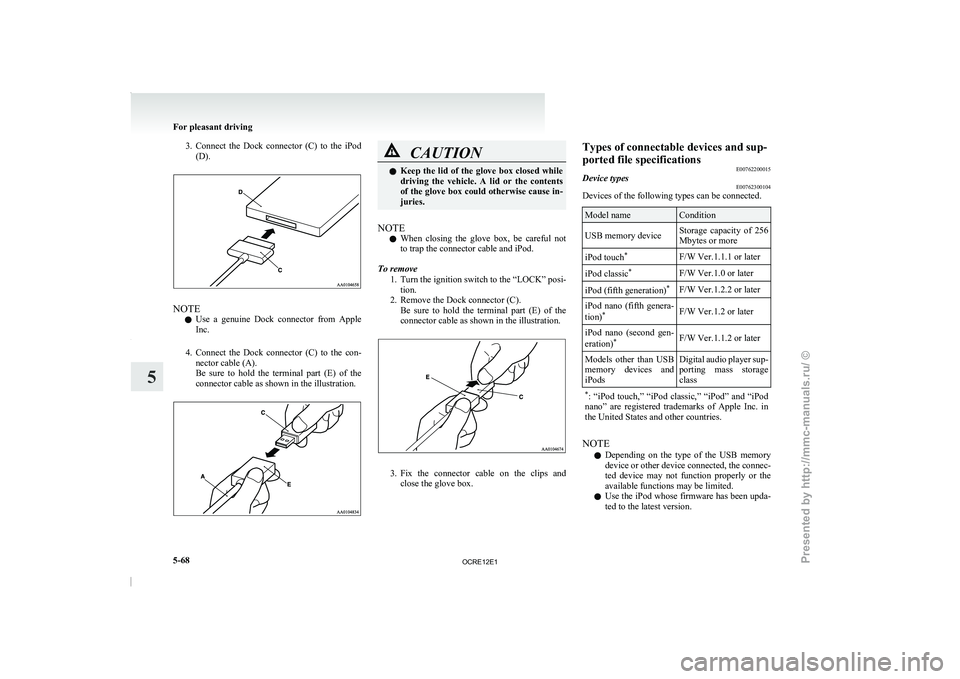
3. Connect the Dock connector (C) to the iPod
(D). NOTE
l Use
a genuine Dock connector
from Apple
Inc.
4. Connect the Dock connector (C) to the con- nector cable (A).
Be sure to hold the terminal part (E) of the
connector cable as shown in the illustration. CAUTION
l
Keep the lid of the
glove box closed while
driving the vehicle. A lid or the contents
of the glove box could otherwise cause in-
juries.
NOTE l When
closing the glove box,
be careful not
to trap the connector cable and iPod.
To remove 1. Turn the ignition switch to the “LOCK” posi-tion.
2. Remove the Dock connector (C). Be sure to hold the terminal part (E) of the
connector cable as shown in the illustration. 3. Fix the connector cable on the clips and
close the glove box. Types of connectable devices and sup-
ported file specifications
E00762200015
Device types E00762300104
Devices of the following types can be connected. Model name Condition
USB memory device Storage capacity of 256
Mbytes or more
iPod touch *
F/W Ver.1.1.1 or later
iPod classic *
F/W Ver.1.0 or later
iPod (fifth generation) *
F/W Ver.1.2.2 or later
iPod nano (fifth genera-
tion) *
F/W Ver.1.2 or later
iPod nano (second gen-
eration) *
F/W Ver.1.1.2 or later
Models other than USB
memory devices and
iPods Digital audio
player
sup-
porting mass storage
class
* : “iPod touch,” “iPod classic,”
“iPod” and “iPod
nano” are registered trademarks of Apple Inc. in
the United States and other countries. NOTE
l Depending
on the
type of
the USB memory
device or other device connected, the connec-
ted device may not function properly or the
available functions may be limited.
l Use the iPod whose firmware has been upda-
ted to the latest version. For pleasant driving
5-68
5
OCRE12E1
Presented by http://mmc-manuals.ru/ \251
Page 252 of 369
l
You can charge your iPod by connecting it to
the USB input terminal
when
the ignition
switch is in the “ACC” or “ON” position.
l Do not keep your USB memory device or
iPod in your vehicle.
l It is recommended that you back up files in
case of data damage.
l Do not connect to the USB input terminal
any device (hard disk, card reader, memory
reader, etc.) other than the connectable devi-
ces specified in the previous section. The de-
vice and/or data may be damaged. If any of
these devices was connected by mistake, re-
move it after turning the ignition switch to
the “LOCK” position.
File specifications E00762400017
You can play music files of the following specifica-
tions that are saved in
a USB memory device or oth-
er device supporting mass storage class. Item Condition
File format MP3, WMA, AAC,
WAV
Maximum number of
levels (including the
root) Level 8
Number of folders 700
Number of files 65,535 Sun visors
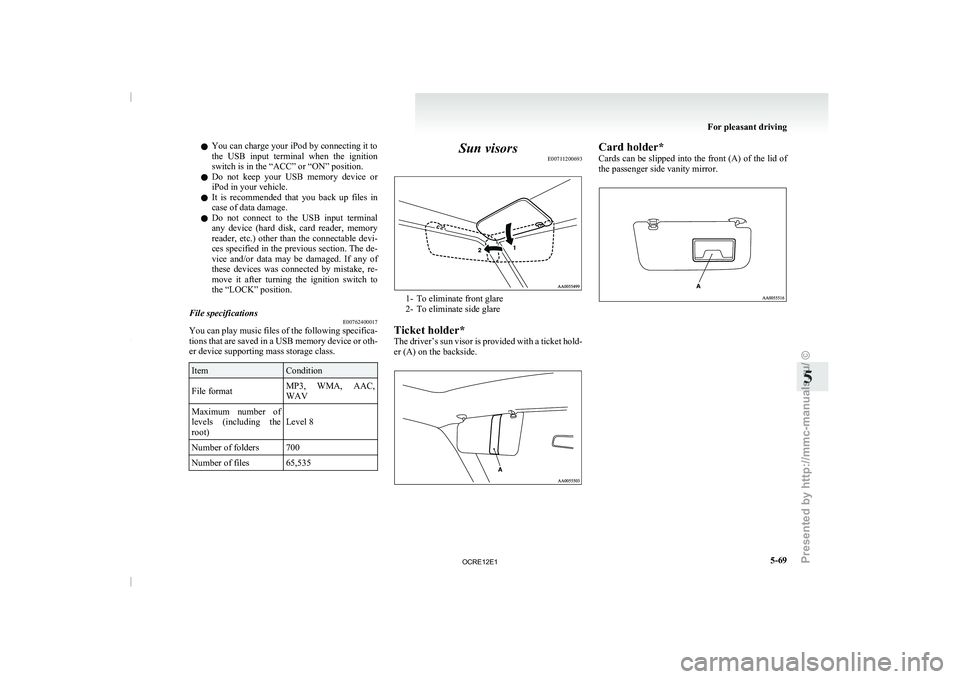
E00711200693 1- To eliminate front glare
2- To eliminate side glare
Ticket holder*
The driver’s sun visor
is provided with a ticket hold-
er (A) on the backside. Card holder*
Cards can be slipped
into
the front (A) of the lid of
the passenger side vanity mirror. For pleasant driving
5-69 5
OCRE12E1
Presented by http://mmc-manuals.ru/ \251
Page 256 of 369
Digital clock*
E00711700193
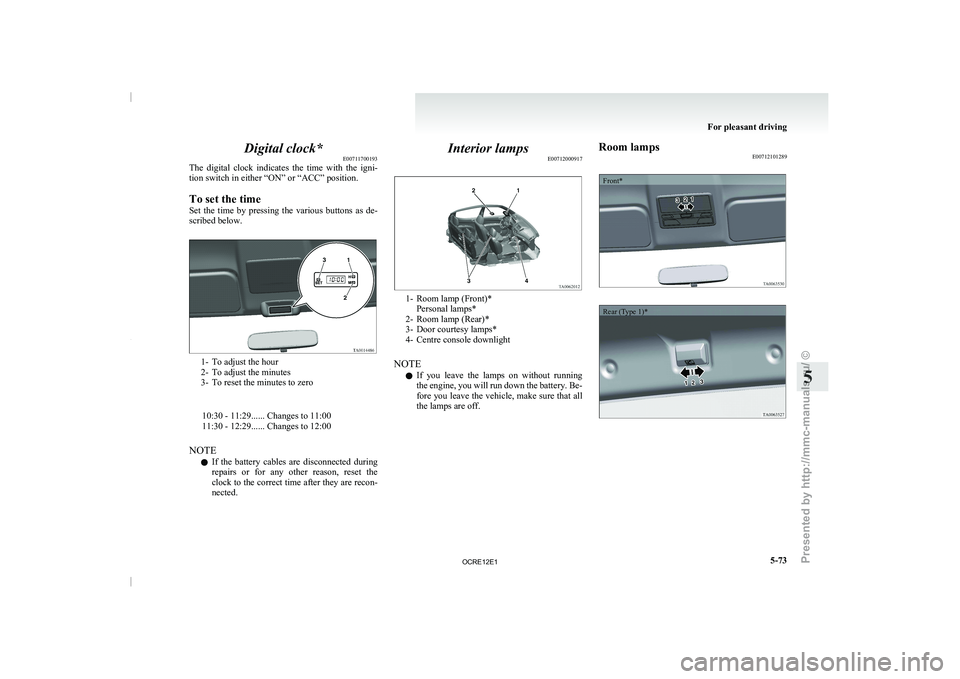
The digital clock indicates the
time with the igni-
tion switch in either “ON” or “ACC” position.
To set the time
Set the time by pressing the various buttons as de-
scribed below. 1- To adjust the hour
2- To adjust the minutes
3- To reset the minutes to zero
10:30 - 11:29...... Changes to 11:00
11:30 - 12:29...... Changes to 12:00
NOTE l If the
battery
cables are disconnected during
repairs or for any other reason, reset the
clock to the correct time after they are recon-
nected. Interior lamps
E00712000917 1- Room lamp (Front)*
Personal lamps*
2- Room lamp (Rear)*
3- Door courtesy lamps*
4- Centre console downlight
NOTE l If
you
leave the lamps on without running
the engine, you will run down the battery. Be-
fore you leave the vehicle, make sure that all
the lamps are off. Room lamps
E00712101289
Front*
Rear (Type 1)* For pleasant driving
5-73 5
OCRE12E1
Presented by http://mmc-manuals.ru/ \251
Page 257 of 369
![MITSUBISHI TRITON 2011 Owners Manual Rear (Type 2)*1
(ON/
) - The lamp illuminates.
2
( ) -
[Vehicles without central door locks
system]
The room lamp goes
on when a door
is opened. When all doors are
closed, the room lamp is i](/img/19/58153/w960_58153-256.png "MITSUBISHI TRITON 2011 Owners Manual Rear (Type 2)*1
(ON/
) - The lamp illuminates.
2
( ) -
[Vehicles without central door locks
system]
The room lamp goes
on when a door
is opened. When all doors are
closed, the room lamp is i")
Rear (Type 2)*1
(ON/
) - The lamp illuminates.
2
( ) -
[Vehicles without central door locks
system]
The room lamp goes
on when a door
is opened. When all doors are
closed, the room lamp is illuminated
and dimmed gradually for 7 seconds
then goes out.
However, the lamp goes out immedi-
ately without being dimmed when
the ignition switch is turned to the
“ON” position.
[Vehicles with central door locks sys-
tem]
The room lamp goes on when a door
is opened. When all doors are
closed, the room lamp is illuminated
and dimmed gradually for 15 sec-
onds then goes out.
However, the lamp goes out immedi-
ately without being dimmed in case
of the followings:
l All doors are closed and the ig-
nition switch is turned to the
“ON” position.
l All doors are locked using the
key mechanism of the driver’s
door, the lock knob of the driv-
er’s door, or the remote con-
trol switch of the keyless entry
system (if so equipped).
NOTE
l On
vehicles with keyless entry
system,
when the ignition key
is removed with the doors
closed, the lamp is illuminated
and after about 15 seconds it
goes off.
The dimming period is also ad-
justable.
For further information, we
recommend you to consult a
MITSUBISHI MOTORS Au-
thorized Service Point.
3
(OFF/ ) - The lamp goes off.
Personal lamps* E00712500156
Push the switch (A) to turn on the lamp. Push it
again to turn it off. For pleasant driving
5-74
5
OCRE12E1
Presented by http://mmc-manuals.ru/ \251
Page 259 of 369
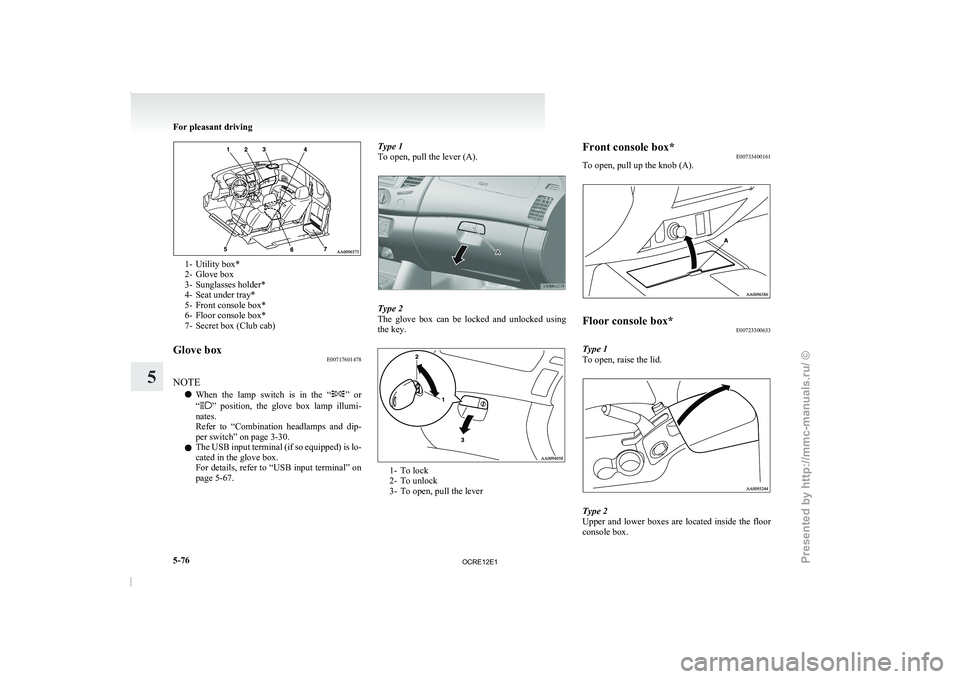
1- Utility box*
2- Glove box
3- Sunglasses holder*
4- Seat under tray*
5-
Front console box*
6-
Floor console box*
7- Secret box (Club cab)
Glove box E00717601478
NOTE l When
the lamp switch is
in the “ ” or
“ ” position, the glove box lamp illumi-
nates.
Refer to “Combination headlamps
and dip-
per switch” on page 3-30.
l The USB input terminal (if so equipped) is lo-
cated in the glove box.
For details, refer to “USB input terminal” on
page 5-67. Type 1
To open, pull the lever (A).
Type 2
The glove box can
be
locked and unlocked using
the key. 1- To lock
2- To unlock
3- To open, pull the leverFront console box*
E00733400161
To open, pull up the knob (A). Floor console box*
E00723300633
Type 1
To open, raise the lid. Type 2
Upper and lower boxes
are
located inside the floor
console box. For pleasant driving
5-76
5
OCRE12E1
Presented by http://mmc-manuals.ru/ \251
Page 261 of 369
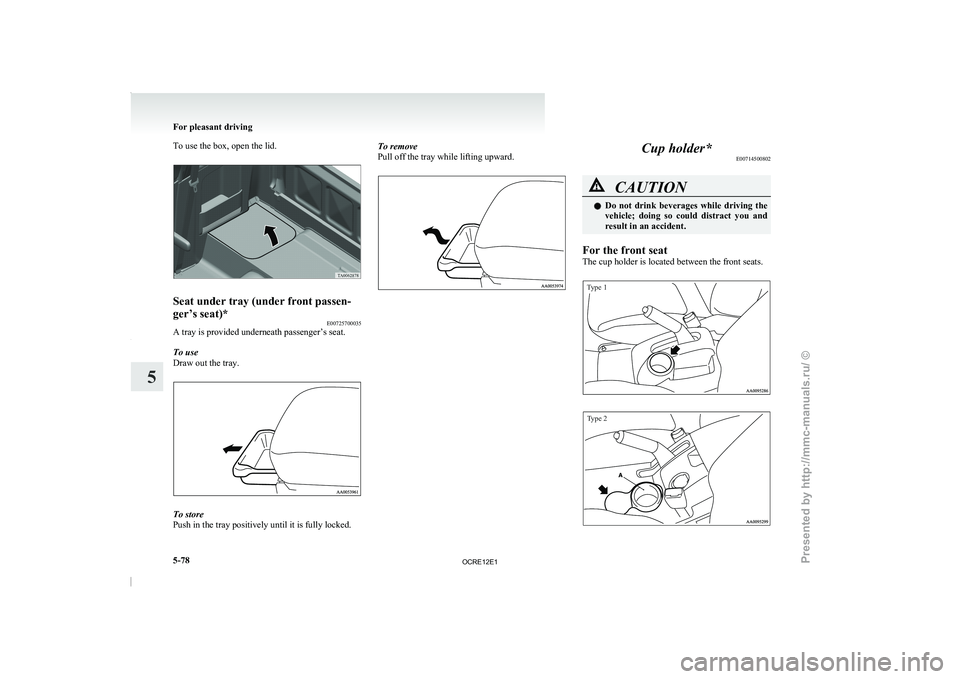
To use the box, open the lid.
Seat under tray (under front passen-
ger’s seat)*
E00725700035
A tray is provided underneath passenger’s seat.
To use
Draw out the tray. To store
Push in the tray positively until it is fully locked. To remove
Pull off the tray while lifting upward. Cup holder*
E00714500802 CAUTION
l
Do not drink beverages
while driving the
vehicle; doing so could distract you and
result in an accident.
For the front seat
The cup holder is located between the front seats.
Type 1
Type 2 For pleasant driving
5-78
5
OCRE12E1
Presented by http://mmc-manuals.ru/ \251
Page 268 of 369
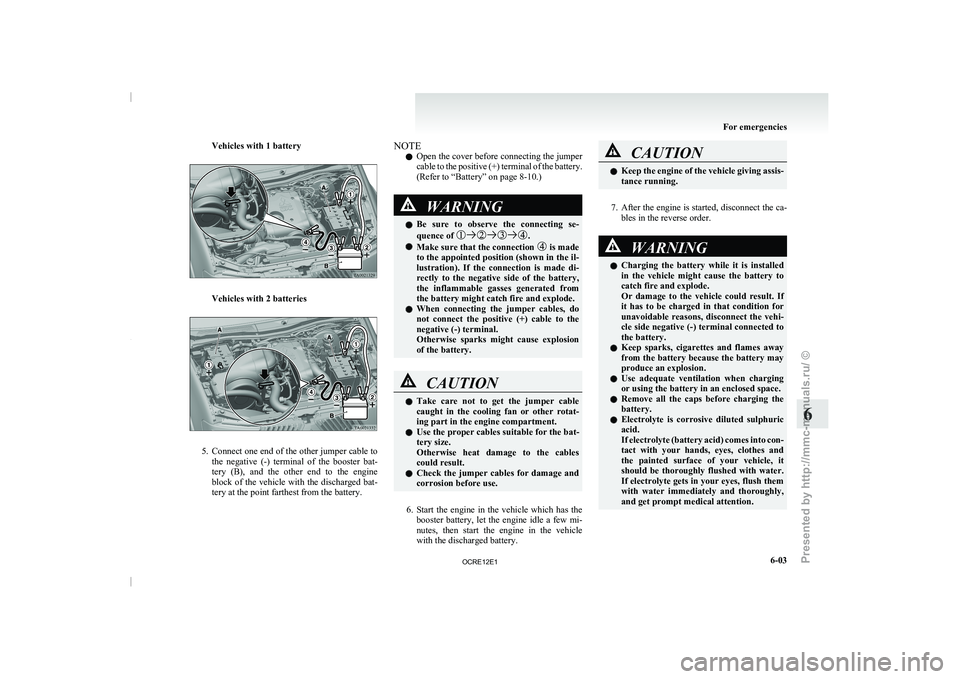
Vehicles with 1 battery
Vehicles with 2 batteries
5. Connect
one end of the other jumper cable to
the negative
(-) terminal
of the booster bat-
tery (B), and the other end to the engine
block of the vehicle with the discharged bat-
tery at the point farthest from the battery. NOTE
l Open
the cover before connecting
the jumper
cable to the positive (+) terminal of the battery.
(Refer to “Battery” on page 8-10.) WARNING
l Be sure to observe
the
connecting se-
quence of .
l Make sure that the connection is made
to the appointed position (shown
in the il-
lustration). If the connection is made di-
rectly to the negative side of the battery,
the inflammable gasses generated from
the battery might catch fire and explode.
l When connecting the jumper cables, do
not connect the positive (+) cable to the
negative (-) terminal.
Otherwise sparks might cause explosion
of the battery. CAUTION
l
Take care not to get
the jumper cable
caught in the cooling fan or other rotat-
ing part in the engine compartment.
l Use the proper cables suitable for the bat-
tery size.
Otherwise heat damage to the cables
could result.
l Check the jumper cables for damage and
corrosion before use.
6. Start the engine in the vehicle which has the
booster battery,
let the
engine idle a few mi-
nutes, then start the engine in the vehicle
with the discharged battery. CAUTION
l
Keep the engine of the
vehicle giving assis-
tance running.
7. After the engine is started, disconnect the ca-
bles in the reverse order. WARNING
l Charging the battery while it
is installed
in the vehicle might cause the battery to
catch fire and explode.
Or damage to the vehicle could result. If
it has to be charged in that condition for
unavoidable reasons, disconnect the vehi-
cle side negative (-) terminal connected to
the battery.
l Keep sparks, cigarettes and flames away
from the battery because the battery may
produce an explosion.
l Use adequate ventilation when charging
or using the battery in an enclosed space.
l Remove all the caps before charging the
battery.
l Electrolyte is corrosive diluted sulphuric
acid.
If electrolyte (battery acid) comes into con-
tact with your hands, eyes, clothes and
the painted surface of your vehicle, it
should be thoroughly flushed with water.
If electrolyte gets in your eyes, flush them
with water immediately and thoroughly,
and get prompt medical attention. For emergencies
6-03 6
OCRE12E1
Presented by http://mmc-manuals.ru/ \251
Page 269 of 369
CAUTION
l
Do not attempt to start the engine by pull-
ing or pushing the vehicle.
It could damage your vehicle.
l Always wear protective eye goggles when
working near the battery.
l Keep the battery out of the reach of chil-
dren.
NOTE l On
vehicles with anti-lock brake
system, if
the vehicle is put in motion without fully
charging the battery, it might cause the loss
of smooth engine operation and the antilock
brake warning lamp to illuminate.
Refer to “Anti-lock brake system (ABS)” on
page 4-44. Engine overheating
E00800601985
If the water temperature gauge
indication remains
in the overheating zone for a long time, the engine
may be overheating. If this occurs, take the follow-
ing corrective measures: 1. Stop the vehicle in a safe place.
2. Check whether steam is coming from the en-gine compartment.
[If steam does not come from the engine com-
partment]
With the engine still running, raise the bon-
net to ventilate the engine compartment.
[If steam is coming from the engine compart-
ment]
Stop the engine, and when the steam stops,
raise the bonnet to ventilate the engine com-
partment. Restart the engine. WARNING
l Do not open the
bonnet
while steam is com-
ing from the engine compartment. It
could cause steam or hot water to spurt
out, causing burns. Hot water could spurt
out even when there is no steam coming
out, and some parts will be very hot. Be
very careful when opening the bonnet.
l Be careful of hot steam, which could be
blowing off the reserve tank cap.
l Do not attempt to remove the radiator
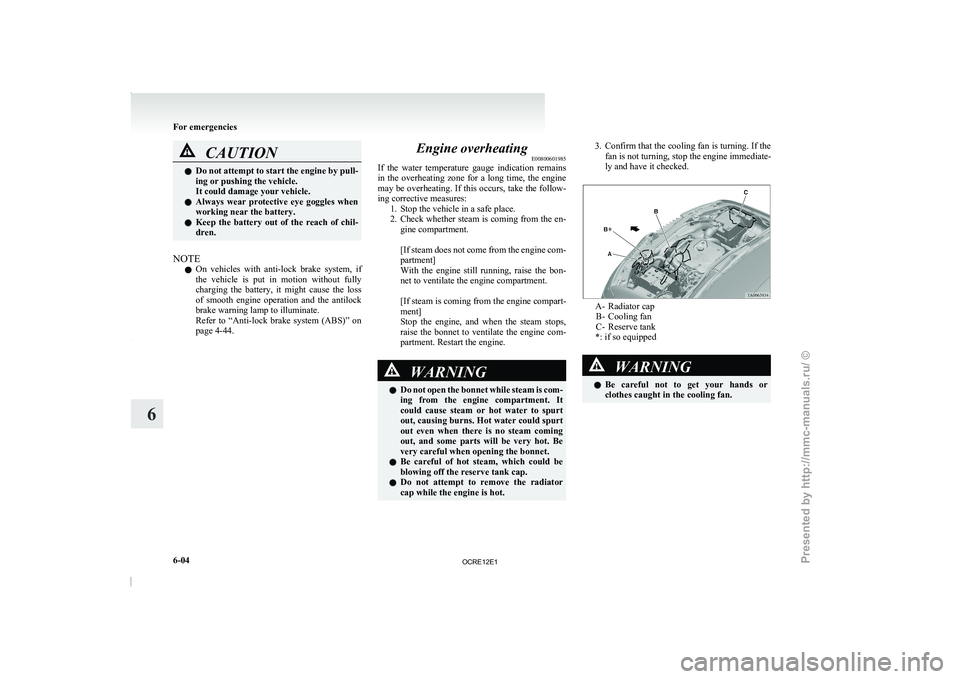
cap while the engine is hot. 3. Confirm that the cooling fan is turning. If the
fan is not turning, stop the engine immediate-
ly and have it checked. A- Radiator cap
B- Cooling fan
C- Reserve tank
*: if so equipped WARNING
l Be careful not to
get your hands or
clothes caught in the cooling fan. For emergencies
6-04
6
OCRE12E1
Presented by http://mmc-manuals.ru/ \251
Page 277 of 369
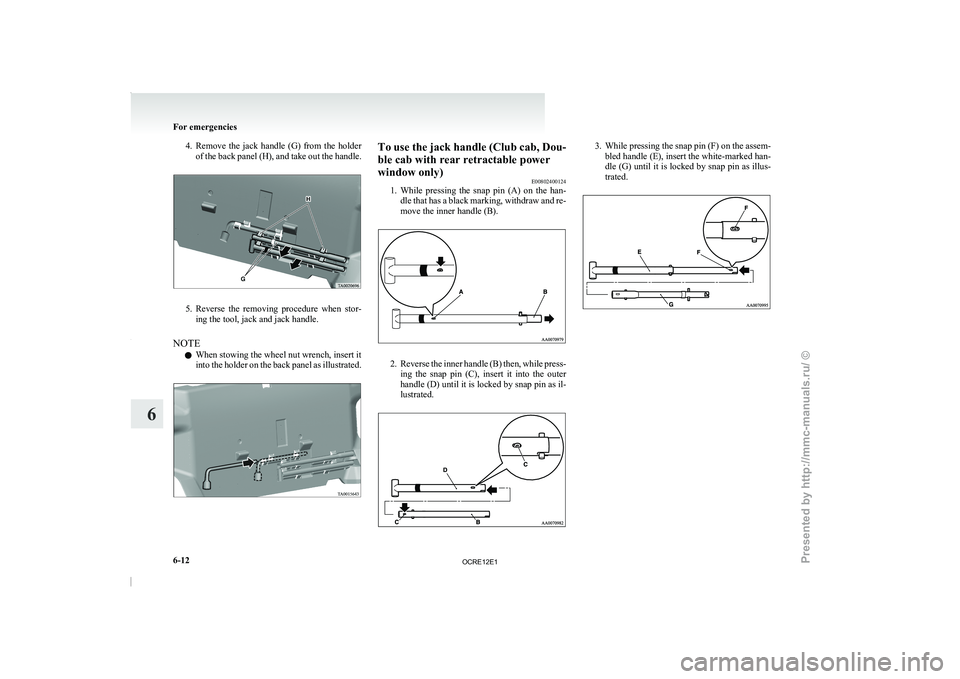
4. Remove the jack handle (G) from the holder
of the back panel (H), and take out the handle.5. Reverse the removing procedure when stor-
ing the tool, jack and jack handle.
NOTE l When stowing the wheel nut wrench, insert it
into the holder
on
the back panel as illustrated. To use the jack handle (Club cab, Dou-
ble cab with rear retractable power
window only)
E00802400124
1. While pressing the snap pin
(A) on the han-
dle that has a black marking, withdraw and re-
move the inner handle (B). 2. Reverse the inner handle (B) then, while press-
ing the snap pin
(C), insert it into the outer
handle (D) until it is locked by snap pin as il-
lustrated. 3. While pressing the snap pin (F) on the assem-
bled handle (E), insert the white-marked han-
dle (G) until it
is locked by snap pin as illus-
trated. For emergencies
6-12
6
OCRE12E1
Presented by http://mmc-manuals.ru/ \251
Page 278 of 369
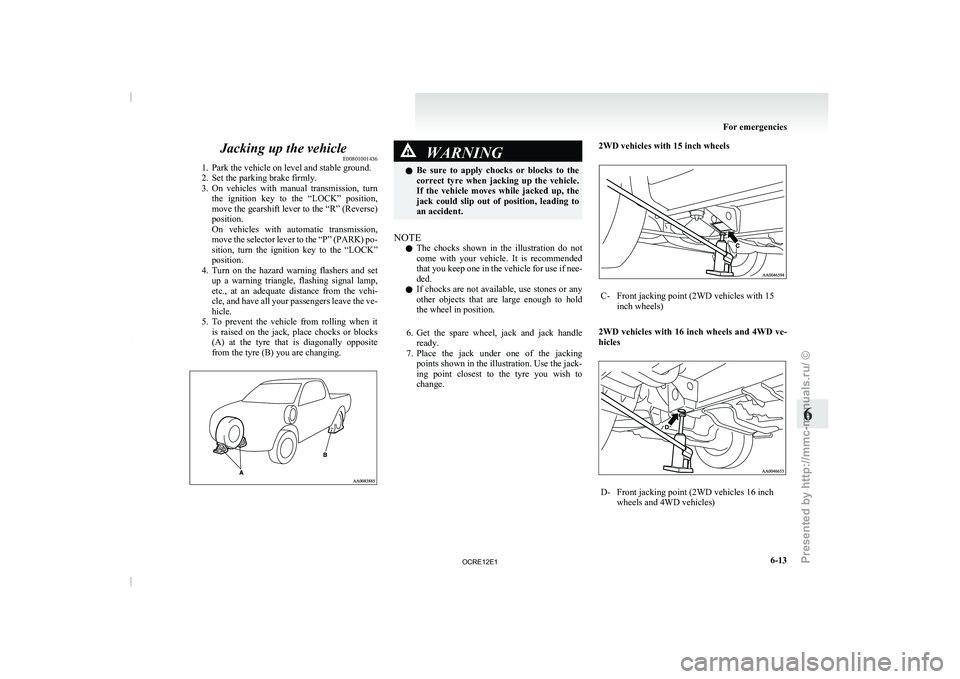
Jacking up the vehicle
E00801001436
1. Park the vehicle on level and stable ground.
2. Set the parking brake firmly.
3. On vehicles
with manual transmission, turn
the ignition key to the “LOCK” position,
move the gearshift lever to the “R” (Reverse)
position.
On vehicles with automatic transmission,
move the selector lever to the “P” (PARK) po-
sition, turn the ignition key to the “LOCK”
position.
4. Turn on the hazard warning flashers and set up a warning triangle, flashing signal lamp,
etc., at an adequate distance from the vehi-
cle, and have all your passengers leave the ve-
hicle.
5. To prevent the vehicle from rolling when it is raised on the jack, place chocks or blocks
(A) at the tyre that is diagonally opposite
from the tyre (B) you are changing. WARNING
l Be sure to apply chocks
or blocks to the
correct tyre when jacking up the vehicle.
If the vehicle moves while jacked up, the
jack could slip out of position, leading to
an accident.
NOTE l The
chocks shown in the
illustration do not
come with your vehicle. It is recommended
that you keep one in the vehicle for use if nee-
ded.
l If chocks are not available, use stones or any
other objects that are large enough to hold
the wheel in position.
6. Get the spare wheel, jack and jack handle ready.
7. Place the jack under one of the jacking points shown in the illustration. Use the jack-
ing point closest to the tyre you wish to
change. 2WD vehicles with 15 inch wheels C- Front jacking point (2WD vehicles with 15
inch wheels)
2WD vehicles with 16 inch wheels and 4WD ve-
hicles D- Front jacking point (2WD vehicles 16 inch
wheels and 4WD vehicles) For emergencies
6-13 6
OCRE12E1
Presented by http://mmc-manuals.ru/ \251