lock MITSUBISHI TRITON 2011 Manual Online
[x] Cancel search | Manufacturer: MITSUBISHI, Model Year: 2011, Model line: TRITON, Model: MITSUBISHI TRITON 2011Pages: 369, PDF Size: 26.15 MB
Page 189 of 369
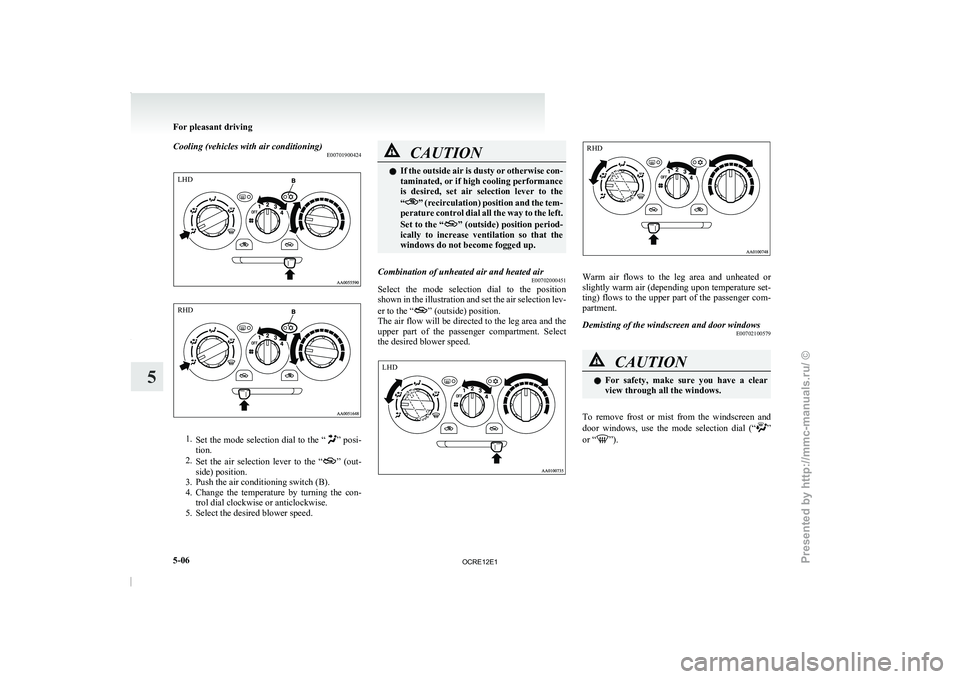
Cooling (vehicles with air conditioning)
E007019004241.
Set the mode selection dial
to the “ ” posi-
tion.
2. Set the air selection
lever to the “ ” (out-
side) position.
3. Push the air conditioning switch (B).
4. Change the
temperature by turning the con-
trol dial clockwise or anticlockwise.
5. Select the desired blower speed. CAUTION
l
If the outside air is
dusty or otherwise con-
taminated, or if high cooling performance
is desired, set air selection lever to the
“ ” (recirculation) position and the tem-
perature control dial all
the way to the left.
Set to the “ ” (outside) position period-
ically to increase ventilation
so that the
windows do not become fogged up.
Combination of unheated air and heated air E00702000451
Select the mode selection dial to the position
shown in the illustration and
set the air selection lev-
er to the “ ” (outside) position.
The air flow
will be
directed to the leg area and the
upper part of the passenger compartment. Select
the desired blower speed. Warm air flows to the leg area and unheated or
slightly warm air (depending
upon
temperature set-
ting) flows to the upper part of the passenger com-
partment.
Demisting of the windscreen and door windows E00702100579 CAUTION
l
For safety, make sure
you
have a clear
view through all the windows.
To remove frost or mist from the windscreen and
door windows, use
the mode
selection dial (“ ”
or “ ”).For pleasant driving
5-06
5LHD RHD LHD RHD
OCRE12E1
Presented by http://mmc-manuals.ru/ \251
Page 191 of 369
Introduction of outside air
E00702200235
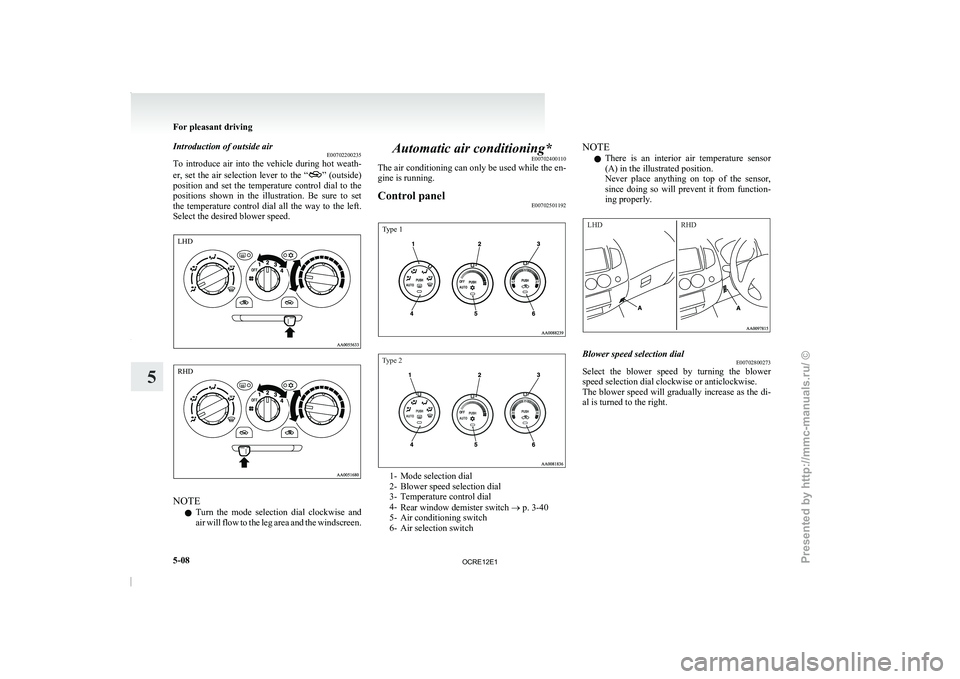
To introduce air into the
vehicle during hot weath-
er, set the air selection lever to the “ ” (outside)
position and set the
temperature control dial to the
positions shown in the illustration. Be sure to set
the temperature control dial all the way to the left.
Select the desired blower speed. NOTE
l Turn
the mode selection dial
clockwise and
air will flow to the leg area and the windscreen. Automatic air conditioning*
E00702400110
The air conditioning can only
be used while the en-
gine is running.
Control panel E00702501192
Type 1
Type 2 1- Mode selection dial
2- Blower speed selection dial
3- Temperature control dial
4-
Rear window demister switch ® p. 3-40
5- Air conditioning switch
6-
Air selection switch NOTE
l There
is an interior air
temperature sensor
(A) in the illustrated position.
Never place anything on top of the sensor,
since doing so will prevent it from function-
ing properly.
LHD RHD Blower speed selection dial
E00702800273
Select the blower speed by turning the blower
speed selection dial clockwise or anticlockwise.
The blower speed will gradually
increase as the di-
al is turned to the right. For pleasant driving
5-08
5 LHD RHD
OCRE12E1
Presented by http://mmc-manuals.ru/ \251
Page 192 of 369
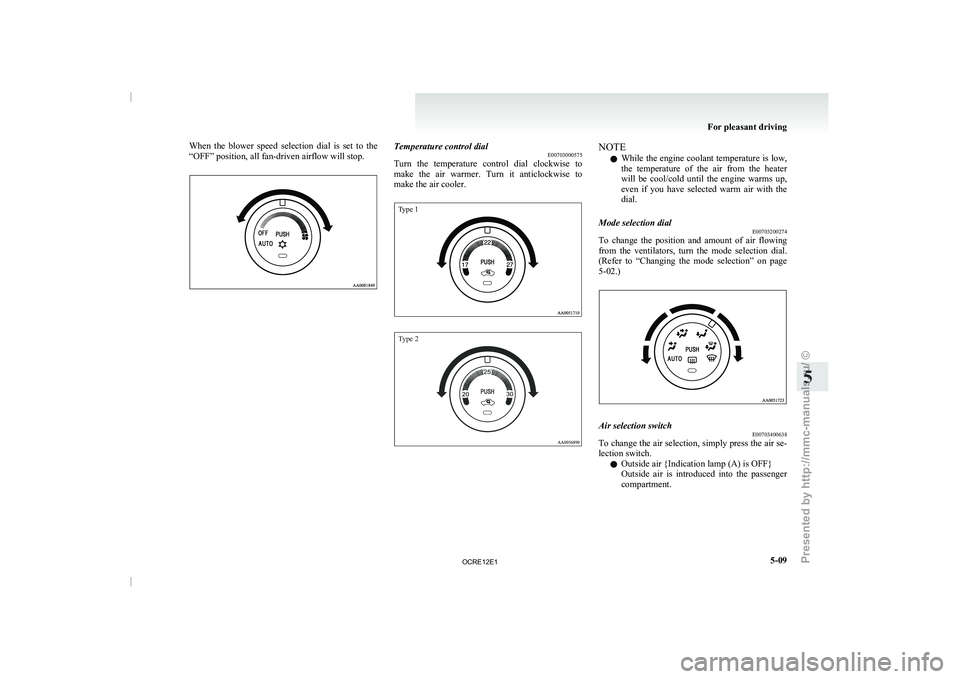
When the blower speed selection dial is set to the
“OFF” position, all fan-driven airflow will stop.
Temperature control dial
E00703000575
Turn the temperature control dial
clockwise to
make the air warmer. Turn it anticlockwise to
make the air cooler.
Type 1
Type 2 NOTE
l While the engine coolant
temperature
is low,
the temperature of the air from the heater
will be cool/cold until the engine warms up,
even if you have selected warm air with the
dial.
Mode selection dial E00703200274
To change the position and amount of air flowing
from the ventilators, turn
the
mode selection dial.
(Refer to “Changing the mode selection” on page
5-02.) Air selection switch
E00703400638
To change the air selection, simply press the air se-
lection switch.
l Outside air {Indication lamp (A) is OFF}
Outside
air
is introduced
into
the passenger
compartment. For pleasant driving
5-09 5
OCRE12E1
Presented by http://mmc-manuals.ru/ \251
Page 198 of 369
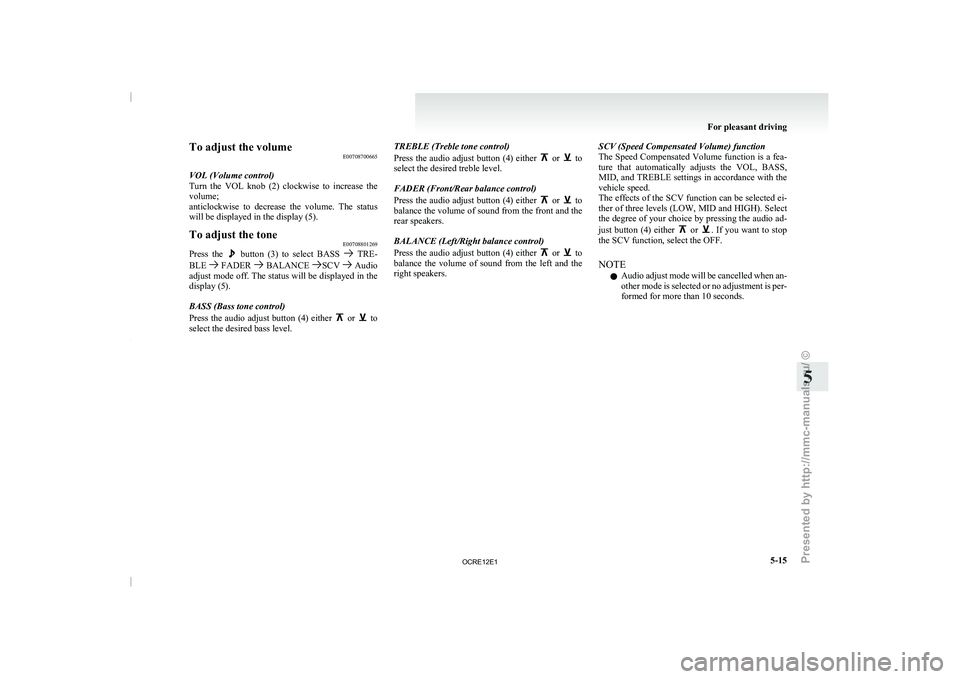
To adjust the volume
E00708700665
VOL (Volume control)
Turn the VOL knob (2)
clockwise to increase the
volume;
anticlockwise to decrease the volume. The status
will be displayed in the display (5).
To adjust the tone E00708801269
Press the button (3) to select BASS TRE-
BLE FADER BALANCE SCV Audio
adjust mode off. The status
will be displayed in the
display (5).
BASS (Bass tone control)
Press the audio adjust button (4) either or to
select the desired bass level. TREBLE (Treble tone control)
Press the audio adjust button
(4) either or to
select the desired treble level.
FADER (Front/Rear balance control)
Press the audio adjust button
(4) either or to
balance the volume of sound
from the front and the
rear speakers.
BALANCE (Left/Right balance control)
Press the audio adjust button (4) either or to
balance the volume of sound
from the left and the
right speakers. SCV (Speed Compensated Volume) function
The Speed Compensated Volume
function
is a fea-
ture that automatically adjusts the VOL, BASS,
MID, and TREBLE settings in accordance with the
vehicle speed.
The effects of the SCV function can be selected ei-
ther of three levels (LOW, MID and HIGH). Select
the degree of your choice by pressing the audio ad-
just button (4) either or . If you want to stop
the SCV function, select the OFF.
NOTE
l Audio
adjust mode will be
cancelled when an-
other mode is selected or no adjustment is per-
formed for more than 10 seconds. For pleasant driving
5-15 5
OCRE12E1
Presented by http://mmc-manuals.ru/ \251
Page 201 of 369
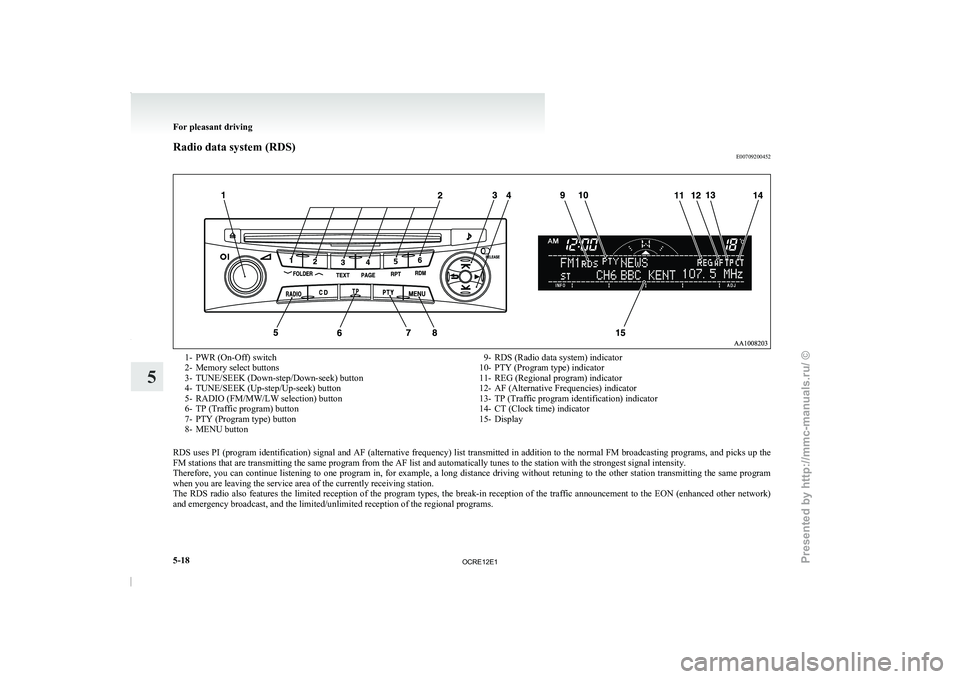
Radio data system (RDS)
E007092004521- PWR (On-Off) switch
2- Memory select buttons
3- TUNE/SEEK (Down-step/Down-seek) button
4- TUNE/SEEK (Up-step/Up-seek) button
5-
RADIO (FM/MW/LW selection) button
6-
TP (Traffic program) button
7- PTY (Program type) button
8- MENU button 9- RDS (Radio data system) indicator
10- PTY (Program type) indicator
11- REG (Regional program) indicator
12- AF (Alternative Frequencies) indicator
13- TP (Traffic program identification) indicator
14-
CT (Clock time) indicator
15- Display
RDS uses PI (program identification) signal and AF (alternative frequency) list transmitted in addition to the normal FM broadcasting programs, and picks up the
FM stations that are transmitting the same program from the AF list and automatically tunes to the station with the strongest signal intensity.
Therefore, you can continue listening
to one program in, for example, a long distance driving without retuning to the other station transmitting the same program
when you are leaving the service area of the currently receiving station.
The RDS radio also features the limited reception of the program types, the break-in reception of the traffic announcement to the EON (enhanced other network)
and emergency broadcast, and the limited/unlimited reception of the regional programs. For pleasant driving
5-18
5
OCRE12E1
Presented by http://mmc-manuals.ru/ \251
Page 202 of 369
AF (Alternative Frequencies) function
E00720900061
The AF function finds a
station broadcasting the
same program and selects the station with the stron-
gest signal of AF lists.
The AF function is turned on (with the AF indica-
tor (12) shown on the display) at all times unless
you manually switch it off.
The AF function can be turned ON and OFF.
Refer to “Function setup mode” on page 5-21.
CT (Clock Time) function E00721000131
The clock can be set automatically by using the sig-
nal from the local RDS
stations. Refer to “Adjust-
ing the time” on page 3-12.
REG (Regional) function E00721100057
REG function limits to receive the stations broad-
casting regional programs.
Regional programming and regional networks
are
organized differently depending on the country or
area (they may be changed according to the hour,
state, or broadcast area), so if you don’t want to re-
ceive the regional programs automatically, you can
set up REG ON not to receive regional programs.
The REG function can be turned ON and OFF.
Refer to “Function setup mode” on page 5-21.
PI (Program Identification) search function E00721200221
When travelling long distance and the recalled pre-
set station is weak, the
radio searches another fre-
quency broadcasting the same programming with
the same PI code in AF list. If there are no frequencies broadcasting the same
programming, the radio searches
a
frequency broad-
casting the regional programming. The radio suc-
ceeds in searching the regional programming, then
the display shows the REG indicator (11).
If the radio does not succeed in searching the re-
gional programming, the radio returns to the recal-
led preset station.
The PI function can be turned ON and OFF.
Refer to “Function setup mode” on page 5-21.
NOTE
l While searching, the audio system is muted.
The display shows “WAIT” or “SEARCH”.
PTY (Program type) E00721300349
RDS broadcasts are classified according to pro-
gram type (PTY) as follows.
Use the TUNE/SEEK
button (3 or 4) to select your desired PTY.
1. NEWS
2. AFFAIRS (Current affairs)
3. INFO (Information)
4. SPORT
5. EDUCATE (Education)
6. DRAMA
7. CULTURE
8. SCIENCE
9. VARIED
10. POP M (Pop music)
11. ROCK M (Rock music)
12. EASY M (Easy music)
13. LIGHT M (Light classics)
14. CLASSICS
15. OTHER M (Other music)
16. WEATHER (Weather information)
17. FINANCE
18. CHILDREN 19. SOCIAL
20. RELIGION
21. PHONE IN
22. TRAVEL
23. LEISURE
24.
JAZZ
25. COUNTRY
26. NATION M (National music)
27. OLDIES
28. FOLK M (Folk music)
29. DOCUMENT
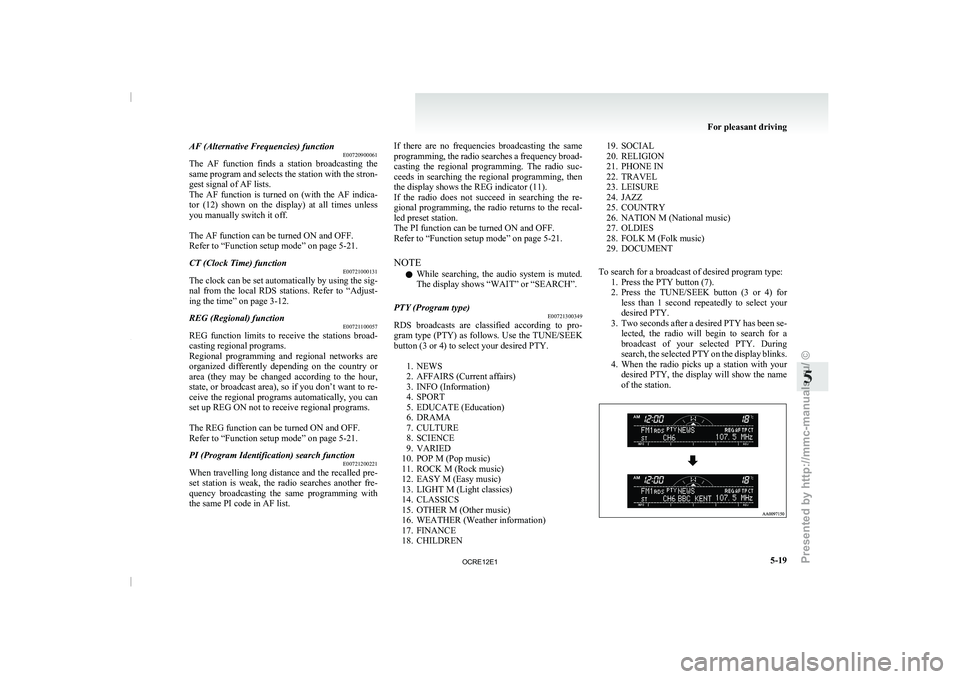
To search for a broadcast of desired program type: 1. Press the PTY button (7).
2. Press the TUNE/SEEK button (3 or 4) forless than 1 second repeatedly to select your
desired PTY.
3. Two seconds after a desired PTY has been se- lected, the radio will begin to search for a
broadcast of your selected PTY. During
search, the selected PTY on the display blinks.
4. When the radio picks up a station with your desired PTY, the display will show the name
of the station. For pleasant driving
5-19 5
OCRE12E1
Presented by http://mmc-manuals.ru/ \251
Page 231 of 369
Audio system anti-theft feature
E00710200348
To prevent theft of the
audio system, the control
knob can be removed. Always remove the control
knob when you leave the vehicle.
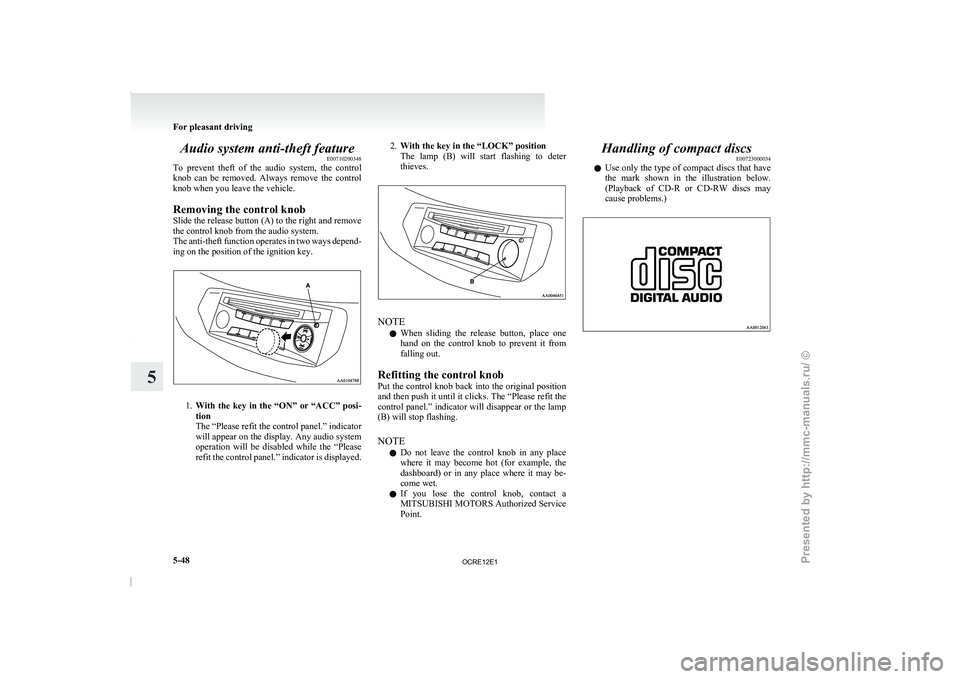
Removing the control knob
Slide the release button (A) to the right and remove
the control knob from the audio system.
The anti-theft function operates in two ways depend-
ing on the position of the ignition key. 1.
With the key in the “ON” or “ACC” posi-
tion
The “Please refit the control panel.” indicator
will appear on the
display. Any audio system
operation will be disabled while the “Please
refit the control panel.” indicator is displayed. 2.
With the key in the “LOCK” position
The lamp (B) will start
flashing to deter
thieves. NOTE
l When
sliding the release button,
place one
hand on the control knob to prevent it from
falling out.
Refitting the control knob
Put the control knob back into the original position
and then push it until it clicks. The “Please refit the
control panel.” indicator will disappear or the lamp
(B) will stop flashing.
NOTE l Do not leave the control knob in any place
where it may become hot (for example, the
dashboard) or in any place where it may be-
come wet.
l If you lose the control knob, contact a
MITSUBISHI MOTORS Authorized Service
Point. Handling of compact discs
E00723000034
l Use only the type
of
compact discs that have
the mark shown in the illustration below.
(Playback of CD-R or CD-RW discs may
cause problems.) For pleasant driving
5-48
5
OCRE12E1
Presented by http://mmc-manuals.ru/ \251
Page 233 of 369
l
The unit may not
successfully play back a
CD-R/RW that was made by the combina-
tion of writing software, a CD recorder
(CD-R/RW drive) and a disc if they are in-
compatible with one another.
l This player cannot play the CD-R/RW discs
if the session is not closed.
l This player cannot play CD-R/RW discs
which contain other than CD-DA or MP3 da-
ta (Video CD, etc.).
l Be sure to observe the handling instructions
for the CD-R/RW disc. WARNING
l Operating the CD player
in
a manner oth-
er than specifically instructed herein may
result in hazardous radiation exposure.
Do not remove the cover and attempt to
repair the CD player by yourself. There
are no user serviceable parts inside. In
case of malfunction, we recommend you
to have it checked. Antenna
E00710500022
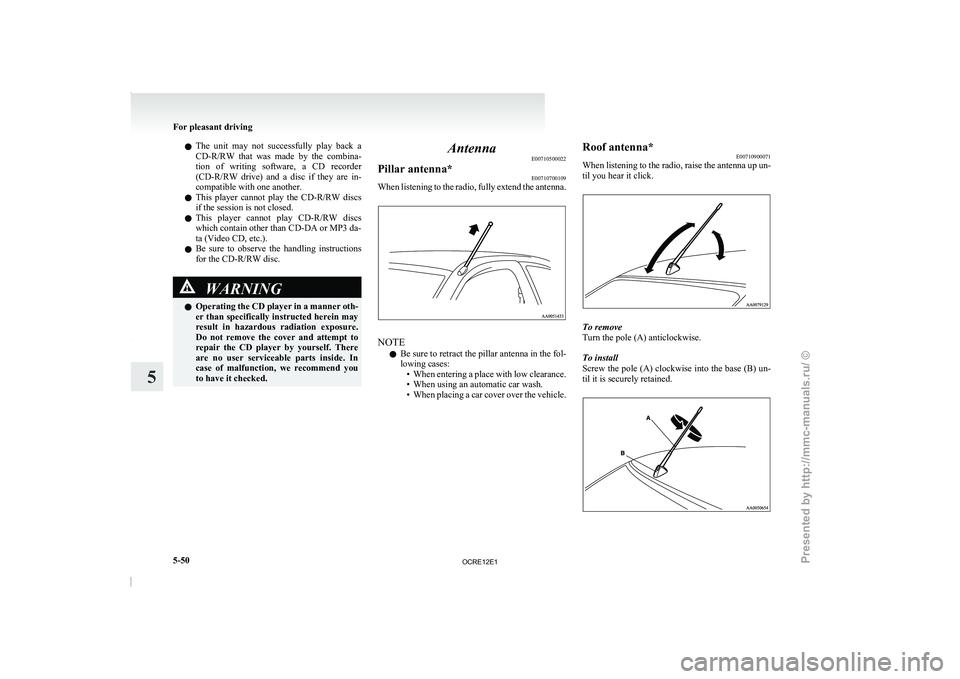
Pillar antenna* E00710700109
When listening to the radio, fully extend the antenna. NOTE
l Be
sure to retract the
pillar antenna in the fol-
lowing cases: • When entering a place with low clearance.
• When using an automatic car wash.
• When placing a car cover over the vehicle. Roof antenna*
E00710900071
When listening to the
radio,
raise the antenna up un-
til you hear it click. To remove
Turn the pole (A) anticlockwise.
To install
Screw the pole (A)
clockwise
into the base (B) un-
til it is securely retained. For pleasant driving
5-50
5
OCRE12E1
Presented by http://mmc-manuals.ru/ \251
Page 237 of 369
1. Press the SPEECH button.
2. Say “Setup”.
3. Say “Confirmation prompts”.
4. The voice
guide will say “Confirmation
prompts are
confirmation prompts
Answer “Yes” to change the setting or an-
swer “No” to keep the current setting.
5. The voice guide will say “Confirmation prompts are
will return to the main menu.
Security function E00760500131
It is possible to use a password as a security func-
tion by setting a password
of your choice for the
Bluetooth ®
2.0 interface.
When the security function is turned on, it is neces-
sary to make a voice input of a 4-digit password in
order to use all functions of the Bluetooth ®
2.0 in-
terface, except for reception.
Setting the password
Use the following procedure to turn on the security
function by setting a password. 1. Press the SPEECH button.
2. Say “Setup”.
3. Say “Password.”
4. The voice guide will say “Password is disa-bled. Would you like to enable it?” Answer
“Yes.”
Answer “No” to cancel the setting of the pass-
word and return to the main menu.
5. The voice guide will say “Please say a 4-dig- it password. Remember this password. It will
be required to use this system”.
Say a 4-digit number which you want to set
as a password. 6. For confirmation purposes, the voice guide
will say “Password <4-digit
password>. Is
this correct?” Answer “Yes.”
Answer “No” to return to the password input
in Step 5.
7. When the registration of the password is com- pleted, the voice guide will say “Password is
enabled” and the system will return to the
main menu.
NOTE l Password will be required to access the sys-
tem after the next ignition cycle.
l It is required for a little time after engine
stop that the entered password is actually re-
corded in the system.
If the ignition switch is made to “ACC” or
“ON” or the engine is started immediately af-
ter engine stop, there is a case when the en-
tered password is not recorded in the system.
At this time, please try to enter the password
again.
Entering the password
If a password has been set and the security function
is enabled, the voice guide will say “Hands-free sys-
tem is locked. State the password to continue”
when the SPEECH button is pressed to enter voice
recognition mode. Say the 4-digit password num-
ber to enter the password.
If the entered password is wrong, the voice guide
will say “<4- digit password>, Incorrect password.
Please try again”. Enter the correct password.
NOTE l You can re-enter the password as many times
as you want. l
If
you have forgotten your password, say
“Cancel” to quit the voice input mode and
then check with a MITSUBISHI MOTORS
Authorized Service Point.
Disabling the password
Use the following procedure to turn off the security
function by disabling the password.
NOTE l System must be unlocked to disable the pass-
word.
1. Press the SPEECH button.
2. Say “Setup”.
3. Say “Password.”
4. The voice guide will say “Password is ena- bled. Would you like to disable it?”
Answer “Yes.” Answer “No” to cancel the
disabling of the password and return to the
main menu.
5. When the disabling of the password is com- pleted, the voice guide will say “Password is
disabled” and the system will return to the
main menu.
Speaker enrollment function E00727400209
The Bluetooth ®
2.0 interface can use
the speaker en-
rollment function to create a voice model for one
person per language.
This makes it easier for the Bluetooth ®
2.0 inter-
face to recognise voice commands said by you.
You can turn a voice model registered with the
speaker enrollment function on and off whenever
you want. For pleasant driving
5-54
5
OCRE12E1
Presented by http://mmc-manuals.ru/ \251
Page 250 of 369
USB input terminal*
E00761900015
You can connect your USB
memory device or
iPod* to play music files stored in the USB memo-
ry device or iPod.
The following explains how to connect and remove
a USB memory device or iPod.
Refer to the following sections for details on how
to play music files:
Refer to “To play tracks from USB device” on
page 5-27.
*: “iPod” is a registered trademark of Apple Inc. in
the United States and other countries.
How to connect a USB memory device E00762000202
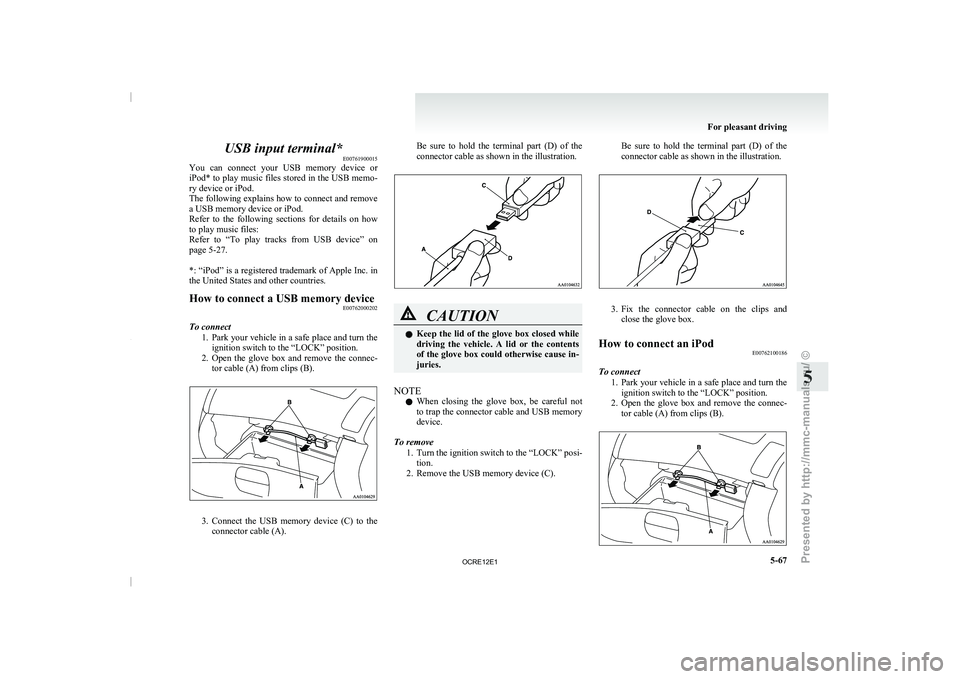
To connect 1. Park your vehicle in a
safe place and turn the
ignition switch to the “LOCK” position.
2. Open the glove box and remove the connec- tor cable (A) from clips (B). 3. Connect the USB memory device (C) to the
connector cable (A). Be sure to
hold
the terminal part (D) of the
connector cable as shown in the illustration. CAUTION
l
Keep the lid of
the
glove box closed while
driving the vehicle. A lid or the contents
of the glove box could otherwise cause in-
juries.
NOTE l When
closing the glove box,
be careful not
to trap the connector cable and USB memory
device.
To remove 1. Turn the ignition switch to the “LOCK” posi-tion.
2. Remove the USB memory device (C). Be sure to hold the terminal part (D) of the
connector cable as shown in the illustration.
3. Fix the connector cable on the clips and
close the glove box.
How to connect an iPod E00762100186
To connect 1. Park your vehicle in
a
safe place and turn the
ignition switch to the “LOCK” position.
2. Open the glove box and remove the connec- tor cable (A) from clips (B). For pleasant driving
5-67 5
OCRE12E1
Presented by http://mmc-manuals.ru/ \251