lock MITSUBISHI TRITON 2011 Manual PDF
[x] Cancel search | Manufacturer: MITSUBISHI, Model Year: 2011, Model line: TRITON, Model: MITSUBISHI TRITON 2011Pages: 369, PDF Size: 26.15 MB
Page 169 of 369
WARNING
l Do not leave any objects near the brake
pedal or let a floor mat slide under it; do-
ing so could prevent the full pedal stroke
that would be necessary in an emergency.
Make sure that the pedal can be operated
freely at all times. Make sure the floor
mat is securely held in place.
Brake pads and linings l Avoid hard braking situations.
New
brakes need to be
broken-in by moder-
ate use for the first 200 km (124 miles).
l The disc brakes are provided with a warning
device which emits a shrieking metallic
sound while braking if the brake pads have
reached their wear limit.
If you hear this sound, have the brake pads re-
placed immediately. WARNING
l Driving with worn brake
pads
will make
it harder to stop, and can cause an acci-
dent. Brake assist system*
E00627000392
The brake assist system is a device assisting drivers
who cannot depress the brake
pedal firmly when it
is necessary to do so (such as in emergency stop sit-
uations) and provides greater braking force.
If the brake pedal is depressed suddenly, the brakes
will be applied with more force than usual. CAUTION
l
The brake assist system
is
not a device de-
signed to exercise braking force greater
than its capacity. Make sure to always
keep a sufficient distance between vehi-
cles in front of you without relying too
much on the brake assist system.
NOTE l Once
the brake assist system
is operational,
it maintains great braking force even if the
brake pedal is lightly released.
To stop its operation, completely remove
your foot from the brake pedal.
l When the brake assist system is in use while
driving, you may feel the brake pedal at-
tempt to resist, the pedal moves in small mo-
tions in conjunction with the operation noise,
or the vehicle body and the steering wheel vi-
brate. This occurs when the brake assist sys-
tem is operating normally and does not indi-
cate faulty operation. Continue to firmly de-
press the brake pedal.
l When the active stability & traction control
(ASTC) indication lamp is illuminated, the
brake assist system may not function. Anti-lock brake system (ABS)*
E00607100775
Environmental conditions can have
an
effect on
braking. During sudden braking when there is
snow, ice, oil, water etc. on the road surface, a skid
may occur. In this situation, steering control and
braking effectiveness is reduced and the stopping
distance is increased. The vehicle may also go into
an uncontrolled spin.
The ABS helps prevent the wheels from locking dur-
ing braking, thus maintaining directional stability,
ensuring controllability and providing optimum
braking force.
Driving hints
l With ABS fitted, steering during sudden brak-
ing (when the ABS functions) differs slightly
from when the brakes are not being applied.
Steer the vehicle carefully in these conditions.
l Always maintain the same distance from the
vehicle in front of you as you would for a ve-
hicle not equipped with ABS.
Compared with vehicles not fitted with ABS,
your vehicle may require a longer stopping
distance in the following cases:
• Driving on gravel or snow-covered roads.
• Driving with tyre chains installed.
• Driving on roads where the road surfaceis pitted or has other differences in sur-
face height.
• Driving on bumpy roads or other poor driv- ing surfaces. Starting and driving
4-44
4
OCRE12E1
Presented by http://mmc-manuals.ru/ \251
Page 170 of 369
l
Operation of ABS is
not restricted to situa-
tions where brakes are applied suddenly.
This system may also operate to prevent
wheel lock when you are driving over man-
holes, steel road-work plates, or the vehicle
is driven over steps or level differences in
the road, road markings, or other surfaces
which are difficult for the wheels to grip.
l When the ABS is activated, you may feel the
brake pedal pulsation and hear a characteris-
tic noise. Also at this time, you may feel as if
the pedal attempts to resist being depressed.
In this situation, to let the ABS work for
you, just hold the brake pedal down more
firmly. Do not pump the brake. This pump-
ing will result in reduced braking perform-
ance. CAUTION
l
Even the ABS cannot
prevent
the natural
laws of physics from acting on the vehi-
cle. It cannot for instance avoid accidents
that may result from excessive speed on
bends or following another vehicle too
closely or aquaplaning. It should remain
the driver’s task to observe safety precau-
tions to judge speeds and brake applica-
tions correctly in such conditions.
l Be sure to use tyres of the same type and
size on 4 wheels.
If tyre types or sizes are mixed, ABS may
not function normally. CAUTION
l
Never install a limited-slip differential,
which
is not a MITSUBISHI MOTORS
genuine part, as the ABS may not func-
tion normally.
We recommend you to consult a
MITSUBISHI MOTORS Authorized
Service Point.
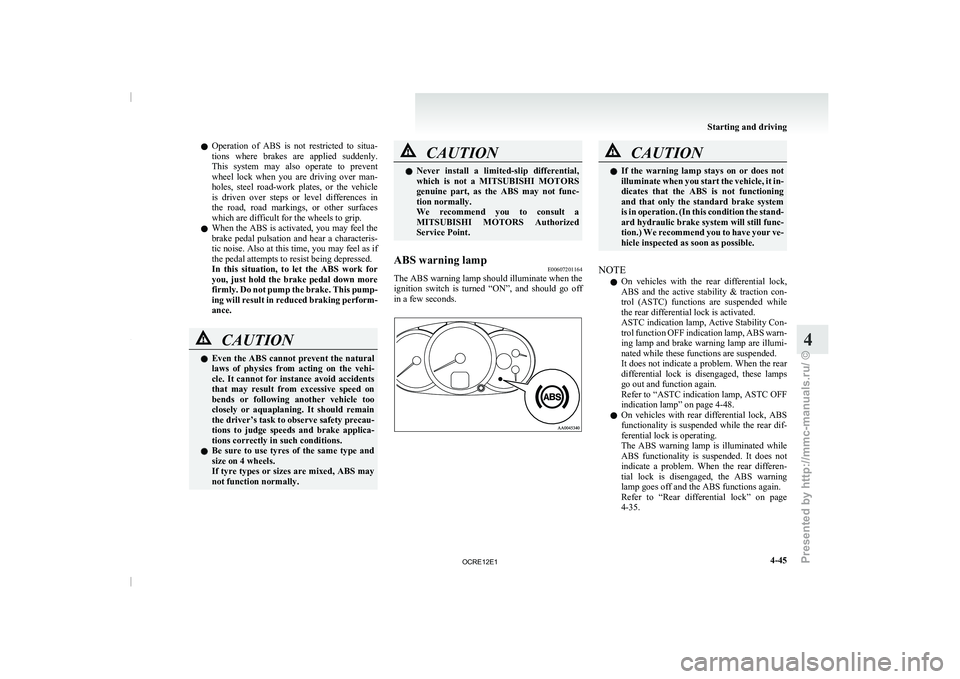
ABS warning lamp E00607201164
The ABS warning lamp should illuminate when the
ignition switch is
turned “ON”,
and should go off
in a few seconds. CAUTION
l
If the warning lamp stays
on or does not
illuminate when you start the vehicle, it in-
dicates that the ABS is not functioning
and that only the standard brake system
is in operation. (In this condition the stand-
ard hydraulic brake system will still func-
tion.) We recommend you to have your ve-
hicle inspected as soon as possible.
NOTE l On
vehicles with the rear
differential lock,
ABS and the active stability & traction con-
trol (ASTC) functions are suspended while
the rear differential lock is activated.
ASTC indication lamp, Active Stability Con-
trol function OFF indication lamp, ABS warn-
ing lamp and brake warning lamp are illumi-
nated while these functions are suspended.
It does not indicate a problem. When the rear
differential lock is disengaged, these lamps
go out and function again.
Refer to “ASTC indication lamp, ASTC OFF
indication lamp” on page 4-48.
l On vehicles with rear differential lock, ABS
functionality is suspended while the rear dif-
ferential lock is operating.
The ABS warning lamp is illuminated while
ABS functionality is suspended. It does not
indicate a problem. When the rear differen-
tial lock is disengaged, the ABS warning
lamp goes off and the ABS functions again.
Refer to “Rear differential lock” on page
4-35. Starting and driving
4-45 4
OCRE12E1
Presented by http://mmc-manuals.ru/ \251
Page 172 of 369
Power steering system
E00607400260
The power steering system operates
while the en-
gine is running. It helps reduce the effort needed to
turn the steering wheel.
The power steering system has mechanical steering
capability in case the power assist is lost. If the pow-
er assist is lost for some reason, you will still be
able to steer your vehicle. If the power assist is
lost, you will notice it takes much more effort to
steer and that there is much more “free play” in the
steering wheel. If this happens, take your vehicle to
an authorized MITSUBISHI MOTORS dealer. WARNING
l Do not stop the
engine
while the vehicle is
moving. Stopping the engine would make
the steering wheel extremely hard to
turn, possibly resulting in an accident. CAUTION
l
Do not leave the steering
wheel turned all
the way in one direction. This can cause
damage to the power steering system. Active Stability & Traction
Control (ASTC)* E00616700344
The active stability & traction
control (ASTC)
takes overall control of the anti-lock brake system,
traction control function and Active Stability Con-
trol function to help maintain the vehicle’s control
and traction. Please read this section in conjunction
with the page on the anti-lock brake system, trac-
tion control function and Active Stability Control
function.
Anti-lock brake system (ABS) ® p. 4-44
Active Traction Control function ® p. 4-48
Active Stability Control function ® p. 4-48 CAUTION
l
Do not over-rely on
the
ASTC. This sys-
tem, like any other system, has limits and
cannot help you to maintain traction and
control of the vehicle in all circumstan-
ces. Reckless driving may lead to acci-
dents. Always drive carefully, taking into
account the traffic, road and environmen-
tal conditions.
l Be sure to use the same specified type and
size of tyre on all 4 wheels. Otherwise, the
ASTC may not work correctly.
NOTE l After
your vehicle is driven
a short distance
after starting the engine, a click is heard from
the engine compartment; however, this is on-
ly the sound of ASTC being checked. l
Some
vibration will be
felt
in the vehicle
body and a whining sound of a motor will be
heard from the engine compartment when
the ASTC functions. This is a normal result
of the ASTC operation, and does not indicate
a malfunction.
l The ASTC does not operate while the ABS
warning lamp is illuminated.
l On vehicles with the rear differential lock,
the ASTC and ABS functions are suspended
while the rear differential lock is activated.
ASTC indication lamp, ASTC OFF indica-
tion lamp and ABS warning lamp are illumi-
nated while these functions are suspended. It
does not indicate a problem. When the rear
differential lock is disengaged, these lamps
go out and function again.
Refer to “ABS warning lamp” on page 4-45,
“ASTC indication lamp, ASTC OFF indica-
tion lamp” on page 4-48.
Driving hints E00616800039
When extricating the vehicle from mud, sand or
fresh snow, you may find
that operation of the
ASTC prevents the engine speed from increasing
in response to depression of the accelerator pedal.
If this happens and the vehicle remains stuck as a
result, deactivate the ASC function by pressing the
“ASC OFF” switch. The vehicle will then be easier
to extricate. (Brake control of the ATC function is
still working to prevent wheel spins when the ASC
function is deactivated by pressing the “ASC OFF”
switch.) Starting and driving
4-47 4
OCRE12E1
Presented by http://mmc-manuals.ru/ \251
Page 173 of 369
Active Stability Control function
E00616900056
The Active Stability Control function
is designed
to improve the vehicle’s stability by restraining its
tendency to slip sideways (for example, when round-
ing a curve in slippery conditions, or when the driv-
er takes rapid steering action to avoid an obstacle).
It works by controlling the engine output and brake
on each wheel.
NOTE
l On vehicles with the rear differential lock,
the Active Stability Control function does
not operate when the rear differential lock is
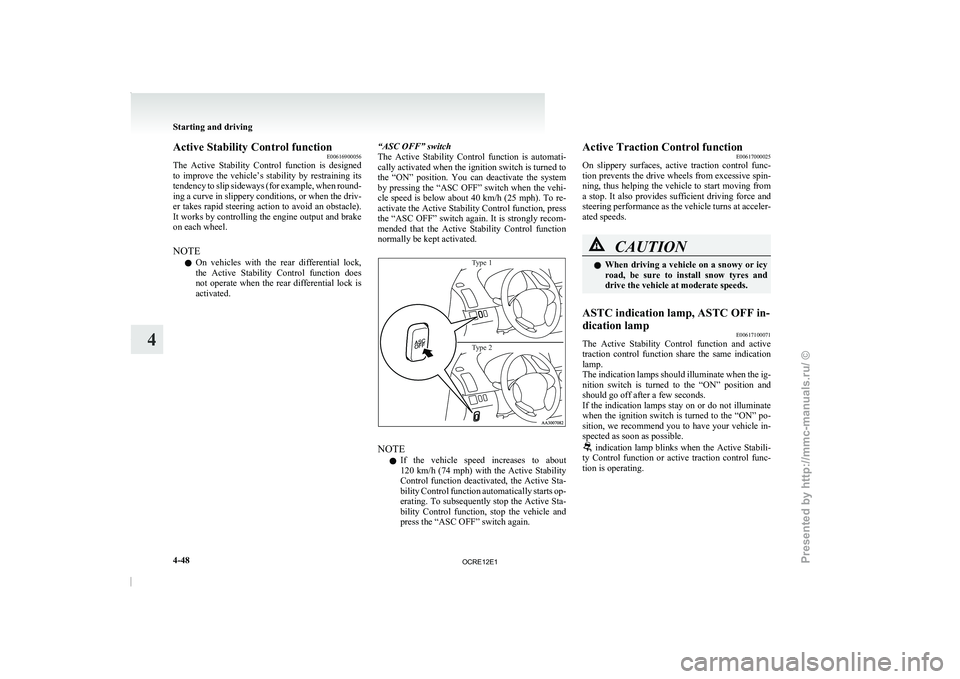
activated. “ASC OFF” switch
The
Active Stability Control function
is automati-
cally activated when the ignition switch is turned to
the “ON” position. You can deactivate the system
by pressing the “ASC OFF” switch when the vehi-
cle speed is below about 40 km/h (25 mph). To re-
activate the Active Stability Control function, press
the “ASC OFF” switch again. It is strongly recom-
mended that the Active Stability Control function
normally be kept activated.
Type 1
Type 2 NOTE
l If
the vehicle speed increases
to about
120 km/h (74 mph) with the Active Stability
Control function deactivated, the Active Sta-
bility Control function automatically starts op-
erating. To subsequently stop the Active Sta-
bility Control function, stop the vehicle and
press the “ASC OFF” switch again. Active Traction Control function
E00617000025
On slippery surfaces, active
traction
control func-
tion prevents the drive wheels from excessive spin-
ning, thus helping the vehicle to start moving from
a stop. It also provides sufficient driving force and
steering performance as the vehicle turns at acceler-
ated speeds. CAUTION
l
When driving a vehicle
on
a snowy or icy
road, be sure to install snow tyres and
drive the vehicle at moderate speeds.
ASTC indication lamp, ASTC OFF in-
dication lamp E00617100071
The Active Stability Control function and active
traction control function
share the
same indication
lamp.
The indication lamps should illuminate when the ig-
nition switch is turned to the “ON” position and
should go off after a few seconds.
If the indication lamps stay on or do not illuminate
when the ignition switch is turned to the “ON” po-
sition, we recommend you to have your vehicle in-
spected as soon as possible. indication lamp blinks when the Active Stabili-
ty Control function or active
traction control func-
tion is operating. Starting and driving
4-48
4
OCRE12E1
Presented by http://mmc-manuals.ru/ \251
Page 174 of 369
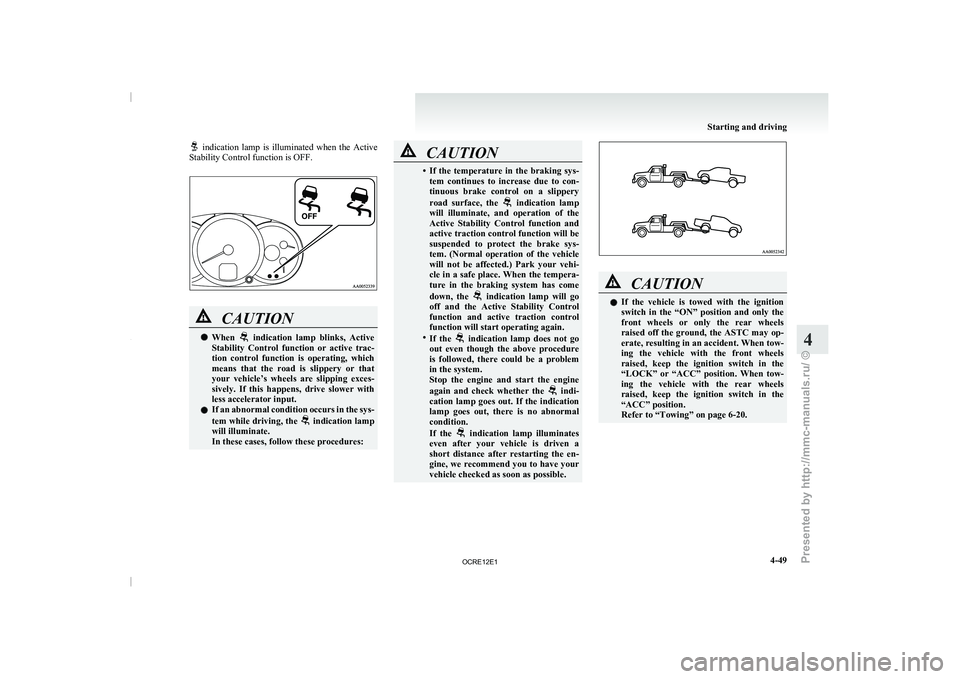
indication lamp is illuminated when the Active
Stability Control function is OFF. CAUTION
l
When indication lamp blinks, Active
Stability Control function or active
trac-
tion control function is operating, which
means that the road is slippery or that
your vehicle’s wheels are slipping exces-
sively. If this happens, drive slower with
less accelerator input.
l If an abnormal condition occurs in the sys-
tem while driving, the indication lamp
will illuminate.
In these cases, follow these procedures: CAUTION
• If the temperature in the braking sys-
tem continues to increase
due to con-
tinuous brake control on a slippery
road surface, the indication lamp
will illuminate, and operation of
the
Active Stability Control function and
active traction control function will be
suspended to protect the brake sys-
tem. (Normal operation of the vehicle
will not be affected.) Park your vehi-
cle in a safe place. When the tempera-
ture in the braking system has come
down, the indication lamp will go
off and the Active Stability
Control
function and active traction control
function will start operating again.
• If the indication lamp does not go
out even though the above
procedure
is followed, there could be a problem
in the system.
Stop the engine and start the engine
again and check whether the indi-
cation lamp goes out. If
the indication
lamp goes out, there is no abnormal
condition.
If the indication lamp illuminates
even after your vehicle is
driven a
short distance after restarting the en-
gine, we recommend you to have your
vehicle checked as soon as possible. CAUTION
l
If the vehicle is
towed
with the ignition
switch in the “ON” position and only the
front wheels or only the rear wheels
raised off the ground, the ASTC may op-
erate, resulting in an accident. When tow-
ing the vehicle with the front wheels
raised, keep the ignition switch in the
“LOCK” or “ACC” position. When tow-
ing the vehicle with the rear wheels
raised, keep the ignition switch in the
“ACC” position.
Refer to “Towing” on page 6-20. Starting and driving
4-49 4
OCRE12E1
Presented by http://mmc-manuals.ru/ \251
Page 175 of 369
Cruise control*
E00609100779
Cruise control is an automatic
speed control system
that keeps a set speed. It can be activated at about
40 km/h (25 mph) or more. CAUTION
l
When you do not
wish
to drive at a set
speed, turn off the cruise control for safety.
l Do not use cruise control when driving
conditions will not allow you to stay at
the same speed, such as in heavy traffic
or on roads that are winding, icy, snow-
covered, wet, slippery, on a steep down-
hill slope.
l On vehicles with manual transmission, do
not move the gearshift lever to the “N”
(Neutral) position while driving at a set
speed without depressing the clutch ped-
al. The engine will run too fast and might
be damaged.
NOTE l Cruise
control may not be
able to keep your
speed on uphills or downhills.
l Your speed may decrease on a steep uphill.
You may use the accelerator pedal if you
want to stay at your set speed.
l Your speed may increase to more than the
set speed on a steep downhill. You must use
the brake to control your speed. As a result,
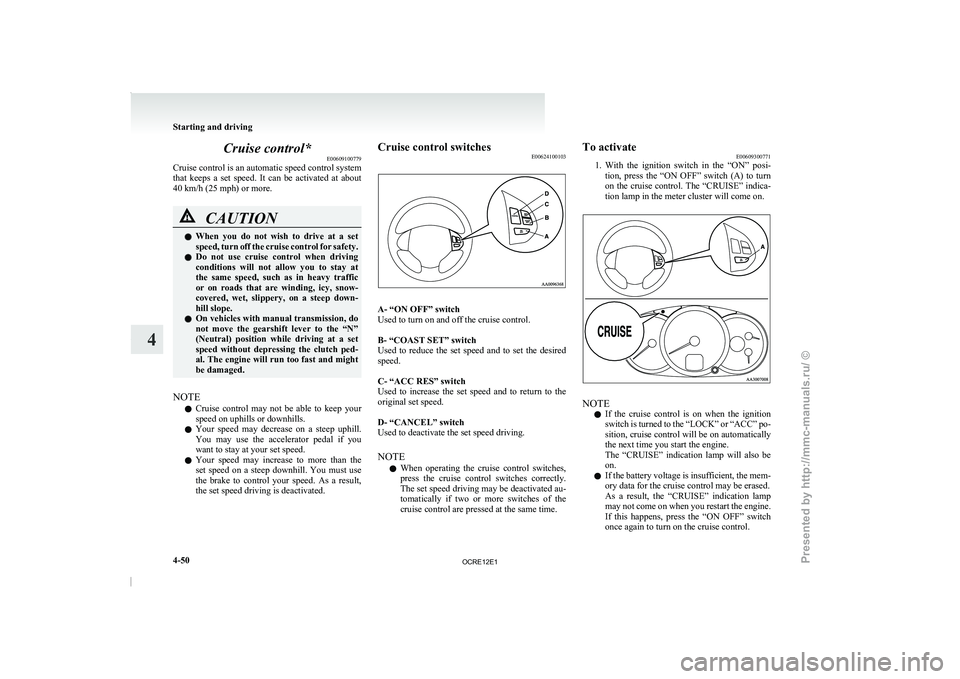
the set speed driving is deactivated. Cruise control switches
E00624100103 A- “ON OFF” switch
Used to turn on and off the cruise control.
B- “COAST SET” switch
Used to reduce the
set
speed and to set the desired
speed.
C- “ACC RES” switch
Used to increase the set speed and to return to the
original set speed.
D- “CANCEL” switch
Used to deactivate the set speed driving.
NOTE
l When operating the cruise control switches,
press the cruise control switches correctly.
The set speed driving may be deactivated au-
tomatically if two or more switches of the
cruise control are pressed at the same time. To activate
E00609300771
1. With the ignition
switch in
the “ON” posi-
tion, press the “ON OFF” switch (A) to turn
on the cruise control. The “CRUISE” indica-
tion lamp in the meter cluster will come on. NOTE
l If
the cruise control is
on when the ignition
switch is turned to the “LOCK” or “ACC” po-
sition, cruise control will be on automatically
the next time you start the engine.
The “CRUISE” indication lamp will also be
on.
l If the battery voltage is insufficient, the mem-
ory data for the cruise control may be erased.
As a result, the “CRUISE” indication lamp
may not come on when you restart the engine.
If this happens, press the “ON OFF” switch
once again to turn on the cruise control. Starting and driving
4-50
4
OCRE12E1
Presented by http://mmc-manuals.ru/ \251
Page 179 of 369
Cargo loads
E00609901123
Cargo loads precautions CAUTION
l
When
loading
luggage, be
careful to the
following. • Stow cargo and luggage in the cargoarea whenever possible.
• Distribute cargo or luggage evenly not to be unbalanced in weight.
• Do not place cargo or luggage on the instrument panel.
Also, do not stack up cargo or luggage
on the front passenger’s seat or the
rear seat.
Having the driver’s vision blocked,
and your cargo being thrown inside
the cabin if you suddenly have to
brake can cause a serious accident or
injury. Trailer towing (Except for
vehicles for Morocco) E00610000521
In order to tow a
trailer with your vehicle, when hav-
ing a trailer towing device mounted that meets all
relevant regulations in your area, consult a
MITSUBISHI MOTORS Authorized Service Point.
The regulations concerning the towing of a trailer
may differ from country to country. You are ad-
vised to obey the regulations in each area. CAUTION
l
Danger of Accident!
A towing bar should
be
fitted according
to MITSUBISHI MOTORS guidelines.
NOTE l If
you are going to
tow a trailer, pay careful
attention to the following points.
Maximum towable weight with brake
and maximum trailer-nose weight
Never exceed the maximum towable weight with
brake and the maximum trailer-nose weight as lis-
ted in the specifications. (Refer to “Vehicle
weight” on page 9-10.)
If you tow a trailer at an altitude of more than
1,000 m above sea-level, reduce your weight by
10 % of the gross combination weight for every in-
crease of 1,000 m above sea-level, as the engine out-
put is lowered owing to decrease in atmospheric
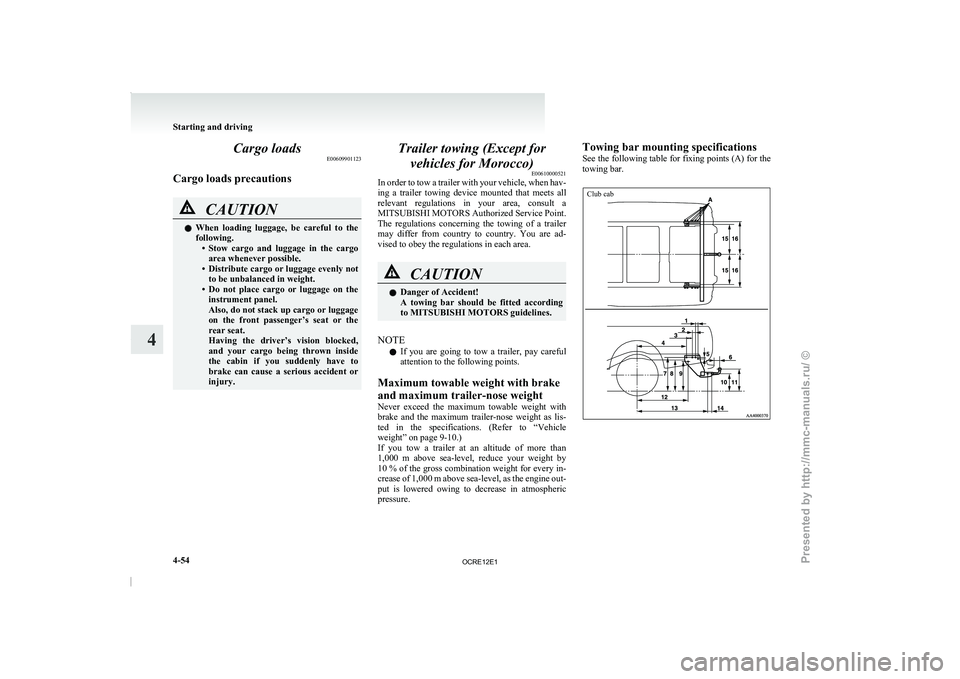
pressure. Towing bar mounting specifications
See
the following table
for
fixing points (A) for the
towing bar.
Club cab Starting and driving
4-54
4
OCRE12E1
Presented by http://mmc-manuals.ru/ \251
Page 184 of 369
Ventilators
.................................................................................... 5-02
Heater/Manual air conditioning* ..................................................5-03
Automatic air conditioning* ......................................................... 5-08
Important operation tips for the air conditioning..........................5-12 Air purifier*.................................................................................. 5-12
LW/MW/FM electronic tuning radio with CD player* ................5-13
To play tracks from USB device* ................................................5-27
To play tracks from a Bluetooth ®
device (vehicles with
Bluetooth ®
2.0 interface).......................................................... 5-36
To use the external audio input function* ....................................5-39
Steering wheel remote control switch* ........................................5-40
Error codes
.................................................................................... 5-42
Error codes (iPod)......................................................................... 5-44
Error codes (USB memory device) ..............................................5-46
Audio system anti-theft feature .................................................... 5-48
Handling of compact discs ........................................................... 5-48
Antenna......................................................................................... 5-50
Link System* ................................................................................ 5-51
Bluetooth ®
2.0 interface* ............................................................. 5-51
USB input terminal* ..................................................................... 5-67
Sun visors..................................................................................... 5-69
Vanity mirror* .............................................................................. 5-70
Ashtray.......................................................................................... 5-70
Cigarette lighter ............................................................................ 5-71
Accessory socket*........................................................................ 5-72
Digital clock* ............................................................................... 5-73
Interior lamps ................................................................................5-73
Storage spaces............................................................................... 5-75
Cup holder*.................................................................................. 5-78
Bottle holder ................................................................................. 5-79 Convenient hook
........................................................................... 5-80
Coat hook*.................................................................................... 5-80
First-aid kit and warning triangle securing bands* ......................5-80 For pleasant driving
5
OCRE12E1
Presented by http://mmc-manuals.ru/ \251
Page 187 of 369
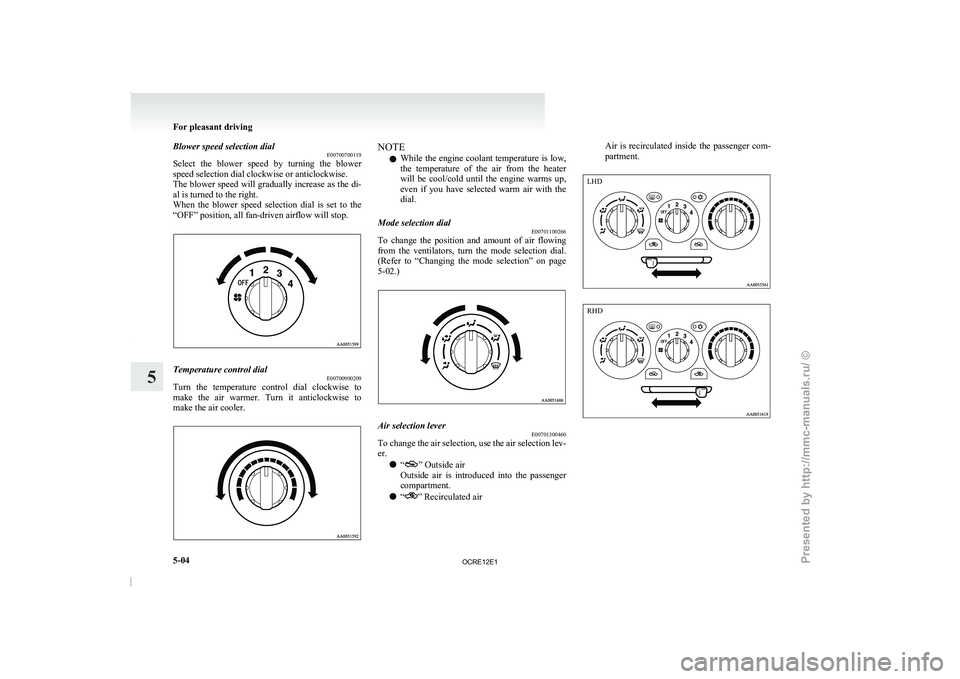
Blower speed selection dial
E00700700119
Select the blower speed by
turning the blower
speed selection dial clockwise or anticlockwise.
The blower speed will gradually increase as the di-
al is turned to the right.
When the blower speed selection dial is set to the
“OFF” position, all fan-driven airflow will stop. Temperature control dial
E00700900209
Turn the temperature control dial clockwise to
make the air warmer. Turn
it anticlockwise to
make the air cooler. NOTE
l While
the engine coolant temperature
is low,
the temperature of the air from the heater
will be cool/cold until the engine warms up,
even if you have selected warm air with the
dial.
Mode selection dial E00701100266
To change the position and amount of air flowing
from the ventilators, turn
the
mode selection dial.
(Refer to “Changing the mode selection” on page
5-02.) Air selection lever
E00701300460
To change the air selection, use the air selection lev-
er.
l “ ” Outside air
Outside air
is introduced
into
the passenger
compartment.
l “ ” Recirculated airAir is recirculated inside the passenger com-
partment.For pleasant driving
5-04
5 LHD RHD
OCRE12E1
Presented by http://mmc-manuals.ru/ \251
Page 188 of 369
CAUTION
l
Normally, use the “ ” (outside) posi-
tion to keep the
windscreen and side win-
dows clear and quickly remove fog or
frost from the windscreen.
If high cooling performance is desired, or
if the outside air is dusty or otherwise con-
taminated, use the “ ” (recirculation)
position. Set the air
selection lever to the
“ ” (outside) position periodically to in-
crease ventilation so that
the windows do
not become fogged up.
l Use of the “ ” (recirculation) position
for extended time may
cause the windows
to fog up.
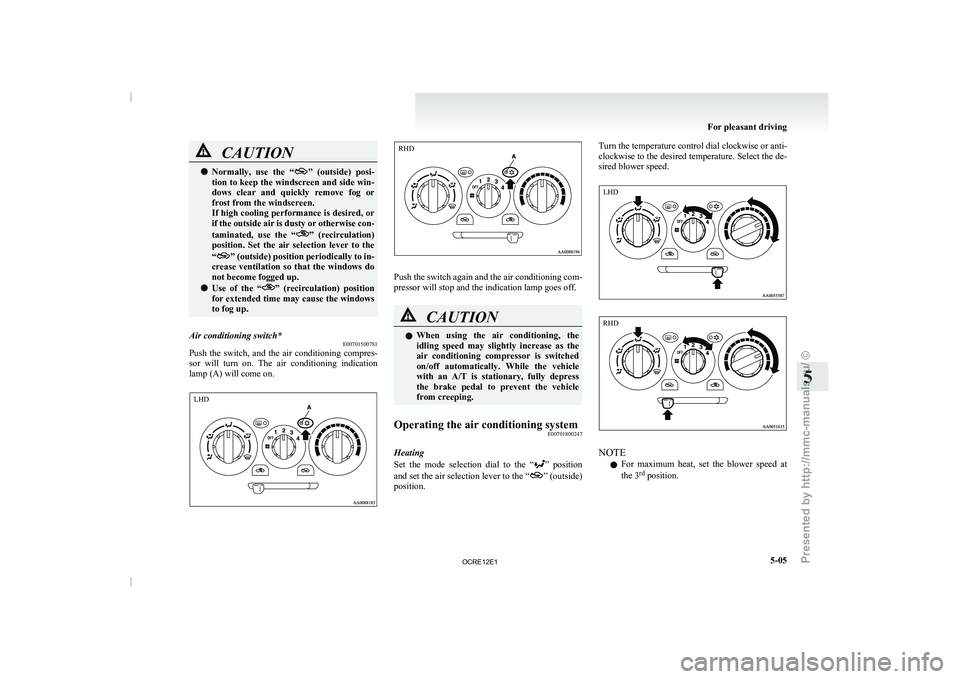
Air conditioning switch* E00701500781
Push the switch, and the air conditioning compres-
sor will turn on. The
air conditioning indication
lamp (A) will come on. Push the switch again and the air conditioning com-
pressor will stop and the indication lamp goes off.
CAUTION
l
When using the air conditioning,
the
idling speed may slightly increase as the
air conditioning compressor is switched
on/off automatically. While the vehicle
with an A/T is stationary, fully depress
the brake pedal to prevent the vehicle
from creeping.
Operating the air conditioning system E00701800247
Heating
Set the mode selection dial
to the “ ” position
and set the air
selection lever to the “ ” (outside)
position. Turn the temperature control dial clockwise or anti-
clockwise to the desired temperature.
Select the de-
sired blower speed. NOTE
l For
maximum heat, set the
blower speed at
the 3 rd
position. For pleasant driving
5-05 5 LHD RHD LHD RHD
OCRE12E1
Presented by http://mmc-manuals.ru/ \251