lock MITSUBISHI TRITON 2011 Repair Manual
[x] Cancel search | Manufacturer: MITSUBISHI, Model Year: 2011, Model line: TRITON, Model: MITSUBISHI TRITON 2011Pages: 369, PDF Size: 26.15 MB
Page 143 of 369
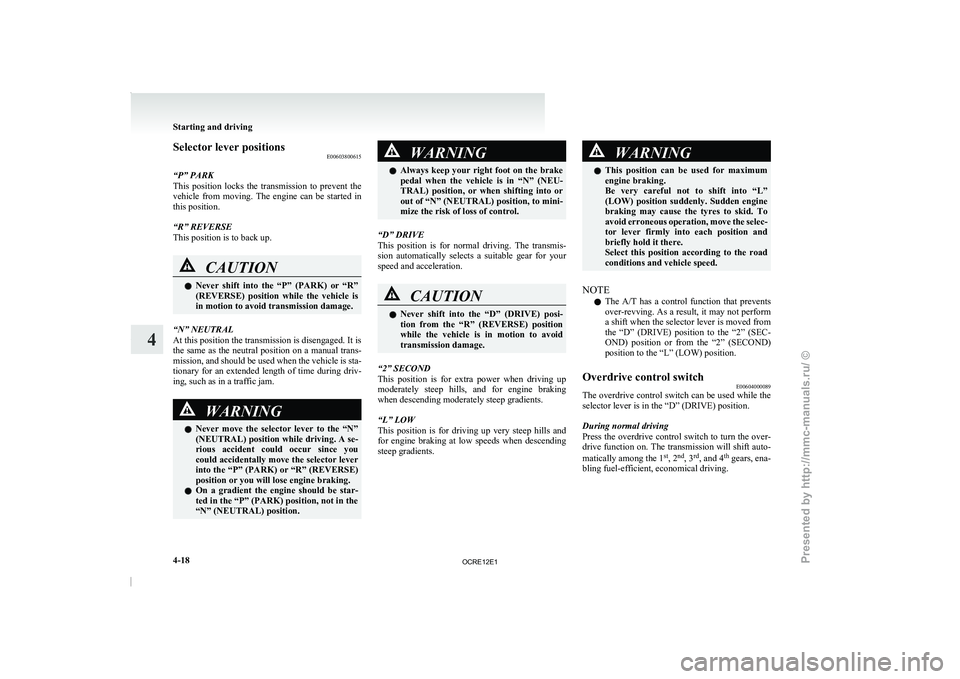
Selector lever positions
E00603800615
“P” PARK
This position locks the transmission
to prevent the
vehicle from moving. The engine can be started in
this position.
“R” REVERSE
This position is to back up. CAUTION
l
Never
shift into
the “P”
(PARK) or “R”
(REVERSE) position while the vehicle is
in motion to avoid transmission damage.
“N” NEUTRAL
At this position the transmission is disengaged. It is
the same as the neutral
position on a manual trans-
mission, and should be used when the vehicle is sta-
tionary for an extended length of time during driv-
ing, such as in a traffic jam. WARNING
l Never move the selector
lever
to the “N”
(NEUTRAL) position while driving. A se-
rious accident could occur since you
could accidentally move the selector lever
into the “P” (PARK) or “R” (REVERSE)
position or you will lose engine braking.
l On a gradient the engine should be star-
ted in the “P” (PARK) position, not in the
“N” (NEUTRAL) position. WARNING
l Always keep your right foot
on the brake
pedal when the vehicle is in “N” (NEU-
TRAL) position, or when shifting into or
out of “N” (NEUTRAL) position, to mini-
mize the risk of loss of control.
“D” DRIVE
This position is for normal
driving. The transmis-
sion automatically selects a suitable gear for your
speed and acceleration. CAUTION
l
Never shift into the
“D”
(DRIVE) posi-
tion from the “R” (REVERSE) position
while the vehicle is in motion to avoid
transmission damage.
“2” SECOND
This position is for extra
power when driving up
moderately steep hills, and for engine braking
when descending moderately steep gradients.
“L” LOW
This position is for driving up very steep hills and
for engine braking at low speeds when descending
steep gradients. WARNING
l This position can be used
for maximum
engine braking.
Be very careful not to shift into “L”
(LOW) position suddenly. Sudden engine
braking may cause the tyres to skid. To
avoid erroneous operation, move the selec-
tor lever firmly into each position and
briefly hold it there.
Select this position according to the road
conditions and vehicle speed.
NOTE l The A/T
has a control function
that prevents
over-revving. As a result, it may not perform
a shift when the selector lever is moved from
the “D” (DRIVE) position to the “2” (SEC-
OND) position or from the “2” (SECOND)
position to the “L” (LOW) position.
Overdrive control switch E00604000089
The overdrive control switch can be used while the
selector lever is in the “D” (DRIVE) position.
During normal driving
Press the overdrive control switch
to turn the over-
drive function on. The transmission will shift auto-
matically among the 1 st
, 2 nd
, 3 rd
, and 4 th
gears, ena-
bling fuel-efficient, economical driving. Starting and driving
4-18
4
OCRE12E1
Presented by http://mmc-manuals.ru/ \251
Page 146 of 369
When the automatic transmission makes no speed
change
E00604800478
If the transmission does not
change speeds while
driving, or your vehicle does not pick up enough
speed when starting on an uphill slope, it may be
that there is something unusual happening in the
transmission, causing a safety device to activate.
We recommend you to have your checked as soon
as possible.
NOTE
l When the selector lever position indicator in
the instrument panel blinks, it means that
there is an abnormal condition in the trans-
mission. Refer to “When the selector lever po-
sition indicator blinks” on page 4-19. Automatic transmission Sports
Mode 5A/T E00603200576
NOTE l During
running-in period or immediately
af-
ter reconnection of the battery cable, there
may be a case where gear shifts are not made
smoothly. This does not indicate a faulty trans-
mission.
Gear shifts will become smooth after the trans-
mission has been shifted several times by the
electronic control system.
Selector lever operation E00603300867
The transmission has 5 forward gears and 1 reverse
gear.
The individual gears are selected
automatically, de-
pending on the position of the gear selector lever,
the speed of the vehicle and the position of the ac-
celerator pedal.
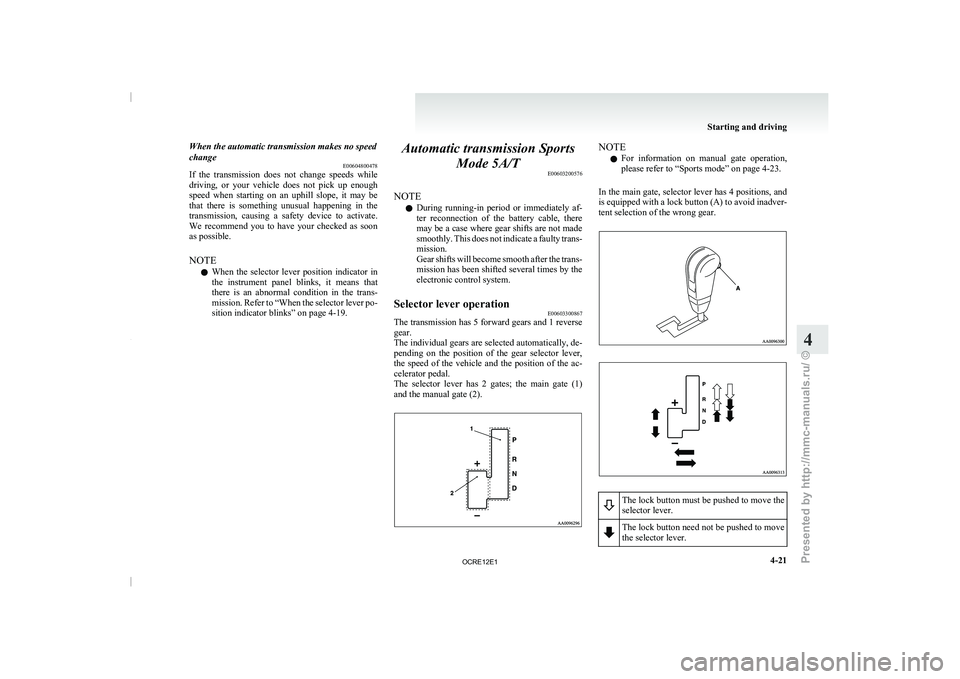
The selector lever has 2 gates; the main gate (1)
and the manual gate (2). NOTE
l For
information on manual gate
operation,
please refer to “Sports mode” on page 4-23.
In the main gate, selector lever has 4 positions, and
is equipped with a lock button (A) to avoid inadver-
tent selection of the wrong gear. The lock button must be pushed to move the
selector lever.
The lock button need not be pushed to move
the selector lever. Starting and driving
4-21 4
OCRE12E1
Presented by http://mmc-manuals.ru/ \251
Page 147 of 369
WARNING
l If the lock button is always pushed to op-
erate the selector lever, the lever may be
accidentally shifted into the “P” (PARK)
or “R” (REVERSE) position. Be sure not
to push the lock button when performing
the operations indicated by in the illus-
tration.
l Always depress the brake
pedal
when
shifting the selector lever into a gear
from the “P” (PARK) or “N” (NEU-
TRAL) position.
When beginning to drive, do not shift the
selector lever from the “P” (PARK) or
“N” (NEUTRAL) position while depress-
ing the accelerator pedal, doing so is dan-
gerous because the vehicle will “jump” for-
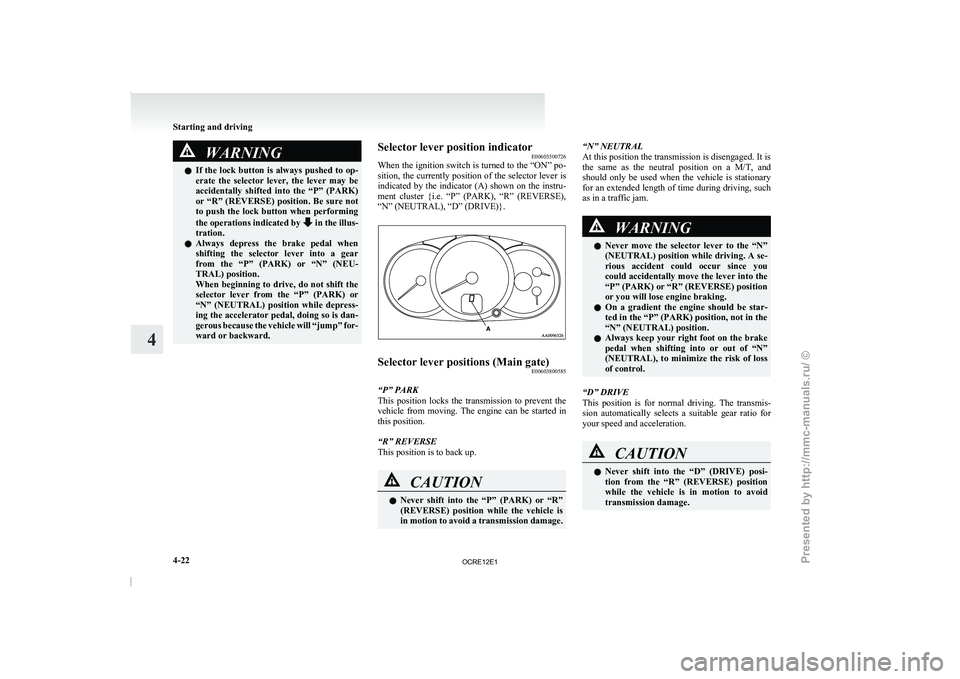
ward or backward. Selector lever position indicator
E00603500726
When the
ignition switch
is
turned to the “ON” po-
sition, the currently position of the selector lever is
indicated by the indicator (A) shown on the instru-
ment cluster {i.e. “P” (PARK), “R” (REVERSE),
“N” (NEUTRAL), “D” (DRIVE)}. Selector lever positions (Main gate)
E00603800585
“P” PARK
This position locks the transmission
to prevent the
vehicle from moving. The engine can be started in
this position.
“R” REVERSE
This position is to back up. CAUTION
l
Never shift into the
“P”
(PARK) or “R”
(REVERSE) position while the vehicle is
in motion to avoid a transmission damage. “N” NEUTRAL
At this position the transmission is disengaged. It is
the
same as the neutral
position on a M/T, and
should only be used when the vehicle is stationary
for an extended length of time during driving, such
as in a traffic jam. WARNING
l Never move the selector
lever
to the “N”
(NEUTRAL) position while driving. A se-
rious accident could occur since you
could accidentally move the lever into the
“P” (PARK) or “R” (REVERSE) position
or you will lose engine braking.
l On a gradient the engine should be star-
ted in the “P” (PARK) position, not in the
“N” (NEUTRAL) position.
l Always keep your right foot on the brake
pedal when shifting into or out of “N”
(NEUTRAL), to minimize the risk of loss
of control.
“D” DRIVE
This position is for normal
driving. The transmis-
sion automatically selects a suitable gear ratio for
your speed and acceleration. CAUTION
l
Never shift into the “D”
(DRIVE) posi-
tion from the “R” (REVERSE) position
while the vehicle is in motion to avoid
transmission damage. Starting and driving
4-22
4
OCRE12E1
Presented by http://mmc-manuals.ru/ \251
Page 156 of 369
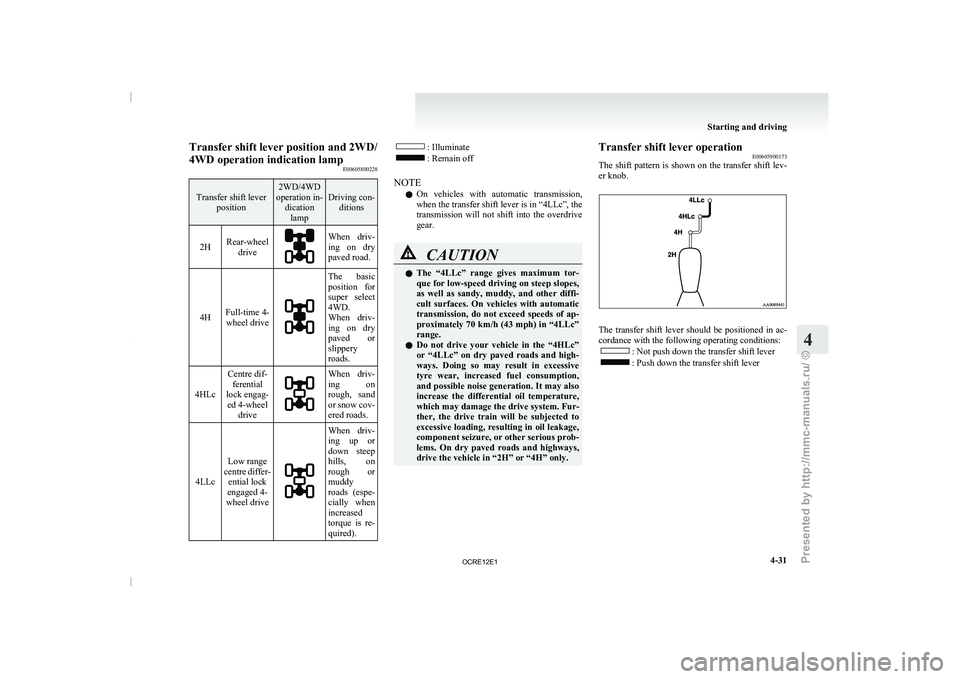
Transfer shift lever position and 2WD/
4WD operation indication lamp
E00605800228Transfer shift lever
position 2WD/4WD
operation in- dicationlamp Driving con-
ditions
2H Rear-wheel
drive When driv-
ing on dry
paved road.
4H Full-time 4-
wheel drive The basic
position for
super select
4WD.
When driv-
ing
on
dry
paved or
slippery
roads.
4HLc Centre dif-
ferential
lock engag- ed 4-wheel drive When driv-
ing on
rough, sand
or snow
cov-
ered roads.
4LLc Low range
centre
differ-
ential lock
engaged 4-
wheel drive When driv-
ing up or
down steep
hills,
on
rough
or
muddy
roads (espe-
cially when
increased
torque is re-
quired). : Illuminate
: Remain off
NOTE l On
vehicles with automatic transmission,
when the transfer shift lever is in “4LLc”, the
transmission
will not shift into the overdrive
gear. CAUTION
l
The “4LLc” range gives
maximum
tor-
que for low-speed driving on steep slopes,
as well as sandy, muddy, and other diffi-
cult surfaces. On vehicles with automatic
transmission, do not exceed speeds of ap-
proximately 70 km/h (43 mph) in “4LLc”
range.
l Do not drive your vehicle in the “4HLc”
or “4LLc” on dry paved roads and high-
ways. Doing so may result in excessive
tyre wear, increased fuel consumption,
and possible noise generation. It may also
increase the differential oil temperature,
which may damage the drive system. Fur-
ther, the drive train will be subjected to
excessive loading, resulting in oil leakage,
component seizure, or other serious prob-
lems. On dry paved roads and highways,
drive the vehicle in “2H” or “4H” only. Transfer shift lever operation
E00605900173
The shift pattern is shown
on the transfer shift lev-
er knob. The transfer shift lever should be positioned in ac-
cordance with the following operating conditions:
: Not push down the transfer shift lever
: Push down the transfer shift lever Starting and driving
4-31 4
OCRE12E1
Presented by http://mmc-manuals.ru/ \251
Page 158 of 369
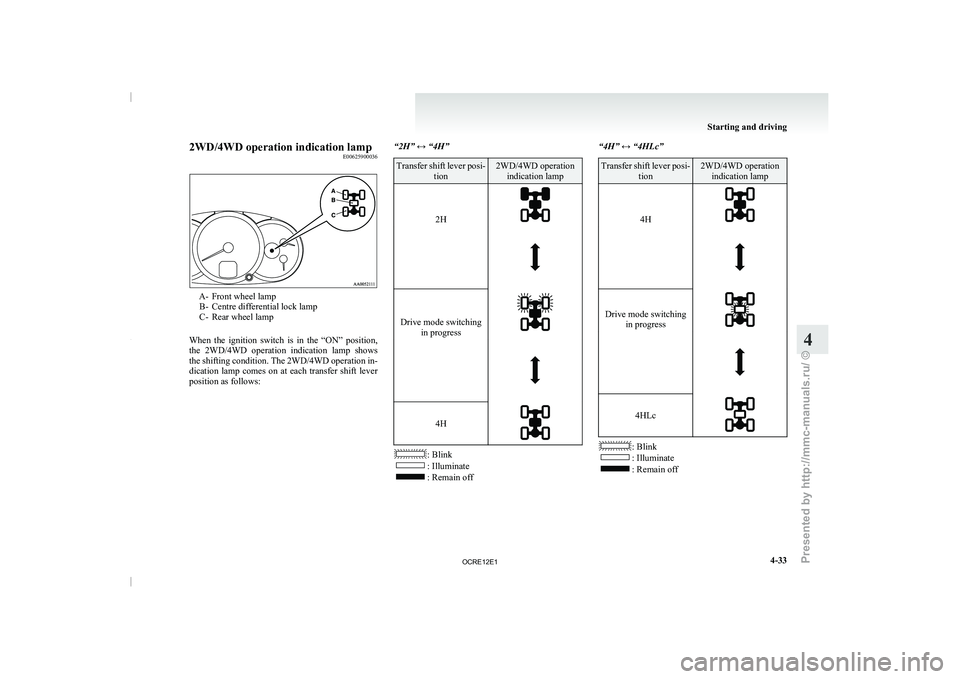
2WD/4WD operation indication lamp
E00625900036A- Front wheel lamp
B- Centre differential lock lamp
C- Rear wheel lamp
When the ignition
switch is in the “ON” position,
the 2WD/4WD operation indication lamp shows
the shifting condition. The 2WD/4WD operation in-
dication lamp comes on at each transfer shift lever
position as follows: “2H” ↔ “4H” Transfer shift lever posi-
tion 2WD/4WD operation
indication lamp
2H
Drive mode switching
in progress
4H
: Blink
: Illuminate
: Remain off“4H” ↔ “4HLc” Transfer shift lever posi-
tion 2WD/4WD operation
indication lamp
4H
Drive mode switching
in progress
4HLc
: Blink
: Illuminate
: Remain off Starting and driving
4-33 4
OCRE12E1
Presented by http://mmc-manuals.ru/ \251
Page 159 of 369
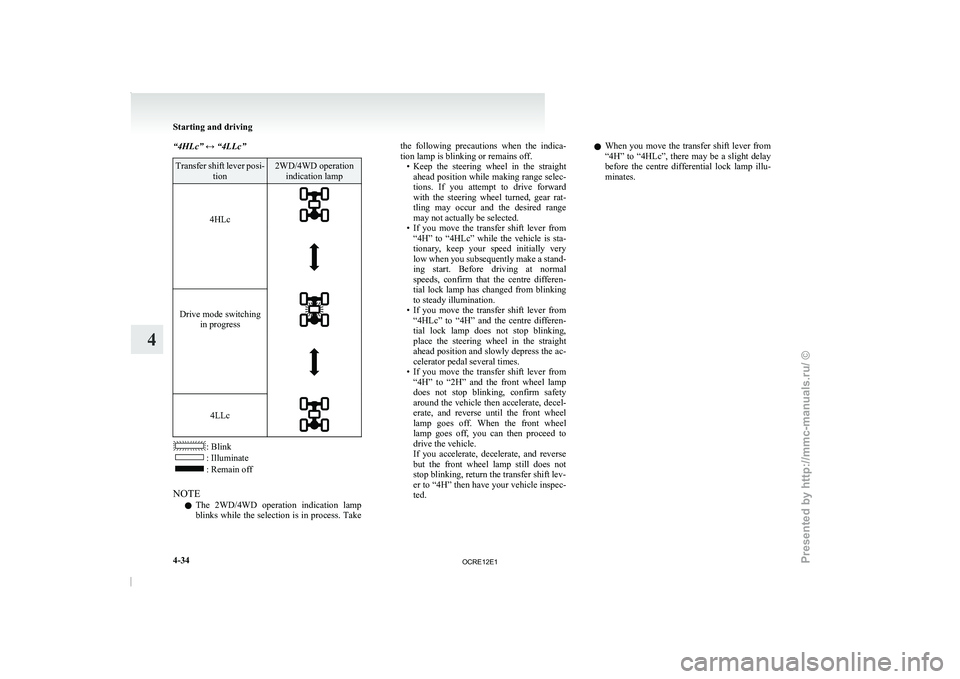
“4HLc” ↔ “4LLc”
Transfer shift lever posi-
tion 2WD/4WD operation
indication lamp
4HLc
Drive mode switching
in progress
4LLc
: Blink
: Illuminate
: Remain off
NOTE l The
2WD/4WD operation indication lamp
blinks
while the selection is in process. Take the following precautions when the indica-
tion lamp is blinking or remains off.
• Keep the steering wheel
in
the straight
ahead position while making range selec-
tions. If you attempt to drive forward
with the steering wheel turned, gear rat-
tling may occur and the desired range
may not actually be selected.
• If you move the transfer shift lever from “4H” to “4HLc” while the vehicle is sta-
tionary, keep your speed initially very
low when you subsequently make a stand-
ing start. Before driving at normal
speeds, confirm that the centre differen-
tial lock lamp has changed from blinking
to steady illumination.
• If you move the transfer shift lever from “4HLc” to “4H” and the centre differen-
tial lock lamp does not stop blinking,
place the steering wheel in the straight
ahead position and slowly depress the ac-
celerator pedal several times.
• If you move the transfer shift lever from “4H” to “2H” and the front wheel lamp
does not stop blinking, confirm safety
around the vehicle then accelerate, decel-
erate, and reverse until the front wheel
lamp goes off. When the front wheel
lamp goes off, you can then proceed to
drive the vehicle.
If you accelerate, decelerate, and reverse
but the front wheel lamp still does not
stop blinking, return the transfer shift lev-
er to “4H” then have your vehicle inspec-
ted. l
When you move the
transfer shift lever from
“4H” to “4HLc”, there may be a slight delay
before the centre differential lock lamp illu-
minates. Starting and driving
4-34
4
OCRE12E1
Presented by http://mmc-manuals.ru/ \251
Page 160 of 369
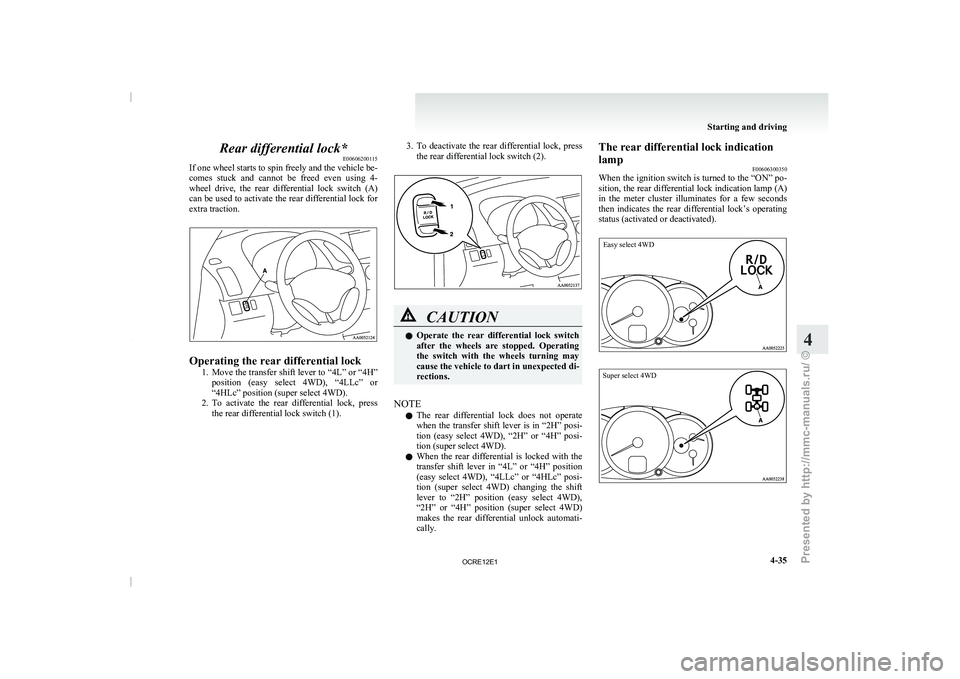
Rear differential lock*
E00606200115
If one wheel starts to
spin freely and the vehicle be-
comes stuck and cannot be freed even using 4-
wheel drive, the rear differential lock switch (A)
can be used to activate the rear differential lock for
extra traction. Operating the rear differential lock
1. Move the transfer shift lever
to “4L” or “4H”
position (easy select 4WD), “4LLc” or
“4HLc” position (super select 4WD).
2. To activate the rear differential lock, press the rear differential lock switch (1). 3. To deactivate the rear differential lock, press
the rear differential lock switch (2). CAUTION
l
Operate the rear differential
lock
switch
after the wheels are stopped. Operating
the switch with the wheels turning may
cause the vehicle to dart in unexpected di-
rections.
NOTE l The
rear differential lock does
not operate
when the transfer shift lever is in “2H” posi-
tion (easy select 4WD), “2H” or “4H” posi-
tion (super select 4WD).
l When the rear differential is locked with the
transfer shift lever in “4L” or “4H” position
(easy select 4WD), “4LLc” or “4HLc” posi-
tion (super select 4WD) changing the shift
lever to “2H” position (easy select 4WD),
“2H” or “4H” position (super select 4WD)
makes the rear differential unlock automati-
cally. The rear differential lock indication
lamp
E00606300350
When the ignition switch
is
turned to the “ON” po-
sition, the rear differential lock indication lamp (A)
in the meter cluster illuminates for a few seconds
then indicates the rear differential lock’s operating
status (activated or deactivated).
Easy select 4WD
Super select 4WD Starting and driving
4-35 4
OCRE12E1
Presented by http://mmc-manuals.ru/ \251
Page 161 of 369
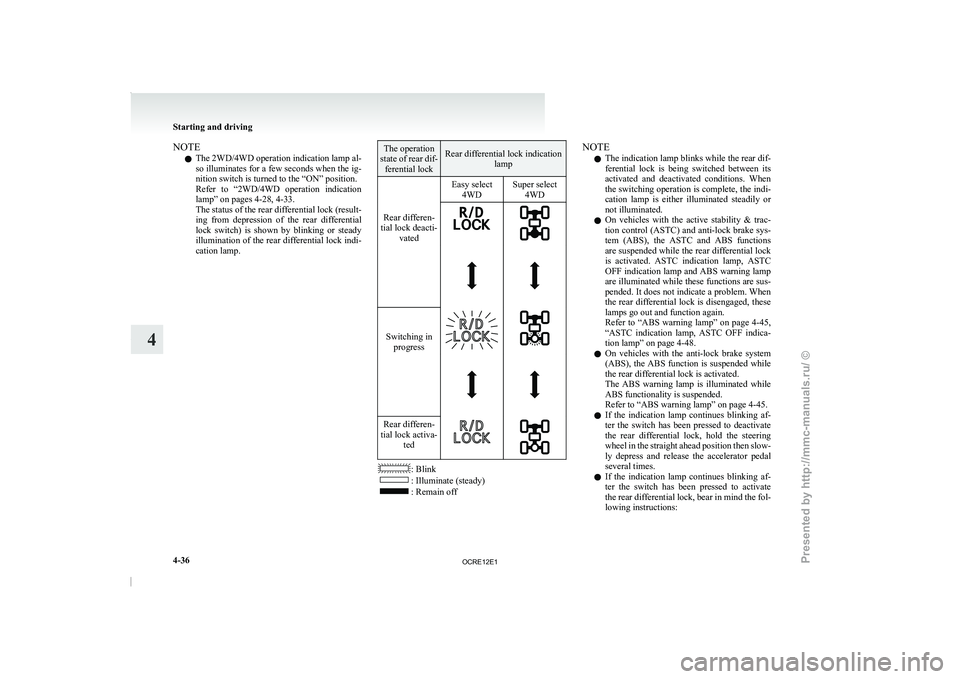
NOTE
l The
2WD/4WD operation indication lamp
al-
so illuminates for a few seconds when the ig-
nition switch is turned to the “ON” position.
Refer to “2WD/4WD operation indication
lamp” on pages 4-28, 4-33.
The status of the rear differential lock (result-
ing from depression of the rear differential
lock switch) is shown by blinking or steady
illumination of the rear differential lock indi-
cation lamp. The operation
state of rear dif- ferential lock Rear differential lock indication
lamp
Easy select 4WDSuper select
4WD
Rear differen-
tial lock deacti- vated
Switching in
progress
Rear differen-
tial lock activa- ted : Blink
: Illuminate (steady)
: Remain offNOTE
l The indication lamp blinks while the rear dif-
ferential
lock is being switched
between its
activated and deactivated conditions. When
the switching operation is complete, the indi-
cation lamp is either illuminated steadily or
not illuminated.
l On vehicles with the active stability & trac-
tion control (ASTC) and anti-lock brake sys-
tem (ABS), the ASTC and ABS functions
are suspended while the rear differential lock
is activated. ASTC indication lamp, ASTC
OFF indication lamp and ABS warning lamp
are illuminated while these functions are sus-
pended. It does not indicate a problem. When
the rear differential lock is disengaged, these
lamps go out and function again.
Refer to “ABS warning lamp” on page 4-45,
“ASTC indication lamp, ASTC OFF indica-
tion lamp” on page 4-48.
l On vehicles with the anti-lock brake system
(ABS), the ABS function is suspended while
the rear differential lock is activated.
The ABS warning lamp is illuminated while
ABS functionality is suspended.
Refer to “ABS warning lamp” on page 4-45.
l If the indication lamp continues blinking af-
ter the switch has been pressed to deactivate
the rear differential lock, hold the steering
wheel in the straight ahead position then slow-
ly depress and release the accelerator pedal
several times.
l If the indication lamp continues blinking af-
ter the switch has been pressed to activate
the rear differential lock, bear in mind the fol-
lowing instructions: Starting and driving
4-36
4
OCRE12E1
Presented by http://mmc-manuals.ru/ \251
Page 162 of 369
• If the vehicle speed is 12 km/h (7 mph)
or higher, decelerate to a speed of 6 km/h
(4 mph) or lower. The indication lamp
will illuminate steadily and the rear differ-
ential lock will be activated.
• If the vehicle speed is 12 km/h (7 mph) or lower, turn the steering wheel from
side to side until the indication lamp illu-
minates steadily. If the vehicle is stuck in
soft ground, make sure the area around
the vehicle is clear then repeatedly at-
tempt to drive forward and backward.
The indication lamp will illuminate stead-
ily and the rear differential lock will be ac-
tivated.
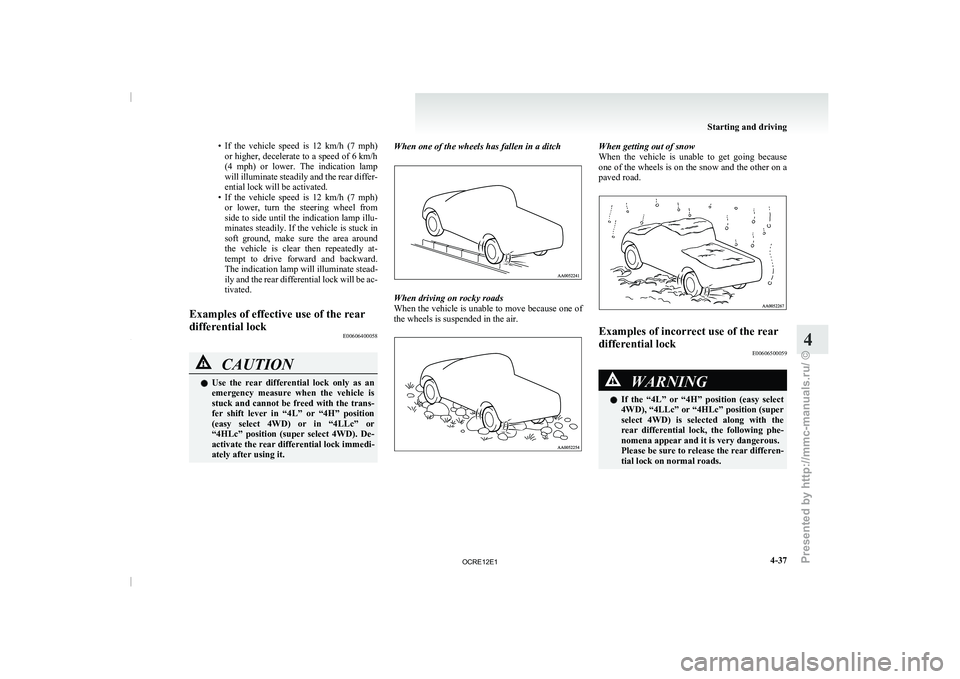
Examples of effective use of the rear
differential lock E00606400058CAUTION
l
Use the rear differential
lock
only as an
emergency measure when the vehicle is
stuck and cannot be freed with the trans-
fer shift lever in “4L” or “4H” position
(easy select 4WD) or in “4LLc” or
“4HLc” position (super select 4WD). De-
activate the rear differential lock immedi-
ately after using it. When one of the wheels has fallen in a ditch
When driving on rocky roads
When the vehicle is
unable
to move because one of
the wheels is suspended in the air. When getting out of snow
When the vehicle is unable
to get going because
one of the wheels is on the snow and the other on a
paved road. Examples of incorrect use of the rear
differential lock
E00606500059 WARNING
l If the “4L” or
“4H”
position (easy select
4WD), “4LLc” or “4HLc” position (super
select 4WD) is selected along with the
rear differential lock, the following phe-
nomena appear and it is very dangerous.
Please be sure to release the rear differen-
tial lock on normal roads. Starting and driving
4-37 4
OCRE12E1
Presented by http://mmc-manuals.ru/ \251
Page 163 of 369
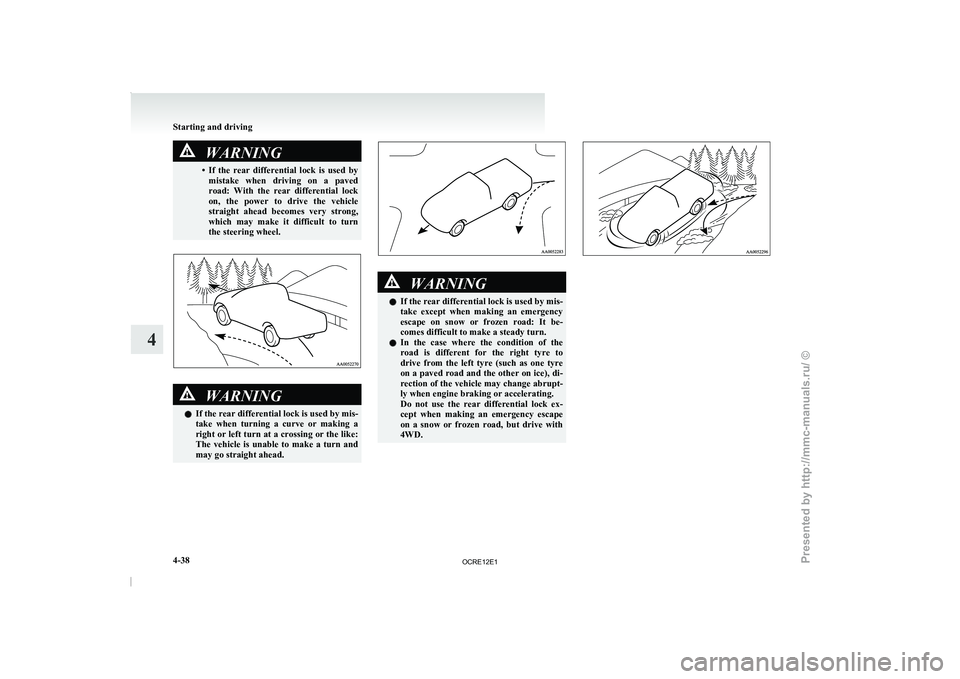
WARNING
• If the rear differential lock is used by mistake when driving on
a paved
road: With the rear differential lock
on, the power to drive the vehicle
straight ahead becomes very strong,
which may make it difficult to turn
the steering wheel. WARNING
l If the rear differential
lock
is used by mis-
take when turning a curve or making a
right or left turn at a crossing or the like:
The vehicle is unable to make a turn and
may go straight ahead. WARNING
l If the rear differential
lock
is used by mis-
take except when making an emergency
escape on snow or frozen road: It be-
comes difficult to make a steady turn.
l In the case where the condition of the
road is different for the right tyre to
drive from the left tyre (such as one tyre
on a paved road and the other on ice), di-
rection of the vehicle may change abrupt-
ly when engine braking or accelerating.
Do not use the rear differential lock ex-
cept when making an emergency escape
on a snow or frozen road, but drive with
4WD. Starting and driving
4-38
4
OCRE12E1
Presented by http://mmc-manuals.ru/ \251