ECO mode NISSAN ALMERA 2001 Service Manual
[x] Cancel search | Manufacturer: NISSAN, Model Year: 2001, Model line: ALMERA, Model: NISSAN ALMERA 2001Pages: 2898, PDF Size: 60.76 MB
Page 1988 of 2898
CONSULT-II DIAGNOSTIC TEST MODE FUNCTION=NJEL0410S02
CONSULT-II DIAGNOSTIC TEST
MODEDescription
C/U INITIALIZATION When replacing any of the following components, C/U initialization and re-registration of all
NATS ignition keys are necessary.
[NATS ignition key/IMMU/ECM/Dongle unit]
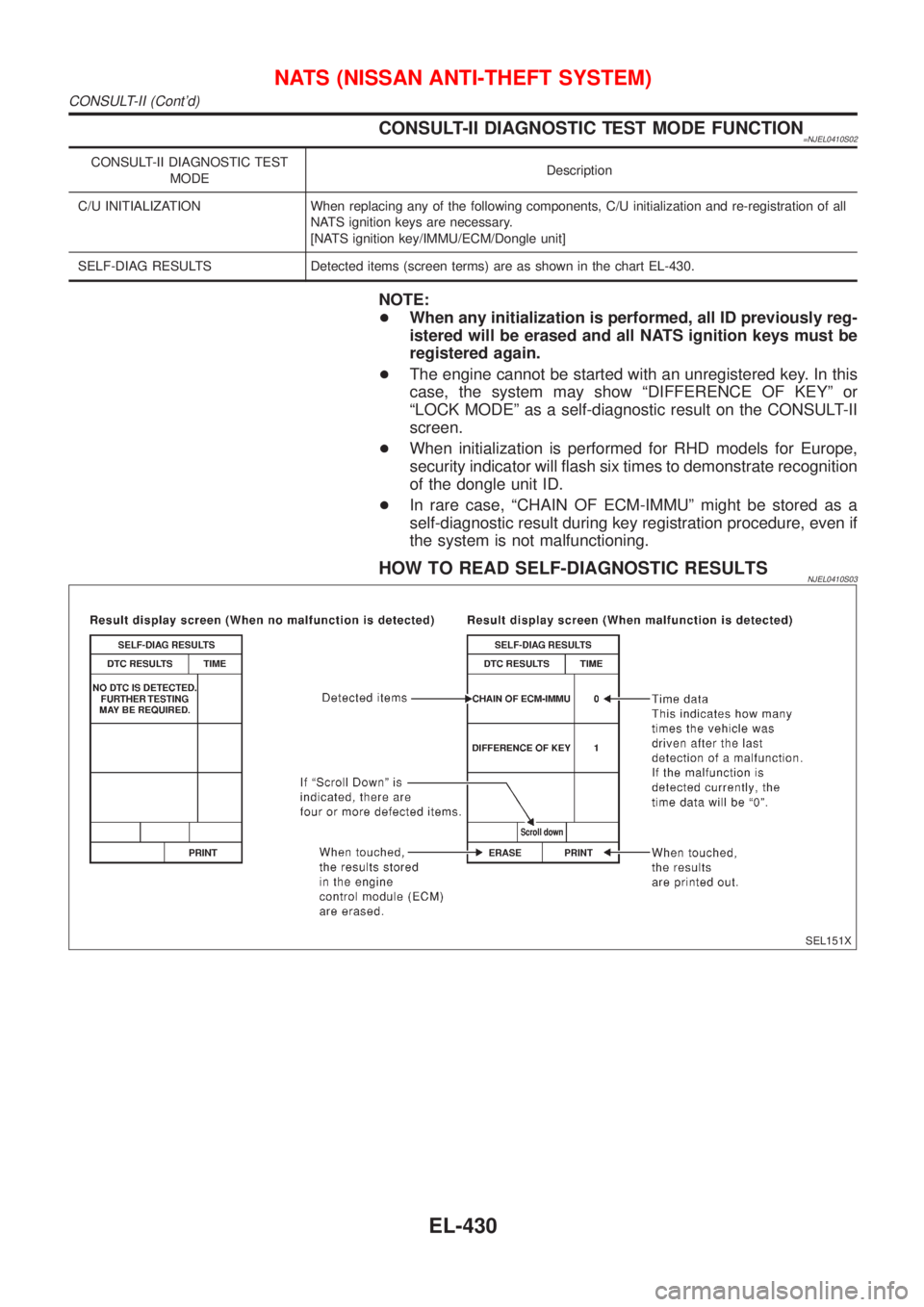
SELF-DIAG RESULTS Detected items (screen terms) are as shown in the chart EL-430.
NOTE:
+When any initialization is performed, all ID previously reg-
istered will be erased and all NATS ignition keys must be
registered again.
+The engine cannot be started with an unregistered key. In this
case, the system may show ªDIFFERENCE OF KEYº or
ªLOCK MODEº as a self-diagnostic result on the CONSULT-II
screen.
+When initialization is performed for RHD models for Europe,
security indicator will flash six times to demonstrate recognition
of the dongle unit ID.
+In rare case, ªCHAIN OF ECM-IMMUº might be stored as a
self-diagnostic result during key registration procedure, even if
the system is not malfunctioning.
HOW TO READ SELF-DIAGNOSTIC RESULTSNJEL0410S03
SEL151X
NATS (NISSAN ANTI-THEFT SYSTEM)
CONSULT-II (Cont'd)
EL-430
Page 2004 of 2898
DIAGNOSTIC PROCEDURE 7=NJEL0411S11Self-diagnostic results:
ªLOCK MODEº displayed on CONSULT-II screen
1 CONFIRM SELF-DIAGNOSTIC RESULTS
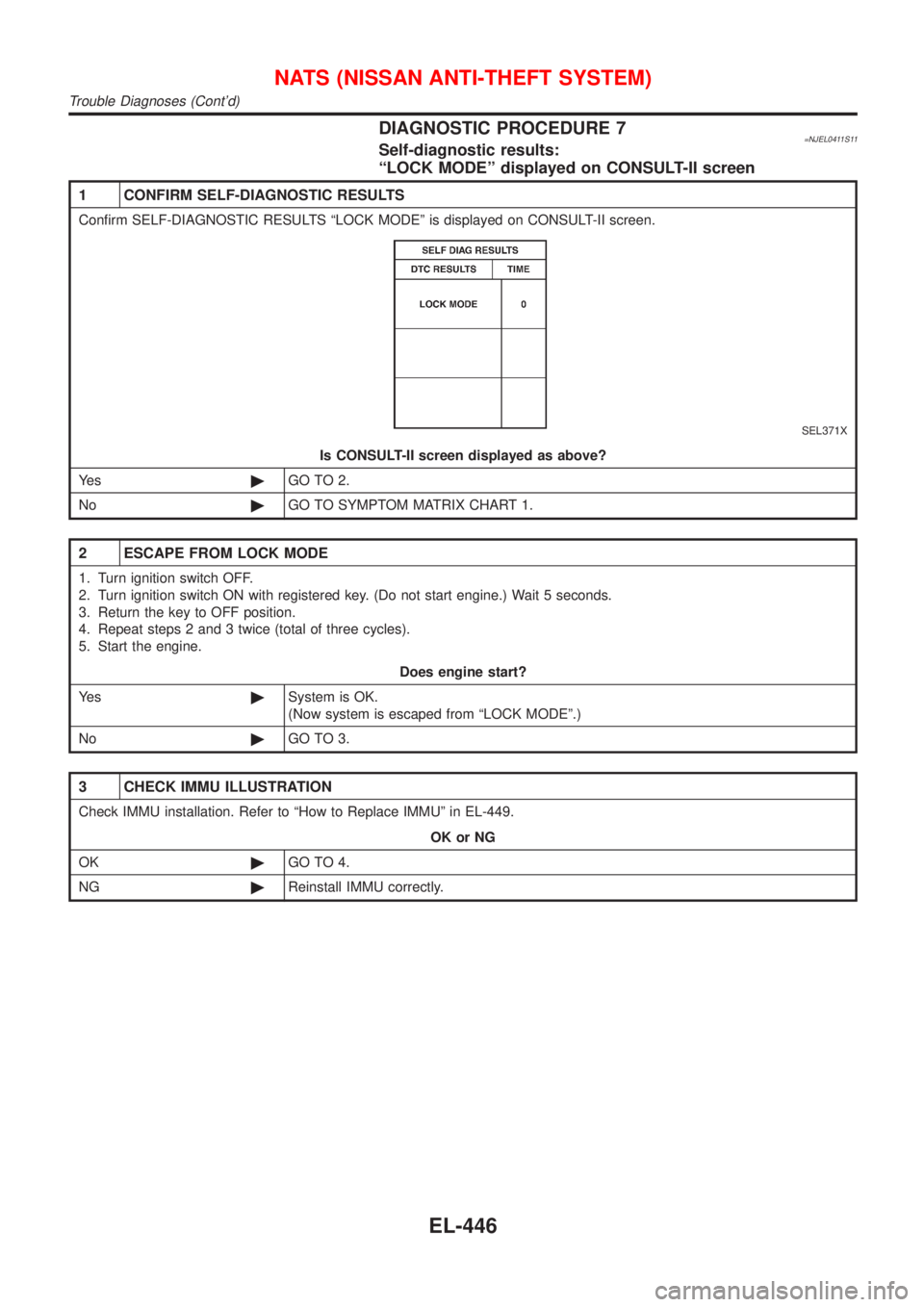
Confirm SELF-DIAGNOSTIC RESULTS ªLOCK MODEº is displayed on CONSULT-II screen.
SEL371X
Is CONSULT-II screen displayed as above?
Ye s©GO TO 2.
No©GO TO SYMPTOM MATRIX CHART 1.
2 ESCAPE FROM LOCK MODE
1. Turn ignition switch OFF.
2. Turn ignition switch ON with registered key. (Do not start engine.) Wait 5 seconds.
3. Return the key to OFF position.
4. Repeat steps 2 and 3 twice (total of three cycles).
5. Start the engine.
Does engine start?
Ye s©System is OK.
(Now system is escaped from ªLOCK MODEº.)
No©GO TO 3.
3 CHECK IMMU ILLUSTRATION
Check IMMU installation. Refer to ªHow to Replace IMMUº in EL-449.
OK or NG
OK©GO TO 4.
NG©Reinstall IMMU correctly.
NATS (NISSAN ANTI-THEFT SYSTEM)
Trouble Diagnoses (Cont'd)
EL-446
Page 2034 of 2898
Self-diagnosis ModeNJEL0519APPLICATION ITEMSNJEL0519S01
Mode DescriptionReference
page
Self DiagnosisSelf-diagnosis for Navigation, Display and GPS Antenna
connection.EL-477
Confirmation/
adjustmentDiagnose the DisplayColor and gray gradation of display can be checked in
this mode.EL-485
Diagnosis for Signals from the CarSeveral input signals to NAVI control unit, can be moni-
tored in this mode.EL-483
NavigationCheck the map CD-
ROM versionThe version (parts number) of inserted CD-ROM can be
checked in this model.EL-484
Error historyDiagnosis results previously stored in the memory
(before turning ignition switch ON) are displayed in this
mode. Time and location when/where the errors
occurred are also displayed.EL-479
Longitude & LatitudeDisplay the map. Use the joystick to adjust position. Lon-
gitude and latitude will be displayed.EL-486
Adjust the AngleTurning angle of the vehicle on the display can be
adjusted in this mode.EL-487
Speed CalibrationUnder ordinary conditions, the navigation system dis-
tance measuring function will automatically compensate
for minute decreases in wheel and tire diameter caused
by tire wear or low pressure. Speed calibration immedi-
ately restores system accuracy in cases such as when
distance calibration is needed because of the use of tire
chains in inclement weather.EL-488
Initialize LocationThis mode is for initializing the current location. Use
when the vehicle is transported a long distance by a
trailer, etc.EL-489
MODEMAP
SEL617X
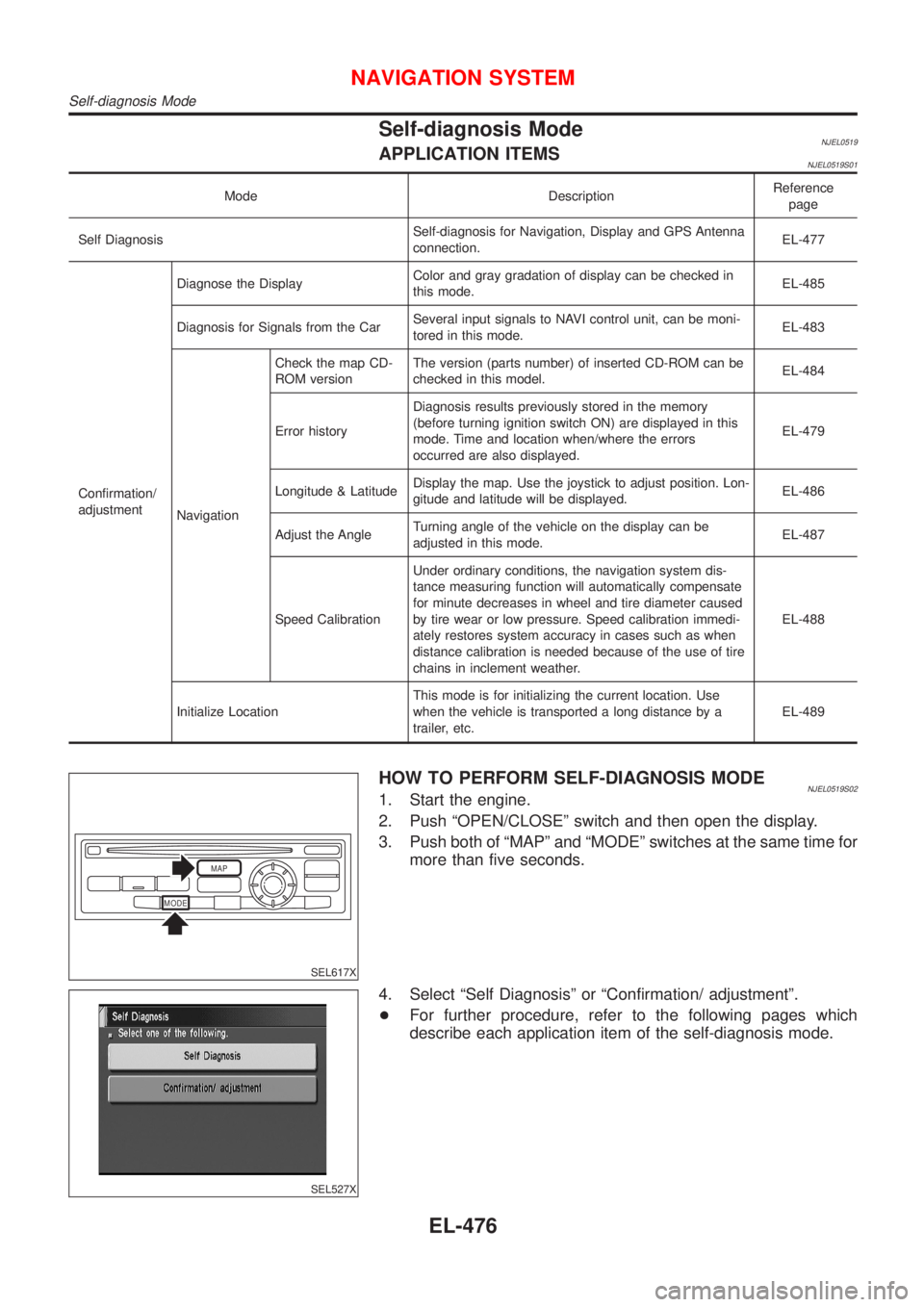
HOW TO PERFORM SELF-DIAGNOSIS MODENJEL0519S021. Start the engine.
2. Push ªOPEN/CLOSEº switch and then open the display.
3. Push both of ªMAPº and ªMODEº switches at the same time for
more than five seconds.
SEL527X
4. Select ªSelf Diagnosisº or ªConfirmation/ adjustmentº.
+For further procedure, refer to the following pages which
describe each application item of the self-diagnosis mode.
NAVIGATION SYSTEM
Self-diagnosis Mode
EL-476
Page 2035 of 2898
SEL527X
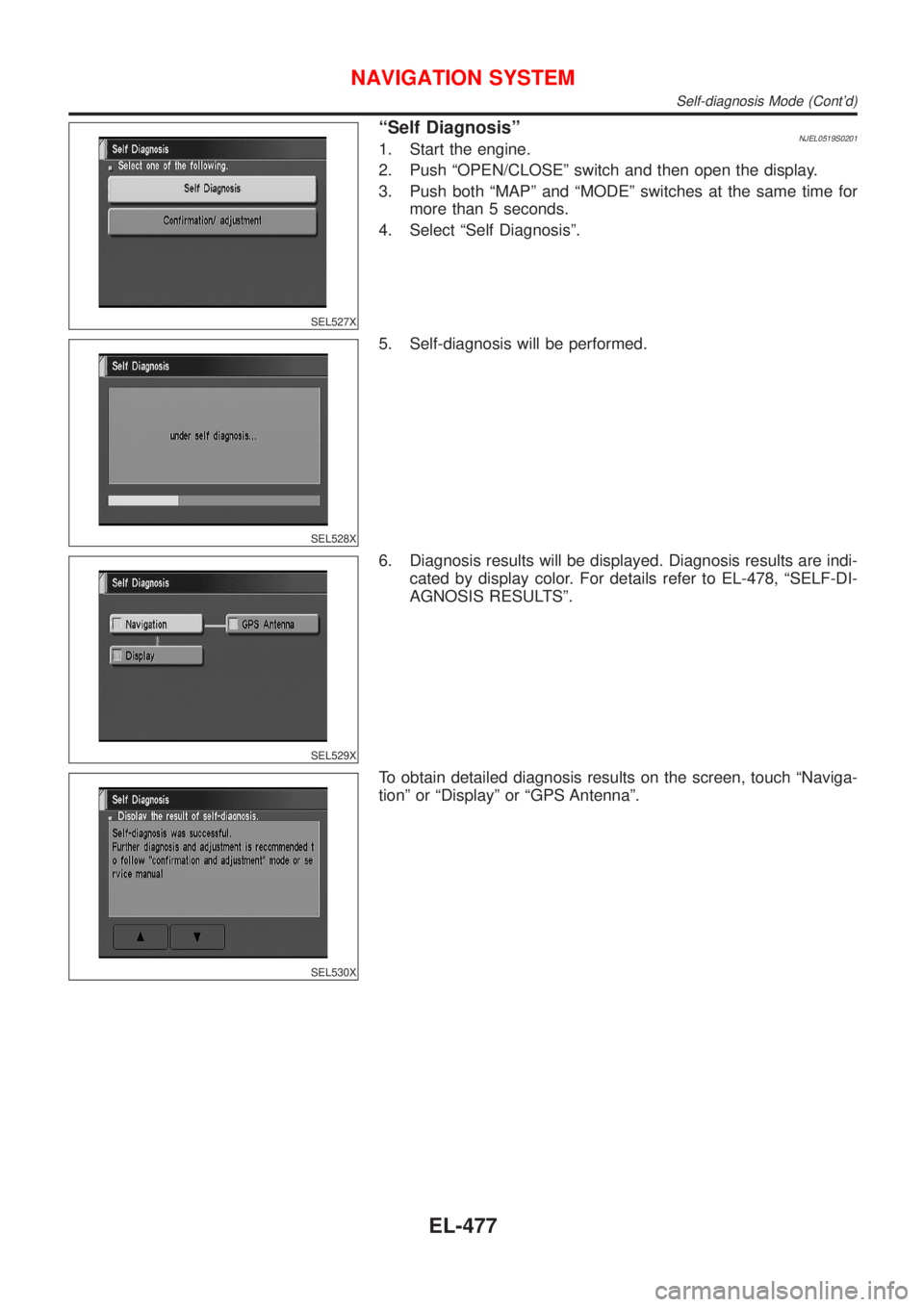
ªSelf DiagnosisºNJEL0519S02011. Start the engine.
2. Push ªOPEN/CLOSEº switch and then open the display.
3. Push both ªMAPº and ªMODEº switches at the same time for
more than 5 seconds.
4. Select ªSelf Diagnosisº.
SEL528X
5. Self-diagnosis will be performed.
SEL529X
6. Diagnosis results will be displayed. Diagnosis results are indi-
cated by display color. For details refer to EL-478, ªSELF-DI-
AGNOSIS RESULTSº.
SEL530X
To obtain detailed diagnosis results on the screen, touch ªNaviga-
tionº or ªDisplayº or ªGPS Antennaº.
NAVIGATION SYSTEM
Self-diagnosis Mode (Cont'd)
EL-477
Page 2037 of 2898
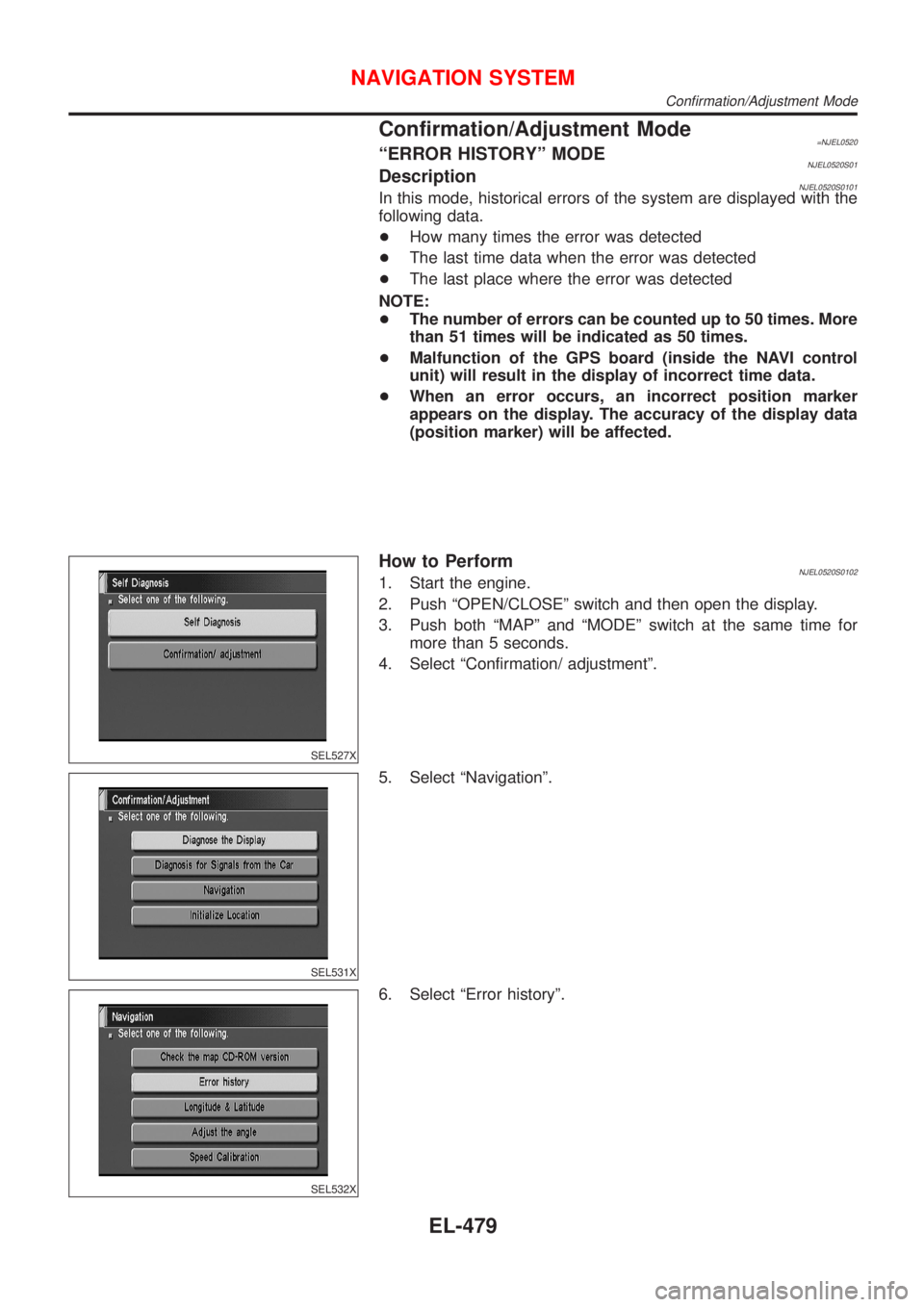
Confirmation/Adjustment Mode=NJEL0520ªERROR HISTORYº MODENJEL0520S01DescriptionNJEL0520S0101In this mode, historical errors of the system are displayed with the
following data.
+How many times the error was detected
+The last time data when the error was detected
+The last place where the error was detected
NOTE:
+The number of errors can be counted up to 50 times. More
than 51 times will be indicated as 50 times.
+Malfunction of the GPS board (inside the NAVI control
unit) will result in the display of incorrect time data.
+When an error occurs, an incorrect position marker
appears on the display. The accuracy of the display data
(position marker) will be affected.
SEL527X
How to PerformNJEL0520S01021. Start the engine.
2. Push ªOPEN/CLOSEº switch and then open the display.
3. Push both ªMAPº and ªMODEº switch at the same time for
more than 5 seconds.
4. Select ªConfirmation/ adjustmentº.
SEL531X
5. Select ªNavigationº.
SEL532X
6. Select ªError historyº.
NAVIGATION SYSTEM
Confirmation/Adjustment Mode
EL-479
Page 2038 of 2898
SEL533X
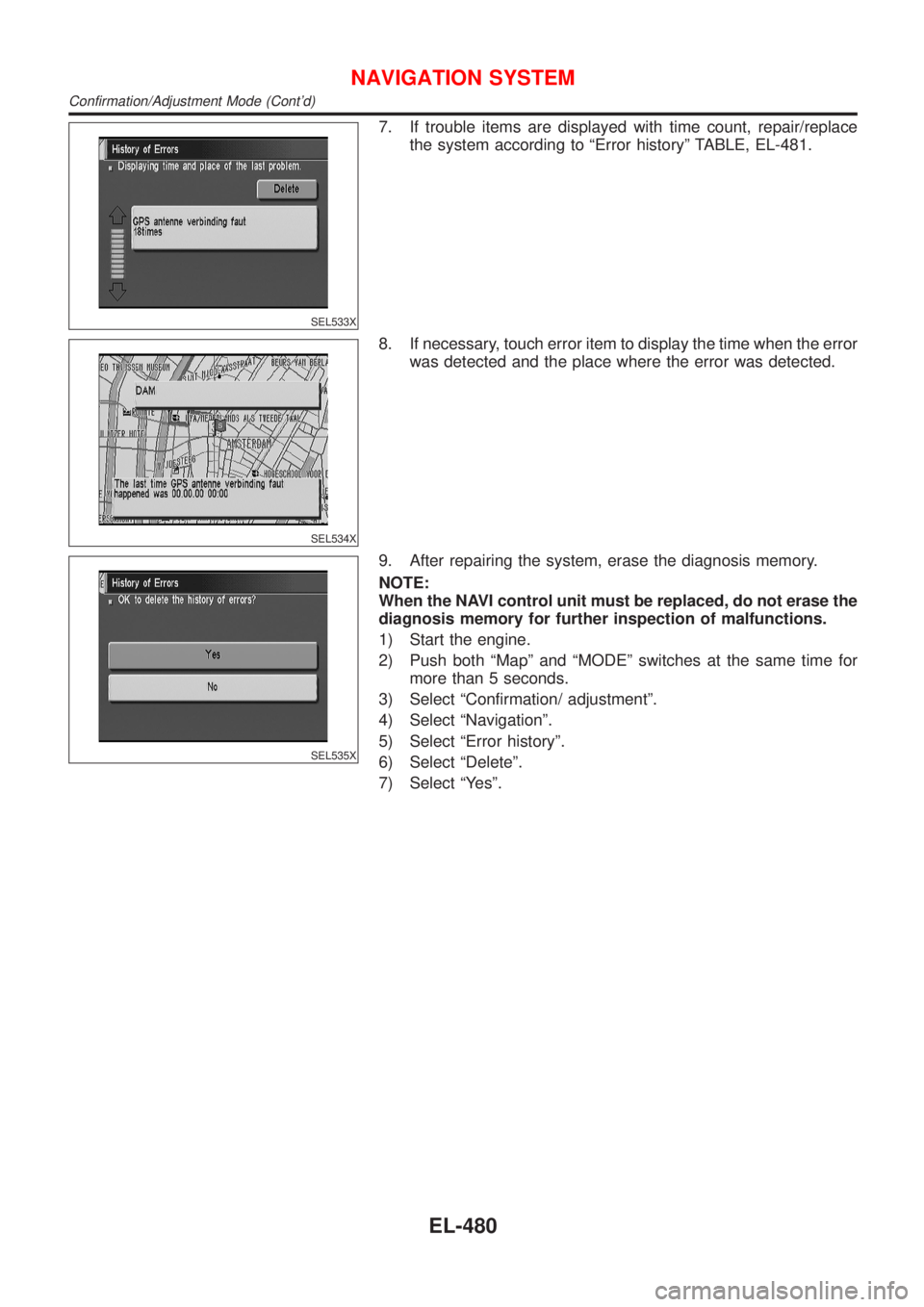
7. If trouble items are displayed with time count, repair/replace
the system according to ªError historyº TABLE, EL-481.
SEL534X
8. If necessary, touch error item to display the time when the error
was detected and the place where the error was detected.
SEL535X
9. After repairing the system, erase the diagnosis memory.
NOTE:
When the NAVI control unit must be replaced, do not erase the
diagnosis memory for further inspection of malfunctions.
1) Start the engine.
2) Push both ªMapº and ªMODEº switches at the same time for
more than 5 seconds.
3) Select ªConfirmation/ adjustmentº.
4) Select ªNavigationº.
5) Select ªError historyº.
6) Select ªDeleteº.
7) Select ªYesº.
NAVIGATION SYSTEM
Confirmation/Adjustment Mode (Cont'd)
EL-480
Page 2041 of 2898
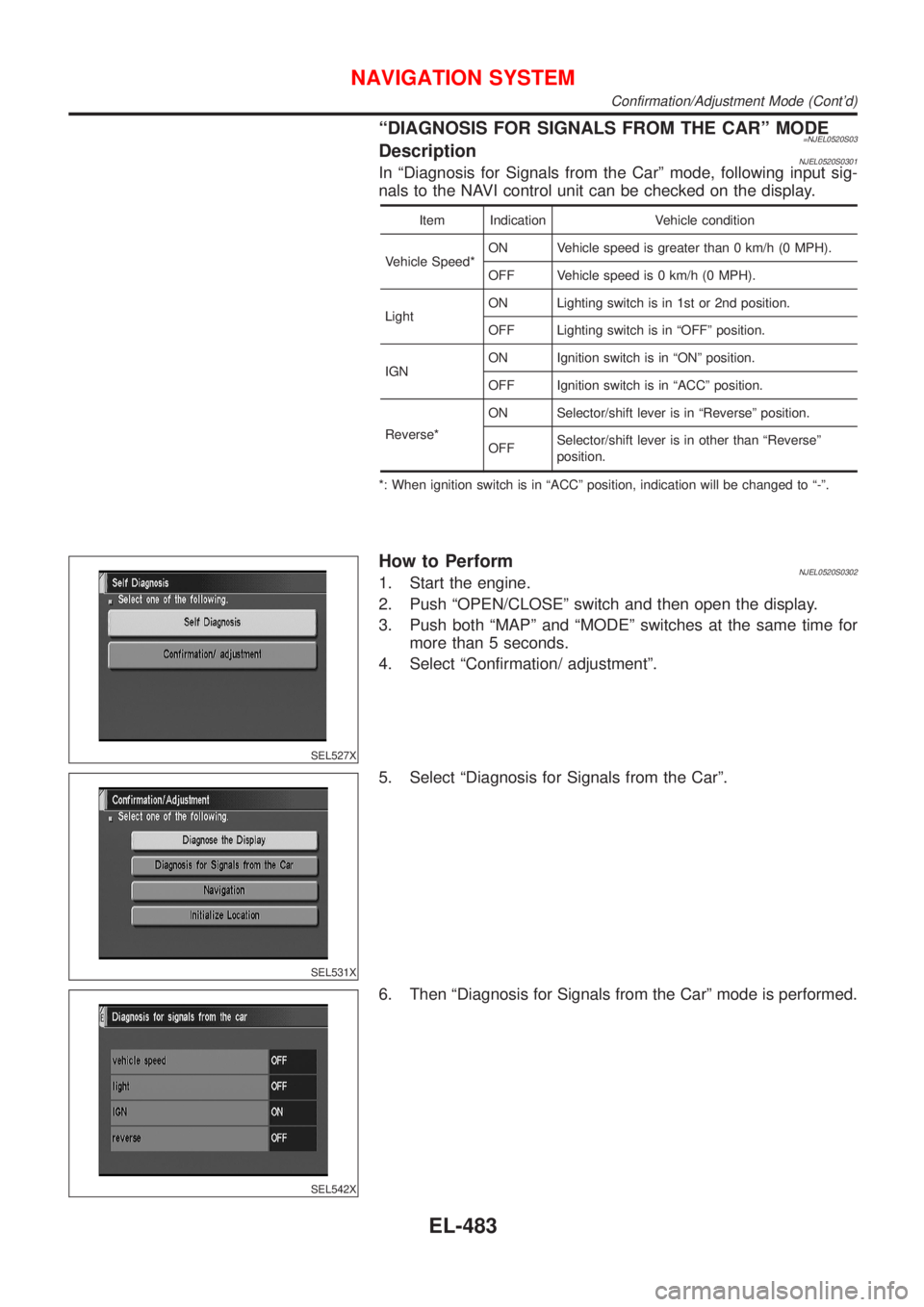
ªDIAGNOSIS FOR SIGNALS FROM THE CARº MODE=NJEL0520S03DescriptionNJEL0520S0301In ªDiagnosis for Signals from the Carº mode, following input sig-
nals to the NAVI control unit can be checked on the display.
Item Indication Vehicle condition
Vehicle Speed*ON Vehicle speed is greater than 0 km/h (0 MPH).
OFF Vehicle speed is 0 km/h (0 MPH).
LightON Lighting switch is in 1st or 2nd position.
OFF Lighting switch is in ªOFFº position.
IGNON Ignition switch is in ªONº position.
OFF Ignition switch is in ªACCº position.
Reverse*ON Selector/shift lever is in ªReverseº position.
OFFSelector/shift lever is in other than ªReverseº
position.
*: When ignition switch is in ªACCº position, indication will be changed to ª-º.
SEL527X
How to PerformNJEL0520S03021. Start the engine.
2. Push ªOPEN/CLOSEº switch and then open the display.
3. Push both ªMAPº and ªMODEº switches at the same time for
more than 5 seconds.
4. Select ªConfirmation/ adjustmentº.
SEL531X
5. Select ªDiagnosis for Signals from the Carº.
SEL542X
6. Then ªDiagnosis for Signals from the Carº mode is performed.
NAVIGATION SYSTEM
Confirmation/Adjustment Mode (Cont'd)
EL-483
Page 2042 of 2898
SEL527X
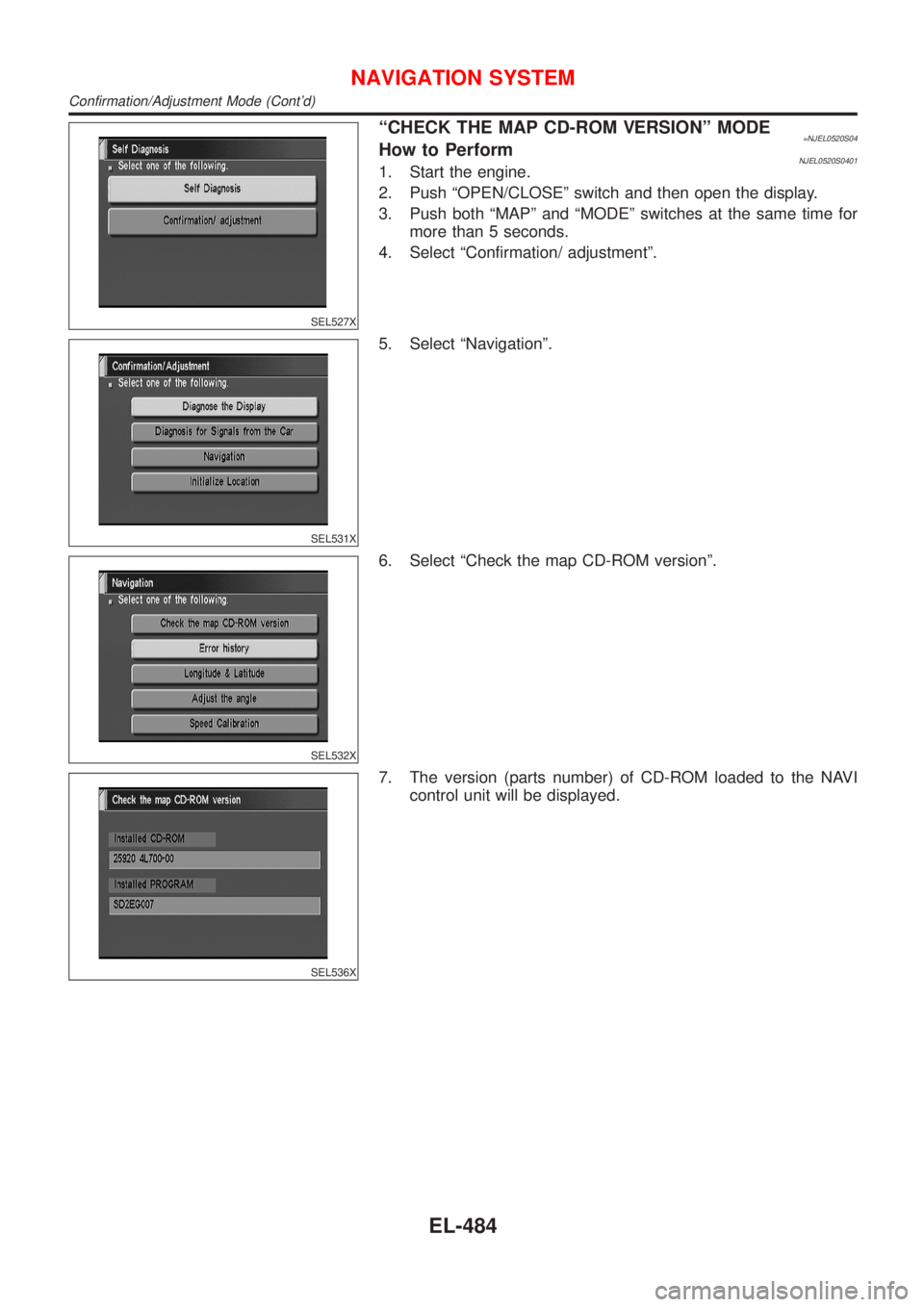
ªCHECK THE MAP CD-ROM VERSIONº MODE=NJEL0520S04How to PerformNJEL0520S04011. Start the engine.
2. Push ªOPEN/CLOSEº switch and then open the display.
3. Push both ªMAPº and ªMODEº switches at the same time for
more than 5 seconds.
4. Select ªConfirmation/ adjustmentº.
SEL531X
5. Select ªNavigationº.
SEL532X
6. Select ªCheck the map CD-ROM versionº.
SEL536X
7. The version (parts number) of CD-ROM loaded to the NAVI
control unit will be displayed.
NAVIGATION SYSTEM
Confirmation/Adjustment Mode (Cont'd)
EL-484
Page 2043 of 2898
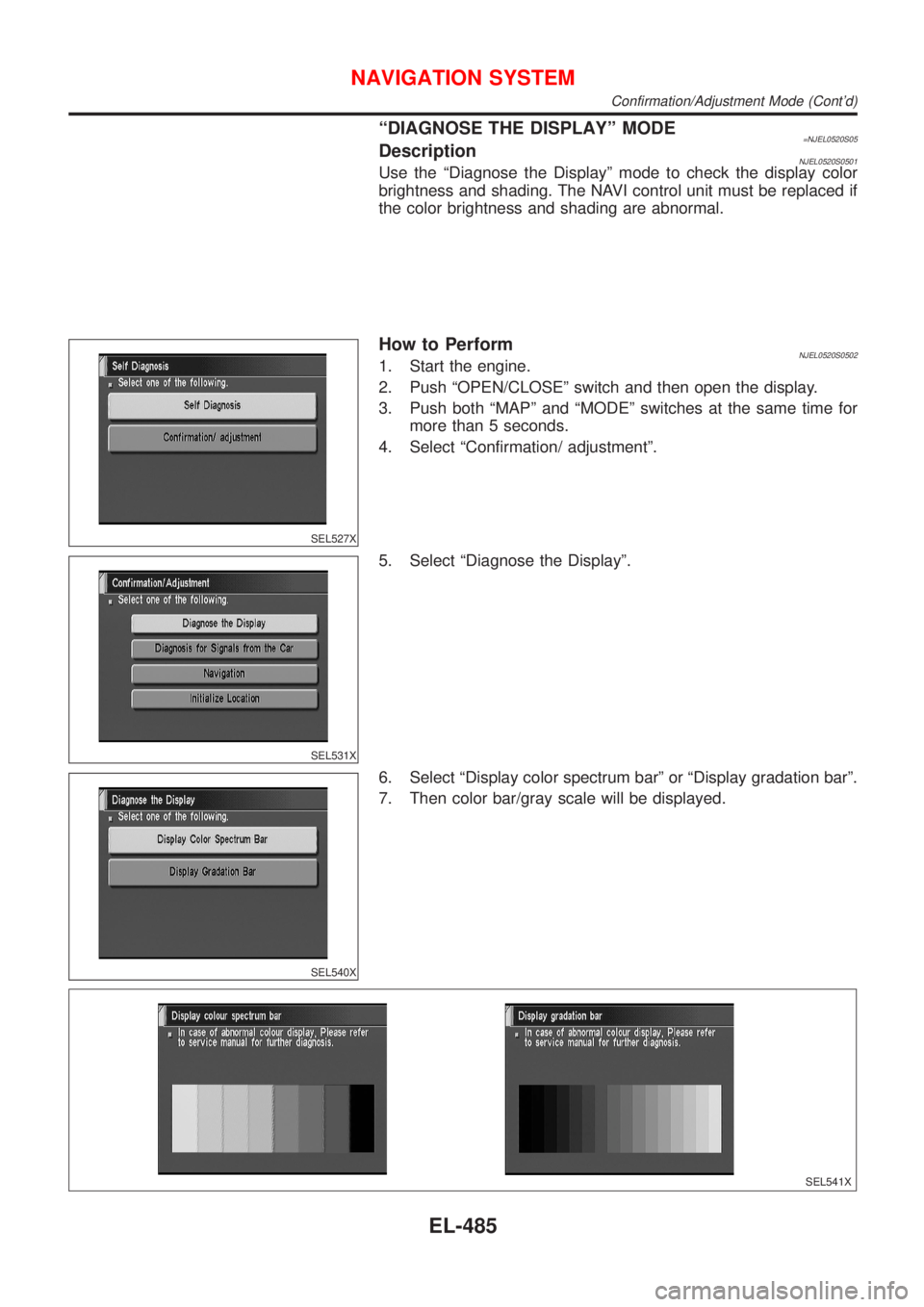
ªDIAGNOSE THE DISPLAYº MODE=NJEL0520S05DescriptionNJEL0520S0501Use the ªDiagnose the Displayº mode to check the display color
brightness and shading. The NAVI control unit must be replaced if
the color brightness and shading are abnormal.
SEL527X
How to PerformNJEL0520S05021. Start the engine.
2. Push ªOPEN/CLOSEº switch and then open the display.
3. Push both ªMAPº and ªMODEº switches at the same time for
more than 5 seconds.
4. Select ªConfirmation/ adjustmentº.
SEL531X
5. Select ªDiagnose the Displayº.
SEL540X
6. Select ªDisplay color spectrum barº or ªDisplay gradation barº.
7. Then color bar/gray scale will be displayed.
SEL541X
NAVIGATION SYSTEM
Confirmation/Adjustment Mode (Cont'd)
EL-485
Page 2044 of 2898
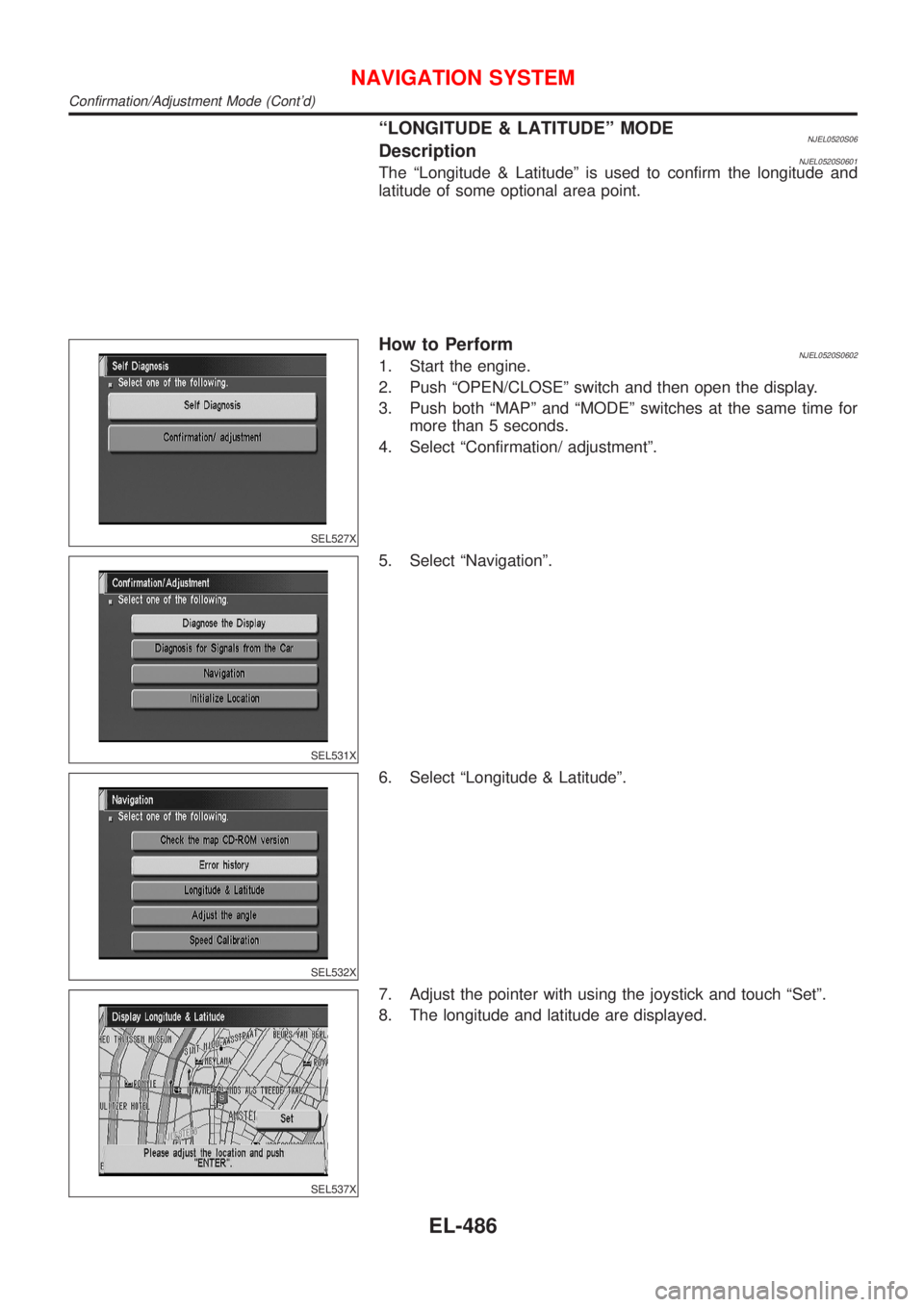
ªLONGITUDE & LATITUDEº MODENJEL0520S06DescriptionNJEL0520S0601The ªLongitude & Latitudeº is used to confirm the longitude and
latitude of some optional area point.
SEL527X
How to PerformNJEL0520S06021. Start the engine.
2. Push ªOPEN/CLOSEº switch and then open the display.
3. Push both ªMAPº and ªMODEº switches at the same time for
more than 5 seconds.
4. Select ªConfirmation/ adjustmentº.
SEL531X
5. Select ªNavigationº.
SEL532X
6. Select ªLongitude & Latitudeº.
SEL537X
7. Adjust the pointer with using the joystick and touch ªSetº.
8. The longitude and latitude are displayed.
NAVIGATION SYSTEM
Confirmation/Adjustment Mode (Cont'd)
EL-486