button NISSAN ALMERA N16 2003 Electronic Repair Manual
[x] Cancel search | Manufacturer: NISSAN, Model Year: 2003, Model line: ALMERA N16, Model: NISSAN ALMERA N16 2003Pages: 3189, PDF Size: 54.76 MB
Page 7 of 3189

SEF289H
Before starting repairs which do not require battery power:
Turn off ignition switch.
Disconnect the negative battery terminal.
SGI233
To prevent serious burns:
Avoid contact with hot metal parts.
Do not remove the radiator cap when the engine is hot.
SGI234
Before servicing the vehicle:
Protect fenders, upholstery and carpeting with appropriate cov-
ers.
Take caution that keys, buckles or buttons do not scratch paint.
Clean all disassembled parts in the designated liquid or solvent
prior to inspection or assembly.
Replace oil seals, gaskets, packings, O-rings, locking washers,
cotter pins, self-locking nuts, etc. with new ones.
Replace inner and outer races of tapered roller bearings and
needle bearings as a set.
Arrange the disassembled parts in accordance with their
assembled locations and sequence.
Do not touch the terminals of electrical components which use
microcomputers (such as ECMs).
Static electricity may damage internal electronic components.
After disconnecting vacuum or air hoses, attach a tag to indi-
cate the proper connection.
Use only the fluids and lubricants specified in this manual.
Use approved bonding agent, sealants or their equivalents
when required.
Use tools and recommended special tools where specified for
safe and efficient service repairs.
When repairing the fuel, oil, water, vacuum or exhaust
systems, check all affected lines for leaks.
Dispose of drained oil or the solvent used for cleaning parts in
an appropriate manner.
MA
EM
LC
EC
FE
CL
MT
AT
AX
SU
BR
ST
RS
BT
HA
SC
EL
IDX
PRECAUTIONS
Precautions (Cont’d)
GI-5
Page 1274 of 3189
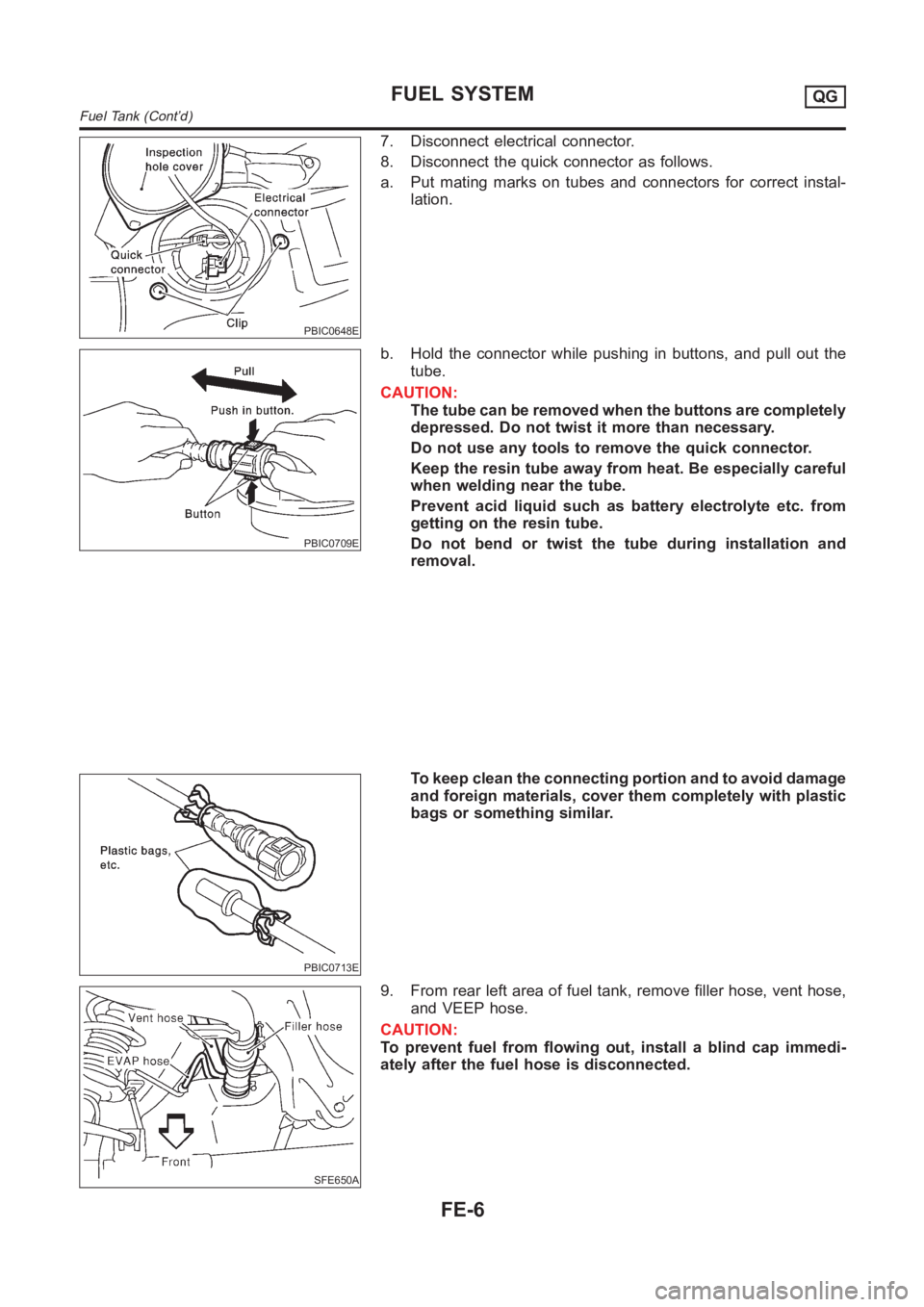
PBIC0648E
7. Disconnect electrical connector.
8. Disconnect the quick connector as follows.
a. Put mating marks on tubes and connectors for correct instal-
lation.
PBIC0709E
b. Hold the connector while pushing in buttons, and pull out the
tube.
CAUTION:
The tube can be removed when the buttons are completely
depressed. Do not twist it more than necessary.
Do not use any tools to remove the quick connector.
Keep the resin tube away from heat. Be especially careful
when welding near the tube.
Prevent acid liquid such as battery electrolyte etc. from
getting on the resin tube.
Do not bend or twist the tube during installation and
removal.
PBIC0713E
To keep clean the connecting portion and to avoid damage
and foreign materials, cover them completely with plastic
bags or something similar.
SFE650A
9. From rear left area of fuel tank, remove filler hose, vent hose,
and VEEP hose.
CAUTION:
To prevent fuel from flowing out, install a blind cap immedi-
ately after the fuel hose is disconnected.
FUEL SYSTEMQG
Fuel Tank (Cont’d)
FE-6
Page 1859 of 3189
![NISSAN ALMERA N16 2003 Electronic Repair Manual A/T SHIFT LOCK SYSTEM
AT-403
[ALL]
D
E
F
G
H
I
J
K
L
MA
B
AT
A/T DEVICE CHECK
1. Shift Lock Solenoid
●Check operation sound.
When ignition switch is turned to “ON” position and selector lever is](/img/5/57350/w960_57350-1858.png "NISSAN ALMERA N16 2003 Electronic Repair Manual A/T SHIFT LOCK SYSTEM
AT-403
[ALL]
D
E
F
G
H
I
J
K
L
MA
B
AT
A/T DEVICE CHECK
1. Shift Lock Solenoid
●Check operation sound.
When ignition switch is turned to “ON” position and selector lever is")
A/T SHIFT LOCK SYSTEM
AT-403
[ALL]
D
E
F
G
H
I
J
K
L
MA
B
AT
A/T DEVICE CHECK
1. Shift Lock Solenoid
●Check operation sound.
When ignition switch is turned to “ON” position and selector lever is set in “P” position.
2. Park Position Switch
●Check resistance between A/T device harness terminal 6 and 7.
STOP LAMP SWITCH
●Check continuity between terminals 1 and 2.
Check stop lamp switch after adjusting brake pedal — refer to
BR-12.
Brake pedal Operation sound
Depressed Yes
Released No
Condition Resistance
When selector lever is set in “P” position and selector
lever button is released111Ω
When selector lever is not set in “P” position and selector
lever button is released0Ω
SAT011K
Condition Continuity
When brake pedal is depressed Yes
When brake pedal is released No
SAT861JA
Page 2032 of 3189
ATC-52
TROUBLE DIAGNOSIS
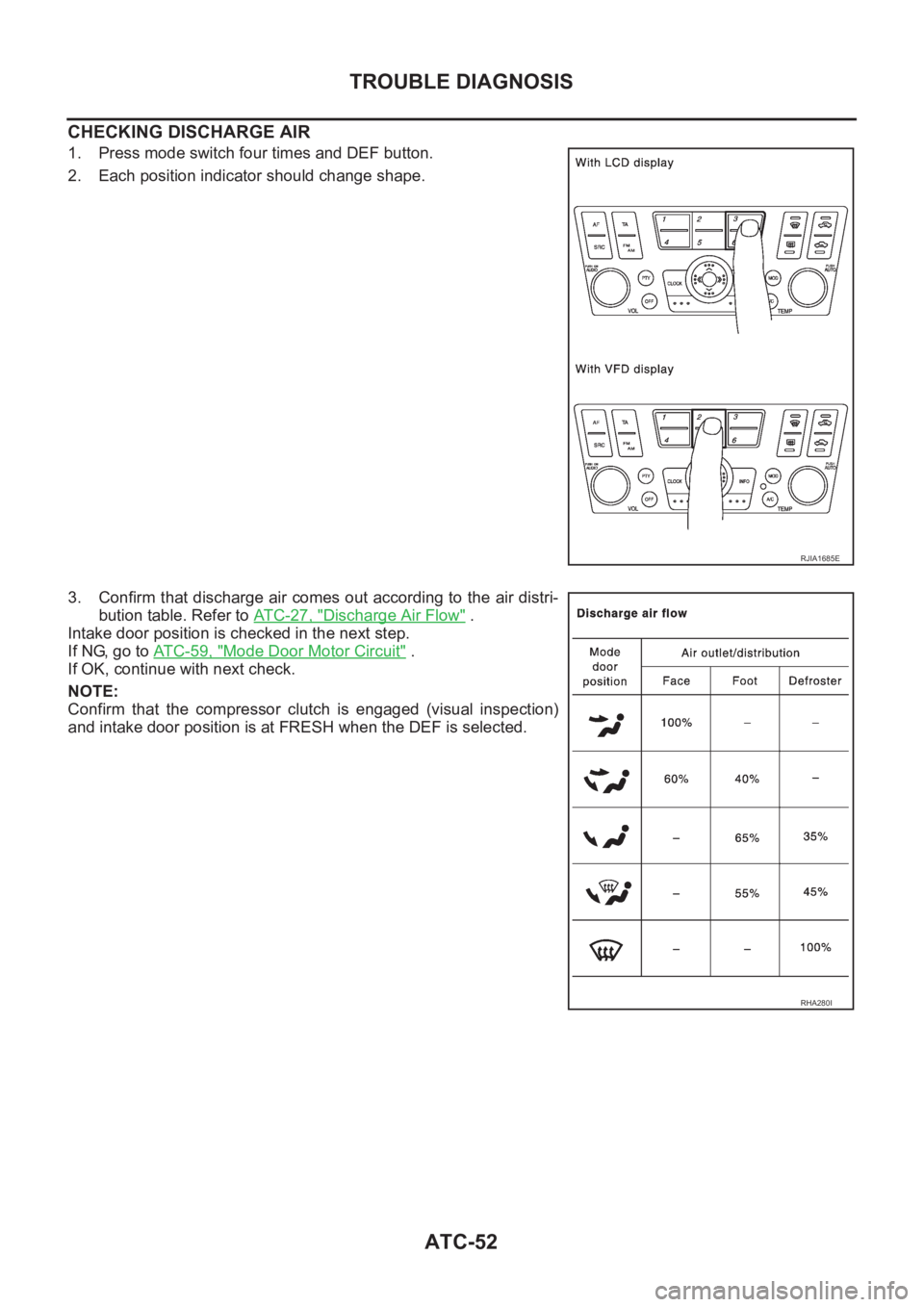
CHECKING DISCHARGE AIR
1. Press mode switch four times and DEF button.
2. Each position indicator should change shape.
3. Confirm that discharge air comes out according to the air distri-
bution table. Refer to ATC-27, "
Discharge Air Flow" .
Intake door position is checked in the next step.
If NG, go to AT C - 5 9 , "
Mode Door Motor Circuit" .
If OK, continue with next check.
NOTE:
Confirm that the compressor clutch is engaged (visual inspection)
and intake door position is at FRESH when the DEF is selected.
RJIA1685E
RHA280I
Page 2051 of 3189
TROUBLE DIAGNOSIS
ATC-71
C
D
E
F
G
H
I
K
L
MA
B
AT C
In the most extreme case (very low ambient) the blower starting delay will be 150 seconds as described
above. After this delay, the blower will operate at low speed until the engine coolant temperature rises above
56°C (133°F), at which time the blower speed will increase to the objective speed.
Start Up From Usual or HOT SOAK Condition (Automatic mode)
The blower will begin operation momentarily after the A/C button is pushed. The blower speed will gradually
rise to the objective speed over a time period of 3 seconds or less (actual time depends on the objective
blower speed).
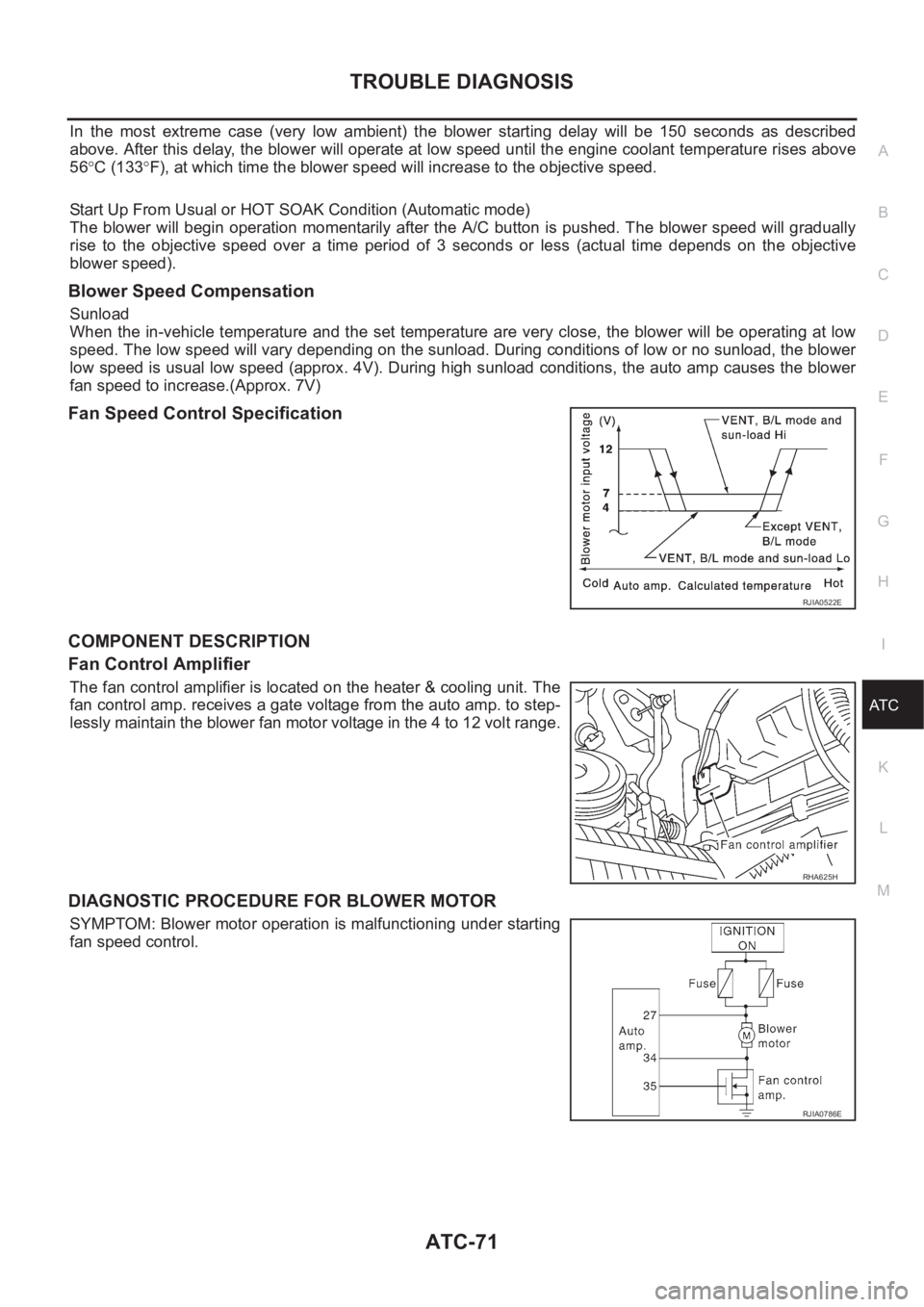
Blower Speed Compensation
Sunload
When the in-vehicle temperature and the set temperature are very close, the blower will be operating at low
speed. The low speed will vary depending on the sunload. During conditions of low or no sunload, the blower
low speed is usual low speed (approx. 4V). During high sunload conditions, the auto amp causes the blower
fan speed to increase.(Approx. 7V)
Fan Speed Control Specification
COMPONENT DESCRIPTION
Fan Control Amplifier
The fan control amplifier is located on the heater & cooling unit. The
fan control amp. receives a gate voltage from the auto amp. to step-
lessly maintain the blower fan motor voltage in the 4 to 12 volt range.
DIAGNOSTIC PROCEDURE FOR BLOWER MOTOR
SYMPTOM: Blower motor operation is malfunctioning under starting
fan speed control.
RJIA0522E
RHA625H
RJIA0786E
Page 2453 of 3189
Combination Meter Self-DiagnosisNJEL0447PERFORMING SELF-DIAGNOSIS MODENJEL0447S011. Turn the ignition switch to the “LOCK” position.
2. Press both reset buttons on the combination meter and keep
them depressed.
3. Turn the ignition switch to the “ON” position, while keeping the
reset buttons pressed.
4. Release both reset buttons then self-diagnosis will start. The
sequence (A to J) is activated by press the either reset buttons.
NOTE:
If either reset button is not pressed for 20 seconds at each step or
if the ignition switch is turned OFF, the self-diagnosis mode is
exited.
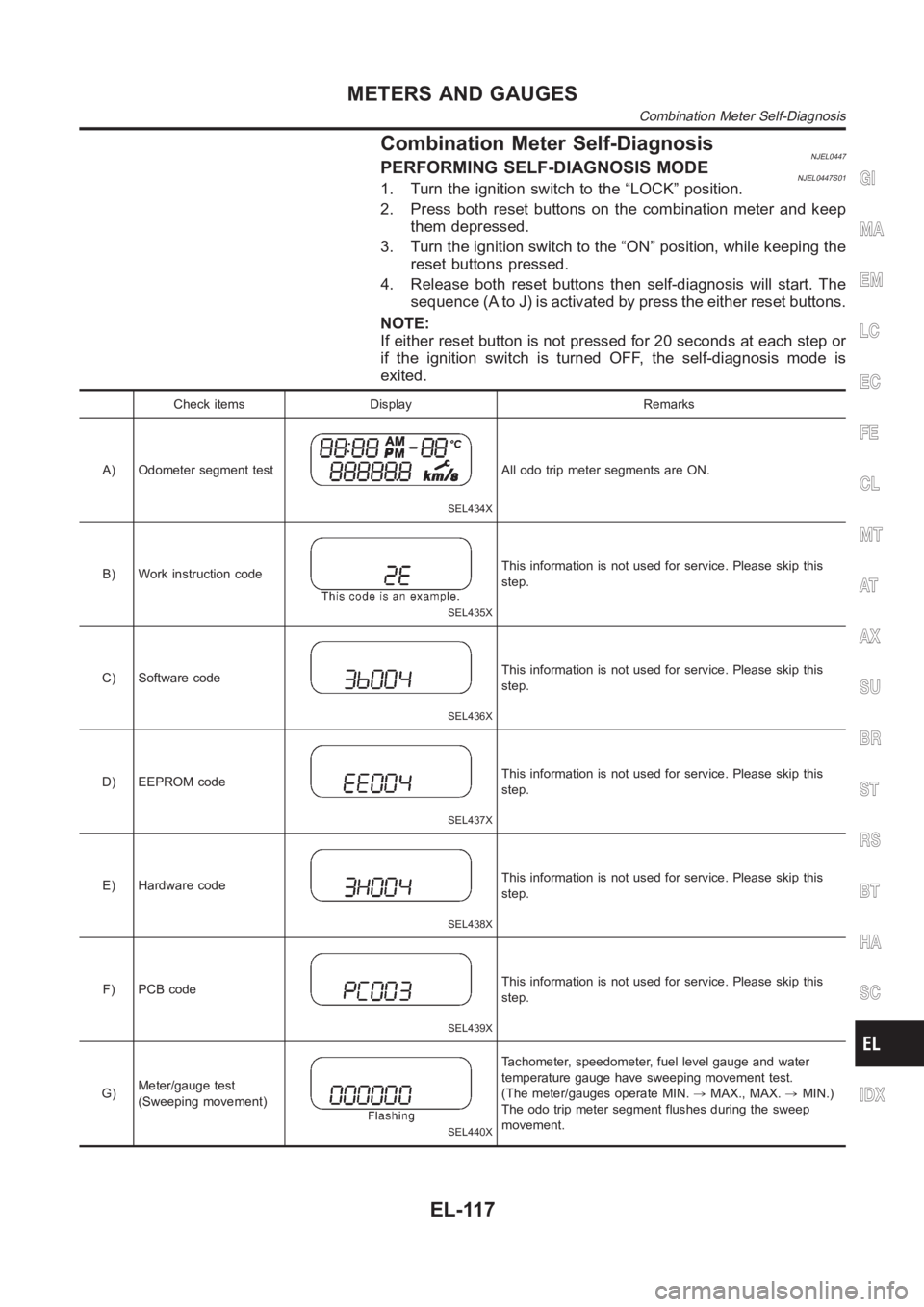
Check items Display Remarks
A) Odometer segment test
SEL434X
All odo trip meter segments are ON.
B) Work instruction code
SEL435X
This information is not used for service. Please skip this
step.
C) Software code
SEL436X
This information is not used for service. Please skip this
step.
D) EEPROM code
SEL437X
This information is not used for service. Please skip this
step.
E) Hardware code
SEL438X
This information is not used for service. Please skip this
step.
F) PCB code
SEL439X
This information is not used for service. Please skip this
step.
G)Meter/gauge test
(Sweeping movement)
SEL440X
Tachometer, speedometer, fuel level gauge and water
temperature gauge have sweeping movement test.
(The meter/gauges operate MIN.,MAX., MAX.,MIN.)
The odo trip meter segment flushes during the sweep
movement.
GI
MA
EM
LC
EC
FE
CL
MT
AT
AX
SU
BR
ST
RS
BT
HA
SC
IDX
METERS AND GAUGES
Combination Meter Self-Diagnosis
EL-117
Page 2455 of 3189
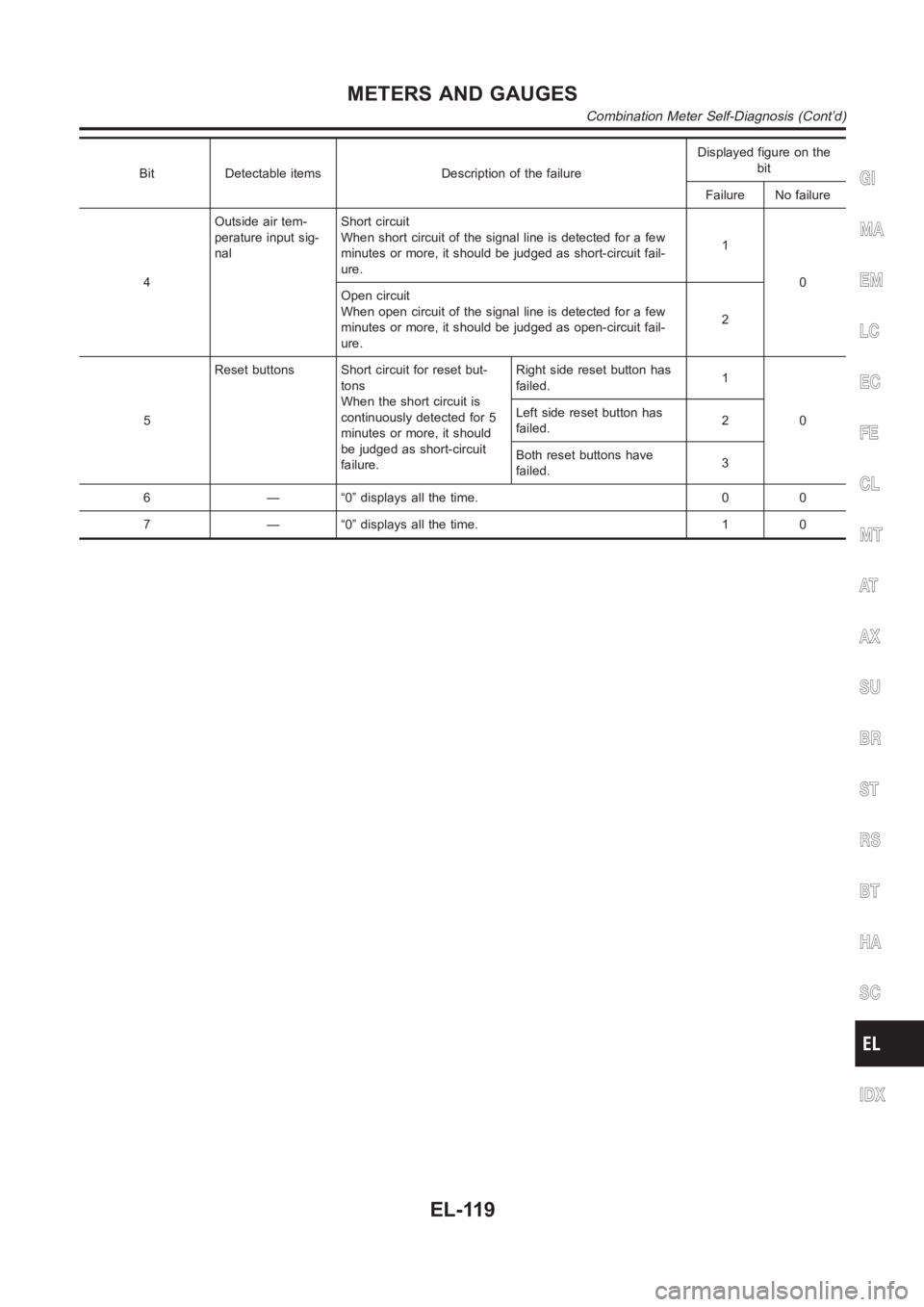
Bit Detectable items Description of the failureDisplayed figure on the
bit
Failure No failure
4Outside air tem-
perature input sig-
nalShort circuit
When short circuit of the signal line is detected for a few
minutes or more, it should be judged as short-circuit fail-
ure.1
0
Open circuit
When open circuit of the signal line is detected for a few
minutes or more, it should be judged as open-circuit fail-
ure.2
5Reset buttons Short circuit for reset but-
tons
When the short circuit is
continuously detected for 5
minutes or more, it should
be judged as short-circuit
failure.Right side reset button has
failed.1
0 Left side reset button has
failed.2
Both reset buttons have
failed.3
6 — “0” displays all the time. 0 0
7 — “0” displays all the time. 1 0GI
MA
EM
LC
EC
FE
CL
MT
AT
AX
SU
BR
ST
RS
BT
HA
SC
IDX
METERS AND GAUGES
Combination Meter Self-Diagnosis (Cont’d)
EL-119
Page 2559 of 3189
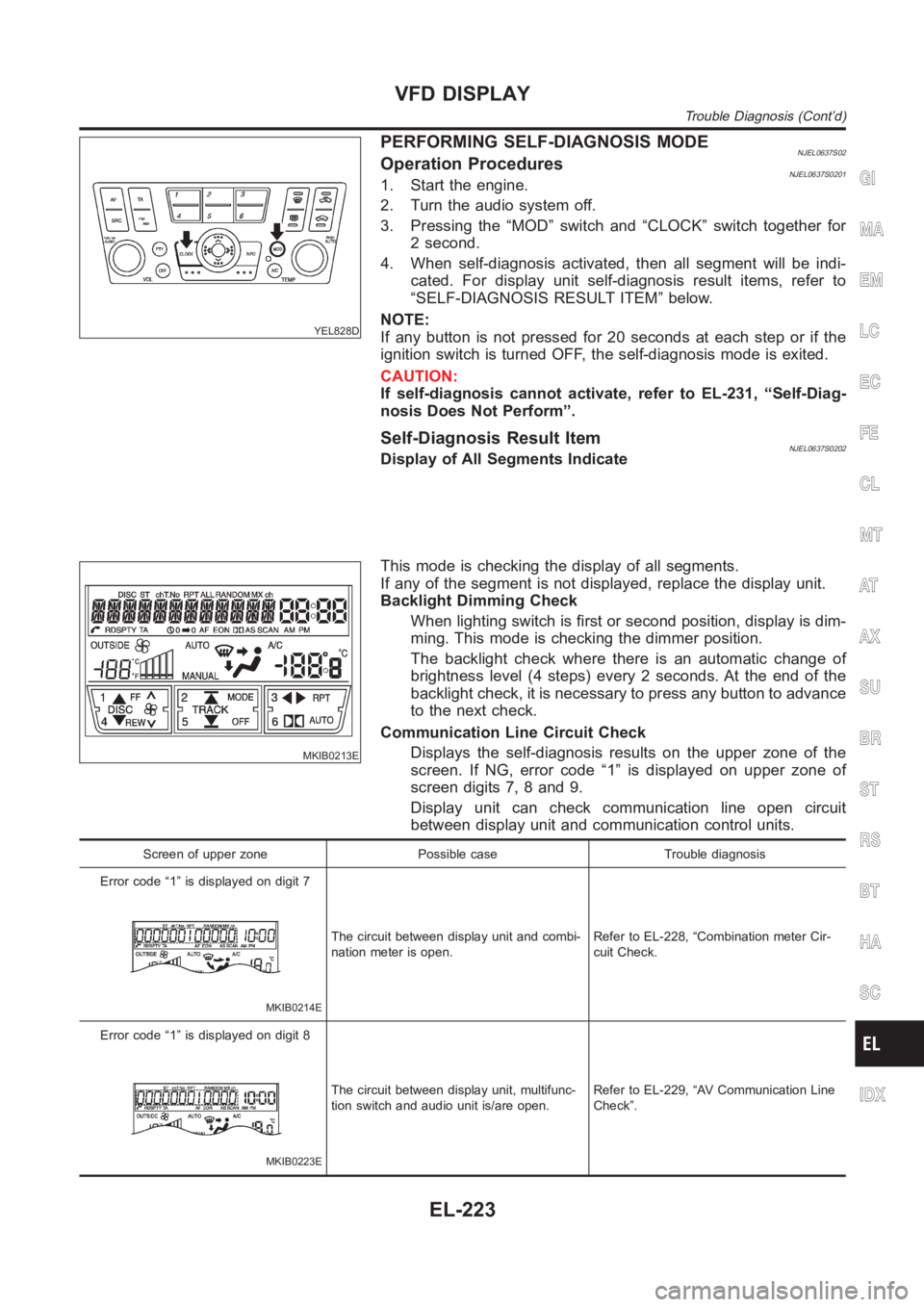
YEL828D
PERFORMING SELF-DIAGNOSIS MODENJEL0637S02Operation ProceduresNJEL0637S02011. Start the engine.
2. Turn the audio system off.
3. Pressing the “MOD” switch and “CLOCK” switch together for
2 second.
4. When self-diagnosis activated, then all segment will be indi-
cated. For display unit self-diagnosis result items, refer to
“SELF-DIAGNOSIS RESULT ITEM” below.
NOTE:
If any button is not pressed for 20 seconds at each step or if the
ignition switch is turned OFF, the self-diagnosis mode is exited.
CAUTION:
If self-diagnosis cannot activate, refer to EL-231, “Self-Diag-
nosis Does Not Perform”.
Self-Diagnosis Result ItemNJEL0637S0202Display of All Segments Indicate
MKIB0213E
This mode is checking the display of all segments.
If any of the segment is not displayed, replace the display unit.
Backlight Dimming Check
When lighting switch is first or second position, display is dim-
ming. This mode is checking the dimmer position.
The backlight check where there is an automatic change of
brightness level (4 steps) every 2 seconds. At the end of the
backlight check, it is necessary to press any button to advance
to the next check.
Communication Line Circuit Check
Displays the self-diagnosis results on the upper zone of the
screen. If NG, error code “1” is displayed on upper zone of
screen digits 7, 8 and 9.
Display unit can check communication line open circuit
between display unit and communication control units.
Screen of upper zone Possible case Trouble diagnosis
Error code “1” is displayed on digit 7
MKIB0214E
The circuit between display unit and combi-
nation meter is open.Refer to EL-228, “Combination meter Cir-
cuit Check.
Error code “1” is displayed on digit 8
MKIB0223E
The circuit between display unit, multifunc-
tion switch and audio unit is/are open.Refer to EL-229, “AV Communication Line
Check”.
GI
MA
EM
LC
EC
FE
CL
MT
AT
AX
SU
BR
ST
RS
BT
HA
SC
IDX
VFD DISPLAY
Trouble Diagnosis (Cont’d)
EL-223
Page 2597 of 3189
System Description=NJEL0502OPERATIONNJEL0502S02Power door lock/unlock operation by door key cylinder
With the key inserted into front door key cylinder, turning it to LOCK will lock all doors.
With the key inserted into front door key cylinder, turning it to UNLOCK will unlock all doors.
Power door lock/unlock operation by multi-remote controller (If equipped)
Pressing multi-remote controller LOCK button will lock all doors.
Pressing multi-remote controller UNLOCK button once will unlock driver door. Then, if an unlock signal is
sent from the remote controller again within 5 seconds, all other doors will be unlocked.
Power door lock/unlock operation by lock/unlock switch
With lock/unlock switch on driver door trim setting to LOCK will lock all doors.
With lock/unlock switch on driver door trim setting to UNLOCK will unlock all doors.GI
MA
EM
LC
EC
FE
CL
MT
AT
AX
SU
BR
ST
RS
BT
HA
SC
IDX
POWER DOOR LOCK
System Description
EL-261
Page 2637 of 3189
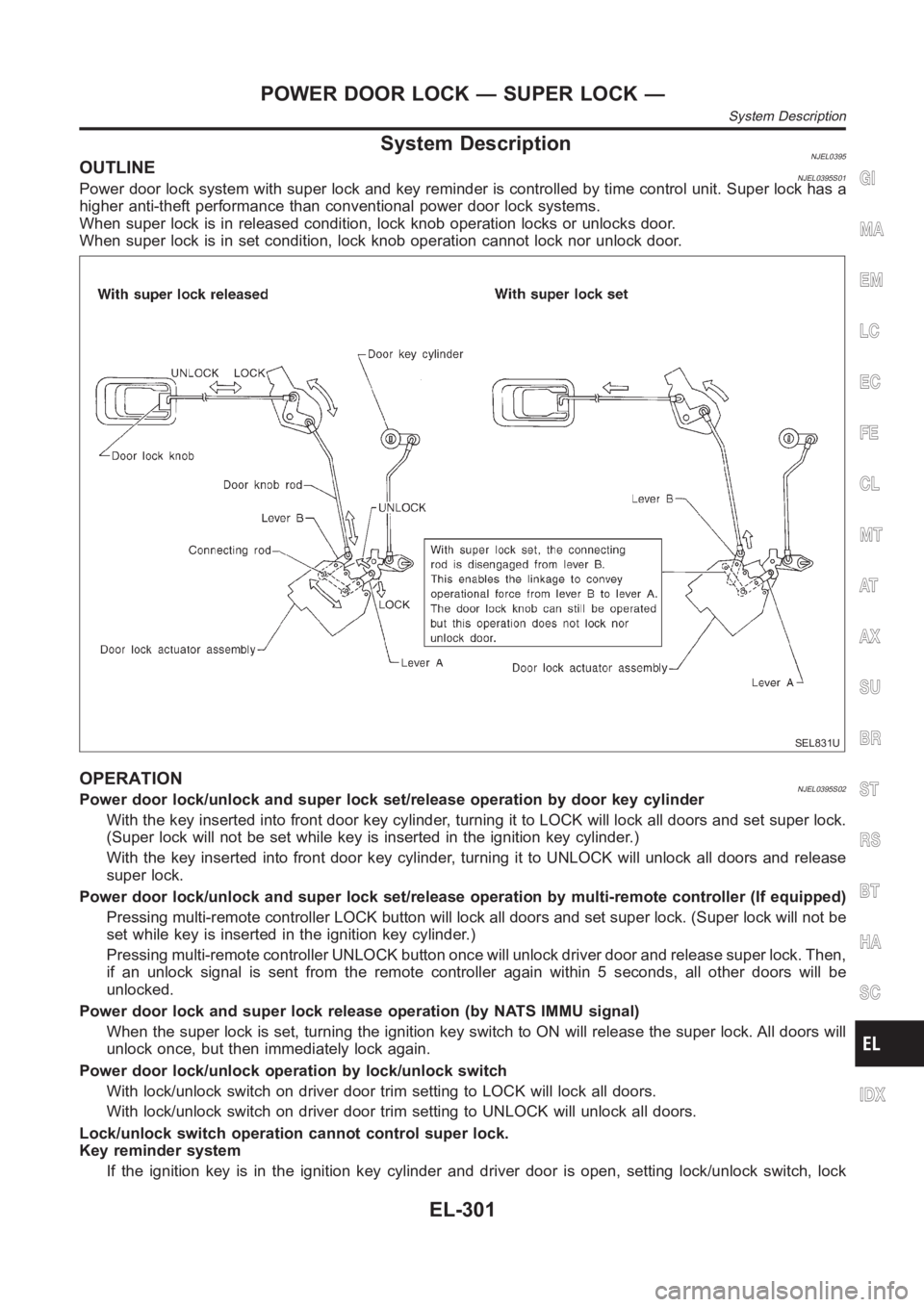
System DescriptionNJEL0395OUTLINENJEL0395S01Power door lock system with super lock and key reminder is controlled by time control unit. Super lock has a
higher anti-theft performance than conventional power door lock systems.
When super lock is in released condition, lock knob operation locks or unlocks door.
When super lock is in set condition, lock knob operation cannot lock nor unlock door.
SEL831U
OPERATIONNJEL0395S02Power door lock/unlock and super lock set/release operation by door key cylinder
With the key inserted into front door key cylinder, turning it to LOCK will lock all doors and set super lock.
(Super lock will not be set while key is inserted in the ignition key cylinder. )
With the key inserted into front door key cylinder, turning it to UNLOCK will unlock all doors and release
super lock.
Power door lock/unlock and super lock set/release operation by multi-remote controller (If equipped)
Pressing multi-remote controller LOCK button will lock all doors and set super lock. (Super lock will not be
set while key is inserted in the ignition key cylinder.)
Pressing multi-remote controller UNLOCK button once will unlock driver door and release super lock. Then,
if an unlock signal is sent from the remote controller again within 5 seconds, all other doors will be
unlocked.
Power door lock and super lock release operation (by NATS IMMU signal)
When the super lock is set, turning the ignition key switch to ON will release the super lock. All doors will
unlock once, but then immediately lock again.
Power door lock/unlock operation by lock/unlock switch
With lock/unlock switch on driver door trim setting to LOCK will lock all doors.
With lock/unlock switch on driver door trim setting to UNLOCK will unlock all doors.
Lock/unlock switch operation cannot control super lock.
Key reminder system
If the ignition key is in the ignition key cylinder and driver door is open, setting lock/unlock switch, lock
GI
MA
EM
LC
EC
FE
CL
MT
AT
AX
SU
BR
ST
RS
BT
HA
SC
IDX
POWER DOOR LOCK — SUPER LOCK —
System Description
EL-301