navigation NISSAN ALTIMA HYBRID 2008 L32A / 4.G User Guide
[x] Cancel search | Manufacturer: NISSAN, Model Year: 2008, Model line: ALTIMA HYBRID, Model: NISSAN ALTIMA HYBRID 2008 L32A / 4.GPages: 351, PDF Size: 4.14 MB
Page 159 of 351
WARNING
cDo not disassemble or modify this sys-
tem. If you do, it may result in accidents,
fire, or electrical shock.
cDo not use this system if you notice any
abnormality, such as a frozen screen or
lack of sound. Continued use of the
system may result in accident, fire or
electric shock.
cIn case you notice any foreign object in
the system hardware, spill liquid on it,
or notice smoke or smell coming from
it, stop using the system immediately
and contact your nearest NISSAN
dealer. Ignoring such conditions may
lead to accidents, fire or electrical
shock.
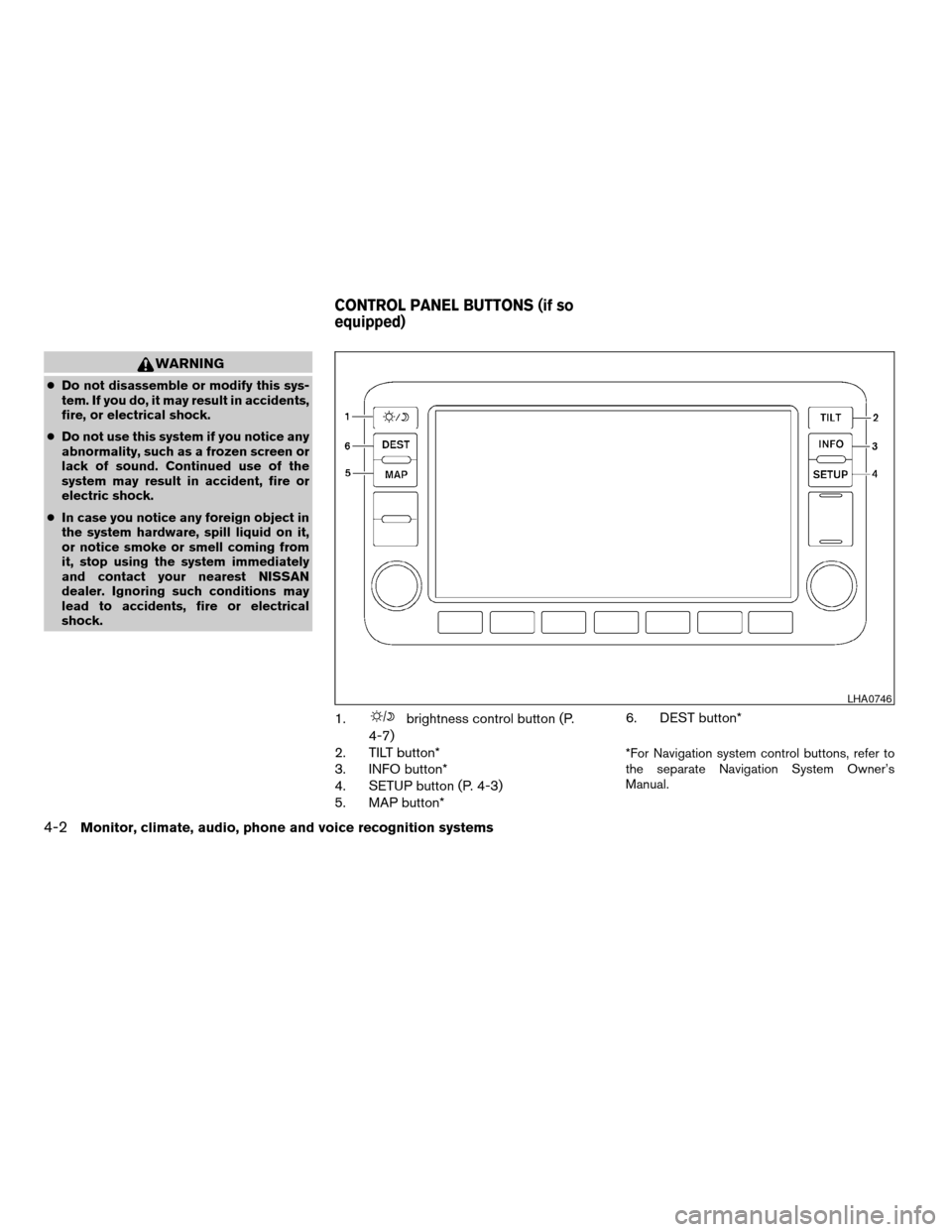
1.brightness control button (P.
4-7)
2. TILT button*
3. INFO button*
4. SETUP button (P. 4-3)
5. MAP button*6. DEST button*
*For Navigation system control buttons, refer to
the separate Navigation System Owner’s
Manual.
LHA0746
CONTROL PANEL BUTTONS (if so
equipped)
4-2Monitor, climate, audio, phone and voice recognition systems
ZREVIEW COPYÐ2008 Altima Hybrid Electric
(ahv)
Owners ManualÐUSA_English(nna)
05/31/07Ðdebbie
X
Page 160 of 351

When you use this system, make sure the Hybrid
System is turned ON.
If you use the system with the Hybrid Sys-
tem off (ignition ON or ACC) for a long time,
it will use up all the 12-volt battery power,
and the Hybrid System will not turn ON.
Reference symbols:
SETUP button — This is a button on the control
panel.
“Display” key — This is a select key on the touch-
screen. By touching this key you can proceed to
the next function.
SETTING UP THE START-UP
SCREEN
With the ignition to ACC or ON, the SYSTEM
START-UP warning is displayed on the screen.
Read the warning and touch the “I agree” key
(English) or the “Enter” (Français) key.
If you do not touch the “I agree” key, the Naviga-
tion system will not proceed to the next step
display.
If you do not press a button or touch a screen key
for more than 1 minute on the START-UP screen,
the screen will change to the audio screen auto-
matically.To proceed to the next step, refer to the separate
Navigation System Owner’s Manual.
HOW TO USE THE SETUP BUTTON
When the SETUP button is pressed, the settings
screen will appear on the display. You can select
and/or adjust several functions, features and
modes that are available for your vehicle. Touch
one of the setting item keys to select each item to
be set.
LHA0747
Monitor, climate, audio, phone and voice recognition systems4-3
ZREVIEW COPYÐ2008 Altima Hybrid Electric
(ahv)
Owners ManualÐUSA_English(nna)
05/31/07Ðdebbie
X
Page 164 of 351

Select Language:
Touch the “Select Language” key. From the fol-
lowing display, select the English “ON” key or the
Français “ON” key for your language preference.Select Units:
Touch the “Select Units” key. From the following
display, select the US “ON” key or the Metric
“ON” key for your units preference.
Unit: US — mile, °F, MPG
Metric: — km, °C, L/100 km
The settings are automatically saved when you
exit the menu by touching the “Back” key.
Phone settings
For information on the phone settings, see
“BluetoothTHands-Free Phone System with
Navigation (if so equipped)” later in this section.
Voice recognition settings
For information on the voice recognition settings,
see “Voice Recognition System (if so equipped)”
later in this section.
Audio settings
For information on the audio settings, see “Audio
System” later in this section.
Navigation settings
Refer to the separate Navigation System Own-
er’s Manual for information regarding these set-
tings.
BUTTON
To change the display brightness, press
thebutton. Pressing the button again will
change the display to the dayor the
nightdisplay. Then, adjust the brightness
by touching thekey or thekey.
If no operation is done within 10 seconds, the
display will return to the previous display.
LHA1007LHA1008
Monitor, climate, audio, phone and voice recognition systems4-7
ZREVIEW COPYÐ2008 Altima Hybrid Electric
(ahv)
Owners ManualÐUSA_English(nna)
05/31/07Ðdebbie
X
Page 196 of 351
When installing a CB, ham radio or car phone in
your NISSAN, be sure to observe the following
precautions, otherwise the new equipment may
adversely affect the engine control system and
other electronic parts.
High voltage parts and cables on the NISSAN
hybrid vehicle emit approximately the same
amount of electromagnetic waves as the conven-
tional gasoline powered vehicles or home elec-
tronic appliances despite of their electromag-
netic shieldings. Unwanted noise may occur in
the reception of a mobile two-way radio.
WARNING
cA cellular telephone should not be used
while driving so full attention may be
given to vehicle operation. Some juris-
dictions prohibit the use of cellular tele-
phones while driving.
cIf you must make a call while your ve-
hicle is in motion, the hands free cellu-
lar phone operational mode (if so
equipped) is highly recommended. Ex-
ercise extreme caution at all times so
full attention may be given to vehicle
operation.cIf a conversation in a moving vehicle
requires you to take notes, pull off the
road to a safe location and stop your
vehicle before doing so.
CAUTION
cKeep the antenna as far away as pos-
sible from the electronic control
modules.
cKeep the antenna wire more than 8 in
(20 cm) away from the electronic con-
trol system harnesses. Do not route the
antenna wire next to any harness.
cAdjust the antenna standing-wave ratio
as recommended by the manufacturer.
cConnect the ground wire from the CB
radio chassis to the body.
cFor details, consult a NISSAN dealer.
WARNING
cUse a phone after stopping your vehicle
in a safe location. If you have to use a
phone while driving, exercise extreme
caution at all times so full attention may
be given to vehicle operation.
cIf you are unable to devote full attention
to vehicle operation while talking on
the phone, pull off the road to a safe
location and stop your vehicle before
doing so.
CAUTION
To avoid discharging the 12-volt battery,
use a phone when the Hybrid System is in
the READY mode.
CAR PHONE OR CB RADIO BLUETOOTHTHANDS-FREE PHONE
SYSTEM WITHOUT NAVIGATION
SYSTEM (if so equipped)
Monitor, climate, audio, phone and voice recognition systems4-39
ZREVIEW COPYÐ2008 Altima Hybrid Electric
(ahv)
Owners ManualÐUSA_English(nna)
05/31/07Ðdebbie
X
Page 210 of 351
WARNING
cUse a phone after stopping your vehicle
in a safe location. If you have to use a
phone while driving, exercise extreme
caution at all times so full attention may
be given to vehicle operation.
cIf you are unable to devote full attention
to vehicle operation while talking on
the phone, pull off the road to a safe
location and stop your vehicle before
doing so.
CAUTION
To avoid discharging the 12-volt battery,
use a phone when the Hybrid System is in
the READY mode.
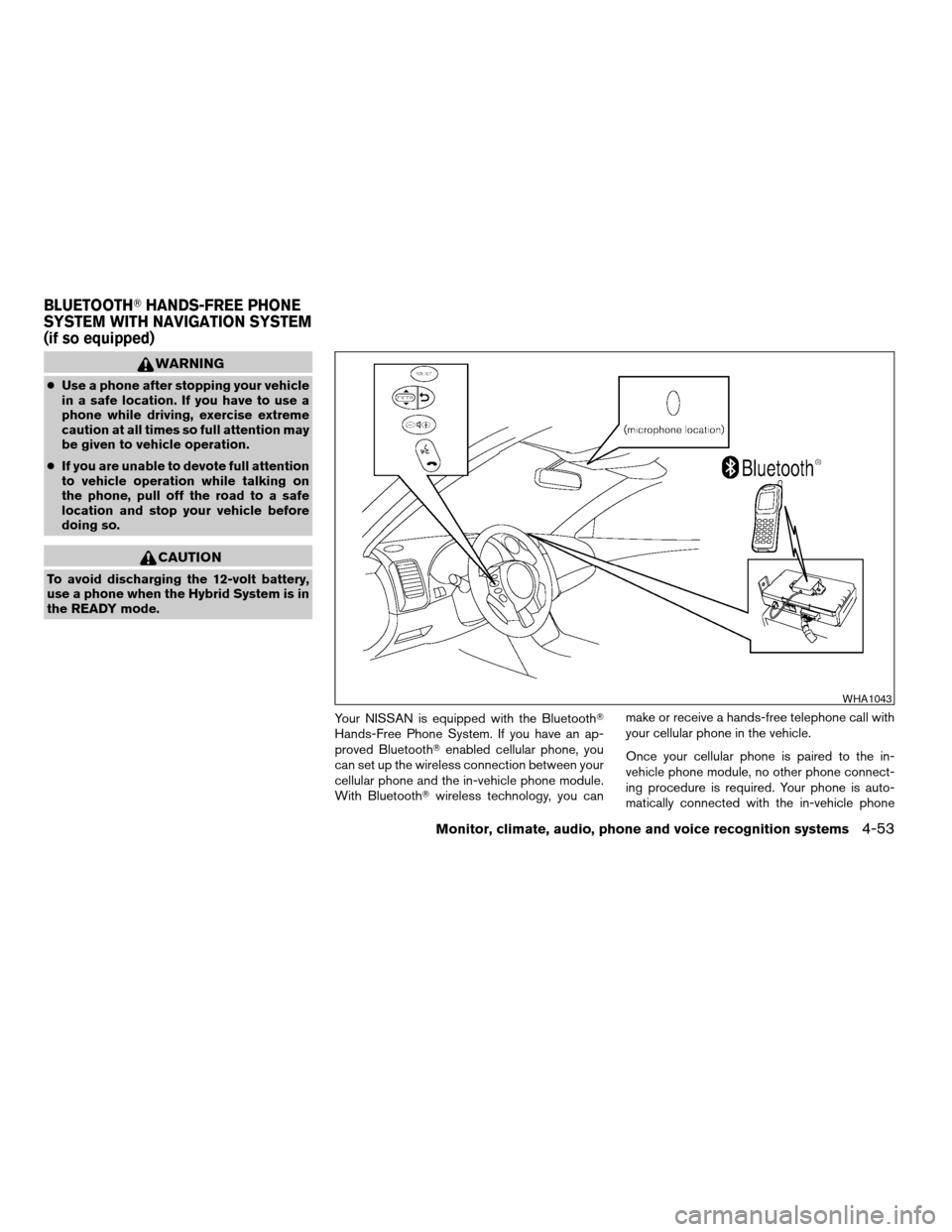
Your NISSAN is equipped with the BluetoothT
Hands-Free Phone System. If you have an ap-
proved BluetoothTenabled cellular phone, you
can set up the wireless connection between your
cellular phone and the in-vehicle phone module.
With BluetoothTwireless technology, you canmake or receive a hands-free telephone call with
your cellular phone in the vehicle.
Once your cellular phone is paired to the in-
vehicle phone module, no other phone connect-
ing procedure is required. Your phone is auto-
matically connected with the in-vehicle phone
WHA1043
BLUETOOTHTHANDS-FREE PHONE
SYSTEM WITH NAVIGATION SYSTEM
(if so equipped)
Monitor, climate, audio, phone and voice recognition systems4-53
ZREVIEW COPYÐ2008 Altima Hybrid Electric
(ahv)
Owners ManualÐUSA_English(nna)
05/31/07Ðdebbie
X
Page 211 of 351

module when the ignition switch is turned to the
ON position with the paired cellular phone turned
on and carried in the vehicle.
You can register up to 5 different BluetoothT
cellular phones to the in-vehicle phone module.
However, you can talk on only one cellular phone
at a time.
NISSAN Voice Recognition system supports the
phone commands, so dialing a phone number
using your voice is possible. For more details, see
“NISSAN Voice Recognition System” later in this
section.
Before using the BluetoothTHands-Free Phone
System, refer to the following notes.
cSet up the wireless connection between a
cellular phone and the in-vehicle phone
module before using the hands-free phone
system.
cSome BluetoothTenabled cellular phones
may not be recognized by the in-vehicle
phone module. Please visit
www.nissanusa.com/bluetooth for a recom-
mended phone list and pairing.
cYou will not be able to use a hands-free
phone under the following conditions:
– Your vehicle is outside of the cellular ser-
vice area.– Your vehicle is in an area where it is
difficult to receive cellular signal; such as
in a tunnel, in an underground parking
garage, near a tall building or in a moun-
tainous area.
– Your cellular phone is locked to prevent it
from being dialed.
cWhen the radio wave condition is not ideal
or ambient sound is too loud, it may be
difficult to hear the other person’s voice dur-
ing a call.
cImmediately after the ignition switch is
pushed to the ON position or the DVD-ROM
for the navigation system is inserted into the
player, it may be impossible to receive a call
for a short period of time.
cDo not place the cellular phone in an area
surrounded by metal or far away from the
in-vehicle phone module to prevent tone
quality degradation and wireless connection
disruption.
cWhile a cellular phone is connected through
the BluetoothTwireless connection, the bat-
tery power of the cellular phone may dis-
charge quicker than usual. The BluetoothT
Hands-Free Phone System cannot charge
cellular phones.cIf the hands-free phone system seems to be
malfunctioning, please refer to “Trouble-
shooting guide” later in this section. You can
also visit www.nissanusa.com/bluetooth for
troubleshooting help.
cRefer to the cellular phone owner’s manual
regarding the telephone charges, cellular
phone antenna and body, etc.
cThe signal strength display on the monitor
will not coincide with the signal strength
display of some cellular phones.
This device complies with Part 15 of the
FCC Rules. Operation is subject to the fol-
lowing two conditions: (1) this device may
not cause harmful interference, and (2) this
device must accept any interference re-
ceived, including interference that may
cause undesired operation.
FCC Radiation Exposure Statement:
This equipment complies with FCC radiation ex-
posure limits set forth for an uncontrolled envi-
ronment. This equipment should be installed and
operated with minimum distance of 8 inches (20
cm) between the radiator and your body. This
Transmitter must not be co-located or operating
in conjunction with any other antenna or transmit-
ter.
4-54Monitor, climate, audio, phone and voice recognition systems
ZREVIEW COPYÐ2008 Altima Hybrid Electric
(ahv)
Owners ManualÐUSA_English(nna)
05/31/07Ðdebbie
X
Page 219 of 351

The NISSAN Voice Recognition system allows
hands-free operation of the systems equipped on
this vehicle, such as the phone and navigation
systems.
To operate NISSAN Voice Recognition, press
the
button located on the steering wheel.
Then speak the command for the system you
wish to activate. The command given is picked up
by the microphone, and it is performed when it is
properly recognized. At this time NISSAN Voice
Recognition will provide a voice and message (in
the center display) to inform you of the command
results.
USING THE SYSTEM
Initialization
When the ignition switch is in the ON position,
NISSAN Voice Recognition is initialized, which
takes a few seconds. When completed, the sys-
tem is ready to accept voice commands. If
the
button is pressed before the initializa-
tion completes, the display will show the mes-
sage: “Phonetic data downloaded. Please wait.”
Giving voice commands
1. Press thebutton.
2. The system announces: “Please say a com-
mand”
3. After the tone sounds and the face icon of
the display changes, speak a command. For
additional information, see “List of voice
commands” later in this section.
4. Voice and message feedback will be pro-
vided when the command is accepted.
cIf the command is not recognized, the sys-
tem announces: “Please say again.” Repeat
the command in a clear voice.cIf you want to cancel the command, press
the
button or press and hold
thebutton for 2 seconds during feed-
back. The system will announce: “Voice in-
put is canceled”
cIf you want to adjust the volume of the voice
feedback, press the volume control buttons
(2or +) on the steering wheel while being
provided with the feedback.
Operating tips
To get the best performance out of NISSAN
Voice Recognition, observe the following:
cKeep the interior of the vehicle as quiet as
possible. Close the windows to eliminate the
surrounding noises (traffic noises, vibration
sounds, etc.) , which may prevent the system
from recognizing the voice commands cor-
rectly.
cWait until a tone sounds before speaking a
command. Otherwise, the command will not
be received properly.
cStart speaking a command within 3.5 sec-
onds after the tone sounds.
cSpeak in a natural voice without pausing
between words.
LHA0768
NISSAN VOICE RECOGNITION
SYSTEM (if so equipped)
4-62Monitor, climate, audio, phone and voice recognition systems
ZREVIEW COPYÐ2008 Altima Hybrid Electric
(ahv)
Owners ManualÐUSA_English(nna)
05/31/07Ðdebbie
X
Page 220 of 351

SYSTEM FEATURES
NISSAN Voice Recognition can activate the fol-
lowing systems:
cNavigation (if so equipped) - See the sepa-
rate Navigation System Owner’s Manual for
the available voice commands and opera-
tion.
cBluetoothTHands-Free Phone
For additional information on the navigation sys-
tem, see the separate Navigation System Own-
er’s Manual.
How to say numbers
NISSAN Voice Recognition requires a certain
way to speak numbers in voice commands. Refer
to the following examples.
General rule: Either “zero” or “oh” can be used for
“0”.
Phone numbers:
Speak phone numbers according to the following
examples:
c1-800-662-6200
csay “Dial” or “Phone dial” the system will
respond with “Please say the first group of
numbers”, then say:– “one eight oh oh six six two six two oh oh”,
– “one eight hundred six six two six two oh
oh”, or
– “one eight zero zero six six two six two oh
oh”.
Note 1: For the best voice recognition phone
dialing results, say phone numbers as single dig-
its.
Note 2: You cannot say 555-6000 as “five five
five six thousand”.
Personal vocabulary (voicetags)
NISSAN Voice Recognition provides the function
called “voicetags”, which can be associated with
the phone and the navigation system (if so
equipped) . Using your own voice, 70 voicetags
can be registered in the “Phonebook” (phone)
and 20 locations can be registered in the “Ad-
dress Book” (navigation system) .
For additional information, see “BluetoothT
Hands-Free Phone System” earlier in this section
and/or the separate Navigation System Owner’s
Manual (if so equipped) for the method of “voic-
etag” registration.
BLUETOOTHTHANDS-FREE
PHONE SYSTEM VOICE
COMMANDS
Depending on the commands, some different
phrases are available. Optional words are shown
in brackets [ ]. A few words, identified with a slash
/, indicate the alternate words that you can select
when speaking the command. Data items that
you need to enter, such as phone numbers, are
indicated in italics with brackets < >.
How to say commands
Example: “[PHONE] DIAL/CALL
commands.
DIAL<1 to 32 phone number digits>
CALL<1 to 32 phone number digits>
PHONE DIAL<1 to 32 phone number digits>
Help commands
c“COMMAND LIST”, “VOICE HELP” or
“HELP”
Gives spoken information about NISSAN
Voice Recognition and displays the list of
help commands.
Monitor, climate, audio, phone and voice recognition systems4-63
ZREVIEW COPYÐ2008 Altima Hybrid Electric
(ahv)
Owners ManualÐUSA_English(nna)
05/31/07Ðdebbie
X
Page 221 of 351
![NISSAN ALTIMA HYBRID 2008 L32A / 4.G User Guide Phone commands
c“[PHONE] DIAL<phone number digits>”
or “CALL<phone number digits>”
Dials the phone number given in the com-
mand. Speak the phone number in one se-
quence. The number is automa](/img/5/221/w960_221-220.png "NISSAN ALTIMA HYBRID 2008 L32A / 4.G User Guide Phone commands
c“[PHONE] DIAL<phone number digits>”
or “CALL<phone number digits>”
Dials the phone number given in the com-
mand. Speak the phone number in one se-
quence. The number is automa")
Phone commands
c“[PHONE] DIAL
or “CALL
Dials the phone number given in the com-
mand. Speak the phone number in one se-
quence. The number is automatically dialed.
c“[PHONE] REDIAL”
Redials the phone number last dialed.
c“OUTGOING CALLS”
Shows the outgoing call history (1 to 5) .
c“INCOMING CALLS”
Shows the incoming call history (1 to 5) .
c“PHONE SELECT
If multiple phones are registered to the sys-
tem, you can change which phone to con-
nect to the system (as long as that phone is
present in the vehicle) .
c“PHONEBOOK”
Shows the first page of the “phone book” list.
c“PHONEBOOK
Shows the specified “voicetag” entry in the
“phone book” and dials the phone number
registered in the specified “voicetag” after
pressing theENTERbutton on the steering
wheel.c“ PHONEBOOK [PLAY] DIRECTORY” or
“PLAY PHONEBOOK [DIRECTORY]”
Dials the phone number registered in the
phone book.
NAVIGATION SYSTEM VOICE
COMMANDS (if so equipped)
For additional information, see the separate Navi-
gation System Owner’s Manual for the voice
commands available and operations.
4-64Monitor, climate, audio, phone and voice recognition systems
ZREVIEW COPYÐ2008 Altima Hybrid Electric
(ahv)
Owners ManualÐUSA_English(nna)
05/31/07Ðdebbie
X
Page 340 of 351

10 Index
12-volt battery..................8-15
A
Active Head Restraint..............1-6
Air bag (See supplemental restraint
system).....................1-34
Air bag system
Front (See supplemental front impact air
bag system).................1-41
Air bag warning light...........1-49, 2-14
Air cleaner housing filter............8-17
Air conditioner
Air conditioner service...........4-13
Air conditioner specification label.....9-11
Air conditioner system refrigerant and oil
recommendations..............9-6
Heater and air conditioner controls. . . .4-11
Servicing air conditioner..........4-13
Alarm system
(See vehicle security system).........2-26
Anchor point locations.............1-19
Antenna.....................4-38
Anti-lock brake warning light..........2-10
Anti-lock Braking System (ABS)........5-19
Armrests.....................1-5
Audible reminders................2-17
Audio system..................4-13
Compact Disc (CD) changer. . . .4-27, 4-33
Compact disc (CD) player.........4-22FM-AM radio with compact disc (CD)
player....................4-20
FM/AM/SAT radio with compact disc
(CD) changer.............4-25, 4-31
Radio....................4-13
Autolight switch.................2-30
Automatic
Automatic power window switch.....2-43
Transmission selector lever lock
release....................5-12
Automatic anti-glare inside mirror.......3-23
AUX jack..............4-23, 4-29, 4-35
B
Battery
Charge warning light........2-11, 2-12
Before starting the vehicle............5-9
Belt (See drive belt)..............8-15
Block heater
Engine....................5-23
BluetoothThands-free phone
system..................4-39, 4-53
Booster seats..................1-29
Brake
Anti-lock Braking System (ABS)......5-19
Brake fluid..................8-13
Brake light (See stop light).........8-25
Brake system................5-17
Brake warning light.........2-10, 2-11
Brake wear indicators........2-17, 8-19Parking brake operation..........5-13
Self-adjusting brakes............8-19
Brakes......................8-19
Break-in schedule................5-15
Brightness control
Instrument panel..............2-32
Brightness/contrast button...........4-7
Bulb check/instrument panel..........2-9
Bulb replacement................8-25
C
Capacities and recommended
fuel/lubricants...................9-2
Car phone or CB radio.............4-39
Cargo (See vehicle loading information) . . .9-12
CD care and cleaning.............4-36
CD changer (See audio system). . . .4-27, 4-33
CD player (See audio system).........4-22
Child restraint with top tether strap......1-18
Child restraints.......1-9, 1-10, 1-15, 1-17
Precautions on child
restraints............1-15, 1-23, 1-29
Top tether strap anchor point locations . .1-19
Child safety rear door lock............3-5
Chimes, audible reminders...........2-17
Cleaning exterior and interior..........7-2
Clock.............4-5, 4-21, 4-25, 4-31
(models with navigation system)......4-5
(models without navigation
system)................4-21, 4-25
ZREVIEW COPYÐ2008 Altima Hybrid Electric
(ahv)
Owners ManualÐUSA_English(nna)
05/31/07Ðdebbie
X