display NISSAN ARMADA 2017 2.G Owners Manual
[x] Cancel search | Manufacturer: NISSAN, Model Year: 2017, Model line: ARMADA, Model: NISSAN ARMADA 2017 2.GPages: 614, PDF Size: 2.87 MB
Page 451 of 614
5-110Starting and driving
such as ice, snow, stickers, for
example. In these cases, the system
may not be able to warn the driver
properly. Be sure that you check,
clean and clear the sensor area
regularly.
. Excessive noise will interfere with
the warning chime sound, and the
chime may not be heard.
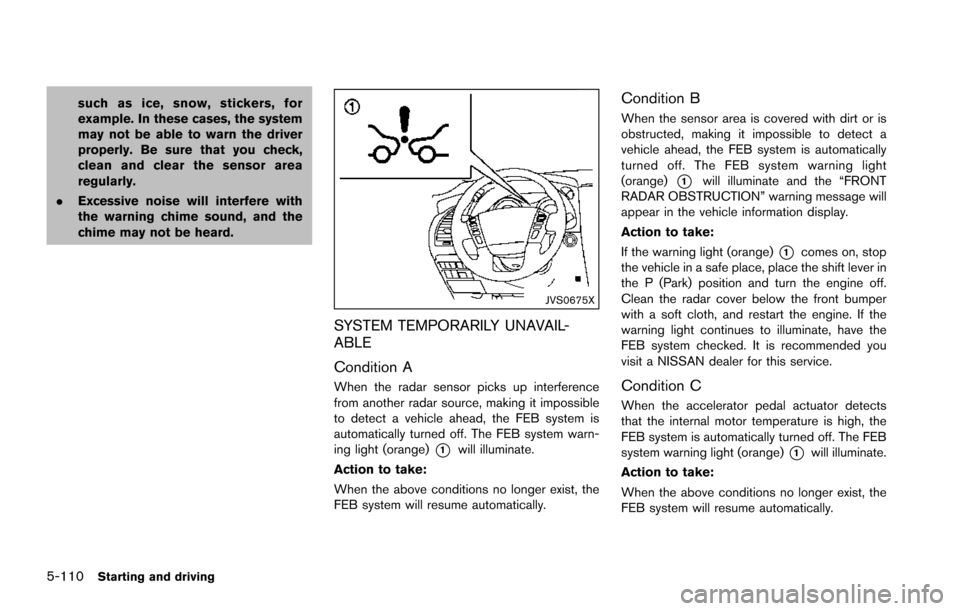
JVS0675X
SYSTEM TEMPORARILY UNAVAIL-
ABLE
Condition A
When the radar sensor picks up interference
from another radar source, making it impossible
to detect a vehicle ahead, the FEB system is
automatically turned off. The FEB system warn-
ing light (orange)
*1will illuminate.
Action to take:
When the above conditions no longer exist, the
FEB system will resume automatically.
Condition B
When the sensor area is covered with dirt or is
obstructed, making it impossible to detect a
vehicle ahead, the FEB system is automatically
turned off. The FEB system warning light
(orange)
*1will illuminate and the “FRONT
RADAR OBSTRUCTION” warning message will
appear in the vehicle information display.
Action to take:
If the warning light (orange)
*1comes on, stop
the vehicle in a safe place, place the shift lever in
the P (Park) position and turn the engine off.
Clean the radar cover below the front bumper
with a soft cloth, and restart the engine. If the
warning light continues to illuminate, have the
FEB system checked. It is recommended you
visit a NISSAN dealer for this service.
Condition C
When the accelerator pedal actuator detects
that the internal motor temperature is high, the
FEB system is automatically turned off. The FEB
system warning light (orange)
*1will illuminate.
Action to take:
When the above conditions no longer exist, the
FEB system will resume automatically.
Page 454 of 614
JVS0895X
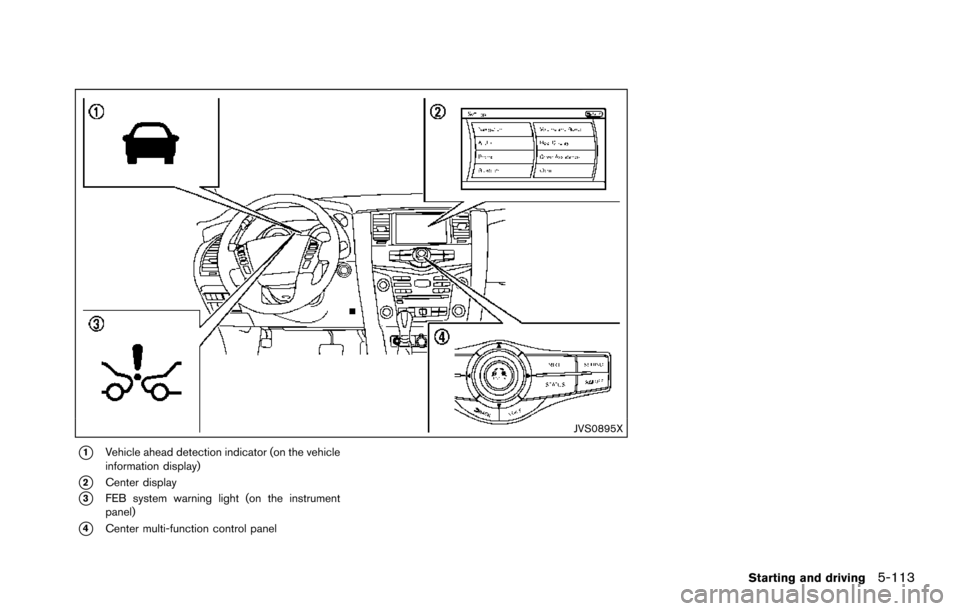
*1Vehicle ahead detection indicator (on the vehicle
information display)
*2Center display
*3FEB system warning light (on the instrument
panel)
*4Center multi-function control panel
Starting and driving5-113
Page 456 of 614
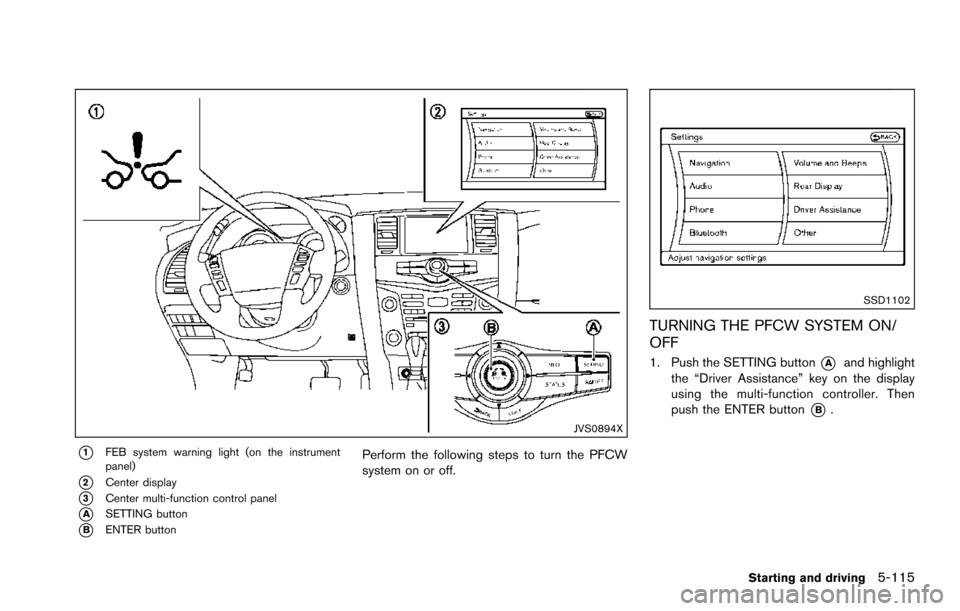
JVS0894X
*1FEB system warning light (on the instrument
panel)
*2Center display
*3Center multi-function control panel
*ASETTING button
*BENTER button
Perform the following steps to turn the PFCW
system on or off.
SSD1102
TURNING THE PFCW SYSTEM ON/
OFF
1. Push the SETTING button*Aand highlight
the “Driver Assistance” key on the display
using the multi-function controller. Then
push the ENTER button
*B.
Starting and driving5-115
Page 457 of 614
5-116Starting and driving
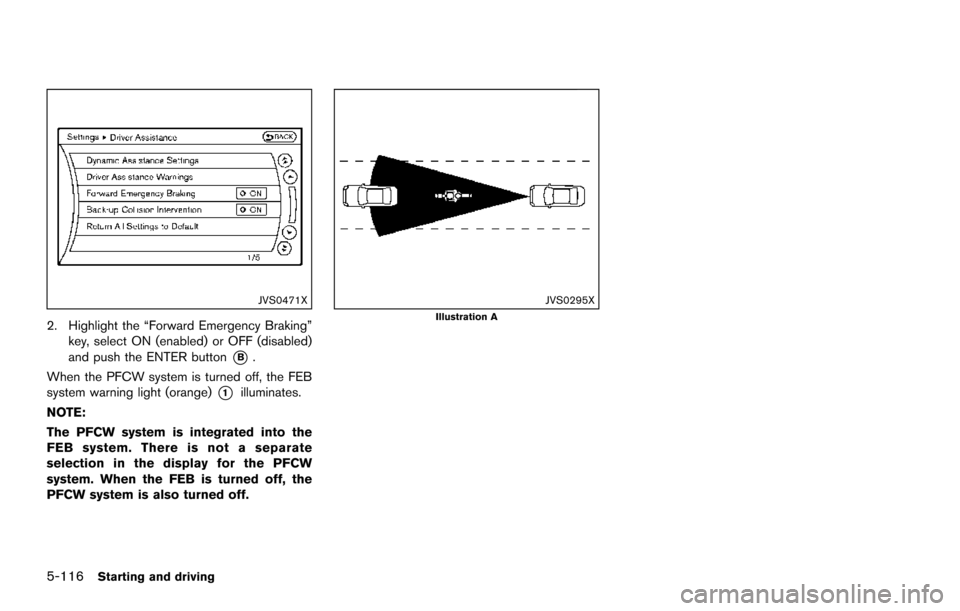
JVS0471X
2. Highlight the “Forward Emergency Braking”key, select ON (enabled) or OFF (disabled)
and push the ENTER button
*B.
When the PFCW system is turned off, the FEB
system warning light (orange)
*1illuminates.
NOTE:
The PFCW system is integrated into the
FEB system. There is not a separate
selection in the display for the PFCW
system. When the FEB is turned off, the
PFCW system is also turned off.
JVS0295XIllustration A
Page 460 of 614
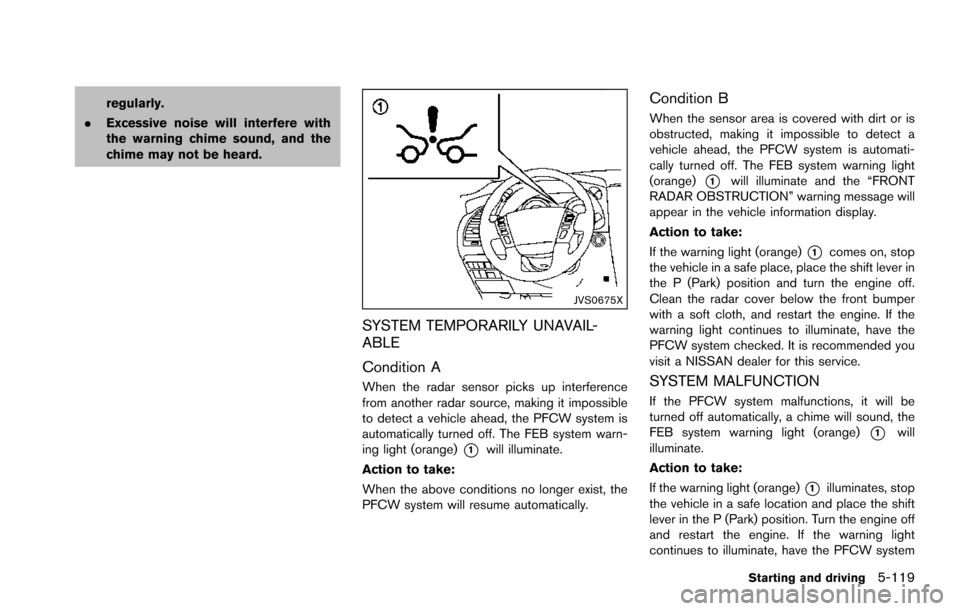
regularly.
. Excessive noise will interfere with
the warning chime sound, and the
chime may not be heard.
JVS0675X
SYSTEM TEMPORARILY UNAVAIL-
ABLE
Condition A
When the radar sensor picks up interference
from another radar source, making it impossible
to detect a vehicle ahead, the PFCW system is
automatically turned off. The FEB system warn-
ing light (orange)
*1will illuminate.
Action to take:
When the above conditions no longer exist, the
PFCW system will resume automatically.
Condition B
When the sensor area is covered with dirt or is
obstructed, making it impossible to detect a
vehicle ahead, the PFCW system is automati-
cally turned off. The FEB system warning light
(orange)
*1will illuminate and the “FRONT
RADAR OBSTRUCTION” warning message will
appear in the vehicle information display.
Action to take:
If the warning light (orange)
*1comes on, stop
the vehicle in a safe place, place the shift lever in
the P (Park) position and turn the engine off.
Clean the radar cover below the front bumper
with a soft cloth, and restart the engine. If the
warning light continues to illuminate, have the
PFCW system checked. It is recommended you
visit a NISSAN dealer for this service.
SYSTEM MALFUNCTION
If the PFCW system malfunctions, it will be
turned off automatically, a chime will sound, the
FEB system warning light (orange)
*1will
illuminate.
Action to take:
If the warning light (orange)
*1illuminates, stop
the vehicle in a safe location and place the shift
lever in the P (Park) position. Turn the engine off
and restart the engine. If the warning light
continues to illuminate, have the PFCW system
Starting and driving5-119
Page 469 of 614
5-128Starting and driving
.Never shift the 4WD shift switch
between 4L and 4H while driving.
. Engine idling speed is high while
warming up the engine. Be espe-
cially careful when starting or driv-
ing on slippery surfaces with the
4WD shift switch in AUTO.
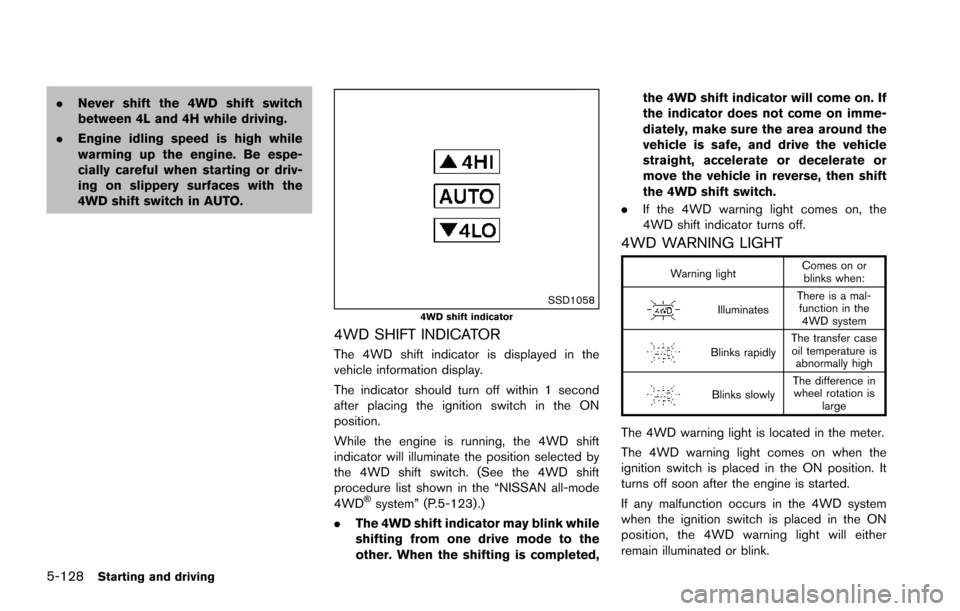
SSD10584WD shift indicator
4WD SHIFT INDICATOR
The 4WD shift indicator is displayed in the
vehicle information display.
The indicator should turn off within 1 second
after placing the ignition switch in the ON
position.
While the engine is running, the 4WD shift
indicator will illuminate the position selected by
the 4WD shift switch. (See the 4WD shift
procedure list shown in the “NISSAN all-mode
4WD
Šsystem” (P.5-123) .)
. The 4WD shift indicator may blink while
shifting from one drive mode to the
other. When the shifting is completed, the 4WD shift indicator will come on. If
the indicator does not come on imme-
diately, make sure the area around the
vehicle is safe, and drive the vehicle
straight, accelerate or decelerate or
move the vehicle in reverse, then shift
the 4WD shift switch.
. If the 4WD warning light comes on, the
4WD shift indicator turns off.
4WD WARNING LIGHT
Warning light Comes on or
blinks when:
Illuminates There is a mal-
function in the 4WD system
Blinks rapidly The transfer case
oil temperature is abnormally high
Blinks slowly The difference in
wheel rotation is large
The 4WD warning light is located in the meter.
The 4WD warning light comes on when the
ignition switch is placed in the ON position. It
turns off soon after the engine is started.
If any malfunction occurs in the 4WD system
when the ignition switch is placed in the ON
position, the 4WD warning light will either
remain illuminated or blink.
Page 474 of 614
SSD0622
WARNING
.The sonar system is a convenience
but it is not a substitute for proper
parking. Always look around and
check that it is safe to do so before
parking. Always move slowly.
. Read and understand the limita-
tions of the sonar system as con-
tained in this section. Inclement
weather may affect the function of
the sonar system; this may include
reduced performance or a false
activation. .
This system is not designed to
prevent contact with small or mov-
ing objects.
. The system is designed as an aid to
the driver in detecting large station-
ary objects to help avoid damaging
the vehicle. The system will not
detect small objects below the
bumper, and may not detect objects
that are too close to the bumper or
on the ground.
. If your vehicle sustains damage to
the bumper fascia, leaving it mis-
aligned or bent, the sensing zone may be altered causing inaccurate
measurement of obstacles or false
alarms.
CAUTION
Keep the interior of the vehicle as quiet
as possible to hear the tone clearly.
The sonar system sounds a tone to warn the
driver of obstacles near the bumper. When the
“Sonar Display” key is ON, the sonar indicator
will also appear in the center display. (See
“Sonar indicator” (P.5-134) .) The system de-
tects front obstacles when the shift lever is in the
D (Drive) position or N (Neutral) position. The
system detects both front and rear obstacles
when the shift lever is in the R (Reverse)
position.
The system may not detect objects at speeds
above 6 MPH (10 km/h) and may not detect
certain angular or moving objects.
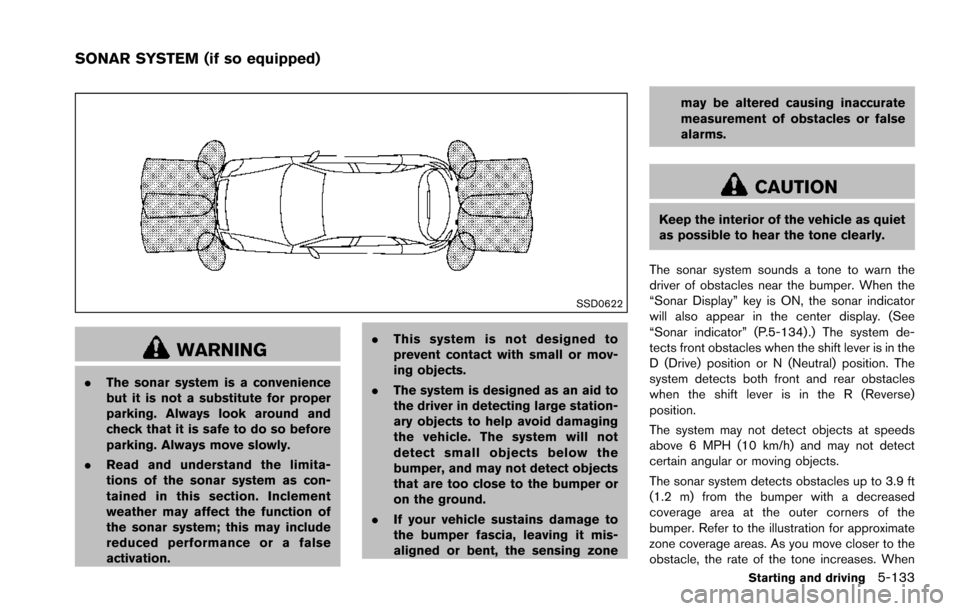
The sonar system detects obstacles up to 3.9 ft
(1.2 m) from the bumper with a decreased
coverage area at the outer corners of the
bumper. Refer to the illustration for approximate
zone coverage areas. As you move closer to the
obstacle, the rate of the tone increases. When
Starting and driving5-133
SONAR SYSTEM (if so equipped)
Page 475 of 614
5-134Starting and driving
the obstacle is less than 11.8 in (30 cm) away,
the tone will sound continuously.
Keep the corner/center sensors (located on the
bumper fascia) free from snow, ice and large
accumulations of dirt (do not clean the sensors
with sharp objects) . If the sensors are covered, it
will affect the accuracy of the sonar system.
The sensitivity level of the corner/center sensors
can be adjusted (higher or lower) in the Sonar
setting display. (See “Sonar settings” (P.4-27) .)
The intermittent tone will stop in 3 seconds
when an obstacle is detected by only the corner
sensor and the distance does not change.
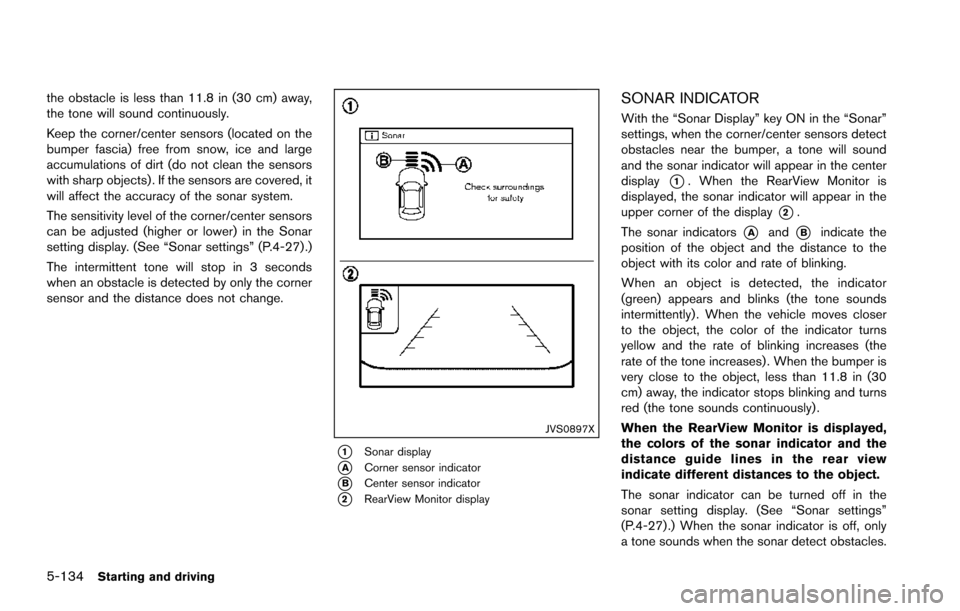
JVS0897X
*1Sonar display
*ACorner sensor indicator
*BCenter sensor indicator
*2RearView Monitor display
SONAR INDICATOR
With the “Sonar Display” key ON in the “Sonar”
settings, when the corner/center sensors detect
obstacles near the bumper, a tone will sound
and the sonar indicator will appear in the center
display
*1. When the RearView Monitor is
displayed, the sonar indicator will appear in the
upper corner of the display
*2.
The sonar indicators
*Aand*Bindicate the
position of the object and the distance to the
object with its color and rate of blinking.
When an object is detected, the indicator
(green) appears and blinks (the tone sounds
intermittently) . When the vehicle moves closer
to the object, the color of the indicator turns
yellow and the rate of blinking increases (the
rate of the tone increases) . When the bumper is
very close to the object, less than 11.8 in (30
cm) away, the indicator stops blinking and turns
red (the tone sounds continuously) .
When the RearView Monitor is displayed,
the colors of the sonar indicator and the
distance guide lines in the rear view
indicate different distances to the object.
The sonar indicator can be turned off in the
sonar setting display. (See “Sonar settings”
(P.4-27) .) When the sonar indicator is off, only
a tone sounds when the sonar detect obstacles.
Page 486 of 614
To shut off the engine in an emergency situation
while driving, perform the following procedure:
.Rapidly push the push-button ignition switch
3 consecutive times in less than 1.5
seconds, or
. Push and hold the push-button ignition
switch for more than 2 seconds.TIRE PRESSURE MONITORING SYS-
TEM (TPMS)
This vehicle is equipped with the Tire Pressure
Monitoring System (TPMS) . It monitors tire
pressure of all tires except the spare. When
the low tire pressure warning light is lit and the
CHECK TIRE PRESSURE warning appears in
the vehicle information display, one or more of
your tires is significantly under-inflated. If the
vehicle is being driven with low tire pressure, the
TPMS will activate and warn you of it by the low
tire pressure warning light. This system will
activate only when the vehicle is driven at
speeds above 16 MPH (25 km/h) . For more
details, see “Warning lights, indicator lights and
audible reminders” (P.2-10) , “TIRE PRESSURE
information” (P.4-10) and “Tire Pressure Mon-
itoring System (TPMS)” (P.5-5) .
WARNING
.If the low tire pressure warning light
illuminates or LOW PRESSURE in-
formation is displayed on the moni-
tor screen while driving, avoid
sudden steering maneuvers or
abrupt braking, reduce vehicle
speed, pull off the road to a safe
location and stop the vehicle as soon as possible. Driving with un-
der-inflated tires may permanently
damage the tires and increase the
likelihood of tire failure. Serious
vehicle damage could occur and
may lead to an accident and could
result in serious personal injury.
Check the tire pressure for all four
tires. Adjust the tire pressure to the
recommended COLD tire pressure
shown on the Tire and Loading
Information label to turn the low
tire pressure warning light OFF. If
the light still illuminates while driv-
ing after adjusting the tire pressure,
a tire may be flat. If you have a flat
tire, replace it with a spare tire as
soon as possible.
. Since the spare tire is not equipped
with the TPMS, when a spare tire is
mounted or a wheel is replaced, the
TPMS will not function and the low
tire pressure warning light will flash
for approximately 1 minute. The
light will remain on after 1 minute.
Have your tires replaced and/or
TPMS system reset as soon as
possible. It is recommended you
visit a NISSAN dealer for these
services.
In case of emergency6-3
EMERGENCY ENGINE SHUT OFF FLAT TIRE
Page 494 of 614
COLD pressure:
After the vehicle has been parked
for three hours or more or driven
less than 1 mile (1.6 km) .
COLD tire pressures are shown on
the Tire and Loading Information
label affixed to the driver side center
pillar.
After adjusting tire pressure to the COLD tire
pressure, the display of the tire pressure
information may show higher pressure than the
COLD tire pressure after the vehicle has been
driven more than 1 mile (1.6 km). This is
because the tire pressurizes as the tire tem-
perature rises. This does not indicate a system
malfunction.
Stowing the damaged tire and tools
1. Securely store the damaged tire, jack and tools in the storage area.
2. Close the cargo floor cover.
3. Replace the cargo floor board.
4. Close the liftgate.
WARNING
Always make sure that the spare tire
and jacking equipment are properly
secured after use. Such items can
become dangerous projectiles in an
accident or sudden stop.
In case of emergency6-11