lane assist NISSAN ARMADA 2018 Owner´s Manual
[x] Cancel search | Manufacturer: NISSAN, Model Year: 2018, Model line: ARMADA, Model: NISSAN ARMADA 2018Pages: 532, PDF Size: 2.3 MB
Page 303 of 532
![NISSAN ARMADA 2018 Owner´s Manual 5-48Starting and driving
JVS1043X
HOW TO ENABLE/DISABLE THE I-BSI
SYSTEM
Perform the following steps to enable or
disable the I-BSI system.
1. Push the SETTING button
.
2. Touch [Driver Assistance].
3](/img/5/40302/w960_40302-302.png "NISSAN ARMADA 2018 Owner´s Manual 5-48Starting and driving
JVS1043X
HOW TO ENABLE/DISABLE THE I-BSI
SYSTEM
Perform the following steps to enable or
disable the I-BSI system.
1. Push the SETTING button
.
2. Touch [Driver Assistance].
3")
5-48Starting and driving
JVS1043X
HOW TO ENABLE/DISABLE THE I-BSI
SYSTEM
Perform the following steps to enable or
disable the I-BSI system.
1. Push the SETTING button
.
2. Touch [Driver Assistance].
3. Touch [Blind Spot Assist].
4. Touch [Blind Spot Intervention] to turn the system ON/OFF.
I-BSI SYSTEM LIMITATIONS
WARNING
Listed below are the system limita-
tions for the I-BSI system. Failure to
operate the vehicle in accordance
with these system limitations could
result in serious injury or death.
.The I-BSI system cannot detect all
vehicles under all conditions.
. The radar sensors may not be
able to detect and activate I-BSI
when certain objects are present
such as:
— Pedestrians, bicycles, animals.
— Vehicles such as motorcycles,
low height vehicles, or high
ground clearance vehicles.
— Vehicles remaining in the de- tection zone when you accel-
erate from a stop.
— Oncoming vehicles.
— A vehicle merging into an adjacent lane at a speed ap-
proximately the same as your
vehicle. — A vehicle approaching rapidly
from behind.
— A vehicle which your vehicle overtakes rapidly.
— A vehicle that passes through the detection zone quickly.
. The radar sensor’s detection zone
is designed based on a standard
lane width. When driving in a
wider lane, the radar sensors
may not detect vehicles in an
adjacent lane. When driving in a
narrow lane, the radar sensors
may detect vehicles driving two
lanes away.
. The radar sensors are designed
to ignore most stationary objects,
however objects such as guard-
rails, walls, foliage and parked
vehicles may occasionally be de-
tected. This is a normal operation
condition.
. The camera may not detect lane
markers in the following situa-
tions and the I-BSI system may
not operate properly.
— On roads where there are
multiple parallel lane markers;
lane markers that are faded or
not painted clearly; yellow
Page 347 of 532
5-92Starting and driving
.The I-DC system automatically
decelerates your vehicle to help
assist the driver to maintain a
following distance from the vehi-
cle ahead. Manually brake when
deceleration is required to main-
tain a safe distance upon sudden
braking by the vehicle ahead or
when a vehicle suddenly appears
in front of you. Always stay alert
when using the I-DC system.
. If the vehicle ahead comes to a
stop, the vehicle decelerates to a
standstill within the limitations of
the system. The system will can-
cel with a warning chime once it
judges that the vehicle has come
to a standstill. To prevent the
vehicle from moving, the driver
must depress the brake pedal.
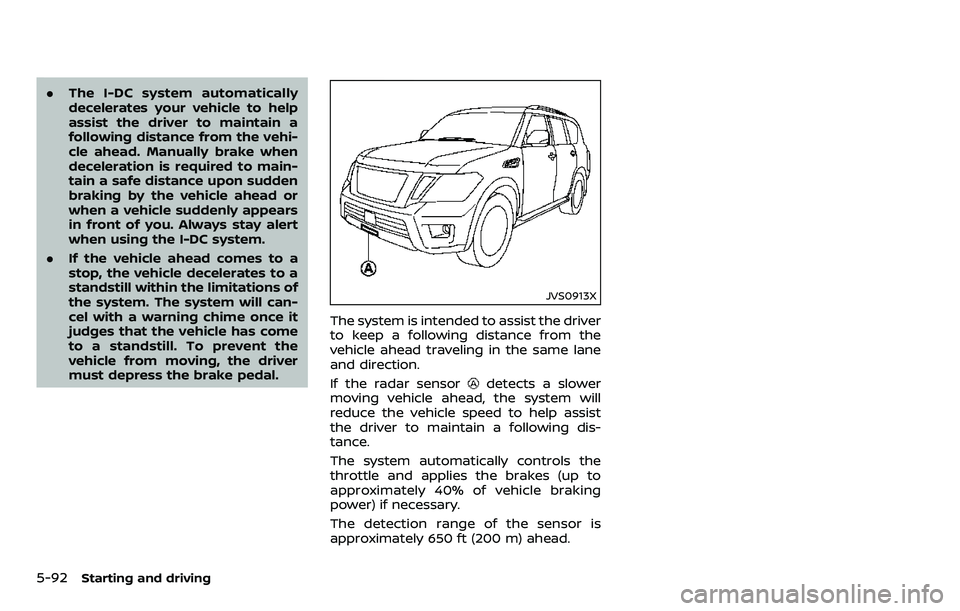
JVS0913X
The system is intended to assist the driver
to keep a following distance from the
vehicle ahead traveling in the same lane
and direction.
If the radar sensor
detects a slower
moving vehicle ahead, the system will
reduce the vehicle speed to help assist
the driver to maintain a following dis-
tance.
The system automatically controls the
throttle and applies the brakes (up to
approximately 40% of vehicle braking
power) if necessary.
The detection range of the sensor is
approximately 650 ft (200 m) ahead.
Page 348 of 532
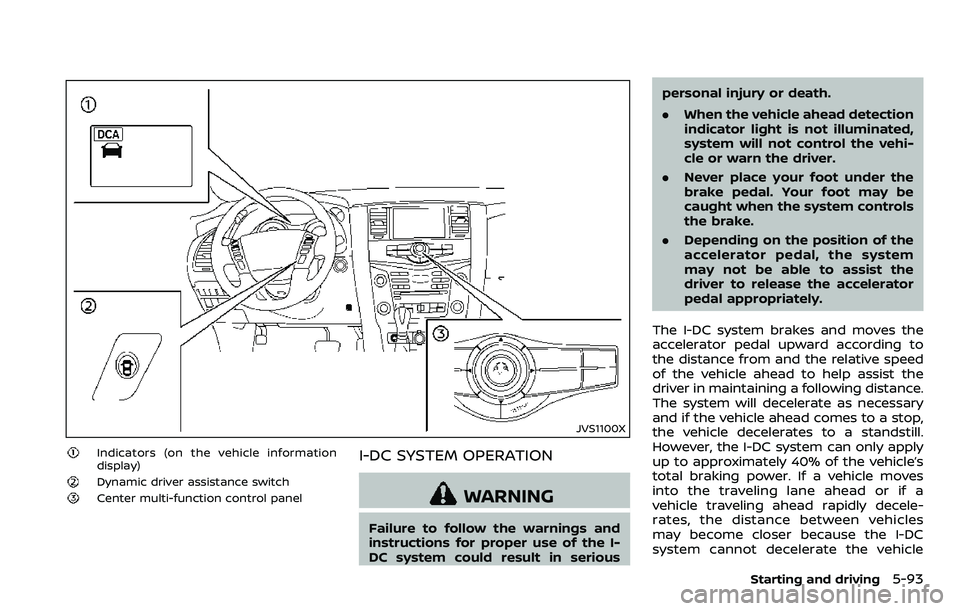
JVS1100X
Indicators (on the vehicle information
display)
Dynamic driver assistance switch
Center multi-function control panel
I-DC SYSTEM OPERATION
WARNING
Failure to follow the warnings and
instructions for proper use of the I-
DC system could result in seriouspersonal injury or death.
.
When the vehicle ahead detection
indicator light is not illuminated,
system will not control the vehi-
cle or warn the driver.
. Never place your foot under the
brake pedal. Your foot may be
caught when the system controls
the brake.
. Depending on the position of the
accelerator pedal, the system
may not be able to assist the
driver to release the accelerator
pedal appropriately.
The I-DC system brakes and moves the
accelerator pedal upward according to
the distance from and the relative speed
of the vehicle ahead to help assist the
driver in maintaining a following distance.
The system will decelerate as necessary
and if the vehicle ahead comes to a stop,
the vehicle decelerates to a standstill.
However, the I-DC system can only apply
up to approximately 40% of the vehicle’s
total braking power. If a vehicle moves
into the traveling lane ahead or if a
vehicle traveling ahead rapidly decele-
rates, the distance between vehicles
may become closer because the I-DC
system cannot decelerate the vehicle
Starting and driving5-93
Page 359 of 532
5-104Starting and driving
.Always keep the sensor area of the
front bumper clean.
. Do not strike or damage the areas
around the sensor.
. Do not cover or attach stickers or
similar objects on the front bumper
near the sensor area. This could cause
failure or malfunction.
. Do not attach metallic objects near
the sensor area (brush guard, etc.).
This could cause failure or malfunc-
tion.
. Do not alter, remove or paint the front
bumper. It is recommended you con-
tact a NISSAN dealer before customiz-
ing or restoring the front bumper.
FCC Notice:
For USA:
This device complies with Part 15 of the
FCC Rules. Operation is subject to the
following two conditions:
1. This device may not cause harmful
interference, and
2. This device must accept any inter-
ference received, including interfer-
ence that may cause undesired
operation.
FCC Warning
Changes or modification not expressly
approved by the party responsible for compliance could void the user’s
authority to operate the equipment.
For Canada:
This device complies with Industry Ca-
nada licence-exempt RSS standard(s).
Operation is subject to the following
two conditions:
1.
This device may not cause interfer-
ence, and
2. This device must accept any inter-
ference, including interference that
may cause undesired operation of
the device.
WARNING
Failure to follow the warnings and
instructions for proper use of the
AEB system could result in serious
injury or death.
.The AEB system is a supplemen-
tal aid to the driver. It is not a
replacement for the driver’s at-
tention to traffic conditions or
responsibility to drive safely. It
cannot prevent accidents due to
carelessness or dangerous driv-
ing techniques.
. The AEB system does not func-
tion in all driving, traffic, weather
and road conditions.
The AEB system can assist the driver
when there is a risk of a forward collision
with the vehicle ahead in the traveling
lane.
AUTOMATIC EMERGENCY BRAKING
(AEB) (if so equipped)
Page 526 of 532
Fuel-filler cap............................................................ 3-26
Fuel-filler door......................................................... 3-26
Gauge........................................................................\
........ 2-8
LOOSE FUEL CAP warning............................. 3-29
Fuel efficient driving tips .................................... 5-122
Fuses........................................................................\
.............. 8-18
Fusible links...................................................................... 8-19
G
Garage door opener HomeLink®
Universal Transceiver ......................... 2-68, 2-72
Gas cap........................................................................\
........ 3-26
Gauge........................................................................\
................ 2-5 Engine coolant temperature gauge......... 2-7
Engine oil pressure gauge ............................... 2-8
Fuel gauge .................................................................... 2-8
Odometer....................................................................... 2-6
Speedometer .............................................................. 2-6
Tachometer.................................................................. 2-7
Trip computer ......................................................... 2-27
General maintenance................................................... 9-2
Glove box ........................................................................\
... 2-53
H
Hazard warning flasher switch ............................ 6-2
Head restraints/headrests................................... 1-15
Headlights Aiming control ........................................................ 2-39
Bulb replacement ................................................. 8-24
Headlight switch ................................................... 2-37
Heated seats ................................................................... 2-43
Heated steering wheel ............................................ 2-42
Heater Automatic air conditioner ............................. 4-35 Engine block heater ....................................... 5-143
Heater and air
conditioner operation....................................... 4-34
Hill start assist system ......................................... 5-131
HomeLink® Universal Transceiver ..... 2-68, 2-72
Hood release ................................................................... 3-21
Hook Coat hooks ................................................................ 2-56
Luggage hook ......................................................... 2-56
Horn........................................................................\
................ 2-43
I
Ignition switch (Push-button)............................ 5-13
Immobilizer system.................................................... 2-31
In-cabin microfilter ..................................................... 4-42
Indicator Lights..................................................................\
............ 2-18
Vehicle information display.......................... 2-21
Inside mirror .................................................................... 3-31
Inspection/Maintenance (I/M) test............. 10-33
Instrument brightness control ......................... 2-40
Instrument panel ............................................................. 2-4
Intelligent Around View Monitor ..................... 4-10
Intelligent Auto Headlight system ................. 2-37
Intelligent Back-up Intervention (I-BI) ......... 5-57
Intelligent Blind Spot
Intervention (I-BSI) ...................................................... 5-43
Intelligent Blind Spot Intervention (I-BSI)
ON indicator light ........................................................ 2-18
Intelligent Cruise Control (ICC) ........................ 5-69
Intelligent Cruise Control (ICC) system main switch indicator ....................................... 2-25
Intelligent Cruise Control (ICC) system
warning light ................................................................... 2-14
Intelligent Distance Control (I-DC) ................. 5-91 Intelligent Distance Control (I-DC) system
warning light ................................................................... 2-13
Intelligent Forward Collision
Warning (I-FCW).......................................................... 5-113
Intelligent Key..................................................................... 3-2
Intelligent Key system ................................................. 3-7
Battery replacement.......................................... 8-21
Key operating range ............................................. 3-9
Key operation .......................................................... 3-10
Warning light............................................................ 2-14
Warning signals...................................................... 3-12
Intelligent Key warning light .............................. 2-14
Intelligent Lane Intervention (I-LI) .................. 5-23
Intelligent Lane Intervention (I-LI) ON
indicator light (green) .............................................. 2-19
Intelligent Rear View Mirror................................. 3-32
Interior light control switch ................................ 2-66
Interior light replacement..................................... 8-26
Interior lights................................................................... 2-65
ISOFIX child restraint ................................................ 1-35
J
Jump starting ................................................................. 6-12
K
Keyless entry (See remote keyless
entry system) .................................................................. 3-15
Keys ........................................................................\
.................... 3-2 For Intelligent Key system................................ 3-7
L
LabelsAir bag warning labels ..................................... 1-70
Air conditioner specification label....... 10-13
11-3