display NISSAN ARMADA 2020 Owner´s Manual
[x] Cancel search | Manufacturer: NISSAN, Model Year: 2020, Model line: ARMADA, Model: NISSAN ARMADA 2020Pages: 528, PDF Size: 2.1 MB
Page 329 of 528

SSD0967
How to change set distance to
vehicle ahead
The distance to the vehicle ahead can be
selected at any time depending on the
traffic conditions.
Each time the DISTANCE switch
is
pushed, the set distance will change to
long, middle, short and back to long again
in that sequence.
JVS0732X
. The distance to the vehicle ahead will
change according to the vehicle
speed. The higher the vehicle speed,
the longer the distance.
. If the engine is stopped, the set
distance becomes “long”. (Each time
the engine is started, the initial setting
becomes “long”.)Approach warning
If your vehicle comes closer to the vehicle
ahead due to rapid deceleration of that
vehicle or if another vehicle cuts in, the
system warns the driver with the chime
and ICC system display. Decelerate by
depressing the brake pedal to maintain a
Starting and driving5-73
Page 330 of 528

5-74Starting and driving
safe vehicle distance if:
.The chime sounds.
. The vehicle ahead detection and set
distance indicator blink.
The warning chime may not sound in
some cases when there is a short dis-
tance between vehicles. Some examples
are:
. When the vehicles are traveling at the
same speed and the distance be-
tween vehicles is not changing
. When the vehicle ahead is traveling
faster and the distance between ve-
hicles is increasing
. When a vehicle cuts in near your
vehicle
The warning chime will not sound when:
. Your vehicle approaches other vehi-
cles that are parked or moving slowly.
. The accelerator pedal is depressed,
overriding the system.
NOTE:
The approach warning chime may
sound and the system display may
blink when the radar sensor detects
objects on the side of the vehicle or on
the side of the road. This may cause the
ICC system to decelerate or accelerate
the vehicle. The radar sensor may de-
tect these objects when the vehicle is
driven on winding roads, narrow roads, hilly roads or when entering or exiting a
curve. In these cases you will have to
manually control the proper distance
ahead of your vehicle.
Also, the sensor sensitivity can be af-
fected by vehicle operation (steering
maneuver or driving position in the lane)
or traffic or vehicle condition (for example,
if a vehicle is being driven with some
damage).
Automatic cancellation
A chime sounds under the following
conditions and the control is automati-
cally canceled.
.
When the vehicle ahead is not de-
tected and your vehicle is traveling
below the speed of 15 MPH (24 km/h)
. When the system judges the vehicle is
at standstill
. When the shift lever is not in the D
(Drive) or manual shift mode
. When the parking brake is applied
. When the SNOW mode switch is
pushed on.
. When the 4WD shift switch is in the 4H
or 4L position (for 4WD models)
. When the VDC system is turned off
. When ABS or VDC (including the trac-
tion control system) operates .
When distance measurement be-
comes impaired due to adhesion of
dirt or obstruction to the sensor
. When a wheel slips
. When the radar signal is temporarily
interrupted
Vehicle-to-vehicle distance control
mode limitations
WARNING
Listed below are the system limita-
tions for the ICC system. Failure to
operate the vehicle in accordance
with these system limitations could
result in serious injury or death.
.The system is primarily intended
for use on straight, dry, open
roads with light traffic. It is not
advisable to use the system in
city traffic or congested areas.
. This system will not adapt auto-
matically to road conditions. This
system should be used in evenly
flowing traffic. Do not use the
system on roads with sharp
curves, or on icy roads, in heavy
rain or in fog.
Page 334 of 528

5-78Starting and driving
JVS0889X
Warning light and display (example)MAIN (ON·OFF) switch
SSD1110
System temporarily unavailable
Condition A:
Under the following conditions, the ICC
system is automatically canceled. The
chime will sound and the system will not
be able to be set.
.When the VDC is turned off
. When the ABS or VDC operates
. When a tire slips
. When the SNOW mode switch is
pushed on
. When the 4WD shift switch is in the 4H
or 4L position (for 4WD models)
Page 335 of 528

.When the radar signal is temporarily
interrupted
Action to take:
When the conditions listed above are no
longer present, turn the system off using
the MAIN switch
. Turn the ICC system
back on to use the system.
JVS0481X
Condition B:
Under the following conditions, making it
impossible to detect a vehicle ahead, the
ICC system is automatically canceled.
The chime will sound, the ICC system
warning light (orange) will come on and
the “FRONT RADAR OBSTRUCTION” warn-
ing message will appear in the vehicle
information display.
. When the radar sensor area of the
front bumper is covered with dirt or is
obstructed
Action to take:
If the warning light (orange) comes on or
warning message appears, stop the ve- hicle in a safe place, place the shift lever in
the P (Park) position and turn the engine
off. When the radar signal is temporarily
interrupted, clean the sensor area of the
front bumper and restart the engine. If
the warning light (orange) stays on or
warning message continues to be dis-
played, have the ICC system checked. It is
recommended you visit a NISSAN dealer
for this service.
.
When driving on roads with limited
road structures or buildings (for ex-
ample, long bridges, deserts, snow
fields, driving next to long walls)
Action to take:
When the above conditions no longer
exist, the ICC system will resume auto-
matically.
Starting and driving5-79
Page 337 of 528
This could cause failure or malfunc-
tion.
. Do not alter, remove or paint the front
bumper. It is recommended you con-
tact a NISSAN dealer before customiz-
ing or restoring the front bumper.
FCC Notice:
For USA:
This device complies with Part 15 of the
FCC Rules. Operation is subject to the
following two conditions:
1. This device may not cause harmful
interference, and
2. This device must accept any inter-
ference received, including interfer-
ence that may cause undesired
operation.
FCC Warning
Changes or modification not expressly
approved by the party responsible for
compliance could void the user’s
authority to operate the equipment.
For Canada:
This device complies with Industry Ca-
nada licence-exempt RSS standard(s).
Operation is subject to the following
two conditions:
1. This device may not cause interfer-
ence, and 2.
This device must accept any inter-
ference, including interference that
may cause undesired operation of
the device.
CONVENTIONAL (fixed speed)
CRUISE CONTROL MODE
This mode allows driving at a speed
between 25 to 90 MPH (40 to 144 km/h)
without keeping your foot on the accel-
erator pedal.
WARNING
.In the conventional (fixed speed)
cruise control mode, a warning
chime does not sound to warn
you if you are too close to the
vehicle ahead, as neither the pre-
sence of the vehicle ahead nor
the vehicle-to-vehicle distance is
detected.
. Pay special attention to the dis-
tance between your vehicle and
the vehicle ahead of you or a
collision could occur.
. Always confirm the setting in the
ICC system display.
. Do not use the conventional
(fixed speed) cruise control mode
when driving under the following conditions.
— when it is not possible to keep
the vehicle at a set speed
— in heavy traffic or in traffic that varies in speed
— on winding or hilly roads
— on slippery roads (rain, snow, ice, etc.)
— in very windy areas
Doing so could cause a loss of
vehicle control and result in an acci-
dent.
Starting and driving5-81
Page 338 of 528

5-82Starting and driving
SSD0968
Conventional (fixed speed) cruise
control switch
1. ACCELERATE/RESUME switch:Resumes set speed or increases speed
incrementally.
2. COAST/SET switch: Sets the desired cruise speed, reduces
speed incrementally.
3. CANCEL switch: Deactivates the system without eras-
ing the set speed.
4. MAIN switch:
Master switch to activate the system.
SSD1013
Conventional (fixed speed) cruise
control mode display and indica-
tors
The display is on the vehicle information
display located between the speed-
ometer and tachometer.
1. MAIN switch indicator:Indicates that the MAIN switch is ON.
2. Cruise set switch indicator: Displays while the vehicle speed is
controlled by the conventional (fixed
speed) cruise control mode of the ICC
system. 3. Cruise system warning light:
Comes on if there is a malfunction in
the cruise control system.
Page 339 of 528
SSD0969
Operating conventional (fixed
speed) cruise control mode
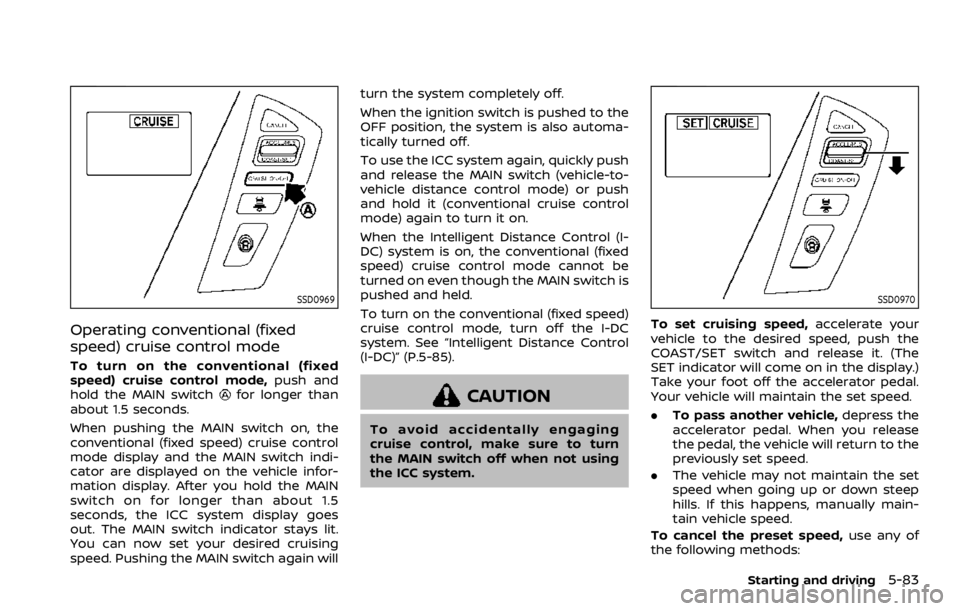
To turn on the conventional (fixed
speed) cruise control mode,push and
hold the MAIN switch
for longer than
about 1.5 seconds.
When pushing the MAIN switch on, the
conventional (fixed speed) cruise control
mode display and the MAIN switch indi-
cator are displayed on the vehicle infor-
mation display. After you hold the MAIN
switch on for longer than about 1.5
seconds, the ICC system display goes
out. The MAIN switch indicator stays lit.
You can now set your desired cruising
speed. Pushing the MAIN switch again will turn the system completely off.
When the ignition switch is pushed to the
OFF position, the system is also automa-
tically turned off.
To use the ICC system again, quickly push
and release the MAIN switch (vehicle-to-
vehicle distance control mode) or push
and hold it (conventional cruise control
mode) again to turn it on.
When the Intelligent Distance Control (I-
DC) system is on, the conventional (fixed
speed) cruise control mode cannot be
turned on even though the MAIN switch is
pushed and held.
To turn on the conventional (fixed speed)
cruise control mode, turn off the I-DC
system. See “Intelligent Distance Control
(I-DC)” (P.5-85).CAUTION
To avoid accidentally engaging
cruise control, make sure to turn
the MAIN switch off when not using
the ICC system.
SSD0970
To set cruising speed,
accelerate your
vehicle to the desired speed, push the
COAST/SET switch and release it. (The
SET indicator will come on in the display.)
Take your foot off the accelerator pedal.
Your vehicle will maintain the set speed.
. To pass another vehicle, depress the
accelerator pedal. When you release
the pedal, the vehicle will return to the
previously set speed.
. The vehicle may not maintain the set
speed when going up or down steep
hills. If this happens, manually main-
tain vehicle speed.
To cancel the preset speed, use any of
the following methods:
Starting and driving5-83
Page 343 of 528
JVS1100X
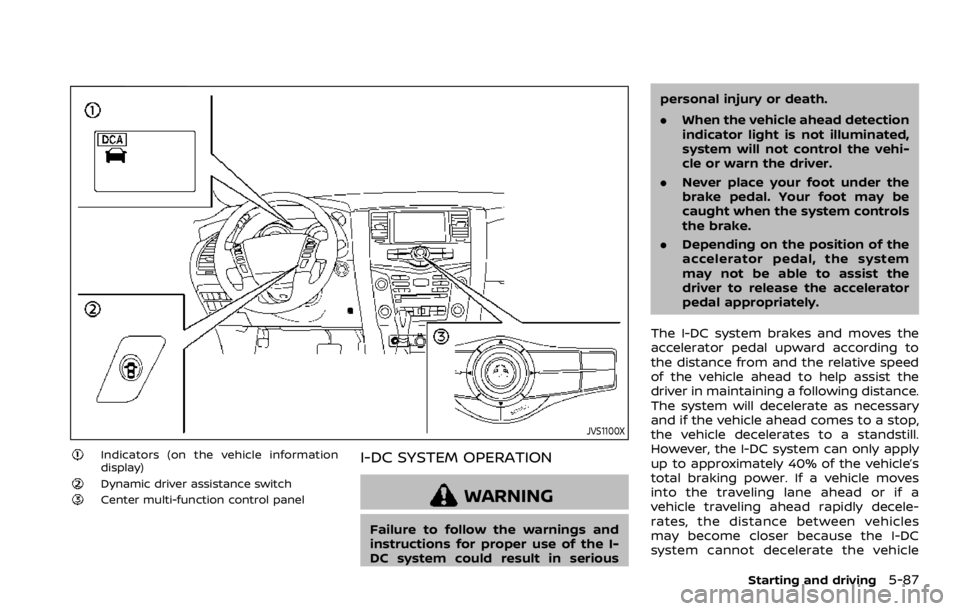
Indicators (on the vehicle information
display)
Dynamic driver assistance switchCenter multi-function control panel
I-DC SYSTEM OPERATION
WARNING
Failure to follow the warnings and
instructions for proper use of the I-
DC system could result in seriouspersonal injury or death.
.
When the vehicle ahead detection
indicator light is not illuminated,
system will not control the vehi-
cle or warn the driver.
. Never place your foot under the
brake pedal. Your foot may be
caught when the system controls
the brake.
. Depending on the position of the
accelerator pedal, the system
may not be able to assist the
driver to release the accelerator
pedal appropriately.
The I-DC system brakes and moves the
accelerator pedal upward according to
the distance from and the relative speed
of the vehicle ahead to help assist the
driver in maintaining a following distance.
The system will decelerate as necessary
and if the vehicle ahead comes to a stop,
the vehicle decelerates to a standstill.
However, the I-DC system can only apply
up to approximately 40% of the vehicle’s
total braking power. If a vehicle moves
into the traveling lane ahead or if a
vehicle traveling ahead rapidly decele-
rates, the distance between vehicles
may become closer because the I-DC
system cannot decelerate the vehicle
Starting and driving5-87
Page 344 of 528

5-88Starting and driving
quickly enough. If this occurs, the I-DC
system will sound a warning chime and
blink the system display to notify the
driver to take necessary action.
See “Approach warning” (P.5-89).
SSD0997
System set display with a vehicle aheadSystem set display without a vehicle
ahead
The I-DC system helps assist the driver to
keep a following distance to the vehicle
ahead by braking and moving the accel-
erator pedal upward in the normal driving
condition.
When a vehicle ahead is detected:
The vehicle ahead detection indicator
comes on.
When the vehicle approaches a vehicle
ahead:
.If the driver’s foot is not on the
accelerator pedal, the system acti-
vates the brakes to decelerate smoothly as necessary. If the vehicle
ahead comes to a stop, the vehicle
decelerates to a standstill within the
limitations of the system.
. If the driver’s foot is on the accelerator
pedal, the system moves the accel-
erator pedal upward to assist the
driver to release the accelerator pedal.
When brake operation by the driver is
required:
The system alerts the driver by a warning
chime and blinking the vehicle ahead
detection indicator. If the driver’s foot is
on the accelerator pedal after the warn-
ing, the system moves the accelerator
pedal upward to assist the driver to
Page 345 of 528

switch to the brake pedal.
NOTE:
.The stop lights of the vehicle come
on when braking is performed by
the I-DC system.
. When the brake operates, a noise
may be heard and/or vibration may
be felt. This is not a malfunction.
Overriding the system:
The following driver’s operation overrides
the system operation.
. When the driver depresses the accel-
erator pedal even further while the
system is moving the accelerator
pedal upward, the I-DC system control
of the accelerator pedal is canceled.
. When the driver’s foot is on the accel-
erator pedal, the brake control by the
system is not operated.
. When the driver’s foot is on the brake
pedal, neither the brake control nor
the alert by the system operates.
. When the Intelligent Cruise Control
(ICC) system is set, the I-DC system
will be inactive.Approach warning
If your vehicle comes closer to the vehicle
ahead due to rapid deceleration of that
vehicle or if another vehicle cuts in, the
system warns the driver with the chime
and I-DC system display. Decelerate by
depressing the brake pedal to maintain a
safe vehicle distance if:
.The chime sounds.
. The vehicle ahead detection indicator
blinks.
The warning chime may not sound in
some cases when there is a short dis-
tance between vehicles. Some examples
are:
. When the vehicles are traveling at the
same speed and the distance be-
tween vehicles is not changing
. When the vehicle ahead is traveling
faster and the distance between ve-
hicles is increasing
. When a vehicle cuts in near your
vehicle
The warning chime will not sound when
your vehicle approaches vehicles that are
parked or moving slowly.
NOTE:
The approach warning chime may
sound and the system display may
blink when the radar sensor detects
objects on the side of the vehicle or on the side of the road. This may cause the
I-DC system to decelerate or accelerate
the vehicle. The radar sensor may de-
tect these objects when the vehicle is
driven on winding roads, narrow roads,
hilly roads or when entering or exiting a
curve. In these cases you will have to
manually control the proper distance
ahead of your vehicle.
Also, the sensor sensitivity can be af-
fected by vehicle operation (steering
maneuver or driving position in the lane)
or traffic or vehicle condition (for example,
if a vehicle is being driven with some
damage).
Starting and driving5-89