display NISSAN ARMADA 2020 Owner´s Manual
[x] Cancel search | Manufacturer: NISSAN, Model Year: 2020, Model line: ARMADA, Model: NISSAN ARMADA 2020Pages: 528, PDF Size: 2.1 MB
Page 378 of 528
5-122Starting and driving
.Never shift the 4WD shift switch
between 4L and 4H while driving.
. Engine idling speed is high while
warming up the engine. Be espe-
cially careful when starting or
driving on slippery surfaces with
the 4WD shift switch in AUTO.
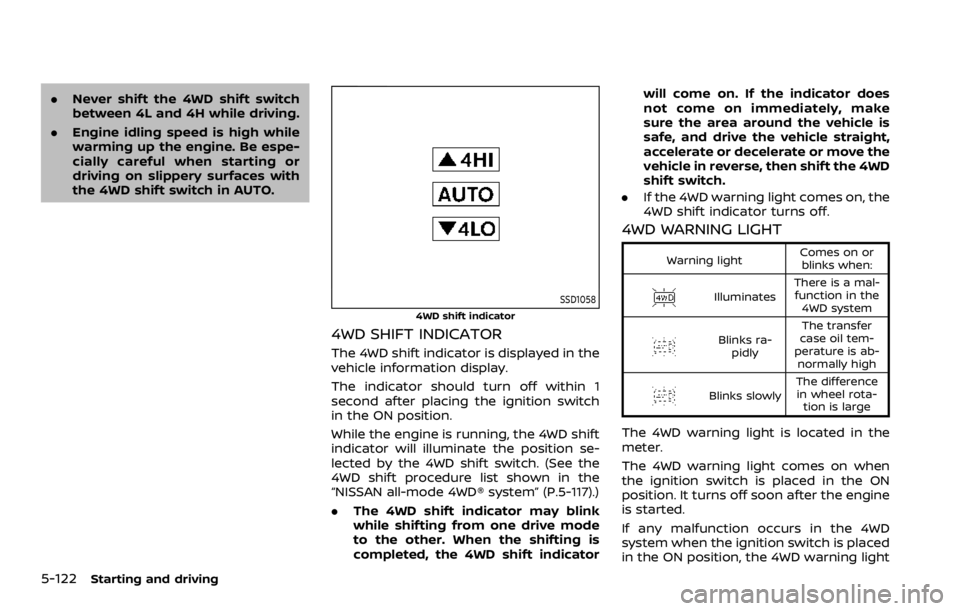
SSD1058
4WD shift indicator
4WD SHIFT INDICATOR
The 4WD shift indicator is displayed in the
vehicle information display.
The indicator should turn off within 1
second after placing the ignition switch
in the ON position.
While the engine is running, the 4WD shift
indicator will illuminate the position se-
lected by the 4WD shift switch. (See the
4WD shift procedure list shown in the
“NISSAN all-mode 4WD® system” (P.5-117).)
.The 4WD shift indicator may blink
while shifting from one drive mode
to the other. When the shifting is
completed, the 4WD shift indicator will come on. If the indicator does
not come on immediately, make
sure the area around the vehicle is
safe, and drive the vehicle straight,
accelerate or decelerate or move the
vehicle in reverse, then shift the 4WD
shift switch.
. If the 4WD warning light comes on, the
4WD shift indicator turns off.
4WD WARNING LIGHT
Warning light Comes on or
blinks when:
Illuminates There is a mal-
function in the 4WD system
Blinks ra- pidly The transfer
case oil tem-
perature is ab- normally high
Blinks slowly The difference
in wheel rota- tion is large
The 4WD warning light is located in the
meter.
The 4WD warning light comes on when
the ignition switch is placed in the ON
position. It turns off soon after the engine
is started.
If any malfunction occurs in the 4WD
system when the ignition switch is placed
in the ON position, the 4WD warning light
Page 384 of 528
5-128Starting and driving
accurate measurement of obsta-
cles or false alarms.
CAUTION
Keep the interior of the vehicle as
quiet as possible to hear the tone
clearly.
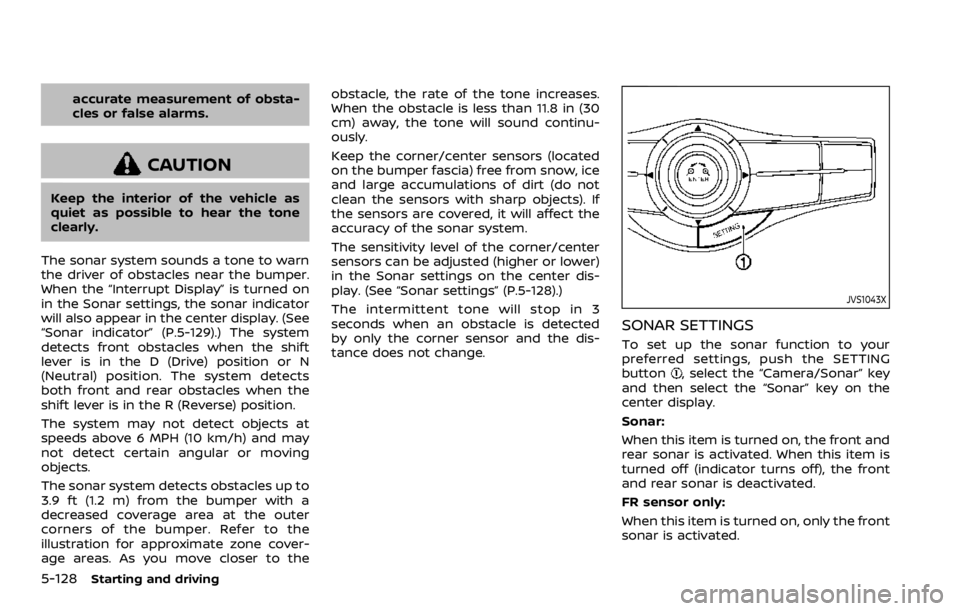
The sonar system sounds a tone to warn
the driver of obstacles near the bumper.
When the “Interrupt Display” is turned on
in the Sonar settings, the sonar indicator
will also appear in the center display. (See
“Sonar indicator” (P.5-129).) The system
detects front obstacles when the shift
lever is in the D (Drive) position or N
(Neutral) position. The system detects
both front and rear obstacles when the
shift lever is in the R (Reverse) position.
The system may not detect objects at
speeds above 6 MPH (10 km/h) and may
not detect certain angular or moving
objects.
The sonar system detects obstacles up to
3.9 ft (1.2 m) from the bumper with a
decreased coverage area at the outer
corners of the bumper. Refer to the
illustration for approximate zone cover-
age areas. As you move closer to the obstacle, the rate of the tone increases.
When the obstacle is less than 11.8 in (30
cm) away, the tone will sound continu-
ously.
Keep the corner/center sensors (located
on the bumper fascia) free from snow, ice
and large accumulations of dirt (do not
clean the sensors with sharp objects). If
the sensors are covered, it will affect the
accuracy of the sonar system.
The sensitivity level of the corner/center
sensors can be adjusted (higher or lower)
in the Sonar settings on the center dis-
play. (See “Sonar settings” (P.5-128).)
The intermittent tone will stop in 3
seconds when an obstacle is detected
by only the corner sensor and the dis-
tance does not change.
JVS1043X
SONAR SETTINGS
To set up the sonar function to your
preferred settings, push the SETTING
button
, select the “Camera/Sonar” key
and then select the “Sonar” key on the
center display.
Sonar:
When this item is turned on, the front and
rear sonar is activated. When this item is
turned off (indicator turns off), the front
and rear sonar is deactivated.
FR sensor only:
When this item is turned on, only the front
sonar is activated.
Page 385 of 528

Interrupt Display:
When this item is turned on, the sonar
display will interrupt the current view to
indicate that the obstacles are around
the vehicle.
Sonar Sensitivity:
Adjust the sensitivity level of the sonar.
Sonar Volume:
Adjust the tone volume of the sonar.
JVS1085X
Sonar displayCorner sensor indicatorCenter sensor indicatorRearView Monitor display
SONAR INDICATOR
With the “Interrupt Display” turned on in
the Sonar settings, when the corner/
center sensors detect obstacles near the
bumper, a tone will sound and the sonar
indicator will appear in the center display
. When the RearView Monitor is dis-
played, the sonar indicator will appear in
the upper corner of the display
.
The sonar indicators
andindicate the
position of the object and the distance to
the object with its color and rate of
blinking.
When an object is detected, the indicator
(green) appears and blinks (the tone
sounds intermittently). When the vehicle
moves closer to the object, the color of
the indicator turns yellow and the rate of
blinking increases (the rate of the tone
increases). When the bumper is very close
to the object, less than 11.8 in (30 cm)
away, the indicator stops blinking and
turns red (the tone sounds continuously).
When the RearView Monitor is dis-
played, the colors of the sonar indicator
and the distance guide lines in the rear
view indicate different distances to the
object.
When the
is touched, the sonar will
be turned off temporarily.
The sonar indicator can be turned off in
Starting and driving5-129
Page 386 of 528
5-130Starting and driving
the Sonar settings on the center display.
(See “Sonar settings” (P.5-128).) When the
sonar indicator is off, only a tone sounds
when the sonar detect obstacles.
WARNING
If the engine is not running or is
turned off while driving, the power
assist for the steering will not work.
Steering will be harder to operate.
The power assisted steering uses a hy-
draulic pump, driven by the engine, to
assist steering.
If the engine stops or the drive belt
breaks, you will still have control of the
vehicle. However, much greater steering
effort is needed, especially in sharp turns
and at low speeds.
BRAKING PRECAUTIONS
The brake system has two separate
hydraulic circuits. If one circuit malfunc-
tions, you will still have braking ability at
two wheels.
You may feel a small click and hear a
sound when the brake pedal is fully
depressed slowly. This is not a malfunc-
tion and indicates that the brake assist
mechanism is operating properly.
Hydraulically-assisted brakes
The hydraulically-assisted brake system is
designed to use a hydraulic pump driven
electrically, to assist braking. If the engine
stops, you can stop the vehicle by de-
pressing the foot brake pedal. However,
greater foot pressure on the foot brake
pedal will be required to stop the vehicle.
The stopping distance will be longer.
Wet brakes
When the vehicle is washed or driven
through water, the brakes may get wet.
As a result, your braking distance will be
longer and the vehicle may pull to one
side during braking.
To dry brakes, drive the vehicle at a safe
speed while lightly tapping the brake
pedal to heat-up the brakes. Do this until
the brakes return to normal. Avoid driving
the vehicle at high speeds until the brakes
POWER STEERING BRAKE SYSTEM
Page 397 of 528
To shut off the engine in an emergency
situation while driving, perform the fol-
lowing procedure:
.Rapidly push the push-button ignition
switch 3 consecutive times in less
than 1.5 seconds, or
. Push and hold the push-button igni-
tion switch for more than 2 seconds.TIRE PRESSURE MONITORING SYS-
TEM (TPMS)
This vehicle is equipped with the Tire
Pressure Monitoring System (TPMS). It
monitors tire pressure of all tires except
the spare. When the low tire pressure
warning light is lit and the CHECK TIRE
PRESSURE warning appears in the vehicle
information display, one or more of your
tires is significantly under-inflated. If the
vehicle is being driven with low tire
pressure, the TPMS will activate and warn
you of it by the low tire pressure warning
light. This system will activate only when
the vehicle is driven at speeds above 16
MPH (25 km/h). For more details, see “Low
tire pressure warning light” (P.2-15) and
“Tire Pressure Monitoring System (TPMS)”
(P.5-5).
WARNING
.If the low tire pressure warning
light illuminates or Low Pressure
information is displayed on the
monitor screen while driving,
avoid sudden steering maneu-
vers or abrupt braking, reduce
vehicle speed, pull off the road
to a safe location and stop the
vehicle as soon as possible. Driv-
ing with under-inflated tires may permanently damage the tires
and increase the likelihood of tire
failure. Serious vehicle damage
could occur and may lead to an
accident and could result in ser-
ious personal injury. Check the
tire pressure for all four tires.
Adjust the tire pressure to the
recommended COLD tire pressure
shown on the Tire and Loading
Information label to turn the low
tire pressure warning light OFF. If
the light still illuminates while
driving after adjusting the tire
pressure, a tire may be flat. If
you have a flat tire, replace it with
a spare tire as soon as possible.
. Since the spare tire is not
equipped with the TPMS, when a
spare tire is mounted or a wheel
is replaced, the TPMS will not
function and the low tire pressure
warning light will flash for ap-
proximately 1 minute. The light
will remain on after 1 minute.
Have your tires replaced and/or
TPMS system reset as soon as
possible. It is recommended you
visit a NISSAN dealer for these
services.
. Replacing tires with those not
originally specified by NISSAN
In case of emergency6-3
EMERGENCY ENGINE SHUT OFF FLAT TIRE
Page 405 of 528
fications at each lubrication inter-
val.
.Adjust tire pressure to the COLDpressure.
COLD pressure:
After the vehicle has been parked
for three hours or more or driven
less than 1 mile (1.6 km).
COLD tire pressures are shown on
the Tire and Loading Information
label affixed to the driver side
center pillar.
After adjusting tire pressure to the COLD
tire pressure, the display of the tire
pressure information may show higher
pressure than the COLD tire pressure
after the vehicle has been driven more
than 1 mile (1.6 km). This is because the
tire pressurizes as the tire temperature
rises. This does not indicate a system
malfunction.
Stowing the damaged tire and
tools
1. Securely store the damaged tire, jack and tools in the storage area.
2. Close the cargo floor cover.
3. Replace the cargo floor board.
4. Close the liftgate.
WARNING
. Always make sure that the spare
tire and jacking equipment are
properly secured after use. Such
items can become dangerous
projectiles in an accident or sud-
den stop.
. The full-size temporary use only
spare tire (if so equipped) is de-
signed for emergency use. (See
specific instructions under the
heading “Wheels and tires” (P.8-
30).)
In case of emergency6-11
Page 447 of 528

SDI2704
Extended storage fuse switch (if so
equipped)
To reduce battery drain, the extended
storage fuse switch comes from the
factory switched off. Prior to delivery of
your vehicle, the switch is pushed in
(switched on) and should always remain
on.
If the extended storage fuse switch is not
pushed in (switched on), the “SHIPPING
MODE ON, PUSH STORAGE FUSE” warning
may appear on the vehicle information
display (if so equipped). See “Vehicle
information display” (P.2-20).
If any electrical equipment does not
operate, remove the extended storagefuse switch and check for an open fuse.
NOTE:
If the extended storage fuse switch
malfunctions or if the fuse is open, it is
not necessary to replace the switch. In
this case, remove the extended storage
fuse switch and replace it with a new
fuse of the same rating.
How to remove the extended storage
fuse switch:
1. To remove the extended storage fuse
switch, be sure the ignition switch is in
the OFF or LOCK position.
2. Be sure the headlight switch is in the OFF position.
3. Remove the fuse box cover.
4. Pinch the locking tabsfound on
each side of the storage fuse switch.
5. Pull the storage fuse switch straight out from the fuse box
.
CAUTION
Be careful not to allow children to
swallow the battery and removed
parts.
Do-it-yourself8-21
INTELLIGENT KEY BATTERY REPLACEMENT
Page 456 of 528

8-30Do-it-yourself
If you have a flat tire, see “Flat tire” (P.6-
3).
TIRE PRESSURE
Tire Pressure Monitoring System
(TPMS)
This vehicle is equipped with the Tire
Pressure Monitoring System (TPMS). It
monitors tire pressure of all tires except
the spare. When the low tire pressure
warning light is lit and the CHECK TIRE
PRESSURE warning appears in the vehicle
information display, one or more of your
tires is significantly under-inflated.
The TPMS will activate only when the
vehicle is driven at speeds above 16 MPH
(25 km/h). Also, this system may not
detect a sudden drop in tire pressure
(for example, a flat tire while driving).
For more details, see “Low tire pressure
warning light” (P.2-15), “Tire Pressure Mon-
itoring System (TPMS)” (P.5-5) and “Tire
Pressure Monitoring System (TPMS) ” (P.6-
3).
Tire inflation pressure
Check the pressure of the tires
(including the spare) often and al-
ways prior to long distance trips.
The recommended tire pressure
specifications are shown on the
Tire and Loading Information label
under the “Cold Tire Pressure”
heading. The Tire and Loading In-
formation label is affixed to the
driver side center pillar. Tire pres-
sures should be checked regularly
because:
.Most tires naturally lose air over
time.
. Tires can lose air suddenly when
driven over potholes or other
objects or if the vehicle strikes
a curb while parking.
The tire pressures should be
checked when the tires are cold.
The tires are considered COLD after
the vehicle has been parked for 3 or
more hours, or driven less than 1
mile (1.6 km) at moderate speeds.
TPMS with Easy Fill Tire Alert pro-
vides visual and audible signals outside the vehicle for inflating the
tires to the recommended COLD
tire pressure. (See “TPMS with Easy
Fill Tire Alert” (P.5-8).)
Incorrect tire pressure, including
under inflation, may adversely
affect tire life and vehicle hand-
ling.
WARNING
.
Improperly inflated tires can
fail suddenly and cause an
accident.
. The Gross Vehicle Weight
rating (GVWR) is located on
the F.M.V.S.S./C.M.V.S.S. cer-
tification label. The vehicle
weight capacity is indicated
on the Tire and Loading In-
formation label. Do not load
your vehicle beyond this ca-
pacity. Overloading your ve-
hicle may result in reduced
tire life, unsafe operating
conditions due to premature
tire failure, or unfavorable
WHEELS AND TIRES
Page 521 of 528

Fuel-filler door......................................................... 3-26
Gauge........................................................................\
........ 2-8
LOOSE FUEL CAP warning............................. 3-29
Fuel efficient driving tips .................................... 5-115
Fuses........................................................................\
.............. 8-18
Fusible links...................................................................... 8-19
G
Garage door opener HomeLink®
Universal Transceiver ......................... 2-70, 2-74
Gas cap........................................................................\
........ 3-26
Gauge........................................................................\
................ 2-5 Engine coolant temperature gauge......... 2-7
Engine oil pressure gauge ............................... 2-8
Fuel gauge .................................................................... 2-8
Odometer....................................................................... 2-6
Speedometer .............................................................. 2-6
Tachometer.................................................................. 2-7
Trip computer ......................................................... 2-28
General maintenance................................................... 9-2
Glove box ........................................................................\
... 2-56
H
Hazard warning flasher switch ............................ 6-2
Head restraints/headrests................................... 1-14
Headlights Bulb replacement ................................................. 8-24
Headlight switch ................................................... 2-37
Heated seats ................................................................... 2-43
Heated steering wheel ............................................ 2-42
Heater Automatic air conditioner ............................. 4-36
Engine block heater ....................................... 5-136 Heater and air
conditioner operation....................................... 4-35
Hill start assist system ......................................... 5-124
HomeLink® Universal Transceiver ..... 2-70, 2-74
Hood release ................................................................... 3-21
Hook Coat hooks ................................................................ 2-59
Luggage hook ......................................................... 2-59
Horn........................................................................\
................ 2-42
I
Ignition switch (Push-button)............................ 5-13
Immobilizer system.................................................... 2-31
In-cabin microfilter ..................................................... 4-43
Indicator Lights..................................................................\
............ 2-17
Vehicle information display.......................... 2-20
Inside mirror .................................................................... 3-31
Inspection/Maintenance (I/M) test............. 10-32
Instrument brightness control ......................... 2-40
Instrument panel ............................................................. 2-4
Intelligent Around View Monitor ..................... 4-10
Intelligent Auto Headlight system ................. 2-38
Intelligent Back-up Intervention (I-BI) ......... 5-53
Intelligent Blind Spot Intervention
(I-BSI)........................................................................\
.............. 5-40
Intelligent Blind Spot Intervention (I-BSI)
ON indicator light ........................................................ 2-18
Intelligent Cruise Control (ICC) ........................ 5-63
Intelligent Cruise Control (ICC) system main switch indicator ....................................... 2-25
Intelligent Cruise Control (ICC) system
warning light ................................................................... 2-14
Intelligent Distance Control (I-DC) ................. 5-85
Intelligent Distance Control (I-DC) system
warning light ................................................................... 2-13 Intelligent Forward Collision Warning
(I-FCW)........................................................................\
........ 5-106
Intelligent Key..................................................................... 3-2
Intelligent Key system ................................................. 3-7
Battery replacement.......................................... 8-21
Key operating range ............................................. 3-9
Key operation .......................................................... 3-10
Warning light............................................................ 2-14
Warning signals...................................................... 3-12
Intelligent Key warning light .............................. 2-14
Intelligent Lane Intervention (I-LI) .................. 5-23
Intelligent Lane Intervention (I-LI) ON
indicator light (green) .............................................. 2-18
Intelligent Rear View Mirror................................. 3-32
Interior light replacement..................................... 8-26
Interior light switch.................................................... 2-68
Interior lights................................................................... 2-68
ISOFIX child restraint ................................................ 1-35
J
Jump starting ................................................................. 6-12
K
Keyless entry (See remote keyless
entry system) .................................................................. 3-15
Keys ........................................................................\
.................... 3-2 For Intelligent Key system................................ 3-7
L
LabelsAir bag warning labels ..................................... 1-70
Air conditioner specification label....... 10-12
Emission control information label .... 10-11
Engine serial number .................................... 10-11
11-3
Page 525 of 528

Vehicle Dynamic Control (VDC)
system ....................................................................... 5-133
Vehicle Dynamic Control (VDC)
warning light ............................................................ 2-17
Vehicle information display................................. 2-20
Ventilators ........................................................................\
. 4-34
Voltmeter ........................................................................\
....... 2-9
W
Warning Check tire pressure warning....................... 2-24
Hazard warning flasher switch .................... 6-2
Intelligent Forward Collision
Warning (I-FCW).................................................. 5-106
Lights..................................................................\
............ 2-11
Loose fuel cap warning................................... 2-24
Tire Pressure Monitoring System
(TPMS) .................................................................... 5-5, 6-3
Vehicle information display.......................... 2-20
Warning lights, indicator lights and
audible reminders ................................................ 2-10
Warning labels, Air bag warning labels...... 1-70
Warning light 4WD warning light ........................................... 5-122
Air bag warning light.......................... 1-71, 2-17
Anti-lock Braking System (ABS)
warning light ............................................................ 2-11
Automatic Emergency Braking (AEB)
system warning light......................................... 2-11
Brake warning light ............................................ 2-12
Intelligent Key warning light ....................... 2-14
Lane Departure Warning (LDW)
indicator light (orange) .................................... 2-14
Low tire pressure warning light ............... 2-15
Seat belt warning light and chime......... 2-16 Warranty, Emission control system
warranty ........................................................................\
.. 10-31
Washer switch
Rear window wiper and washer
switch........................................................................\
..... 2-36
Windshield wiper and
washer switch ......................................................... 2-33
Washing........................................................................\
........... 7-2
Waxing ........................................................................\
.............. 7-2
Welcome light................................................................. 2-67
Wheel/tire size ............................................................... 10-8
Wheels and tires ........................................................... 8-30 Care of wheels........................................................... 7-3
Cleaning aluminum alloy wheels ................ 7-3
Cleaning bright wheels....................................... 7-4
Window washer fluid ................................................ 8-10
Window(s) Cleaning ........................................................................\
.. 7-3
Power windows ..................................................... 2-63
Windshield wiper and washer switch.......... 2-33
Wiper Rain-sensing auto wiper system ............. 2-34
Rear window wiper and
washer switch ......................................................... 2-36
Windshield wiper and
washer switch ......................................................... 2-33
Wiper blades ............................................................. 8-16
11-7