display NISSAN ARMADA 2020 Owner´s Manual
[x] Cancel search | Manufacturer: NISSAN, Model Year: 2020, Model line: ARMADA, Model: NISSAN ARMADA 2020Pages: 528, PDF Size: 2.1 MB
Page 262 of 528

5-6Starting and driving
Additional information
.Since the spare tire is not equipped
with the TPMS, the TPMS does not
monitor the tire pressure of the spare
tire.
. The TPMS will activate only when the
vehicle is driven at speeds above 16
MPH (25 km/h). Also, this system may
not detect a sudden drop in tire
pressure (for example, a flat tire while
driving).
. The low tire pressure warning light
does not automatically turn off when
the tire pressure is adjusted. After the
tire is inflated to the recommended
pressure, the vehicle must be driven at
speeds above 16 MPH (25 km/h) to
activate the TPMS and turn off the low
tire pressure warning light. Use a tire
pressure gauge to check the tire
pressure.
. The CHECK TIRE PRESSURE warning
appears in the vehicle information
display when the low tire pressure
warning light is illuminated and low
tire pressure is detected. The CHECK
TIRE PRESSURE warning turns off
when the low tire pressure warning
light turns off.
The CHECK TIRE PRESSURE warning
appears each time the ignition switch
is placed in the ON position as long as the low tire pressure warning light
remains illuminated.
The CHECK TIRE PRESSURE warning
does not appear if the low tire pres-
sure warning light illuminates to in-
dicate a TPMS malfunction.
. Tire pressure rises and falls depending
on the heat caused by the vehicle’s
operation and the outside tempera-
ture. Do not reduce the tire pressure
after driving because the tire pressure
rises after driving. Low outside tem-
perature can lower the temperature
of the air inside the tire which can
cause a lower tire inflation pressure.
This may cause the low tire pressure
warning light to illuminate. If the
warning light illuminates in low ambi-
ent temperature, check the tire pres-
sure for all four tires.
. You can also check the pressure of all
tires (except the spare tire) on the
center display. (See NissanConnect®
Owner’s Manual.) The order of the tire
pressure figures displayed on the
screen may not correspond with the
actual order of the tire position.
For additional information, see “Low tire
pressure warning light” (P.2-15) and “Tire
Pressure Monitoring System (TPMS) ” (P.6-
3).WARNING
. If the low tire pressure warning
light illuminates or Low Pressure
information is displayed on the
monitor screen while driving,
avoid sudden steering maneu-
vers or abrupt braking, reduce
vehicle speed, pull off the road
to a safe location and stop the
vehicle as soon as possible. Driv-
ing with under-inflated tires may
permanently damage the tires
and increase the likelihood of tire
failure. Serious vehicle damage
could occur and may lead to an
accident and could result in ser-
ious personal injury. Check the
tire pressure for all four tires.
Adjust the tire pressure to the
recommended COLD tire pressure
shown on the Tire and Loading
Information label to turn the low
tire pressure warning light OFF. If
the light still illuminates while
driving after adjusting the tire
pressure, a tire may be flat or
the TPMS may be malfunctioning.
If you have a flat tire, replace it
with a spare tire as soon as
possible. If no tire is flat and all
tires are properly inflated, it is
Page 270 of 528

5-14Starting and driving
moved to the P (Park) position.
When the ignition switch cannot be
pushed toward the LOCK position, pro-
ceed as follows:
1. Move the shift lever into the P (Park)position.
2. Push the ignition switch to the OFF position. The ignition switch position
indicator will not illuminate.
3. Open the door. The ignition switch will change to the LOCK position.
The shift lever can be moved from the P
(Park) position if the ignition switch is in
the ON position and the brake pedal is
depressed.
If the battery of the vehicle is dis-
charged, the push-button ignition
switch cannot be turned from the LOCK
position.
Some indicators and warnings for opera-
tion are displayed on the vehicle informa-
tion display between the speedometer
and tachometer. (See “Vehicle informa-
tion display” (P.2-20).)PUSH-BUTTON IGNITION SWITCH
POSITIONS
LOCK (Normal parking position)
The ignition switch can only be locked in
this position.
The ignition switch will be unlocked when
it is pushed to the ACC position while
carrying the Intelligent Key.
ACC (Accessories)
This position activates electrical acces-
sories such as the radio, when the engine
is not running.
ACC has a battery saver feature that will
turn the ignition switch to the OFF posi-
tion after a period of time under the
following conditions:
. all doors are closed.
. shift lever is in P (Park).
. turn signal/hazard indicator lights are
not flashing.
The battery saver feature will be can-
celled if any of the following occur:
. any door is opened.
. shift lever is moved out of P (Park).
. ignition switch changes position.
ON (Normal operating position)
This position turns on the ignition system
and electrical accessories.
ON has a battery saver feature that will
turn the ignition switch to the OFF posi-
tion, if the vehicle is not running, after
some time under the following condi-
tions:
. all doors are closed.
. shift lever is in P (Park).
. turn signal/hazard indicator lights are
not flashing.
The battery saver feature will be can-
celled if any of the following occur:
. any door is opened.
. shift lever is moved out of P (Park).
. ignition switch changes position.
OFF
The engine can be turned off in the
position.
The ignition lock is designed so that the
ignition switch cannot be switched to the
LOCK position until the shift lever is
moved to the P (Park) position.
Page 271 of 528

CAUTION
Do not leave the vehicle with the
push-button ignition switch in ACC or
ON positions when the engine is not
running for an extended period. This
can discharge the battery.
EMERGENCY ENGINE SHUT OFF
To shut off the engine in an emergency
situation while driving, perform the fol-
lowing procedure:
.Rapidly push the push-button ignition
switch 3 consecutive times in less
than 1.5 seconds, or
. Push and hold the push-button igni-
tion switch for more than 2 seconds.
JVS0404X
INTELLIGENT KEY BATTERY DIS-
CHARGE
If the battery of the Intelligent Key is
discharged, or environmental conditions
interfere with the Intelligent Key opera-
tion, start the engine according to the
following procedure:
1. Move the shift lever to the P (Park)
position.
2. Firmly apply the foot brake.
3. Touch the ignition switch with the Intelligent Key as illustrated. (A chime
will sound.)
4. Push the ignition switch while depres- sing the brake pedal within 10 sec- onds after the chime sounds. The
engine will start.
After step 3 is performed, when the
ignition switch is pushed without depres-
sing the brake pedal, the ignition switch
position will change to ACC.
NOTE:
. When the ignition switch is pushed
to the ACC or ON position or the
engine is started by the above pro-
cedures, the Intelligent Key battery
discharge indicator appears on the
vehicle information display even if
the Intelligent Key is inside the
vehicle. This is not a malfunction.
To turn off the Intelligent Key bat-
tery discharge indicator, touch the
ignition switch with the Intelligent
Key again.
. If the Intelligent Key battery dis-
charge indicator appears, replace
the battery as soon as possible.
(See “Battery” (P.8-11).)
Starting and driving5-15
Page 276 of 528
5-20Starting and driving
brake pedal and shift the shift lever from
P (Park) to R (Reverse), N (Neutral), D
(Drive) or Manual shift mode position.
Push the button to shift into P (Park) or R
(Reverse). All other positions can be
selected without pushing the button.
WARNING
Apply the parking brake if the shift
lever is in any position while the
engine is not running. Failure to do
so could cause the vehicle to move
unexpectedly or roll away and result
in serious personal injury or property
damage.
CAUTION
Make sure the vehicle is completely
stopped and the transmission is in
the P (Park) position.
P (Park) position:
Use this position when the vehicle is
parked or when starting the engine. Make
sure the vehicle is completely stopped.
The brake pedal must be depressed and
the shift lever button pushed in to move the shift lever from the N (Neutral)
position or any drive position to the P
(Park) position.
Apply the parking brake.
When parking on a hill, apply the parking
brake first, then move the shift lever to
the P (Park) position.
CAUTION
Use this position only when the
vehicle is completely stopped.
R (Reverse):
Use this position to back up. Always be
sure the vehicle is completely stopped
before selecting the R (Reverse) position.
The brake pedal must be depressed and
the shift lever button pushed in to move
the shift lever from the P (Park) posi-
tion, the N (Neutral) position or any
drive position to the R (Reverse) posi-
tion.
N (Neutral):
Neither forward nor reverse gear is en-
gaged. The engine can be started in this
position. You may shift to the N (Neutral)
position and restart a stalled engine while
the vehicle is moving. D (Drive):
Use this position for all normal forward
driving.
Manual shift mode
When the shift lever is in the manual shift
gate, the transmission is ready for the
manual shift mode. Shift ranges can be
selected manually by moving the shift
lever up or down.
When shifting up, move the shift lever to
the + (up) side. The transmission shifts to
the higher range.
When shifting down, move the shift lever
to the − (down) side. The transmission
shifts to the lower range.
When canceling the manual shift mode,
return the shift lever to the D (Drive)
position. The transmission returns to the
normal driving mode.
In the manual shift mode, the shift range
is displayed on the position indicator in
the meter.
Page 277 of 528

Shift ranges up or down one by one as
follows:
M1?
/M2 ?
/M3 ?
/M4 ?
/M5?
/M6 ?
/M7
M7 (7th):
Use this position for all normal forward
driving at highway speeds.
M6 (6th) andM5 (5th):
Use these positions when driving up long
slopes, or for engine braking when driving
down long slopes.
M4 (4th),M3 (3rd) andM2 (2nd):
Use these positions for hill climbing or
engine braking on downhill grades.
M1 (1st):
Use this position when climbing steep
hills slowly or driving slowly through deep
snow, or for maximum engine braking on
steep downhill grades.
. Remember not to drive at high speeds
for extended periods of time in lower
than 7th gear. This reduces fuel econ-
omy.
. Moving the shift lever rapidly to the
same side twice will shift the ranges in
succession.
. In the manual shift mode, the trans-
mission may not shift to the se-
lected gear or may automatically shift to the other gear. This helps
maintain driving performance and
reduces the chance of vehicle da-
mage or loss of control.
. When the transmission does not
shift to the selected gear, the Auto-
matic Transmission (AT) position in-
dicator light (in the vehicle
information display) will blink and
the buzzer will sound.
. In the manual shift mode, the trans-
mission automatically shifts down
to 1st gear before the vehicle comes
to a stop. When accelerating again, it
is necessary to shift up to the
desired range.
Accelerator downshift — In D (Drive)
position —
For passing or hill climbing, fully depress
the accelerator pedal to the floor. This
shifts the transmission down into the
lower gear, depending on the vehicle
speed.
Fail-safe
When the fail-safe operation occurs, note
that the transmission will be locked in any
of the forward gears according to the
condition.
If the vehicle is driven under extreme
conditions, such as excessive wheel spinning and subsequent hard braking,
the fail-safe system may be activated.
This will occur even if all electrical
circuits are functioning properly. In this
case, push the switch to the OFF posi-
tion and wait for 3 seconds. Then push
the ignition switch back to the ON
position. The vehicle should return to
its normal operating condition. If it does
not return to its normal operating con-
dition, have the transmission checked
and repaired, if necessary. It is recom-
mended you visit a NISSAN dealer for
this service.
Starting and driving5-21
Page 281 of 528

panel will flash and a warning chime will
sound.
NOTE:
The LDW system is not designed to
warn when you operate the lane
change signal and change traveling
lanes in the direction of the signal.
(The LDW system will become operable
again approximately 2 seconds after
the lane change signal is turned off.)
JVS1130X
Warning systems switchWarning systems ON indicator lightCenter multi-function control panel
TURNING THE LDW SYSTEM ON/OFF
The warning systems switchis used to
turn on and off the LDW system when it is
activated on the center display using the
center multi-function control panel
. See
“How to enable/disable the LDW system”
(P.5-26). When the warning systems
Starting and driving5-25
Page 284 of 528
5-28Starting and driving
switchagain to turn off the I-LI system.
The I-LI ON indicator light (green)will
turn off.
The dynamic driver assistance switch
is
used for the I-LI, I-BSI (if so equipped) and
I-DC systems.
When the dynamic driver assistance
switch
is pushed, the I-BSI and I-DC
systems will also turn on or off simulta-
neously. The I-LI system can be individu-
ally set to on or off on the center display
using the center multi-function control
panel
.
If the system is set to off, the system will
not turn on even if the dynamic driver
assistance switch
is pushed to on. To
set the system to on or off on the center
display, see “How to enable/disable the I-
LI system” (P.5-28).
JVS1043X
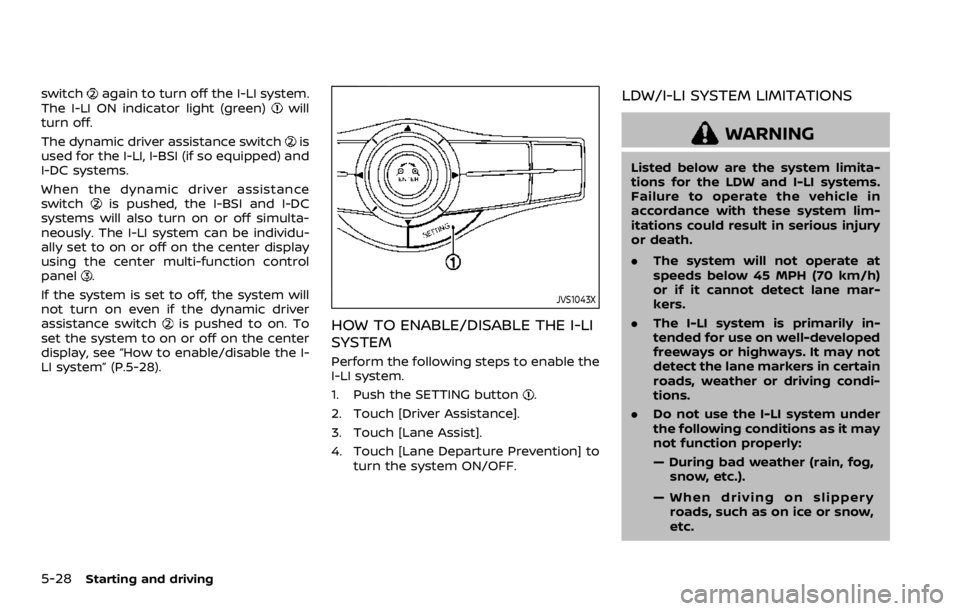
HOW TO ENABLE/DISABLE THE I-LI
SYSTEM
Perform the following steps to enable the
I-LI system.
1. Push the SETTING button
.
2. Touch [Driver Assistance].
3. Touch [Lane Assist].
4. Touch [Lane Departure Prevention] to turn the system ON/OFF.
LDW/I-LI SYSTEM LIMITATIONS
WARNING
Listed below are the system limita-
tions for the LDW and I-LI systems.
Failure to operate the vehicle in
accordance with these system lim-
itations could result in serious injury
or death.
.The system will not operate at
speeds below 45 MPH (70 km/h)
or if it cannot detect lane mar-
kers.
. The I-LI system is primarily in-
tended for use on well-developed
freeways or highways. It may not
detect the lane markers in certain
roads, weather or driving condi-
tions.
. Do not use the I-LI system under
the following conditions as it may
not function properly:
— During bad weather (rain, fog,
snow, etc.).
— When driving on slippery roads, such as on ice or snow,
etc.
Page 290 of 528

5-34Starting and driving
JVS1130X
Warning systems switchWarning systems ON indicator lightCenter multi-function control panel
TURNING THE BSW SYSTEM ON/OFF
The warning systems switchis used to
turn on and off the BSW system when it is
activated on the center display using the
center multi-function control panel
. See
“How to enable/disable the BSW system”
(P.5-34). When the warning systems switch
is turned off, the warning
systems ON indicator lighton the
switch is off.
The warning systems switch
will turn
on and off the LDW and BSW systems at
the same time.
HOW TO ENABLE/DISABLE THE BSW
SYSTEM
The BSW system can be turned off
permanently using the center display.
Page 299 of 528

JVS1098X
I-BSI ON indicator light (green)Dynamic driver assistance switchCenter multi-function control panel
TURNING THE I-BSI SYSTEM ON/
OFF
To turn on the I-BSI system, push the
dynamic driver assistance switchon
the steering wheel after starting the
engine. The I-BSI ON indicator light
(green)
on the instrumental panel will illuminate.
Push the dynamic driver assistance
switch
again to turn off the I-BSI
system. The I-BSI ON indicator light
(green)
will turn off.
The dynamic driver assistance switch
is
used for the I-BSI, I-LI and I-DC systems.
When the dynamic driver assistance
switch
is pushed, the I-LI and I-DC
systems will also turn on or off simulta-
neously. The I-BSI system can be indivi-
dually set to on or off on the center
display using the center multi-function
control panel
.
If the system is set to off, the system will
not turn on even if the dynamic driver
assistance switch
is pushed to on. To
set the system to on or off on the center
display, see “How to enable/disable the I-
BSI system” (P.5-44).
Starting and driving5-43
Page 311 of 528

JVS1099X
Side indicator lightI-BI system indicatorI-BI system key (on the center display)Center multi-function control panel
JVS0173X
I-BI SYSTEM OPERATION
When the shift lever is in the R (Reverse)
position and the vehicle speed is less than
approximately 5 MPH (8 km/h), the I-BI
system operates.
If the radar detects a vehicle approaching
from the side or the sonar detects close
stationary objects behind the vehicle, the
system gives visual and audible warnings.
If the driver does not apply the brakes, the
system automatically applies the brake
for a moment when the vehicle is moving
backwards. After the automatic brake
application, the driver must depress the
brake pedal to maintain brake pressure. If
the driver’s foot is on the accelerator
Starting and driving5-55