warning NISSAN ARMADA 2020 Owner´s Manual
[x] Cancel search | Manufacturer: NISSAN, Model Year: 2020, Model line: ARMADA, Model: NISSAN ARMADA 2020Pages: 528, PDF Size: 2.1 MB
Page 237 of 528
WARNING
Failure to follow the warnings and
instructions for proper use of the
sonar function as outlined in this
section could result in serious injury
or death.
.The sonar is a convenience fea-
ture. It is not a substitute for
proper parking.
. This function is designed as an
aid to the driver in detecting large
stationary objects to help avoid
damaging the vehicle.
. The driver is always responsible
for safety during parking and
other maneuvers.
. Always look around and check
that it is safe to move before
parking.
. Read and understand the limita-
tions of the sonar as contained in
this section.
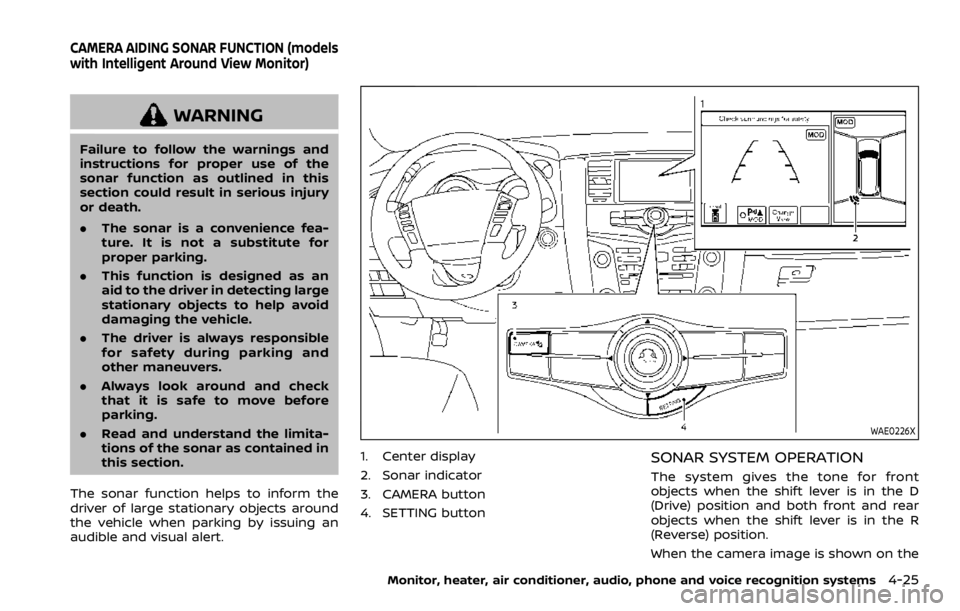
The sonar function helps to inform the
driver of large stationary objects around
the vehicle when parking by issuing an
audible and visual alert.
WAE0226X
1. Center display
2. Sonar indicator
3. CAMERA button
4. SETTING buttonSONAR SYSTEM OPERATION
The system gives the tone for front
objects when the shift lever is in the D
(Drive) position and both front and rear
objects when the shift lever is in the R
(Reverse) position.
When the camera image is shown on the
Monitor, heater, air conditioner, audio, phone and voice recognition systems4-25
CAMERA AIDING SONAR FUNCTION (models
with Intelligent Around View Monitor)
Page 239 of 528
JVH1695X
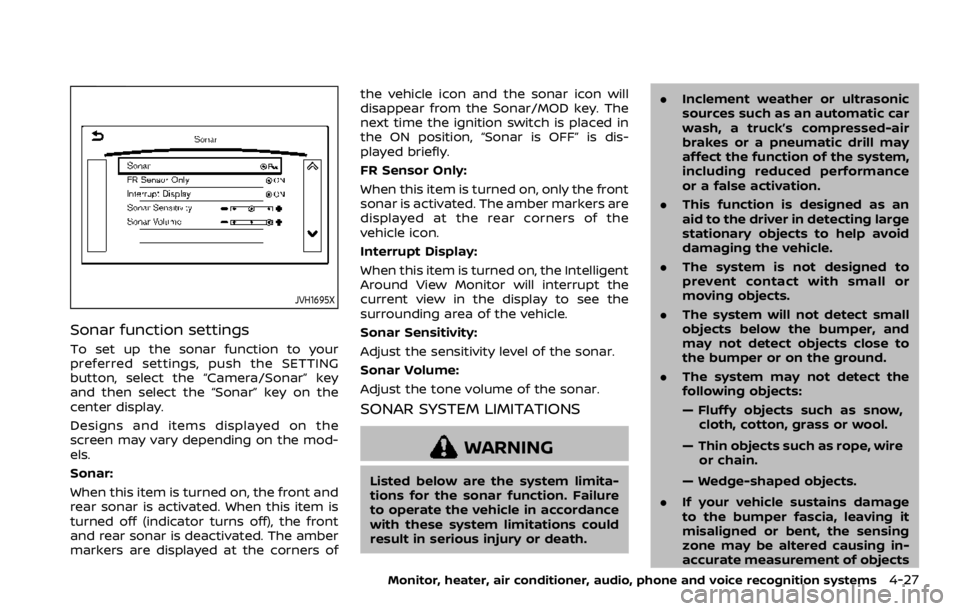
Sonar function settings
To set up the sonar function to your
preferred settings, push the SETTING
button, select the “Camera/Sonar” key
and then select the “Sonar” key on the
center display.
Designs and items displayed on the
screen may vary depending on the mod-
els.
Sonar:
When this item is turned on, the front and
rear sonar is activated. When this item is
turned off (indicator turns off), the front
and rear sonar is deactivated. The amber
markers are displayed at the corners ofthe vehicle icon and the sonar icon will
disappear from the Sonar/MOD key. The
next time the ignition switch is placed in
the ON position, “Sonar is OFF” is dis-
played briefly.
FR Sensor Only:
When this item is turned on, only the front
sonar is activated. The amber markers are
displayed at the rear corners of the
vehicle icon.
Interrupt Display:
When this item is turned on, the Intelligent
Around View Monitor will interrupt the
current view in the display to see the
surrounding area of the vehicle.
Sonar Sensitivity:
Adjust the sensitivity level of the sonar.
Sonar Volume:
Adjust the tone volume of the sonar.
SONAR SYSTEM LIMITATIONS
WARNING
Listed below are the system limita-
tions for the sonar function. Failure
to operate the vehicle in accordance
with these system limitations could
result in serious injury or death.
.
Inclement weather or ultrasonic
sources such as an automatic car
wash, a truck’s compressed-air
brakes or a pneumatic drill may
affect the function of the system,
including reduced performance
or a false activation.
. This function is designed as an
aid to the driver in detecting large
stationary objects to help avoid
damaging the vehicle.
. The system is not designed to
prevent contact with small or
moving objects.
. The system will not detect small
objects below the bumper, and
may not detect objects close to
the bumper or on the ground.
. The system may not detect the
following objects:
— Fluffy objects such as snow,
cloth, cotton, grass or wool.
— Thin objects such as rope, wire or chain.
— Wedge-shaped objects.
. If your vehicle sustains damage
to the bumper fascia, leaving it
misaligned or bent, the sensing
zone may be altered causing in-
accurate measurement of objects
Monitor, heater, air conditioner, audio, phone and voice recognition systems4-27
Page 241 of 528

JVH1689X
1. CAMERA button
2. SETTING button
WARNING
Failure to follow the warnings and
instructions for proper use of the
Moving Object Detection system
could result in serious injury or
death.
.The MOD system is not a substi-
tute for proper vehicle operation
and is not designed to prevent
contact with the objects sur-
rounding the vehicle. When man-
euvering, always use the outside
mirror and rearview mirror and
turn and check the surrounding
to ensure it is safe to maneuver.
. The system is deactivated at
speeds above 6 MPH (10 km/h).
It is reactivated at lower speeds.
. The MOD system is not designed
to detect the surrounding sta-
tionary objects.
The Moving Object Detection (MOD) sys-
tem can inform the driver of the moving
objects surrounding the vehicle when
driving out of garages, maneuvering into
parking lots and in other such instances.
The MOD system detects moving objects
by using image processing technology on
Monitor, heater, air conditioner, audio, phone and voice recognition systems4-29
MOVING OBJECT DETECTION (MOD)
Page 244 of 528

4-32Monitor, heater, air conditioner, audio, phone and voice recognition systems
MOD function setting
To set up the MOD function to your
preferred settings, push the SETTING
button, select “Camera/Sonar” key, and
then select the “Camera” key on the
center display.
JVH1713X
Moving Object Detection:
When this item is turned on, the MOD is
activated. When this item is turned off
(indicator turns off), the MOD system is
deactivated. When the MOD system is
deactivated, “MOD”
will disappear on
the Sonar/MOD keyand the MOD iconwill disappear as well.
When the sonar is turned off on the
setting menu as well, the Sonar/MOD
key
will disappear.
MOD SYSTEM LIMITATIONS
WARNING
Listed below are the system limita-
tions for MOD. Failure to operate the
vehicle in accordance with these
system limitations could result in
serious injury or death.
. Do not use the MOD system when
towing a trailer. The system may
not function properly.
. Excessive noise (for example,
audio system volume or open
vehicle window) will interfere
with the chime sound, and it
may not be heard.
. The MOD system performance
will be limited according to en-
vironmental conditions and sur-
rounding objects such as:
— When there is low contrast
between background and the
moving objects.
— When there is blinking source of light.
— When strong light such as another vehicle’s headlight or
sunlight is present.
Page 247 of 528
SAA3055
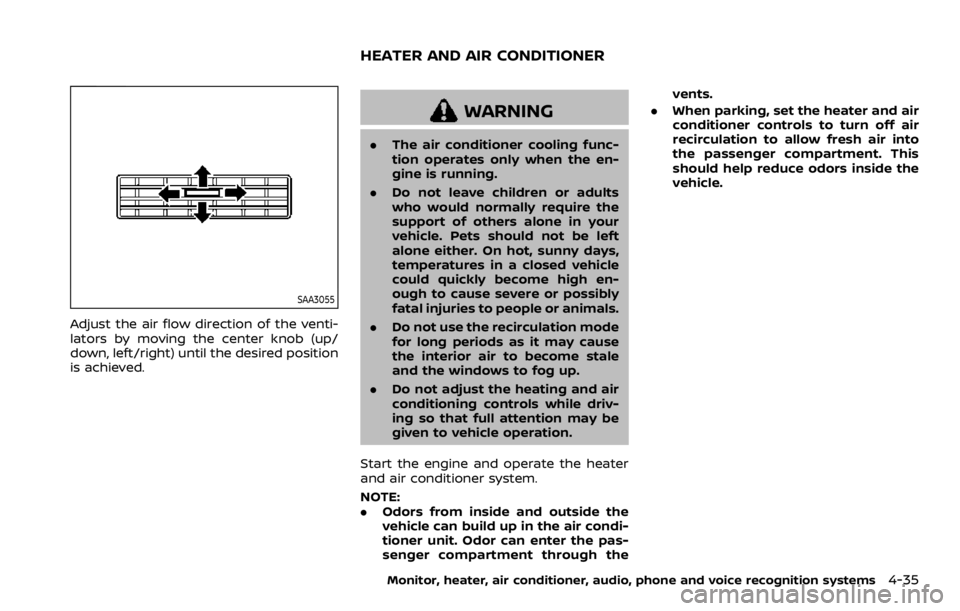
Adjust the air flow direction of the venti-
lators by moving the center knob (up/
down, left/right) until the desired position
is achieved.
WARNING
.The air conditioner cooling func-
tion operates only when the en-
gine is running.
. Do not leave children or adults
who would normally require the
support of others alone in your
vehicle. Pets should not be left
alone either. On hot, sunny days,
temperatures in a closed vehicle
could quickly become high en-
ough to cause severe or possibly
fatal injuries to people or animals.
. Do not use the recirculation mode
for long periods as it may cause
the interior air to become stale
and the windows to fog up.
. Do not adjust the heating and air
conditioning controls while driv-
ing so that full attention may be
given to vehicle operation.
Start the engine and operate the heater
and air conditioner system.
NOTE:
. Odors from inside and outside the
vehicle can build up in the air condi-
tioner unit. Odor can enter the pas-
senger compartment through the vents.
. When parking, set the heater and air
conditioner controls to turn off air
recirculation to allow fresh air into
the passenger compartment. This
should help reduce odors inside the
vehicle.
Monitor, heater, air conditioner, audio, phone and voice recognition systems4-35
HEATER AND AIR CONDITIONER
Page 255 of 528
OPERATING TIPS
When the engine coolant temperature
and outside air temperature are low, the
air flow from the foot outlets may not
operate. However, this is not a malfunc-
tion. After the coolant temperature
warms up, the air flow from the foot
outlets will operate normally.
The sensors
andlocated on the
instrument panel help maintain a con-
stant temperature. Do not put anything
on or around the sensors.
LINKING INTELLIGENT KEY (if so
equipped)
The air conditioner system settings can
be memorized for each Intelligent Key.
For more details, see “Setting memory
function” (P.3-42).
IN-CABIN MICROFILTER
The air conditioner system is equipped
with an in-cabin microfilter which collects
dirt, pollen, dust, etc.
To make sure the air conditioner heats,
defogs, and ventilates efficiently, replace
the filter in accordance with the specified
maintenance intervals listed in the “9.
Maintenance and schedules” section. It is
recommended to see a NISSAN dealer to
replace the filter.
The filter should be replaced if the air flow decreases significantly or if win-
dows fog up easily when operating the
heater or air conditioner.
SERVICING AIR CONDITIONER
The air conditioner system in your NISSAN
is charged with a refrigerant designed
with the environment in mind.
This re-
frigerant will not harm the earth’s
ozone layer. However, special charging
equipment and lubricant are required
when servicing your NISSAN air condi-
tioner. Using improper refrigerants or
lubricants will cause severe damage to
your air conditioner system. (See “Capa-
cities and recommended fluids/lubri-
cants” (P.10-2) for air conditioner system
refrigerant and lubricant recommenda-
tions.)
Your NISSAN dealer will be able to service
your environmentally friendly air condi-
tioner system.
WARNING
The system contains refrigerant un-
der high pressure. To avoid personal
injury, any air conditioner service
should be done only by an experi-
enced technician with the proper
equipment.
WINDOW ANTENNA
The antenna pattern is printed inside the
rear side glass.
CAUTION
. Do not place metalized film near
the 3rd row seat window or at-
tach any metal parts to it. This
may cause poor reception or
noise.
. When cleaning the inside of the
rear side window, be careful not
to scratch or damage the rear
side window antenna. Lightly
wipe along the antenna with a
dampened soft cloth.
Monitor, heater, air conditioner, audio, phone and voice recognition systems4-43
ANTENNA
Page 256 of 528
4-44Monitor, heater, air conditioner, audio, phone and voice recognition systems
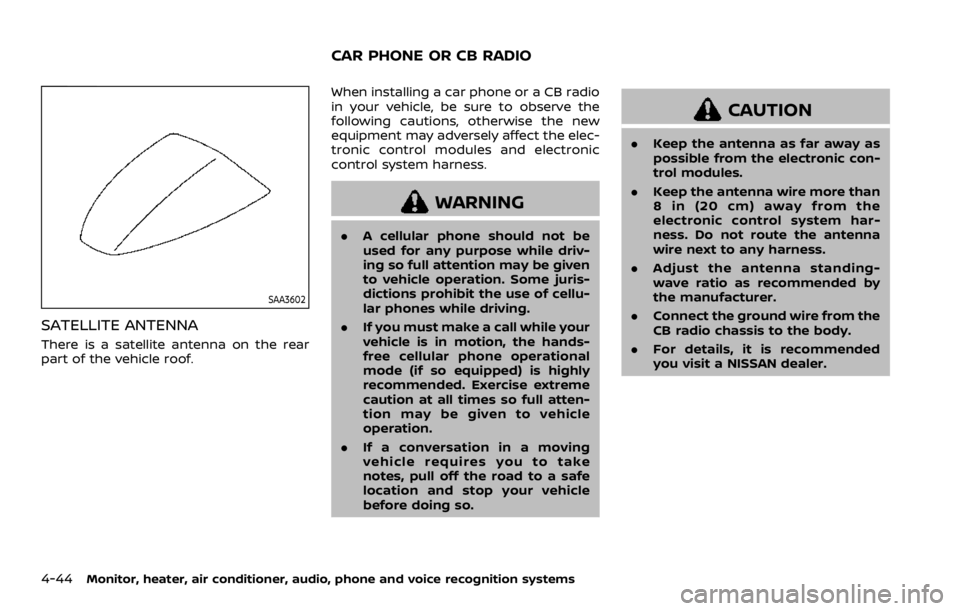
SAA3602
SATELLITE ANTENNA
There is a satellite antenna on the rear
part of the vehicle roof.When installing a car phone or a CB radio
in your vehicle, be sure to observe the
following cautions, otherwise the new
equipment may adversely affect the elec-
tronic control modules and electronic
control system harness.
WARNING
.
A cellular phone should not be
used for any purpose while driv-
ing so full attention may be given
to vehicle operation. Some juris-
dictions prohibit the use of cellu-
lar phones while driving.
. If you must make a call while your
vehicle is in motion, the hands-
free cellular phone operational
mode (if so equipped) is highly
recommended. Exercise extreme
caution at all times so full atten-
tion may be given to vehicle
operation.
. If a conversation in a moving
vehicle requires you to take
notes, pull off the road to a safe
location and stop your vehicle
before doing so.
CAUTION
.Keep the antenna as far away as
possible from the electronic con-
trol modules.
. Keep the antenna wire more than
8 in (20 cm) away from the
electronic control system har-
ness. Do not route the antenna
wire next to any harness.
. Adjust the antenna standing-
wave ratio as recommended by
the manufacturer.
. Connect the ground wire from the
CB radio chassis to the body.
. For details, it is recommended
you visit a NISSAN dealer.
CAR PHONE OR CB RADIO
Page 257 of 528

5 Starting and driving
Precautions when starting and driving ...................... 5-4Exhaust gas (carbon monoxide) ................................ 5-4
Three-way catalyst ............................................................... 5-4
Tire Pressure Monitoring System (TPMS) ........... 5-5
Avoiding collision and rollover .................................... 5-8
On-pavement and off-road driving
precautions ........................................................................\
......... 5-9
Off-road recovery .................................................................. 5-9
Rapid air pressure loss ...................................................... 5-9
Drinking alcohol/drugs and driving ..................... 5-10
Driving safety precautions .......................................... 5-10
Push-button ignition switch ............................................. 5-13 Operating range for engine start function ...... 5-13
Push-button ignition switch positions .............. 5-14
Emergency engine shut off ........................................ 5-15
Intelligent Key battery discharge ........................... 5-15
Before starting the engine ................................................. 5-16
Starting the engine .................................................................. 5-16 Remote engine start (if so equipped) ................. 5-17
Driving the vehicle .................................................................... 5-17
Engine protection mode ............................................... 5-17
Automatic transmission ................................................ 5-18 Parking brake ........................................................................\
....... 5-22
Lane Departure Warning (LDW)/Intelligent
Lane Intervention (I-LI) (if so equipped) .................. 5-23
LDW system operation ................................................. 5-24
Turning the LDW system ON/OFF ...................... 5-25
How to enable/disable the LDW system ....... 5-26
I-LI system operation .................................................... 5-26
Turning the I-LI system ON/OFF .......................... 5-27
How to enable/disable the I-LI system .......... 5-28
LDW/I-LI system limitations ..................................... 5-28
System temporarily unavailable ........................... 5-30
System malfunction ....................................................... 5-31
System maintenance .................................................... 5-31
Blind Spot Warning (BSW) (if so equipped) ........... 5-32 BSW system operation ................................................. 5-33
Turning the BSW system ON/OFF ...................... 5-34
How to enable/disable the BSW system ....... 5-34
BSW system limitations ............................................... 5-35
BSW driving situations .................................................. 5-36
System temporarily unavailable ........................... 5-39
System malfunction ....................................................... 5-39
System maintenance .................................................... 5-40
Page 258 of 528
 (if
so equipped) ........................................................................\
.......... 5-40I-BSI system operation ...........................")
Intelligent Blind Spot Intervention (I-BSI) (if
so equipped) ........................................................................\
.......... 5-40I-BSI system operation ................................................... 5-42
Turning the I-BSI system ON/OFF ......................... 5-43
How to enable/disable the I-BSI system ......... 5-44
I-BSI system limitations ................................................. 5-44
I-BSI driving situations .................................................... 5-46
System temporarily unavailable ............................. 5-51
System malfunction .......................................................... 5-52
System maintenance ....................................................... 5-52
Intelligent Back-up Intervention (I-BI) (if
so equipped) ........................................................................\
.......... 5-53 I-BI system operation ...................................................... 5-55
How to enable/disable the I-BI system ............ 5-59
I-BI system precautions ................................................. 5-60
System temporarily unavailable ............................. 5-61
System malfunction .......................................................... 5-62
System maintenance ....................................................... 5-62
Intelligent Cruise Control (ICC) ....................................... 5-63 How to select the cruise control mode ............ 5-65
Vehicle-to-vehicle distance control mode ...... 5-65
Conventional (fixed speed) cruise
control mode ........................................................................\
.. 5-81
Intelligent Distance Control (I-DC) (if
so equipped) ........................................................................\
.......... 5-85 I-DC system operation .................................................. 5-87
Turning the I-DC system ON/OFF ......................... 5-90
How to enable/disable the I-DC system .......... 5-91
I-DC system display and indicators ..................... 5-91 I-DC system limitations ............................................... 5-92
System temporarily unavailable ........................... 5-95
System malfunction ....................................................... 5-97
System maintenance .................................................... 5-97
Automatic Emergency Braking (AEB) ....................... 5-98 AEB system operation .................................................. 5-99
Turning the AEB system ON/OFF ................... 5-101
AEB system limitations ............................................ 5-101
System temporarily unavailable ....................... 5-103
System malfunction ................................................... 5-104
System maintenance ................................................ 5-105
Intelligent Forward Collision Warning
(I-FCW) ........................................................................\
.................... 5-106 I-FCW system operation ......................................... 5-108
Turning the I-FCW system ON/OFF ............... 5-109
I-FCW system limitations ........................................ 5-111
System temporarily unavailable ....................... 5-113
System malfunction ................................................... 5-113
System maintenance ................................................ 5-114
Break-in schedule ................................................................. 5-115
Fuel efficient driving tips ................................................ 5-115
Increasing fuel economy ................................................ 5-116
NISSAN all-mode 4WD® (if so equipped) ............ 5-116 NISSAN all-mode 4WD® system ........................ 5-117
4WD shift switch ........................................................... 5-121
4WD shift indicator ..................................................... 5-122
4WD warning light ....................................................... 5-122
Hill Start Assist system ..................................................... 5-124
Parking/parking on hills .................................................. 5-125
Page 260 of 528
5-4Starting and driving
WARNING
.Do not leave children or adults
who would normally require the
support of others alone in your
vehicle. Pets should not be left
alone either. They could acciden-
tally injure themselves or others
through inadvertent operation of
the vehicle. Also, on hot, sunny
days, temperatures in a closed
vehicle could quickly become
high enough to cause severe or
possibly fatal injuries to people or
animals.
. Properly secure all cargo to help
prevent it from sliding or shifting.
Do not place cargo higher than
the seatbacks. In a sudden stop
or collision, unsecured cargo
could cause personal injury.
EXHAUST GAS (carbon monoxide)
WARNING
.Do not breathe exhaust gases;
they contain colorless and odor-
less carbon monoxide. Carbon
monoxide is dangerous. It can cause unconsciousness or death.
. If you suspect that exhaust fumes
are entering the vehicle, drive
with all windows fully open, and
have the vehicle inspected imme-
diately.
. Do not run the engine in closed
spaces such as a garage.
. Do not park the vehicle with the
engine running for any extended
length of time.
. Keep the liftgate closed while
driving, otherwise exhaust gases
could be drawn into the passen-
ger compartment. If you must
drive with the liftgate open, fol-
low these precautions:
1) Open all the windows.
2) Set the
air recirculation to
off and the fan control to high
to circulate the air.
. If electrical wiring or other cable
connections must pass to a trailer
through the seal on the liftgate or
the body, follow the manufac-
turer’s recommendation to pre-
vent carbon monoxide entry into
the vehicle.
. The exhaust system and body
should be inspected by a quali- fied mechanic whenever:
— The vehicle is raised for ser-
vice.
— You suspect that exhaust fumes are entering into the
passenger compartment.
— You notice a change in the sound of the exhaust system.
— You have had an accident involving damage to the ex-
haust system, underbody, or
rear of the vehicle.
THREE-WAY CATALYST
The three-way catalyst is an emission
control device installed in the exhaust
system. Exhaust gases in the three-way
catalyst are burned at high temperatures
to help reduce pollutants.
WARNING
. The exhaust gas and the exhaust
system are very hot. Keep people,
animals or flammable materials
away from the exhaust system
components.
. Do not stop or park the vehicle
over flammable materials such as
PRECAUTIONS WHEN STARTING
AND DRIVING