stop NISSAN FRONTIER 2023 Service Manual
[x] Cancel search | Manufacturer: NISSAN, Model Year: 2023, Model line: FRONTIER, Model: NISSAN FRONTIER 2023Pages: 572, PDF Size: 6.58 MB
Page 149 of 572
VEHICLE INFORMATION DISPLAY
WARNINGS AND INDICATORS
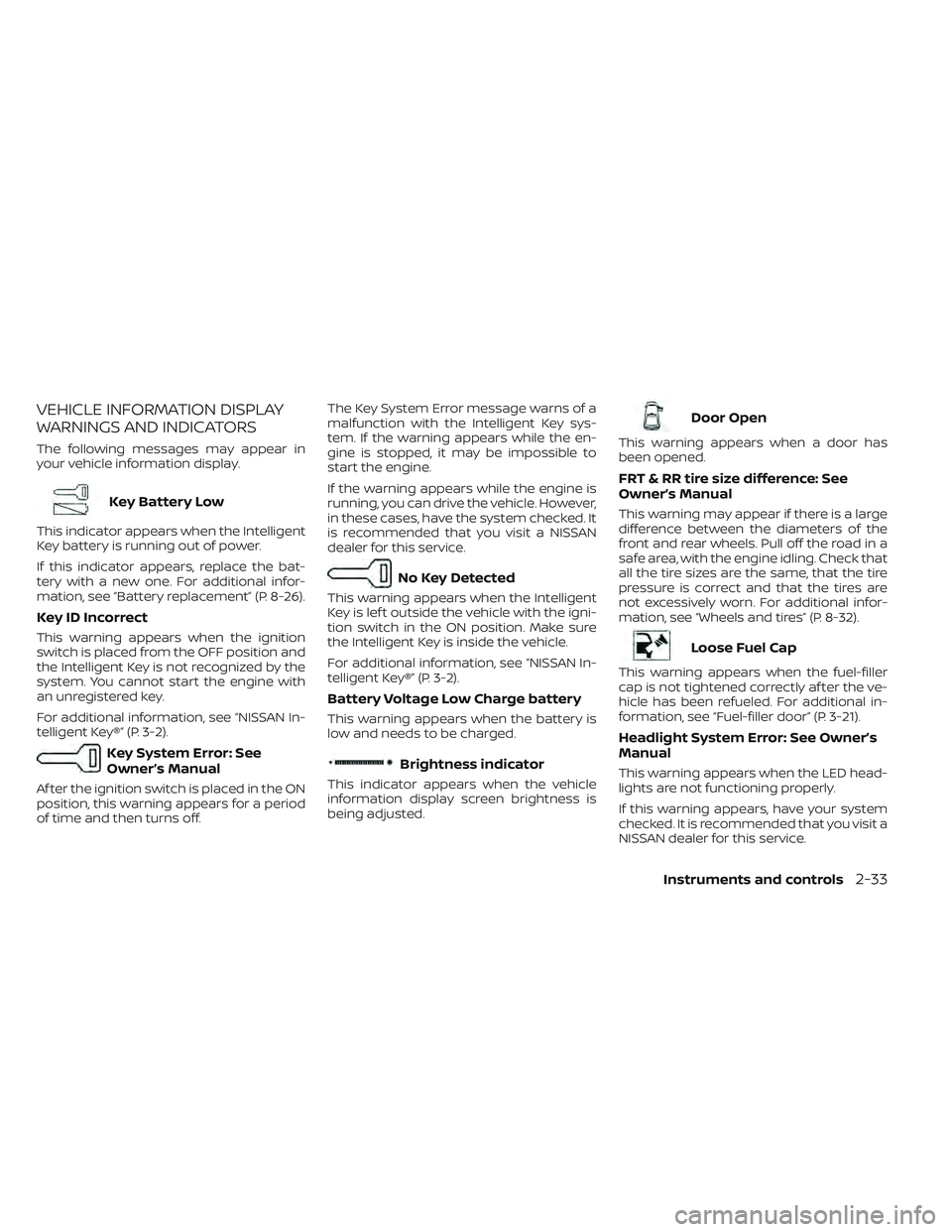
The following messages may appear in
your vehicle information display.
Key Battery Low
This indicator appears when the Intelligent
Key battery is running out of power.
If this indicator appears, replace the bat-
tery with a new one. For additional infor-
mation, see “Battery replacement” (P. 8-26).
Key ID Incorrect
This warning appears when the ignition
switch is placed from the OFF position and
the Intelligent Key is not recognized by the
system. You cannot start the engine with
an unregistered key.
For additional information, see “NISSAN In-
telligent Key®” (P. 3-2).
Key System Error: See
Owner’s Manual
Af ter the ignition switch is placed in the ON
position, this warning appears for a period
of time and then turns off.The Key System Error message warns of a
malfunction with the Intelligent Key sys-
tem. If the warning appears while the en-
gine is stopped, it may be impossible to
start the engine.
If the warning appears while the engine is
running, you can drive the vehicle. However,
in these cases, have the system checked. It
is recommended that you visit a NISSAN
dealer for this service.
No Key Detected
This warning appears when the Intelligent
Key is lef t outside the vehicle with the igni-
tion switch in the ON position. Make sure
the Intelligent Key is inside the vehicle.
For additional information, see “NISSAN In-
telligent Key®” (P. 3-2).
Battery Voltage Low Charge battery
This warning appears when the battery is
low and needs to be charged.
Brightness indicator
This indicator appears when the vehicle
information display screen brightness is
being adjusted.
Door Open
This warning appears when a door has
been opened.
FRT & RR tire size difference: See
Owner’s Manual
This warning may appear if there is a large
difference between the diameters of the
front and rear wheels. Pull off the road in a
safe area, with the engine idling. Check that
all the tire sizes are the same, that the tire
pressure is correct and that the tires are
not excessively worn. For additional infor-
mation, see “Wheels and tires” (P. 8-32).
Loose Fuel Cap
This warning appears when the fuel-filler
cap is not tightened correctly af ter the ve-
hicle has been refueled. For additional in-
formation, see “Fuel-filler door” (P. 3-21).
Headlight System Error: See Owner’s
Manual
This warning appears when the LED head-
lights are not functioning properly.
If this warning appears, have your system
checked. It is recommended that you visit a
NISSAN dealer for this service.
Instruments and controls2-33
Page 150 of 572
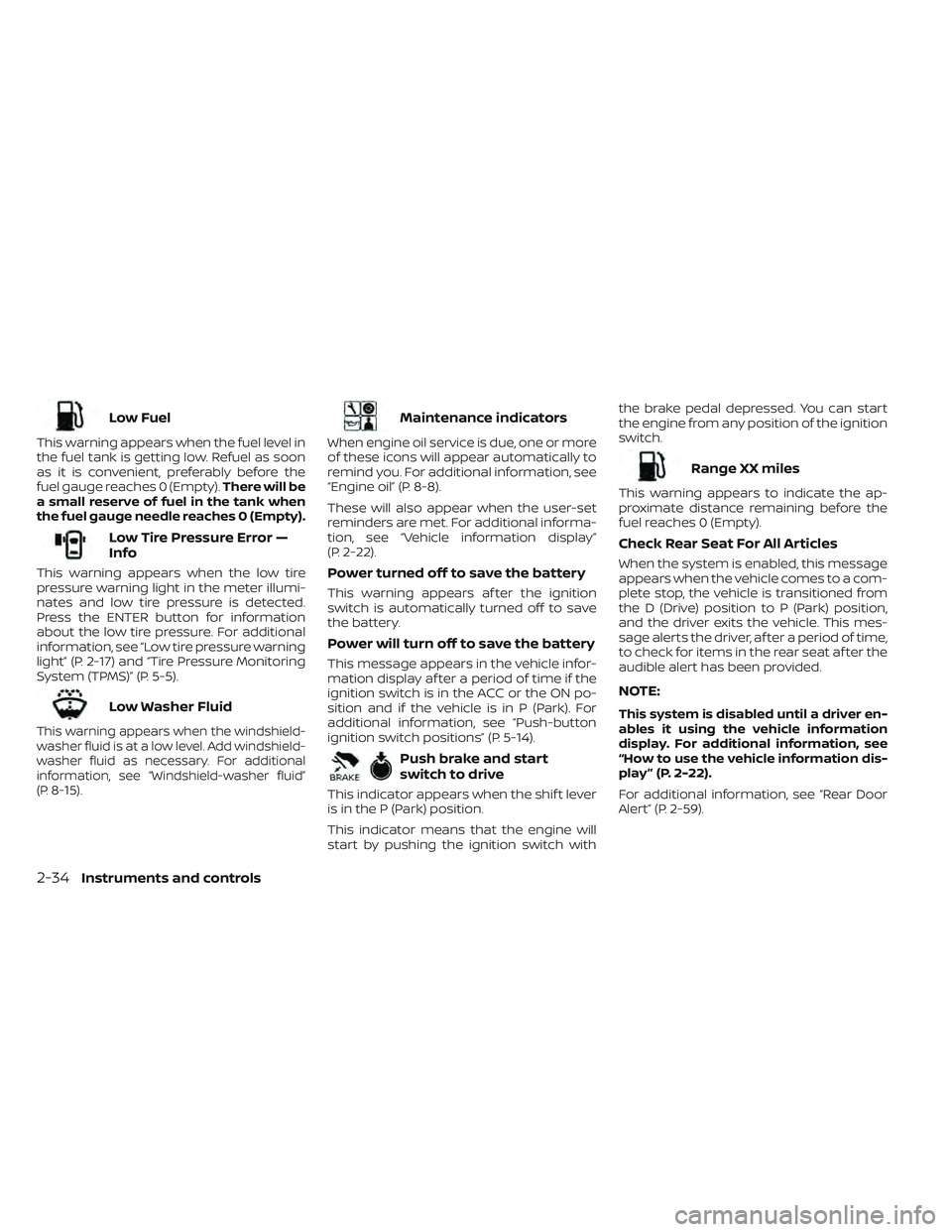
Low Fuel
This warning appears when the fuel level in
the fuel tank is getting low. Refuel as soon
as it is convenient, preferably before the
fuel gauge reaches 0 (Empty).There will be
a small reserve of fuel in the tank when
the fuel gauge needle reaches 0 (Empty).
Low Tire Pressure Error —
Info
This warning appears when the low tire
pressure warning light in the meter illumi-
nates and low tire pressure is detected.
Press the ENTER button for information
about the low tire pressure. For additional
information, see “Low tire pressure warning
light” (P. 2-17) and “Tire Pressure Monitoring
System (TPMS)” (P. 5-5).
Low Washer Fluid
This warning appears when the windshield-
washer fluid is at a low level. Add windshield-
washer fluid as necessary. For additional
information, see “Windshield-washer fluid”
(P. 8-15).
Maintenance indicators
When engine oil service is due, one or more
of these icons will appear automatically to
remind you. For additional information, see
“Engine oil” (P. 8-8).
These will also appear when the user-set
reminders are met. For additional informa-
tion, see “Vehicle information display”
(P. 2-22).
Power turned off to save the battery
This warning appears af ter the ignition
switch is automatically turned off to save
the battery.
Power will turn off to save the battery
This message appears in the vehicle infor-
mation display af ter a period of time if the
ignition switch is in the ACC or the ON po-
sition and if the vehicle is in P (Park). For
additional information, see “Push-button
ignition switch positions” (P. 5-14).
Push brake and start
switch to drive
This indicator appears when the shif t lever
is in the P (Park) position.
This indicator means that the engine will
start by pushing the ignition switch with the brake pedal depressed. You can start
the engine from any position of the ignition
switch.
Range XX miles
This warning appears to indicate the ap-
proximate distance remaining before the
fuel reaches 0 (Empty).
Check Rear Seat For All Articles
When the system is enabled, this message
appears when the vehicle comes to a com-
plete stop, the vehicle is transitioned from
the D (Drive) position to P (Park) position,
and the driver exits the vehicle. This mes-
sage alerts the driver, af ter a period of time,
to check for items in the rear seat af ter the
audible alert has been provided.
NOTE:
This system is disabled until a driver en-
ables it using the vehicle information
display. For additional information, see
“How to use the vehicle information dis-
play ” (P. 2-22).
For additional information, see “Rear Door
Alert” (P. 2-59).
2-34Instruments and controls
Page 151 of 572
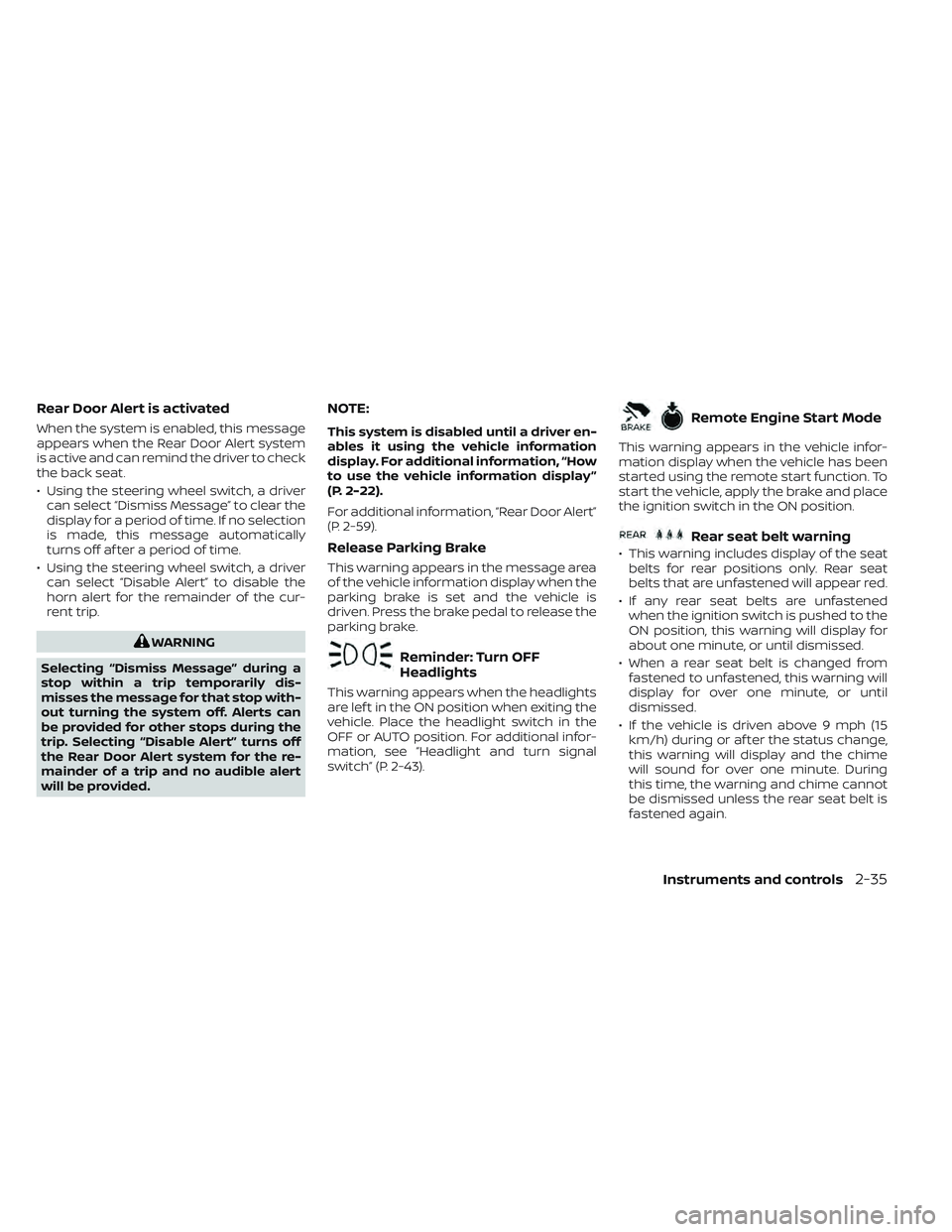
Rear Door Alert is activated
When the system is enabled, this message
appears when the Rear Door Alert system
is active and can remind the driver to check
the back seat.
• Using the steering wheel switch, a drivercan select “Dismiss Message” to clear the
display for a period of time. If no selection
is made, this message automatically
turns off af ter a period of time.
• Using the steering wheel switch, a driver can select “Disable Alert” to disable the
horn alert for the remainder of the cur-
rent trip.
WARNING
Selecting “Dismiss Message” during a
stop within a trip temporarily dis-
misses the message for that stop with-
out turning the system off. Alerts can
be provided for other stops during the
trip. Selecting “Disable Alert” turns off
the Rear Door Alert system for the re-
mainder of a trip and no audible alert
will be provided.
NOTE:
This system is disabled until a driver en-
ables it using the vehicle information
display. For additional information, “How
to use the vehicle information display ”
(P. 2-22).
For additional information, “Rear Door Alert”
(P. 2-59).
Release Parking Brake
This warning appears in the message area
of the vehicle information display when the
parking brake is set and the vehicle is
driven. Press the brake pedal to release the
parking brake.
Reminder: Turn OFF
Headlights
This warning appears when the headlights
are lef t in the ON position when exiting the
vehicle. Place the headlight switch in the
OFF or AUTO position. For additional infor-
mation, see “Headlight and turn signal
switch” (P. 2-43).
Remote Engine Start Mode
This warning appears in the vehicle infor-
mation display when the vehicle has been
started using the remote start function. To
start the vehicle, apply the brake and place
the ignition switch in the ON position.
Rear seat belt warning
• This warning includes display of the seat belts for rear positions only. Rear seat
belts that are unfastened will appear red.
• If any rear seat belts are unfastened when the ignition switch is pushed to the
ON position, this warning will display for
about one minute, or until dismissed.
• When a rear seat belt is changed from fastened to unfastened, this warning will
display for over one minute, or until
dismissed.
• If the vehicle is driven above 9 mph (15 km/h) during or af ter the status change,
this warning will display and the chime
will sound for over one minute. During
this time, the warning and chime cannot
be dismissed unless the rear seat belt is
fastened again.
Instruments and controls2-35
Page 152 of 572
NOTE:
Opening and closing a rear door while
stopped will reset this warning, similar to
pushing the ignition switch to ON again.
NOTE:
In vehicles with only 2 seats in the rear
row, only 2 seats will be displayed.
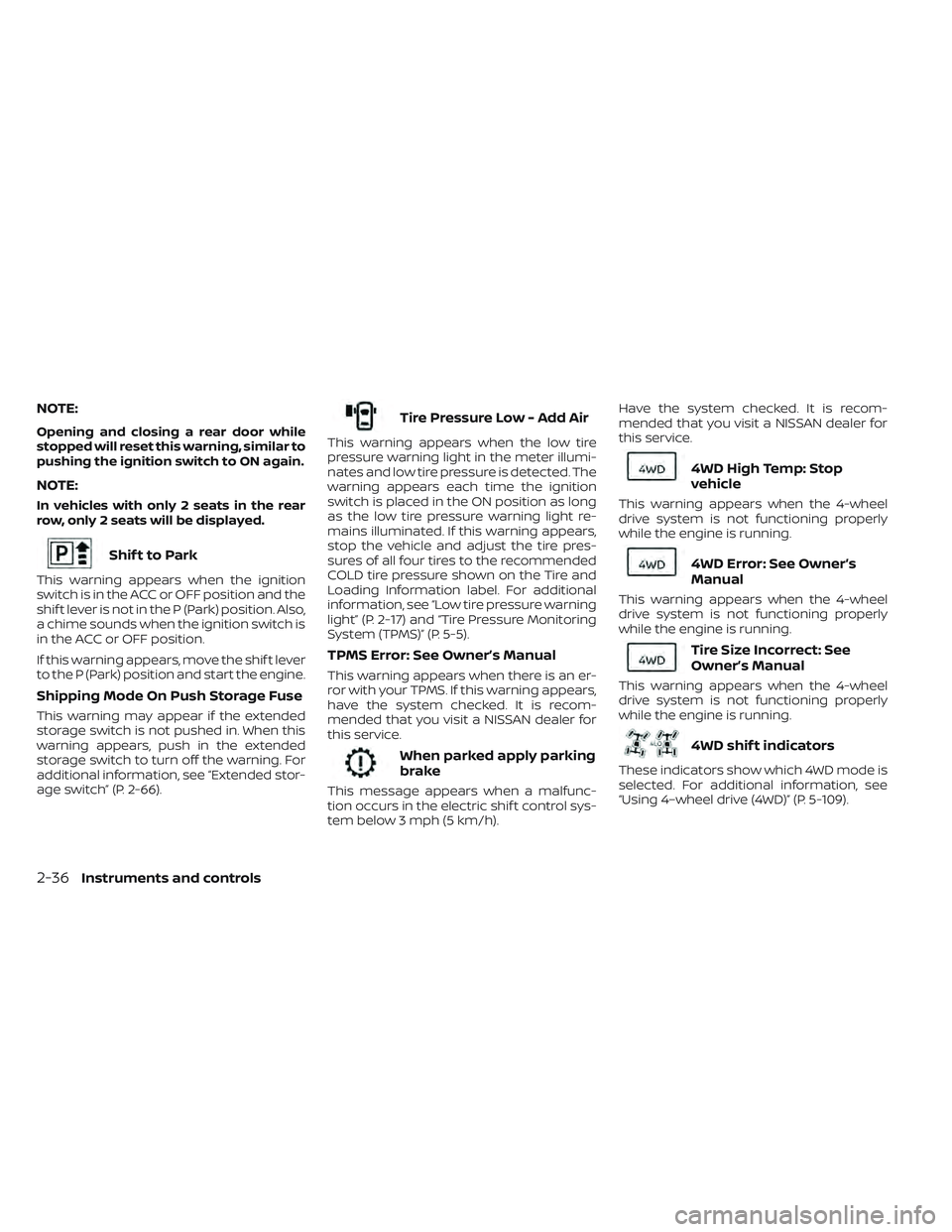
Shif t to Park
This warning appears when the ignition
switch is in the ACC or OFF position and the
shif t lever is not in the P (Park) position. Also,
a chime sounds when the ignition switch is
in the ACC or OFF position.
If this warning appears, move the shif t lever
to the P (Park) position and start the engine.
Shipping Mode On Push Storage Fuse
This warning may appear if the extended
storage switch is not pushed in. When this
warning appears, push in the extended
storage switch to turn off the warning. For
additional information, see “Extended stor-
age switch” (P. 2-66).
Tire Pressure Low - Add Air
This warning appears when the low tire
pressure warning light in the meter illumi-
nates and low tire pressure is detected. The
warning appears each time the ignition
switch is placed in the ON position as long
as the low tire pressure warning light re-
mains illuminated. If this warning appears,
stop the vehicle and adjust the tire pres-
sures of all four tires to the recommended
COLD tire pressure shown on the Tire and
Loading Information label. For additional
information, see “Low tire pressure warning
light” (P. 2-17) and “Tire Pressure Monitoring
System (TPMS)” (P. 5-5).
TPMS Error: See Owner’s Manual
This warning appears when there is an er-
ror with your TPMS. If this warning appears,
have the system checked. It is recom-
mended that you visit a NISSAN dealer for
this service.
When parked apply parking
brake
This message appears when a malfunc-
tion occurs in the electric shif t control sys-
tem below 3 mph (5 km/h).Have the system checked. It is recom-
mended that you visit a NISSAN dealer for
this service.
4WD High Temp: Stop
vehicle
This warning appears when the 4-wheel
drive system is not functioning properly
while the engine is running.
4WD Error: See Owner’s
Manual
This warning appears when the 4-wheel
drive system is not functioning properly
while the engine is running.
Tire Size Incorrect: See
Owner’s Manual
This warning appears when the 4-wheel
drive system is not functioning properly
while the engine is running.
4WD shif t indicators
These indicators show which 4WD mode is
selected. For additional information, see
“Using 4–wheel drive (4WD)” (P. 5-109).
2-36Instruments and controls
Page 154 of 572
Driver Attention Alert —
TakeaBreak?
This alert appears when the system has
detected that the driver may be displaying
fatigue or a lack of attention.
Forward Driving Aids Temporarily
Disabled Front Sensor Blocked See
Owner’s Manual
This message appears when the front ra-
dar sensor may be obstructed due to:
• mud, dirt, snow, ice, etc.
• inclement weather (rain, fog, snow, etc.)
All forward driving aids are temporarily dis-
abled until the system detects that the
front radar sensor is no longer obstructed.
For additional information, see:
• Automatic Emergency Braking (AEB) withPedestrian Detection (P. 5-81)
• Intelligent Cruise Control (ICC) (P. 5-52)
• Intelligent Forward Collision Warning (I- FCW) (P. 5-92)
Idling Stop System
This indicator shows the Idling Stop System
status.
For addition information, see “Idling Stop
System” (P. 5-129).
Intelligent Cruise Control
(ICC) indicators
These indicators show the Intelligent
Cruise Control (ICC) system status. The sta-
tus is shown by color. For additional infor-
mation, see “Intelligent Cruise Control (ICC)”
(P. 5-52).
Automatic Emergency
Braking (AEB) with
Pedestrian Detection
emergency warning
indicator
This indicator appears along, with an au-
dible warning, when the system detects
the possibility of a forward collision.
For additional information, see “Automatic
Emergency Braking (AEB) with Pedestrian
Detection” (P. 5-81).
Lane Departure Warning
(LDW) indicator
This indicator appears when the LDW sys-
tem is engaged.
For additional information, see “Lane De-
parture Warning (LDW)” (P. 5-27).
Malfunction
This warning appears when one or more of
the following systems (if so equipped) is
not functioning properly:
• Blind Spot Warning (BSW)
• Intelligent Cruise Control (ICC)
• Lane Departure Warning (LDW)
• Rear Cross Traffic Alert (RCTA)
• Traffic Sign Recognition (TSR)
If one or more of these warning appears,
have the system checked. It is recom-
mended that you visit a NISSAN dealer for
this service.
Not Available High Camera Temp
This message appears when the camera
detects an interior temperature of more
than approximately 104°F (40°C).
For additional information, see “Automatic
Emergency Braking (AEB) with Pedestrian
Detection” (P. 5-81), “Lane Departure
Warning (LDW)” (P. 5-27).
Parking Sensor
This indicator appears when the sensor is
activated. For additional information, see
“Rear Sonar System (RSS)” (P. 5-124).
2-38Instruments and controls
Page 156 of 572
The system helps deter vehicle thef t but
cannot prevent it, nor can it prevent the
thef t of interior or exterior vehicle compo-
nents in all situations. Always secure your
vehicle even if parking for a brief period.
Never leave your keys in the vehicle, and
always lock the vehicle when unattended.
Be aware of your surroundings, and park in
secure, well-lit areas whenever possible.
Many devices offering additional protec-
tion, such as component locks, identifica-
tion markers, and tracking systems, are
available at auto supply stores and spe-
cialty shops. A NISSAN dealer may also offer
such equipment. Check with your insur-
ance company to see if you may be eligible
for discounts for various thef t protection
features.
How to arm the vehicle security
system
1. Close all windows.(The system can be
armed even if the windows are open.)
2. Remove the Intelligent Key from the vehicle.
3. Close all doors. Lock all doors. The doors can be locked with the power door lock
switch (if the door is opened, locked and
then closed) or with the key fob. Key fob operation:
• Press the
button on the key fob. All
doors lock. The hazard lights flash twice
and the horn beeps once to indicate all
doors are locked.
• When the
button is pressed with all
doors locked, the hazard lights flash twice
and the horn beeps once as a reminder
that the doors are already locked.
The horn may or may not beep.
4. Confirm that the
indicator light
comes on. Theindicator light
stays on for about 30 seconds. The ve-
hicle security system is now pre-armed.
Af ter about 30 seconds the vehicle se-
curity system automatically shif ts into
the armed phase. The
indicator
light begins to flash once every 3 sec-
onds. If, during the 30-second pre-arm
time period, the driver's door is unlocked
by the key fob or the ignition switch is
placed in ACC or ON position, the system
will not arm.
• If the indicator light fails to glow for a
period of time, unlock the door once
and lock it again. •
Even when the driver and/or passen-
gers are in the vehicle, the system will
arm with all doors closed and locked
with the ignition switch placed in the
OFF position.
Vehicle security system activation
The vehicle security system will give the
following alarm:
• The headlights blink and the horn sounds intermittently.
• The alarm automatically turns off af ter a period of time. However, the alarm reacti-
vates if the vehicle is tampered with
again. The alarm can be shut off by un-
locking the driver's door by pressing the
button on the key fob.
The alarm is activated by:
• Opening a door without using the key fob (even if the door is unlocked by using the
inside lock knob or the power door lock
switch).
How to stop an activated alarm
The alarm stops only by pressing thebutton on the key fob.
2-40Instruments and controls
Page 170 of 572
WARNING
• Never rely solely on the hill descent
control system to control vehicle
speed when driving on steep down-
hill grades. Always drive carefully
when using the hill descent control
system and decelerate the vehicle
speed by depressing the brake pedal
if necessary. Be especially careful
when driving on frozen, muddy or ex-
tremely steep downhill roads. Failure
to control vehicle speed may result in
a loss of control of the vehicle and
possible serious injury or death. •
The hill descent control may not con-
trol the vehicle speed on a hill under
all load or road conditions. Always be
prepared to depress the brake pedal
to control vehicle speed. Failure to do
so may result in a collision or serious
personal injury.
CAUTION
When the hill descent control system
operates continuously for a long time,
the temperature of the brake pads may
increase and the hill descent control sys-
tem may be temporarily disabled (the
indicator light will blink). If the indicator
light does not come on continuously
af ter blinking, stop using the system.
The hill descent control system is designed
to reduce driver workload when going down
steep hills. The hill descent control system
helps to control vehicle speed so the driver
can concentrate on steering the vehicle.
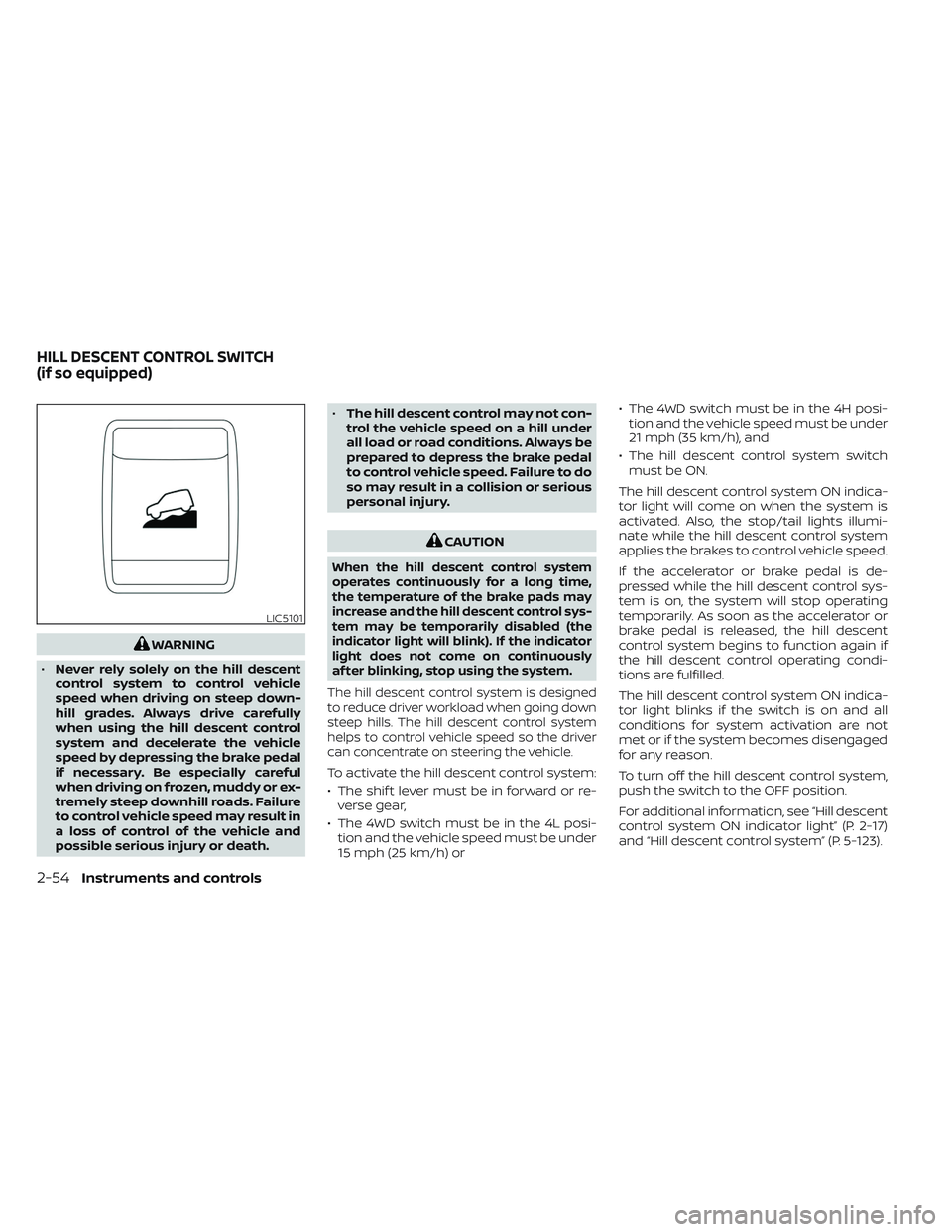
To activate the hill descent control system:
• The shif t lever must be in forward or re- verse gear,
• The 4WD switch must be in the 4L posi- tion and the vehicle speed must be under
15 mph (25 km/h) or • The 4WD switch must be in the 4H posi-
tion and the vehicle speed must be under
21 mph (35 km/h), and
• The hill descent control system switch must be ON.
The hill descent control system ON indica-
tor light will come on when the system is
activated. Also, the stop/tail lights illumi-
nate while the hill descent control system
applies the brakes to control vehicle speed.
If the accelerator or brake pedal is de-
pressed while the hill descent control sys-
tem is on, the system will stop operating
temporarily. As soon as the accelerator or
brake pedal is released, the hill descent
control system begins to function again if
the hill descent control operating condi-
tions are fulfilled.
The hill descent control system ON indica-
tor light blinks if the switch is on and all
conditions for system activation are not
met or if the system becomes disengaged
for any reason.
To turn off the hill descent control system,
push the switch to the OFF position.
For additional information, see “Hill descent
control system ON indicator light” (P. 2-17)
and “Hill descent control system” (P. 5-123).
LIC5101
HILL DESCENT CONTROL SWITCH
(if so equipped)
2-54Instruments and controls
Page 171 of 572
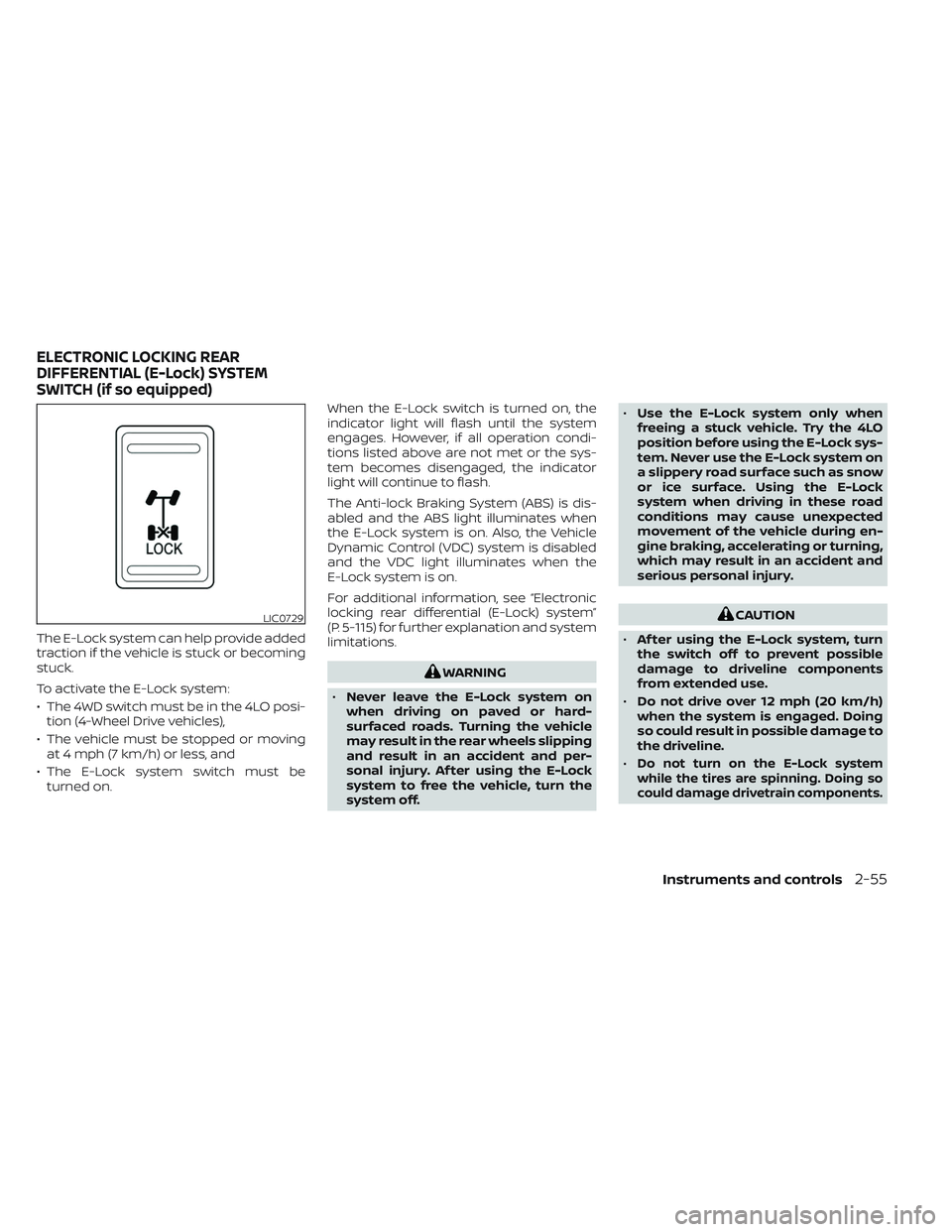
The E-Lock system can help provide added
traction if the vehicle is stuck or becoming
stuck.
To activate the E-Lock system:
• The 4WD switch must be in the 4LO posi-tion (4-Wheel Drive vehicles),
• The vehicle must be stopped or moving at 4 mph (7 km/h) or less, and
• The E-Lock system switch must be turned on. When the E-Lock switch is turned on, the
indicator light will flash until the system
engages. However, if all operation condi-
tions listed above are not met or the sys-
tem becomes disengaged, the indicator
light will continue to flash.
The Anti-lock Braking System (ABS) is dis-
abled and the ABS light illuminates when
the E-Lock system is on. Also, the Vehicle
Dynamic Control (VDC) system is disabled
and the VDC light illuminates when the
E-Lock system is on.
For additional information, see “Electronic
locking rear differential (E-Lock) system”
(P. 5-115) for further explanation and system
limitations.
WARNING
• Never leave the E-Lock system on
when driving on paved or hard-
surfaced roads. Turning the vehicle
may result in the rear wheels slipping
and result in an accident and per-
sonal injury. Af ter using the E-Lock
system to free the vehicle, turn the
system off. •
Use the E-Lock system only when
freeing a stuck vehicle. Try the 4LO
position before using the E-Lock sys-
tem. Never use the E-Lock system on
a slippery road surface such as snow
or ice surface. Using the E-Lock
system when driving in these road
conditions may cause unexpected
movement of the vehicle during en-
gine braking, accelerating or turning,
which may result in an accident and
serious personal injury.
CAUTION
• Af ter using the E-Lock system, turn
the switch off to prevent possible
damage to driveline components
from extended use.
• Do not drive over 12 mph (20 km/h)
when the system is engaged. Doing
so could result in possible damage to
the driveline.
•
Do not turn on the E-Lock system
while the tires are spinning. Doing so
could damage drivetrain components.
LIC0729
ELECTRONIC LOCKING REAR
DIFFERENTIAL (E-Lock) SYSTEM
SWITCH (if so equipped)
Instruments and controls2-55
Page 181 of 572
WARNING
• Never put metallic materials be-
tween the wireless charger and a
smartphone.
• Those who use a pacemaker or other
medical equipment should contact
the electric medical equipment
manufacturer for the possible influ-
ences before use.
• Never put cloth over the smartphone
during charging process.
• Never charge a smartphone when it
is wet.
• Never put metallic materials or small
goods such as a cigarette lighter, In-
telligent Key or memory drive.
CAUTION
• Do not put an RFID/NFC/credit card
between the wireless charger and a
smartphone. This could cause data
corruption in the card.
• Do not use the wireless charger with
dust accumulated or dirt on the pad.
• Do not hit the surface of the wireless
charger. •
Do not spill liquid (water, drinks, etc.)
on the charging pad.
• Do not use grease, oil or alcohol for
cleaning charging pad.
WIRELESS CHARGER INDICATOR
The indicator(1)willil luminate in orange
when the charging process is started.
When the charging has completed, the in-
dicator illuminates in green.
If a malfunction occurs or the charging
process has stopped, the indicator will
blink in orange for 8 seconds then turn off.
WIRELESS CHARGER OPERATION
To use the wireless charger, it is necessary
to seat the smartphone well within the
charging pad. To maximize charging per-
formance, ensure the smartphone is fully
seated on the center of the charging pad
over the "Qi" logo
OA. Because the location
of the power receiver may vary depending
on the smartphone, you will need to try and
find the area that suits your smartphone.
Because some smartphone cases or ac-
cessories may adversely affect charging,
remove them before wireless charging.
Turn off the vibration function of the smart-
phone before wireless charging.
NOTE:
• Only a Qi compatible smartphone can
be used.
• The smartphone may be warmed dur-
ing charging process and the charging
may stop by the protection function of
the wireless charger. This is not a mal-
function. If this occurs, restart charging
af ter the smartphone has cooled
down. The indicator will blink in orange
then turn off.
• The wireless charging process may be
stopped by the status of the smart-
phone (battery temperature, etc.).
• If a radio noise interference occurs dur-
ing charging process, put the smart-
phone onto the center (“Qi” logo) posi-
tion of the wireless charger.
• The wireless charging process will stop
during process of searching the Intelli-
gent Key.
• The wireless charging process will not
be started when a USB (Universal Serial
Bus) cable is connected to the smart-
phone. The indicator may illuminate in
orange or blink if the smartphone is
put on the wireless charger with a USB
cable connected. However, charging is
not performed.
Instruments and controls2-65
Page 186 of 572
WARNING
• Properly secure all cargo with ropes
or straps to help prevent it from slid-
ing or shif ting. In a sudden stop or
collision, unsecured cargo could
cause personal injury.
• The cargo restrained in the under-
seat storage bins must not exceed
the weight limits listed below or the
bins may not stay secured. In a sud-
den stop or collision, the unsecured
bins could cause personal injury.
King Cab® model: 16 lbs. (7.25 kg)
Crew Cab model Driver’s side: 16 lbs. (7.25 kg)
Passenger’s side: 25 lbs. (11.33 kg)
• If the under-seat storage bins are re-
moved for any reason, they should be
securely stored to prevent them from
causing injury to passengers or dam-
age to the vehicle in case of sudden
braking or an accident.
• Do not place sharp objects in the
under-seat storage bins. Such ob-
jects may become dangerous projec-
tiles and cause injury when the ve-
hicle is moving or if the vehicle is
involved in a collision. To access the under-seat storage bins:
For King Cab® models, lif t up the jump seat.
For additional information, see “Jump seat”
(P. 1-6).
For Crew Cab models, lif t up the rear bench
seat. For additional information, see “Fold-
ing the rear bench seat down” (P. 1-7).
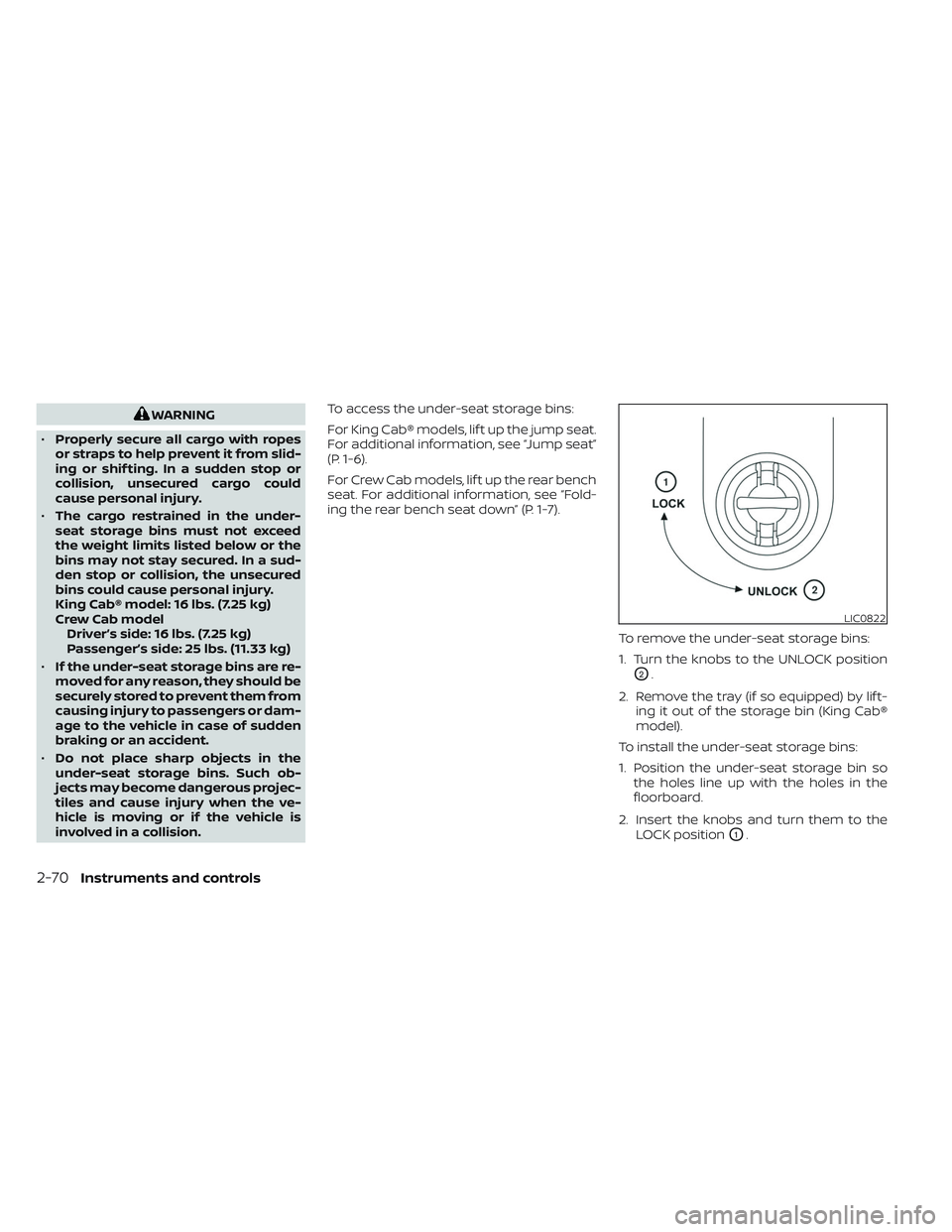
To remove the under-seat storage bins:
1. Turn the knobs to the UNLOCK position
O2.
2. Remove the tray (if so equipped) by lif t- ing it out of the storage bin (King Cab®
model).
To install the under-seat storage bins:
1. Position the under-seat storage bin so the holes line up with the holes in the
floorboard.
2. Insert the knobs and turn them to the LOCK position
O1.
LIC0822
2-70Instruments and controls