set NISSAN GT-R 2015 R35 Multi Function Display Repair Manual
[x] Cancel search | Manufacturer: NISSAN, Model Year: 2015, Model line: GT-R, Model: NISSAN GT-R 2015 R35Pages: 298, PDF Size: 11.39 MB
Page 85 of 298
2-60Navigation
Confirming route
When the suggested route is displayed after
calculation, the route information can be con-
firmed or the suggested route can be simulated.
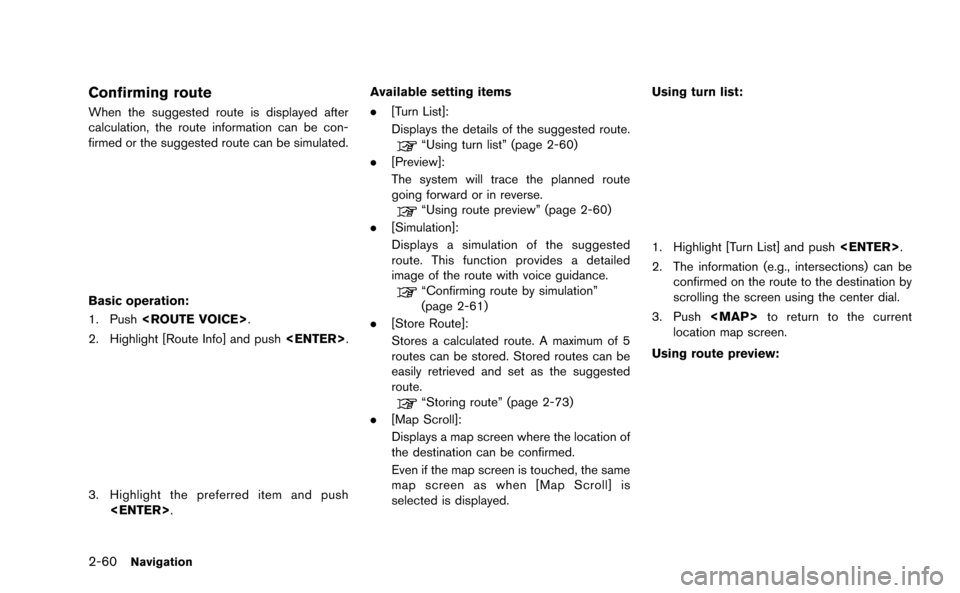
Basic operation:
1. Push
2. Highlight [Route Info] and push
3. Highlight the preferred item and push
.
[Turn List]:
Displays the details of the suggested route.
“Using turn list” (page 2-60)
. [Preview]:
The system will trace the planned route
going forward or in reverse.
“Using route preview” (page 2-60)
. [Simulation]:
Displays a simulation of the suggested
route. This function provides a detailed
image of the route with voice guidance.
“Confirming route by simulation”
(page 2-61)
. [Store Route]:
Stores a calculated route. A maximum of 5
routes can be stored. Stored routes can be
easily retrieved and set as the suggested
route.
“Storing route” (page 2-73)
. [Map Scroll]:
Displays a map screen where the location of
the destination can be confirmed.
Even if the map screen is touched, the same
map screen as when [Map Scroll] is
selected is displayed. Using turn list:
1. Highlight [Turn List] and push
2. The information (e.g., intersections) can be confirmed on the route to the destination by
scrolling the screen using the center dial.
3. Push
Page 86 of 298
![NISSAN GT-R 2015 R35 Multi Function Display Repair Manual 1. Highlight [Preview] and push<ENTER>.
2. Highlight the preferred key and push <ENTER>.
: Moves forward in the direction of thedestination.
: Moves backward in the direction of thestarting point.
/:](/img/5/423/w960_423-85.png "NISSAN GT-R 2015 R35 Multi Function Display Repair Manual 1. Highlight [Preview] and push<ENTER>.
2. Highlight the preferred key and push <ENTER>.
: Moves forward in the direction of thedestination.
: Moves backward in the direction of thestarting point.
/:")
1. Highlight [Preview] and push
2. Highlight the preferred key and push
: Moves forward in the direction of thedestination.
: Moves backward in the direction of thestarting point.
/: Pauses the route preview.
3. Push
Page 87 of 298
2-62Navigation
To turn the Voice Guidance ON or OFF:
“Voice Guidance On/Off” (Alternate Com-
mand Mode)
Recalculate route
A route can be manually searched again after
changing the search condition. When the
vehicle deviates from the suggested route, the
route from the current location to the destination
is automatically searched again.
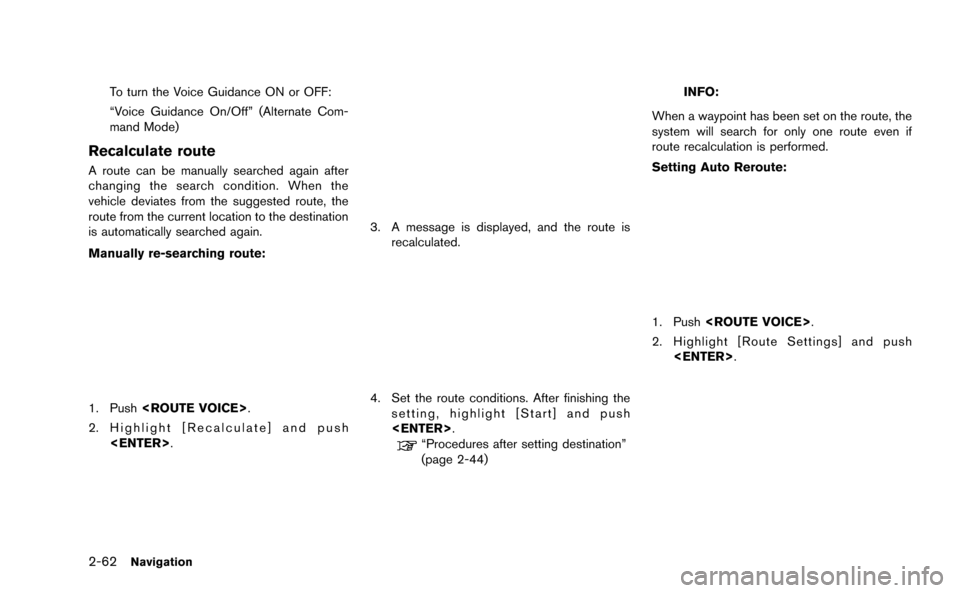
Manually re-searching route:
1. Push
2. Highlight [Recalculate] and push
3. A message is displayed, and the route isrecalculated.
4. Set the route conditions. After finishing thesetting, highlight [Start] and push
“Procedures after setting destination”
(page 2-44)
INFO:
When a waypoint has been set on the route, the
system will search for only one route even if
route recalculation is performed.
Setting Auto Reroute:
1. Push
2. Highlight [Route Settings] and push
Page 88 of 298
![NISSAN GT-R 2015 R35 Multi Function Display Repair Manual 3. Highlight [Other Routing Choices] and push<ENTER>.
4. Highlight [Auto Reroute] and push<ENTER>. The indicator illuminates. When
the current location map screen or route
setting screen is displayed,](/img/5/423/w960_423-87.png "NISSAN GT-R 2015 R35 Multi Function Display Repair Manual 3. Highlight [Other Routing Choices] and push<ENTER>.
4. Highlight [Auto Reroute] and push<ENTER>. The indicator illuminates. When
the current location map screen or route
setting screen is displayed,")
3. Highlight [Other Routing Choices] and push
4. Highlight [Auto Reroute] and push
the current location map screen or route
setting screen is displayed, the system
recalculates a route with the set conditions.
“Detailed route settings” (page 2-65)
Setting detour route
To detour from the suggested route, a route
detouring for a specified distance can be
calculated.
1. Push
2. Highlight [Detour] and push
3. Highlight a detour distance and push
After calculating the detour, the system displays
the detour route on the map.
INFO:
. When the vehicle has deviated from the
suggested route, [Detour] cannot be se-
lected.
. If the system cannot calculate a detour with
the specified conditions, it displays the
previous suggested route.
. If the vehicle is traveling very fast, the detour
route may start from a location that the
vehicle has already passed.
Searching for detour route taking
traffic information into considera-
tion
When a serious traffic event occurs on the route,
or if the system finds a faster route, a detour alert
will pop up automatically. If the automatic alert is
not noticed, a detour can also be manually
searched.
Navigation2-63
Page 89 of 298
![NISSAN GT-R 2015 R35 Multi Function Display Repair Manual 2-64Navigation
1. Push<ROUTE VOICE>.
2. Highlight [Traffic Detour] and push <ENTER>.
3. When the detour search is successful,detailed information about the detour route
(left screen) and the compariso](/img/5/423/w960_423-88.png "NISSAN GT-R 2015 R35 Multi Function Display Repair Manual 2-64Navigation
1. Push<ROUTE VOICE>.
2. Highlight [Traffic Detour] and push <ENTER>.
3. When the detour search is successful,detailed information about the detour route
(left screen) and the compariso")
2-64Navigation
1. Push
2. Highlight [Traffic Detour] and push
3. When the detour search is successful,detailed information about the detour route
(left screen) and the comparison screen of
the two routes (right screen) are displayed.
*1Original route (yellow)
*2Detour route (pink)
*3The change of distance and estimated travel
time to destination when the detour route is
taken.
4. To accept the suggested detour route,
highlight [Yes], and then push
INFO:
. If no route is set, or [Use Real Time Traffic
Information] is turned off, this function
cannot be operated.
. If a detour route is not selected and no
further action is performed, the detour route
will be automatically canceled.
. The detour suggestion can be retrieved even
after the message disappears by manually
selecting [Traffic Detour]. The system will
then search for the detour again and
suggests a detour if one is available at that
time.
. Without a subscription to an NavTraffic
broadcast, it will not be possible to get a
traffic detour or apply settings for functions
related to traffic information. A message
appears when a related menu item is
selected.
. See “NOTES ON NavTraffic INFORMA-
TION” for further information.
“Notes on NavTraffic information”
(page 11-11)
Automatic detour guidance:
When [Auto Reroute] and [Use Real Time Traffic
Information] are turned on in the detailed route
settings, a message will automatically pop up
when the system finds a detour.
“Detailed route settings” (page 2-65)
1. If a traffic jam or a serious traffic problem occurs on the route while driving along the
suggested route, the automatic detour route
search starts and a message pops up if a
detour is found.
2. To accept the suggested detour route, highlight [Yes] and push
INFO:
. If no operation is performed for one minute
after the message is displayed, the message
disappears. The detour will not be accepted,
and the current suggested route will remain
unchanged.
. When [Traffic Announcement] is turned on in
the guidance settings, the system will
announce voice guidance at the same time
that the message appears on the screen.
“Guidance settings” (page 2-61)
Page 90 of 298
Setting conditions for route calcu-
lation
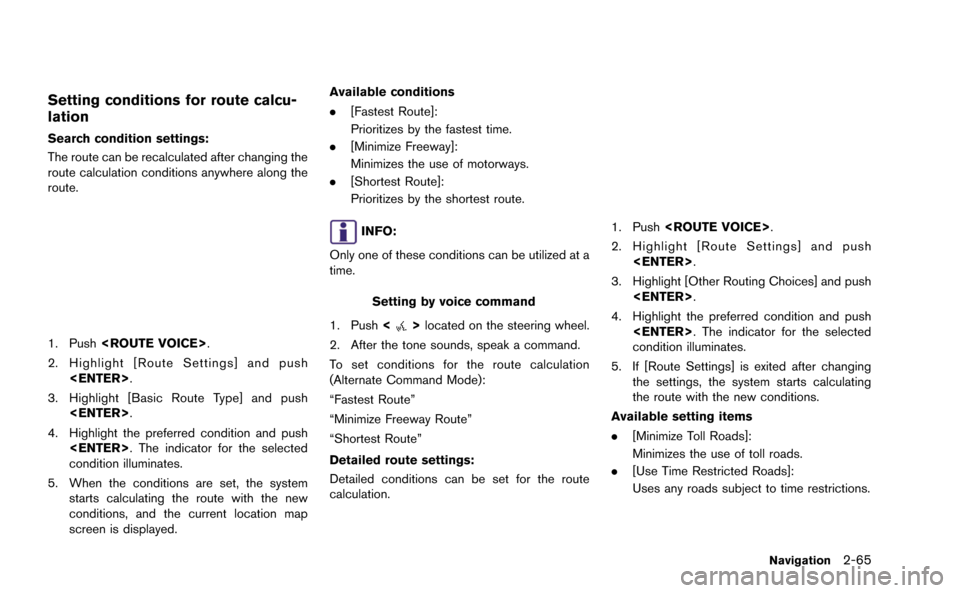
Search condition settings:
The route can be recalculated after changing the
route calculation conditions anywhere along the
route.
1. Push
2. Highlight [Route Settings] and push
3. Highlight [Basic Route Type] and push
4. Highlight the preferred condition and push
condition illuminates.
5. When the conditions are set, the system starts calculating the route with the new
conditions, and the current location map
screen is displayed. Available conditions
.
[Fastest Route]:
Prioritizes by the fastest time.
. [Minimize Freeway]:
Minimizes the use of motorways.
. [Shortest Route]:
Prioritizes by the shortest route.
INFO:
Only one of these conditions can be utilized at a
time.
Setting by voice command
1. Push <
>located on the steering wheel.
2. After the tone sounds, speak a command.
To set conditions for the route calculation
(Alternate Command Mode):
“Fastest Route”
“Minimize Freeway Route”
“Shortest Route”
Detailed route settings:
Detailed conditions can be set for the route
calculation.
1. Push
2. Highlight [Route Settings] and push
3. Highlight [Other Routing Choices] and push
4. Highlight the preferred condition and push
condition illuminates.
5. If [Route Settings] is exited after changing the settings, the system starts calculating
the route with the new conditions.
Available setting items
. [Minimize Toll Roads]:
Minimizes the use of toll roads.
. [Use Time Restricted Roads]:
Uses any roads subject to time restrictions.
Navigation2-65
Page 91 of 298
![NISSAN GT-R 2015 R35 Multi Function Display Repair Manual 2-66Navigation
.[Use Statistical Traffic Information]:
Uses statistical traffic information that is
stored in the map data.
. [Use Real Time Traffic Information]:
Uses the latest traffic information r](/img/5/423/w960_423-90.png "NISSAN GT-R 2015 R35 Multi Function Display Repair Manual 2-66Navigation
.[Use Statistical Traffic Information]:
Uses statistical traffic information that is
stored in the map data.
. [Use Real Time Traffic Information]:
Uses the latest traffic information r")
2-66Navigation
.[Use Statistical Traffic Information]:
Uses statistical traffic information that is
stored in the map data.
. [Use Real Time Traffic Information]:
Uses the latest traffic information received
via the SiriusXM broadcast.
. [Use Avoid Area Settings]:
Enables the avoid area setting.
. [Use Ferries]:
Includes the use of ferries.
. [Use Learned Routes]:
Uses the roads that are most frequently
traveled with the help of self-learning
technology.
. [Auto Reroute]:
If the vehicle deviates from the suggested
route, the system automatically recalculates
a route that leads the vehicle to the
suggested route.
INFO:
. The recalculated route may not be the
shortest route because the system priori-
tizes roads that are easy to drive for safety
reasons. .
If route conditions are set from [Route
Settings], all sections in the route are
subject to the same route conditions even
though different route conditions have been
set for different sections in [Edit/Add to
Route].
. If [Use Time Restricted Roads] is deacti-
vated, the system calculates a route without
any consideration of the regulations con-
cerning the time or day of the week. There-
fore, the suggested route may include a road
subject to traffic regulations concerning the
time or day of the week. When driving along
the route, always follow all traffic regulations
regardless of whether [Use Time Restricted
Roads] is set to on or off.
. If the system cannot calculate any alternative
routes, it displays the previous route.
. If the vehicle greatly deviates from the
suggested route, the system calculates a
new route.
. Statistical traffic information is based on
previous traffic data. When the traffic situa-
tion rapidly changes due to unexpected
accidents, construction work, traffic restric-
tions, emergencies, etc., the prediction
accuracy of the system may be reduced. .
Traffic jam information displayed on the map
screen is not statistical traffic information.
. When [Use Statistical Traffic Information] is
turned on, the system may lead to a road
where a traffic jam occurs or to a detour
even though the shortest route does not
have a traffic jam.
. Even when [Use Real Time Traffic Informa-
tion] is turned on, if traffic information has
not been provided for the area, sometimes it
is possible that a detour will not be indicated
in a location where a traffic jam occurs.
. The system may not lead to a detour if traffic
closure or a traffic jam occurs far from the
present location.
. The system calculates to reduce the time
required for the entire route from the start to
the destination. If there are no appropriate
routes, the system may lead to a route where
a traffic jam occurs instead of leading to a
detour.
. This system can learn and memorize the
route that is most frequently used. However,
despite driving on the same route several
times so that the system can learn the route,
the system may have difficulty learning the
route under the following conditions.
Page 92 of 298
![NISSAN GT-R 2015 R35 Multi Function Display Repair Manual — [Use Time Restricted Roads] is set to on.
— [Use Real Time Traffic Information] is setto on.
ROUTE GUIDANCE SETTINGS
Various guidance information can be set to be
played during route guidance an](/img/5/423/w960_423-91.png "NISSAN GT-R 2015 R35 Multi Function Display Repair Manual — [Use Time Restricted Roads] is set to on.
— [Use Real Time Traffic Information] is setto on.
ROUTE GUIDANCE SETTINGS
Various guidance information can be set to be
played during route guidance an")
— [Use Time Restricted Roads] is set to on.
— [Use Real Time Traffic Information] is setto on.
ROUTE GUIDANCE SETTINGS
Various guidance information can be set to be
played during route guidance and the route and/
or voice guidance can be activated or deacti-
vated.
Basic operation
1. Push
2. Highlight [Navigation] and push
3. Highlight [Guidance Settings] and push
4. Highlight the preferred item and push
5. Push
screen. Push
Page 93 of 298
![NISSAN GT-R 2015 R35 Multi Function Display Repair Manual 2-68Navigation
Setting voice guidance at intersec-
tions
1. Push<SETTING>.
2. Highlight [Navigation] and push <ENTER>.
3. Highlight [Guidance Settings] and push <ENTER>.
4. Highlight [Voice Guidance S](/img/5/423/w960_423-92.png "NISSAN GT-R 2015 R35 Multi Function Display Repair Manual 2-68Navigation
Setting voice guidance at intersec-
tions
1. Push<SETTING>.
2. Highlight [Navigation] and push <ENTER>.
3. Highlight [Guidance Settings] and push <ENTER>.
4. Highlight [Voice Guidance S")
2-68Navigation
Setting voice guidance at intersec-
tions
1. Push
2. Highlight [Navigation] and push
3. Highlight [Guidance Settings] and push
4. Highlight [Voice Guidance Settings] and push
5. Highlight [Intersection Guidance Settings]
and push
6. Highlight the preferred item and push
Available setting items
. [Voice Announcements]:
Sets how many times the voice guidance is
announced before the vehicle reaches an
intersection.
1. Highlight [Voice Announcements] and
push
2. Highlight the preferred item and push
— [Full]: The system announces three kinds of
voice guidance: “Turning Point”, “1
Guide” and “2 Guide”. — [Concise]:
The system announces two kinds of
voice guidance: “Turning Point” and “1
Guide”.
. [Turning Point]:
Turns on the sound that chimes when a
maneuver is supposed to be occurring.
Displaying small turn arrow on map
The guidance screen displayed when the vehicle
passes through an intersection can be changed.
1. Push
2. Highlight [Navigation] and push
3. Highlight [Guidance Settings] and push
4. Highlight [Guidance Display Settings] and push
Page 94 of 298
![NISSAN GT-R 2015 R35 Multi Function Display Repair Manual 5. Highlight [Small Turn Arrow on Map] andpush <ENTER> to activate or deactivate
Small Turn Arrow on the Map (simplified turn
indicator) displayed in the upper left corner
of the map screen. The indic](/img/5/423/w960_423-93.png "NISSAN GT-R 2015 R35 Multi Function Display Repair Manual 5. Highlight [Small Turn Arrow on Map] andpush <ENTER> to activate or deactivate
Small Turn Arrow on the Map (simplified turn
indicator) displayed in the upper left corner
of the map screen. The indic")
5. Highlight [Small Turn Arrow on Map] andpush
Small Turn Arrow on the Map (simplified turn
indicator) displayed in the upper left corner
of the map screen. The indicator illuminates
if the Small Turn Arrow on the Map is
displayed.
Switching estimated arrival time
display
The display of the travel time on the map screen
can be switched between the travel time to the
destination and the travel time to the waypoint.
Example: Switching the display to the travel time
to the waypoint
1. Push
2. Highlight [Navigation] and push
3. Highlight [Guidance Settings] and push
4. Highlight [Estimated Time] and push
5. Highlight [Waypoint] and push
The indicator for the selected condition
illuminates.
6. Push