set NISSAN GT-R 2015 R35 Multi Function Display Manual Online
[x] Cancel search | Manufacturer: NISSAN, Model Year: 2015, Model line: GT-R, Model: NISSAN GT-R 2015 R35Pages: 298, PDF Size: 11.39 MB
Page 106 of 298
![NISSAN GT-R 2015 R35 Multi Function Display Manual Online 1. Highlight [Distance] and push<ENTER>.
2. Highlight the preferred distance option and
push <ENTER>. The indicator of the
selected distance illuminates.
Available distance options:
. 150 feet (50 m)](/img/5/423/w960_423-105.png "NISSAN GT-R 2015 R35 Multi Function Display Manual Online 1. Highlight [Distance] and push<ENTER>.
2. Highlight the preferred distance option and
push <ENTER>. The indicator of the
selected distance illuminates.
Available distance options:
. 150 feet (50 m)")
1. Highlight [Distance] and push
2. Highlight the preferred distance option and
push
selected distance illuminates.
Available distance options:
. 150 feet (50 m)
. 300 feet (100 m)
. 1000 feet (300 m) .
1500 feet (500 m)
INFO:
Once the direction and the distance to sound an
alarm are set, the system will sound the alarm
when the vehicle enters the triggering zone.
Phone number:
Stores the telephone number of the home or a
stored location.
1. Highlight [Phone No.] and push
The telephone number entry screen is
displayed.
2. Enter the telephone number of the home or stored location.
“Number input screen” (page 1-15)
3. Highlight [OK] and push
The telephone number is stored.
INFO:
If the phone number of the home or a location is
stored, the phone number can be used to search
for the destination even if it is not included in the
map data.
Group (only for stored locations):
This groups the stored locations.
By grouping the stored locations, the [By Group]
option of the sort function can be used more
effectively in the [Sort Entries] mode.
Navigation2-81
Page 108 of 298
![NISSAN GT-R 2015 R35 Multi Function Display Manual Online INFO:
If [Store Current Route] is selected, the system
stores the current route.
Available setting items
. [Rename]:
Changes the name.
“Character (letters and numbers) input
screen” (page 1-14)
.](/img/5/423/w960_423-107.png "NISSAN GT-R 2015 R35 Multi Function Display Manual Online INFO:
If [Store Current Route] is selected, the system
stores the current route.
Available setting items
. [Rename]:
Changes the name.
“Character (letters and numbers) input
screen” (page 1-14)
.")
INFO:
If [Store Current Route] is selected, the system
stores the current route.
Available setting items
. [Rename]:
Changes the name.
“Character (letters and numbers) input
screen” (page 1-14)
. [Replace]:
Overwrites the stored route to the current
route.
. [Delete]:
Deletes the stored route.
. [OK]:
Applies the settings.
Editing stored tracking
1. Highlight [Stored Tracking] and push
2. Highlight the stored tracked route and push
illuminated, push
illuminates, and the Edit screen is displayed.
If
indicator is illuminated, the indicator turns
off.
3. Highlight the preferred item and push
Available setting items (Current tracking)
. [View Track]:
Displays the tracked route up to the current
location.
. [Delete]:
Deletes the stored current tracking.
. [OK]:
Applies the settings.
Available setting items (Stored tracked
routes)
.[View Track]:
Displays a stored tracked route on the map.
. [Rename]:
Changes the name.
“Character (letters and numbers) input
screen” (page 1-14)
Navigation2-83
Page 109 of 298
![NISSAN GT-R 2015 R35 Multi Function Display Manual Online 2-84Navigation
.[Replace]:
Overwrites the stored tracked route to the
current tracked route.
. [Delete]:
Deletes the stored tracked route.
. [OK]:
Applies the settings.
Displaying a tracked route:
The](/img/5/423/w960_423-108.png "NISSAN GT-R 2015 R35 Multi Function Display Manual Online 2-84Navigation
.[Replace]:
Overwrites the stored tracked route to the
current tracked route.
. [Delete]:
Deletes the stored tracked route.
. [OK]:
Applies the settings.
Displaying a tracked route:
The")
2-84Navigation
.[Replace]:
Overwrites the stored tracked route to the
current tracked route.
. [Delete]:
Deletes the stored tracked route.
. [OK]:
Applies the settings.
Displaying a tracked route:
The stored tracked route can be displayed on
the map as necessary.
1. Highlight [Stored Tracking] and push
2. Highlight a tracked route to display on the map screen, and push
“ON” indicator illuminates, and the Edit
screen is displayed.
3. After confirming the location to display the tracked route, highlight [OK] and push
previous screen.
4. Push
Page 110 of 298
![NISSAN GT-R 2015 R35 Multi Function Display Manual Online Available setting items.[Rename]:Changes the name.
.[Move Location]:
Adjusts the location of the Avoid Area.
.[Resize Area]:Adjusts the range of the Avoid Area.
.[FWY]:Avoids freeways.
.[Delete]:Delet](/img/5/423/w960_423-109.png "NISSAN GT-R 2015 R35 Multi Function Display Manual Online Available setting items.[Rename]:Changes the name.
.[Move Location]:
Adjusts the location of the Avoid Area.
.[Resize Area]:Adjusts the range of the Avoid Area.
.[FWY]:Avoids freeways.
.[Delete]:Delet")
Available setting items.[Rename]:Changes the name.
.[Move Location]:
Adjusts the location of the Avoid Area.
.[Resize Area]:Adjusts the range of the Avoid Area.
.[FWY]:Avoids freeways.
.[Delete]:Deletes the Avoid Area.
.[OK]:Applies the setting.
4. After finishing the setting, highlight [OK] and push
INFO:
An Avoid Area can be added by selecting [Add
New].
“Storing avoid area” (page 2-75)
Rename:
Changes the name of an Avoid Area.
1. Highlight [Rename] and push
character input screen is displayed.
2. Enter the preferred name for the avoid area.
3. Highlight [OK] and push
name is stored.
Move Location:
Adjusts the location of the Avoid Area.
1. Highlight [Move Location] and push
3. After adjusting the location, push
Resize Area:
Adjusts the range of the Avoid Area.
1. Highlight [Resize Area] and push
2. Highlight the range from 5 available levels.
3. After highlighting the range, push
FWY:
Sets the route to avoid freeways.
Navigation2-85
Page 111 of 298
![NISSAN GT-R 2015 R35 Multi Function Display Manual Online 2-86Navigation
1. Highlight [FWY].To include freeways in the Avoid Area, push
<ENTER> to illuminate this indicator.
2. The Avoid Area is displayed in green if it
includes a freeway or in blue if it do](/img/5/423/w960_423-110.png "NISSAN GT-R 2015 R35 Multi Function Display Manual Online 2-86Navigation
1. Highlight [FWY].To include freeways in the Avoid Area, push
<ENTER> to illuminate this indicator.
2. The Avoid Area is displayed in green if it
includes a freeway or in blue if it do")
2-86Navigation
1. Highlight [FWY].To include freeways in the Avoid Area, push
2. The Avoid Area is displayed in green if it
includes a freeway or in blue if it does not
include a freeway.
INFO:
If the current vehicle location is set to an Avoid
Area, the system will not provide route guidance.
Delete:
Deletes the Avoid Area.
1. Highlight [Delete] and push
2. A confirmation message is displayed. Con-
firm the contents of the message, highlight
[Yes] and push
is deleted from the Address Book.
DELETING STORED ITEM
The locations and routes in the Address Book
can be deleted. Two deletion methods are
available: deleting an individual item and delet-
ing all stored items.
NOTICE
Deleted items cannot be restored. Be-
fore deleting an item, always make sure
that the item is truly not necessary.
Deleting stored item individually
You can delete stored addresses, routes, track-
ing and avoid areas individually.
1. Push
2. Highlight [Navigation] and push
Page 112 of 298
![NISSAN GT-R 2015 R35 Multi Function Display Manual Online 3. Highlight [Address Book] and push<ENTER>.
Example: [Stored Location] is highlighted.
4. Highlight the preferred item for deletion and push <ENTER>.
5. Highlight the preferred location/route for
del](/img/5/423/w960_423-111.png "NISSAN GT-R 2015 R35 Multi Function Display Manual Online 3. Highlight [Address Book] and push<ENTER>.
Example: [Stored Location] is highlighted.
4. Highlight the preferred item for deletion and push <ENTER>.
5. Highlight the preferred location/route for
del")
3. Highlight [Address Book] and push
Example: [Stored Location] is highlighted.
4. Highlight the preferred item for deletion and push
5. Highlight the preferred location/route for
deletion and push
6. Highlight [Delete] and push
7. A confirmation message is displayed. Con-
firm the contents of the message, highlight
[Yes] and push
is deleted from the Address Book.
Other settings:
A stored address can also be deleted using the
following procedure.
1. Push
2. Highlight [Address Book] and push
3. Highlight [Store/Edit] and push
4. Highlight [Edit or Delete an Entry] and push
5. Highlight a preferred address and push
“Setting destination” (page 2-23)
Navigation2-87
Page 113 of 298
2-88Navigation
INFO:
This procedure applies only for deleting a stored
home or address. A stored route, tracking or
avoid area cannot be deleted using this proce-
dure.
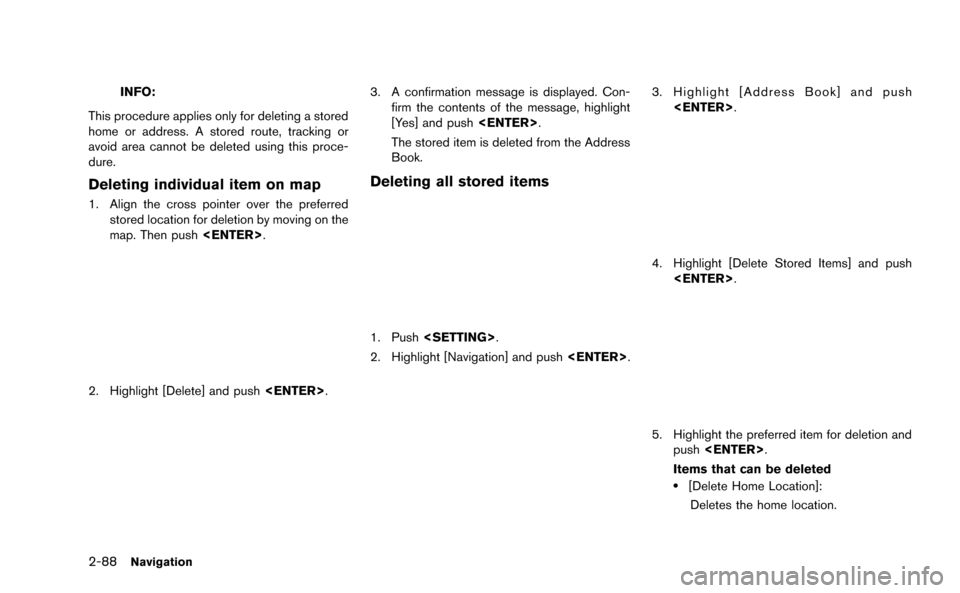
Deleting individual item on map
1. Align the cross pointer over the preferred stored location for deletion by moving on the
map. Then push
2. Highlight [Delete] and push
3. A confirmation message is displayed. Con-
firm the contents of the message, highlight
[Yes] and push
The stored item is deleted from the Address
Book.
Deleting all stored items
1. Push
2. Highlight [Navigation] and push
3. Highlight [Address Book] and push
4. Highlight [Delete Stored Items] and push
5. Highlight the preferred item for deletion and
push
Items that can be deleted
.[Delete Home Location]: Deletes the home location.
Page 114 of 298
![NISSAN GT-R 2015 R35 Multi Function Display Manual Online .[Delete Address Book]:Deletes all stored locations.
.[Delete Stored Routes]:Deletes all stored routes.
.[Delete Current Tracking]:
Deletes the current tracked route.
.[Delete Stored Tracking]:
Delete](/img/5/423/w960_423-113.png "NISSAN GT-R 2015 R35 Multi Function Display Manual Online .[Delete Address Book]:Deletes all stored locations.
.[Delete Stored Routes]:Deletes all stored routes.
.[Delete Current Tracking]:
Deletes the current tracked route.
.[Delete Stored Tracking]:
Delete")
.[Delete Address Book]:Deletes all stored locations.
.[Delete Stored Routes]:Deletes all stored routes.
.[Delete Current Tracking]:
Deletes the current tracked route.
.[Delete Stored Tracking]:
Deletes all stored tracked routes.
.[Delete Avoid Areas]:Deletes all stored Avoid Areas.
.[Delete Stored Voicetags]:
Deletes all stored Voicetags.
.[Delete Previous Destinations]:Deletes all or one of the previous
destinations.
.[Delete Previous Start Point]:Deletes all previous start points.
.[Delete Learned Route]:
Deletes all system learned routes.
6. A confirmation message is displayed. Con- firm the contents of the message, highlight
[Yes] and push
are deleted from the Address Book.
Other settings:
All stored addresses can also be deleted using
the following procedure.
1. Push
2. Highlight [Address Book] and push
4. Highlight [Delete All Addressbook Entries] and push
“Setting destination” (page 2-23)
INFO:
This procedure applies only for deleting a stored
home or address. A stored route, tracking or
avoid area cannot be deleted using this proce-
dure.
TRANSFERRING INFORMATION TO/
FROM ADDRESS BOOK
The information of the stored home and ad-
dresses can be exported and imported using a
USB device.
1. Insert a USB device and push
Navigation2-89
Page 116 of 298
INFO:
If the USB device already has the data for a
stored address, a confirmation message is
displayed. Once overwritten, the original data
cannot be recovered.The navigation system can be set in details to
meet the preference.
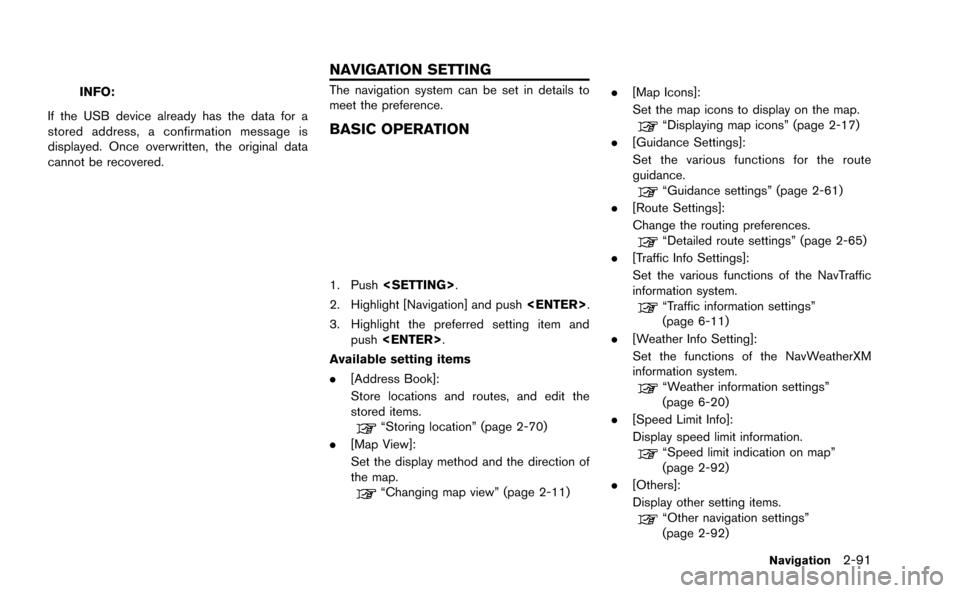
BASIC OPERATION
1. Push
2. Highlight [Navigation] and push
3. Highlight the preferred setting item and push
Available setting items
. [Address Book]:
Store locations and routes, and edit the
stored items.
“Storing location” (page 2-70)
. [Map View]:
Set the display method and the direction of
the map.
“Changing map view” (page 2-11) .
[Map Icons]:
Set the map icons to display on the map.
“Displaying map icons” (page 2-17)
. [Guidance Settings]:
Set the various functions for the route
guidance.
“Guidance settings” (page 2-61)
. [Route Settings]:
Change the routing preferences.
“Detailed route settings” (page 2-65)
. [Traffic Info Settings]:
Set the various functions of the NavTraffic
information system.
“Traffic information settings”
(page 6-11)
. [Weather Info Setting]:
Set the functions of the NavWeatherXM
information system.
“Weather information settings”
(page 6-20)
. [Speed Limit Info]:
Display speed limit information.
“Speed limit indication on map”
(page 2-92)
. [Others]:
Display other setting items.
“Other navigation settings”
(page 2-92)
Navigation2-91
NAVIGATION SETTING
Page 117 of 298
![NISSAN GT-R 2015 R35 Multi Function Display Manual Online 2-92Navigation
.[Delete Stored Information]:
Delete stored locations and the home
setting in the Address Book.
“Delete stored items” (page 2-96)
. [Delete All Previous Destinations]:
Delete all pr](/img/5/423/w960_423-116.png "NISSAN GT-R 2015 R35 Multi Function Display Manual Online 2-92Navigation
.[Delete Stored Information]:
Delete stored locations and the home
setting in the Address Book.
“Delete stored items” (page 2-96)
. [Delete All Previous Destinations]:
Delete all pr")
2-92Navigation
.[Delete Stored Information]:
Delete stored locations and the home
setting in the Address Book.
“Delete stored items” (page 2-96)
. [Delete All Previous Destinations]:
Delete all previous destinations.
“Delete stored items” (page 2-96)
. [Delete Previous Starting Point]:
Delete all previous starting points.
“Delete stored items” (page 2-96)
. [Reset All Navigation Settings to Default]:
Reset all of the settings to default.
“Reset all navigation settings to de-
fault” (page 2-96)
SPEED LIMIT INDICATION ON MAP
Turn the [Speed Limit Info] display on or off. The
indicator light illuminates when the speed limit
display function is set to on.
1. Highlight [Speed Limit Info] and push
2. Highlight [Speed Limit Indication on Map] totoggle the function between on and off. The
indicator light illuminates when the speed
limit display function is set to on.
OTHER NAVIGATION SETTINGS
Basic Operation
1. Push
2. Highlight [Navigation] and push
3. Highlight [Others] and push
4. Highlight the preferred setting item and push
Available setting items
. [Audio Display on Map]:
Allows the audio information to be displayed
at all times.
“Displaying audio information on map
screen” (page 2-93)
. [Small Step Zoom by Dial]:
Sets the free zoom function on or off. When
this setting is on, it is possible to adjust the
scale in smaller steps than with normal scale
adjustment.
. [Map Scrolling Information]:
Sets the system so that when the map
scrolls the information about the location
aligned at the center of the cross pointer is
displayed.
“Map scrolling information”
(page 2-18)
. [Customize Nearby Places]:
Set the category of frequently visited land-
marks.
“Customizing Nearby Places”
(page 2-93)