brake NISSAN LATIO 2010 Service Manual PDF
[x] Cancel search | Manufacturer: NISSAN, Model Year: 2010, Model line: LATIO, Model: NISSAN LATIO 2010Pages: 3745, PDF Size: 73.67 MB
Page 227 of 3745
AT-210
< SERVICE INFORMATION >
A/T SHIFT LOCK SYSTEM
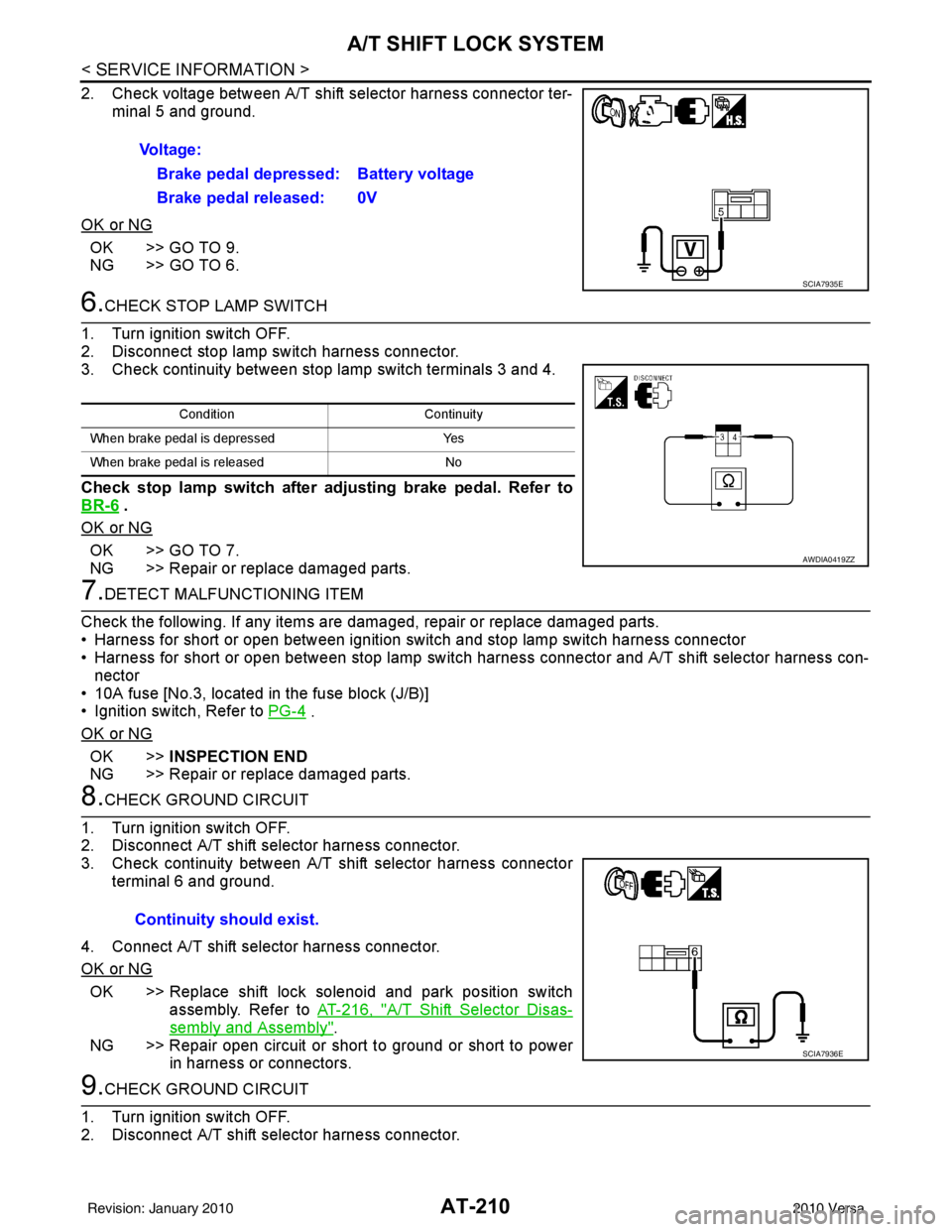
2. Check voltage between A/T shift selector harness connector ter-minal 5 and ground.
OK or NG
OK >> GO TO 9.
NG >> GO TO 6.
6.CHECK STOP LAMP SWITCH
1. Turn ignition switch OFF.
2. Disconnect stop lamp switch harness connector.
3. Check continuity between stop lamp switch terminals 3 and 4.
Check stop lamp switch after adjusting brake pedal. Refer to
BR-6
.
OK or NG
OK >> GO TO 7.
NG >> Repair or replace damaged parts.
7.DETECT MALFUNCTIONING ITEM
Check the following. If any items are damaged, repair or replace damaged parts.
• Harness for short or open between ignition switch and stop lamp switch harness connector
• Harness for short or open between stop lamp switch harness connector and A/T shift selector harness con-
nector
• 10A fuse [No.3, located in the fuse block (J/B)]
• Ignition switch, Refer to PG-4
.
OK or NG
OK >> INSPECTION END
NG >> Repair or replace damaged parts.
8.CHECK GROUND CIRCUIT
1. Turn ignition switch OFF.
2. Disconnect A/T shift selector harness connector.
3. Check continuity between A/T shift selector harness connector terminal 6 and ground.
4. Connect A/T shift selector harness connector.
OK or NG
OK >> Replace shift lock solenoid and park position switch assembly. Refer to AT-216, "
A/T Shift Selector Disas-
sembly and Assembly".
NG >> Repair open circuit or short to ground or short to power in harness or connectors.
9.CHECK GROUND CIRCUIT
1. Turn ignition switch OFF.
2. Disconnect A/T shift selector harness connector. Voltage:
Brake pedal depressed: Battery voltage
Brake pedal released: 0V
SCIA7935E
Condition Continuity
When brake pedal is depressed Yes
When brake pedal is released No
AWDIA0419ZZ
Continuity should exist.
SCIA7936E
Revision: January 20102010 Versa
Page 231 of 3745
AT-214
< SERVICE INFORMATION >
SHIFT CONTROL SYSTEM
REMOVAL
CAUTION:
Make sure that parking brake is applied before removal/installation.
1. Place the shift lever in the “N” position.
2. Remove the center console assembly. Refer to IP-11
.
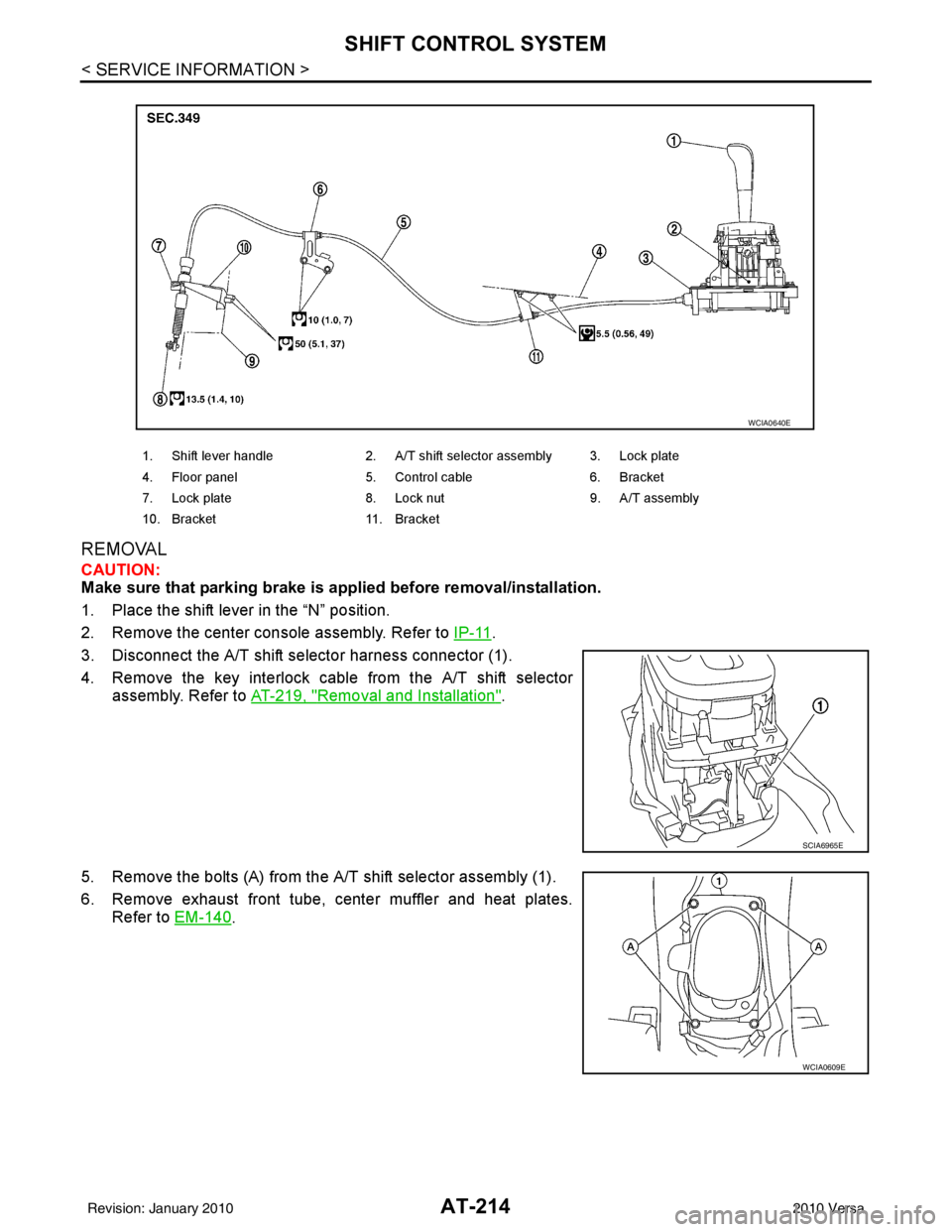
3. Disconnect the A/T shift selector harness connector (1).
4. Remove the key interlock cable from the A/T shift selector assembly. Refer to AT-219, "
Removal and Installation".
5. Remove the bolts (A) from the A/T shift selector assembly (1).
6. Remove exhaust front tube, center muffler and heat plates. Refer to EM-140
.
1. Shift lever handle 2. A/T shift selector assembly 3. Lock plate
4. Floor panel 5. Control cable 6. Bracket
7. Lock plate 8. Lock nut 9. A/T assembly
10. Bracket 11. Bracket
WCIA0640E
SCIA6965E
WCIA0609E
Revision: January 20102010 Versa
Page 233 of 3745
AT-216
< SERVICE INFORMATION >
SHIFT CONTROL SYSTEM
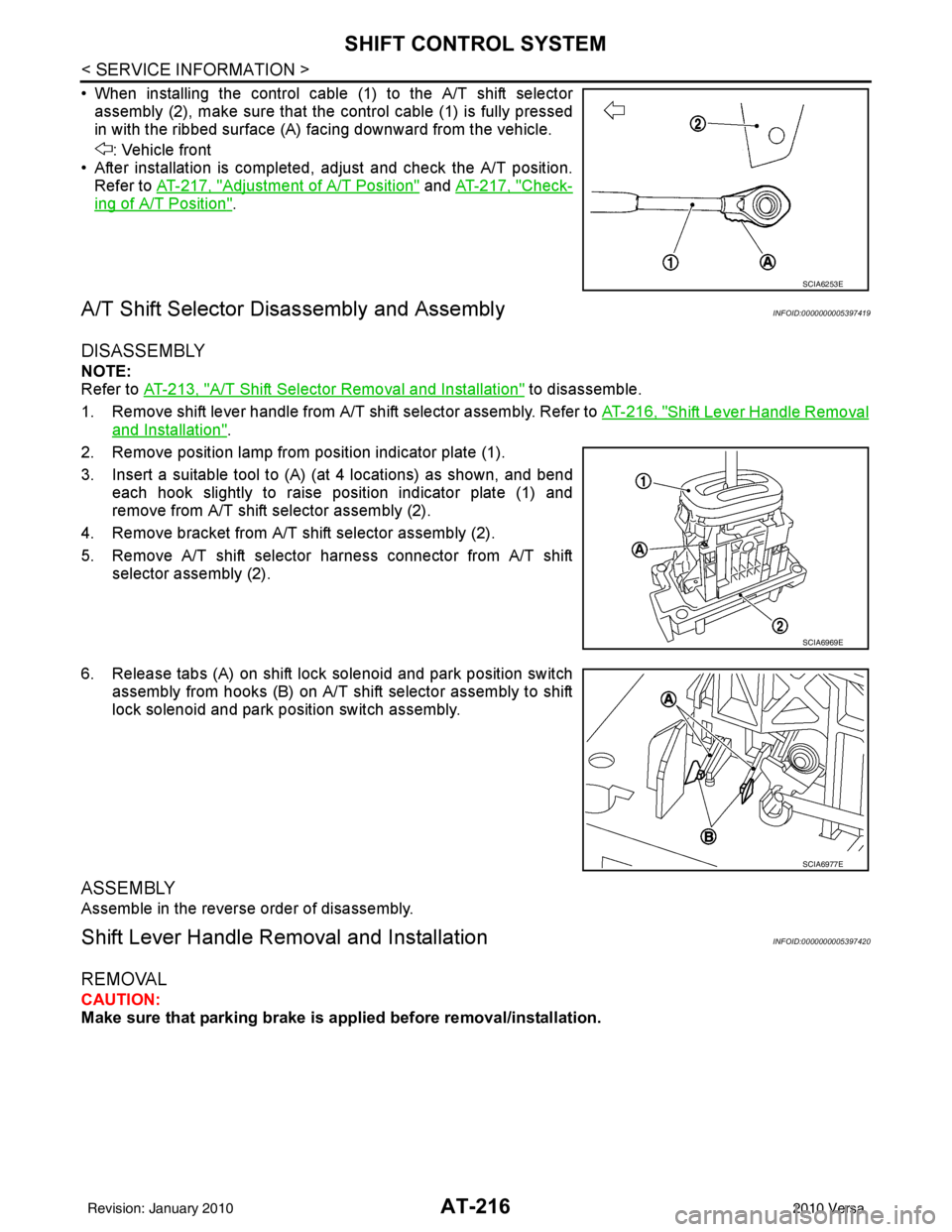
• When installing the control cable (1) to the A/T shift selectorassembly (2), make sure that the control cable (1) is fully pressed
in with the ribbed surface (A) facing downward from the vehicle.
: Vehicle front
• After installation is completed, adjust and check the A/T position.
Refer to AT-217, "
Adjustment of A/T Position" and AT-217, "Check-
ing of A/T Position".
A/T Shift Selector Di sassembly and AssemblyINFOID:0000000005397419
DISASSEMBLY
NOTE:
Refer to AT-213, "
A/T Shift Selector Removal and Installation" to disassemble.
1. Remove shift lever handle from A/T shift selector assembly. Refer to AT-216, "
Shift Lever Handle Removal
and Installation".
2. Remove position lamp from position indicator plate (1).
3. Insert a suitable tool to (A) (at 4 locations) as shown, and bend each hook slightly to raise position indicator plate (1) and
remove from A/T shift selector assembly (2).
4. Remove bracket from A/T shift selector assembly (2).
5. Remove A/T shift selector harness connector from A/T shift selector assembly (2).
6. Release tabs (A) on shift lock solenoid and park position switch assembly from hooks (B) on A/T shift selector assembly to shift
lock solenoid and park position switch assembly.
ASSEMBLY
Assemble in the reverse order of disassembly.
Shift Lever Handle Remo val and InstallationINFOID:0000000005397420
REMOVAL
CAUTION:
Make sure that parking brake is applied before removal/installation.
SCIA6253E
SCIA6969E
SCIA6977E
Revision: January 20102010 Versa
Page 234 of 3745
SHIFT CONTROL SYSTEMAT-217
< SERVICE INFORMATION >
DE
F
G H
I
J
K L
M A
B
AT
N
O P
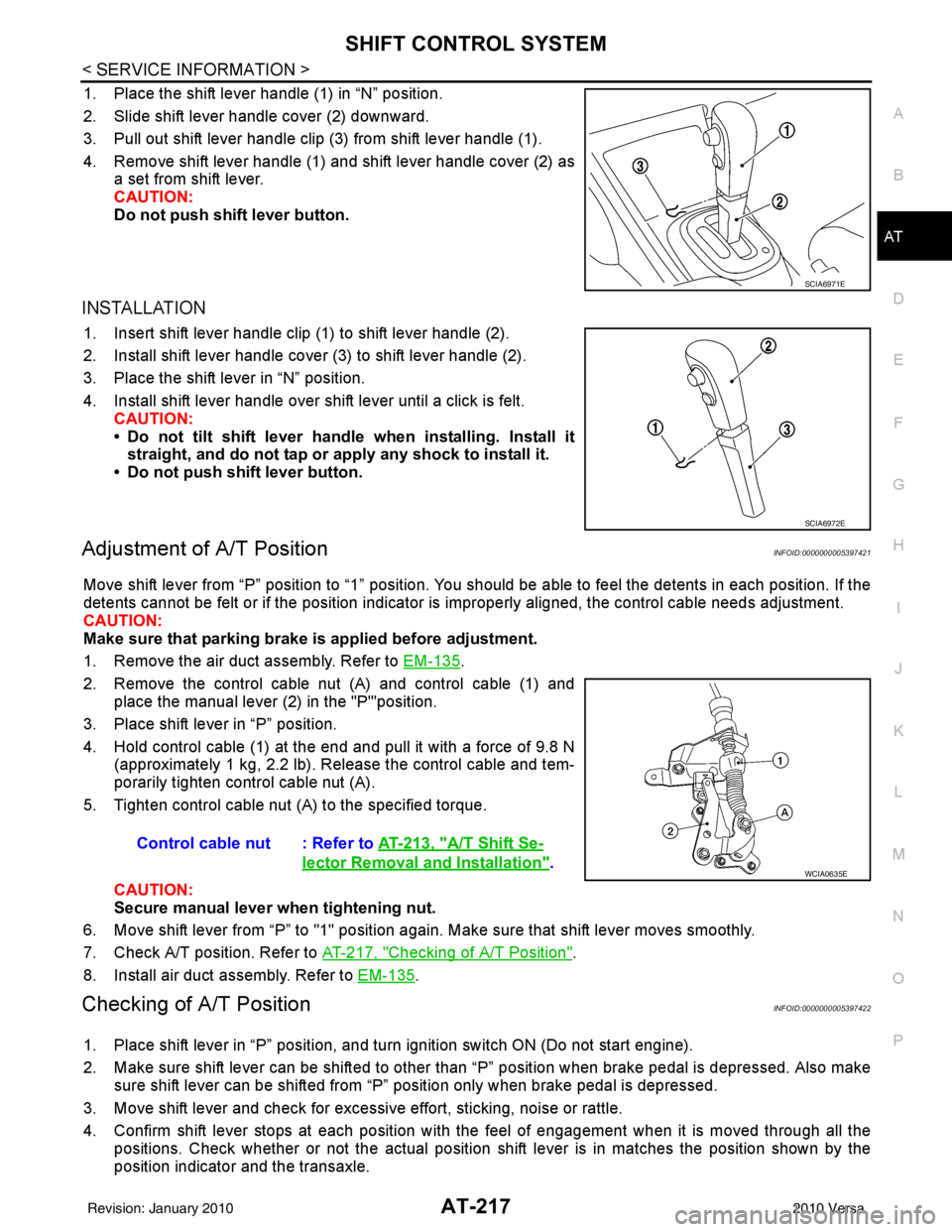
1. Place the shift lever handle (1) in “N” position.
2. Slide shift lever handle cover (2) downward.
3. Pull out shift lever handle clip (3) from shift lever handle (1).
4. Remove shift lever handle (1) and shift lever handle cover (2) as a set from shift lever.
CAUTION:
Do not push shift lever button.
INSTALLATION
1. Insert shift lever handle clip (1) to shift lever handle (2).
2. Install shift lever handle cover (3) to shift lever handle (2).
3. Place the shift lever in “N” position.
4. Install shift lever handle over shift lever until a click is felt.CAUTION:
• Do not tilt shift lever handle when installing. Install it
straight, and do not tap or ap ply any shock to install it.
• Do not push shift lever button.
Adjustment of A/T PositionINFOID:0000000005397421
Move shift lever from “P” position to “1” position. You should be able to feel the detents in each position. If the
detents cannot be felt or if the position indicator is improperly aligned, the control cable needs adjustment.
CAUTION:
Make sure that parking brake is applied before adjustment.
1. Remove the air duct assembly. Refer to EM-135
.
2. Remove the control cable nut (A) and control cable (1) and place the manual lever (2) in the "P'"position.
3. Place shift lever in “P” position.
4. Hold control cable (1) at the end and pull it with a force of 9.8 N (approximately 1 kg, 2.2 lb). Release the control cable and tem-
porarily tighten control cable nut (A).
5. Tighten control cable nut (A) to the specified torque.
CAUTION:
Secure manual lever when tightening nut.
6. Move shift lever from “P” to "1" position again. Make sure that shift lever moves smoothly.
7. Check A/T position. Refer to AT-217, "
Checking of A/T Position".
8. Install air duct assembly. Refer to EM-135
.
Checking of A/T PositionINFOID:0000000005397422
1. Place shift lever in “P” position, and turn ignition switch ON (Do not start engine).
2. Make sure shift lever can be shifted to other t han “P” position when brake pedal is depressed. Also make
sure shift lever can be shifted from “P” position only when brake pedal is depressed.
3. Move shift lever and check for excessive effort, sticking, noise or rattle.
4. Confirm shift lever stops at each position with the feel of engagement when it is moved through all the positions. Check whether or not the actual position shift lever is in matches the position shown by the
position indicator and the transaxle.
SCIA6971E
SCIA6972E
Control cable nut : Refer to AT-213, "A/T Shift Se-
lector Removal and Installation".WCIA0635E
Revision: January 20102010 Versa
Page 235 of 3745

AT-218
< SERVICE INFORMATION >
SHIFT CONTROL SYSTEM
5. The method of operating shift lever to individual positions cor-rectly should be as shown.
• (A): Press shift lever button to operate selector lever, whiledepressing the brake pedal.
• (B): Press shift lever button to operate shift lever.
• (C): Shift lever can be operated without pressing shift lever button.
6. Confirm back-up lamps illuminate only when shift lever is placed in “R” position. Confirm back-up lamps do not illuminate when
shift lever is in “P” or “N” position even if it is pushed toward “R”
position without pressing shift lever button.
7. Confirm engine can only be started with shift lever in “P” and “N” positions.
8. Make sure A/T is locked completely in “P” position.
WCIA0636E
Revision: January 20102010 Versa
Page 236 of 3745
KEY INTERLOCK CABLEAT-219
< SERVICE INFORMATION >
DE
F
G H
I
J
K L
M A
B
AT
N
O P
KEY INTERLOCK CABLE
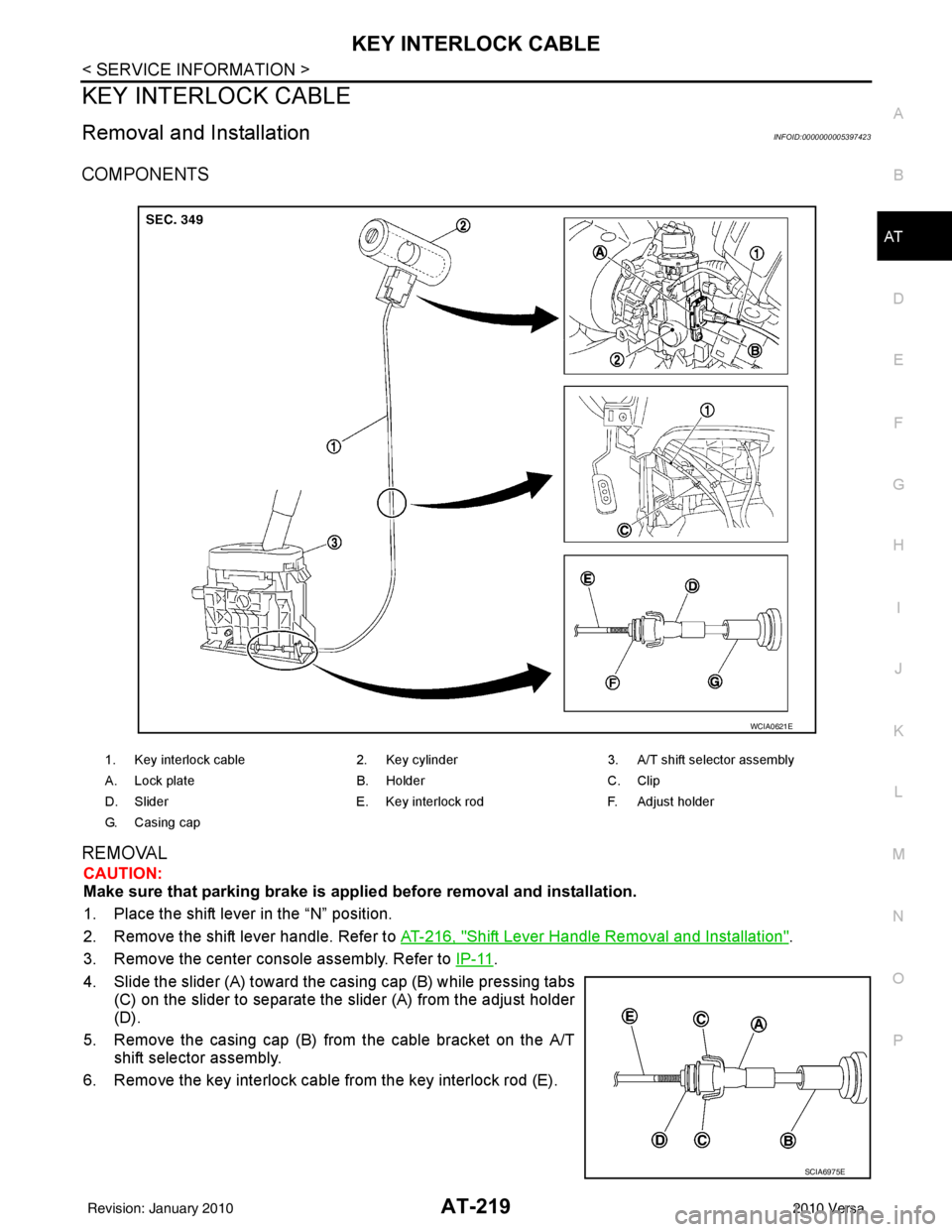
Removal and InstallationINFOID:0000000005397423
COMPONENTS
REMOVAL
CAUTION:
Make sure that parking brake is applie d before removal and installation.
1. Place the shift lever in the “N” position.
2. Remove the shift lever handle. Refer to AT-216, "
Shift Lever Handle Removal and Installation".
3. Remove the center console assembly. Refer to IP-11
.
4. Slide the slider (A) toward the casing cap (B) while pressing tabs (C) on the slider to separate the slider (A) from the adjust holder
(D).
5. Remove the casing cap (B) from the cable bracket on the A/T shift selector assembly.
6. Remove the key interlock cable from the key interlock rod (E).
1. Key interlock cable 2. Key cylinder3. A/T shift selector assembly
A. Lock plate B. HolderC. Clip
D. Slider E. Key interlock rodF. Adjust holder
G. C a s i n g c a p
WCIA0621E
SCIA6975E
Revision: January 20102010 Versa
Page 258 of 3745

OVERHAULAT-241
< SERVICE INFORMATION >
DE
F
G H
I
J
K L
M A
B
AT
N
O P
7. Seal lip 8. D-ring9. Reverse clutch drum
10. Thrust washer 11. Reverse clutch assembly 12. Drive plate
13. Snap ring 14. Needle bearing15. Front sun gear
16. Needle bearing 17. High clutch hub18. Snap ring
19. Retaining plate 20. Drive plate21. Snap ring
22. Cancel cover 23. Spring retainer assembly 24. High clutch piston
25. Input shaft assembly (high clutch drum) 26. Needle bearing
27. High clutch assembly
28. Bearing race 29. Seal ring30. Driven plate
31. Needle bearing 32. Needle bearing33. Overrun clutch hub
34. End bearing 35. Forward clutch hub 36. Needle bearing
37. Rear planetary carrier 38. Rear sun gear39. Front planetary carrier
40. Low one-way clutch 41. Snap ring42. Needle bearing
43. Needle bearing 44. Rear internal gear 45. Thrust washer
46. Forward one-way clutch 47. Thrust washer48. Thrust washer
49. Forward clutch drum 50. Seal ring51. Seal ring
52. Overrun clutch piston 53. Spring retainer assembly 54. Snap ring
55. Dish plate 56. Driven plate57. Retaining plate
58. Snap ring 59. Dish plate60. Driven plate
61. Retaining plate 62. Snap ring63. Forward clutch assembly and over-
run clutch assembly
64. Drive plate 65. Drive plate66. D-ring
67. Forward clutch piston 68. D-ring69. Seal ring
70. Driven plate 71. Snap ring72. Low & reverse brake assembly
73. Retaining plate 74. Drive plate75. Retaining plate
76. Dish plate 77. Driven plate78. Snap ring
79. Spring retainer assembly 80. Low & reverse brake pis-
ton 81. D-ring
Revision: January 20102010 Versa
Page 259 of 3745
AT-242
< SERVICE INFORMATION >
OVERHAUL
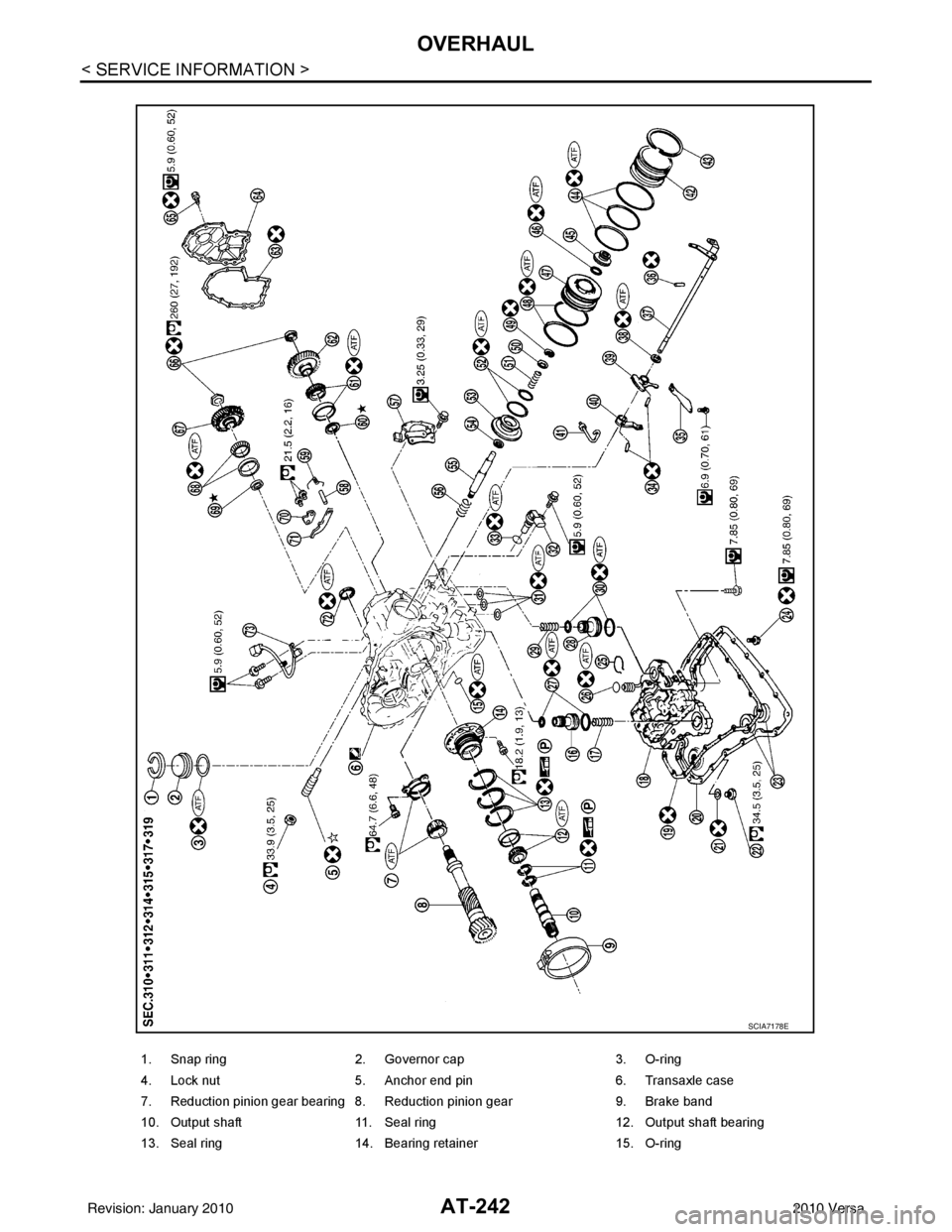
1. Snap ring2. Governor cap 3. O-ring
4. Lock nut 5. Anchor end pin 6. Transaxle case
7. Reduction pinion gear bearing 8. Reduction pinion gear 9. Brake band
10. Output shaft 11. Seal ring 12. Output shaft bearing
13. Seal ring 14. Bearing retainer 15. O-ring
SCIA7178E
Revision: January 20102010 Versa
Page 265 of 3745

AT-248
< SERVICE INFORMATION >
OVERHAUL
19. Retaining plate20. Drive plate21. Snap ring
22. Cancel cover 23. Spring retainer assembly 24. High clutch piston
25. Input shaft assembly (high clutch drum) 26. Needle bearing
27. High clutch assembly
28. Bearing race 29. Seal ring30. Driven plate
31. Needle bearing 32. Needle bearing33. Overrun clutch hub
34. End bearing 35. Forward clutch hub 36. Needle bearing
37. Rear planetary carrier 38. Rear sun gear 39. Front planetary carrier
40. Low one-way clutch 41. Snap ring42. Needle bearing
43. Needle bearing 44. Rear internal gear 45. Thrust washer
46. Forward one-way clutch 47. Thrust washer48. Thrust washer
49. Forward clutch drum 50. Seal lip51. Seal lip
52. Overrun clutch piston 53. Spring retainer assembly54. Snap ring
55. Dish plate 56. Driven plate57. Retaining plate
58. Snap ring 59. Dish plate60. Driven plate
61. Retaining plate 62. Snap ring63. Forward clutch assembly and over-
run clutch assembly
64. Drive plate 65. Drive plate 66. D-ring
67. Forward clutch piston 68. D-ring 69. Needle bearing
70. Seal lip 71. Driven plate 72. Snap ring
73. Low & reverse brake assembly 74. Retaining plate 75. Drive plate
76. Retaining plate 77. Dish plate78. Driven plate
79. Snap ring 80. Spring retainer assembly 81. Low & reverse brake piston
82. D-ring
Revision: January 20102010 Versa
Page 266 of 3745
OVERHAULAT-249
< SERVICE INFORMATION >
DE
F
G H
I
J
K L
M A
B
AT
N
O P
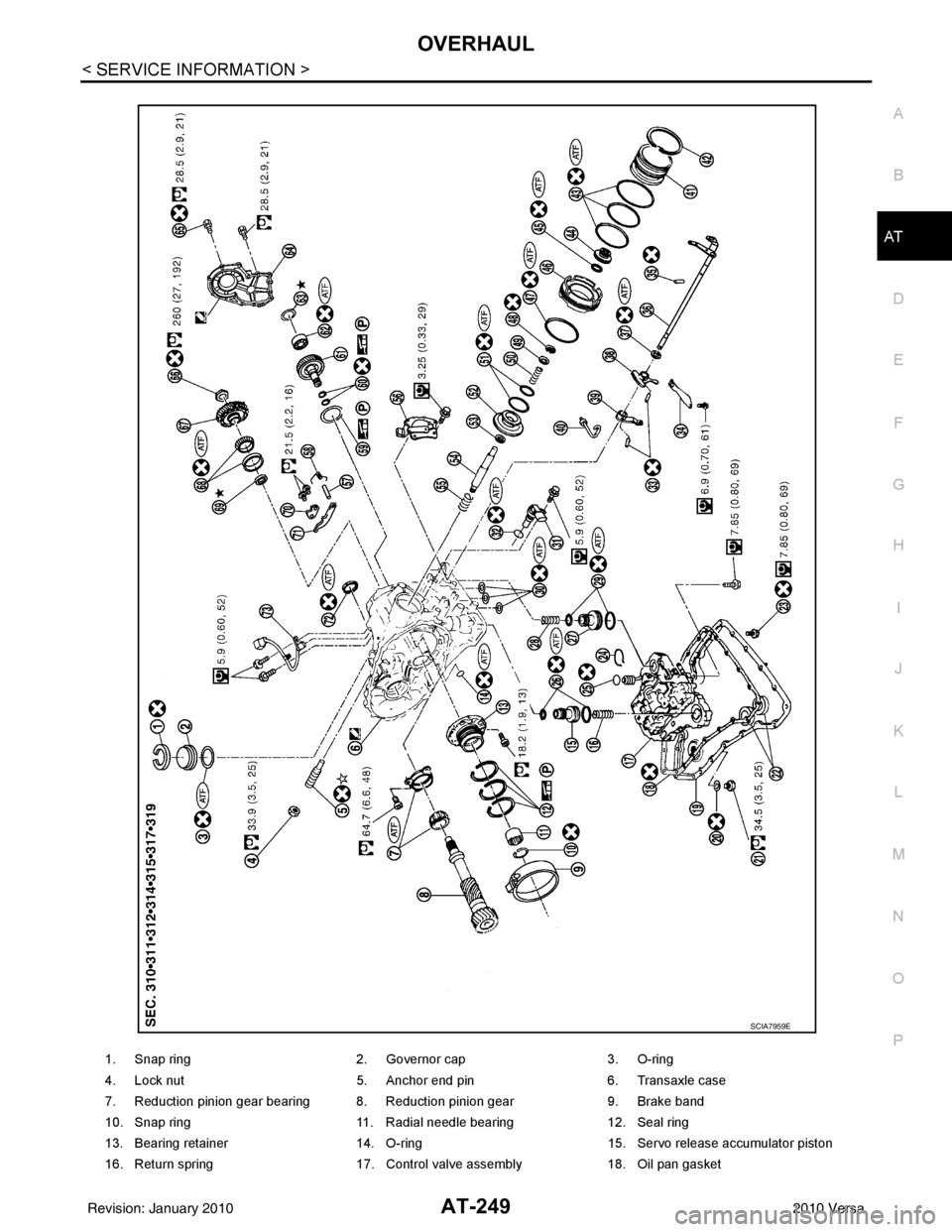
1. Snap ring 2. Governor cap3. O-ring
4. Lock nut 5. Anchor end pin6. Transaxle case
7. Reduction pinion gear bearing 8. Reduction pinion gear 9. Brake band
10. Snap ring 11. Radial needle bearing12. Seal ring
13. Bearing retainer 14. O-ring15. Servo release accumulator piston
16. Return spring 17. Control valve assembly18. Oil pan gasket
SCIA7959E
Revision: January 20102010 Versa