battery NISSAN LATIO 2010 Service Manual PDF
[x] Cancel search | Manufacturer: NISSAN, Model Year: 2010, Model line: LATIO, Model: NISSAN LATIO 2010Pages: 3745, PDF Size: 73.67 MB
Page 465 of 3745
![NISSAN LATIO 2010 Service Manual PDF AV-68
< SERVICE INFORMATION >[AUDIO WITH NAVIGATION]
AUDIO
OK or NG
OK >> GO TO 3.
NG >> • Check connector housings
for disconnected or loose
terminals.
• Repair harness or connector.
3.GROUND CI](/img/5/57358/w960_57358-464.png "NISSAN LATIO 2010 Service Manual PDF AV-68
< SERVICE INFORMATION >[AUDIO WITH NAVIGATION]
AUDIO
OK or NG
OK >> GO TO 3.
NG >> • Check connector housings
for disconnected or loose
terminals.
• Repair harness or connector.
3.GROUND CI")
AV-68
< SERVICE INFORMATION >[AUDIO WITH NAVIGATION]
AUDIO
OK or NG
OK >> GO TO 3.
NG >> • Check connector housings
for disconnected or loose
terminals.
• Repair harness or connector.
3.GROUND CIRCUIT CHECK
Check continuity between AV control unit harness connectors M43
(A), M70 (B) terminals 20, 32 and ground.
OK or NG
OK >> Inspection End.
NG >> • Check connector housings for disconnected or loose
terminals.
• Repair harness or connector.
Steering Switch CheckINFOID:0000000005988558
1.CHECK HARNESS
1. Turn ignition switch OFF.
2. Disconnect audio unit connector and combination switch (spiral cable) connector.
3. Check continuity between audio unit harness connecto r (A) terminals and combination switch (spiral
cable) harness connector (B) terminals.
4. Check continuity between audio unit and ground.
OK or NG
OK >> GO TO 3.
NG >> Repair harness.
Unit Te r m i n a l N o .
OFF ACC ON
(+)
(-)
Connector Terminal
AV c o n t r o l
unit M4319 Ground
Battery
voltage Battery
voltage Battery
voltage
7Ground0V Battery
voltage Battery
voltage
WKIA5769E
Continuity should exist.
AWNIA2216ZZ
Te r m i n a l s
Continuity
AB
Connector Terminal Connector Terminal
M43 6
M30 24
Ye s
15 31
16 32
Te r m i n a l s Continuity
(+)
(–)
Connector Terminal
M43 6
Ground No
15
16
AWNIA1823GB
Revision: January 20102010 Versa
Page 469 of 3745
![NISSAN LATIO 2010 Service Manual PDF AV-72
< SERVICE INFORMATION >[AUDIO WITH NAVIGATION]
AUDIO
1. Connect AV control unit connector and rear speaker connector.
2. Turn ignition switch to ACC.
3. Push “POWER” switch.
4. Check the sig](/img/5/57358/w960_57358-468.png "NISSAN LATIO 2010 Service Manual PDF AV-72
< SERVICE INFORMATION >[AUDIO WITH NAVIGATION]
AUDIO
1. Connect AV control unit connector and rear speaker connector.
2. Turn ignition switch to ACC.
3. Push “POWER” switch.
4. Check the sig")
AV-72
< SERVICE INFORMATION >[AUDIO WITH NAVIGATION]
AUDIO
1. Connect AV control unit connector and rear speaker connector.
2. Turn ignition switch to ACC.
3. Push “POWER” switch.
4. Check the signal between AV control unit harness connector ter-
minals with CONSULT-III or oscilloscope.
OK or NG
OK >> Replace speaker. Refer to AV-72, "Removal and Instal-
lation".
NG >> Replace AV control unit. Refer to AV-72, "
Removal and
Installation".
Removal and InstallationINFOID:0000000005924420
AUDIO UNIT
Removal
1. Disconnect the battery negative terminal.
2. Remove cluster lid C. Refer to IP-11
.
3. Remove the audio unit screws (A), disconnect the connectors and remove the audio unit (1).
4. Remove the audio unit bracket.
Installation
Installation is in the reverse order of removal.
FRONT DOOR SPEAKER
Removal
1. Remove the front door finisher. Refer to EI-34.
Te r m i n a l s
Condi-tion Reference
signal
(+)
(-)
Con- nec- tor Te r m i -
nal Con-
nec- tor Te r m i -
nal
M43 4
M43 5
Re-
ceive
audio
signal
13
14
WKIA5808E
SKIA0177E
ALNIA1246ZZ
Revision: January 20102010 Versa
Page 477 of 3745
![NISSAN LATIO 2010 Service Manual PDF AV-80
< SERVICE INFORMATION >[AUDIO WITH NAVIGATION]
TELEPHONE
Bluetooth Control Unit Harnes s Connector Terminal Layout
INFOID:0000000005924428
Terminal and Reference Value for Bluetooth Control Unit](/img/5/57358/w960_57358-476.png "NISSAN LATIO 2010 Service Manual PDF AV-80
< SERVICE INFORMATION >[AUDIO WITH NAVIGATION]
TELEPHONE
Bluetooth Control Unit Harnes s Connector Terminal Layout
INFOID:0000000005924428
Terminal and Reference Value for Bluetooth Control Unit")
AV-80
< SERVICE INFORMATION >[AUDIO WITH NAVIGATION]
TELEPHONE
Bluetooth Control Unit Harnes s Connector Terminal Layout
INFOID:0000000005924428
Terminal and Reference Value for Bluetooth Control UnitINFOID:0000000005924429
AWNIA1988GB
Te r m i n a l
(Wire color) ItemSignal
input/
output Condition
Reference value
(Approx.) Example of symptom
+– Ignition
switch Operation
1 (R) Ground Battery pow-
erInput –
–Battery voltage System does not
work properly.
2 (L) Ground ACC power Input ACC/
ON –
Battery voltage System does not
work properly.
3 (LG) Ground IGN power Input ON/
START –
Battery voltage System does not
work properly.
4 (B) – Ground – – –– –
5–Shield –– – ––
6–Shield –– – ––
7 (R/W) 8 (R/L) Mic-in signal Input – ––Bluetooth Micro-
phone inoperative.
9 (LG) 10 (V) Audio out Output ACC/
ON Bluetooth control
unit sends audio
signal Audio can not be
heard.
21 (B) – Cont-2 – – –– –
27 (B) – Cont-6 – – –– –
28 (O) Ground Vehicle
speed signal
(8–pulse)Input ON When vehicle
speed is approx.
40 km/h (25
MPH) Speed sensitive vol-
ume is inoperative.
29 (B) Ground Bluetooth
Microphone
powerOutput –
–5VBluetooth Micro-
phone inoperative.
33 – Bluetooth
antenna sig-
nalInput –
– – –
35 (L) — M CAN + — — —— —
SKIB3609E
PKIC0643E
Revision: January 20102010 Versa
Page 479 of 3745
![NISSAN LATIO 2010 Service Manual PDF AV-82
< SERVICE INFORMATION >[AUDIO WITH NAVIGATION]
TELEPHONE
Workflow
INFOID:0000000005924431
Power Supply and Ground Circuit Inspection for Bluetooth Control UnitINFOID:0000000005924432
1.CHECK FUS](/img/5/57358/w960_57358-478.png "NISSAN LATIO 2010 Service Manual PDF AV-82
< SERVICE INFORMATION >[AUDIO WITH NAVIGATION]
TELEPHONE
Workflow
INFOID:0000000005924431
Power Supply and Ground Circuit Inspection for Bluetooth Control UnitINFOID:0000000005924432
1.CHECK FUS")
AV-82
< SERVICE INFORMATION >[AUDIO WITH NAVIGATION]
TELEPHONE
Workflow
INFOID:0000000005924431
Power Supply and Ground Circuit Inspection for Bluetooth Control UnitINFOID:0000000005924432
1.CHECK FUSES
Make sure the following fuses for the Bluetooth control unit are not blown.
OK or NG
OK >> GO TO 2.
NG >> If fuse is blown, be sure to eliminate cause of malfunction before installing new fuse. Refer to PG-
4.
2.CHECK POWER SUPPLY CIRCUIT
1. Disconnect Bluetooth control unit connector B121.
2. Check voltage between connector terminals and ground as fol- lows.
OK or NG
OK >> GO TO 3.
NG >> Check harness for open between Bluetooth control unit and fuse.
3.CHECK GROUND CIRCUITS
1. Turn ignition switch OFF.
Failure Message Action
“Internal failure” Replace Bluetooth control unit. Refer to AV- 8 5 , "
Removal and Installation".
“Bluetooth antenna open” 1. Inspect harness connection.
2. Replace Bluetooth antenna. Refer to AV- 8 5 , "
Removal and Installation".
“Bluetooth antenna shorted”
“Phone/Send for Hands Free System is stuck” Check steering wheel audio control switches. Refer to AV- 6 8 , "
Steering Switch
Check".
“Phone/End for the Hands Free System is stuck”
“Microphone test” (failed interactive test) 1. Inspect harness between Bluetooth control unit and microphone.
2. Replace microphone. Refer to
AV- 8 5 , "
Removal and Installation".
Te r m i n a l s
Ignition Switch Fuse No.
Connector Terminal
B121 1
All positions27
2 ACC/ON20
3 ON/START3
Terminals Ignition switch position
(+) (–) OFF ACC ON
Connector Terminal
B121 1
Ground Battery
voltage Battery
voltage Battery
voltage
20 VBattery
voltage Battery
voltage
30 V0V Battery
voltage
WKIA4389E
Revision: January 20102010 Versa
Page 484 of 3745
![NISSAN LATIO 2010 Service Manual PDF TELEPHONEAV-87
< SERVICE INFORMATION > [AUDIO WITH NAVIGATION]
C
D
E
F
G H
I
J
L
M A
B
AV
N
O P
Hatchback
Sedan
Removal
1. Disconnect the battery negative terminal.
2. For hatchback, remove luggage si](/img/5/57358/w960_57358-483.png "NISSAN LATIO 2010 Service Manual PDF TELEPHONEAV-87
< SERVICE INFORMATION > [AUDIO WITH NAVIGATION]
C
D
E
F
G H
I
J
L
M A
B
AV
N
O P
Hatchback
Sedan
Removal
1. Disconnect the battery negative terminal.
2. For hatchback, remove luggage si")
TELEPHONEAV-87
< SERVICE INFORMATION > [AUDIO WITH NAVIGATION]
C
D
E
F
G H
I
J
L
M A
B
AV
N
O P
Hatchback
Sedan
Removal
1. Disconnect the battery negative terminal.
2. For hatchback, remove luggage side lower finisher (RH). Refer to EI-54, "
Removal and Installation".
3. For sedan, fold the rear seat back down, remove the seat back finisher (RH). Refer to EI-57, "
Removal
and Installation".
4. Disconnect the Bluetooth antenna feeder harness clips.
5. Disconnect the Bluetooth ant enna feeder harness connector.
6. Remove the Bluetooth antenna bracket bolt(s) and remove antenna.
7. Remove the Bluetooth antenna screws and remove bracket.
Installation
Installation is in the reverse order of removal.
LKIA0763E
1. Bluetooth antenna bracket 2. Bluetooth antennaA. Bluetooth antenna bracket bolts
B. Bluetooth antenna screws C. Bluetooth antenna feeder harness
clips
LKIA0937E
1. Bluetooth antenna bracket 2. Bluetooth antennaA. Bluetooth antenna bracket bolts
B. Bluetooth antenna screws C. Bluetooth antenna feeder harness
clip ⇒
Front
Revision: January 20102010 Versa
Page 490 of 3745

BCS-1
ELECTRICAL
C
DE
F
G H
I
J
L
M
SECTION BCS
A
B
BCS
N
O P
CONTENTS
BODY CONTROL SYSTEM
SERVICE INFORMATION .. ..........................2
PRECAUTIONS .............................................. .....2
Precaution for Supplemental Restraint System
(SRS) "AIR BAG" and "SEAT BELT PRE-TEN-
SIONER" ............................................................. ......
2
Precaution Necessary for Steering Wheel Rota-
tion After Battery Disconnect ............................... ......
2
BCM (BODY CONTROL MODULE) ....................4
System Description ............................................. ......4
CAN Communication System Description .................8
Schematic ............................................................ .....9
BCM Terminal Arrangement ....................................11
Terminal and Reference Value for BCM ..................12
BCM Power Supply and Ground Circuit Inspection
....
16
CONSULT-III Function (BCM) .................................17
CAN Communication Inspection Using CON-
SULT-III (Self-Diagnosis) ..................................... ....
18
Configuration ...........................................................19
Removal and Installation of BCM ............................19
Revision: January 20102010 Versa
Page 491 of 3745

BCS-2
< SERVICE INFORMATION >
PRECAUTIONS
SERVICE INFORMATION
PRECAUTIONS
Precaution for Supplemental Restraint System (SRS) "AIR BAG" and "SEAT BELT
PRE-TENSIONER"
INFOID:0000000005715841
The Supplemental Restraint System such as “A IR BAG” and “SEAT BELT PRE-TENSIONER”, used along
with a front seat belt, helps to reduce the risk or severity of injury to the driver and front passenger for certain
types of collision. This system includes seat belt switch inputs and dual stage front air bag modules. The SRS
system uses the seat belt switches to determine the front air bag deployment, and may only deploy one front
air bag, depending on the severity of a collision and w hether the front occupants are belted or unbelted.
Information necessary to service the system safely is included in the SRS and SB section of this Service Man-
ual.
WARNING:
• To avoid rendering the SRS inopera tive, which could increase the risk of personal injury or death in
the event of a collision which would result in air bag inflation, all maintenance must be performed by
an authorized NISSAN/INFINITI dealer.
• Improper maintenance, including incorrect removal and installation of the SRS can lead to personal
injury caused by unintent ional activation of the system. For re moval of Spiral Cable and Air Bag
Module, see the SRS section.
• Do not use electrical test equipmen t on any circuit related to the SRS unless instructed to in this
Service Manual. SRS wiring harn esses can be identified by yellow and/or orange harnesses or har-
ness connectors.
PRECAUTIONS WHEN USING POWER TOOLS (AIR OR ELECTRIC) AND HAMMERS
WARNING:
• When working near the Airbag Diagnosis Sensor Unit or other Airbag System sensors with the Igni-
tion ON or engine running, DO NOT use air or electri c power tools or strike near the sensor(s) with a
hammer. Heavy vibration could activate the sensor( s) and deploy the air bag(s), possibly causing
serious injury.
• When using air or electric power tools or hammers , always switch the Ignition OFF, disconnect the
battery, and wait at least 3 minu tes before performing any service.
Precaution Necessary for Steering W heel Rotation After Battery Disconnect
INFOID:0000000005976476
NOTE:
• This Procedure is applied only to models with Intelligent Key system and NATS (NISSAN ANTI-THEFT SYS-
TEM).
• Remove and install all control units after disconnecting both battery cables with the ignition knob in the
″LOCK ″ position.
• Always use CONSULT-III to perform self-diagnosis as a part of each function inspection after finishing work.
If DTC is detected, perform trouble diagnosis according to self-diagnostic results.
For models equipped with the Intelligent Key system and NATS, an electrically controlled steering lock mech-
anism is adopted on the key cylinder.
For this reason, if the battery is disconnected or if the battery is discharged, the steering wheel will lock and
steering wheel rotation will become impossible.
If steering wheel rotation is required when battery pow er is interrupted, follow the procedure below before
starting the repair operation.
OPERATION PROCEDURE
1. Connect both battery cables. NOTE:
Supply power using jumper cables if battery is discharged.
2. Use the Intelligent Key or mechanical key to turn the ignition switch to the ″ACC ″ position. At this time, the
steering lock will be released.
3. Disconnect both battery cables. The steering lock will remain released and the steering wheel can be rotated.
4. Perform the necessary repair operation.
Revision: January 20102010 Versa
Page 492 of 3745

PRECAUTIONSBCS-3
< SERVICE INFORMATION >
C
DE
F
G H
I
J
L
M A
B
BCS
N
O P
5. When the repair work is completed, return the ignition switch to the ″LOCK ″ position before connecting
the battery cables. (At this time, the steering lock mechanism will engage.)
6. Perform a self-diagnosis check of al l control units using CONSULT-III.
Revision: January 20102010 Versa
Page 496 of 3745
BCM (BODY CONTROL MODULE)BCS-7
< SERVICE INFORMATION >
C
DE
F
G H
I
J
L
M A
B
BCS
N
O P
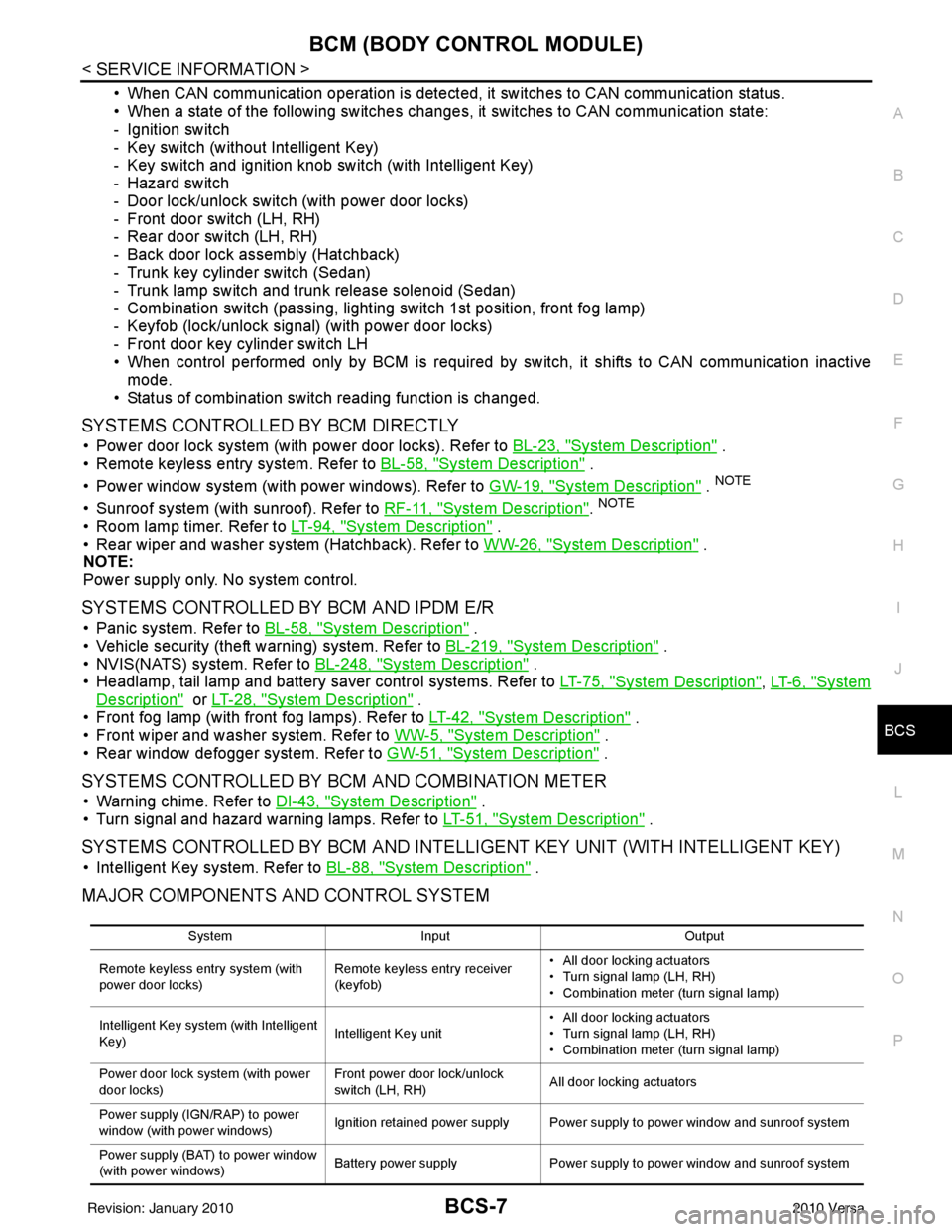
• When CAN communication operation is detected, it switches to CAN communication status.
• When a state of the following switches changes , it switches to CAN communication state:
- Ignition switch
- Key switch (without Intelligent Key)
- Key switch and ignition knob switch (with Intelligent Key)
- Hazard switch
- Door lock/unlock switch (with power door locks)
- Front door switch (LH, RH)
- Rear door switch (LH, RH)
- Back door lock assembly (Hatchback)
- Trunk key cylinder switch (Sedan)
- Trunk lamp switch and trunk release solenoid (Sedan)
- Combination switch (passing, lighting switch 1st position, front fog lamp)
- Keyfob (lock/unlock signal) (with power door locks)
- Front door key cylinder switch LH
• When control performed only by BCM is required by switch, it shifts to CAN communication inactive mode.
• Status of combination switch reading function is changed.
SYSTEMS CONTROLLED BY BCM DIRECTLY
• Power door lock system (with power door locks). Refer to BL-23, "System Description" .
• Remote keyless entry system. Refer to BL-58, "
System Description" .
• Power window system (with power windows). Refer to GW-19, "
System Description" . NOTE
• Sunroof system (with sunroof). Refer to RF-11, "System Description". NOTE
• Room lamp timer. Refer to LT-94, "System Description" .
• Rear wiper and washer system (Hatchback). Refer to WW-26, "
System Description" .
NOTE:
Power supply only. No system control.
SYSTEMS CONTROLLED BY BCM AND IPDM E/R
• Panic system. Refer to BL-58, "System Description" .
• Vehicle security (theft warning) system. Refer to BL-219, "
System Description" .
• NVIS(NATS) system. Refer to BL-248, "
System Description" .
• Headlamp, tail lamp and battery saver control systems. Refer to LT-75, "
System Description", LT- 6 , "System
Description" or LT-28, "System Description" .
• Front fog lamp (with front fog lamps). Refer to LT-42, "
System Description" .
• Front wiper and washer system. Refer to WW-5, "
System Description" .
• Rear window defogger system. Refer to GW-51, "
System Description" .
SYSTEMS CONTROLLED BY BCM AND COMBINATION METER
• Warning chime. Refer to DI-43, "System Description" .
• Turn signal and hazard warning lamps. Refer to LT-51, "
System Description" .
SYSTEMS CONTROLLED BY BCM AND INTELLIGENT KEY UNIT (WITH INTELLIGENT KEY)
• Intelligent Key system. Refer to BL-88, "System Description" .
MAJOR COMPONENTS AND CONTROL SYSTEM
System Input Output
Remote keyless entry system (with
power door locks) Remote keyless entry receiver
(keyfob)• All door locking actuators
• Turn signal lamp (LH, RH)
• Combination meter (turn signal lamp)
Intelligent Key system (with Intelligent
Key) Intelligent Key unit• All door locking actuators
• Turn signal lamp (LH, RH)
• Combination meter (turn signal lamp)
Power door lock system (with power
door locks) Front power door lock/unlock
switch (LH, RH)
All door locking actuators
Power supply (IGN /RAP) to power
window (with power windows) Ignition retained power supply Power supply to power window and sunroof system
Power supply (BAT) to power window
(with power windows) Battery power supply
Power supply to power window and sunroof system
Revision: January 20102010 Versa
Page 497 of 3745

BCS-8
< SERVICE INFORMATION >
BCM (BODY CONTROL MODULE)
CAN Communication System Description
INFOID:0000000005395104
Refer to LAN-7, "System Description".
Panic alarm •Key switch
•KeyfobIPDM E/R
Vehicle security system • All door switches
•Keyfob
• Door lock/unlock switch
• Trunk key cylinder switch (Se-
dan)
• Front door key cylinder switch LH • IPDM/ER
• Security indicator lamp
Battery save r control • Ignition switch
• Combination switch
IPDM E/R
Headlamp Combination switch IPDM E/R
Tail lamp Combination switchIPDM E/R
Front fog lamp (with front fog lamps) Combination switch IPDM E/R
Turn signal lamp Combination switch• Turn signal lamp
• Combination meter
Hazard lamp Hazard switch• Turn signal lamp
• Combination meter
Room lamp timer •Key switch
•Keyfob
• Main power window and door
lock/unlock switch
• Front door switch LH
• All door switch Interior room lamp
Back door switch signal (Hatchback) Back door lock assembly Luggage room lamp
Back door lock signal (Hatchback) Back door lock assembly Back door opener
Trunk lamp switch signal (Sedan) Trunk lamp switch and trunk re-
lease solenoidLuggage room lamp
Trunk lid opener signal (Sedan) Trunk lamp switch and trunk re-
lease solenoid
Trunk lid opener
Key warning chime •Key switch
• Front door switch LHCombination meter (warning buzzer)
Light warning chime • Combination switch
•Key switch
• Front door switch LHCombination meter (warning buzzer)
Seat belt warning chime • Seat belt buckle switch LH
• Ignition switch
Combination meter (warning buzzer)
Front wiper and washer system • Combination switch
• Ignition switchIPDM E/R
Rear window defogger Rear window defogger switch IPDM E/R
Rear wiper and washer system
(Hatchback) • Combination switch
• Ignition switch
Rear wiper motor
A/C switch signal Front air controlECM
Blower fan switch signal Front air controlECM
A/C indicator signal Front air controlA/C indicator
Low tire pressure warning system Remote keyless entry receiver Combination meter System
Input Output
Revision: January 20102010 Versa