stop start NISSAN LATIO 2011 Service User Guide
[x] Cancel search | Manufacturer: NISSAN, Model Year: 2011, Model line: LATIO, Model: NISSAN LATIO 2011Pages: 3787, PDF Size: 78.35 MB
Page 136 of 3787
P0734 4GR INCORRECT RATIOAT-119
< SERVICE INFORMATION >
DE
F
G H
I
J
K L
M A
B
AT
N
O P
WITH CONSULT-III
1. Start engine and select “DATA MONITOR” m ode for “TRANSMISSION” with CONSULT-III.
2. Touch “START”.
3. Make sure that output voltage of A/T fluid temperature sensor is within the range below. FLUID TEMP SE: 0.4 - 1.5 V
If out of range, drive the vehicle to decrease the vo ltage (warm up the fluid) or stop engine to increase the
voltage (cool down the fluid).
4. Select “4TH GR FNCTN P0734” of “DTC & SR T CONFIRMATION” mode for “TRANSMISSION” with
CONSULT-III and touch “START”.
5. Accelerate vehicle to 55 to 65 km/h (34 to 40 MPH) under the following conditions and release the accel-
erator pedal completely.
THROTTLE POSI: Less th an 5.5/8 (at all times during step 4)
SLCT LVR POSI: “D” position
- Make sure that “GEAR” shows “3” after releasing pedal.
6. Depress accelerator pedal steadily with 1.0/8 - 2.0/ 8 of “THROTTLE POSI” from a speed of 55 to 65 km/h
(34 to 40 MPH) until “TESTING” has turned to “STO P VEHICLE” or “COMPLETED”. (It will take approxi-
mately 3 seconds.)
If the check result NG appears on CONSULT-III screen, go to AT-119, "
Diagnosis Procedure".
If “STOP VEHICLE” appears on CONSULT-III screen, go to following step.
- Make sure that “GEAR” shows “4” when depressing accelerator pedal with 1.0/8 - 2.0/8 of
“THROTTLE POSI”.
- If “TESTING” does not appear on CONSULT-III fo r a long time, select “SELF-DIAG RESULTS” for
“TRANSMISSION”. In case a DTC other than “P0734 4GR INCORRECT RATIO” is shown, refer to
AT-77, "
CONSULT-III Function (TRANSMISSION)".
7. Stop vehicle.
8. Follow the instruction displayed. (Check for normal shifting referring to the table below.)
9. Make sure that “OK” is disp layed. (If “NG” is displayed, refer to “Diagnostic Procedure”.)
Refer to AT-119, "
Diagnosis Procedure".
Refer to AT-64, "
Vehicle Speed at Which Gear Shifting Occurs".
WITH GST
Follow the procedure “WITH CONSULT-III”.
Diagnosis ProcedureINFOID:0000000005928163
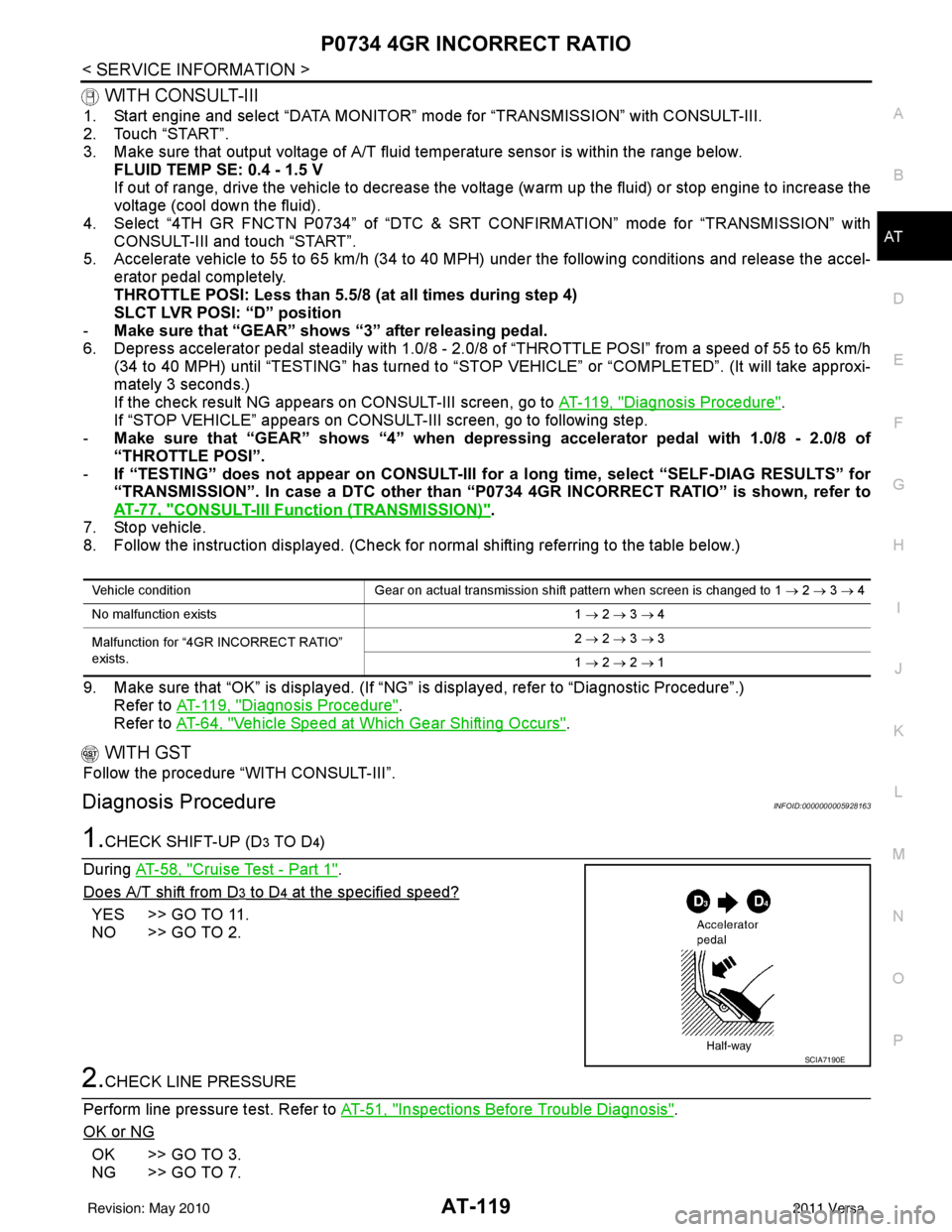
1.CHECK SHIFT-UP (D3 TO D4)
During AT-58, "
Cruise Test - Part 1".
Does A/T shift from D
3 to D4 at the specified speed?
YES >> GO TO 11.
NO >> GO TO 2.
2.CHECK LINE PRESSURE
Perform line pressure test. Refer to AT-51, "
Inspections Before Trouble Diagnosis".
OK or NG
OK >> GO TO 3.
NG >> GO TO 7.
Vehicle condition Gear on actual transmission shift pattern when screen is changed to 1 → 2 → 3 → 4
No malfunction exists 1 → 2 → 3 → 4
Malfunction for “4GR INCORRECT RATIO”
exists. 2
→ 2 → 3 → 3
1 → 2 → 2 → 1
SCIA7190E
Revision: May 2010 2011 Versa
Page 145 of 3787

AT-128
< SERVICE INFORMATION >
P0744 TORQUE CONVERTER
P0744 TORQUE CONVERTER
DescriptionINFOID:0000000005928172
• This malfunction will not be detected while the OD OFF indicator lamp is indicating another self-diagnosismalfunction.
• This malfunction is detected when the A/T does not shif t into fourth gear position or the torque converter
clutch does not lock-up as instructed by the TCM. This is not caused by electrical malfunction (circuits open
or shorted) but by mechanical malfunction such as c ontrol valve sticking, improper solenoid valve operation,
malfunctioning oil pump or torque converter clutch, etc.
CONSULT-III Reference Value in Data Monitor ModeINFOID:0000000005928173
Remarks: Specification data are reference values.
On Board Diagn osis LogicINFOID:0000000005928174
• This is an OBD-II self-diagnostic item.
• Diagnostic trouble code “P0744 T/C CLUTCH FNCTN” wit h CONSULT-III is detected when A/T cannot per-
form lock-up even if electrical circuit is good.
• This diagnosis monitors actual gear position by checki ng the torque converter slip ratio calculated by TCM
as follows:
Torque converter slip ratio = A x C/B
A: Output shaft revolution signal from output speed sensor
B: Engine speed signal from ECM
C: Gear ratio determined as gear position which TCM supposes
If the actual gear position is much lower than the pos ition (4th) supposed by TCM, the slip ratio will be much
less than normal. In case the ratio does not reach t he specified value, TCM judges this diagnosis malfunc-
tion.
This malfunction will be caused when shift solenoid valve B is stuck closed.
• Gear positions supposed by TCM are as follows.
In case of gear position with no malfunctions: 1, 2, 3 and 4 positions
In case of gear position with shift solenoid valve B stuc k closed: 1, 2, 2 and 1* positions to each gear position
above
*: “P0744 T/C CLUTCH FNCTN” is detected.
Possible CauseINFOID:0000000005928175
• Line pressure solenoid valve
• Torque converter clutch solenoid valve
• Each clutch
• Hydraulic control circuit
DTC Confirmation ProcedureINFOID:0000000005928176
CAUTION:
• Always drive vehicle at a safe speed.
• If performing this “DTC Confirmation Procedure” again, always turn ignition switch OFF and wait at
least 10 seconds before continuing.
After the repair, perform the following proc edure to confirm the malfunction is eliminated.
WITH CONSULT-III
1. Start engine and select “DATA MONITOR” m ode for “TRANSMISSION” with CONSULT-III.
2. Touch “START”.
3. Make sure that output voltage of A/T fluid temperature sensor is within the range below.
FLUID TEMP SE: 0.4 - 1.5 V
If out of range, drive vehicle to decrease voltage (warm up the fluid) or stop engine to increase voltage
(cool down the fluid).
4. Select “TCC S/V FNCTN P0744” of “DTC & SR T CONFIRMATION” mode for “TRANSMISSION” with
CONSULT-III and touch “START”.
Item name Condition Display value (Approx)
TCC S/V DUTY Lock-up OFF ⇔ Lock-up ON 4% ⇔ 94%
Revision: May 2010 2011 Versa
Page 234 of 3787
SHIFT CONTROL SYSTEMAT-217
< SERVICE INFORMATION >
DE
F
G H
I
J
K L
M A
B
AT
N
O P
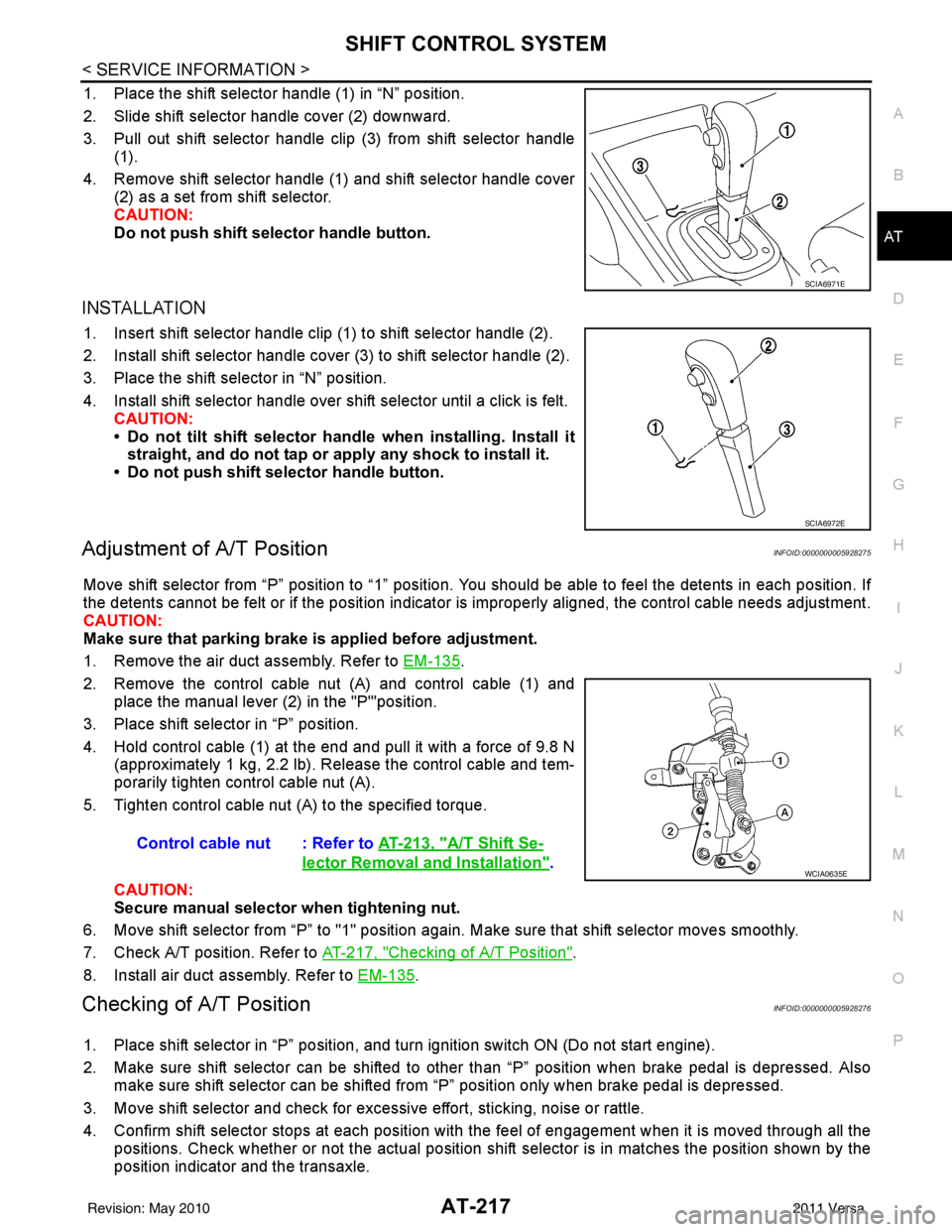
1. Place the shift selector handle (1) in “N” position.
2. Slide shift selector handle cover (2) downward.
3. Pull out shift selector handle clip (3) from shift selector handle (1).
4. Remove shift selector handle (1) and shift selector handle cover (2) as a set from shift selector.
CAUTION:
Do not push shift selector handle button.
INSTALLATION
1. Insert shift selector handle clip (1) to shift selector handle (2).
2. Install shift selector handle cover (3) to shift selector handle (2).
3. Place the shift selector in “N” position.
4. Install shift selector handle over shift selector until a click is felt.
CAUTION:
• Do not tilt shift selector hand le when installing. Install it
straight, and do not tap or ap ply any shock to install it.
• Do not push shift selector handle button.
Adjustment of A/T PositionINFOID:0000000005928275
Move shift selector from “P” position to “1” position. You should be able to feel the detents in each position. If
the detents cannot be felt or if the position indicator is improperly aligned, the control cable needs adjustment.
CAUTION:
Make sure that parking brake is applied before adjustment.
1. Remove the air duct assembly. Refer to EM-135
.
2. Remove the control cable nut (A) and control cable (1) and place the manual lever (2) in the "P'"position.
3. Place shift selector in “P” position.
4. Hold control cable (1) at the end and pull it with a force of 9.8 N (approximately 1 kg, 2.2 lb). Release the control cable and tem-
porarily tighten control cable nut (A).
5. Tighten control cable nut (A) to the specified torque.
CAUTION:
Secure manual selector when tightening nut.
6. Move shift selector from “P” to "1" position again. Make sure that shift selector moves smoothly.
7. Check A/T position. Refer to AT-217, "
Checking of A/T Position".
8. Install air duct assembly. Refer to EM-135
.
Checking of A/T PositionINFOID:0000000005928276
1. Place shift selector in “P” position, and tu rn ignition switch ON (Do not start engine).
2. Make sure shift selector can be shifted to other than “P” position when brake pedal is depressed. Also make sure shift selector can be shifted from “P” position only when brake pedal is depressed.
3. Move shift selector and check for excessive effort, sticking, noise or rattle.
4. Confirm shift selector stops at each position with the feel of engagement when it is moved through all the
positions. Check whether or not the ac tual position shift selector is in matches the position shown by the
position indicator and the transaxle.
SCIA6971E
SCIA6972E
Control cable nut : Refer to AT-213, "A/T Shift Se-
lector Removal and Installation".WCIA0635E
Revision: May 2010 2011 Versa
Page 519 of 3787

SQUEAK AND RATTLE TROUBLE DIAGNOSESBL-9
< SERVICE INFORMATION >
C
DE
F
G H
J
K L
M A
B
BL
N
O P
SILICONE GREASE
Used instead of UHMW tape that will be visible or not fit.
Note: Will only last a few months.
SILICONE SPRAY
Use when grease cannot be applied.
DUCT TAPE
Use to eliminate movement.
CONFIRM THE REPAIR
Confirm that the cause of a noise is repaired by test driving the vehicle. Operate the vehicle under the same
conditions as when the noise originally occurred. Refer to the notes on the Diagnostic Worksheet.
Generic Squeak and Rattle TroubleshootingINFOID:0000000005929274
Refer to Table of Contents for specific component removal and installation information.
INSTRUMENT PANEL
Most incidents are caused by contact and movement between:
1. The cluster lid A and instrument panel
2. Acrylic lens and combination meter housing
3. Instrument panel to front pillar garnish
4. Instrument panel to windshield
5. Instrument panel mounting pins
6. Wiring harnesses behind the combination meter
7. A/C defroster duct and duct joint
These incidents can usually be located by tapping or moving the components to duplicate the noise or by
pressing on the components while driving to stop the noi se. Most of these incidents can be repaired by apply-
ing felt cloth tape or silicone spray (in hard to reach areas). Urethane pads can be used to insulate wiring har-
ness.
CAUTION:
Do not use silicone spray to isolate a squeak or ra ttle. If you saturate the area with silicone, you will
not be able to recheck the repair.
CENTER CONSOLE
Components to pay attention to include:
1. Shift selector cover to finisher
2. A/C control unit and cluster lid C
3. Wiring harnesses behind audio and A/C control unit
The instrument panel repair and isolation pr ocedures also apply to the center console.
DOORS
Pay attention to the:
1. Finisher and inner panel making a slapping noise
2. Inside handle escutcheon to door finisher
3. Wiring harnesses tapping
4. Door striker out of alignment causing a popping noise on starts and stops
Tapping or moving the components or pressing on them while driving to duplicate the conditions can isolate
many of these incidents. You can usually insulate the ar eas with felt cloth tape or insulator foam blocks from
the NISSAN Squeak and Rattle Kit (J-43980) to repair the noise.
TRUNK
Trunk noises are often caused by a loose jack or loose items put into the trunk by the owner.
In addition look for:
1. Trunk lid bumpers out of adjustment
2. Trunk lid striker out of adjustment
3. The trunk lid torsion bars knocking together
4. A loose license plate or bracket
Revision: May 2010 2011 Versa
Page 631 of 3787
INTELLIGENT KEY SYSTEMBL-121
< SERVICE INFORMATION >
C
DE
F
G H
J
K L
M A
B
BL
N
O P
NON-DTC ITEM
NOTE:
• Before performing the diagnosis in the following table, check “Trouble Diagnosis Procedure”. Refer to BL-
115, "Trouble Diagnosis Procedure".
• Make sure that vehicle is under the condition shown in “Conditions of vehicle” before starting diagnosis, and
check each symptom.
• If the following “symptoms” are detected, check syst ems shown in the “Diagnoses/service procedure” col-
umn in this order.
Conditions of Vehicle (Operating Conditions)
• Intelligent Key is registered.
• Multiple mechanical keys are not set in a keyfob. (If mechanical keys are near the ignition switch, the operation may not work properly.)
ENGINE START CONDITION CHECK
NOTE:
• Before performing the diagnosis in the following table, check “Trouble Diagnosis Procedure”. Refer to BL-
115, "Trouble Diagnosis Procedure".
• If the following “symptoms” are detected, check syst ems shown in the ”Diagnoses/service procedure” col-
umn in this order.
ALL FUNCTIONS OF INTELLIGENT KEY SYSTEM DO NOT OPERATE
NOTE:
• Before performing the diagnosis in the following table, check “Trouble Diagnosis Procedure”. Refer to BL-
115, "Trouble Diagnosis Procedure".
• Make sure that vehicle is under the condition shown in “Conditions of vehicle” before starting diagnosis, and
check each symptom.
• If the following “symptoms” are detected, check syst ems shown in the “Diagnosis/service procedure” column
in this order.
Conditions of Vehicle (Operating Conditions)
• “ENGINE START BY I-KEY” and “LOCK/UNLOCK BY I-KEY” are ON when setting on CONSULT-III.
• Mechanical key is out of ignition switch.
• Ignition switch is not depressed.
• All doors are closed.
• Intelligent key is registered.
RED key warning lamp does not illuminate
[Without Intelligent Key]. 1. Check "KEY" warning lamp (RED).
BL-155
2. Replace Intelligent Key unit.BL-158
SymptomDiagnosis/service procedureReference page
SymptomDiagnosis/service procedure Reference page
Non DTC Item 1. Check key switch.
BL-127
2. Check NATS antenna amp.BL-246
SymptomDiagnosis/service procedure Reference page
Engine start condition check 1. Check CVT or A/T shift selector (park position switch).
(with CVT or A/T) BL-153
2. Check key interlock solenoid (with M/T).
BL-149
3. Check stop lamp switch (with CVT or A/T).BL-150
4. Check stop lamp switch (with M/T).BL-152
Revision: May 2010 2011 Versa
Page 854 of 3787
BRAKE PEDALBR-7
< SERVICE INFORMATION >
C
DE
G H
I
J
K L
M A
B
BR
N
O P
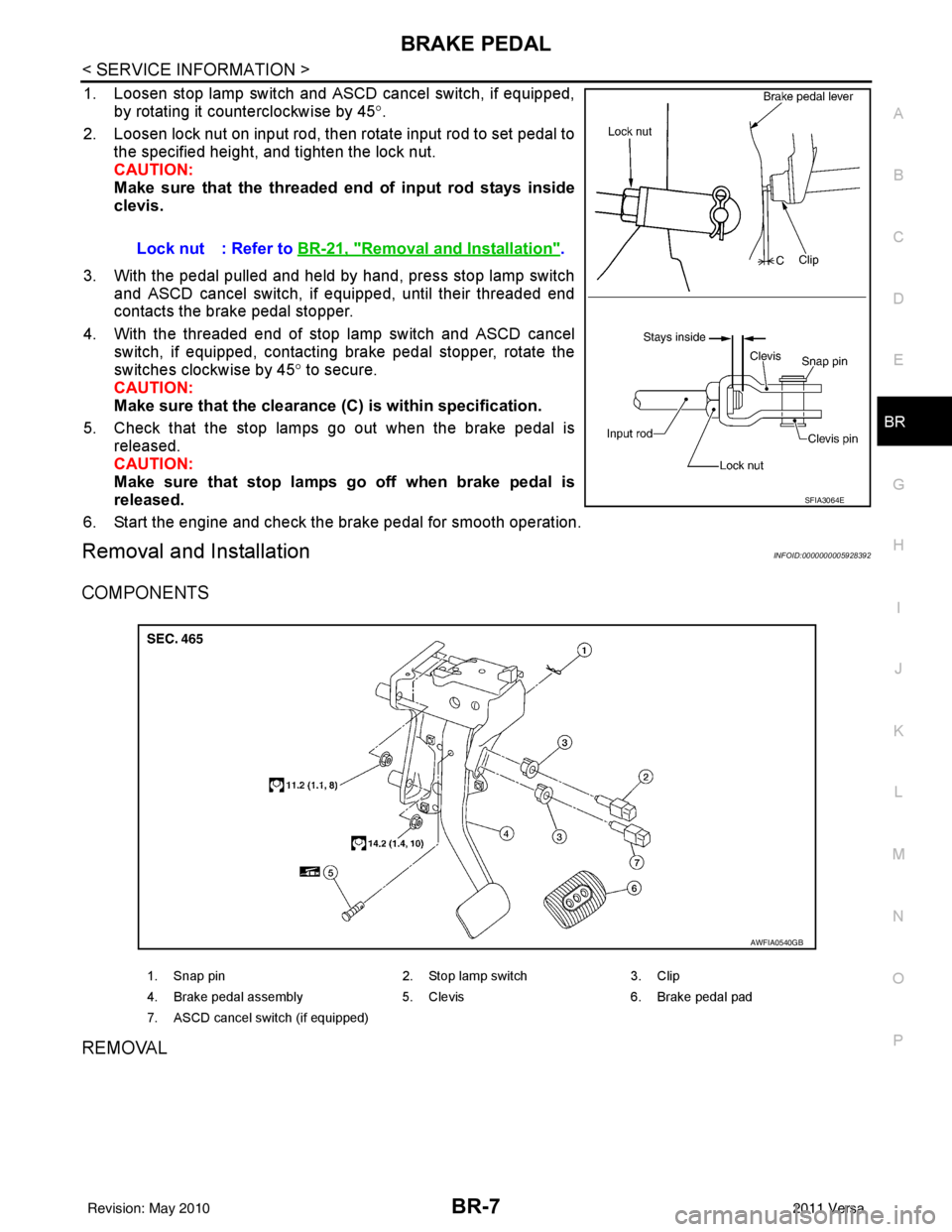
1. Loosen stop lamp switch and ASCD cancel switch, if equipped, by rotating it counterclockwise by 45 °.
2. Loosen lock nut on input rod, then rotate input rod to set pedal to the specified height, and tighten the lock nut.
CAUTION:
Make sure that the threaded end of input rod stays inside
clevis.
3. With the pedal pulled and held by hand, press stop lamp switch and ASCD cancel switch, if equipped, until their threaded end
contacts the brake pedal stopper.
4. With the threaded end of stop lamp switch and ASCD cancel switch, if equipped, contacting brake pedal stopper, rotate the
switches clockwise by 45 ° to secure.
CAUTION:
Make sure that the clearance (C) is within specification.
5. Check that the stop lamps go out when the brake pedal is released.
CAUTION:
Make sure that stop lamps go off when brake pedal is
released.
6. Start the engine and check the brake pedal for smooth operation.
Removal and InstallationINFOID:0000000005928392
COMPONENTS
REMOVAL
Lock nut : Refer to BR-21, "Removal and Installation".
SFIA3064E
1. Snap pin 2. Stop lamp switch3. Clip
4. Brake pedal assembly 5. Clevis6. Brake pedal pad
7. ASCD cancel switch (if equipped)
AWFIA0540GB
Revision: May 2010 2011 Versa
Page 867 of 3787
BR-20
< SERVICE INFORMATION >
BRAKE BOOSTER
BRAKE BOOSTER
On Board InspectionINFOID:0000000005928405
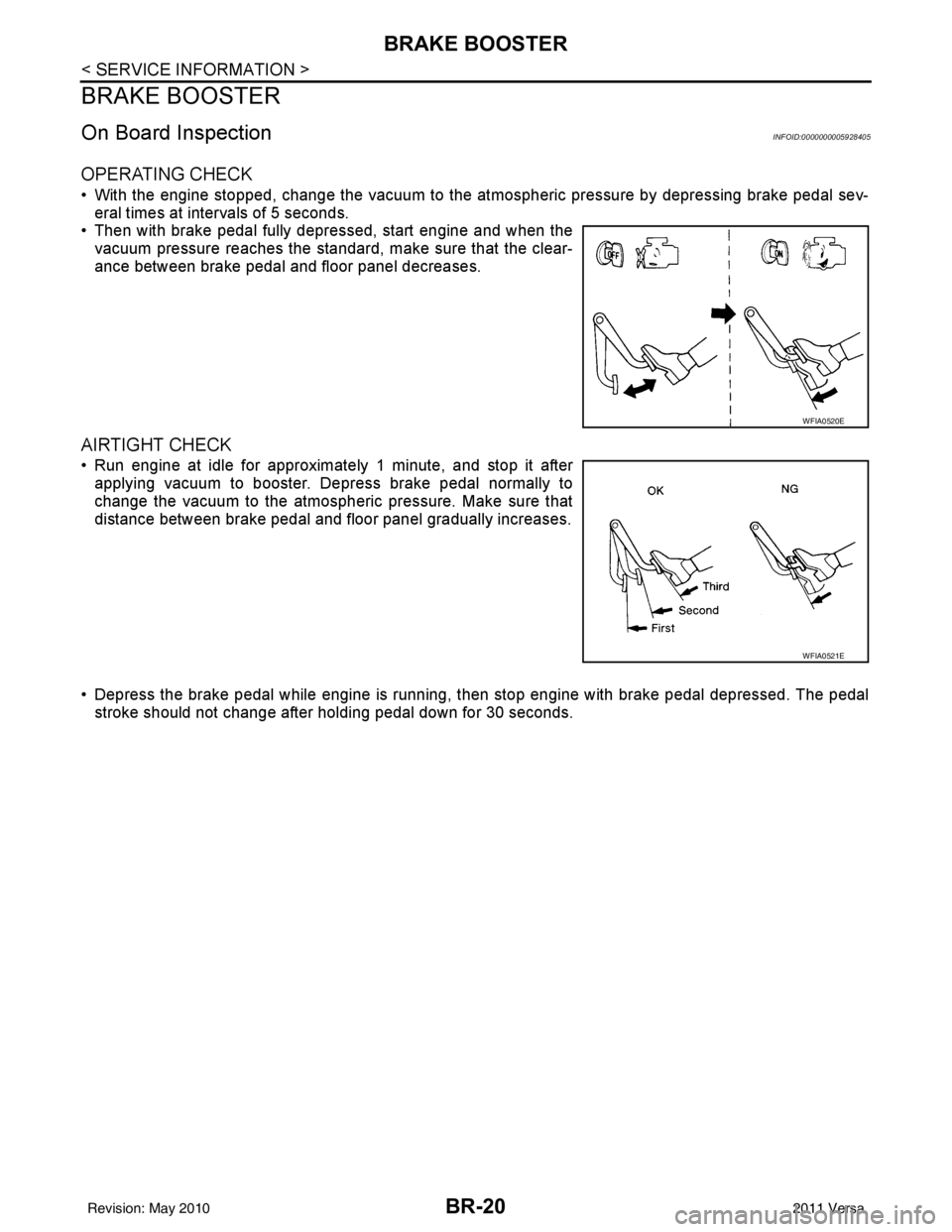
OPERATING CHECK
• With the engine stopped, change the vacuum to the atmospheric pressure by depressing brake pedal sev-
eral times at intervals of 5 seconds.
• Then with brake pedal fully depressed, start engine and when the vacuum pressure reaches the standard, make sure that the clear-
ance between brake pedal and floor panel decreases.
AIRTIGHT CHECK
• Run engine at idle for approximately 1 minute, and stop it afterapplying vacuum to booster. Depress brake pedal normally to
change the vacuum to the atmospheric pressure. Make sure that
distance between brake pedal and floor panel gradually increases.
• Depress the brake pedal while engine is running, then stop engine with brake pedal depressed. The pedal
stroke should not change after holding pedal down for 30 seconds.
WFIA0520E
WFIA0521E
Revision: May 2010 2011 Versa
Page 893 of 3787
![NISSAN LATIO 2011 Service User Guide BRC-4
< SERVICE INFORMATION >[ABS]
PRECAUTIONS
Precaution for Brake Control
INFOID:0000000005928428
• During ABS operation, the brake pedal may vibrate lightly and a mechanical noise may be heard.](/img/5/57357/w960_57357-892.png "NISSAN LATIO 2011 Service User Guide BRC-4
< SERVICE INFORMATION >[ABS]
PRECAUTIONS
Precaution for Brake Control
INFOID:0000000005928428
• During ABS operation, the brake pedal may vibrate lightly and a mechanical noise may be heard.")
BRC-4
< SERVICE INFORMATION >[ABS]
PRECAUTIONS
Precaution for Brake Control
INFOID:0000000005928428
• During ABS operation, the brake pedal may vibrate lightly and a mechanical noise may be heard. This is
normal.
• Just after starting the vehicle, the brake pedal may vibrate or motor operating noises may be heard from
engine compartment. This is normal due to the self check operation.
• Stopping distance may be longer than that of vehicles without ABS when vehicle drives on rough, gravel, or
snow-covered (fresh, deep snow) roads.
• When an error is indicated by ABS or another warning la mp, collect all necessary information from customer
(what symptoms are present under what conditions) and check for simple causes before starting diagnosis.
Besides electrical system inspection, check brake booster operation, brake fluid level, and fluid leaks.
• If incorrect tire sizes or types are installed on the v ehicle or brake pads are not Genuine NISSAN parts, stop-
ping distance or steering stability may deteriorate.
• If there is a radio, antenna or related wiring near t he control module, ABS function may have a malfunction
or error.
• If aftermarket parts (car stereo, CD player, etc.) have been installed, check for incidents such as harness
pinches, open circuits or improper wiring.
Precaution for CAN SystemINFOID:0000000005928429
• Do not apply voltage of 7.0V or higher to terminal to be measured.
• Maximum open terminal voltage of test er in use must be less than 7.0V.
• Before checking harnesses, turn ignition sw itch OFF and disconnect battery negative cable.
• Area to be repaired must be soldered and wrapped with tape. Make sure that fraying of twisted wire is within 110 mm (4.33 in).
• Do not make a bypass connection to repaired area. (If the circuit is bypassed, characteristics of twisted wire will be lost.)
PKIA0306E
PKIA0307E
Revision: May 2010 2011 Versa
Page 895 of 3787
![NISSAN LATIO 2011 Service User Guide BRC-6
< SERVICE INFORMATION >[ABS]
SYSTEM DESCRIPTION
SYSTEM DESCRIPTION
System ComponentINFOID:0000000005928432
ABS FunctionINFOID:0000000005928433
• The Anti-Lock Brake System detects wheel revolu](/img/5/57357/w960_57357-894.png "NISSAN LATIO 2011 Service User Guide BRC-6
< SERVICE INFORMATION >[ABS]
SYSTEM DESCRIPTION
SYSTEM DESCRIPTION
System ComponentINFOID:0000000005928432
ABS FunctionINFOID:0000000005928433
• The Anti-Lock Brake System detects wheel revolu")
BRC-6
< SERVICE INFORMATION >[ABS]
SYSTEM DESCRIPTION
SYSTEM DESCRIPTION
System ComponentINFOID:0000000005928432
ABS FunctionINFOID:0000000005928433
• The Anti-Lock Brake System detects wheel revolution while braking and improves handling stability during
sudden braking by electrically preventing wheel lockup. Maneuverability is also improved for avoiding obsta-
cles during emergency braking.
• If the electrical system malfunctions, the Fail-Safe function is activated, the ABS becomes inoperative and the ABS warning lamp turns on.
• The electrical system can be diagnosed using CONSULT-III.
• During ABS operation, the brake pedal may vibrate lightly and a mechanical noise may be heard. This is
normal.
• Just after starting the vehicle, the brake pedal may vibrate or motor operating noises may be heard from the engine compartment. This is normal due to the self check operation.
• Stopping distance may be longer than that of vehicles without ABS when vehicle drives on rough, gravel, or
snow-covered (fresh, deep snow) roads.
EBD FunctionINFOID:0000000005928434
• Electronic Brake Distribution is a function that detec ts subtle slippages between the front and rear wheels
during braking, and it improves handling stability by elec tronically controlling the brake fluid pressure which
results in reduced rear wheel slippage.
• If the electrical system malfunctions, the Fail-Saf e function is activated, the EBD and ABS become inopera-
tive, and the ABS warning lamp and brake warning lamp are turned on.
• The electrical system can be diagnosed using CONSULT-III.
• During EBD operation, the brake pedal may vibrate lightly and a mechanical noise may be heard. This is
normal.
• Just after starting the vehicle, the brake pedal may vibrate or motor operating noises may be heard from the
engine compartment. This is normal due to the self check operation.
Fail-Safe FunctionINFOID:0000000005928435
CAUTION:
If the Fail-Safe function is activated, perform the Self Diagnosis for ABS system.
ABS/EBD SYSTEM
In case of an electrical malfunction with the ABS, the AB S warning lamp will turn on. In case of an electrical
malfunction with the EBD system, the brake warning lamp and the ABS warning lamp will turn on.
The system will revert to one of the follo wing conditions of the Fail-Safe function.
1. For ABS malfunction, only the EBD is operative and the condition of the vehicle is the same condition of vehicles without ABS system.
WFIA0118E
Revision: May 2010 2011 Versa
Page 909 of 3787
![NISSAN LATIO 2011 Service User Guide BRC-20
< SERVICE INFORMATION >[ABS]
TROUBLE DIAGNOSIS
SELF-DIAGNOSIS
Description
If an error is detected in the system
, the ABS warning lamp will turn on. In this case, perform self-diagnosis as
foll](/img/5/57357/w960_57357-908.png "NISSAN LATIO 2011 Service User Guide BRC-20
< SERVICE INFORMATION >[ABS]
TROUBLE DIAGNOSIS
SELF-DIAGNOSIS
Description
If an error is detected in the system
, the ABS warning lamp will turn on. In this case, perform self-diagnosis as
foll")
BRC-20
< SERVICE INFORMATION >[ABS]
TROUBLE DIAGNOSIS
SELF-DIAGNOSIS
Description
If an error is detected in the system
, the ABS warning lamp will turn on. In this case, perform self-diagnosis as
follows:
Operation Procedure
1. Turn ignition switch OFF.
2. Connect CONSULT-III to the data link connector.
3. Turn ignition switch ON.
4. Start engine and drive at approximately 30 km/h (19 MPH) or more for approximately 1 minute.
5. After stopping the vehicle, with the engine running, t ouch “ABS”, “SELF-DIAG RESULTS” in order on the
CONSULT-III screen.
6. The self-diagnostic results are displayed. (If neces sary, the self-diagnostic results can be printed out by
touching “PRINT”.)
• When “NO DTC IS DETECTED” is displayed, check the ABS warning lamp.
7. Conduct the appropriate inspection from the display item list, and repair or replace the malfunctioning component.
8. Start engine and drive at approximately 30 km/h (19 MPH) or more for approximately 1 minute.
CAUTION:
• When a wheel sensor “short-circuit” is detected, if the vehicle is not driven at 30 km/h (19 MPH) for at least 1 minute, the ABS warn ing lamp will not turn off even if the malfunction is repaired.
9. Turn ignition switch OFF to prepare for erasing the memory.
10. Start the engine and touch “ABS”, “SELF-DIAG RESULTS”, “ERASE” in order on the CONSULT-III screen
to erase the error memory.
If “ABS” is not indicated, go to GI-36, "
CONSULT-III Data Link Connector (DLC) Circuit".
CAUTION:
If the error memory is not erased, re -conduct the operation from step 5.
11. For the final inspection, drive at approximately 30 km/h (19 MPH) or more for approximately 1 minute and
confirm that the ABS warning lamp is off.
Display Item List
FUNCTION TEST Conducted by CONS ULT-III instead of a technician to determine whether each system is "OK" or "NG".
ECU IDENTIFICATION ABS actuator and electric unit (control unit) part number can be read. Diagnostic mode
Description
Revision: May 2010 2011 Versa