phone NISSAN LEAF 2017 1.G Navigation Manual
[x] Cancel search | Manufacturer: NISSAN, Model Year: 2017, Model line: LEAF, Model: NISSAN LEAF 2017 1.GPages: 268, PDF Size: 1.41 MB
Page 185 of 268
![NISSAN LEAF 2017 1.G Navigation Manual .Push <>on the steering wheel.
. Touch [Answer].
Rejecting a call:
To reject the call, touch [Decline].
Holding a call:
To hold the call, touch [Hold Call].
During a call
The screen as illustrated wil](/img/5/531/w960_531-184.png "NISSAN LEAF 2017 1.G Navigation Manual .Push <>on the steering wheel.
. Touch [Answer].
Rejecting a call:
To reject the call, touch [Decline].
Holding a call:
To hold the call, touch [Hold Call].
During a call
The screen as illustrated wil")
.Push <>on the steering wheel.
. Touch [Answer].
Rejecting a call:
To reject the call, touch [Decline].
Holding a call:
To hold the call, touch [Hold Call].
During a call
The screen as illustrated will appear during a call.
To hang up the phone, touch [Hang up]. Call from a second person:
When another phone call is received during a
call, the screen as illustrated will appear.
Rejecting call from a second person:
To reject a call from the second person and
continue the conversation with the first caller,
touch [Decline].
Answering call from a second person:
To answer the call from the second person and
place the first caller on hold, take one of the
following actions.
. Push <
>on the steering wheel.
. Touch [Answer].
The screen as illustrated will appear during a call
with a second person.
To hang up the phone and return to the
conversation with the first caller, touch [Hang
up].
To switch between two calls on line, touch
[Switch Call].
Operations during a call:
There are some options available other than
hanging up a call or answering/rejecting incom-
ing calls.
Touch one of the following displayed keys on the
screen to take action.
7-5
7. Hands-Free Phone
Page 186 of 268
![NISSAN LEAF 2017 1.G Navigation Manual Available item Action
[Use Handset] Transfer the call to the cellularphone.
[Mute]/[Cancel
Mute] When muted, your voice will
not be heard by the person on
the other end of the line.
[Dial Number] Usin](/img/5/531/w960_531-185.png "NISSAN LEAF 2017 1.G Navigation Manual Available item Action
[Use Handset] Transfer the call to the cellularphone.
[Mute]/[Cancel
Mute] When muted, your voice will
not be heard by the person on
the other end of the line.
[Dial Number] Usin")
Available item Action
[Use Handset] Transfer the call to the cellularphone.
[Mute]/[Cancel
Mute] When muted, your voice will
not be heard by the person on
the other end of the line.
[Dial Number] Using the touch tone, send digits to the connected party
for using services such as
voicemail.
[Switch Call]* Answer another incoming call. The person you are talking to
will be placed on hold. Push
once more to speak to the
person on hold again.
*: Available when a call is received while on the
line with another person. The availability of this
function depends on the phone device.
INFO:
To adjust the person’s voice to be louder or
quieter, push
+>on the steering wheel, while talking on
the phone.
HANDS-FREE TEXT MESSAGING
ASSISTANT
WARNING
. Use the text messaging feature after
parking your vehicle in a safe loca-
tion. If you have to use the feature
while driving, exercise extreme cau-
tion at all times so full attention may
be given to vehicle operation.
. Laws in some jurisdictions may re-
strict the use of “Text-to-Speech.”
Check local regulations before using
this feature.
. Laws in some jurisdictions may re-
strict the use of some of the applica-
tions and features, such as social
networking and texting. Check local
regulations for any requirements.
. If you are unable to devote full
attention to vehicle operation while
using the text messaging feature, pull
off the road to a safe location and
stop your vehicle.
NOTE:
This feature is disabled if the connected
device does not support it. See the cellular
phone Owner’s Manual for details and
instructions.
The system allows for the sending and receiving
of text messages through the vehicle interface.
Receiving a message
When the cellular phone connected to the
vehicle receives a text message, a notification
will appear on the touch screen display with a
tone.
To check the message, touch [Read]. Touch
[Ignore] to save the message to be checked later.
7-6
7. Hands-Free Phone
Page 187 of 268
![NISSAN LEAF 2017 1.G Navigation Manual INFO:
Depending on the phone device, notification
display setting needs to be turned on on the
phone device.
Displaying received message list
1. Touch [Phone] on the Launch Bar.
2. Touch [Text Message](/img/5/531/w960_531-186.png "NISSAN LEAF 2017 1.G Navigation Manual INFO:
Depending on the phone device, notification
display setting needs to be turned on on the
phone device.
Displaying received message list
1. Touch [Phone] on the Launch Bar.
2. Touch [Text Message")
INFO:
Depending on the phone device, notification
display setting needs to be turned on on the
phone device.
Displaying received message list
1. Touch [Phone] on the Launch Bar.
2. Touch [Text Message].
3. Touch an item on the list to read or reply to the message.
INFO:
Up to 20 messages can be stored in the
message list.
Received message screen
Touching [Read] on the new message notifica-
tion screen or selecting a message from the
message list will show the details of the received
message on the display.
Available actions: . [Prev.]:
Touch to read the previous message.
. [Next]:
Touch to read the next message.
. [Play]/[Stop]:
Touch [Play] to have the hands-free phone
system read out the received message.
Touch [Stop] to stop reading.
. [Call]:
If the sender of the message is registered in
the Phonebook, touch this icon to make a call
to the sender. .
[Reply]:
A reply message can be selected from the
template.
“Sending a text message” (page 7-8)
. [Exit]:
Touch to exit the text messaging screen.
INFO:
. Available keys may vary depending on the
situations.
. If the sender’s name and phone number is
registered in the Phonebook, the name of the
sender is displayed when a message is
received.
. The volume of the voice for text message
reading can be adjusted.
“Volume and Beeps settings”
(page 1-16)
7-7
7. Hands-Free Phone
Page 188 of 268
![NISSAN LEAF 2017 1.G Navigation Manual Sending a text message
1. Touch [Phone] on the Launch Bar.
2. Touch [Text Message].
3. Touch [Create Message].
The following items are available.
Available itemAction
[To] [Quick Dial]
Select a recipi](/img/5/531/w960_531-187.png "NISSAN LEAF 2017 1.G Navigation Manual Sending a text message
1. Touch [Phone] on the Launch Bar.
2. Touch [Text Message].
3. Touch [Create Message].
The following items are available.
Available itemAction
[To] [Quick Dial]
Select a recipi")
Sending a text message
1. Touch [Phone] on the Launch Bar.
2. Touch [Text Message].
3. Touch [Create Message].
The following items are available.
Available itemAction
[To] [Quick Dial]
Select a recipient from Quick Dial.
[Phonebook] Select a contact from the Phonebook.
[Call History] Select a contact/phone number from call history.
[Enter Number by Keypad] Enter the phone number of the recipient using the keypad. Touch [OK] to confirm the
address.
[Select Text] [Fixed Text] Touch to display a list of pre-defined text messages.
[Custom Text] Touch to display a list of custom text message templates.
Custom text can be created or edited from the setting menu.
“Phone and text message assistant settings” (page 7-9)
[Send] Touch to send the message.
7-8
7. Hands-Free Phone
Page 189 of 268
![NISSAN LEAF 2017 1.G Navigation Manual PHONE AND TEXT MESSAGE ASSISTANT SETTINGS
Phone settings
Hands-Free Phone System settings can be changed according to the user’s preference.
1. Touch [Settings] on the Launch Bar.
2. Touch [Phone].](/img/5/531/w960_531-188.png "NISSAN LEAF 2017 1.G Navigation Manual PHONE AND TEXT MESSAGE ASSISTANT SETTINGS
Phone settings
Hands-Free Phone System settings can be changed according to the user’s preference.
1. Touch [Settings] on the Launch Bar.
2. Touch [Phone].")
PHONE AND TEXT MESSAGE ASSISTANT SETTINGS
Phone settings
Hands-Free Phone System settings can be changed according to the user’s preference.
1. Touch [Settings] on the Launch Bar.
2. Touch [Phone].
The following phone setting items are available.
Setting itemAction
[Quick Dial] [Edit] Entries in the Quick Dial can be edited. Touch [Add New] to register a new
entry.
[Delete All] Deletes all of the phone number in the Quick Dial.
[Call History] [Incoming] Items in the calls history can be deleted or be registered in the Quick Dial.
[Outgoing]
[Missed]
[Phonebook] [Download Entire Phonebook] All of the phone numbers that are stored in a phonebook of a cellular phone
that is connected to the vehicle are downloaded at once.
[Download 1 Entry] Each of the phone numbers that are stored in the phonebook of a cellular
phone that is connected to the vehicle is downloaded one by one.
[Downloaded List] The downloaded phonebook data is displayed. The items on the list can be
added to the Quick Dial entries or be deleted from the phonebook.
7-9
7. Hands-Free Phone
Page 190 of 268
![NISSAN LEAF 2017 1.G Navigation Manual [Text Message][Text Message] Turns the message function on/off.
[Text Message Ringtone] Turns the incoming message sound on/off.
[Signature] Turns the signature setting for the outgoing text message o](/img/5/531/w960_531-189.png "NISSAN LEAF 2017 1.G Navigation Manual [Text Message][Text Message] Turns the message function on/off.
[Text Message Ringtone] Turns the incoming message sound on/off.
[Signature] Turns the signature setting for the outgoing text message o")
[Text Message][Text Message] Turns the message function on/off.
[Text Message Ringtone] Turns the incoming message sound on/off.
[Signature] Turns the signature setting for the outgoing text message on/off.
[Auto Reply] Turns the automatic reply of fixed messages on/off.
[Auto Reply Text Message] Selects and sets an automatic reply message.
[Sending Retry Count] Sets the number of retries after failing to send a text message.
[Edit Custom Text] Edits the custom text.
[Volume] [Ringtone] Adjust the volume level of the ringtone by touching [+] or [-].
[Incoming Call] Adjust the incoming call volume by touching [+] or [-].
[Outgoing Call] Adjust the outgoing call volume by touching [+] or [-].
[Automatic Hold] When this function is activated, an incoming phone call will be put on hold
automatically.
[Vehicle Ringtone] When this function is activated, a specific ringtone that is different from that of
the cellular phone will sound when receiving a call.
[Auto Downloaded] Turns the automatic download on/off.
INFO:
The phone volume can also be changed by touching [Phone] on the Launch Bar and then touching [Volume].
7-10
7. Hands-Free Phone
Page 191 of 268
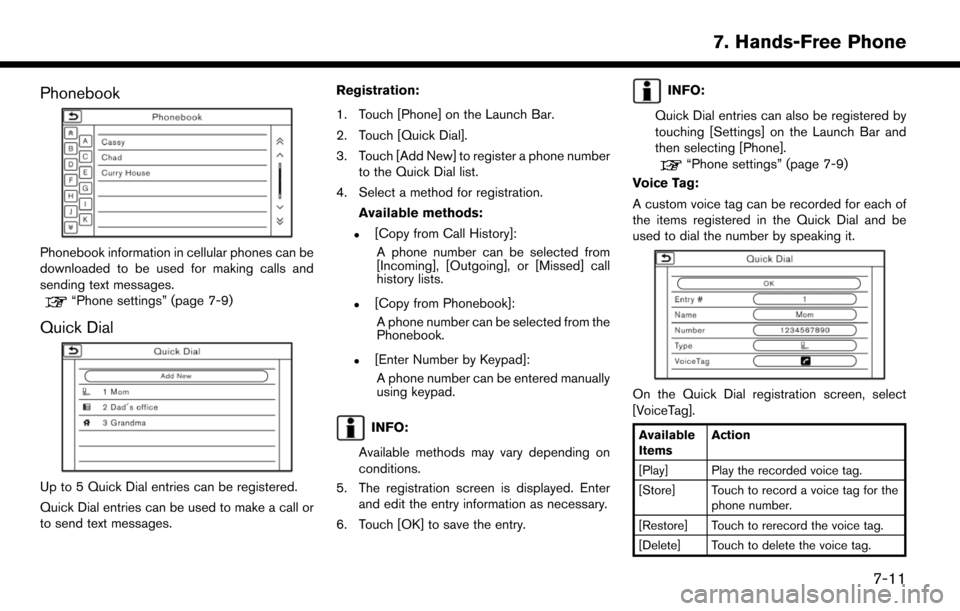
Phonebook
Phonebook information in cellular phones can be
downloaded to be used for making calls and
sending text messages.
“Phone settings” (page 7-9)
Quick Dial
Up to 5 Quick Dial entries can be registered.
Quick Dial entries can be used to make a call or
to send text messages.Registration:
1. Touch [Phone] on the Launch Bar.
2. Touch [Quick Dial].
3. Touch [Add New] to register a phone number
to the Quick Dial list.
4. Select a method for registration.
Available methods:
.[Copy from Call History]:A phone number can be selected from
[Incoming], [Outgoing], or [Missed] call
history lists.
.[Copy from Phonebook]:A phone number can be selected from the
Phonebook.
.[Enter Number by Keypad]:A phone number can be entered manually
using keypad.
INFO:
Available methods may vary depending on
conditions.
5. The registration screen is displayed. Enter and edit the entry information as necessary.
6. Touch [OK] to save the entry.
INFO:
Quick Dial entries can also be registered by
touching [Settings] on the Launch Bar and
then selecting [Phone].
“Phone settings” (page 7-9)
Voice Tag:
A custom voice tag can be recorded for each of
the items registered in the Quick Dial and be
used to dial the number by speaking it.
On the Quick Dial registration screen, select
[VoiceTag].
Available
Items Action
[Play] Play the recorded voice tag.
[Store] Touch to record a voice tag for the phone number.
[Restore] Touch to rerecord the voice tag.
[Delete] Touch to delete the voice tag.
7-11
7. Hands-Free Phone
Page 192 of 268
![NISSAN LEAF 2017 1.G Navigation Manual BLUETOOTHŠSETTING
The BluetoothŠsetting can be changed.
1. Touch [Settings] on the Launch Bar.
2. Touch [Bluetooth].
Available item Action
[Bluetooth] If this setting is turned off, the connection](/img/5/531/w960_531-191.png "NISSAN LEAF 2017 1.G Navigation Manual BLUETOOTHŠSETTING
The BluetoothŠsetting can be changed.
1. Touch [Settings] on the Launch Bar.
2. Touch [Bluetooth].
Available item Action
[Bluetooth] If this setting is turned off, the connection")
BLUETOOTHŠSETTING
The BluetoothŠsetting can be changed.
1. Touch [Settings] on the Launch Bar.
2. Touch [Bluetooth].
Available item Action
[Bluetooth] If this setting is turned off, the connection between the BluetoothŠdevices and the in-vehicle BluetoothŠ
module will be canceled.
[Connect Device]Connects to the BluetoothŠdevice. Up to 5 devices can be registered.
[Select BT Device][Phone]Registered devices are shown on the list. Select a BluetoothŠdevice from the list.Information of the selected device can be edited and the device can also be deleted from the device list.
[Audio Player]
[Edit Bluetooth Information] [OK] Touch to apply the changes after editing the Bluetooth
Šinformation.
[PIN]PIN code can be checked and changed.
[Device Name] Device Name can be checked and changed.
[Device Address] Device Address can be checked.
7-12
7. Hands-Free Phone
Page 195 of 268
![NISSAN LEAF 2017 1.G Navigation Manual Operating tips
.Speak a command after the tone.
. If the command is not recognized, the system
will prompt you to speak the command again.
Repeat the command in a clear voice.
. Touch [
] on the touch](/img/5/531/w960_531-194.png "NISSAN LEAF 2017 1.G Navigation Manual Operating tips
.Speak a command after the tone.
. If the command is not recognized, the system
will prompt you to speak the command again.
Repeat the command in a clear voice.
. Touch [
] on the touch")
Operating tips
.Speak a command after the tone.
. If the command is not recognized, the system
will prompt you to speak the command again.
Repeat the command in a clear voice.
. Touch [
] on the touch screen to return to
the previous screen.
. To exit the Voice Recognition system, push
and hold <
>on the steering wheel.
. To adjust the volume of the system feedback,
push <-
+>on the steering wheel or
push
announcement.
The volume setting is also available from
[Guidance Volume] in the [Settings] on the
Launch Bar.
“Volume and Beeps settings”
(page 1-16)
. When setting a destination for route gui-
dance with some search methods, such as
POI, Intersection or City Center search, the
search area is automatically set to the state/
province where your vehicle is located.
Change state/province to change the search
area to another state/province if necessary. Voice Prompt Interrupt:
In most cases, you can interrupt the voice
feedback to speak the next command by pushing
the
<
>on the steering wheel. After inter-
rupting the system, wait for a tone before
speaking your command.
One Shot Call:
To use the system faster when making a call, you
may speak the second level command skipping
speaking the first level command. For example,
push <
>and say “Redial” after the tone
without first saying “Phone”.
How to see voice command screen
1. Push <>to display the first screen of the
voice command list.
2. Speak a command or select an item on the voice command list. The Second screen is
displayed.
3. Speak a command or select an item on the voice command list. The command is exe-
cuted or the next screen for further command
is displayed.
4. Follow the prompts to complete the com- mands. Voice command screens:
First screen
*1Shows a list of available categories. Speak a
category command or touch the key of the
corresponding category.
*2Shows a list of available commands for the
selected category. Speak a preferred com-
mand.
*3Touch [HELP] or say “Help” to hear help
announcements on how to use the system.
INFO:
Push <
>to stop the help announcements.
8-3
8. Voice recognition
Page 196 of 268

Second screen
*4Previously selected command.
*5Command list
You can speak a command from the list or
touch the corresponding key. Preferred
words can be spoken for the part of the
command enclosed in < >.
*6[Previous]/[Next]
Say as a command or touch to go to the
previous/next screen.
List screen
*7Speak a number from 1 to 5 or touch an item
on the list screen to select the item.
How to speak numbers
The Voice Recognition system requires the user
to speak numbers in a certain way when giving
voice commands.
General rule:
500, 800 and 900 can be pronounced as “five
hundred”, “eight hundred” and “nine hundred”
respectively.
For other numbers, only single digits 0 (zero) to 9
can be used. (For example, for the number “600”,
speaking “six zero zero” can be recognized by
the system, but “six hundred” cannot.)Example:
1-800-662-6200
“One eight hundred six six two six two zero zero”
INFO:
For the best recognition, speak “zero” for the
number “0”, and “oh” for the letter “o”.
Voice command examples
As examples, some additional basic operations
that can be performed by voice commands are
described here.
Example 1 Placing call by speaking a
phone number:
1. Push <
>located on the steering wheel.
2. Wait for the indicator to change to
.
Speak “Phone”.
8-4
8. Voice recognition