maintenance NISSAN LEAF 2020 Owner´s Manual
[x] Cancel search | Manufacturer: NISSAN, Model Year: 2020, Model line: LEAF, Model: NISSAN LEAF 2020Pages: 596, PDF Size: 4.33 MB
Page 207 of 596

1. Push brake and power switch to drive
2. No Key Detected
3. Key Battery Low
4. EV system operation for discharged In-telligent Key system indicator
5. Door open
6. Low battery charge indicator
7. Driver alert
8. Low outside air temperature
9. Low Washer Fluid (if so equipped)
10. Reminder Turn OFF Headlights
11. Tire Pressure Low — Add Air
12. Cruise control indicator (if so equipped)
13. Intelligent Cruise Control (ICC) indica- tors (if so equipped)
14. Shif t to Park
15. Key System Error: See Owner’s Manual
16. Release Parking Brake
17. ProPILOT Assist (if so equipped)/ Intelligent Lane Intervention (I-LI)/
Intelligent Blind Spot Intervention (I-BSI)
indicator 18. Not Available Seat Belt Not Fastened (if
so equipped)
19. Malfunction: See Owner’s Manual
20. Indicators for maintenance
21. Steering Assist indicator (if so equipped)
22. Steering Assist warning (if so equipped)
23. Not Available Front Radar Blocked
24. Unavailable Side Radar Obstruction
25. Not Available Visibility is Impaired (if so equipped)
26. Not Available Bad Weather (if so equipped)
27. Driver Attention Alert Take a Break? (if so equipped)
28. Driver Attention Alert System Fault (if so equipped)
29. Unavailable High Cabin Temperature
30. Not Available Parking Brake On (if so equipped)
31. Not Available Poor Road Conditions (if so equipped)
32. Currently not available (if so equipped) 33. Not Available System Malfunction
34. Press Brake Pedal (if so equipped)
35. Lane Departure Warning (LDW)
indicator
36. Vehicle ahead detection indicator
37. Shipping Mode On Push Storage Fuse
38. Blind Spot Warning (BSW) indicator
39. Rear Automatic Braking (RAB) system warning indicator
40. Headlight System Error: See Owner’s Manual (if so equipped)
41. When Parked Apply Parking Brake
42. T/M system malfunction Visit dealer
43. Check position of shif t lever
44. Chassis Control System Error: See Owner’s Manual
45. Press brake pedal to operate e-Pedal switch
46. Rear Door Alert is activated
47. Check Rear Seat For All Articles
48. e-Pedal system failure! Press brake pedal to slow or stop (if so equipped)
49. Parking Sensor
2-34Instruments and controls
Page 208 of 596
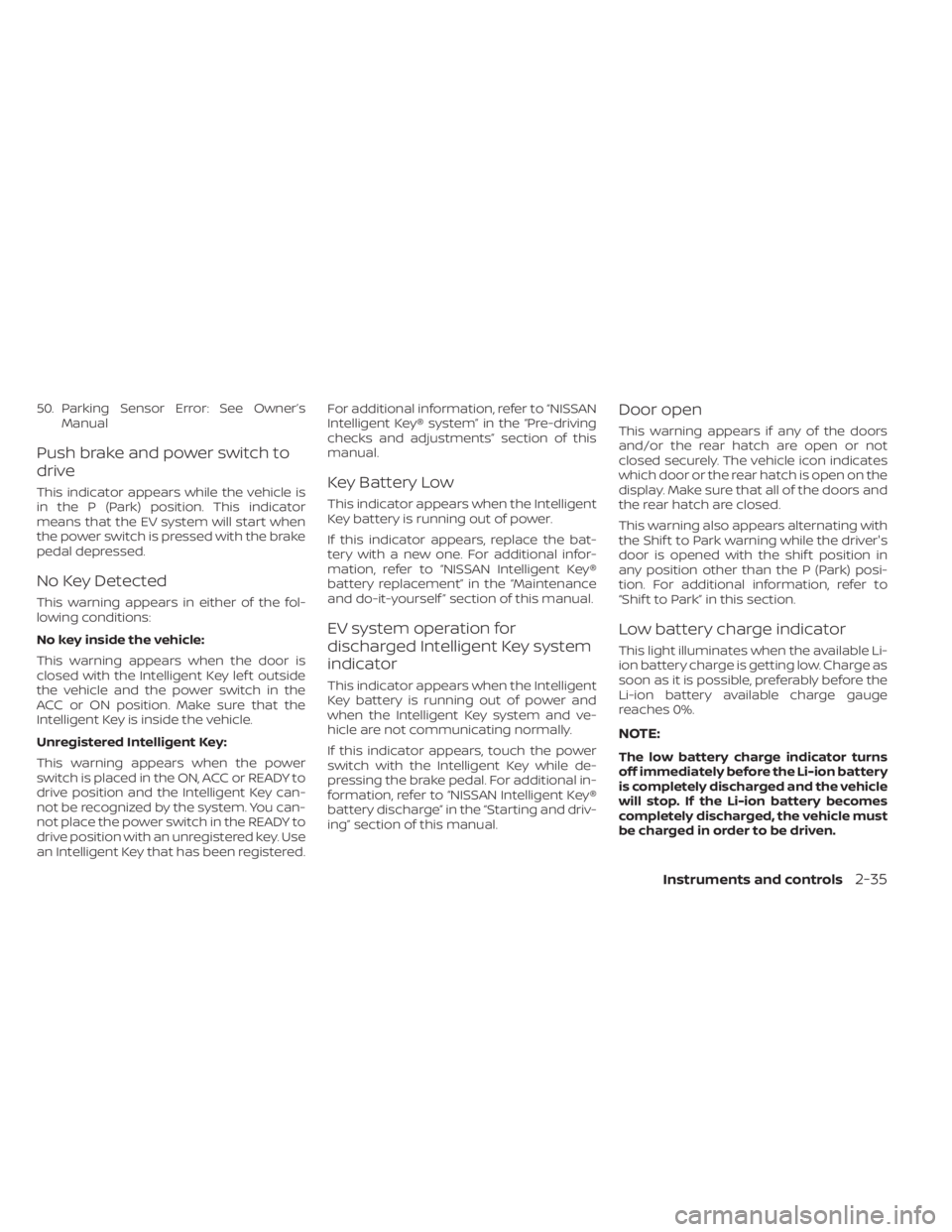
50. Parking Sensor Error: See Owner’sManual
Push brake and power switch to
drive
This indicator appears while the vehicle is
in the P (Park) position. This indicator
means that the EV system will start when
the power switch is pressed with the brake
pedal depressed.
No Key Detected
This warning appears in either of the fol-
lowing conditions:
No key inside the vehicle:
This warning appears when the door is
closed with the Intelligent Key lef t outside
the vehicle and the power switch in the
ACC or ON position. Make sure that the
Intelligent Key is inside the vehicle.
Unregistered Intelligent Key:
This warning appears when the power
switch is placed in the ON, ACC or READY to
drive position and the Intelligent Key can-
not be recognized by the system. You can-
not place the power switch in the READY to
drive position with an unregistered key. Use
an Intelligent Key that has been registered. For additional information, refer to “NISSAN
Intelligent Key® system” in the “Pre-driving
checks and adjustments” section of this
manual.
Key Battery Low
This indicator appears when the Intelligent
Key battery is running out of power.
If this indicator appears, replace the bat-
tery with a new one. For additional infor-
mation, refer to “NISSAN Intelligent Key®
battery replacement” in the “Maintenance
and do-it-yourself ” section of this manual.
EV system operation for
discharged Intelligent Key system
indicator
This indicator appears when the Intelligent
Key battery is running out of power and
when the Intelligent Key system and ve-
hicle are not communicating normally.
If this indicator appears, touch the power
switch with the Intelligent Key while de-
pressing the brake pedal. For additional in-
formation, refer to “NISSAN Intelligent Key®
battery discharge” in the “Starting and driv-
ing” section of this manual.
Door open
This warning appears if any of the doors
and/or the rear hatch are open or not
closed securely. The vehicle icon indicates
which door or the rear hatch is open on the
display. Make sure that all of the doors and
the rear hatch are closed.
This warning also appears alternating with
the Shif t to Park warning while the driver's
door is opened with the shif t position in
any position other than the P (Park) posi-
tion. For additional information, refer to
“Shif t to Park” in this section.
Low battery charge indicator
This light illuminates when the available Li-
ion battery charge is getting low. Charge as
soon as it is possible, preferably before the
Li-ion battery available charge gauge
reaches 0%.
NOTE:
The low battery charge indicator turns
off immediately before the Li-ion battery
is completely discharged and the vehicle
will stop. If the Li-ion battery becomes
completely discharged, the vehicle must
be charged in order to be driven.
Instruments and controls2-35
Page 209 of 596
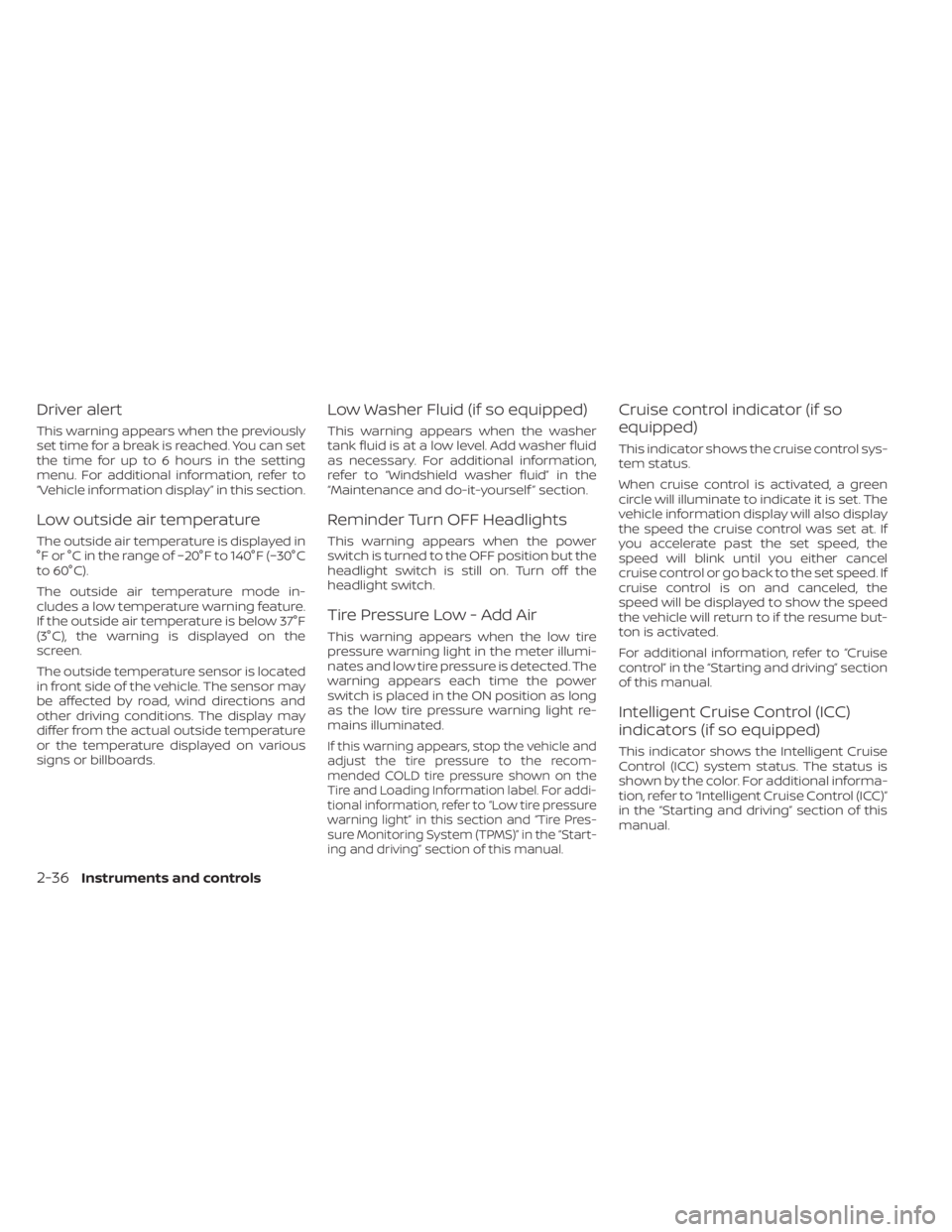
Driver alert
This warning appears when the previously
set time for a break is reached. You can set
the time for up to 6 hours in the setting
menu. For additional information, refer to
“Vehicle information display” in this section.
Low outside air temperature
The outside air temperature is displayed in
°F or °C in the range of −20°F to 140°F (−30°C
to 60°C).
The outside air temperature mode in-
cludes a low temperature warning feature.
If the outside air temperature is below 37°F
(3°C), the warning is displayed on the
screen.
The outside temperature sensor is located
in front side of the vehicle. The sensor may
be affected by road, wind directions and
other driving conditions. The display may
differ from the actual outside temperature
or the temperature displayed on various
signs or billboards.
Low Washer Fluid (if so equipped)
This warning appears when the washer
tank fluid is at a low level. Add washer fluid
as necessary. For additional information,
refer to “Windshield washer fluid” in the
“Maintenance and do-it-yourself ” section.
Reminder Turn OFF Headlights
This warning appears when the power
switch is turned to the OFF position but the
headlight switch is still on. Turn off the
headlight switch.
Tire Pressure Low - Add Air
This warning appears when the low tire
pressure warning light in the meter illumi-
nates and low tire pressure is detected. The
warning appears each time the power
switch is placed in the ON position as long
as the low tire pressure warning light re-
mains illuminated.
If this warning appears, stop the vehicle and
adjust the tire pressure to the recom-
mended COLD tire pressure shown on the
Tire and Loading Information label. For addi-
tional information, refer to “Low tire pressure
warning light” in this section and “Tire Pres-
sure Monitoring System (TPMS)” in the “Start-
ing and driving” section of this manual.
Cruise control indicator (if so
equipped)
This indicator shows the cruise control sys-
tem status.
When cruise control is activated, a green
circle will illuminate to indicate it is set. The
vehicle information display will also display
the speed the cruise control was set at. If
you accelerate past the set speed, the
speed will blink until you either cancel
cruise control or go back to the set speed. If
cruise control is on and canceled, the
speed will be displayed to show the speed
the vehicle will return to if the resume but-
ton is activated.
For additional information, refer to “Cruise
control” in the “Starting and driving” section
of this manual.
Intelligent Cruise Control (ICC)
indicators (if so equipped)
This indicator shows the Intelligent Cruise
Control (ICC) system status. The status is
shown by the color. For additional informa-
tion, refer to “Intelligent Cruise Control (ICC)”
in the “Starting and driving” section of this
manual.
2-36Instruments and controls
Page 211 of 596
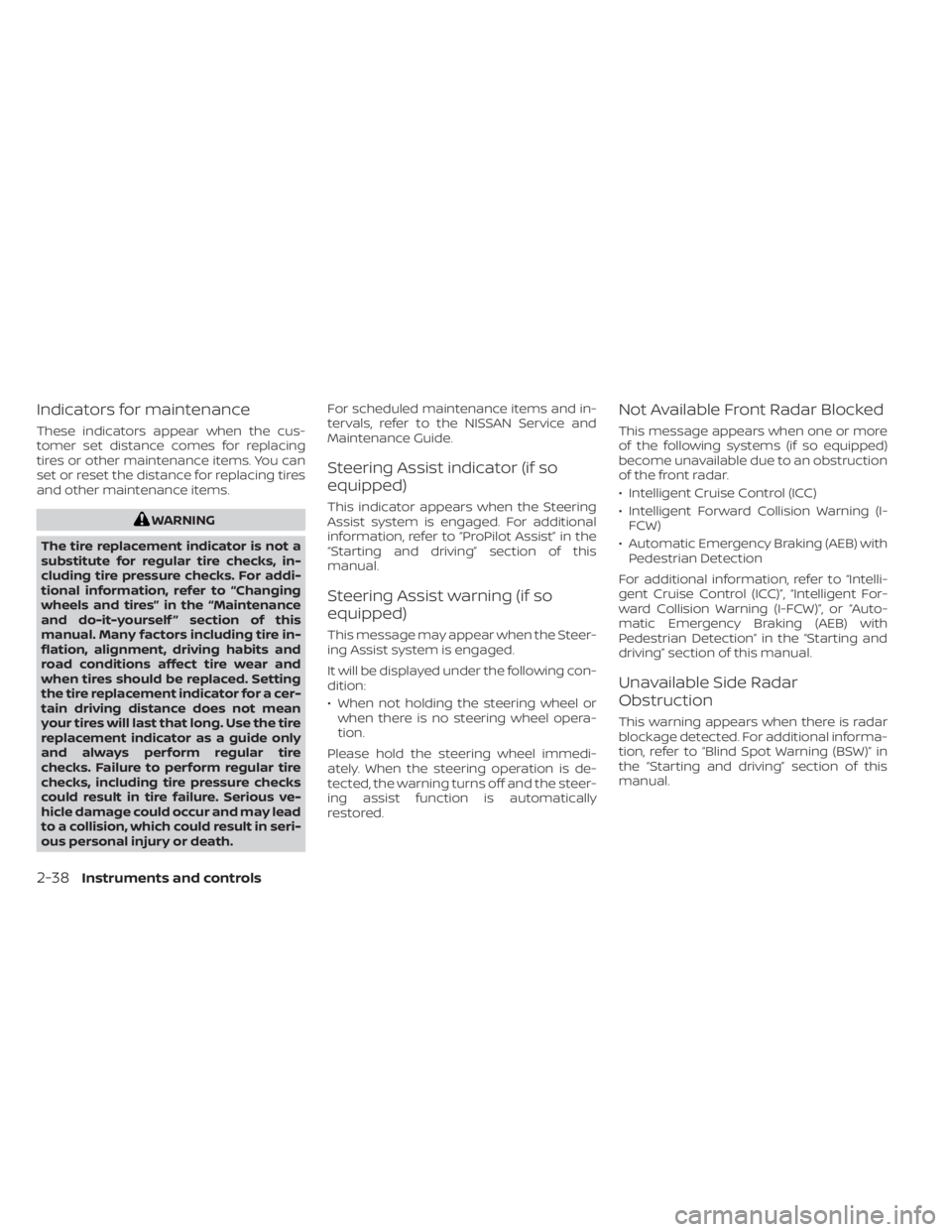
Indicators for maintenance
These indicators appear when the cus-
tomer set distance comes for replacing
tires or other maintenance items. You can
set or reset the distance for replacing tires
and other maintenance items.
WARNING
The tire replacement indicator is not a
substitute for regular tire checks, in-
cluding tire pressure checks. For addi-
tional information, refer to “Changing
wheels and tires” in the “Maintenance
and do-it-yourself ” section of this
manual. Many factors including tire in-
flation, alignment, driving habits and
road conditions affect tire wear and
when tires should be replaced. Setting
the tire replacement indicator for a cer-
tain driving distance does not mean
your tires will last that long. Use the tire
replacement indicator as a guide only
and always perform regular tire
checks. Failure to perform regular tire
checks, including tire pressure checks
could result in tire failure. Serious ve-
hicle damage could occur and may lead
to a collision, which could result in seri-
ous personal injury or death. For scheduled maintenance items and in-
tervals, refer to the NISSAN Service and
Maintenance Guide.
Steering Assist indicator (if so
equipped)
This indicator appears when the Steering
Assist system is engaged. For additional
information, refer to “ProPilot Assist” in the
“Starting and driving” section of this
manual.
Steering Assist warning (if so
equipped)
This message may appear when the Steer-
ing Assist system is engaged.
It will be displayed under the following con-
dition:
• When not holding the steering wheel or
when there is no steering wheel opera-
tion.
Please hold the steering wheel immedi-
ately. When the steering operation is de-
tected, the warning turns off and the steer-
ing assist function is automatically
restored.
Not Available Front Radar Blocked
This message appears when one or more
of the following systems (if so equipped)
become unavailable due to an obstruction
of the front radar.
• Intelligent Cruise Control (ICC)
• Intelligent Forward Collision Warning (I- FCW)
• Automatic Emergency Braking (AEB) with Pedestrian Detection
For additional information, refer to “Intelli-
gent Cruise Control (ICC)”, “Intelligent For-
ward Collision Warning (I-FCW)”, or “Auto-
matic Emergency Braking (AEB) with
Pedestrian Detection” in the “Starting and
driving” section of this manual.
Unavailable Side Radar
Obstruction
This warning appears when there is radar
blockage detected. For additional informa-
tion, refer to “Blind Spot Warning (BSW)” in
the “Starting and driving” section of this
manual.
2-38Instruments and controls
Page 213 of 596

Currently not available (if so
equipped)
This message may appear when the Intel-
ligent Cruise Control (ICC) (with ProPILOT
Assist) system or the ICC is engaged.
Under the following condition, the ICC (with
ProPILOT Assist) system or the ICC system
is automatically canceled:
• When the VDC system is turned off.
The above system cannot be used in some
situations (VDC operates, wheel slip, and
VDC system is off.)
Not Available System Malfunction
This warning appears when one or more of
the following systems (if so equipped) are
not functioning properly:
• Intelligent Blind Spot Intervention (I-BSI)
• Blind Spot Warning (BSW)
• ProPILOT Assist
If one or more of these warning appears,
have the system checked. It is recom-
mended that you visit a NISSAN certified
LEAF dealer for this service.
Press Brake Pedal (if so equipped)
This message may appear in the following
situations:
• The driver tries to release the electronicparking brake manually without depress-
ing the brake pedal.
• The vehicle is stopped on a steep hill; and there is a possibility of moving back-
wards, even if the electronic parking
brake is applied.
• The vehicle moves while the automatic brake hold is activated.
For additional information, refer to “Elec-
tronic parking brake” in the “Starting and
driving” section of this manual.
Lane Departure Warning (LDW)
indicator
This indicator shows when the LDW system
is engaged.
For additional information, refer to ”Warn-
ing systems switch” in this section and
“Lane Departure Warning (LDW) system” in
the “Starting and driving” section of this
manual.
Vehicle ahead detection indicator
This indicator shows when the Automatic
Emergency Braking with Pedestrian Detec-
tion system is engaged and has detected a
vehicle.
For additional information, refer to “Auto-
matic Emergency Braking with Pedestrian
Detection” in the “Starting and driving” sec-
tion of this manual.
Shipping Mode On Push Storage
Fuse
This warning may appear if the extended
storage switch is not pushed in. When this
warning appears, push in the extended
storage switch to turn off the warning.
For additional information, refer to “Extended
storage switch” in the “Maintenance and do-
it-yourself ” section of this manual.
Blind Spot Warning (BSW)
indicator
This indicator shows when the BSW/I-BSI
systems are engaged.
For additional information, refer to “Blind
Spot Warning (BSW)” or “Intelligent Blind
Spot Intervention (I-BSI)” in the “Starting
and driving” section of this manual.
2-40Instruments and controls
Page 225 of 596
High Beam Assist operations
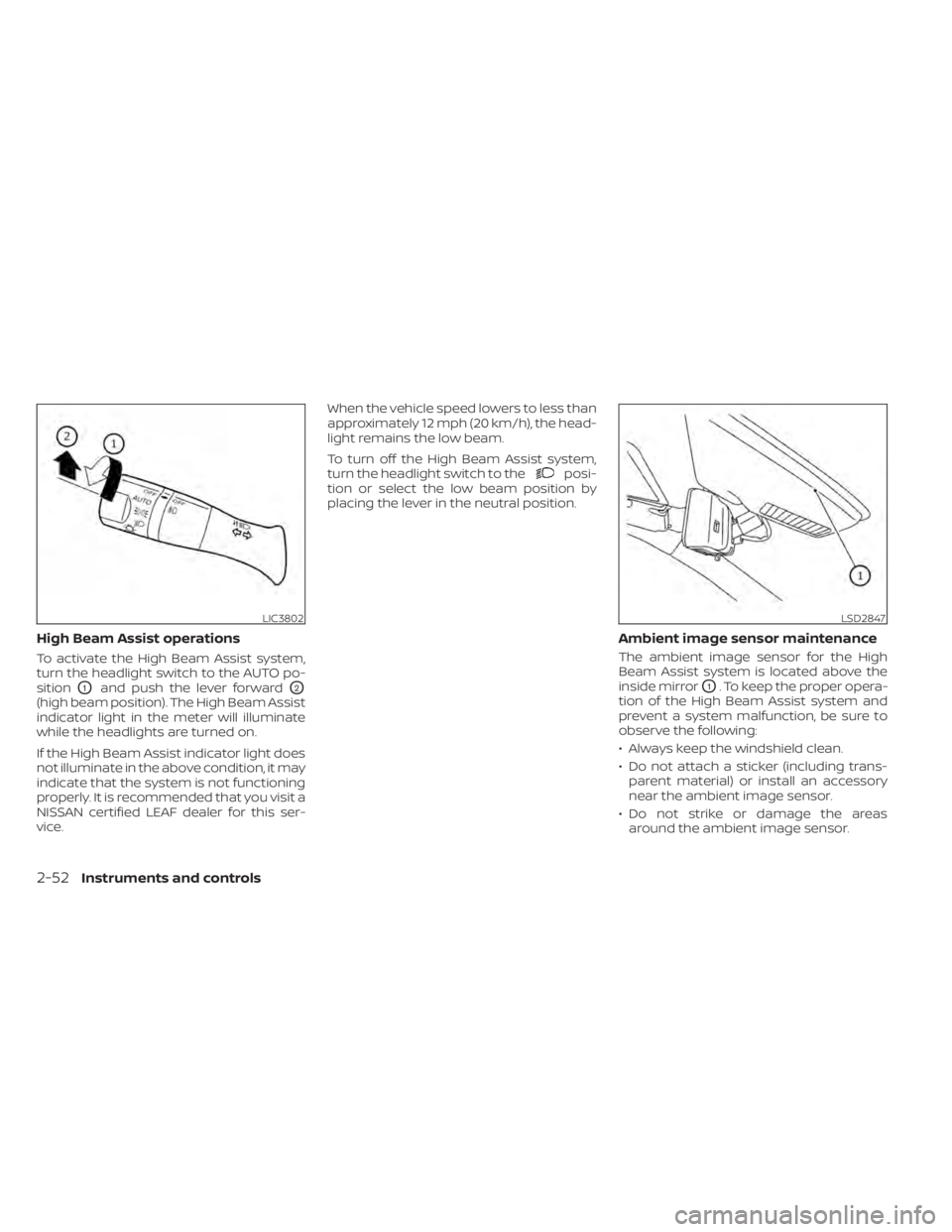
To activate the High Beam Assist system,
turn the headlight switch to the AUTO po-
sition
O1and push the lever forwardO2
(high beam position). The High Beam Assist
indicator light in the meter will illuminate
while the headlights are turned on.
If the High Beam Assist indicator light does
not illuminate in the above condition, it may
indicate that the system is not functioning
properly. It is recommended that you visit a
NISSAN certified LEAF dealer for this ser-
vice.When the vehicle speed lowers to less than
approximately 12 mph (20 km/h), the head-
light remains the low beam.
To turn off the High Beam Assist system,
turn the headlight switch to the
posi-
tion or select the low beam position by
placing the lever in the neutral position.
Ambient image sensor maintenance
The ambient image sensor for the High
Beam Assist system is located above the
inside mirror
O1. To keep the proper opera-
tion of the High Beam Assist system and
prevent a system malfunction, be sure to
observe the following:
• Always keep the windshield clean.
• Do not attach a sticker (including trans- parent material) or install an accessory
near the ambient image sensor.
• Do not strike or damage the areas around the ambient image sensor.
LIC3802LSD2847
2-52Instruments and controls
Page 243 of 596
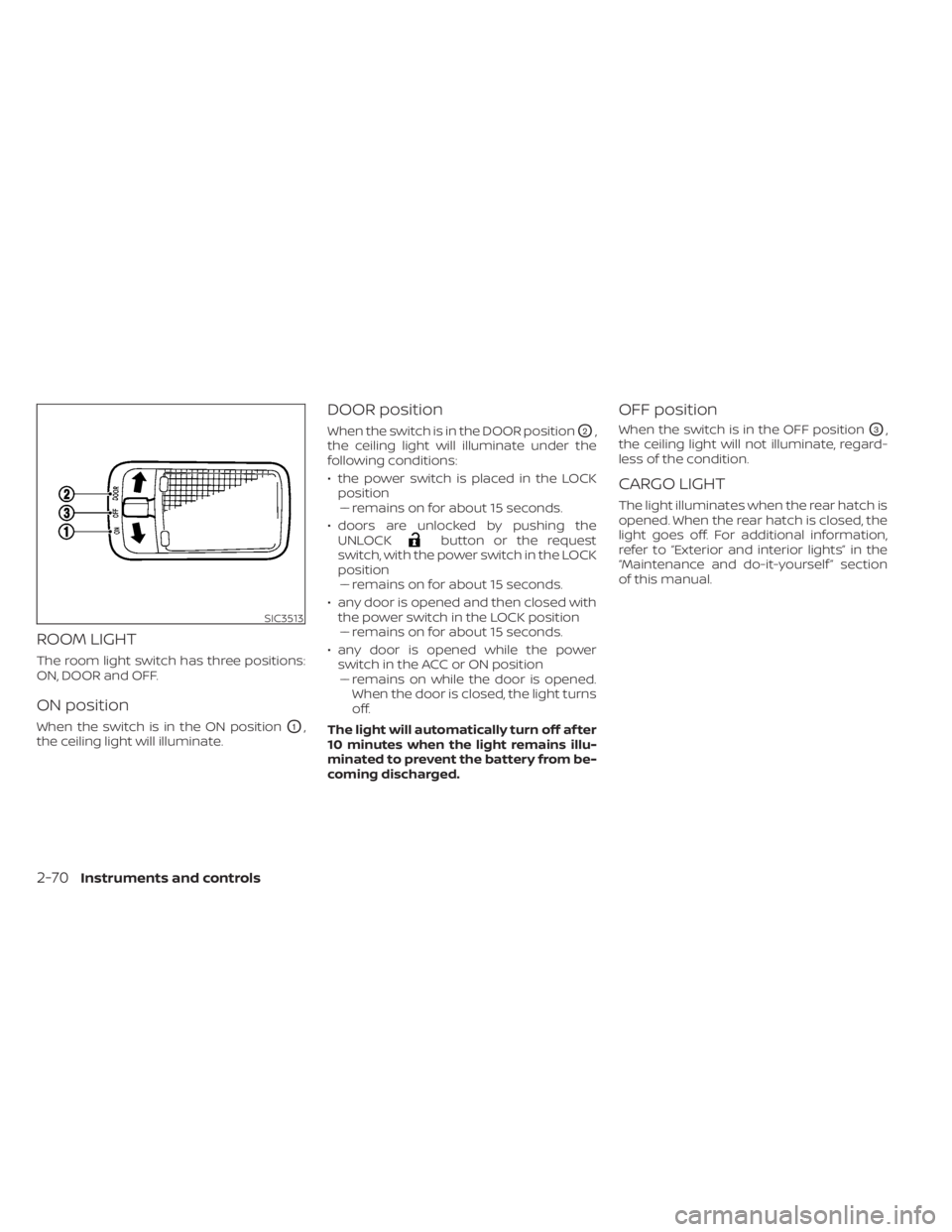
ROOM LIGHT
The room light switch has three positions:
ON, DOOR and OFF.
ON position
When the switch is in the ON positionO1,
the ceiling light will illuminate.
DOOR position
When the switch is in the DOOR positionO2,
the ceiling light will illuminate under the
following conditions:
• the power switch is placed in the LOCK position–– remains on for about 15 seconds.
• doors are unlocked by pushing the UNLOCK
button or the request
switch, with the power switch in the LOCK
position –– remains on for about 15 seconds.
• any door is opened and then closed with the power switch in the LOCK position–– remains on for about 15 seconds.
• any door is opened while the power switch in the ACC or ON position– – remains on while the door is opened.
When the door is closed, the light turns
off.
The light will automatically turn off af ter
10 minutes when the light remains illu-
minated to prevent the battery from be-
coming discharged.
OFF position
When the switch is in the OFF positionO3,
the ceiling light will not illuminate, regard-
less of the condition.
CARGO LIGHT
The light illuminates when the rear hatch is
opened. When the rear hatch is closed, the
light goes off. For additional information,
refer to “Exterior and interior lights” in the
“Maintenance and do-it-yourself ” section
of this manual.
SIC3513
2-70Instruments and controls
Page 256 of 596
WARNING
• Radio waves could adversely affect
electric medical equipment. Those
who use a pacemaker should contact
the electric medical equipment
manufacturer for the possible influ-
ences before use.
• The Intelligent Key transmits radio
waves when the buttons are pressed.
The FAA advises that the radio waves
may affect aircraf t navigation and
communication systems. Do not op-
erate the Intelligent Key while on an
airplane. Make sure the buttons are
not operated unintentionally when
the unit is stored during a flight.
The Intelligent Key system can operate all
the door and the rear hatch locks by using
the remote control function or pushing the
request switch on the vehicle without tak-
ing the key out from a pocket or purse. The
operating environment and/or conditions
may affect the Intelligent Key system op-
eration.
Be sure to read the following items before
using the Intelligent Key system.CAUTION
• Be sure to carry the Intelligent Key
with you when operating the vehicle.
• Never leave the Intelligent Key in the
vehicle when you leave the vehicle.
The Intelligent Key is always communicat-
ing with the vehicle because it receives ra-
dio waves. The Intelligent Key system
transmits weak radio waves. Environmen-
tal conditions may interfere with the op-
eration of the Intelligent Key system under
the following operating conditions.
• When operating near a location where strong radio waves are transmitted, such
as a TV tower, power station or broad-
casting station.
• When in possession of wireless equip- ment, such as a cellular phone, trans-
ceiver or a CB radio.
• When the Intelligent Key is in contact with or covered by metallic materials.
• When any type of radio wave remote con- trol is used nearby.
• When the Intelligent Key is placed near an electric appliance such as a personal
computer.
• When the vehicle is parked near a parking meter. In such cases, correct the operating condi-
tions before using the Intelligent Key func-
tion or use the mechanical key.
Although the life of the battery varies de-
pending on the operating conditions, the
battery’s life is approximately two years. If
the battery is discharged, replace it with a
new one.
When the Intelligent Key battery is almost
discharged, firmly apply the foot brake and
touch the power switch with the Intelligent
Key. Then push the power switch while de-
pressing the brake pedal within 10 seconds
af ter the chime sound.
Since the Intelligent Key is continuously re-
ceiving radio waves, if the key is lef t near
equipment that transmits strong radio
waves, such as signals from a TV or per-
sonal computer, the battery life may be-
come shorter.
For additional information, refer to “NISSAN
Intelligent Key® battery replacement” in the
“Maintenance and do-it-yourself ” section
of this manual.
Pay special attention that the vehicle bat-
tery is not completely discharged.
As many as four Intelligent Keys can be
registered and used with one vehicle. For
NISSAN INTELLIGENT KEY® SYSTEM
Pre-driving checks and adjustments3-7
Page 278 of 596
4 Monitor, climate, audio, phone and
voice recognition systems
NissanConnect® Manual (for Leaf )...............4-2
RearView Monitor (if so equipped) ...............4-3
RearView Monitor system operation ..........4-4
How to read the displayed lines ..............4-5
Difference between predicted and
actual distances .............................4-5
How to park with predictive course
lines ..........................................4-7
Adjusting the screen .........................4-8
How to turn on and off predictive
course lines ..................................4-9
RearView Monitor system limitations .........4-9
System maintenance ....................... 4-10
Intelligent Around View Monitor
(if so equipped) .................................. 4-11
Intelligent Around View Monitor system
operation ................................... 4-12
Difference between predicted and
actual distances ............................ 4-15
How to park with predictive course
lines ......................................... 4-17
How to switch the display ...................4-18
Adjusting the screen ........................ 4-19
Intelligent Around View Monitor system
limitations .................................. 4-19System maintenance
....................... 4-21
Moving Object Detection (MOD)
(if so equipped) ................................. 4-22
MOD system operation ......................4-23
Turning MOD ON and OFF ...................4-25
MOD system limitations .....................4-25
System maintenance .......................4-26
Vents .......................................... 4-27
Heater and air conditioner (automatic) .........4-28
Displaying climate control system
status screen (models with navigation
system) ..................................... 4-30
Operating tips ............................... 4-30
In-cabin microfilter .......................... 4-31
Automatic climate control
(models without Navigation System) ........4-32
Automatic climate control
(models with Navigation System) ............4-35
Climate ctrl. timer ........................... 4-38
USB/iPod® charging ports ......................4-43
Antenna ........................................ 4-43
Car phone or CB radio .......................... 4-44
iPod®/iPhone® ................................. 4-44
Page 287 of 596
• There may be a delay when switchingbetween views.
• If dirt, rain or snow accumulate on the camera, RearView Monitor may not dis-
play objects clearly. Clean the camera.
• Do not use wax on the camera lens. Wipe off any wax with a clean cloth dampened
with a diluted mild cleaning agent, then
wipe with a dry cloth.
SYSTEM MAINTENANCE
CAUTION
• Do not use alcohol, benzine or thin-
ner to clean the camera. This will
cause discoloration.
• Do not damage the camera as the
monitor screen may be adversely
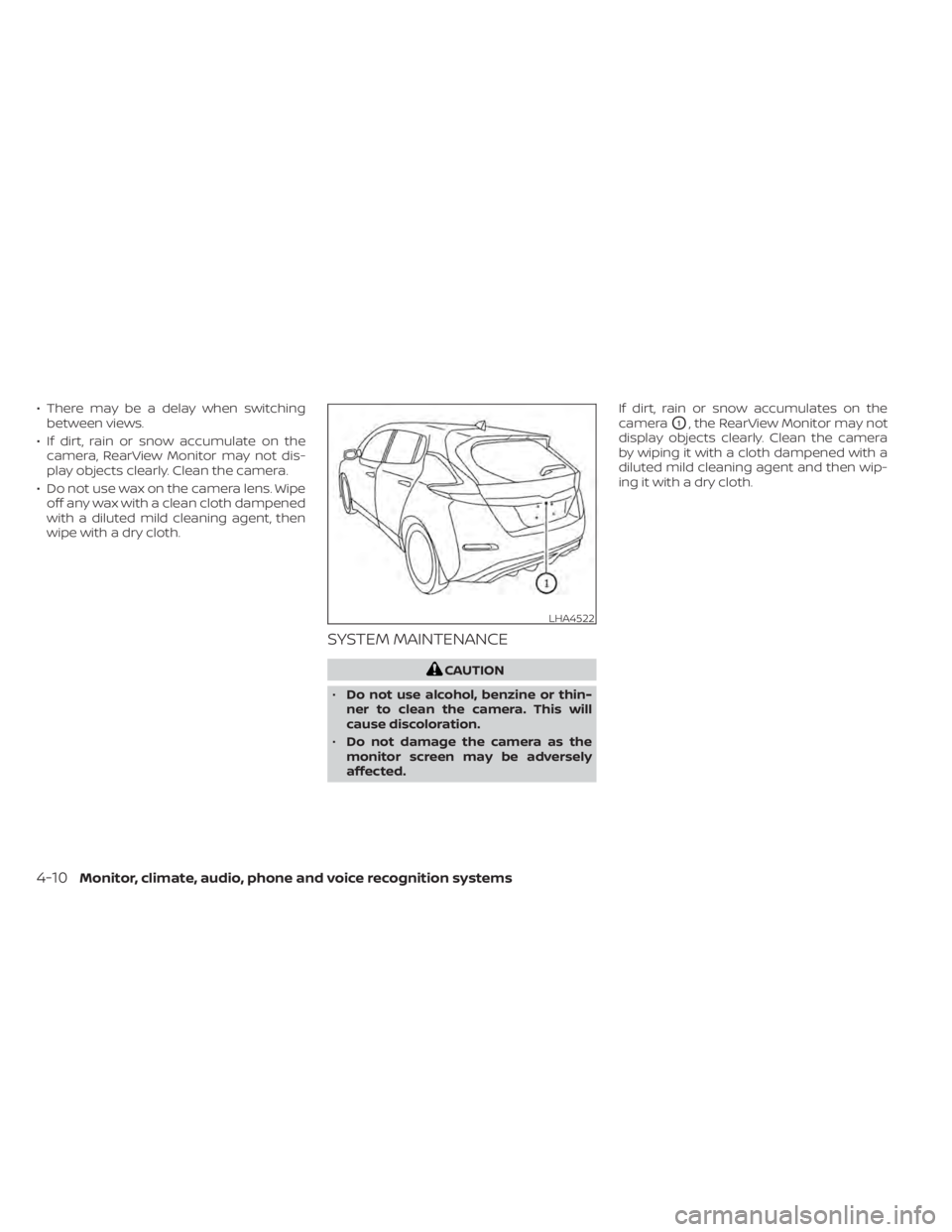
affected. If dirt, rain or snow accumulates on the
camera
O1, the RearView Monitor may not
display objects clearly. Clean the camera
by wiping it with a cloth dampened with a
diluted mild cleaning agent and then wip-
ing it with a dry cloth.
LHA4522
4-10Monitor, climate, audio, phone and voice recognition systems