maintenance NISSAN LEAF 2020 Owner´s Manual
[x] Cancel search | Manufacturer: NISSAN, Model Year: 2020, Model line: LEAF, Model: NISSAN LEAF 2020Pages: 596, PDF Size: 4.33 MB
Page 298 of 596
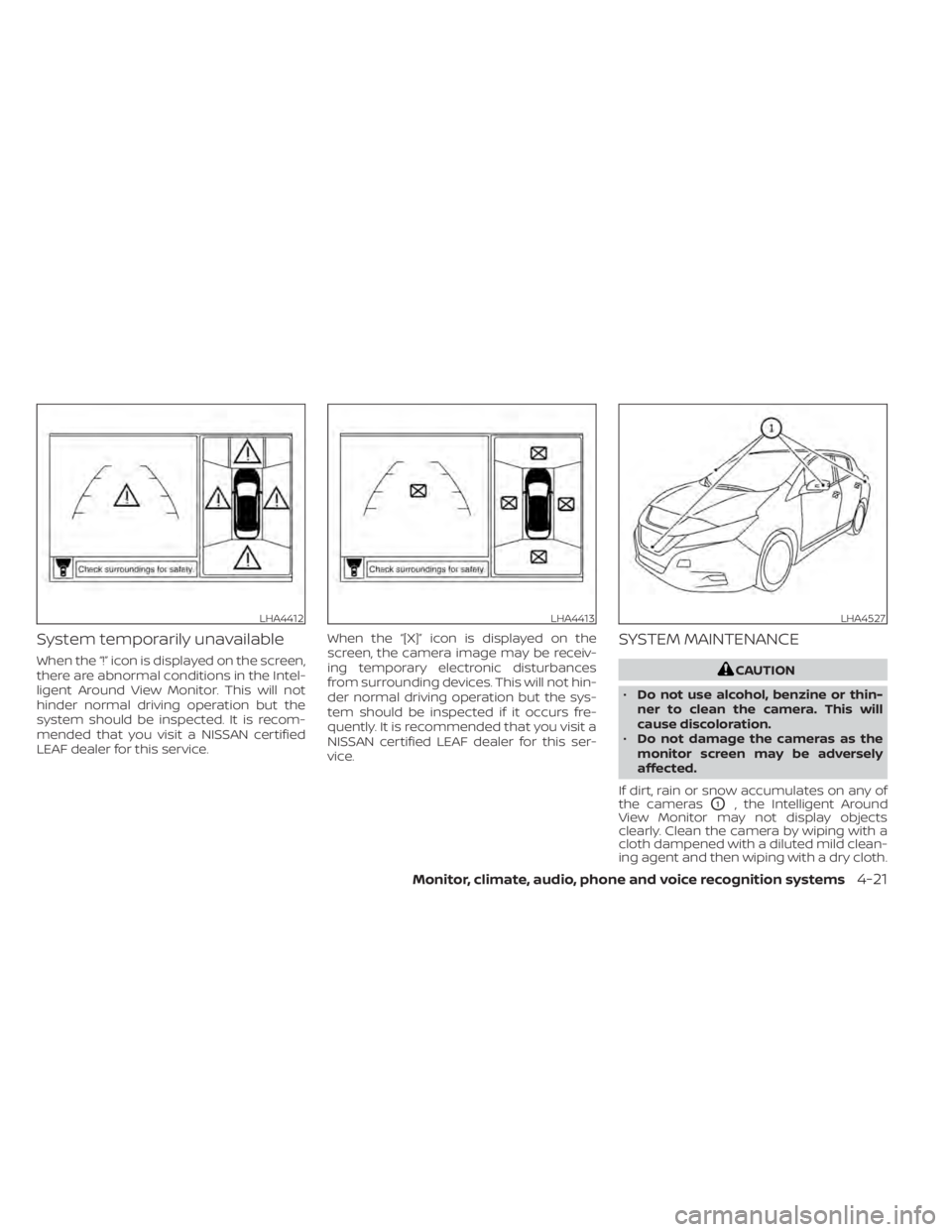
System temporarily unavailable
When the “!” icon is displayed on the screen,
there are abnormal conditions in the Intel-
ligent Around View Monitor. This will not
hinder normal driving operation but the
system should be inspected. It is recom-
mended that you visit a NISSAN certified
LEAF dealer for this service.When the “[X]” icon is displayed on the
screen, the camera image may be receiv-
ing temporary electronic disturbances
from surrounding devices. This will not hin-
der normal driving operation but the sys-
tem should be inspected if it occurs fre-
quently. It is recommended that you visit a
NISSAN certified LEAF dealer for this ser-
vice.
SYSTEM MAINTENANCE
CAUTION
• Do not use alcohol, benzine or thin-
ner to clean the camera. This will
cause discoloration.
• Do not damage the cameras as the
monitor screen may be adversely
affected.
If dirt, rain or snow accumulates on any of
the cameras
O1, the Intelligent Around
View Monitor may not display objects
clearly. Clean the camera by wiping with a
cloth dampened with a diluted mild clean-
ing agent and then wiping with a dry cloth.
LHA4412LHA4413LHA4527
Monitor, climate, audio, phone and voice recognition systems4-21
Page 303 of 596
NOTE:
The blue MOD icon will change to orange
if one of the following has occurred:
• When the system is malfunctioning.
• When the component temperaturereaches a high level (icon will blink).
If the icon light continues to illuminate
orange, have the MOD system checked.
It is recommended that you visit a
NISSAN certified LEAF dealer for this
service.
SYSTEM MAINTENANCE
CAUTION
• Do not use alcohol, benzine or thin-
ner to clean the camera. This will
cause discoloration.
• Do not damage the cameras as the
monitor screen may be adversely
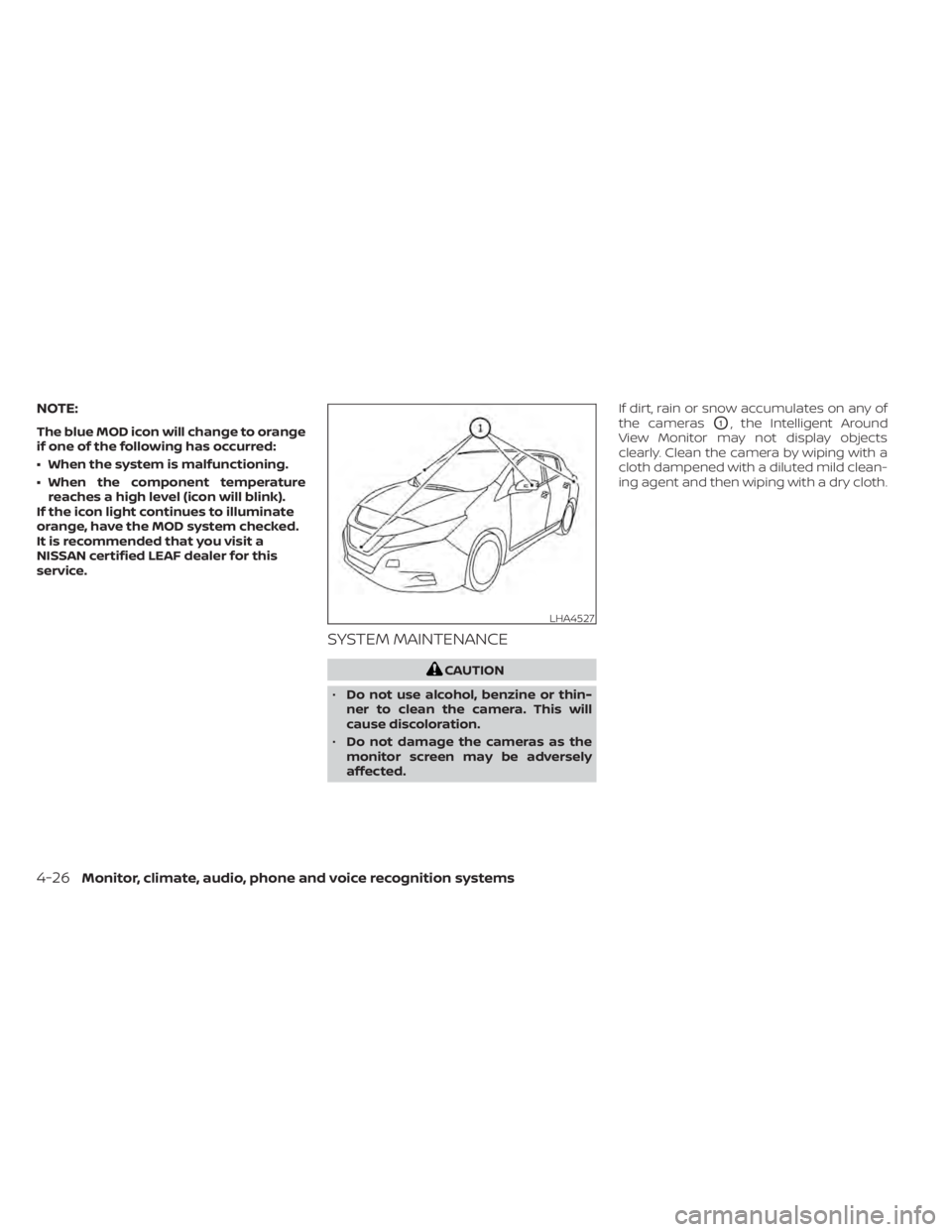
affected. If dirt, rain or snow accumulates on any of
the cameras
O1, the Intelligent Around
View Monitor may not display objects
clearly. Clean the camera by wiping with a
cloth dampened with a diluted mild clean-
ing agent and then wiping with a dry cloth.
LHA4527
4-26Monitor, climate, audio, phone and voice recognition systems
Page 323 of 596
5 Starting and driving
Precautions when starting and driving..........5-4
Tire Pressure Monitoring System
(TPMS) .......................................5-4
Avoiding collision and rollover ................5-7
Off-roadrecovery ............................5-8
Rapid air pressure loss .......................5-8
Drinking alcohol/drugs and driving ...........5-9
Push-button power switch .....................5-10
NISSAN Intelligent Key® system ..............5-10
Operating range for EV start function .......5-10
Power switch operation .....................5-12
Power switch positions ......................5-13
Emergency EV shut off ......................5-13
NISSAN Intelligent Key® battery
discharge ................................... 5-13
NISSAN Vehicle Immobilizer System .........5-14
Before starting the EV system ..................5-14
Starting the EV system ......................... 5-15
Driving the vehicle .............................. 5-15
Electric shif t control system .................5-15
Parking brake .................................. 5-19
Pedal type ................................... 5-20
Switch type (models with electronic
parking brake system) ......................5-20
e-Pedal system ................................ 5-22
e-Pedal system operation ...................5-22e-Pedal system limitations
..................5-24
System malfunction ......................... 5-25
Lane Departure Warning (LDW) .................5-26
LDW system operation ......................5-27
How to enable/disable the LDW system .....5-28
LDW system limitations .....................5-28
System temporarily unavailable .............5-29
System malfunction ......................... 5-30
System maintenance .......................5-30
Intelligent Lane Intervention (I-LI) ...............5-31
I-LI system operation ........................ 5-32
How to enable/disable the I-LI system ......5-33
I-LI system limitations .......................5-34
System temporarily unavailable .............5-35
System malfunction ......................... 5-36
S
ystem maintenance ....................... 5-36
Blind Spot Warning (BSW) .......................5-37
BSW system operation ......................5-38
How to enable/disable the BSW system .....5-40
BSW system limitations .....................5-41
BSW driving situations .......................5-42
System temporarily unavailable .............5-45
System maintenance .......................5-46
Intelligent Blind Spot Intervention (I-BSI) ........5-47
I-BSI system operation ......................5-49
How to enable/disable the I-BSI system .....5-50
Page 324 of 596
I-BSI system limitations.....................5-51
I-BSI driving situations .......................5-52
System temporarily unavailable .............5-57
System malfunction ......................... 5-57
System maintenance .......................5-58
RearCrossTrafficAlert(RCTA) .................. 5-59
RCTA system operation .....................5-60
How to enable/disable the RCTA
system ...................................... 5-62
RCTA system limitations .....................5-63
System temporarily unavailable .............5-65
System maintenance .......................5-65
Cruise control (if so equipped) ..................5-66
Precautions on cruise control ...............5-66
Cruise control operations ...................5-67
Intelligent Cruise Control (ICC) (for vehicles
without ProPILOT Assist) (if so equipped) .......5-69
How to select the cruise control mode ......5-70
Vehicle-to-vehicle distance control
mode ....................................... 5-70
Vehicle-to-vehicle distance control
mode operation ............................. 5-71
Vehicle-to-vehicle distance control
mode switches ............................. 5-73Vehicle-to-vehicle distance control
mode limitations
............................ 5-80
System temporarily unavailable .............5-84
System maintenance .......................5-86
Conventional (fixed speed) cruise
control mode ............................... 5-87
ProPILOT Assist (if so equipped) ................5-92
ProPILOT Assist system operation ...........5-94
Turning the conventional (fixed speed)
cruise control mode on .....................5-97
Operating ProPILOT Assist ...................5-98
How to enable/disable the Steering
Assist ...................................... 5-102
Intelligent Cruise Control (ICC)
(for vehicles with ProPILOT Assist) ..........5-103
Steering Assist ............................. 5-114
Conventional (fixed speed) cruise
control mode .............................. 5-121
Automatic Emergency Braking (AEB) with
Pedestrian Detection .......................... 5-125
AEB with Pedestrian Detection system
operation .................................. 5-126
Turning the AEB with Pedestrian
Detection
system on/off ................... 5-128
Page 325 of 596
AEB with Pedestrian Detection system
limitations................................. 5-129
System temporarily unavailable ............5-131
System malfunction ........................ 5-132
System maintenance ......................5-133
Rear Automatic Braking (RAB) .................5-134
RAB system operation ......................5-135
Turning the RAB system on/off .............5-136
RAB system limitations .....................5-137
System malfunction ........................ 5-138
System maintenance ......................5-139
Intelligent Forward Collision Warning (I-FCW) . . 5-139 I-FCW System operation ....................5-140
Turning the I-FCW system on/off ...........5-142
I-FCW system limitations ...................5-143
System temporarily unavailable ............5-147
System malfunction ........................ 5-148
System maintenance ......................5-148
Intelligent Driver Alertness (I-DA)
(if so equipped) ................................ 5-150
I-DA system operation .....................5-150
How to enable/disable the I-DA system ....5-151
I-DA system limitations .....................5-152
ECO Mode ..................................... 5-152
Increasing power economy ...................5-153ECO drive report
.............................. 5-154
Parking/parking on hills .......................5-155
Power steering system ........................5-156
Brake system ................................. 5-157
Brake precautions .......................... 5-157
Anti-lock Braking System (ABS) .............5-159
Brake Assist ................................ 5-160
Vehicle Dynamic Control (VDC) system ........5-160
Chassis control ............................... 5-162
Intelligent Trace Control ....................5-162
Intelligent Ride Control .....................
5-163
R
ear sonar system (RSS) ......................5-163
System operation .......................... 5-164
How to enable/disable the rear sonar
system ..................................... 5-166
Sonar limitations ........................... 5-167
System temporarily unavailable ............5-167
System maintenance ......................5-167
Hill start assist system ........................5-168
Cold weather driving .......................... 5-169
Freeing a frozen door lock ..................5-169
Antifreeze .................................. 5-169
12-volt battery .............................. 5-169
Draining of coolant water ..................5-170
Page 327 of 596
WARNING
• Do not leave children or adults who
would normally require the support
of others alone in your vehicle. Pets
should not be lef t alone either. They
could accidentally injure themselves
or others through inadvertent opera-
tion of the vehicle. Also, on hot, sunny
days, temperatures in a closed ve-
hicle could quickly become high
enough to cause severe or possibly
fatal injuries to people or animals.
• Properly secure all cargo with ropes
or straps to help prevent it from slid-
ing or shif ting. Do not place cargo
higher than the seatbacks. In a sud-
den stop or collision, unsecured
cargo could cause personal injury.
TIRE PRESSURE MONITORING
SYSTEM (TPMS)
Each tire, including the spare (if provided),
should be checked monthly when cold and
inflated to the inflation pressure recom-
mended by the vehicle manufacturer on
the vehicle placard or tire inflation pressure
label. (If your vehicle has tires of a different
size than the size indicated on the vehicle
placard or tire inflation pressure label, you should determine the proper tire inflation
pressure for those tires.)
As an added safety feature, your vehicle
has been equipped with a Tire Pressure
Monitoring System (TPMS) that illuminates
a low tire pressure telltale when one or
more of your tires is significantly under-
inflated. Accordingly, when the low tire
pressure telltale illuminates, you should
stop and check your tires as soon as pos-
sible, and inflate them to the proper pres-
sure. Driving on a significantly under-
inflated tire causes the tire to overheat and
can lead to tire failure. Under-inflation also
reduces power efficiency and tire tread life,
and may affect the vehicle’s handling and
stopping ability.
Please note that the TPMS is not a substi-
tute for proper tire maintenance, and it is
the driver’s responsibility to maintain cor-
rect tire pressure, even if under-inflation
has not reached the level to trigger illumi-
nation of the TPMS low tire pressure telltale.
Your vehicle has also been equipped with a
TPMS malfunction indicator to indicate
when the system is not operating properly.
The TPMS malfunction indicator is com-
bined with the low tire pressure telltale.
When the system detects a malfunction,
the telltale will flash for approximately oneminute and then remain continuously illu-
minated. This sequence will continue upon
subsequent vehicle start-ups as long as
the malfunction exists. When the malfunc-
tion indicator is illuminated, the system
may not be able to detect or signal low tire
pressure as intended. TPMS malfunctions
may occur for a variety of reasons, includ-
ing the installation of replacement or alter-
nate tires or wheels on the vehicle that
prevent the TPMS from functioning prop-
erly. Always check the TPMS malfunction
telltale af ter replacing one or more tires or
wheels on your vehicle to ensure that the
replacement or alternate tires and wheels
allow the TPMS to continue to function
properly.
Additional information
• When replacing a wheel without the
TPMS such as the spare tire, the TPMS
does not monitor the tire pressure of the
spare tire.
• The TPMS will activate only when the ve- hicle is driven at speeds above 16 mph (25
km/h). Also, this system may not detect a
sudden drop in tire pressure (for example,
a flat tire while driving).
PRECAUTIONS WHEN STARTING AND
DRIVING
5-4Starting and driving
Page 331 of 596
Seat belts help reduce the risk of injury in
collisions and rollovers.In a rollover crash,
an unbelted or improperly belted person
is significantly more likely to be injured
or killed than a person properly wearing
a seat belt.
OFF-ROAD RECOVERY
While driving, the right side or lef t side
wheels may unintentionally leave the road
surface. If this occurs, maintain control of
the vehicle by following the procedure be-
low. Please note that this procedure is only
a general guide. The vehicle must be driven
as appropriate based on the conditions of
the vehicle, road and traffic.
1. Remain calm and do not overreact.
2. Do not apply the brakes.
3. Maintain a firm grip on the steering wheel with both hands and try to hold a
straight course.
4. When appropriate, slowly release the ac- celerator pedal to gradually slow the
vehicle. 5. If there is nothing in the way, steer the
vehicle to follow the road while the ve-
hicle speed is reduced. Do not attempt
to drive the vehicle back onto the road
surface until the vehicle speed is
reduced.
6. When it is safe to do so, gradually turn the steering wheel until both tires return
to the road surface. When all tires are on
the road surface, steer the vehicle to
stay in the appropriate driving lane.
• If you decide that it is not safe to return the vehicle to the road surface based
on vehicle, road or traffic conditions,
gradually slow the vehicle to a stop in
a safe place off the road.
RAPID AIR PRESSURE LOSS
Rapid air pressure loss or a “blow-out” can
occur if the tire is punctured or is damaged
due to hitting a curb or pothole. Rapid air
pressure loss can also be caused by driving
on under-inflated tires.
Rapid air pressure loss can affect the han-
dling and stability of the vehicle, especially
at highway speeds. Help prevent rapid air pressure loss by
maintaining the correct air pressure and
visually inspecting the tires for wear and
damage. For additional information, refer
to “Wheels and tires” in the “Maintenance
and do-it-yourself ” section of this manual.
If a tire rapidly loses air pressure or “blows-
out” while driving, maintain control of the
vehicle by following the procedure below.
Please note that this procedure is only a
general guide. The vehicle must be driven
as appropriate based on the conditions of
the vehicle, road and traffic.
WARNING
The following actions can increase the
chance of losing control of the vehicle if
there is a sudden loss of tire air pressure.
Losing control of the vehicle may cause a
collision and result in personal injury.
•
The vehicle generally moves or pulls
in the direction of the flat tire.
• Do not rapidly apply the brakes.
• Do not rapidly release the accelerator
pedal.
• Do not rapidly turn the steering
wheel.
5-8Starting and driving
Page 337 of 596
4. Push the power switch while depressingthe brake pedal within 10 seconds af ter
the chime sounds. The power switch
position changes to the READY to drive
mode.
Af ter step 3 is performed, if the power
switch is pushed without depressing the
brake pedal, the power switch position will
change to ACC.
NOTE:
• When the power switch is pushed to the ACC or ON position or READY to
drive mode by the above procedure,
the EV system operation for dis-
charged Intelligent Key system indica-
tor appears on the vehicle information
display even if the Intelligent Key is in-
side the vehicle. This is not a malfunc-
tion. To stop the warning indicator
from blinking, touch the power switch
with the Intelligent Key again.
• If the Intelligent Key battery discharge indicator appears on the vehicle infor-
mation display, replace the battery as
soon as possible. For additional infor-
mation, refer to “NISSAN Intelligent
Key® battery replacement” in the
“Maintenance and do-it-yourself ” sec-
tion of this manual.
NISSAN VEHICLE IMMOBILIZER
SYSTEM
The NISSAN Vehicle Immobilizer System
will not allow the power switch to be placed
in the READY to drive position without the
use of the registered key.
If the power switch fails to place the vehicle
into the READY to drive position using the
registered key, it may be due to interfer-
ence caused by another registered key, an
automated toll road device or automated
payment device on the key ring. Restart the
EV system using the following procedure:
1. Leave the power switch in the ON posi- tion for approximately 5 seconds.
2. Place the power switch in the OFF posi- tion and wait approximately 10 seconds.
3. Repeat steps 1 and 2 again.
4. Place the power switch in the READY to drive position while holding the device
(which may have caused the interfer-
ence) separate from the registered key.
If this procedure allows the power
switch to be placed in the READY to drive
mode, NISSAN recommends placing the
registered key on a separate key ring to
avoid interference from other devices. • Make sure that the area around the ve-
hicle is clear.
• Check fluid levels such as coolant, brake fluid, and windshield-washer fluid as fre-
quently as possible.
• Check that all windows and lights are clean.
• Visually inspect tires for their appearance and condition. Also check tires for proper
inflation.
• Check that all doors are closed.
• Position the seat and adjust the head restraints/headrests.
• Adjust the inside and outside mirrors.
• Fasten seat belts and ask all passengers to do likewise.
• Check the operation of the warning lights when the power switch is pushed to the
ON position. For additional information,
refer to “Warning lights, indicator lights
and audible reminders” in the “Instru-
ments and controls” section of this
manual.
BEFORE STARTING THE EV SYSTEM
5-14Starting and driving
Page 353 of 596
The LDW system is not designed to warn
under the following conditions:
• When you operate the lane change signaland change traveling lanes in the direc-
tion of the signal. (The LDW system will
become operable again approximately 2
seconds af ter the lane change signal is
turned off.)
• When the vehicle speed lowers to less than approximately 37 mph (60 km/h).
Af ter the above conditions have finished
and the necessary operating conditions
are satisfied, the LDW functions will resume.
SYSTEM MALFUNCTION
If the LDW system malfunctions, it will can-
cel automatically and “Malfunction: See
Owner’s Manual” will appear in the vehicle
information display. If “Malfunction: See
Owner’s Manual” appears in the vehicle in-
formation display, pull off the road to a safe
location and stop the vehicle. Place the
shif t lever in the P (Park) position and the
power switch in the OFF position and re-
start the EV system. If “Malfunction: See
Owner’s Manual” continues to appear in
the vehicle information display, have the
system checked. It is recommended that
you visit a NISSAN certified LEAF dealer for
this service.SYSTEM MAINTENANCE
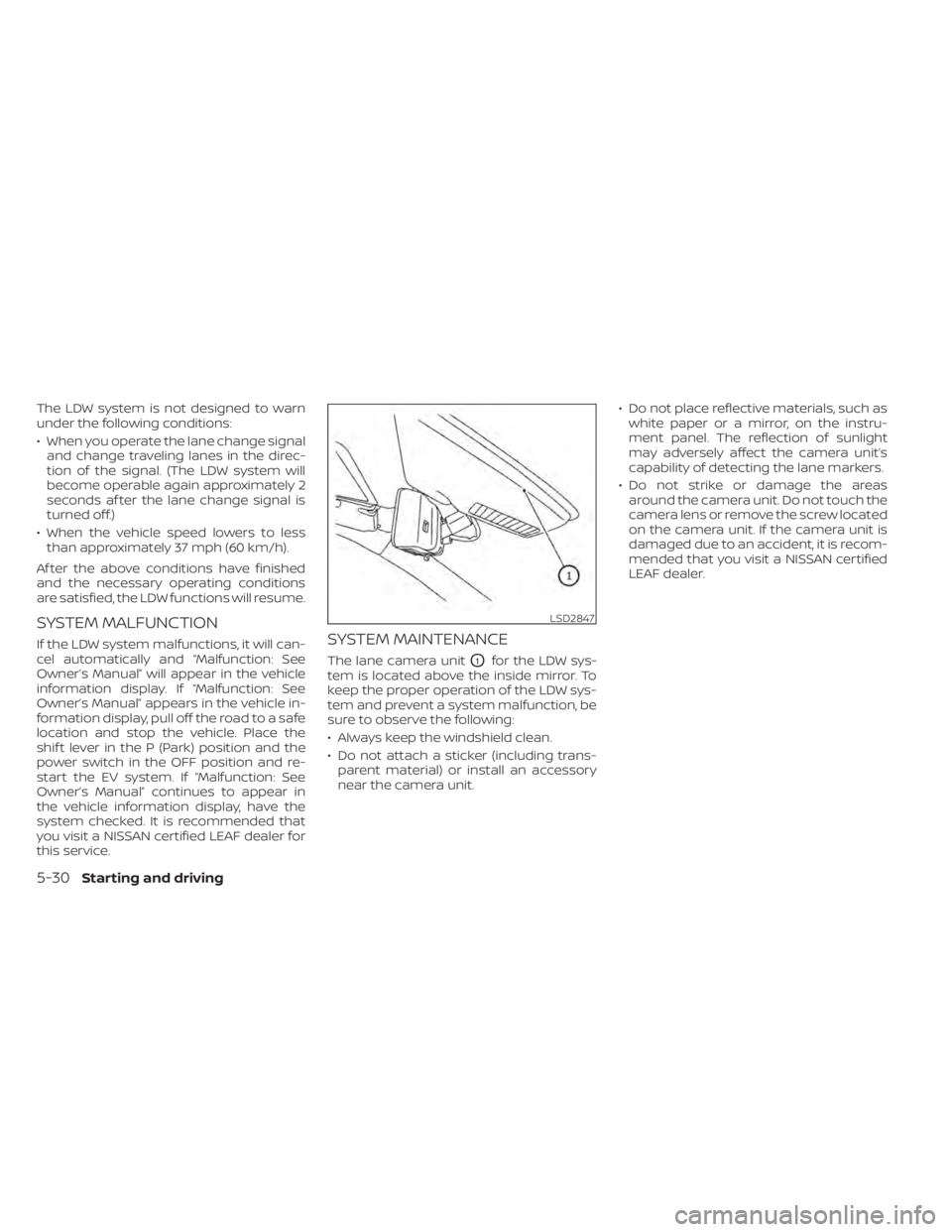
The lane camera unitO1for the LDW sys-
tem is located above the inside mirror. To
keep the proper operation of the LDW sys-
tem and prevent a system malfunction, be
sure to observe the following:
• Always keep the windshield clean.
• Do not attach a sticker (including trans- parent material) or install an accessory
near the camera unit. • Do not place reflective materials, such as
white paper or a mirror, on the instru-
ment panel. The reflection of sunlight
may adversely affect the camera unit’s
capability of detecting the lane markers.
• Do not strike or damage the areas around the camera unit. Do not touch the
camera lens or remove the screw located
on the camera unit. If the camera unit is
damaged due to an accident, it is recom-
mended that you visit a NISSAN certified
LEAF dealer.
LSD2847
5-30Starting and driving
Page 359 of 596
• “Currently not available”: When the VDCsystem is turned off.
Action to take:
When the above conditions no longer exist,
turn off the I-LI system. Push the ProPILOT
Assist switch (models with ProPILOT Assist)
or dynamic driver assistance switch (mod-
els without ProPILOT Assist) to turn the I-LI
system back on.
Temporary disabled status at high tem-
perature:
If the vehicle is parked in direct sunlight
under high temperature conditions (over
approximately 104°F [40°C]) and then the
I-LI system is turned on, the I-LI system
may be deactivated automatically and the
following message will appear on the ve-
hicle information display: “Unavailable: High
Cabin Temperature.” When the interior
temperature is reduced, the system will re-
sume operating automatically.
SYSTEM MALFUNCTION
If the I-LI system malfunctions, it will cancel
automatically. The I-LI system warning light
(orange) will illuminate and “Malfunction:
See Owner’s Manual” warning message will
appear in the display. If the I-LI system warning light (orange) illu-
minates in the display, pull off the road to a
safe location and stop the vehicle. Turn the
EV system off and restart the EV system. If
the I-LI system warning light (orange) con-
tinues to illuminate, have the I-LI system
checked. It is recommended that you visit a
NISSAN certified LEAF dealer for this ser-
vice.
SYSTEM MAINTENANCE
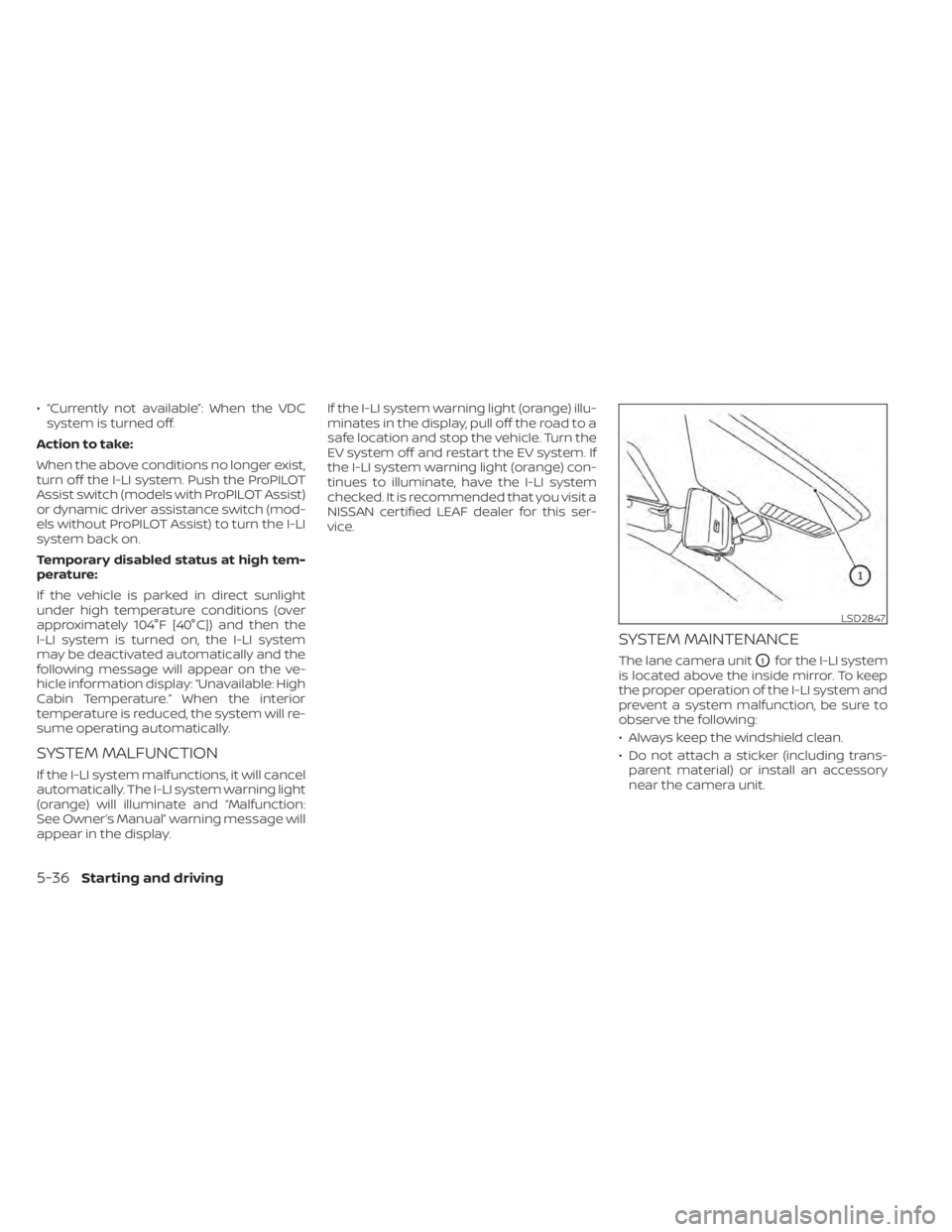
The lane camera unitO1for the I-LI system
is located above the inside mirror. To keep
the proper operation of the I-LI system and
prevent a system malfunction, be sure to
observe the following:
• Always keep the windshield clean.
• Do not attach a sticker (including trans- parent material) or install an accessory
near the camera unit.
LSD2847
5-36Starting and driving