battery NISSAN MAXIMA 2010 Owner´s Manual
[x] Cancel search | Manufacturer: NISSAN, Model Year: 2010, Model line: MAXIMA, Model: NISSAN MAXIMA 2010Pages: 457, PDF Size: 4.66 MB
Page 393 of 457
CAUTION
cDo not ground accessories directly to
the battery terminal. Doing so will by-
pass the variable voltage control sys-
tem and the vehicle battery may not
charge completely.
cUse electrical accessories with the en-
gine running to avoid discharging the
vehicle battery.
Your vehicle is equipped with a variable voltage
control system. This system measures the
amount of electrical discharge from the battery
and controls voltage generated by the generator.
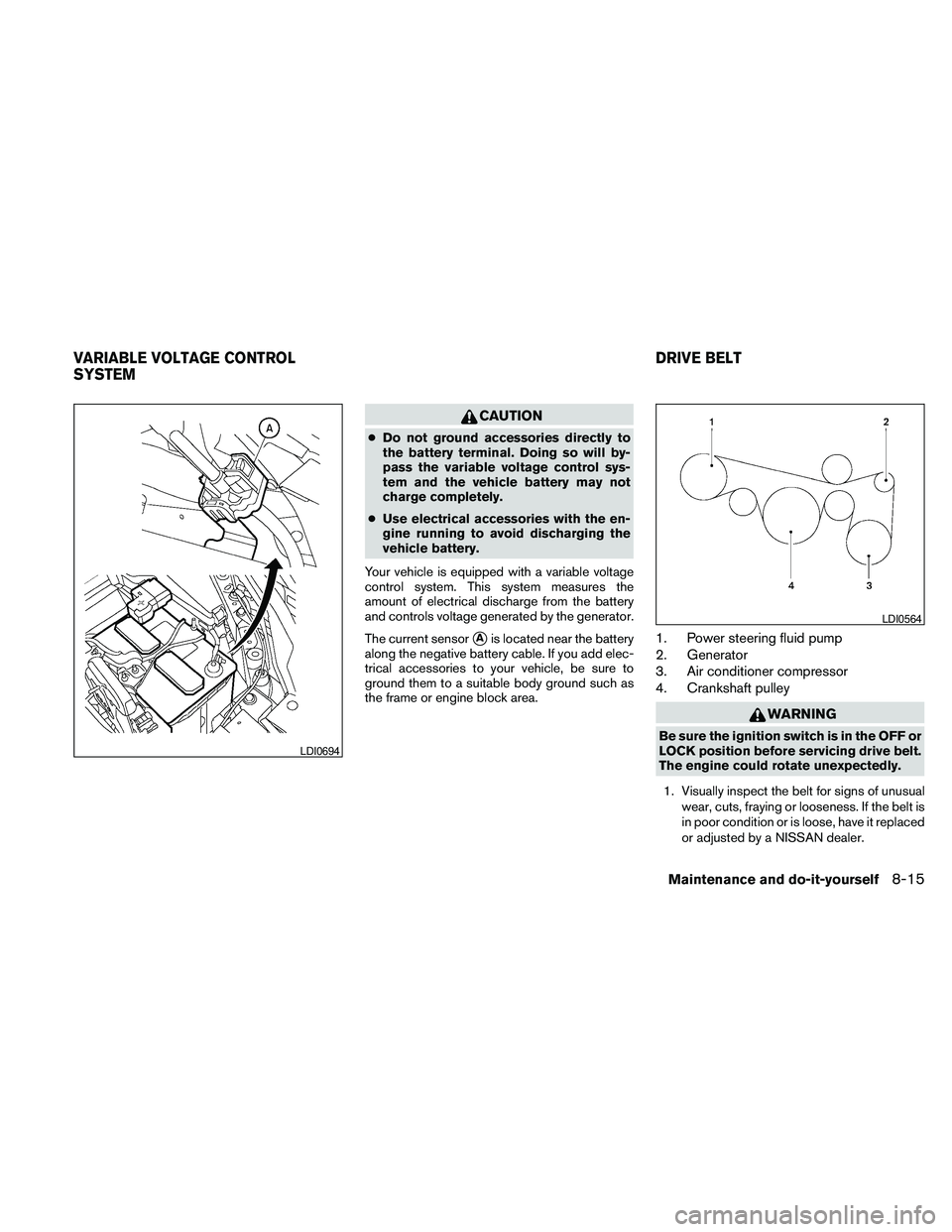
The current sensor
sAis located near the battery
along the negative battery cable. If you add elec-
trical accessories to your vehicle, be sure to
ground them to a suitable body ground such as
the frame or engine block area.1. Power steering fluid pump
2. Generator
3. Air conditioner compressor
4. Crankshaft pulley
WARNING
Be sure the ignition switch is in the OFF or
LOCK position before servicing drive belt.
The engine could rotate unexpectedly.
1. Visually inspect the belt for signs of unusual
wear, cuts, fraying or looseness. If the belt is
in poor condition or is loose, have it replaced
or adjusted by a NISSAN dealer.LDI0694
LDI0564
VARIABLE VOLTAGE CONTROL
SYSTEMDRIVE BELT
Maintenance and do-it-yourself8-15
Page 401 of 457
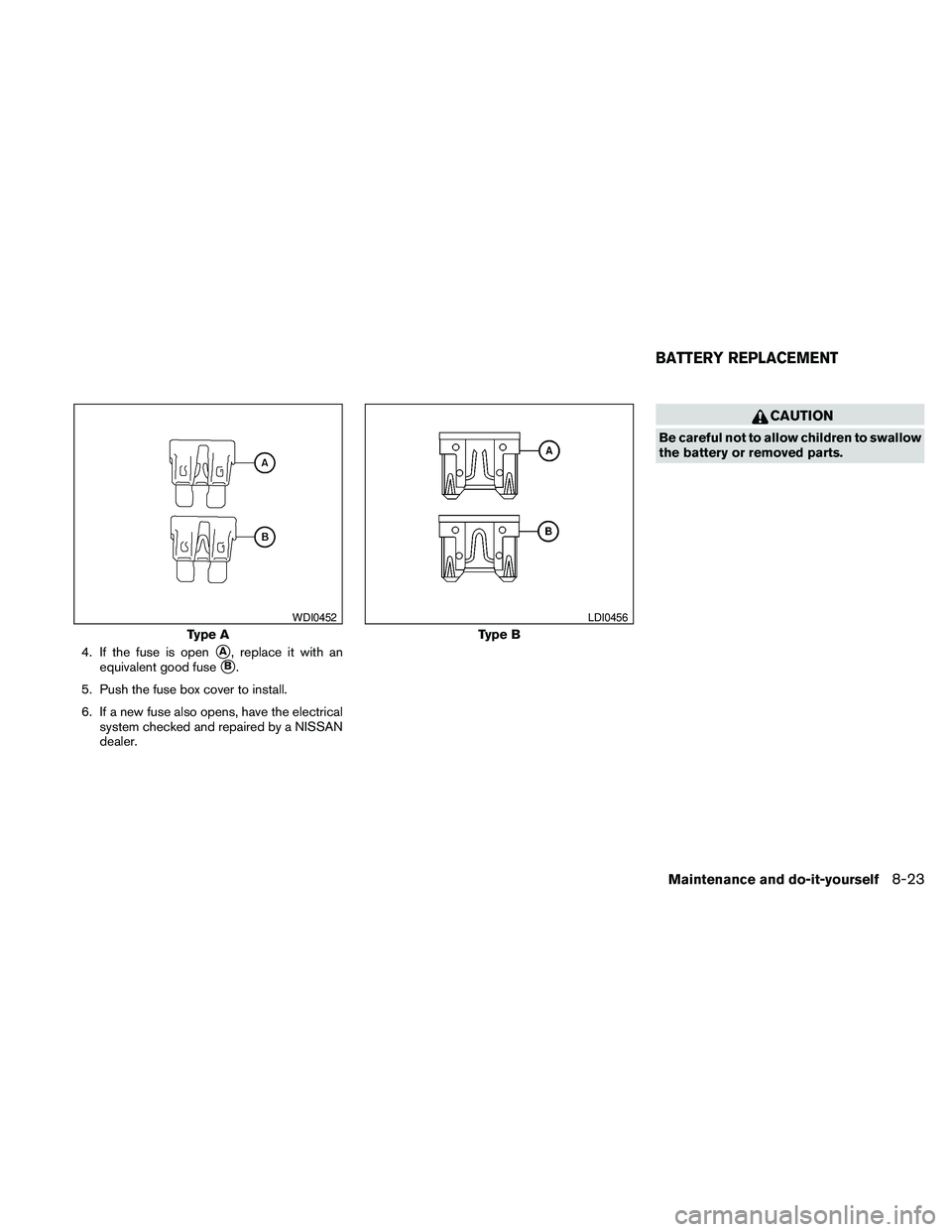
4. If the fuse is opensA, replace it with an
equivalent good fuse
sB.
5. Push the fuse box cover to install.
6. If a new fuse also opens, have the electrical
system checked and repaired by a NISSAN
dealer.
CAUTION
Be careful not to allow children to swallow
the battery or removed parts.
Type A
WDI0452
Type B
LDI0456
BATTERY REPLACEMENT
Maintenance and do-it-yourself8-23
Page 402 of 457
NISSAN INTELLIGENT KEY™
Replace the battery in the Intelligent Key as fol-
lows:
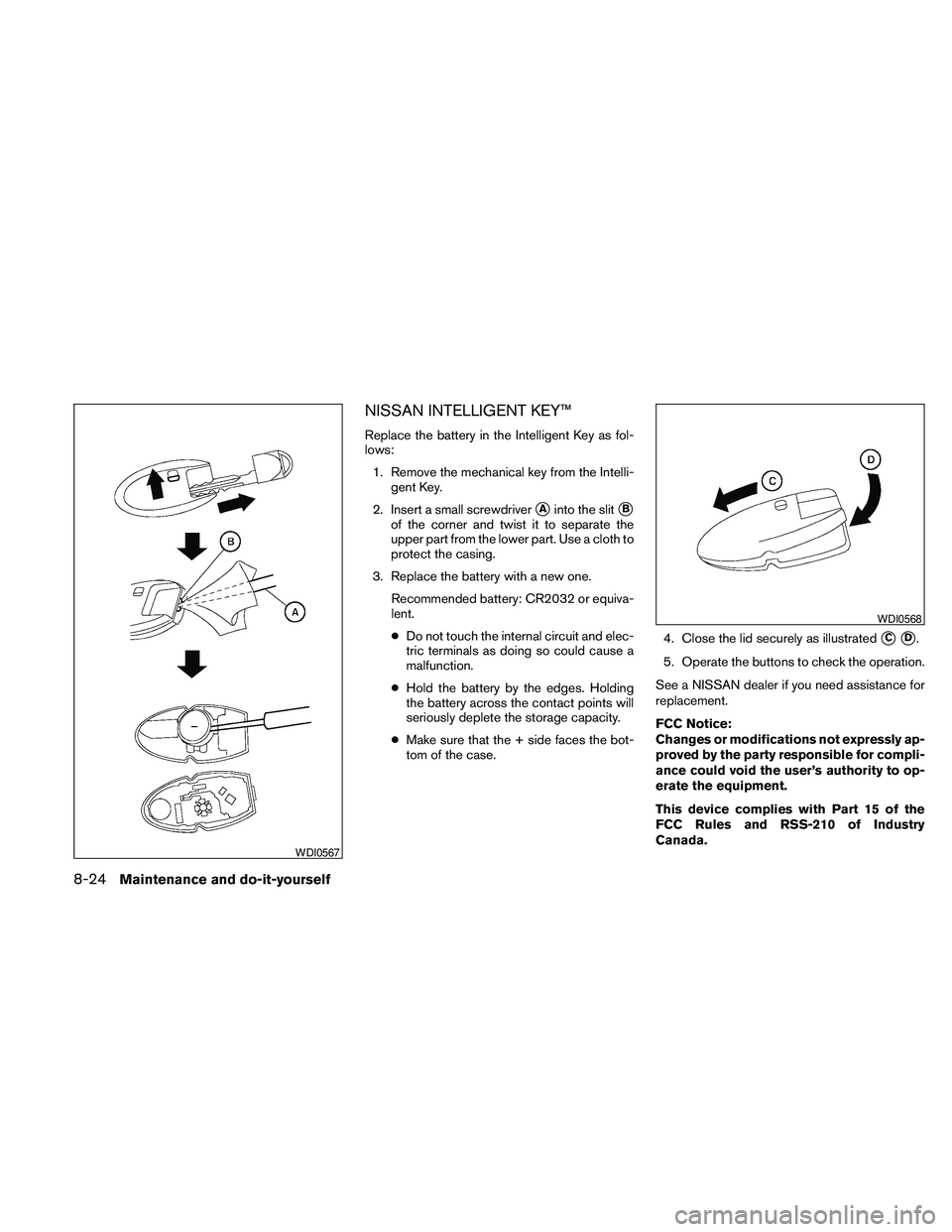
1. Remove the mechanical key from the Intelli-
gent Key.
2. Insert a small screwdriver
sAinto the slitsB
of the corner and twist it to separate the
upper part from the lower part. Use a cloth to
protect the casing.
3. Replace the battery with a new one.
Recommended battery: CR2032 or equiva-
lent.
cDo not touch the internal circuit and elec-
tric terminals as doing so could cause a
malfunction.
cHold the battery by the edges. Holding
the battery across the contact points will
seriously deplete the storage capacity.
cMake sure that the + side faces the bot-
tom of the case.4. Close the lid securely as illustrated
sCsD.
5. Operate the buttons to check the operation.
See a NISSAN dealer if you need assistance for
replacement.
FCC Notice:
Changes or modifications not expressly ap-
proved by the party responsible for compli-
ance could void the user’s authority to op-
erate the equipment.
This device complies with Part 15 of the
FCC Rules and RSS-210 of Industry
Canada.
WDI0567
WDI0568
8-24Maintenance and do-it-yourself
Page 441 of 457
Trailer lights
CAUTION
When splicing into the vehicle electrical
system, a commercially available power-
type module/converter must be used to
provide power for all trailer lighting. This
unit uses the vehicle battery as a direct
power source for all trailer lights while
using the vehicle tail light, stoplight and
turn signal circuits as a signal source. The
module/converter must draw no more
that 15 milliamps from the stop and tail
lamp circuits. Using a module/converter
that exceeds these power requirements
may damage the vehicle’s electrical sys-
tem. See a reputable trailer dealer to ob-
tain the proper equipment and to have it
installed.
Trailer lights should comply with federal and/or
local regulations. For assistance in hooking up
trailer lights, contact a NISSAN dealer or repu-
table trailer dealer.
Trailer brakes
If your trailer is equipped with a braking system,
make sure it conforms to federal and/or local
regulations and that it is properly installed.
WARNING
Never connect a trailer brake system di-
rectly to the vehicle brake system.
Pre-towing tips
cBe certain your vehicle maintains a level
position when a loaded and/or unloaded
trailer is hitched. Do not drive the vehicle if it
has an abnormal nose-up or nose-down
condition; check for improper tongue load,
overload, worn suspension or other possible
causes of either condition.
cAlways secure items in the trailer to prevent
load shift while driving.
cKeep the cargo load as low as possible in
the trailer to keep the trailer center of gravity
low.
cLoad the trailer so approximately 60% of the
trailer load is in the front half and 40% is in
the back half. Also make sure the load is
balanced side to side.
cCheck your hitch, trailer tire pressure, ve-
hicle tire pressure, trailer light operation, and
trailer wheel lug nuts every time you attach a
trailer to the vehicle.cBe certain your rearview mirrors conform to
all federal, state or local regulations. If not,
install any mirrors required for towing before
driving the vehicle.
cDetermine the overall height of the vehicle
and trailer so the required clearance is
known.
Trailer towing tips
In order to gain skill and an understanding of the
vehicle’s behavior, you should practice turning,
stopping and backing up in an area which is free
from traffic. Steering stability and braking perfor-
mance will be somewhat different than under
normal driving conditions.
cAlways secure items in the trailer to prevent
load shift while driving.
cLock the trailer hitch coupler with a pin or
lock to prevent the coupler from inadvert-
ently becoming unlatched.
cAvoid abrupt starts, acceleration or stops.
cAvoid sharp turns or lane changes.
cAlways drive your vehicle at a moderate
speed.
Technical and consumer information9-21
Page 446 of 457
Due to legal requirements in some states and
Canadian Provinces, your vehicle may be re-
quired to be in what is called the “ready condi-
tion” for an Inspection/Maintenance (I/M) test of
the emission control system.
The vehicle is set to the “ready condition” when it
is driven through certain driving patterns. Usually,
the ready condition can be obtained by ordinary
usage of the vehicle.
If a powertrain system component is repaired or
the battery is disconnected, the vehicle may be
reset to a “not ready” condition. Before taking the
I/M test, check the vehicle’s
inspection/maintenance test readiness condi-
tion. Turn the ignition switch ON without starting
the engine. If the Malfunction Indicator Light
(MIL) comes on steady for 20 seconds and then
blinks for 10 seconds , the I/M test condition is
“not ready”. If the MIL does not blink after 20
seconds, the I/M test condition is “ready”. If the
MIL indicates the vehicle is in a “not ready” con-
dition, drive the vehicle through the following
pattern to set the vehicle to the ready condition. If
you cannot or do not want to perform the driving
pattern, a NISSAN dealer can conduct it for you.WARNING
Always drive the vehicle in a safe and
prudent manner according to traffic con-
ditions and obey all traffic laws.
1. Start the engine when the engine coolant
temperature gauge needle points to C. Al-
low the engine to idle until the gauge needle
points between the C and H (normal oper-
ating temperature) .
2. Accelerate the vehicle to 55 MPH (88
km/h) , then quickly release the accelerator
pedal completely and keep it released for at
least 10 seconds.
3. Quickly depress the accelerator pedal for a
moment, then drive the vehicle at a speed of
53 - 60 MPH (86 - 96 km/h) for at least 9
minutes.
4. Stop the vehicle.
5. Accelerate the vehicle to 35 MPH (55 km/h)
and maintain the speed for 20 seconds.
6. Repeat steps 4 through 5 at least 10 times.
7. Accelerate the vehicle to 55 MPH (88 km/h)
and maintain the speed for at least 3 min-
utes.8. Stop the vehicle. Place the shift selector in
the P (Park) or N (Neutral) position.
9. Turn the engine off.
10. Repeat steps1-8atleast one more time.
If steps 1 through 7 are interrupted, repeat the
preceding step. Any safe driving mode is accept-
able between steps. Do not stop the engine until
step 7 is completed.
READINESS FOR INSPECTION/
MAINTENANCE (I/M) TEST
9-26Technical and consumer information
Page 449 of 457
10 Index
A
Air bag
(See supplemental restraint system).....1-39
Air bag system
Front (See supplemental front impact
air bag system)...............1-46
Air bag warning light...........1-53, 2-14
Air cleaner housing filter............8-17
Air conditioner
Air conditioner service...........4-48
Air conditioner specification label.....9-11
Air conditioner system refrigerant and
oil recommendations.............9-6
Heater and air conditioner
controls................4-41, 4-44
Rear seat air conditioner..........4-47
Servicing air conditioner..........4-48
Alarm system
(See vehicle security system).........2-24
Anchor point locations.............1-25
Antenna....................4-116
Anti-lock brake warning light......2-10, 2-11
Anti-lock Braking System (ABS)........5-23
Armrests.....................1-7
Audible reminders...............2-16
Audio system..................4-48
BluetoothTaudio.............4-109
Compact Disc (CD) changer.......4-66
Compact disc (CD) player.....4-72, 4-79
FM-AM radio with compact disc (CD)
changer...................4-64FM/AM/SAT radio with CD/DVD player . .4-75
FM/AM/SAT radio with compact disc
(CD) player.................4-69
Audio System
iPodTPlayer.............4-92, 4-93
Music Box hard-disk drive audio
system...............4-96, 4-102
Audio system
Radio....................4-48
Rear audio controls............4-115
Audio System
Settings...............4-70, 4-76
Audio system
Steering wheel audio control switch . . .4-113
USB interface............4-87, 4-88
Autolight switch.................2-30
Automatic
Automatic drive positioner.........3-29
Automatic power window switch.....2-43
Automatic transmission position indicator
light.....................2-14
Transmission selector lever lock
release....................5-16
Automatic anti-glare inside mirror.......3-25
Automatic door locks..............3-6
AUX jack....................4-68
B
Battery......................8-13
Charge warning light............2-11
Before starting the engine...........5-10Belt (See drive belt)..............8-15
Block heater
Engine....................5-27
BluetoothTaudio...............4-109
BluetoothThands-free phone
system.................4-117, 4-132
Booster seats..................1-36
Brake
Anti-lock Braking System (ABS)......5-23
Brake fluid..................8-12
Brake light (See stop light).........8-26
Brake system................5-22
Brake warning light.............2-11
Brake wear indicators........2-16, 8-19
Parking brake operation..........5-17
Self-adjusting brakes............8-19
Brakes......................8-19
Break-in schedule...............5-19
Brightness control
Instrument panel..............2-32
Brightness/contrast button.......4-15, 4-31
Bulb check/instrument panel..........2-10
Bulb replacement................8-26
C
Capacities and recommended
fuel/lubricants...................9-2
Car phone or CB radio............4-117
Cargo net....................2-41
Cargo (See vehicle loading information) . . .9-12
CD care and cleaning.............4-112
Page 451 of 457
Capacities and recommended
fuel/lubricants.................9-2
Continuously Variable Transmission
(CVT) fluid..................8-11
Engine coolant.................8-7
Engine oil...................8-8
Power steering fluid.............8-11
Window washer fluid............8-12
F.M.V.S.S. certification label...........9-10
Fog light switch.................2-32
Folding rear seat..................1-5
Front air bag system
(See supplemental restraint system)......1-46
Front seats.....................1-2
Fuel
Capacities and recommended
fuel/lubricants.................9-2
Fuel economy................5-20
Fuel gauge...................2-6
Fuel octane rating...............9-4
Fuel recommendation.............9-3
Fuel-filler door and cap...........3-21
Fuses.......................8-20
Fusible links...................8-21
G
Garage door opener, HomeLinkTUniversal
Transceiver....................2-52
Gascap .....................3-21
Gauge
Engine coolant temperature gauge.....2-5
Fuel gauge...................2-6
Odometer...................2-4
Speedometer.................2-4Tachometer..................2-5
Trip odometer.................2-4
General maintenance...............8-2
Glove box.....................2-39
Glove box lock..................2-39
Grocery hooks..................2-40
H
Hands-free phone system,
BluetoothT...............4-117, 4-132
Hazard warning flasher switch.........2-33
Headlight and turn signal switch........2-28
Headlight control switch............2-29
Headlights....................8-25
Heated seats...................2-35
Heated steering wheel.............2-35
Heater
Heater and air conditioner
controls................4-41, 4-44
Heater operation...........4-42, 4-45
Rear seat air conditioner..........4-47
HomeLinkTUniversal Transceiver........2-52
Hood release...................3-18
Horn.......................2-33
I
Ignition Switch
Push-Button Ignition Switch.........5-7
Image viewer...................4-31
Immobilizer system..........2-25, 3-3, 5-9
Important vehicle information label.......9-10
In-cabin microfilter................8-17Increasing fuel economy.............5-20
Indicator lights and audible reminders
(See warning/indicator lights and audible
reminders)....................2-10
Inside automatic anti-glare mirror........3-25
Instrument brightness control..........2-32
Instrument panel...............0-6, 2-2
Instrument panel dimmer switch........2-32
Intelligent Key system
Key operating range..............3-9
Key operation................3-10
Mechanical key................3-3
Remote keyless entry operation.......3-13
Troubleshooting guide............3-16
Warning signals...............3-16
Interior light....................2-49
Interior trunk lid release.............3-20
iPodTPlayer................4-92, 4-93
ISOFIX child restraints.............1-23
J
Jump starting...................6-8
K
Keyfob battery replacement...........8-23
Keyless entry
With Intelligent Key system
(See Intelligent Key system).........3-13
Keys, For Intelligent Key system.........3-2
10-3
Page 455 of 457
Ventilators....................4-40
Visors.......................3-24
Voice recognition system...........4-144
W
Warning
Air bag warning light.........1-53, 2-14
Anti-lock brake warning light.....2-10, 2-11
Battery charge warning light........2-11
Brake warning light.............2-11
Engine oil pressure warning light......2-12
Hazard warning flasher switch.......2-33
Low fuel warning light........2-13, 2-23
Low tire pressure warning light.......2-12
Low washer fluid warning light.......2-23
Passenger air bag and status light.....1-48
Seat belt warning light............2-13
Vehicle security system...........2-24
Warning labels (for SRS)..........1-53
Warning/indicator lights and audible
reminders...................2-10
Warning lights..................2-10
Washer switch
Windshield wiper and washer switch . . .2-26
Weights (See dimensions and weights).....9-8
Wheels and tires.................8-30
Wheel/tire size...................9-8
When traveling or registering your vehicle in
another country..................9-9
Window washer fluid..............8-12
Windows
Locking passengers’ windows.......2-43
Power rear windows.............2-43
Power windows...............2-42Rear power windows............2-43
Windshield wiper and washer switch.....2-26
Wiper
Windshield wiper and washer switch . . .2-26
Wiper blades.................8-18
10-7