service NISSAN MAXIMA 2023 Owners Manual
[x] Cancel search | Manufacturer: NISSAN, Model Year: 2023, Model line: MAXIMA, Model: NISSAN MAXIMA 2023Pages: 494, PDF Size: 5.7 MB
Page 3 of 494
• Your vehicle includes physical parts and/or physical components of such parts on which sof tware and/or firmware (“Sof tware”) is
embedded or installed. Additionally, updates to Sof tware may be made available by NISSAN for download and installation by owners
from time to time as determined by NISSAN in its sole discretion. Such Sof tware, and all updates thereto, including updates delivered by
NISSAN to your vehicle over the air (collectively “Updates”), are licensed, and not sold, to you. A portion of the Sof tware may contain or
consist of open source sof tware, which may be used under the terms and conditions of the specific license under which the open
source sof tware is distributed. For other Sof tware, including Sof tware for which there is no separate license agreement between you
and the manufacturer or owner of the Sof tware, the terms and conditions governing your right to use and the use of the installed
Sof tware, including any Updates, applications, services, and content provided for or through the Sof tware, are set forth in the End User
License Agreement found at https://www.nissanusa.com/owners/ownership. Your use of the Sof tware, including any Updates,
constitutes consent to the End User License Agreement’s terms and conditions.
• PLEASE NOTE: The End User License Agreement contains an arbitration clause. You may opt out of this arbitration clause within 30 days
of the date of your vehicle purchase by sending a signed, written notice to NISSAN at the following address:
Nissan North America, Inc.
Consumer Affairs Department
P.O. Box 685003 Franklin, TN 37068-5003
• Please refer to “Updating system sof tware” in the 5. Information section or "Sof tware Update" in the 2. Getting Started section of the
NissanConnect® Owner's Manual for information about installing Over-the-Air Updates. For questions or assistance concerning
installation of any over-the-air Update, you may contact NISSAN Consumer Affairs at 1-800-333-0207. You may also choose to visit a
NISSAN dealer for assistance - charges may apply.
NISSAN SOFTWARE LICENSE
Page 4 of 494
CALIFORNIA PROPOSITION 65 WARNING
WARNING
Operating, servicing and maintaining a passenger
vehicle or off-highway motor vehicle can expose you to
chemicals including engine exhaust, carbon monoxide,
phthalates, and lead, which are known to the State of
California to cause cancer and birth defects or other
reproductive harm. To minimize exposure, avoid
breathing exhaust, do not idle the engine except as
necessary, service your vehicle in a well-ventilated area
and wear gloves or wash your hands frequently when
servicing your vehicle. For more information go to
www.P65Warnings.ca.gov/passenger-vehicle.
Page 5 of 494
This manual was prepared to help you un-
derstand the operation and maintenance
of your vehicle so that you may enjoy many
miles (kilometers) of driving pleasure.
Please read through this manual before
operating your vehicle.
A separate Warranty Information Book-
let explains details about the warranties
covering your vehicle. The “Maintenance
and schedules” section of this manual
explains details about maintaining and
servicing your vehicle. You will also re-
ceive a separate Customer Care/Lemon
Law Booklet (U.S. only) that will explain
how to resolve any concerns you may
have with your vehicle, and clarif y your
rights under your state's lemon law. Ad-
ditionally, you may receive a separate
NissanConnect
®Owner’s Manual that
will explain the various features and
functions your system may have.
A NISSAN dealership knows your vehicle
best. When you require any service or have
any questions, they will be glad to assist
you with the extensive resources available
to them.
In addition to factory-installed options,
your vehicle may also be equipped with
additional accessories installed by NISSAN
or by a NISSAN dealer prior to delivery. It is recommended that you visit a NISSAN
dealer for details concerning the particular
accessories with which your vehicle is
equipped. It is important that you familiar-
ize yourself with all disclosures, warnings,
cautions and instructions concerning
proper use of such accessories prior to
operating the vehicle and/or accessory.
It is recommended that you visit a NISSAN
dealer for details concerning the particular
accessories with which your vehicle is
equipped.
Before driving your vehicle, please read this
Owner's Manual carefully. This will ensure
familiarity with controls and maintenance
requirements assisting you in the safe op-
eration of your vehicle.
WARNING
IMPORTANT SAFETY INFORMATION
REMINDERS!
Follow these important driving rules to
help ensure a safe and comfortable trip
for you and your passengers!
• NEVER drive under the influence of
alcohol or drugs.
•
ALWAYS observe posted speed limits
and never drive too fast for conditions.
• ALWAYS give your full attention to
driving and avoid using vehicle fea-
tures or taking other actions that
could distract you.
• ALWAYS use your seat belts and ap-
propriate child restraint systems.
Preteen children should be seated in
the rear seat.
• ALWAYS provide information about
the proper use of vehicle safety fea-
tures to all occupants of the vehicle.
• ALWAYS review this Owner’s Manual
for important safety information.
FOREWORD READ FIRST—THEN DRIVE SAFELY
Page 8 of 494
NISSAN CARES . . .
Both NISSAN and your NISSAN dealer are dedicated to serving all your automotive needs. Your satisfaction with your vehicle and your
NISSAN dealer are our primary concerns. YourNISSAN dealer is always available to assist you with all your automobile sales and service
needs.
However, if there is something that your
NISSAN dealer cannot assist you with or
you would like to provide NISSAN directly
with comments or questions, please con-
tact the NISSAN Consumer Affairs Depart-
ment using our toll-free number:
For U.S. customers 1-800-NISSAN-1
(1-800-647-7261)
For Canadian customers 1-800-387-0122 The Consumer Affairs Department will ask
for the following information:
– Your name, address, and telephone
number
– Vehicle identification number (attached to the top of the instrument panel on the
driver's side)
– Date of purchase
– Current odometer reading
– Your NISSAN dealer's name
– Your comments or questions
OR You can write to NISSAN with the informa-
tion at:
For U.S. customers
Nissan North America, Inc.
Consumer Affairs Department
P.O. Box 685003
Franklin, TN 37068-5003
or via e-mail at:
[email protected]
For Canadian customersNissan Canada Inc.
5290 Orbitor Drive
Mississauga, Ontario L4W 4Z5
or via e-mail at:
[email protected]
If you prefer, visit us at:www.nissanusa.com(for U.S. customers)
or
www.nissan.ca (for Canadian customers)
We appreciate your interest in NISSAN and thank you for buying a quality NISSAN vehicle.
NISSAN CUSTOMER CARE PROGRAM
Page 33 of 494
WARNING
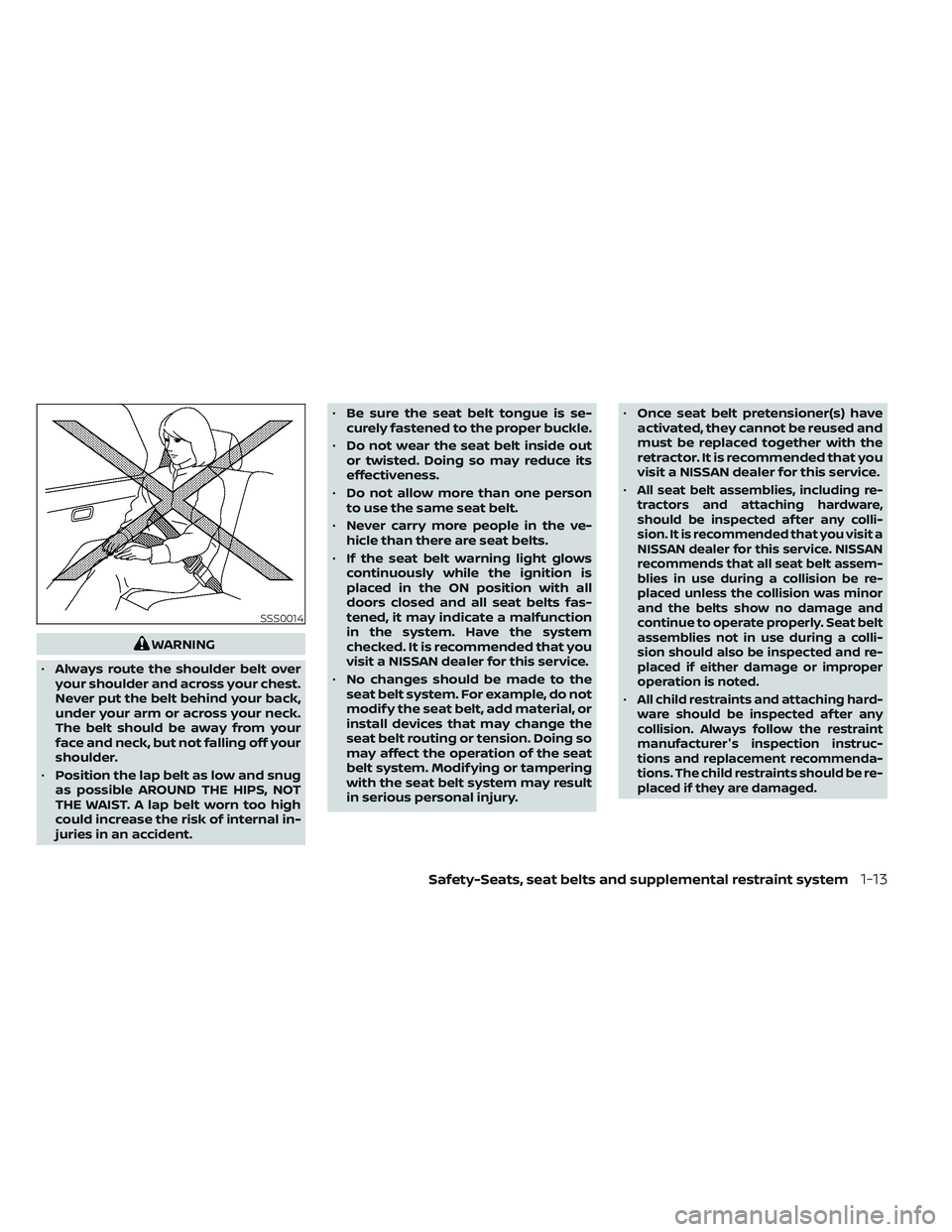
• Always route the shoulder belt over
your shoulder and across your chest.
Never put the belt behind your back,
under your arm or across your neck.
The belt should be away from your
face and neck, but not falling off your
shoulder.
• Position the lap belt as low and snug
as possible AROUND THE HIPS, NOT
THE WAIST. A lap belt worn too high
could increase the risk of internal in-
juries in an accident. •
Be sure the seat belt tongue is se-
curely fastened to the proper buckle.
• Do not wear the seat belt inside out
or twisted. Doing so may reduce its
effectiveness.
• Do not allow more than one person
to use the same seat belt.
• Never carry more people in the ve-
hicle than there are seat belts.
• If the seat belt warning light glows
continuously while the ignition is
placed in the ON position with all
doors closed and all seat belts fas-
tened, it may indicate a malfunction
in the system. Have the system
checked. It is recommended that you
visit a NISSAN dealer for this service.
• No changes should be made to the
seat belt system. For example, do not
modif y the seat belt, add material, or
install devices that may change the
seat belt routing or tension. Doing so
may affect the operation of the seat
belt system. Modif ying or tampering
with the seat belt system may result
in serious personal injury. •
Once seat belt pretensioner(s) have
activated, they cannot be reused and
must be replaced together with the
retractor. It is recommended that you
visit a NISSAN dealer for this service.
•
All seat belt assemblies, including re-
tractors and attaching hardware,
should be inspected af ter any colli-
sion. It is recommended that you visit a
NISSAN dealer for this service. NISSAN
recommends that all seat belt assem-
blies in use during a collision be re-
placed unless the collision was minor
and the belts show no damage and
continue to operate properly. Seat belt
assemblies not in use during a colli-
sion should also be inspected and re-
placed if either damage or improper
operation is noted.
•All child restraints and attaching hard-
ware should be inspected af ter any
collision. Always follow the restraint
manufacturer's inspection instruc-
tions and replacement recommenda-
tions. The child restraints should be re-
placed if they are damaged.
SSS0014
Safety-Seats, seat belts and supplemental restraint system1-13
Page 37 of 494
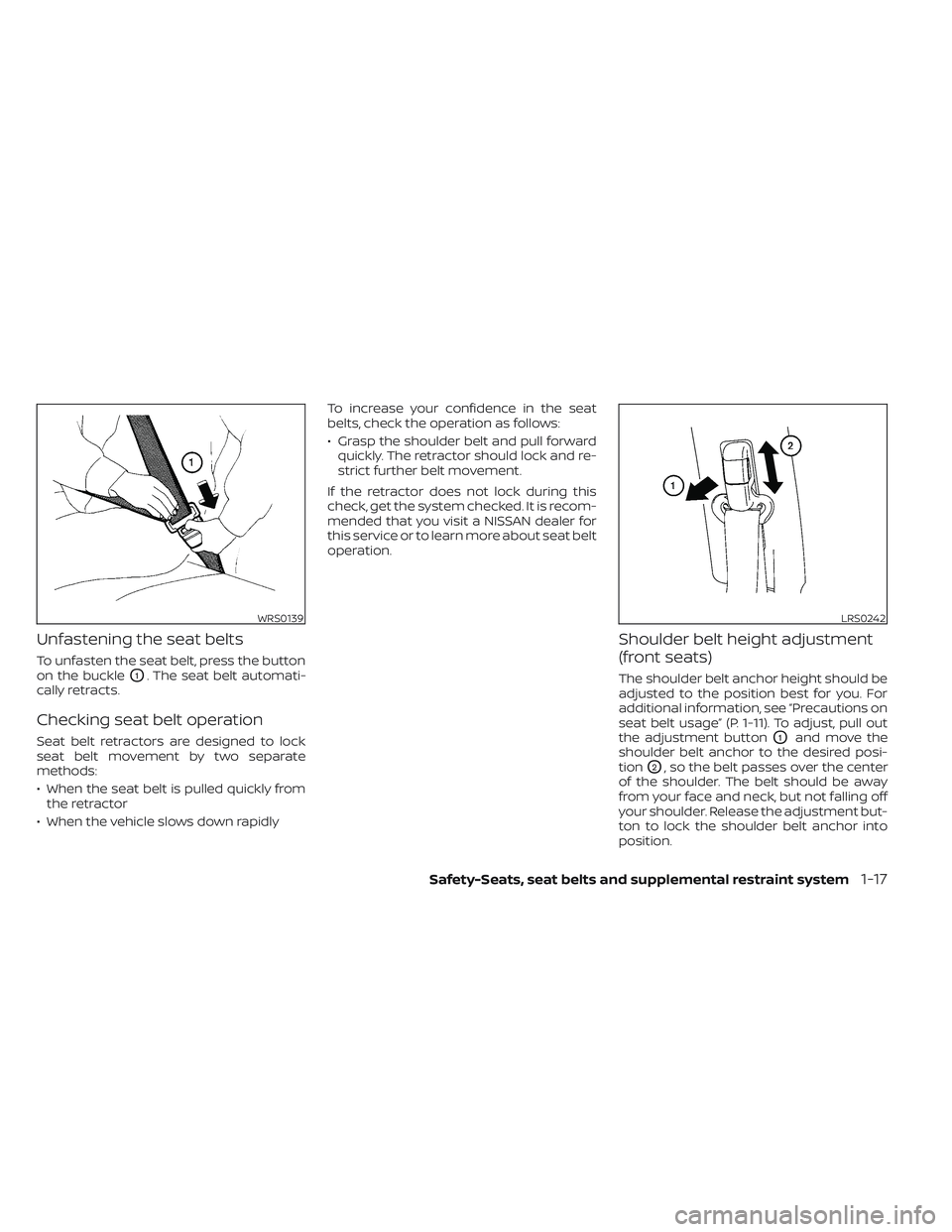
Unfastening the seat belts
To unfasten the seat belt, press the button
on the buckle
O1. The seat belt automati-
cally retracts.
Checking seat belt operation
Seat belt retractors are designed to lock
seat belt movement by two separate
methods:
• When the seat belt is pulled quickly from the retractor
• When the vehicle slows down rapidly To increase your confidence in the seat
belts, check the operation as follows:
• Grasp the shoulder belt and pull forward
quickly. The retractor should lock and re-
strict further belt movement.
If the retractor does not lock during this
check, get the system checked. It is recom-
mended that you visit a NISSAN dealer for
this service or to learn more about seat belt
operation.
Shoulder belt height adjustment
(front seats)
The shoulder belt anchor height should be
adjusted to the position best for you. For
additional information, see “Precautions on
seat belt usage” (P. 1-11). To adjust, pull out
the adjustment button
O1and move the
shoulder belt anchor to the desired posi-
tion
O2, so the belt passes over the center
of the shoulder. The belt should be away
from your face and neck, but not falling off
your shoulder. Release the adjustment but-
ton to lock the shoulder belt anchor into
position.
WRS0139LRS0242
Safety-Seats, seat belts and supplemental restraint system1-17
Page 46 of 494
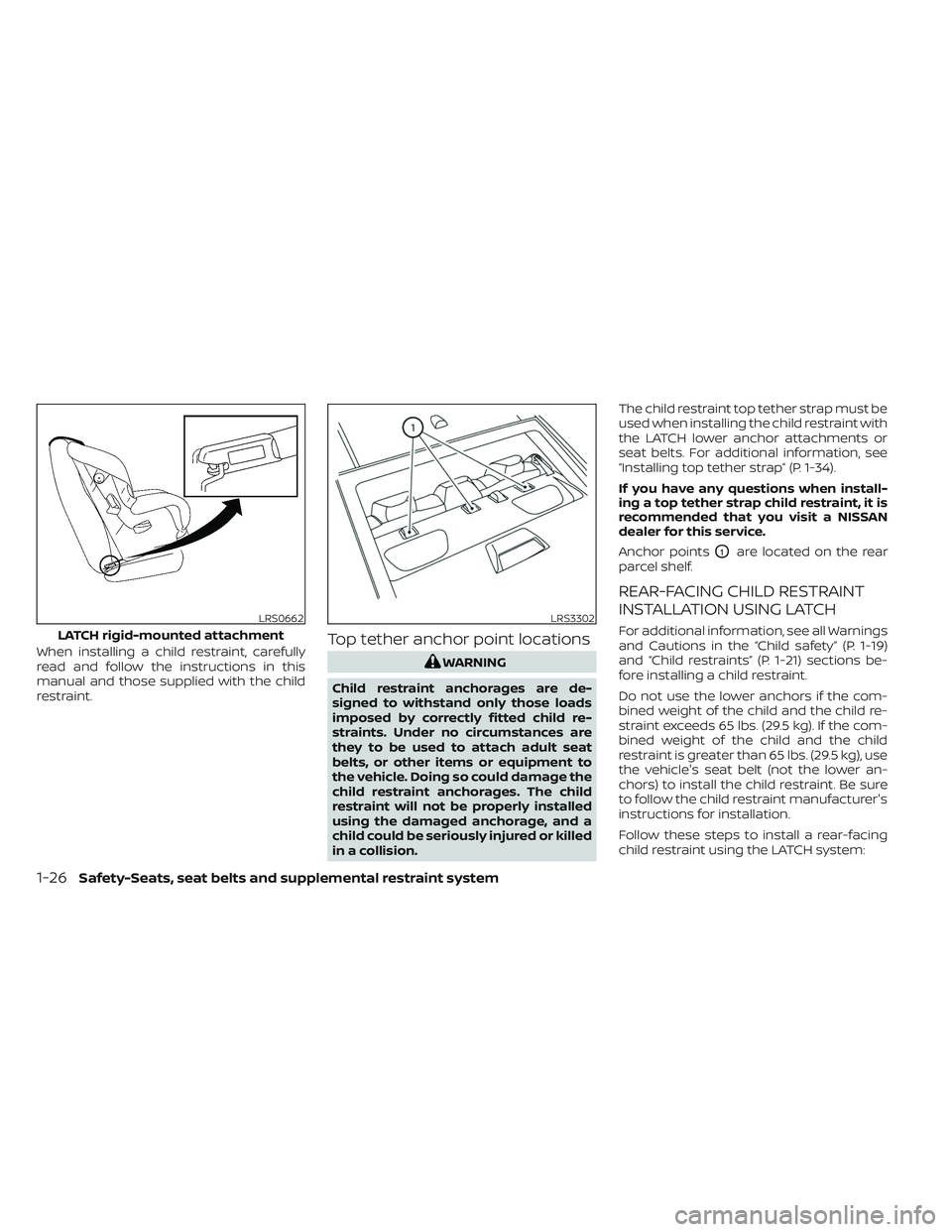
When installing a child restraint, carefully
read and follow the instructions in this
manual and those supplied with the child
restraint.Top tether anchor point locations
WARNING
Child restraint anchorages are de-
signed to withstand only those loads
imposed by correctly fitted child re-
straints. Under no circumstances are
they to be used to attach adult seat
belts, or other items or equipment to
the vehicle. Doing so could damage the
child restraint anchorages. The child
restraint will not be properly installed
using the damaged anchorage, and a
child could be seriously injured or killed
in a collision. The child restraint top tether strap must be
used when installing the child restraint with
the LATCH lower anchor attachments or
seat belts. For additional information, see
“Installing top tether strap” (P. 1-34).
If you have any questions when install-
ing a top tether strap child restraint, it is
recommended that you visit a NISSAN
dealer for this service.
Anchor points
O1are located on the rear
parcel shelf.
REAR-FACING CHILD RESTRAINT
INSTALLATION USING LATCH
For additional information, see all Warnings
and Cautions in the “Child safety” (P. 1-19)
and “Child restraints” (P. 1-21) sections be-
fore installing a child restraint.
Do not use the lower anchors if the com-
bined weight of the child and the child re-
straint exceeds 65 lbs. (29.5 kg). If the com-
bined weight of the child and the child
restraint is greater than 65 lbs. (29.5 kg), use
the vehicle's seat belt (not the lower an-
chors) to install the child restraint. Be sure
to follow the child restraint manufacturer's
instructions for installation.
Follow these steps to install a rear-facing
child restraint using the LATCH system:LRS0662
LATCH rigid-mounted attachment
LRS3302
1-26Safety-Seats, seat belts and supplemental restraint system
Page 57 of 494
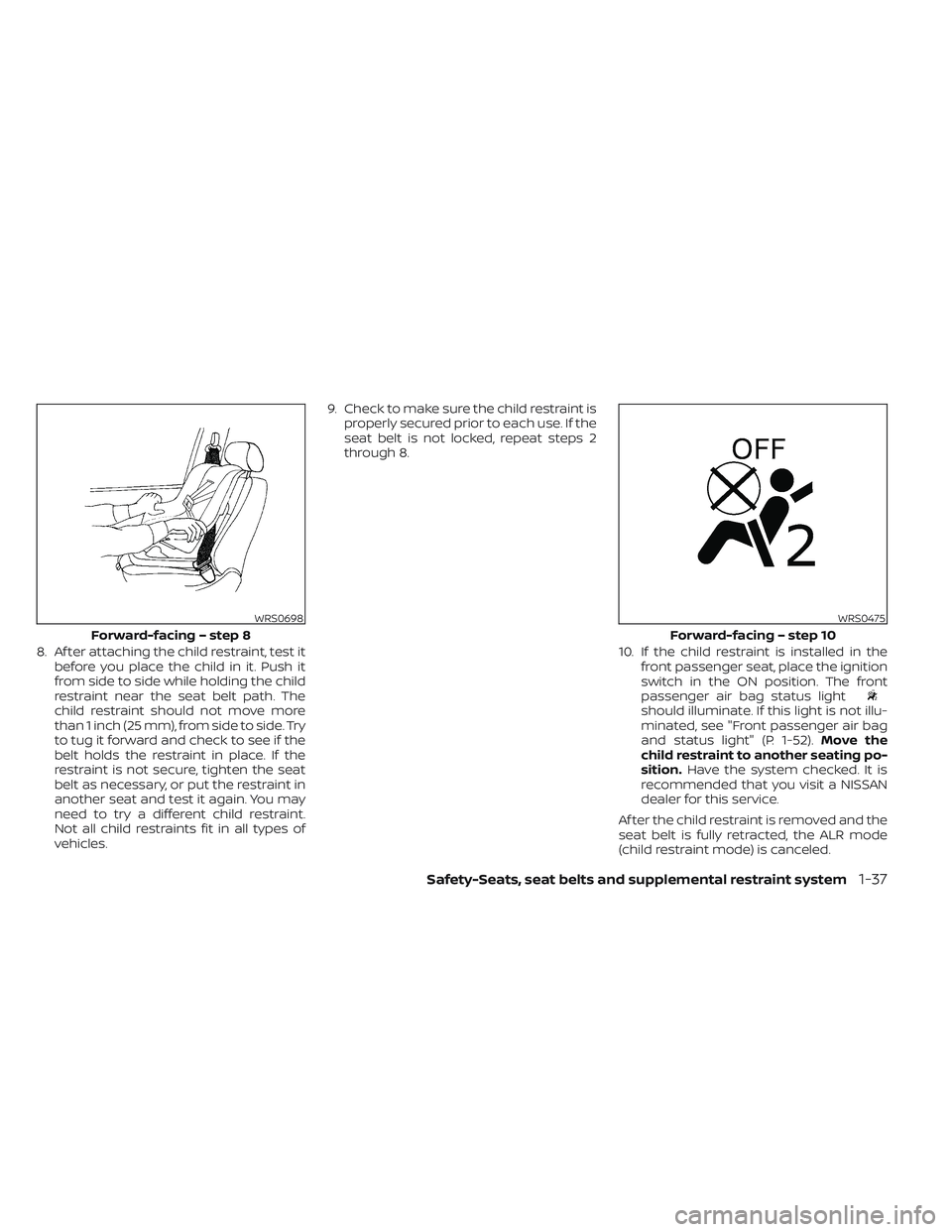
8. Af ter attaching the child restraint, test itbefore you place the child in it. Push it
from side to side while holding the child
restraint near the seat belt path. The
child restraint should not move more
than 1 inch (25 mm), from side to side. Try
to tug it forward and check to see if the
belt holds the restraint in place. If the
restraint is not secure, tighten the seat
belt as necessary, or put the restraint in
another seat and test it again. You may
need to try a different child restraint.
Not all child restraints fit in all types of
vehicles. 9. Check to make sure the child restraint is
properly secured prior to each use. If the
seat belt is not locked, repeat steps 2
through 8.
10. If the child restraint is installed in thefront passenger seat, place the ignition
switch in the ON position. The front
passenger air bag status light
should illuminate. If this light is not illu-
minated, see "Front passenger air bag
and status light" (P. 1-52). Move the
child restraint to another seating po-
sition. Have the system checked. It is
recommended that you visit a NISSAN
dealer for this service.
Af ter the child restraint is removed and the
seat belt is fully retracted, the ALR mode
(child restraint mode) is canceled.
WRS0698
Forward-facing – step 8
WRS0475
Forward-facing – step 10
Safety-Seats, seat belts and supplemental restraint system1-37
Page 70 of 494
WARNING
To ensure proper operation of the pas-
senger’s NISSAN Advanced Air Bag Sys-
tem, please observe the following
items.
• Do not allow a passenger in the rear
bench seats to push or pull on the
seatback pocket.
•
Do not place heavy loads heavier than
9.1 lbs. (4 kg) on the seatback, head
restraint or in the seatback pocket.
•Make sure that there is nothing press-
ing against the rear of the seatback,
such as a child restraint installed in the
rear seat or an object stored on the
floor.
•Make sure that there is no object
placed under the front passenger seat.
• Make sure that there is no object
placed between the seat cushion and
center console or between the seat
cushion and the door. •
If a forward-facing child restraint is
installed in the front passenger seat,
do not position the front passenger
seat so the child restraint contacts
the instrument panel. If the child re-
straint does contact the instrument
panel, the system may determine the
seat is occupied and the passenger
air bag and front passenger supple-
mental knee air bag may deploy in a
collision. Also the front passenger air
bag status light may not illuminate.
For additional information, see “Child
restraints” (P. 1-21).
• Confirm the operating condition with
the front passenger air bag status
light.
• If you notice that the front passenger
air bag status light is not operating
as described in this section, get the
occupant classification system
checked. It is recommended that you
visit a NISSAN dealer for this service.
• Until you have confirmed with a
dealer that your passenger seat oc-
cupant classification system is work-
ing properly, position the occupants
in the rear seating positions. •
Do not position the front passenger
seat so it contacts the rear seat. If the
front seat does contact the rear seat,
the air bag system may determine a
sensor malfunction has occurred
and the front passenger air bag sta-
tus light may illuminate and the
supplemental air bag warning light
may flash.
This vehicle is equipped with the NISSAN
Advanced Air Bag System for the driver and
front passenger seats. This system is de-
signed to meet certification requirements
under U.S. regulations. It is also permitted in
Canada. However, all of the information,
cautions and warnings in this manual
still apply and must be followed.
The driver supplemental front-impact air
bag is located in the center of the steering
wheel. The front passenger supplemental
front-impact air bag is mounted in the
dashboard above the glove box. The front
air bags are designed to inflate in higher
severity frontal collisions, although they
may inflate if the forces in another type of
collision are similar to those of a higher
severity frontal impact. They may not in-
flate in certain frontal collisions. Vehicle
1-50Safety-Seats, seat belts and supplemental restraint system
Page 74 of 494
Using the front passenger air bag status
light, you can monitor when the front pas-
senger air bag and front passenger
supplemental knee air bag are automati-
cally turned OFF.
If an adult occupant is in the seat but the
front passenger air bag status light is illu-
minated (indicating that the front passen-
ger air bag and front passenger supple-
mental knee air bag are OFF), it could be
that the person is a small adult, or is not
sitting on the seat properly or not using the
seat belt properly.
If a child restraint must be used in the front
seat, the front passenger air bag status
light may or may not be illuminated, de-
pending on the size of the child and the
type of child restraint being used. If the air
bag status light is not illuminated (indicat-
ing that the front passenger air bag and
front passenger supplemental knee air
bag might inflate in a crash), it could be that
the child restraint or seat belt is not being
used properly. Make sure that the child re-
straint is installed properly, the seat belt is
used properly and the occupant is posi-
tioned properly. If the air bag status light is
still not illuminated, reposition the occu-
pant or child restraint in a rear seat.If the front passenger air bag status light
will not illuminate even though you believe
that the child restraint, the seat belts and
the occupant are properly positioned, it is
recommended that you take your vehicle
to a NISSAN dealer. A NISSAN dealer can
check system status by using a special
tool. However, until you have confirmed
with a dealer that your air bag is working
properly, reposition the occupant or child
restraint in a rear seat.
The NISSAN Advanced Air Bag System and
front passenger air bag status light will
take a few seconds to register a change in
the front passenger seat status. This is nor-
mal system operation and does not indi-
cate a malfunction.
If a malfunction occurs in the front passen-
ger air bag system, the supplemental air
bag warning light
, located in the me-
ter and gauges area of the instrument
panel, will be illuminated (blinking or
steadily lit). Have the system checked. It is
recommended that you visit a NISSAN
dealer for this service.
Normal operation
In order for the occupant classification
sensor system to classif y the front passen-
ger based on weight, please follow the pre-
cautions and steps outlined below:
Precautions
• Make sure that there are no objects weighing over 9.1 lbs. (4 kg) hanging on
the seat or placed in the seatback pocket.
• Make sure that a child restraint or other object is not pressing against the rear of
the seatback.
• Make sure that a rear passenger is not pushing or pulling on the back of the front
passenger seat.
• Make sure that the front passenger seat or seatback is not forced back against an
object on the seat or floor behind it.
• Make sure that there is no object placed under the front passenger seat.
Steps
1. Adjust the seat as outlined in the “Seats” (P. 1-2) section of this manual. Sit upright,
leaning against the seatback, and cen-
tered on the seat cushion with your feet
comfortably extended to the floor.
2. Make sure there are no objects on your lap.
1-54Safety-Seats, seat belts and supplemental restraint system