NISSAN MURANO 2005 1.G Repair Manual
MURANO 2005 1.G
NISSAN
NISSAN
https://www.carmanualsonline.info/img/5/686/w960_686-0.png
NISSAN MURANO 2005 1.G Repair Manual
Page 121 of 192
5. Select theLandmark Icon key. 6. Choose an icon. (See the illustration on the
next page for a legend of icons which can
be set for stored locations.)
The picture displayed on the left [icon] is a plan-
view icon and the picture displayed on the right
[icon] is a Birdview™ icon.
The icon of the stored location will be set.INFO:
cTo go back to the screen displaying the cur-
rent vehicle position, press the MAP
button.
cIf you press the PREV button, the screen
will go back to the screen displayed in step 5.
cIf you alter the icon of the stored location, the
icon on the map will also change.
INV1939INV1940INV1941
How do I use the address book feature?7-11
ZREVIEW COPYÐ2005(nav)
Navigation System OMÐUSA_English(nna)
07/10/04Ðdebbie
X
Page 123 of 192
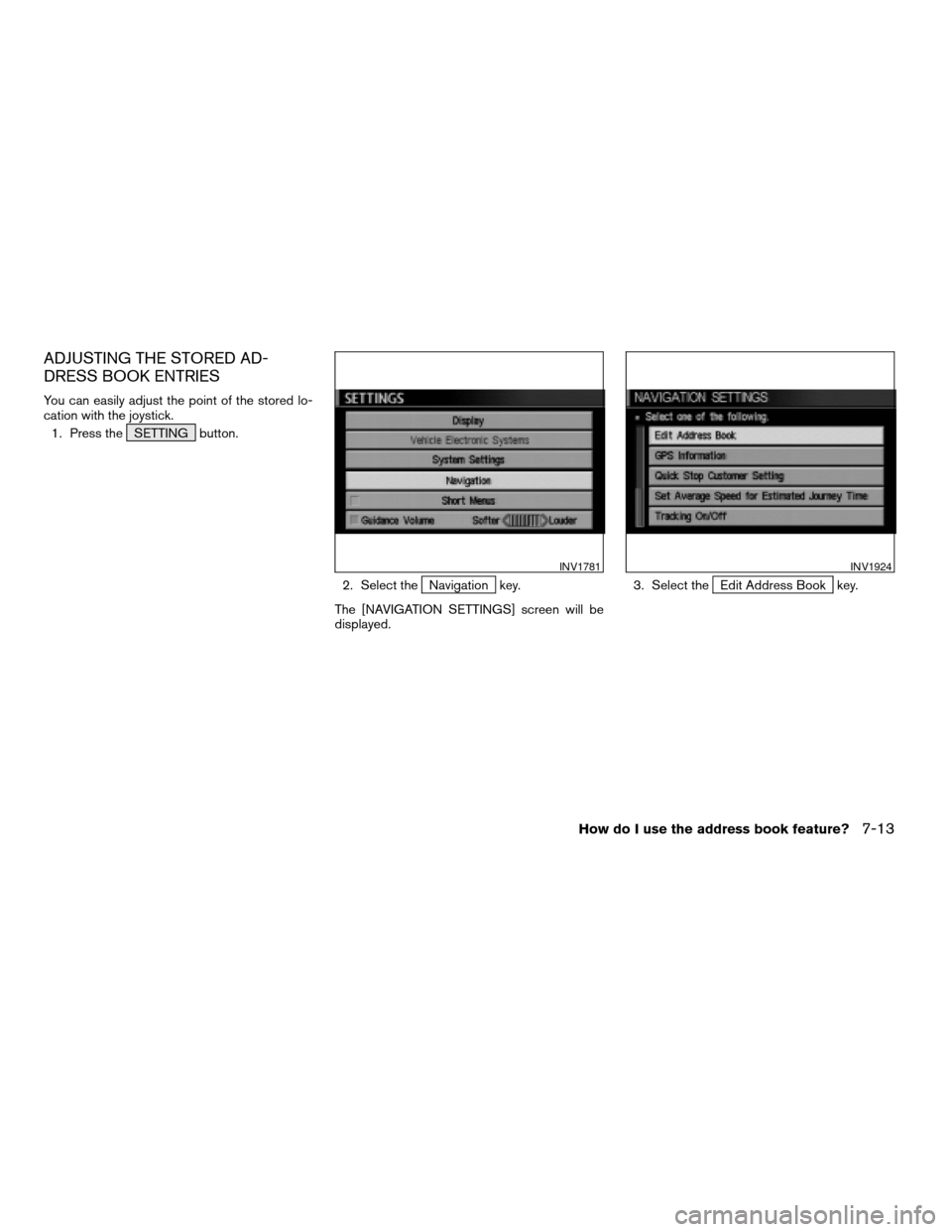
ADJUSTING THE STORED AD-
DRESS BOOK ENTRIES
You can easily adjust the point of the stored lo-
cation with the joystick.
1. Press the SETTING button.
2. Select the
Navigation key.
The [NAVIGATION SETTINGS] screen will be
displayed.3. Select theEdit Address Book key.
INV1781INV1924
How do I use the address book feature?7-13
ZREVIEW COPYÐ2005(nav)
Navigation System OMÐUSA_English(nna)
07/10/04Ðdebbie
X
Page 124 of 192
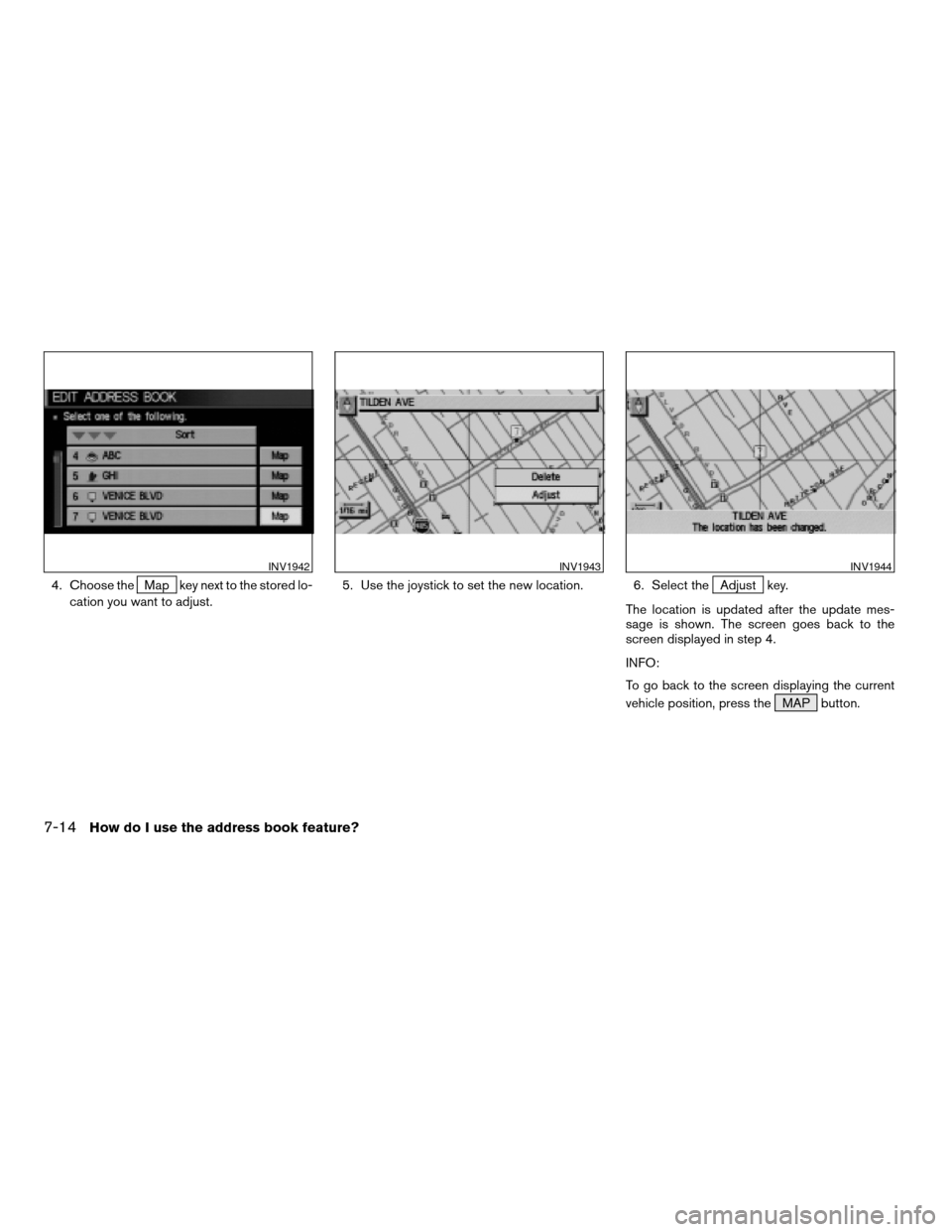
4. Choose theMap key next to the stored lo-
cation you want to adjust.5. Use the joystick to set the new location. 6. Select theAdjust key.
The location is updated after the update mes-
sage is shown. The screen goes back to the
screen displayed in step 4.
INFO:
To go back to the screen displaying the current
vehicle position, press the MAP button.
INV1942INV1943INV1944
7-14How do I use the address book feature?
ZREVIEW COPYÐ2005(nav)
Navigation System OMÐUSA_English(nna)
07/10/04Ðdebbie
X
Page 125 of 192
DELETING STORED LOCATIONS
You can delete the stored locations you no
longer need from the system memory.
1. Press the SETTING button.
2. Select the
Navigation key.
The [NAVIGATION SETTINGS] screen will be
displayed.3. Select theEdit Address Book key.
INV1781INV1924
How do I use the address book feature?7-15
ZREVIEW COPYÐ2005(nav)
Navigation System OMÐUSA_English(nna)
07/10/04Ðdebbie
X
Page 126 of 192
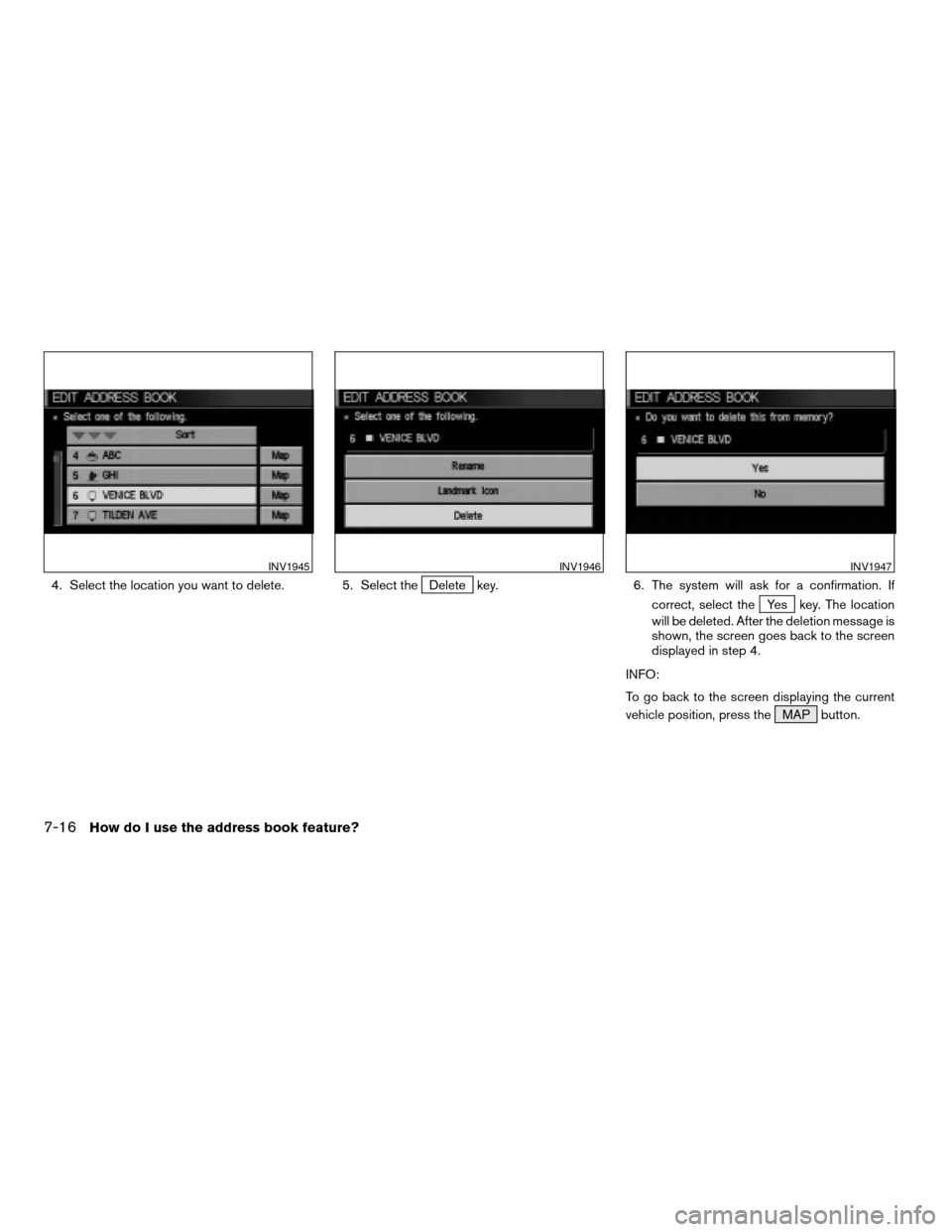
4. Select the location you want to delete. 5. Select theDelete key. 6. The system will ask for a confirmation. If
correct, select the
Yes key. The location
will be deleted. After the deletion message is
shown, the screen goes back to the screen
displayed in step 4.
INFO:
To go back to the screen displaying the current
vehicle position, press the MAP button.
INV1945INV1946INV1947
7-16How do I use the address book feature?
ZREVIEW COPYÐ2005(nav)
Navigation System OMÐUSA_English(nna)
07/10/04Ðdebbie
X
Page 128 of 192
Setting “avoid areas” will give you a route away
from areas you wish to avoid.
INFO:
If the vehicle icon is in the “avoid area,” route cal-
culation cannot be completed.
1. Press the SETTING button.
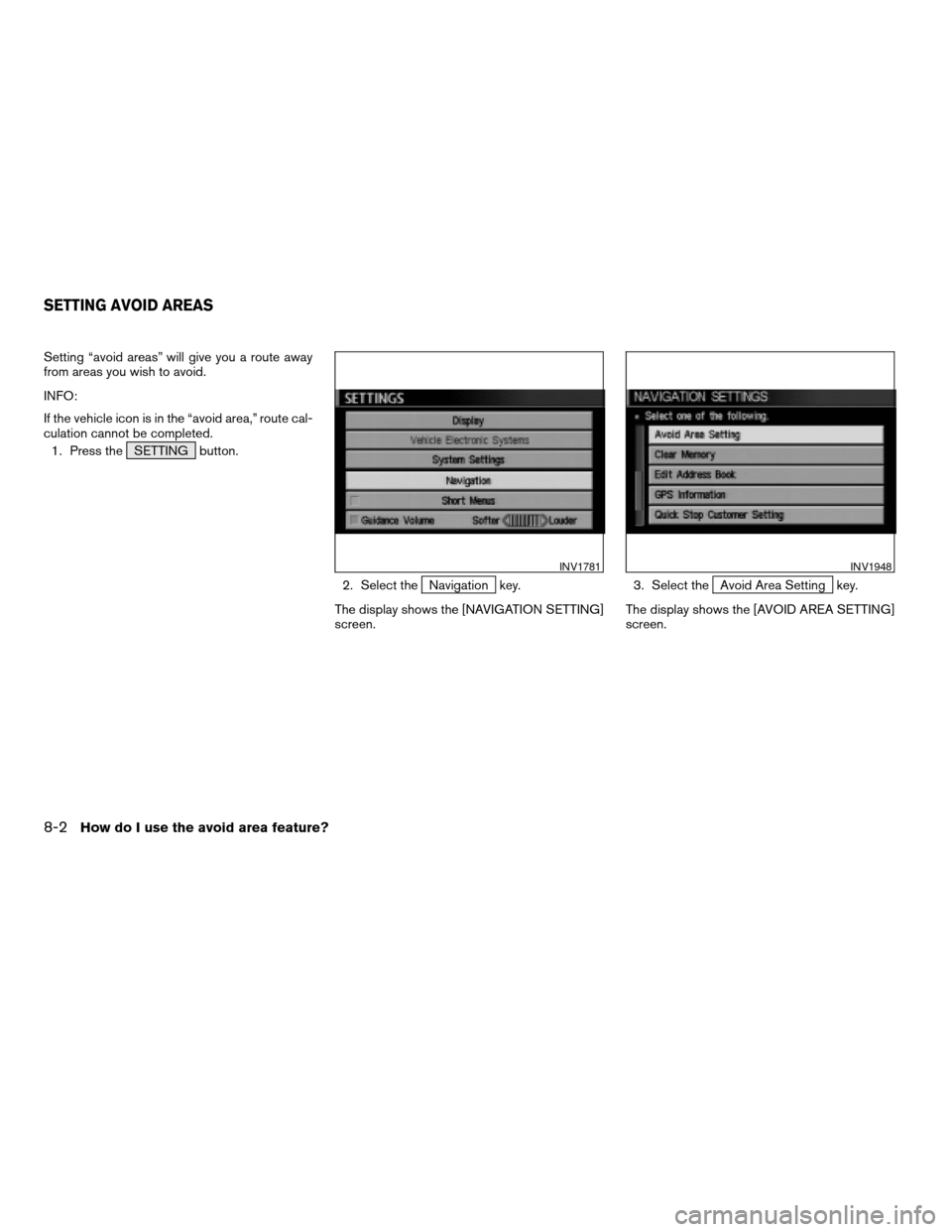
2. Select the
Navigation key.
The display shows the [NAVIGATION SETTING]
screen.3. Select theAvoid Area Setting key.
The display shows the [AVOID AREA SETTING]
screen.
INV1781INV1948
SETTING AVOID AREAS
8-2How do I use the avoid area feature?
ZREVIEW COPYÐ2005(nav)
Navigation System OMÐUSA_English(nna)
07/10/04Ðdebbie
X
Page 129 of 192
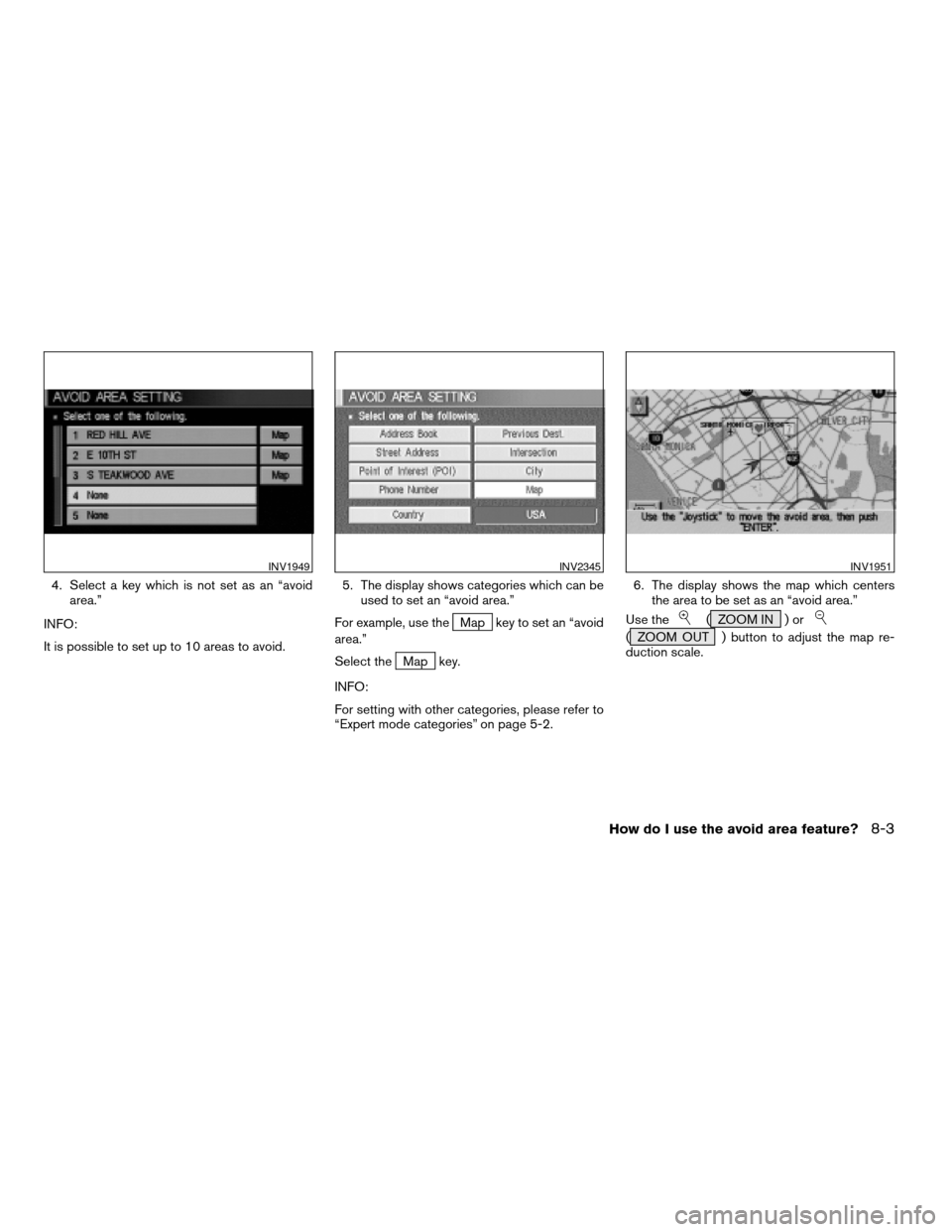
4. Select a key which is not set as an “avoid
area.”
INFO:
It is possible to set up to 10 areas to avoid.5. The display shows categories which can be
used to set an “avoid area.”
For example, use the
Map key to set an “avoid
area.”
Select the
Map key.
INFO:
For setting with other categories, please refer to
“Expert mode categories” on page 5-2.6. The display shows the map which centers
the area to be set as an “avoid area.”
Use the
( ZOOM IN ) or
( ZOOM OUT ) button to adjust the map re-
duction scale.
INV1949INV2345INV1951
How do I use the avoid area feature?8-3
ZREVIEW COPYÐ2005(nav)
Navigation System OMÐUSA_English(nna)
07/10/04Ðdebbie
X
Page 131 of 192
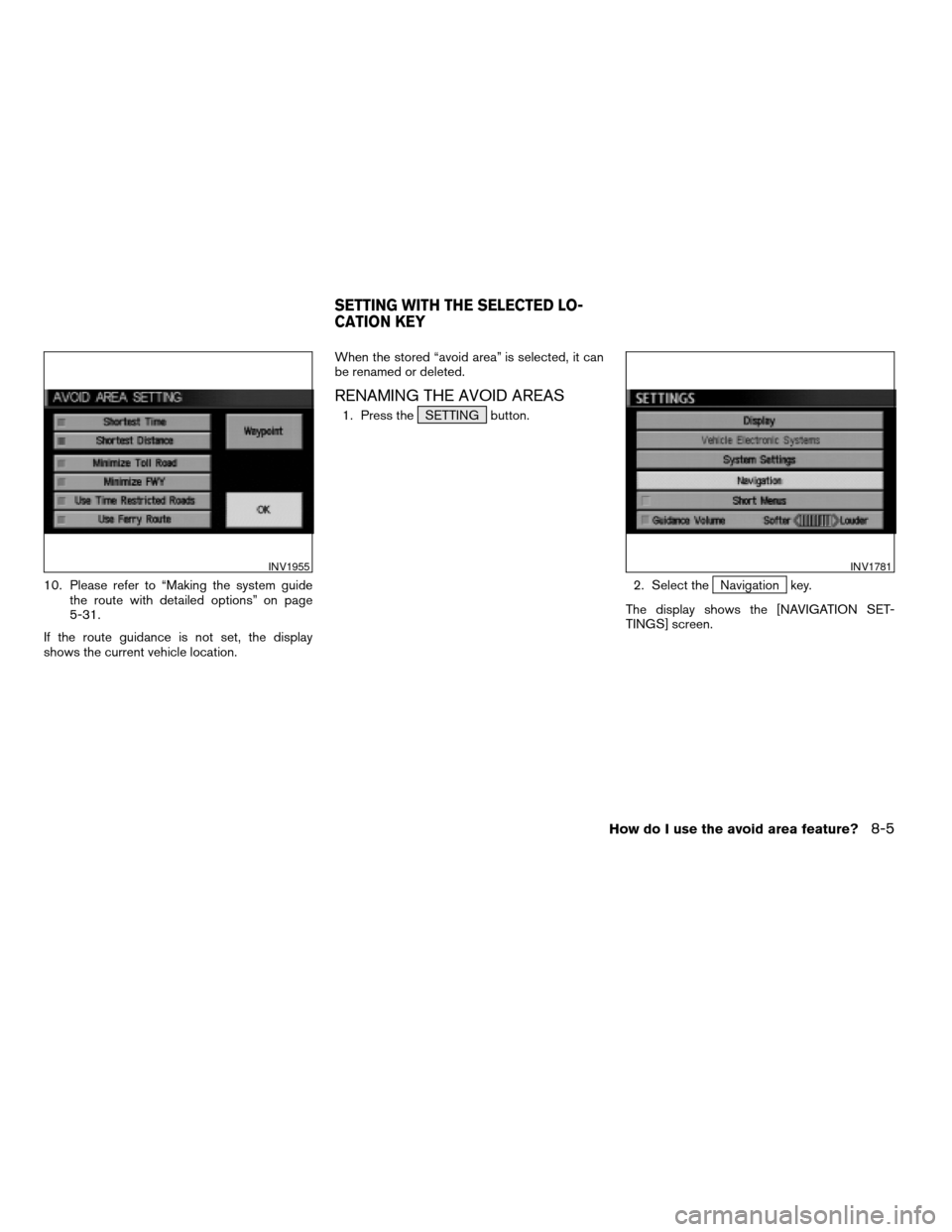
10. Please refer to “Making the system guide
the route with detailed options” on page
5-31.
If the route guidance is not set, the display
shows the current vehicle location.When the stored “avoid area” is selected, it can
be renamed or deleted.
RENAMING THE AVOID AREAS
1. Press the SETTING button.
2. Select the
Navigation key.
The display shows the [NAVIGATION SET-
TINGS] screen.
INV1955INV1781
SETTING WITH THE SELECTED LO-
CATION KEY
How do I use the avoid area feature?8-5
ZREVIEW COPYÐ2005(nav)
Navigation System OMÐUSA_English(nna)
07/10/04Ðdebbie
X
Page 134 of 192
3. Please refer to “Making the system guide
the route with detailed options” on page
5-31.
If the route guidance is not set, the display
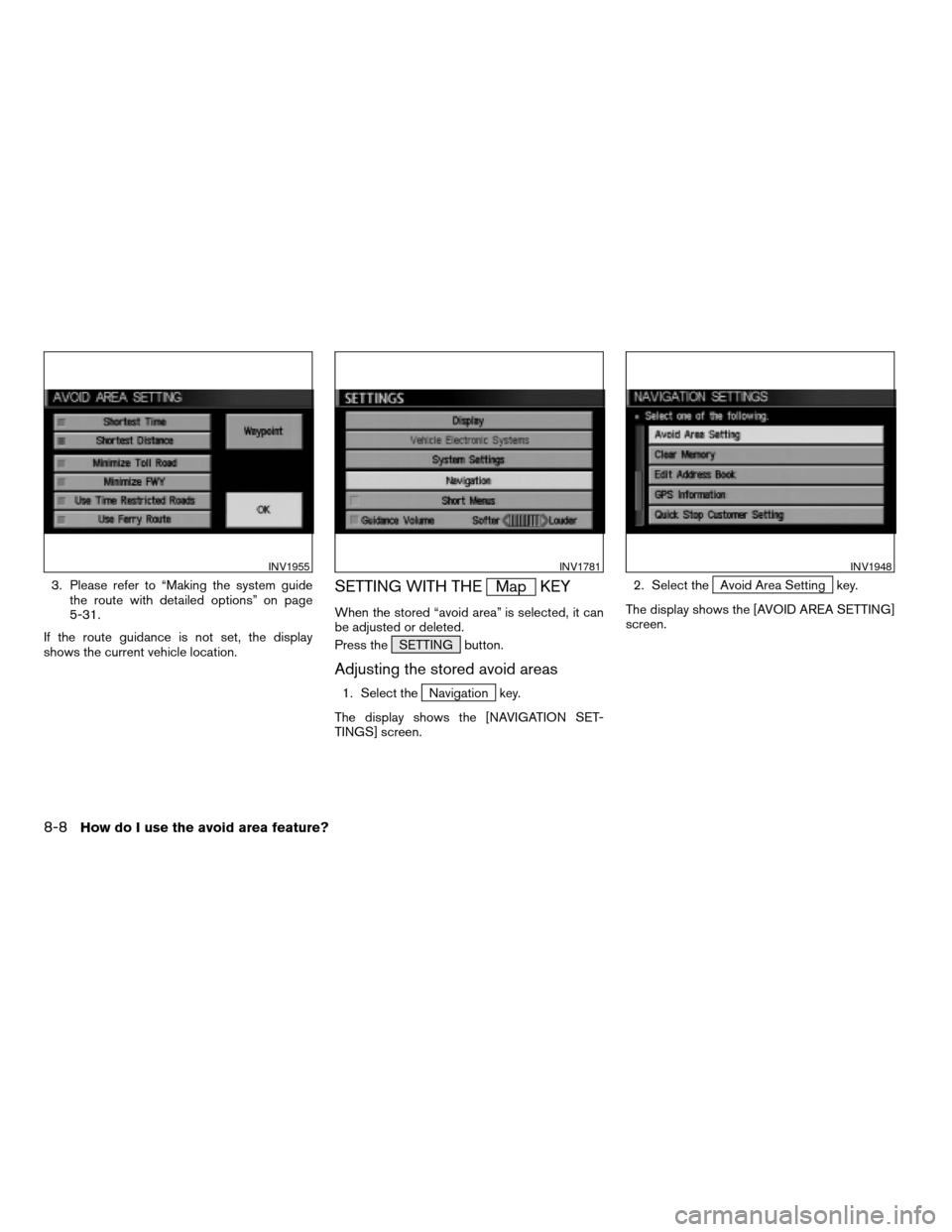
shows the current vehicle location.SETTING WITH THEMap KEY
When the stored “avoid area” is selected, it can
be adjusted or deleted.
Press the SETTING button.
Adjusting the stored avoid areas
1. Select theNavigation key.
The display shows the [NAVIGATION SET-
TINGS] screen.2. Select the
Avoid Area Setting key.
The display shows the [AVOID AREA SETTING]
screen.
INV1955INV1781INV1948
8-8How do I use the avoid area feature?
ZREVIEW COPYÐ2005(nav)
Navigation System OMÐUSA_English(nna)
07/20/04Ðdebbie
X
Page 135 of 192
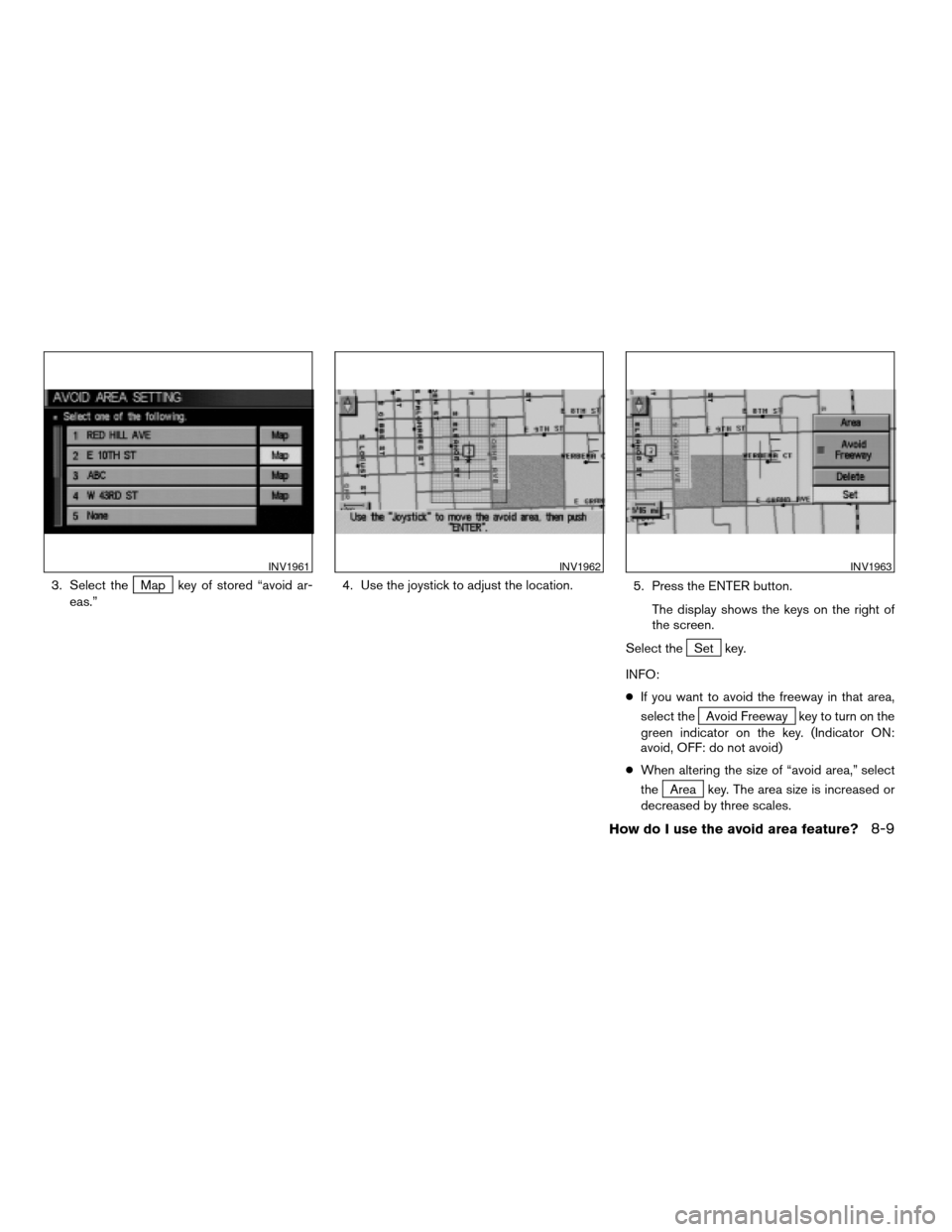
3. Select theMap key of stored “avoid ar-
eas.”4. Use the joystick to adjust the location.
5. Press the ENTER button.
The display shows the keys on the right of
the screen.
Select the
Set key.
INFO:
cIf you want to avoid the freeway in that area,
select the
Avoid Freeway key to turn on the
green indicator on the key. (Indicator ON:
avoid, OFF: do not avoid)
cWhen altering the size of “avoid area,” select
the
Area key. The area size is increased or
decreased by three scales.
INV1961INV1962INV1963
How do I use the avoid area feature?8-9
ZREVIEW COPYÐ2005(nav)
Navigation System OMÐUSA_English(nna)
07/10/04Ðdebbie
X
![NISSAN MURANO 2005 1.G Repair Manual 5. Select theLandmark Icon key. 6. Choose an icon. (See the illustration on the
next page for a legend of icons which can
be set for stored locations.)
The picture displayed on the left [icon] is a pl](/img/5/686/w960_686-120.png "NISSAN MURANO 2005 1.G Repair Manual 5. Select theLandmark Icon key. 6. Choose an icon. (See the illustration on the
next page for a legend of icons which can
be set for stored locations.)
The picture displayed on the left [icon] is a pl")
![NISSAN MURANO 2005 1.G Repair Manual DELETING STORED LOCATIONS
You can delete the stored locations you no
longer need from the system memory.
1. Press the SETTING button.
2. Select the
Navigation key.
The [NAVIGATION SETTINGS] screen wil](/img/5/686/w960_686-124.png "NISSAN MURANO 2005 1.G Repair Manual DELETING STORED LOCATIONS
You can delete the stored locations you no
longer need from the system memory.
1. Press the SETTING button.
2. Select the
Navigation key.
The [NAVIGATION SETTINGS] screen wil")