em button NISSAN MURANO 2005 1.G Manual PDF
[x] Cancel search | Manufacturer: NISSAN, Model Year: 2005, Model line: MURANO, Model: NISSAN MURANO 2005 1.GPages: 192, PDF Size: 4.45 MB
Page 140 of 192
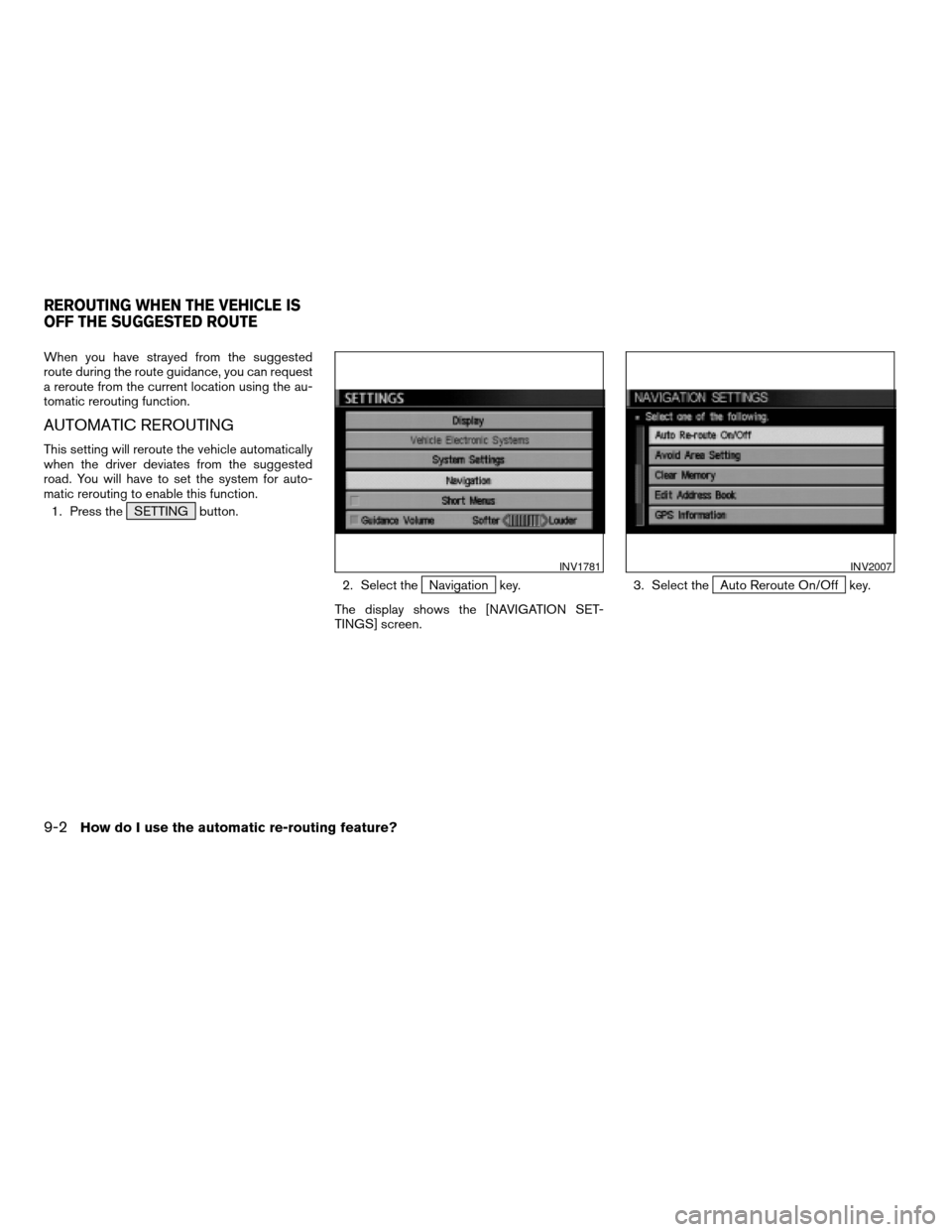
When you have strayed from the suggested
route during the route guidance, you can request
a reroute from the current location using the au-
tomatic rerouting function.
AUTOMATIC REROUTING
This setting will reroute the vehicle automatically
when the driver deviates from the suggested
road. You will have to set the system for auto-
matic rerouting to enable this function.
1. Press the SETTING button.
2. Select the
Navigation key.
The display shows the [NAVIGATION SET-
TINGS] screen.3. Select theAuto Reroute On/Off key.
INV1781INV2007
REROUTING WHEN THE VEHICLE IS
OFF THE SUGGESTED ROUTE
9-2How do I use the automatic re-routing feature?
ZREVIEW COPYÐ2005(nav)
Navigation System OMÐUSA_English(nna)
07/22/04Ðmarlene
X
Page 141 of 192
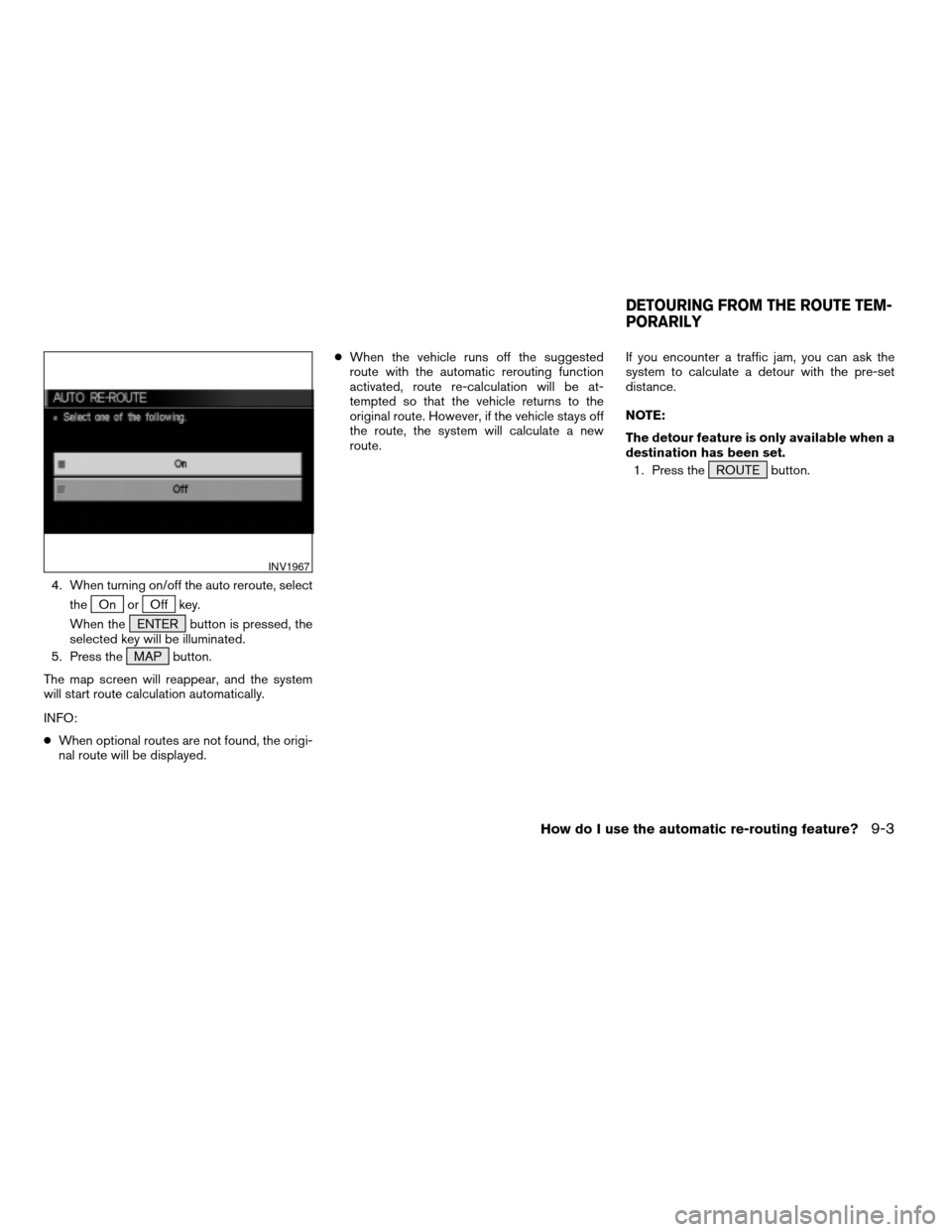
4. When turning on/off the auto reroute, select
the
On orOff key.
When the ENTER button is pressed, the
selected key will be illuminated.
5. Press the MAP button.
The map screen will reappear, and the system
will start route calculation automatically.
INFO:
cWhen optional routes are not found, the origi-
nal route will be displayed.cWhen the vehicle runs off the suggested
route with the automatic rerouting function
activated, route re-calculation will be at-
tempted so that the vehicle returns to the
original route. However, if the vehicle stays off
the route, the system will calculate a new
route.If you encounter a traffic jam, you can ask the
system to calculate a detour with the pre-set
distance.
NOTE:
The detour feature is only available when a
destination has been set.
1. Press the ROUTE button.
INV1967
DETOURING FROM THE ROUTE TEM-
PORARILY
How do I use the automatic re-routing feature?9-3
ZREVIEW COPYÐ2005(nav)
Navigation System OMÐUSA_English(nna)
07/10/04Ðdebbie
X
Page 144 of 192
WARNING
To operate the navigation system or to
use the screen functions, first park the
vehicle in a safe place and set the park-
ing brake. Using the system while driv-
ing can distract the driver and may re-
sult in a serious accident.
BASICS OF VOICE GUIDANCE
The voice guidance will verbally tell you which di-
rection to turn when the vehicle approaches the
intersection in which you have to make a turn to
reach your destination.
NOTE:
cThere may be some cases in which the
voice guidance and the actual road con-
ditions do not correspond. This may oc-
cur because of discrepancies between
the actual road and the information on
the DVD or due to the vehicle’s speed.
cIn case the content of the voice guid-
ance does not match the actual road
conditions, follow the information ob-
tained from traffic signs or notices on
the road.
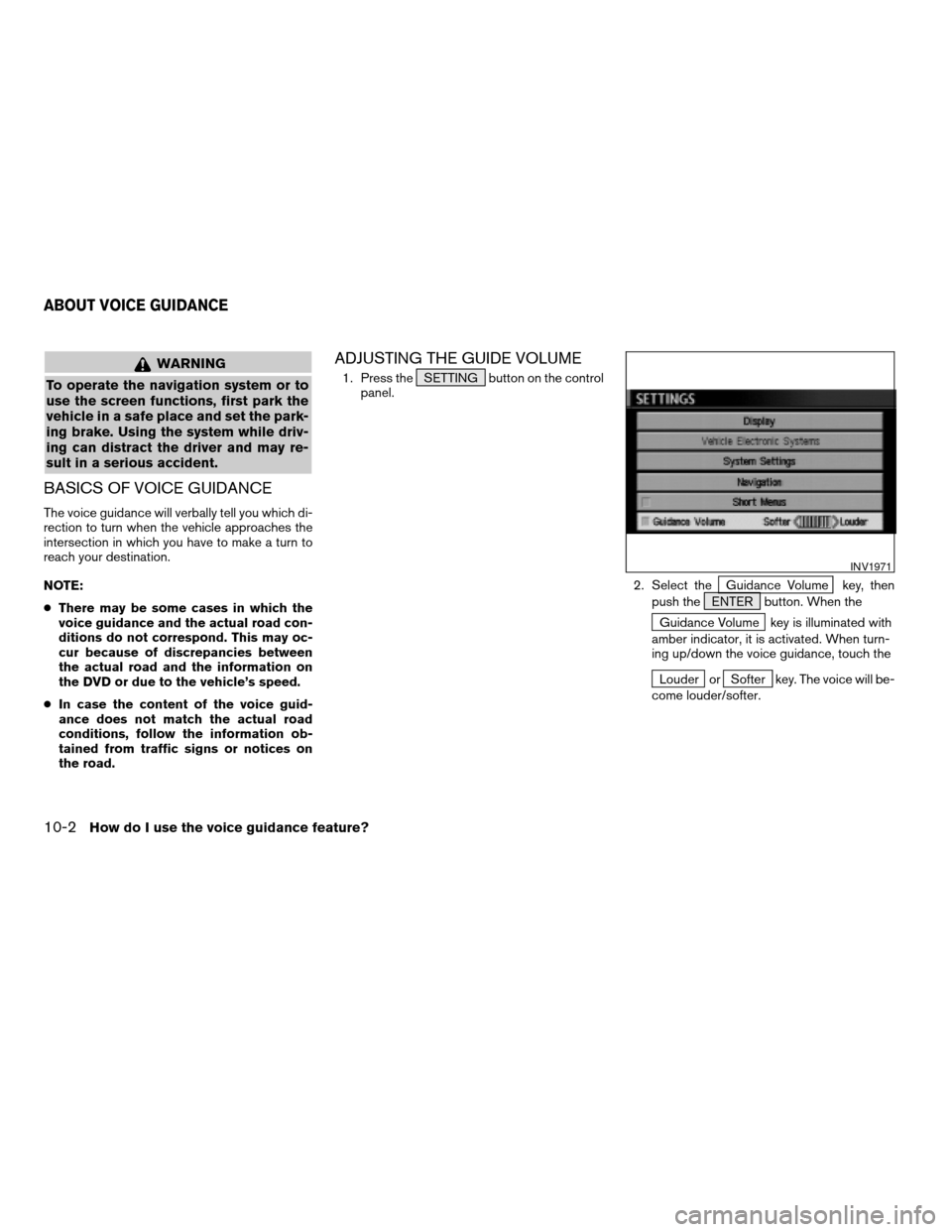
ADJUSTING THE GUIDE VOLUME
1. Press the SETTING button on the control
panel.
2. Select the
Guidance Volume key, then
push the ENTER button. When the
Guidance Volume key is illuminated with
amber indicator, it is activated. When turn-
ing up/down the voice guidance, touch the
Louder orSofter key. The voice will be-
come louder/softer.
INV1971
ABOUT VOICE GUIDANCE
10-2How do I use the voice guidance feature?
ZREVIEW COPYÐ2005(nav)
Navigation System OMÐUSA_English(nna)
07/10/04Ðdebbie
X
Page 146 of 192
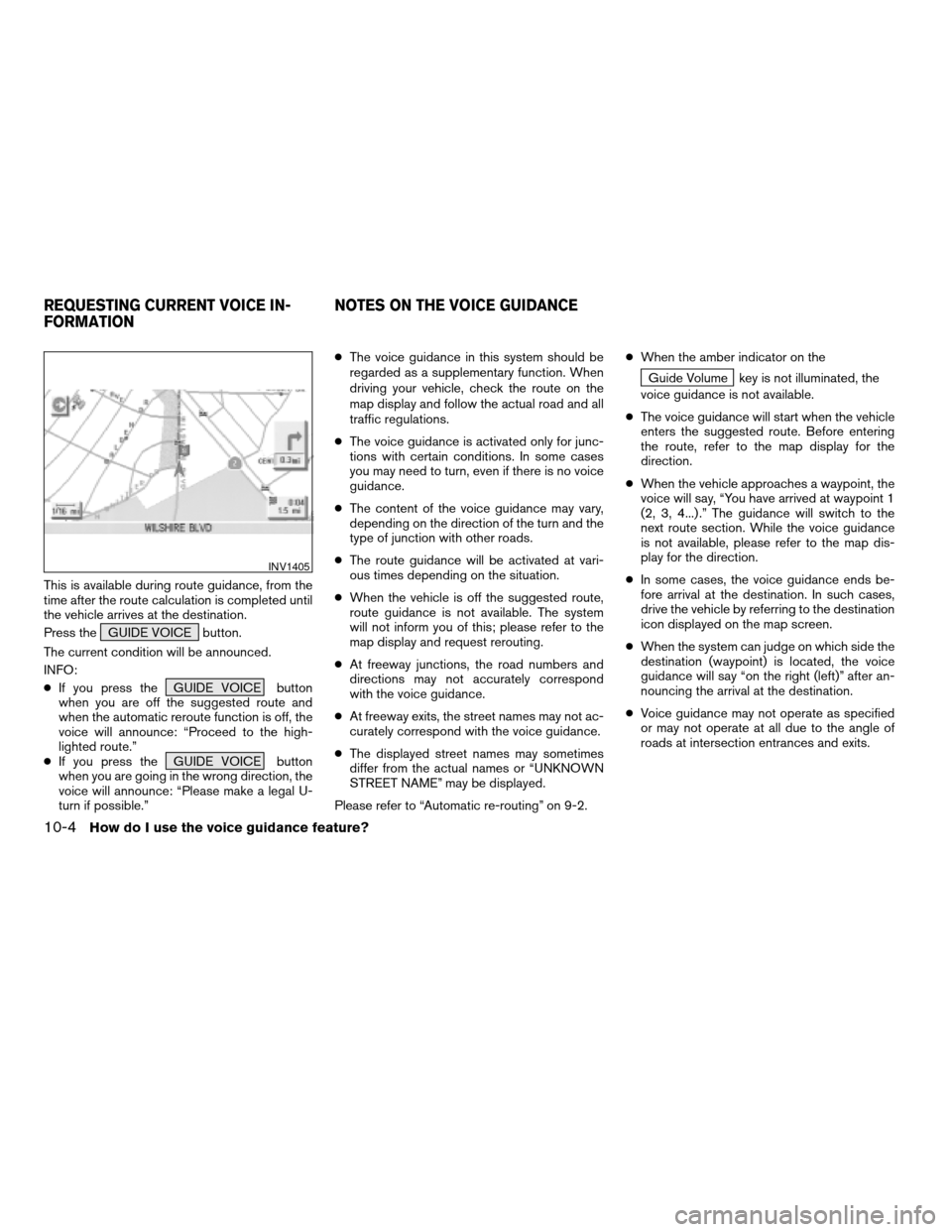
This is available during route guidance, from the
time after the route calculation is completed until
the vehicle arrives at the destination.
Press the GUIDE VOICE button.
The current condition will be announced.
INFO:
cIf you press the GUIDE VOICE button
when you are off the suggested route and
when the automatic reroute function is off, the
voice will announce: “Proceed to the high-
lighted route.”
cIf you press the GUIDE VOICE button
when you are going in the wrong direction, the
voice will announce: “Please make a legal U-
turn if possible.”cThe voice guidance in this system should be
regarded as a supplementary function. When
driving your vehicle, check the route on the
map display and follow the actual road and all
traffic regulations.
cThe voice guidance is activated only for junc-
tions with certain conditions. In some cases
you may need to turn, even if there is no voice
guidance.
cThe content of the voice guidance may vary,
depending on the direction of the turn and the
type of junction with other roads.
cThe route guidance will be activated at vari-
ous times depending on the situation.
cWhen the vehicle is off the suggested route,
route guidance is not available. The system
will not inform you of this; please refer to the
map display and request rerouting.
cAt freeway junctions, the road numbers and
directions may not accurately correspond
with the voice guidance.
cAt freeway exits, the street names may not ac-
curately correspond with the voice guidance.
cThe displayed street names may sometimes
differ from the actual names or “UNKNOWN
STREET NAME” may be displayed.
Please refer to “Automatic re-routing” on 9-2.cWhen the amber indicator on the
Guide Volume key is not illuminated, the
voice guidance is not available.
cThe voice guidance will start when the vehicle
enters the suggested route. Before entering
the route, refer to the map display for the
direction.
cWhen the vehicle approaches a waypoint, the
voice will say, “You have arrived at waypoint 1
(2, 3, 4...) .” The guidance will switch to the
next route section. While the voice guidance
is not available, please refer to the map dis-
play for the direction.
cIn some cases, the voice guidance ends be-
fore arrival at the destination. In such cases,
drive the vehicle by referring to the destination
icon displayed on the map screen.
cWhen the system can judge on which side the
destination (waypoint) is located, the voice
guidance will say “on the right (left)” after an-
nouncing the arrival at the destination.
cVoice guidance may not operate as specified
or may not operate at all due to the angle of
roads at intersection entrances and exits.
INV1405
REQUESTING CURRENT VOICE IN-
FORMATIONNOTES ON THE VOICE GUIDANCE
10-4How do I use the voice guidance feature?
ZREVIEW COPYÐ2005(nav)
Navigation System OMÐUSA_English(nna)
07/10/04Ðdebbie
X
Page 148 of 192
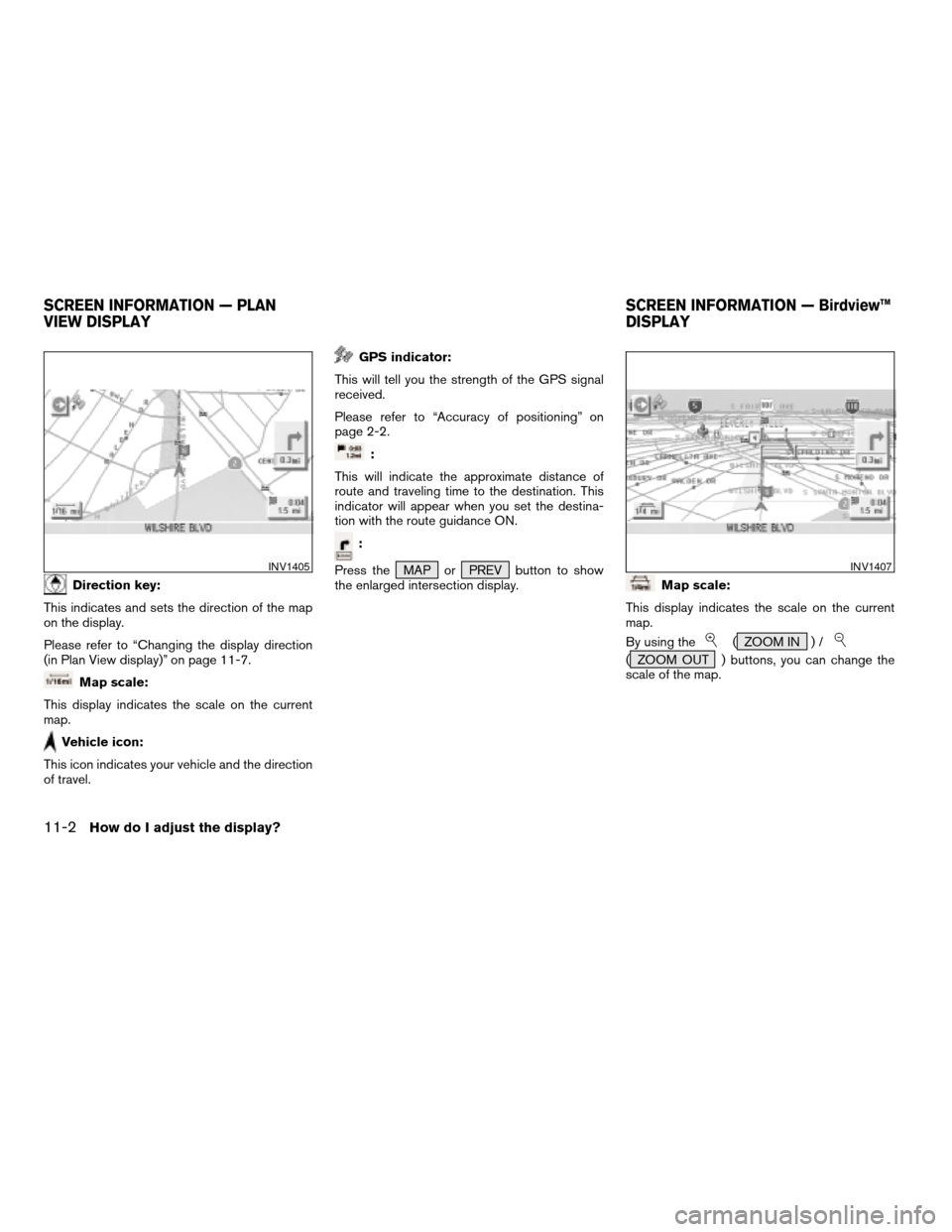
Direction key:
This indicates and sets the direction of the map
on the display.
Please refer to “Changing the display direction
(in Plan View display)” on page 11-7.
Map scale:
This display indicates the scale on the current
map.
Vehicle icon:
This icon indicates your vehicle and the direction
of travel.
GPS indicator:
This will tell you the strength of the GPS signal
received.
Please refer to “Accuracy of positioning” on
page 2-2.
:
This will indicate the approximate distance of
route and traveling time to the destination. This
indicator will appear when you set the destina-
tion with the route guidance ON.
:
Press the MAP or PREV button to show
the enlarged intersection display.
Map scale:
This display indicates the scale on the current
map.
By using the
( ZOOM IN ) /
( ZOOM OUT ) buttons, you can change the
scale of the map.
INV1405INV1407
SCREEN INFORMATION — PLAN
VIEW DISPLAYSCREEN INFORMATION — Birdview™
DISPLAY
11-2How do I adjust the display?
ZREVIEW COPYÐ2005(nav)
Navigation System OMÐUSA_English(nna)
07/10/04Ðdebbie
X
Page 150 of 192
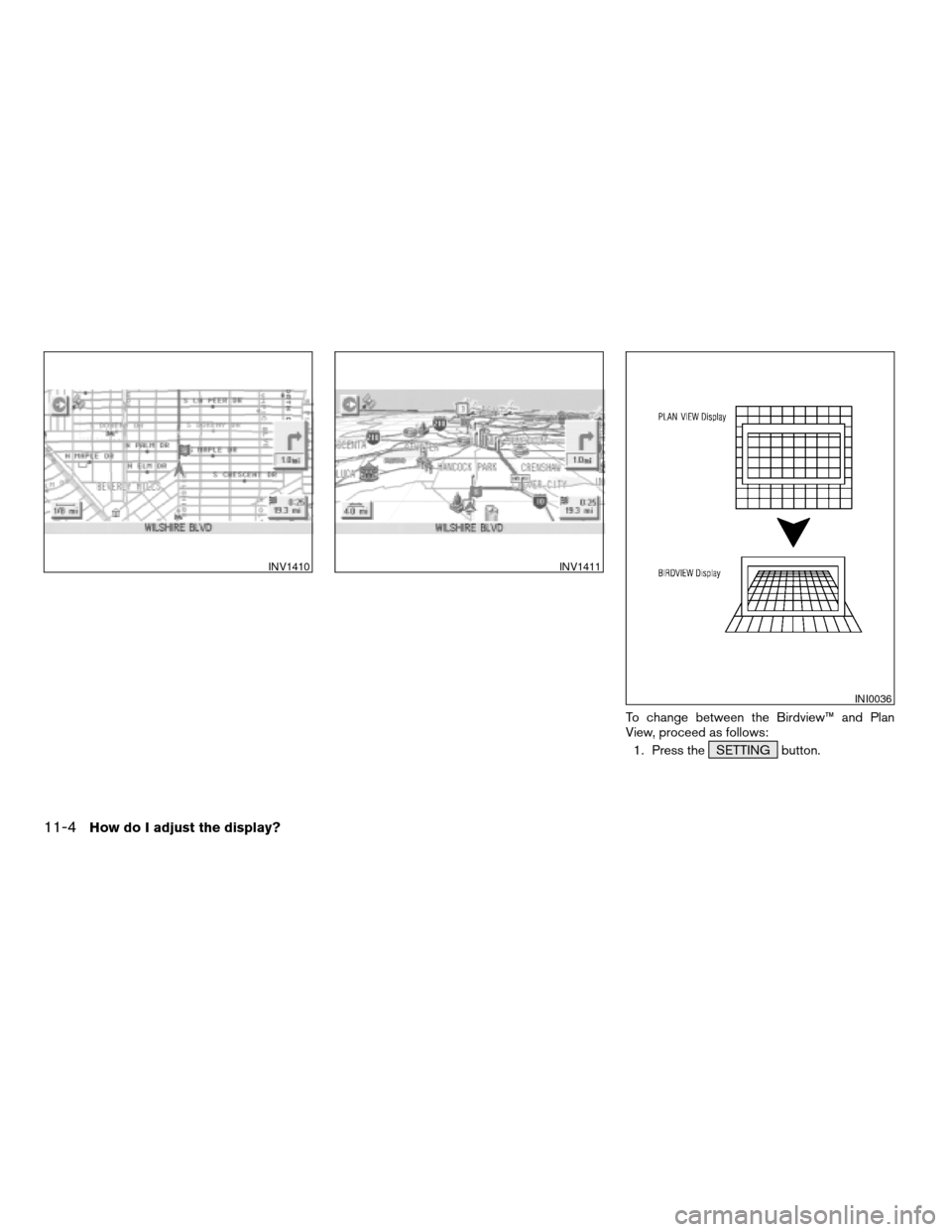
To change between the Birdview™ and Plan
View, proceed as follows:
1. Press the SETTING button.
INV1410INV1411
INI0036
11-4How do I adjust the display?
ZREVIEW COPYÐ2005(nav)
Navigation System OMÐUSA_English(nna)
07/10/04Ðdebbie
X
Page 152 of 192
cWhen the system is re-drawing the display in
Birdview™ display, the distance the vehicle
travels becomes longer, and/or the degree
the vehicle turns becomes larger than in the
Planview display in order to complete
re-drawing.
cThe names of the roads and locations may
differ, depending on where the names appear
on the screen.
cIn order to avoid having too much detail on the
map, all road names are not always shown on
the screen. When the display re-draws the
map, a road name which is shown on the pre-
vious screen may not appear on the new
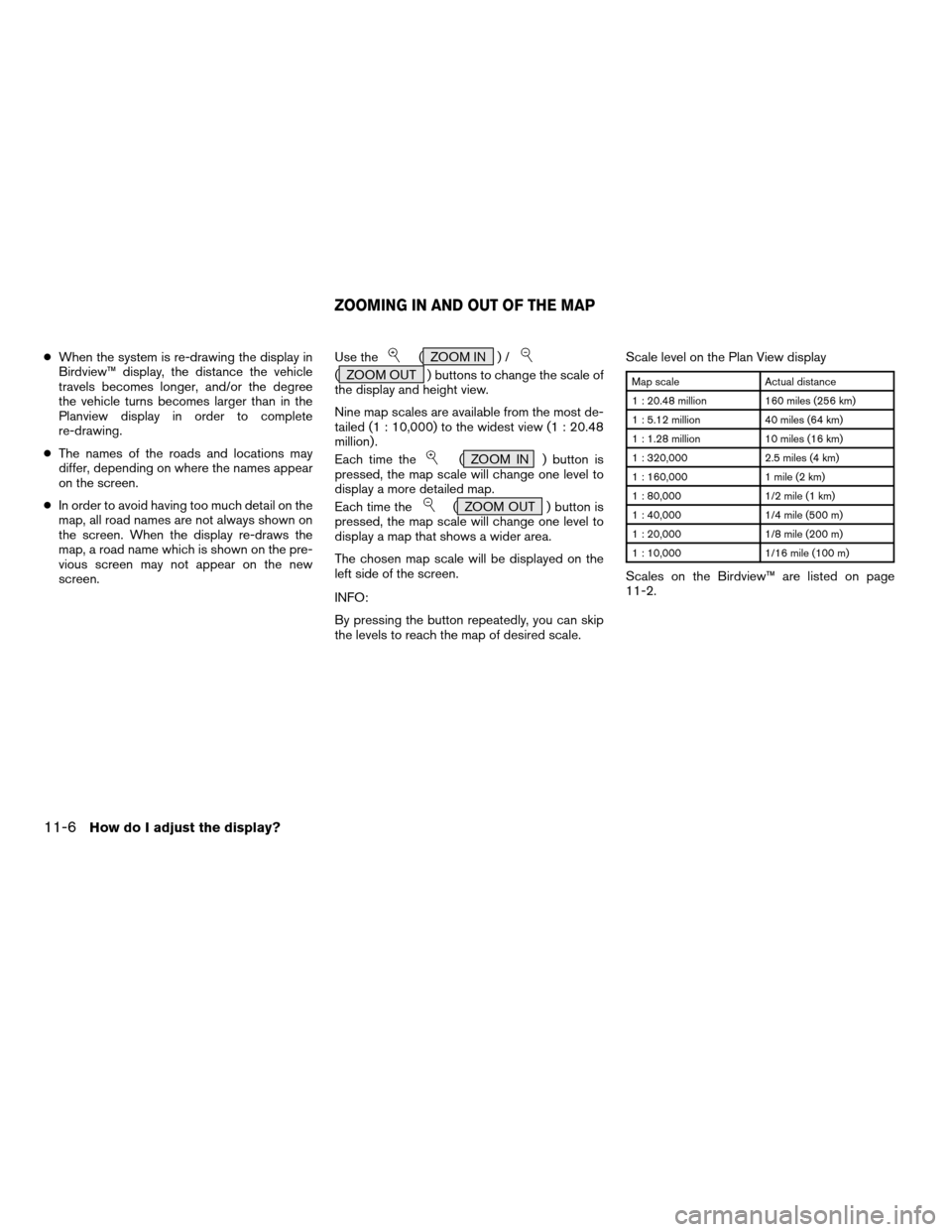
screen.Use the( ZOOM IN ) /
( ZOOM OUT ) buttons to change the scale of
the display and height view.
Nine map scales are available from the most de-
tailed (1 : 10,000) to the widest view (1 : 20.48
million) .
Each time the
( ZOOM IN ) button is
pressed, the map scale will change one level to
display a more detailed map.
Each time the
( ZOOM OUT ) button is
pressed, the map scale will change one level to
display a map that shows a wider area.
The chosen map scale will be displayed on the
left side of the screen.
INFO:
By pressing the button repeatedly, you can skip
the levels to reach the map of desired scale.Scale level on the Plan View display
Map scale Actual distance
1 : 20.48 million 160 miles (256 km)
1 : 5.12 million 40 miles (64 km)
1 : 1.28 million 10 miles (16 km)
1 : 320,000 2.5 miles (4 km)
1 : 160,000 1 mile (2 km)
1 : 80,000 1/2 mile (1 km)
1 : 40,000 1/4 mile (500 m)
1 : 20,000 1/8 mile (200 m)
1 : 10,000 1/16 mile (100 m)
Scales on the Birdview™ are listed on page
11-2.
ZOOMING IN AND OUT OF THE MAP
11-6How do I adjust the display?
ZREVIEW COPYÐ2005(nav)
Navigation System OMÐUSA_English(nna)
07/10/04Ðdebbie
X
Page 153 of 192
![NISSAN MURANO 2005 1.G Manual PDF 1. Press the SETTING button.
2. Select the
Navigation key on the [SET-
TINGS] screen.
Most detailed level (1: 10,000)
INV1413
The widest level (1: 20.48 million)
INV1414INV1781
CHANGING THE DISPLAY DI](/img/5/686/w960_686-152.png "NISSAN MURANO 2005 1.G Manual PDF 1. Press the SETTING button.
2. Select the
Navigation key on the [SET-
TINGS] screen.
Most detailed level (1: 10,000)
INV1413
The widest level (1: 20.48 million)
INV1414INV1781
CHANGING THE DISPLAY DI")
1. Press the SETTING button.
2. Select the
Navigation key on the [SET-
TINGS] screen.
Most detailed level (1: 10,000)
INV1413
The widest level (1: 20.48 million)
INV1414INV1781
CHANGING THE DISPLAY DIRECTION
(in Plan View display)
How do I adjust the display?11-7
ZREVIEW COPYÐ2005(nav)
Navigation System OMÐUSA_English(nna)
07/10/04Ðdebbie
X
Page 155 of 192
![NISSAN MURANO 2005 1.G Manual PDF INFO:
cWhen the key is selected, the amber indicator
light will light up.
cWhen the MAP button is pressed after the
display setting, the [CURRENT LOCATION]
screen will appear.
When the PREV button is](/img/5/686/w960_686-154.png "NISSAN MURANO 2005 1.G Manual PDF INFO:
cWhen the key is selected, the amber indicator
light will light up.
cWhen the MAP button is pressed after the
display setting, the [CURRENT LOCATION]
screen will appear.
When the PREV button is")
INFO:
cWhen the key is selected, the amber indicator
light will light up.
cWhen the MAP button is pressed after the
display setting, the [CURRENT LOCATION]
screen will appear.
When the PREV button is pressed, the
previous screen will reappear.You can manually scroll the map to check the lo-
cation of your choice.
1. Operating the joystick.
The map scrolls in the same direction as the joy-
stick movement.
INFO:
While the vehicle is traveling, a single operation
will move within the displayed area of the screen.
2. Press the MAP button to go back and
show the current vehicle position.
INFO:
You can also select the PREV button to go
back.
Display with the forward direction up
INV1418INV1985
SCROLLING THE MAP
How do I adjust the display?11-9
ZREVIEW COPYÐ2005(nav)
Navigation System OMÐUSA_English(nna)
07/10/04Ðdebbie
X
Page 156 of 192
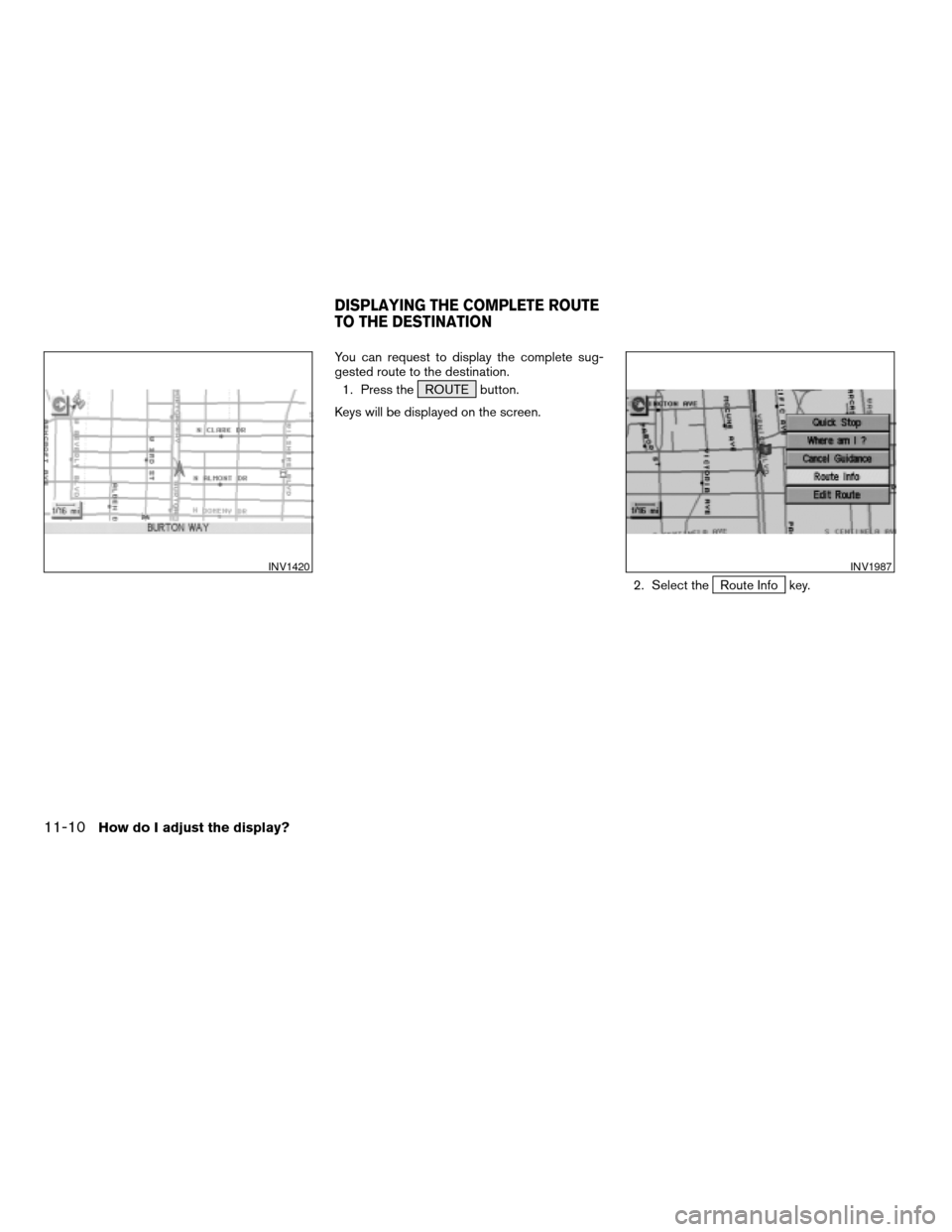
You can request to display the complete sug-
gested route to the destination.
1. Press the ROUTE button.
Keys will be displayed on the screen.
2. Select the
Route Info key.
INV1420INV1987
DISPLAYING THE COMPLETE ROUTE
TO THE DESTINATION
11-10How do I adjust the display?
ZREVIEW COPYÐ2005(nav)
Navigation System OMÐUSA_English(nna)
07/10/04Ðdebbie
X