warning NISSAN MURANO 2008 Manual Online
[x] Cancel search | Manufacturer: NISSAN, Model Year: 2008, Model line: MURANO, Model: NISSAN MURANO 2008Pages: 444, PDF Size: 6.09 MB
Page 150 of 444
Black plate (148,1)
Model "Z51-D" EDITED: 2008/ 6/ 26
Switching procedure:
Push the LOCK
*1
and UNLOCK
*2
buttons simultaneously for more than 2 seconds
to switch the mode from one to the other.
When pushing the buttons to set the hazard
indicator mode, the hazard indicator flashes 3
times.
When pushing the buttons to set the hazard
indicator and horn mode, the hazard indicator
flashes once and the horn chirps once.
SPA2437
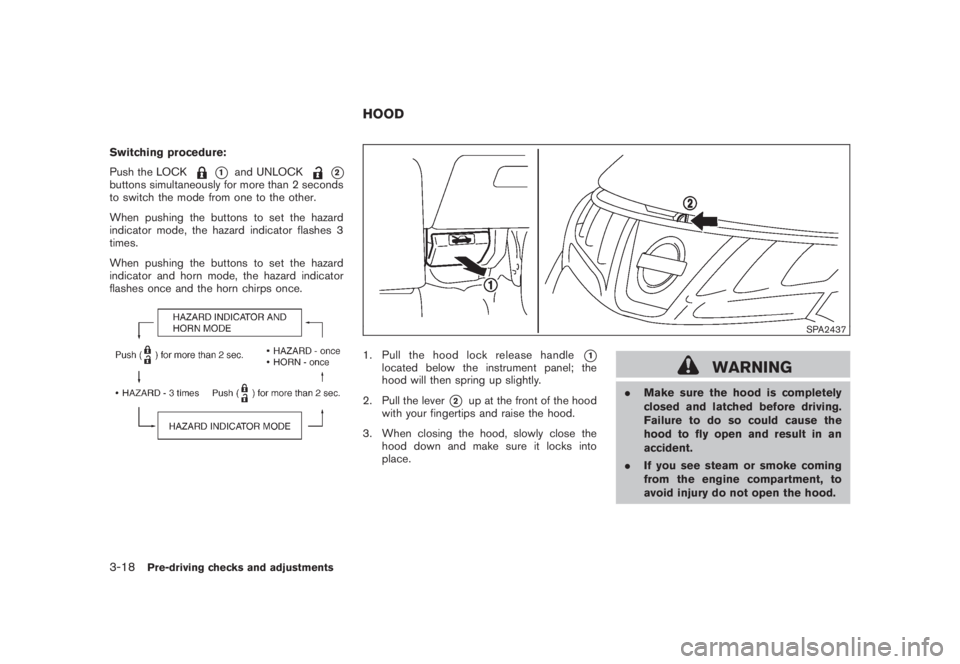
1. Pull the hood lock release handle
*1
located below the instrument panel; the
hood will then spring up slightly.
2. Pull the lever
*2
up at the front of the hood
with your fingertips and raise the hood.
3. When closing the hood, slowly close the
hood down and make sure it locks into
place.
WARNING
.Make sure the hood is completely
closed and latched before driving.
Failure to do so could cause the
hood to fly open and result in an
accident.
.If you see steam or smoke coming
from the engine compartment, to
avoid injury do not open the hood.
HOOD
3-18
Pre-driving checks and adjustments
Page 151 of 444
Black plate (149,1)
Model "Z51-D" EDITED: 2008/ 6/ 26
WARNING
.Always be sure the lift gate has
been closed securely to prevent it
from opening while driving.
.Do not drive with the lift gate open.
This could allow dangerous exhaust
gases to be drawn into the vehicle.
See “EXHAUST GAS (carbon mon-
oxide)” in the “5. Starting and driv-
ing” section of this manual.
.Do not leave children unattended
inside the vehicle. They could un-
knowingly activate switches or con-
trols. Unattended children could
become involved in serious acci-
dents.
.Always be sure that hands and feet
are clear of the door frame to avoid
injury while closing the lift gate.
SPA2438
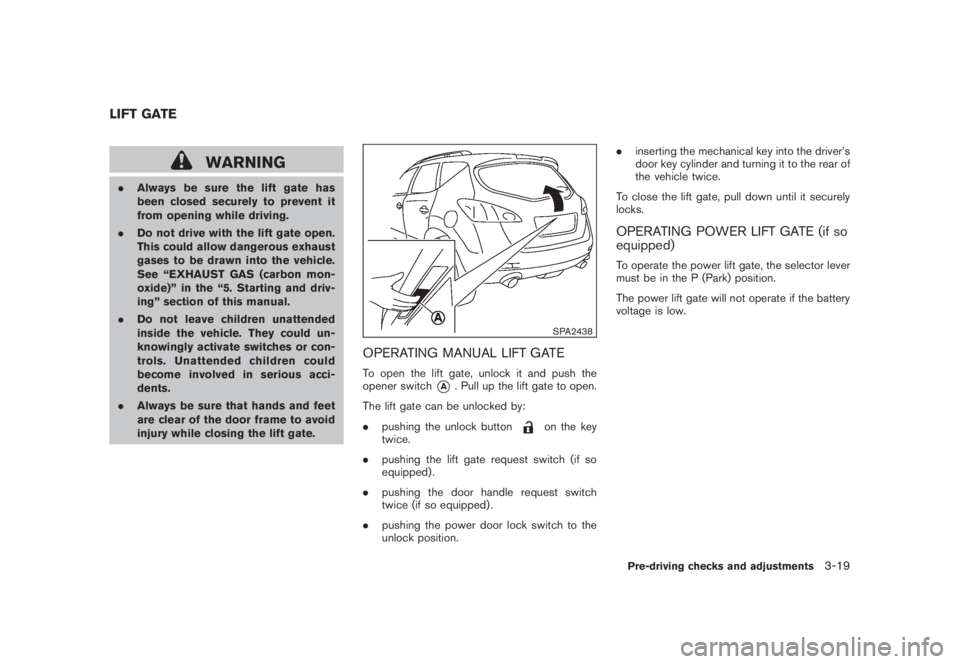
OPERATING MANUAL LIFT GATETo open the lift gate, unlock it and push the
opener switch
*A
. Pull up the lift gate to open.
The lift gate can be unlocked by:
.pushing the unlock button
on the key
twice.
.pushing the lift gate request switch (if so
equipped) .
.pushing the door handle request switch
twice (if so equipped) .
.pushing the power door lock switch to the
unlock position..inserting the mechanical key into the driver’s
door key cylinder and turning it to the rear of
the vehicle twice.
To close the lift gate, pull down until it securely
locks.
OPERATING POWER LIFT GATE (if so
equipped)To operate the power lift gate, the selector lever
must be in the P (Park) position.
The power lift gate will not operate if the battery
voltage is low.
LIFT GATE
Pre-driving checks and adjustments
3-19
Page 153 of 444
Black plate (151,1)
Model "Z51-D" EDITED: 2008/ 6/ 26
Power openWhen the lift gate is fully closed, the lift gate will
fully open automatically by:
.pushing the power lift gate switch
*A
on
the instrument panel
.pushing the lift gate opener switch
*B
.pushing the power lift gate button
*C
on
the key for more than 1 second
The hazard flashes 4 times and the outside
chime sounds when the lift gate starts opening.
NOTE:
The lift gate can be opened by the power
lift gate switch
*A
or the lift gate button
*C
even if the lift gate is locked.
The lift gate will individually unlock and
open. Once the lift gate is closed, its lock
will align to the vehicle’s lock or unlock
status.
Power closeWhen the lift gate is fully opened, the lift gate
will fully close automatically by:
.pushing the power lift gate switch
*A
on
the instrument panel
.pushing the power lift gate switch
*D
on
the lower part of the lift gate
.pushing the lift gate release button
*C
onthe key for more than 1 second
The hazard flashes 4 times and the outside
chime sounds when the lift gate starts closing.
Reverse functionThe power lift gate will reverse immediately if
one of the following actions is performed during
power open or power close.
.pushing the power lift gate switch
*A
on
the instrument panel
.pushing the lift gate switch
*D
on the lower
part of the lift gate
.pushing the lift gate button
*C
on
the key.
The outside chime sounds when the lift gate
starts to reverse.
The power lift gate button
*C
on the key
cannot be operated when the ignition switch is
in the ON position.
Auto reverse functionThe auto-reverse function enables the lift gate to
automatically reverse when something is caught
in the lift gate as it is opening or closing. When
the control unit detects an obstacle, the lift gate
will reverse and return to the full open or full
close position.
If a second obstacle is detected, the lift gatemotion will stop and the drive motor will
disengage. The lift gate will enter the manual
mode.
A pinch sensor is mounted on each side of the
lift gate. If an obstacle is detected by the pinch
sensor during power close, the lift gate will
reverse and return to the full open position
immediately.
NOTE:
If the pinch sensor is damaged or removed,
the power close function will not operate.
WARNING
There is a small distance immediately
before the closed position that cannot
be detected. Make sure that all passen-
gers keep their hands, etc., clear from
the lift gate opening before closing the
lift gate.Manual modeIf power operation is not available, the lift gate
can be operated manually. Power operation may
not be available if multiple obstacles have been
detected in a single power cycle or if the battery
voltage is low. When the power lift gate main
switch is in the OFF position, the lift gate can be
opened manually by pushing the lift gate opener
switch. If the power lift gate opener switch isPre-driving checks and adjustments
3-21
Page 156 of 444
Black plate (154,1)
Model "Z51-D" EDITED: 2008/ 6/ 26
FUEL-FILLER CAP
WARNING
.Gasoline is extremely flammable
and highly explosive under certain
conditions. You could be burned or
seriously injured if it is misused or
mishandled. Always stop engine
and do not smoke or allow open
flames or sparks near the vehicle
when refueling.
.Do not attempt to top off the fuel
tank after the fuel pump nozzle
shuts off automatically. Continued
refueling may cause fuel overflow,
resulting in fuel spray and possibly
a fire.
.Use only an original equipment type
fuel-filler cap as a replacement. It
has a built-in safety valve needed
for proper operation of the fuel
system and emission control sys-
tem. An incorrect cap can result in a
serious malfunction and possible
injury. It could also cause the mal-
function indicator light to come on.
.Never pour fuel into the throttle
body to attempt to start your vehi-cle.
.Do not fill a portable fuel container
in the vehicle or trailer. Static elec-
tricity can cause an explosion of
flammable liquid, vapor or gas in
any vehicle or trailer. To reduce the
risk of serious injury or death when
filling portable fuel containers:
— Always place the container on
the ground when filling.
— Do not use electronic devices
when filling.
— Keep the pump nozzle in contact
with the container while you are
filling it.
— Use only approved portable fuel
containers for flammable liquid.
CAUTION
.If fuel is spilled on the vehicle body,
flush it away with water to avoid
paint damage.
.Tighten until the fuel-filler cap
clicks. Failure to tighten the fuel-
filler cap properly may cause the
malfunction indicator light
(MIL) to illuminate. If the
lightilluminates because the fuel-filler
cap is loose or missing, tighten or
install the cap and continue to drive
the vehicle. The
light should
turn off after a few driving trips. If
the
light does not turn off after
a few driving trips, have the vehicle
inspected by a NISSAN dealer.
3-24
Pre-driving checks and adjustments
Page 157 of 444
Black plate (155,1)
Model "Z51-D" EDITED: 2008/ 6/ 26
SPA2442
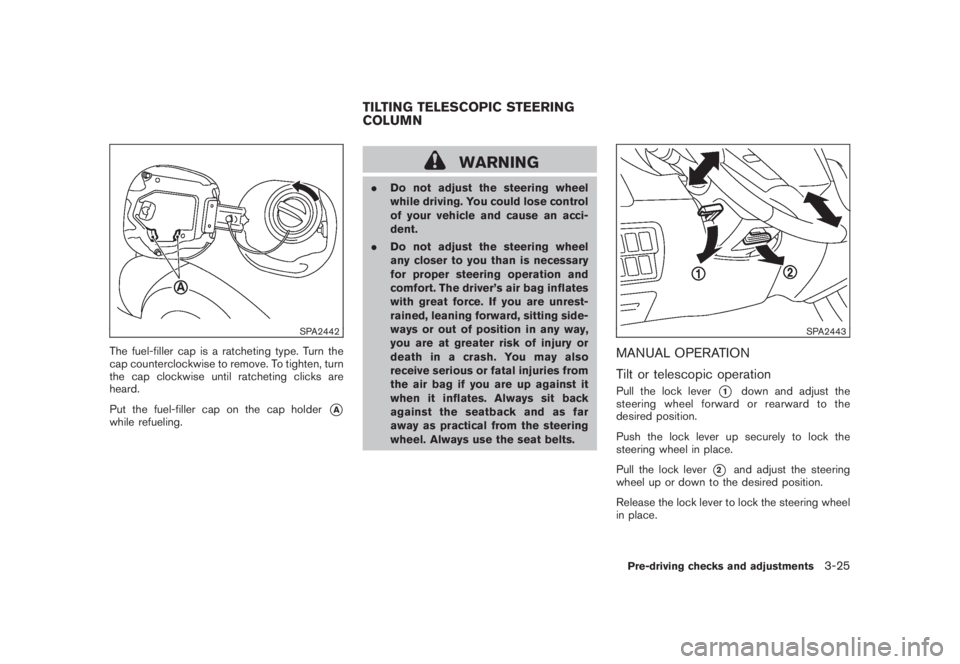
The fuel-filler cap is a ratcheting type. Turn the
cap counterclockwise to remove. To tighten, turn
the cap clockwise until ratcheting clicks are
heard.
Put the fuel-filler cap on the cap holder
*A
while refueling.
WARNING
.Do not adjust the steering wheel
while driving. You could lose control
of your vehicle and cause an acci-
dent.
.Do not adjust the steering wheel
any closer to you than is necessary
for proper steering operation and
comfort. The driver’s air bag inflates
with great force. If you are unrest-
rained, leaning forward, sitting side-
ways or out of position in any way,
you are at greater risk of injury or
death in a crash. You may also
receive serious or fatal injuries from
the air bag if you are up against it
when it inflates. Always sit back
against the seatback and as far
away as practical from the steering
wheel. Always use the seat belts.
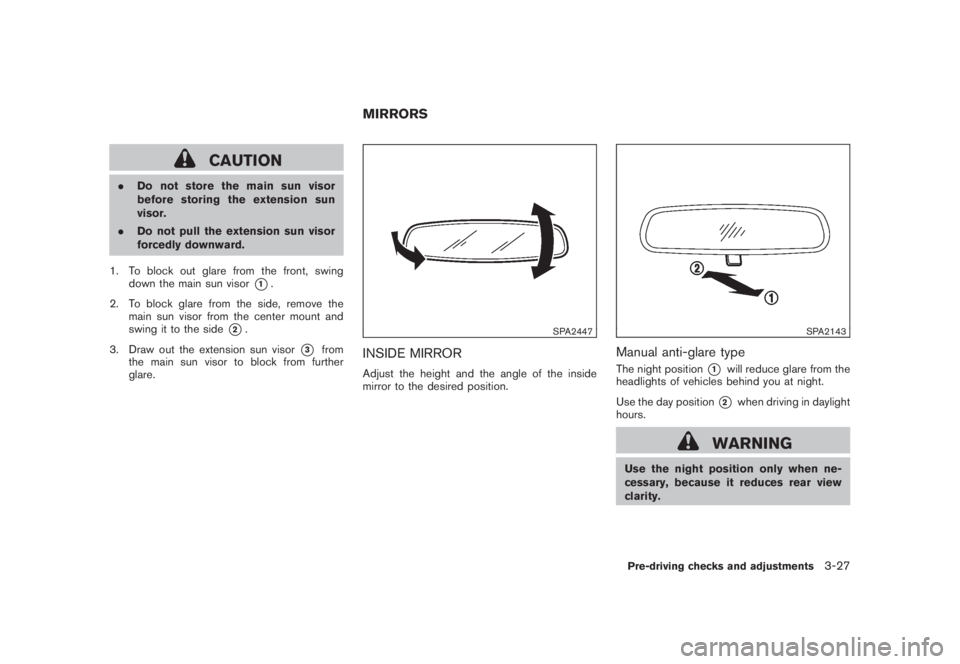
SPA2443
MANUAL OPERATION
Tilt or telescopic operationPull the lock lever
*1
down and adjust the
steering wheel forward or rearward to the
desired position.
Push the lock lever up securely to lock the
steering wheel in place.
Pull the lock lever
*2
and adjust the steering
wheel up or down to the desired position.
Release the lock lever to lock the steering wheel
in place.
TILTING TELESCOPIC STEERING
COLUMN
Pre-driving checks and adjustments
3-25
Page 159 of 444
Black plate (157,1)
Model "Z51-D" EDITED: 2008/ 6/ 26
CAUTION
.Do not store the main sun visor
before storing the extension sun
visor.
.Do not pull the extension sun visor
forcedly downward.
1. To block out glare from the front, swing
down the main sun visor
*1.
2. To block glare from the side, remove the
main sun visor from the center mount and
swing it to the side
*2.
3. Draw out the extension sun visor
*3
from
the main sun visor to block from further
glare.
SPA2447
INSIDE MIRRORAdjust the height and the angle of the inside
mirror to the desired position.
SPA2143
Manual anti-glare typeThe night position
*1
will reduce glare from the
headlights of vehicles behind you at night.
Use the day position*2
when driving in daylight
hours.
WARNING
Use the night position only when ne-
cessary, because it reduces rear view
clarity.
MIRRORS
Pre-driving checks and adjustments
3-27
Page 161 of 444
Black plate (159,1)
Model "Z51-D" EDITED: 2008/ 6/ 26
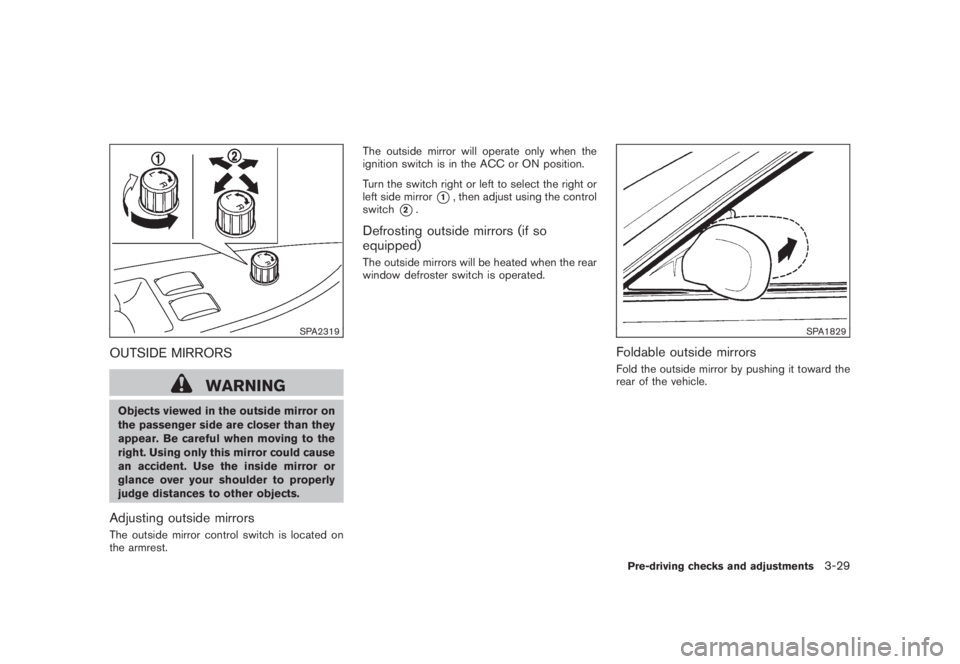
SPA2319
OUTSIDE MIRRORS
WARNING
Objects viewed in the outside mirror on
the passenger side are closer than they
appear. Be careful when moving to the
right. Using only this mirror could cause
an accident. Use the inside mirror or
glance over your shoulder to properly
judge distances to other objects.Adjusting outside mirrorsThe outside mirror control switch is located on
the armrest.The outside mirror will operate only when the
ignition switch is in the ACC or ON position.
Turn the switch right or left to select the right or
left side mirror
*1, then adjust using the control
switch
*2.
Defrosting outside mirrors (if so
equipped)The outside mirrors will be heated when the rear
window defroster switch is operated.
SPA1829
Foldable outside mirrorsFold the outside mirror by pushing it toward the
rear of the vehicle.Pre-driving checks and adjustments
3-29
Page 168 of 444
Black plate (164,1)
Model "Z51-D" EDITED: 2008/ 6/ 26
WARNING
.Do not disassemble or modify this
system. If you do, it may result in
accidents, fire, or electric shock.
.Do not use this system if you notice
any abnormality, such as a frozen
screen or lack of sound. Continued
use of the system may result in
accident, fire or electric shock.
.In case you notice any foreign
object in the system hardware, spill
liquid on it, or notice smoke or smell
coming from it, stop using the
system immediately and contact
your nearest NISSAN dealer. Ignor-
ing such conditions may lead to
accidents, fire, or electric shock.
.Park the vehicle in a safe location
and apply the parking brake to view
the images on the front center dis-
play screen using devices connected
to the auxiliary input jacks.
Do not attempt to operate the system in
extreme temperature conditions [below
48F(208C) and above 1588F(708C)].
Operating this system under these condi-
tions may result in system malfunctions.
SAA1845
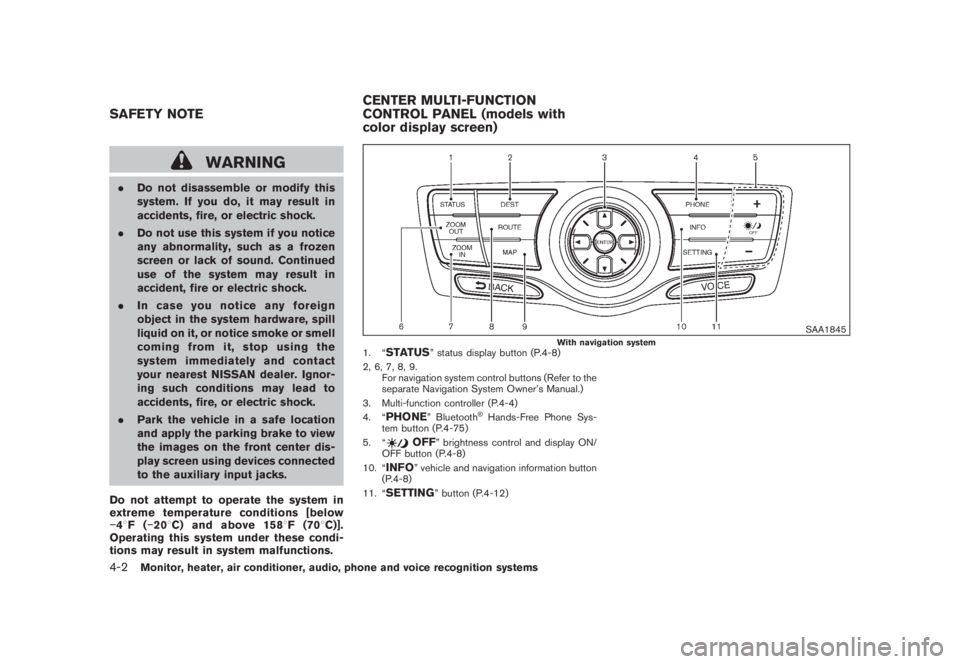
With navigation system
1. “
STATUS
” status display button (P.4-8)
2, 6, 7, 8, 9.
For navigation system control buttons (Refer to the
separate Navigation System Owner’s Manual.)
3. Multi-function controller (P.4-4)
4. “
PHONE
” Bluetooth
®Hands-Free Phone Sys-
tem button (P.4-75)
5. “
OFF
” brightness control and display ON/
OFF button (P.4-8)
10. “
INFO
” vehicle and navigation information button
(P.4-8)
11. “
SETTING
” button (P.4-12)
SAFETY NOTECENTER MULTI-FUNCTION
CONTROL PANEL (models with
color display screen)4-2
Monitor, heater, air conditioner, audio, phone and voice recognition systems
Page 172 of 444
Black plate (168,1)
Model "Z51-D" EDITED: 2008/ 6/ 26
SAA1454
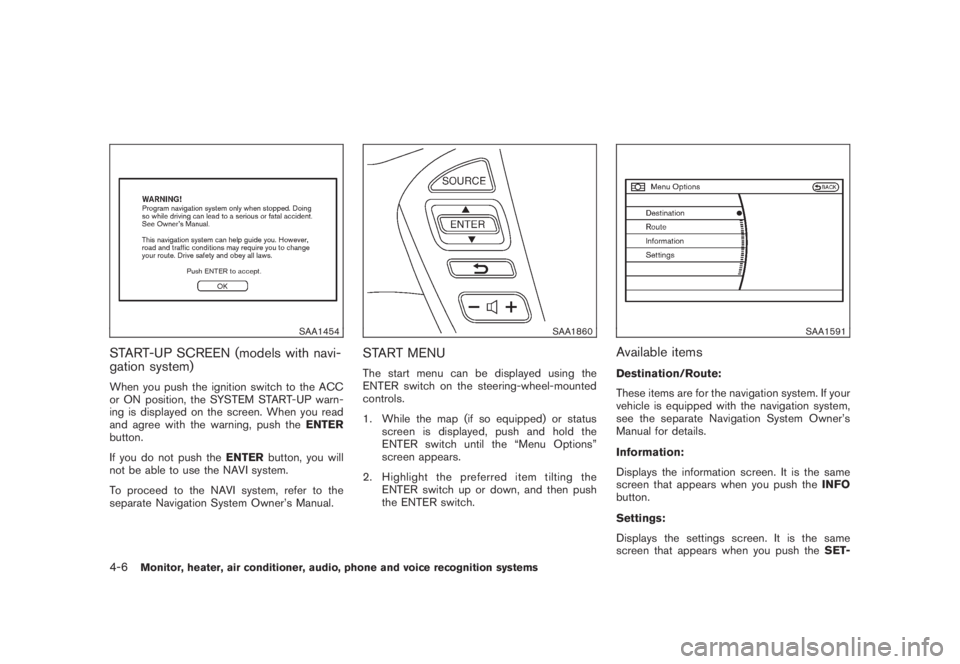
START-UP SCREEN (models with navi-
gation system)When you push the ignition switch to the ACC
or ON position, the SYSTEM START-UP warn-
ing is displayed on the screen. When you read
and agree with the warning, push theENTER
button.
If you do not push theENTERbutton, you will
not be able to use the NAVI system.
To proceed to the NAVI system, refer to the
separate Navigation System Owner’s Manual.
SAA1860
START MENUThe start menu can be displayed using the
ENTER switch on the steering-wheel-mounted
controls.
1. While the map (if so equipped) or status
screen is displayed, push and hold the
ENTER switch until the “Menu Options”
screen appears.
2. Highlight the preferred item tilting the
ENTER switch up or down, and then push
the ENTER switch.
SAA1591
Available itemsDestination/Route:
These items are for the navigation system. If your
vehicle is equipped with the navigation system,
see the separate Navigation System Owner’s
Manual for details.
Information:
Displays the information screen. It is the same
screen that appears when you push theINFO
button.
Settings:
Displays the settings screen. It is the same
screen that appears when you push theSET-
4-6
Monitor, heater, air conditioner, audio, phone and voice recognition systems
Page 185 of 444
Black plate (181,1)
Model "Z51-D" EDITED: 2008/ 6/ 26
SAA1092
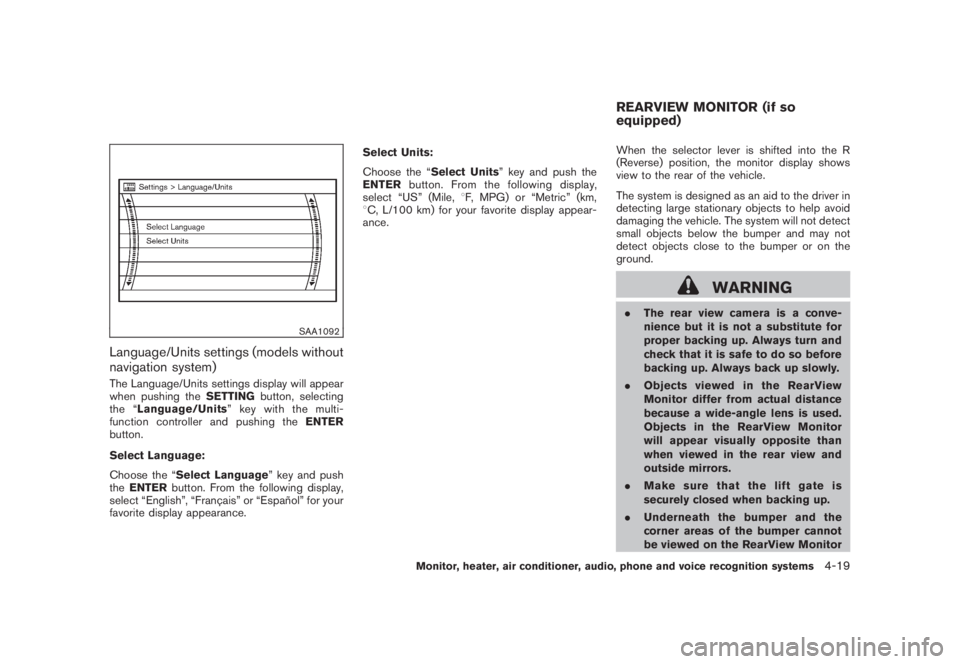
Language/Units settings (models without
navigation system)The Language/Units settings display will appear
when pushing theSETTINGbutton, selecting
the “Language/Units”keywiththemulti-
function controller and pushing theENTER
button.
Select Language:
Choose the “Select Language” key and push
theENTERbutton. From the following display,
select “English”, “Franc¸ ais” or “Espan˜
ol” for your
favorite display appearance.Select Units:
Choose the “Select Units” key and push the
ENTERbutton. From the following display,
select “US” (Mile,8F, MPG) or “Metric” (km,
8C, L/100 km) for your favorite display appear-
ance.When the selector lever is shifted into the R
(Reverse) position, the monitor display shows
view to the rear of the vehicle.
The system is designed as an aid to the driver in
detecting large stationary objects to help avoid
damaging the vehicle. The system will not detect
small objects below the bumper and may not
detect objects close to the bumper or on the
ground.
WARNING
.The rear view camera is a conve-
nience but it is not a substitute for
proper backing up. Always turn and
check that it is safe to do so before
backing up. Always back up slowly.
.Objects viewed in the RearView
Monitor differ from actual distance
because a wide-angle lens is used.
Objects in the RearView Monitor
will appear visually opposite than
when viewed in the rear view and
outside mirrors.
.Make sure that the lift gate is
securely closed when backing up.
.Underneath the bumper and the
corner areas of the bumper cannot
be viewed on the RearView MonitorREARVIEW MONITOR (if so
equipped)
Monitor, heater, air conditioner, audio, phone and voice recognition systems
4-19