display NISSAN MURANO 2010 Owner´s Manual
[x] Cancel search | Manufacturer: NISSAN, Model Year: 2010, Model line: MURANO, Model: NISSAN MURANO 2010Pages: 425, PDF Size: 3.62 MB
Page 289 of 425
Black plate (285,1)
Model "Z51-D" EDITED: 2009/ 8/ 3
Repeat the command in a clear voice.
. Push the BACKbutton once to return to the
previous screen.
. If you want to cancel the command, push
and hold the TALK
switch for 1 second.
The message “Voice canceled” will be
announced.
. Push the TALKswitch again to pause
the operation. Push the TALK
switch to
restart the operation.
. If you want to adjust the volume of the
system feedback, push the volume control
buttons (+ or ) on the steering wheel or
use the audio system volume knob while the
system is making an announcement.
How to speak numbers:
NISSAN Voice Recognition requires a certain
way to speak numbers when giving voice
commands. Refer to the following examples.
General rule
Only single digits 0 (zero) to 9 can be used. (For
example, if you would like to say 500, “five zero
zero” can be used, but “five hundred” cannot.) Phone numbers
Speak phone numbers according to the follow-
ing examples:
.
1-800-662-6200
— “Dial one eight zero zero six six two zero zero.”
Note 1: For the best voice recognition phone
dialing results, say phone numbers as single
digits.
Note 2: You cannot say 555-6000 as “five five
five six thousands”.
Note 3: When speaking a house number, speak
the number “0” as “zero”. If the letter “o (Oh)” is
included in the house number, it will not be
recognized as the number “0 (zero)” even if you
speak “oh” instead of “zero”. You can only say
“zero” for “0 (Zero)”.
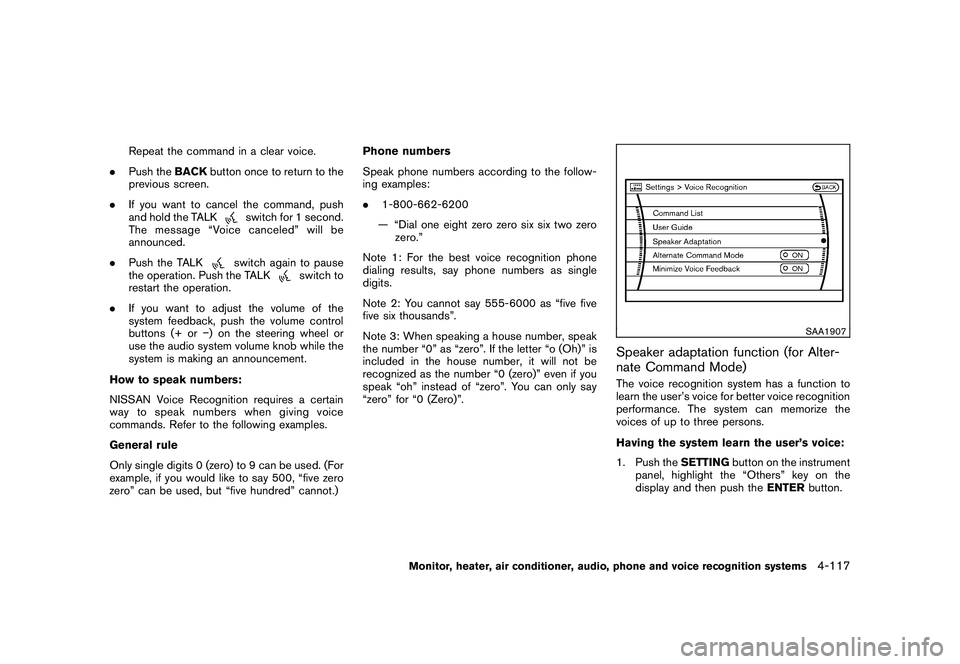
SAA1907
Speaker adaptation function (for Alter-
nate Command Mode)The voice recognition system has a function to
learn the user’s voice for better voice recognition
performance. The system can memorize the
voices of up to three persons.
Having the system learn the user’s voice:
1. Push the SETTINGbutton on the instrument
panel, highlight the “Others” key on the
display and then push the ENTERbutton.
Monitor, heater, air conditioner, audio, phone and voice recognition systems
4-117
Page 290 of 425
Black plate (286,1)
Model "Z51-D" EDITED: 2009/ 8/ 3
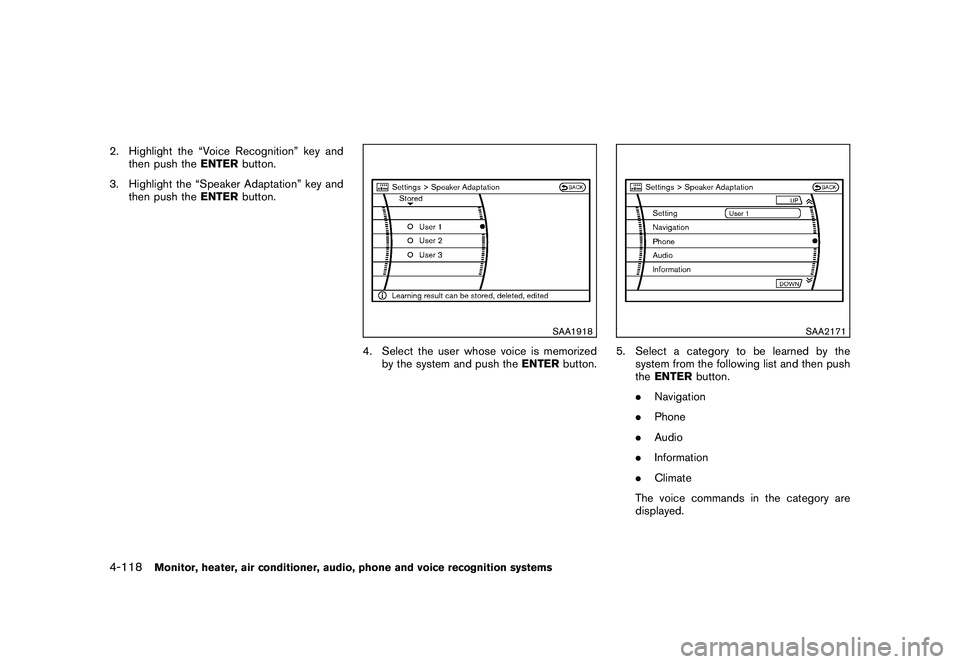
2. Highlight the “Voice Recognition” key andthen push the ENTERbutton.
3. Highlight the “Speaker Adaptation” key and then push the ENTERbutton.
SAA1918
4. Select the user whose voice is memorized
by the system and push the ENTERbutton.
SAA2171
5. Select a category to be learned by the
system from the following list and then push
theENTER button.
. Navigation
. Phone
. Audio
. Information
. Climate
The voice commands in the category are
displayed.
4-118
Monitor, heater, air conditioner, audio, phone and voice recognition systems
Page 291 of 425
Black plate (287,1)
Model "Z51-D" EDITED: 2009/ 8/ 3
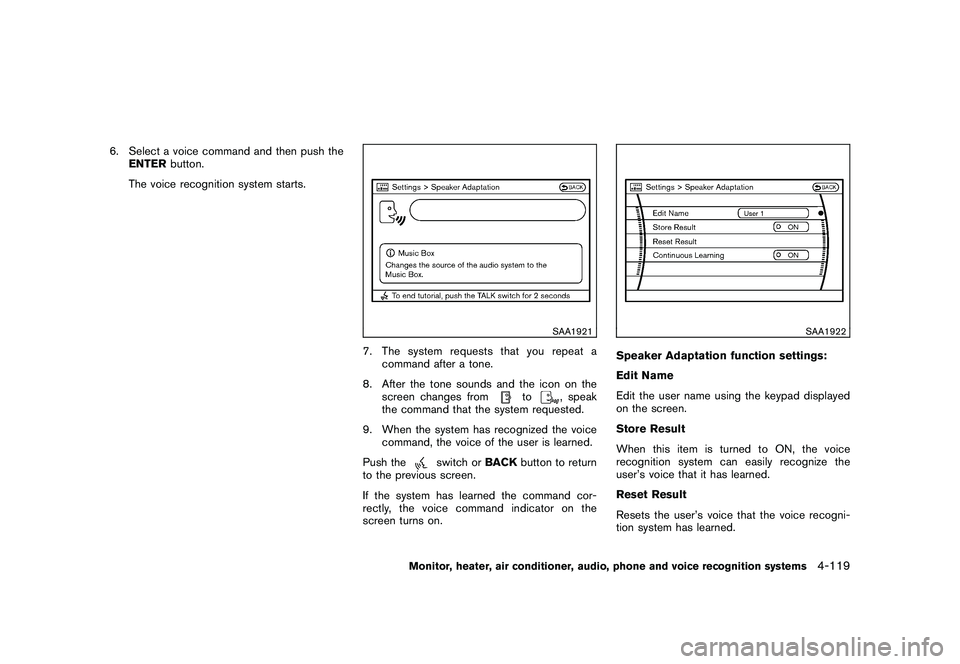
6. Select a voice command and then push theENTER button.
The voice recognition system starts.
SAA1921
7. The system requests that you repeat a command after a tone.
8. After the tone sounds and the icon on the screen changes from
to
, speak
the command that the system requested.
9. When the system has recognized the voice command, the voice of the user is learned.
Push the
switch or BACKbutton to return
to the previous screen.
If the system has learned the command cor-
rectly, the voice command indicator on the
screen turns on.
SAA1922
Speaker Adaptation function settings:
Edit Name
Edit the user name using the keypad displayed
on the screen.
Store Result
When this item is turned to ON, the voice
recognition system can easily recognize the
user’s voice that it has learned.
Reset Result
Resets the user’s voice that the voice recogni-
tion system has learned.
Monitor, heater, air conditioner, audio, phone and voice recognition systems
4-119
Page 293 of 425
Black plate (289,1)
Model "Z51-D" EDITED: 2009/ 8/ 3
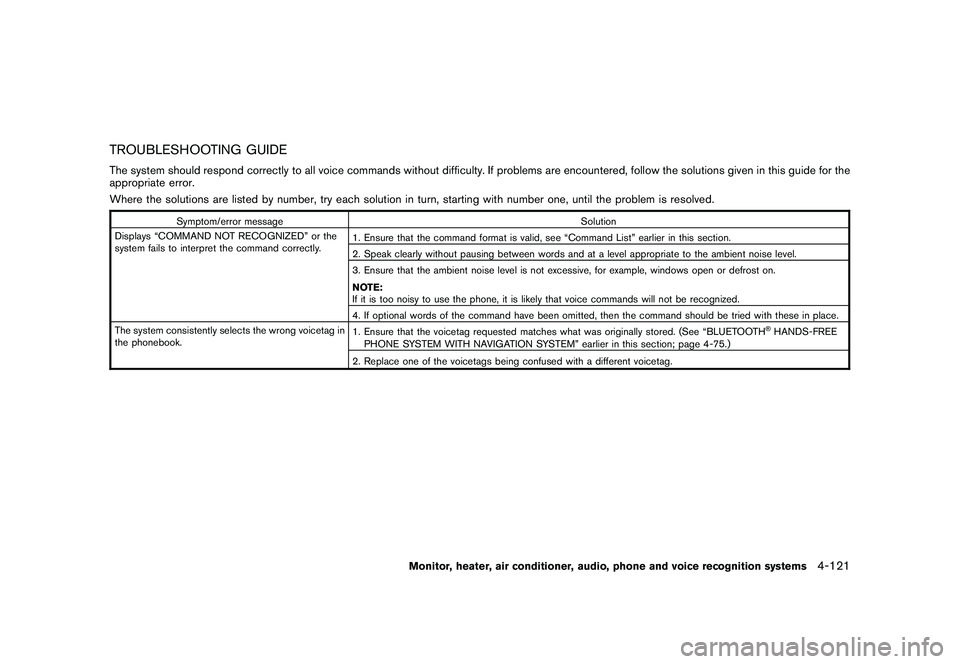
TROUBLESHOOTING GUIDEThe system should respond correctly to all voice commands without difficulty. If problems are encountered, follow the solutions given in this guide for the
appropriate error.
Where the solutions are listed by number, try each solution in turn, starting with number one, until the problem is resolved.
Symptom/error messageSolution
Displays “COMMAND NOT RECOGNIZED” or the
system fails to interpret the command correctly. 1. Ensure that the command format is valid, see “Command List” earlier in this section.
2. Speak clearly without pausing between words and at a level appropriate to the ambient noise level.
3. Ensure that the ambient noise level is not excessive, for example, windows open or defrost on.
NOTE:
If it is too noisy to use the phone, it is likely that voice commands will not be recognized.
4. If optional words of the command have been omitted, then the command should be tried with these in place.
The system consistently selects the wrong voicetag in
the phonebook. 1. Ensure that the voicetag requested matches what was originally stored. (See “BLUETOOTH
®HANDS-FREE
PHONE SYSTEM WITH NAVIGATION SYSTEM” earlier in this section; page 4-75.)
2. Replace one of the voicetags being confused with a different voicetag.
Monitor, heater, air conditioner, audio, phone and voice recognition systems
4-121
Page 304 of 425
Black plate (300,1)
Model "Z51-D" EDITED: 2009/ 8/ 3
.The cargo area is not included in the
operating range, but the Intelligent Key may
function.
. If the Intelligent Key is placed on the
instrument panel, inside the glove box or
door pocket, the Intelligent Key may not
function.
. If the Intelligent Key is placed near the door
or window outside the vehicle, the Intelligent
Key may function.
SSD0910
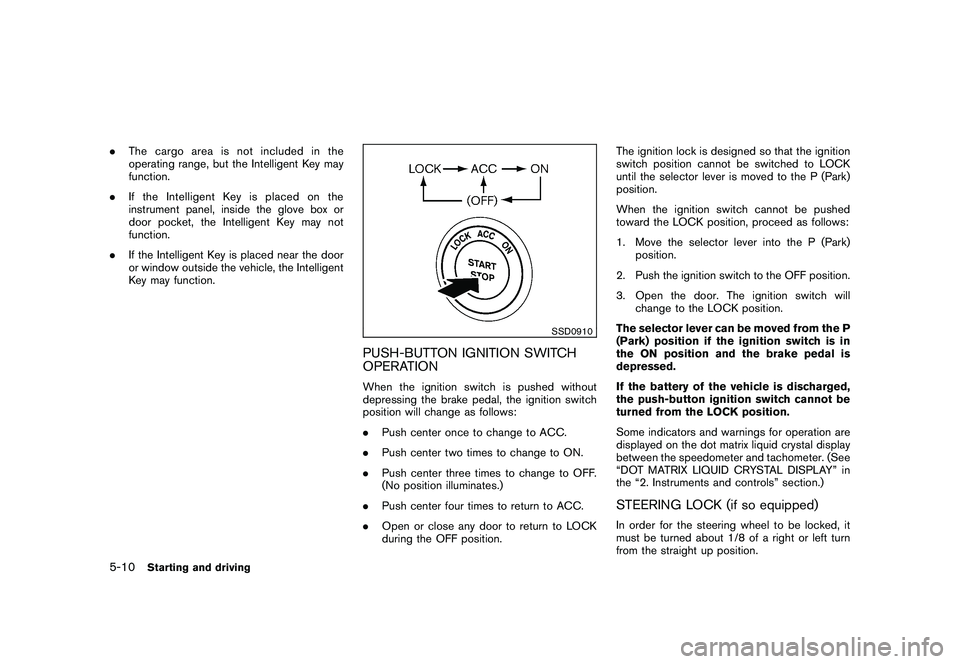
PUSH-BUTTON IGNITION SWITCH
OPERATIONWhen the ignition switch is pushed without
depressing the brake pedal, the ignition switch
position will change as follows:
.Push center once to change to ACC.
. Push center two times to change to ON.
. Push center three times to change to OFF.
(No position illuminates.)
. Push center four times to return to ACC.
. Open or close any door to return to LOCK
during the OFF position. The ignition lock is designed so that the ignition
switch position cannot be switched to LOCK
until the selector lever is moved to the P (Park)
position.
When the ignition switch cannot be pushed
toward the LOCK position, proceed as follows:
1. Move the selector lever into the P (Park)
position.
2. Push the ignition switch to the OFF position.
3. Open the door. The ignition switch will change to the LOCK position.
The selector lever can be moved from the P
(Park) position if the ignition switch is in
the ON position and the brake pedal is
depressed.
If the battery of the vehicle is discharged,
the push-button ignition switch cannot be
turned from the LOCK position.
Some indicators and warnings for operation are
displayed on the dot matrix liquid crystal display
between the speedometer and tachometer. (See
“DOT MATRIX LIQUID CRYSTAL DISPLAY” in
the “2. Instruments and controls” section.)
STEERING LOCK (if so equipped)In order for the steering wheel to be locked, it
must be turned about 1/8 of a right or left turn
from the straight up position.
5-10
Starting and driving
Page 305 of 425
Black plate (301,1)
Model "Z51-D" EDITED: 2009/ 8/ 3
To lock the steering wheel, push the
ignition switch to the OFF position and
open any door. To unlock the steering
wheel, push the ignition switch. If the
steering lock release malfunction indicator
appears on the dot matrix liquid crystal
display, push the push-button ignition
switch again while lightly turning the
steering wheel right and left. (See “DOT
MATRIX LIQUID CRYSTAL DISPLAY” in the
“2. Instruments and controls” section.)PUSH-BUTTON IGNITION SWITCH
POSITIONS
LOCK (Normal parking position)The ignition switch can only be locked in this
position.
The ignition switch will be unlocked when it is
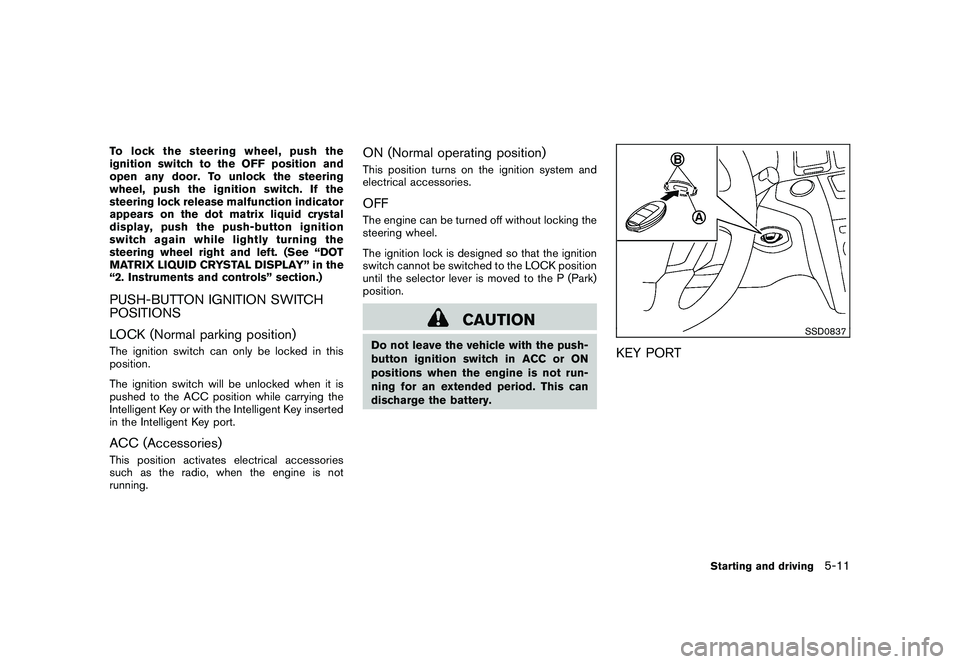
pushed to the ACC position while carrying the
Intelligent Key or with the Intelligent Key inserted
in the Intelligent Key port.ACC (Accessories)This position activates electrical accessories
such as the radio, when the engine is not
running.
ON (Normal operating position)This position turns on the ignition system and
electrical accessories.OFFThe engine can be turned off without locking the
steering wheel.
The ignition lock is designed so that the ignition
switch cannot be switched to the LOCK position
until the selector lever is moved to the P (Park)
position.
CAUTION
Do not leave the vehicle with the push-
button ignition switch in ACC or ON
positions when the engine is not run-
ning for an extended period. This can
discharge the battery.
SSD0837
KEY PORT
Starting and driving
5-11
Page 306 of 425
Black plate (302,1)
Model "Z51-D" EDITED: 2009/ 8/ 3
INTELLIGENT KEY BATTERY DIS-
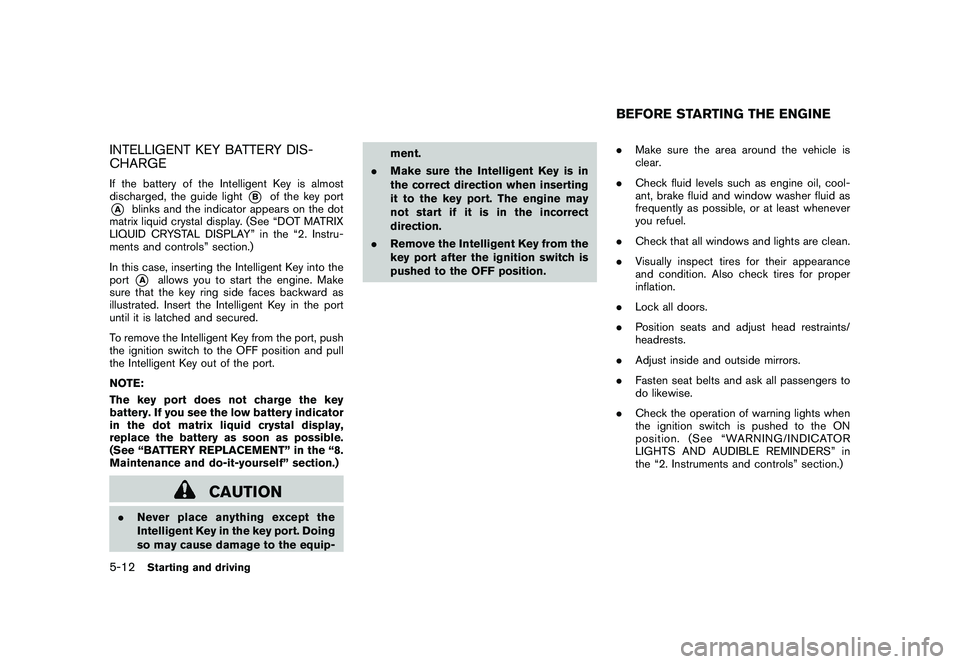
CHARGEIf the battery of the Intelligent Key is almost
discharged, the guide light
*B
of the key port
*A
blinks and the indicator appears on the dot
matrix liquid crystal display. (See “DOT MATRIX
LIQUID CRYSTAL DISPLAY” in the “2. Instru-
ments and controls” section.)
In this case, inserting the Intelligent Key into the
port*A
allows you to start the engine. Make
sure that the key ring side faces backward as
illustrated. Insert the Intelligent Key in the port
until it is latched and secured.
To remove the Intelligent Key from the port, push
the ignition switch to the OFF position and pull
the Intelligent Key out of the port.
NOTE:
The key port does not charge the key
battery. If you see the low battery indicator
in the dot matrix liquid crystal display,
replace the battery as soon as possible.
(See “BATTERY REPLACEMENT” in the “8.
Maintenance and do-it-yourself” section.)
CAUTION
. Never place anything except the
Intelligent Key in the key port. Doing
so may cause damage to the equip- ment.
. Make sure the Intelligent Key is in
the correct direction when inserting
it to the key port. The engine may
not start if it is in the incorrect
direction.
. Remove the Intelligent Key from the
key port after the ignition switch is
pushed to the OFF position. .
Make sure the area around the vehicle is
clear.
. Check fluid levels such as engine oil, cool-
ant, brake fluid and window washer fluid as
frequently as possible, or at least whenever
you refuel.
. Check that all windows and lights are clean.
. Visually inspect tires for their appearance
and condition. Also check tires for proper
inflation.
. Lock all doors.
. Position seats and adjust head restraints/
headrests.
. Adjust inside and outside mirrors.
. Fasten seat belts and ask all passengers to
do likewise.
. Check the operation of warning lights when
the ignition switch is pushed to the ON
position. (See “WARNING/INDICATOR
LIGHTS AND AUDIBLE REMINDERS” in
the “2. Instruments and controls” section.)
BEFORE STARTING THE ENGINE
5-12
Starting and driving
Page 417 of 425
Black plate (1,1)
10 Index
A
ABS (Anti-lock Braking System) .................. 5-26
Advanced air bag system ......................... 1-51
Air bag system Advanced air bag system ..................... 1-51
Front passenger air bag and status light .... 1-52
Front-seat mounted side-impact
supplemental air bag system .................. 1-55
Roof-mounted curtain side-impact and
rollover supplemental air bag system ......... 1-55
Air bag warning labels ............................. 1-58
Air bag warning light ....................... 1-58, 2-14
Air cleaner housing filter .......................... 8-16
Air conditioner Air conditioner operation ...................... 4-26
Air conditioner service ......................... 4-30
Air conditioner specification label ............ 9-10
Air conditioning system refrigerant and
lubricant recommendations .............. 4-30, 9-6
In-cabin microfilter ............................. 4-30
Alarm, How to stop alarm
(see vehicle security system) ..................... 2-27
Alcohol, drugs and driving .......................... 5-7
All-wheel drive (AWD) ............................. 5-21
All-wheel drive (AWD) warning light ............. 2-10
Antenna ............................................. 4-62
Anti-lock Braking System (ABS) .................. 5-26
Anti-lock braking system (ABS) warning light . . . 2-11
Appearance care Exterior appearance care ........................ 7-2
Interior appearance care ........................ 7-4
Armrest ............................................. 1-14 Ashtray (See cigarette lighter and ashtray)
...... 2-40
Audible reminders ................................. 2-16
Audio operation precautions ...................... 4-31
Audio system ....................................... 4-31
Steering wheel audio controls ................ 4-61
Auto closure ........................................ 3-22
Autochanger, Compact Disc (CD) ............... 4-41
Autolight system ................................... 2-33
Automatic Door locks ........................................ 3-6
Drive positioner ................................ 3-30
Seat positioner ................................. 3-30
Avoiding collision and rollover ...................... 5-5
B
Back door (See lift gate) .......................... 3-19
Battery .............................................. 8-13
Battery saver system .......................... 2-34
Keyfob battery replacement ................... 8-21
Variable voltage control system ............... 8-15
Before starting the engine ........................ 5-12
Bluetooth
®Hands-Free Phone System
(with navigation system) ........................... 4-75
Bluetooth®Hands-Free Phone System
(without navigation system) ....................... 4-85
Booster seats ...................................... 1-41
Brake Anti-lock Braking System (ABS) .............. 5-26
Brake fluid ...................................... 8-12
Brake system ................................... 5-25
Parking brake operation ....................... 5-17
Warning light ................................... 2-11 Break-in schedule
.................................. 5-20
Brightness control Display ON/OFF button ......................... 4-8
Instrument panel ............................... 2-35
Bulb check/instrument panel ...................... 2-10
Bulb replacement .................................. 8-24
C
Cabin air filter ...................................... 4-30
Capacities and recommended fuel/lubricants ..... 9-2
Car phone or CB radio ............................ 4-74
Cargo cover ........................................ 2-45
Cargo floor box .................................... 2-45
Cargo lights ........................................ 2-55
Catalytic converter, Three way catalyst ............ 5-2
CD/CF care and cleaning ......................... 4-59
Center multi-function control panel ................. 4-2
Child restraints ..................................... 1-26
Booster seats .................................. 1-41
Installation using LATCH ...................... 1-31
Installation using the seat belts ............... 1-35
LATCH system ................................. 1-28
Precautions on child restraints ................ 1-26
Top tether strap ................................ 1-29
Child safety ......................................... 1-17
Child safety rear door lock .......................... 3-7
Chimes, Audible reminders ....................... 2-16
Cigarette lighter and ashtray ...................... 2-40
Circuit breaker, Fusible link ....................... 8-20
Cleaning exterior and interior ................. 7-2, 7-4
Clock ............................................... 2-38
Coat hooks ......................................... 2-48
Model "Z51-D" EDITED: 2009/ 8/ 3
Page 418 of 425
Black plate (2,1)
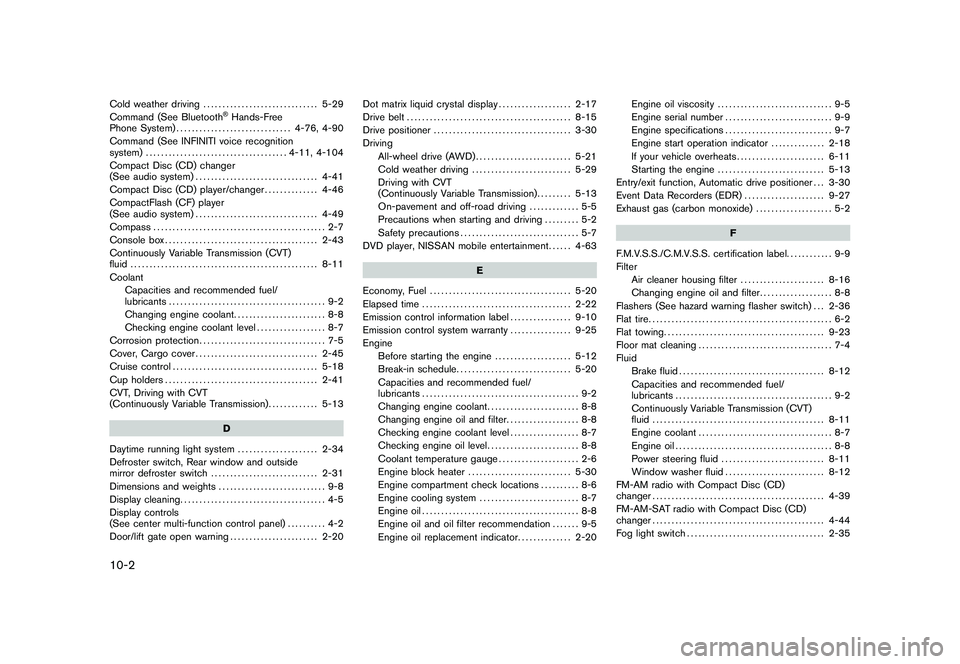
10-2Cold weather driving.............................. 5-29
Command (See Bluetooth
®Hands-Free
Phone System) .............................. 4-76, 4-90
Command (See INFINITI voice recognition
system) ..................................... 4-11, 4-104
Compact Disc (CD) changer
(See audio system) ................................ 4-41
Compact Disc (CD) player/changer .............. 4-46
CompactFlash (CF) player
(See audio system) ................................ 4-49
Compass ............................................. 2-7
Console box ........................................ 2-43
Continuously Variable Transmission (CVT)
fluid ................................................. 8-11
Coolant Capacities and recommended fuel/
lubricants ......................................... 9-2
Changing engine coolant ........................ 8-8
Checking engine coolant level .................. 8-7
Corrosion protection ................................. 7-5
Cover, Cargo cover ................................ 2-45
Cruise control ...................................... 5-18
Cup holders ........................................ 2-41
CVT, Driving with CVT
(Continuously Variable Transmission) ............. 5-13
D
Daytime running light system ..................... 2-34
Defroster switch, Rear window and outside
mirror defroster switch ............................ 2-31
Dimensions and weights ............................ 9-8
Display cleaning ...................................... 4-5
Display controls
(See center multi-function control panel) .......... 4-2
Door/lift gate open warning ....................... 2-20 Dot matrix liquid crystal display
................... 2-17
Drive belt ........................................... 8-15
Drive positioner .................................... 3-30
Driving All-wheel drive (AWD) ......................... 5-21
Cold weather driving .......................... 5-29
Driving with CVT
(Continuously Variable Transmission) ......... 5-13
On-pavement and off-road driving ............. 5-5
Precautions when starting and driving ......... 5-2
Safety precautions ............................... 5-7
DVD player, NISSAN mobile entertainment ...... 4-63
E
Economy, Fuel ..................................... 5-20
Elapsed time ....................................... 2-22
Emission control information label ................ 9-10
Emission control system warranty ................ 9-25
Engine Before starting the engine .................... 5-12
Break-in schedule .............................. 5-20
Capacities and recommended fuel/
lubricants ......................................... 9-2
Changing engine coolant ........................ 8-8
Changing engine oil and filter ................... 8-8
Checking engine coolant level .................. 8-7
Checking engine oil level ........................ 8-8
Coolant temperature gauge ..................... 2-6
Engine block heater ........................... 5-30
Engine compartment check locations .......... 8-6
Engine cooling system .......................... 8-7
Engine oil ......................................... 8-8
Engine oil and oil filter recommendation ....... 9-5
Engine oil replacement indicator .............. 2-20Engine oil viscosity
.............................. 9-5
Engine serial number ............................ 9-9
Engine specifications ............................ 9-7
Engine start operation indicator .............. 2-18
If your vehicle overheats ....................... 6-11
Starting the engine ............................ 5-13
Entry/exit function, Automatic drive positioner . . . 3-30
Event Data Recorders (EDR) ..................... 9-27
Exhaust gas (carbon monoxide) .................... 5-2
F
F.M.V.S.S./C.M.V.S.S. certification label. ........... 9-9
Filter Air cleaner housing filter ...................... 8-16
Changing engine oil and filter ................... 8-8
Flashers (See hazard warning flasher switch) . . . 2-36
Flat tire ................................................ 6-2
Flat towing .......................................... 9-23
Floor mat cleaning ................................... 7-4
Fluid Brake fluid ...................................... 8-12
Capacities and recommended fuel/
lubricants ......................................... 9-2
Continuously Variable Transmission (CVT)
fluid ............................................. 8-11
Engine coolant ................................... 8-7
Engine oil ......................................... 8-8
Power steering fluid ........................... 8-11
Window washer fluid .......................... 8-12
FM-AM radio with Compact Disc (CD)
changer ............................................. 4-39
FM-AM-SAT radio with Compact Disc (CD)
changer ............................................. 4-44
Fog light switch .................................... 2-35
Model "Z51-D" EDITED: 2009/ 8/ 3
Page 419 of 425
Black plate (3,1)
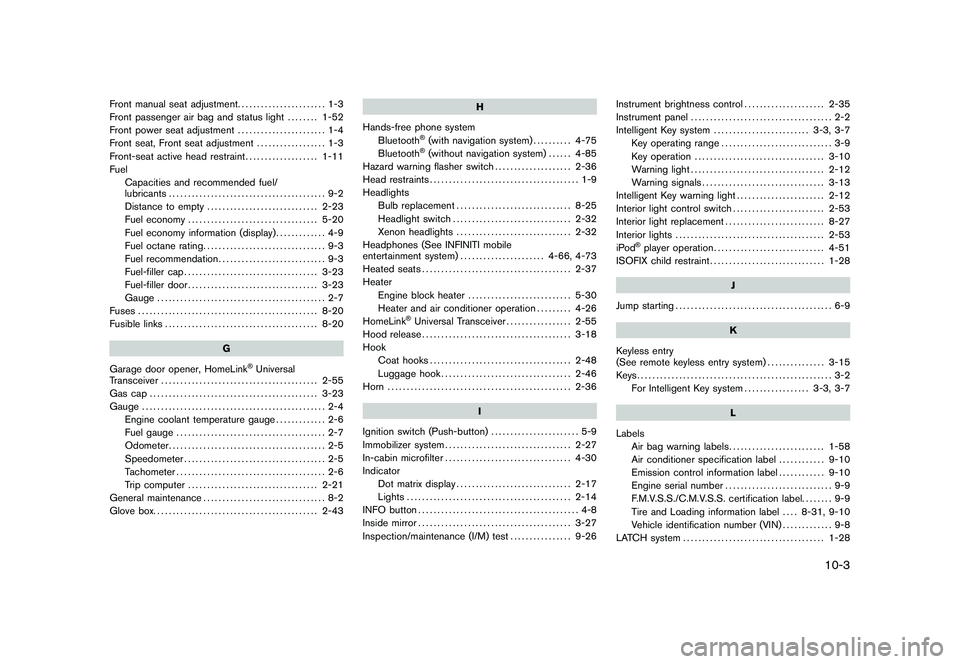
Front manual seat adjustment....................... 1-3
Front passenger air bag and status light ........ 1-52
Front power seat adjustment ....................... 1-4
Front seat, Front seat adjustment .................. 1-3
Front-seat active head restraint ................... 1-11
Fuel Capacities and recommended fuel/
lubricants ......................................... 9-2
Distance to empty ............................. 2-23
Fuel economy .................................. 5-20
Fuel economy information (display) ............. 4-9
Fuel octane rating ................................ 9-3
Fuel recommendation ............................ 9-3
Fuel-filler cap ................................... 3-23
Fuel-filler door .................................. 3-23
Gauge ............................................ 2-7
Fuses ............................................... 8-20
Fusible links ........................................ 8-20
G
Garage door opener, HomeLink
®Universal
Transceiver ......................................... 2-55
Gas cap ............................................ 3-23
Gauge ................................................ 2-4
Engine coolant temperature gauge ............. 2-6
Fuel gauge ....................................... 2-7
Odometer ......................................... 2-5
Speedometer ..................................... 2-5
Tachometer ....................................... 2-6
Trip computer .................................. 2-21
General maintenance ................................ 8-2
Glove box. .......................................... 2-43 H
Hands-free phone system Bluetooth
®(with navigation system) .......... 4-75
Bluetooth®(without navigation system) ...... 4-85
Hazard warning flasher switch .................... 2-36
Head restraints ....................................... 1-9
Headlights Bulb replacement .............................. 8-25
Headlight switch ............................... 2-32
Xenon headlights .............................. 2-32
Headphones (See INFINITI mobile
entertainment system) ...................... 4-66, 4-73
Heated seats ....................................... 2-37
Heater Engine block heater ........................... 5-30
Heater and air conditioner operation ......... 4-26
HomeLink
®Universal Transceiver ................. 2-55
Hood release ....................................... 3-18
Hook Coat hooks ..................................... 2-48
Luggage hook .................................. 2-46
Horn ................................................ 2-36
I
Ignition switch (Push-button) ....................... 5-9
Immobilizer system ................................. 2-27
In-cabin microfilter ................................. 4-30
Indicator Dot matrix display .............................. 2-17
Lights ........................................... 2-14
INFO button .......................................... 4-8
Inside mirror ........................................ 3-27
Inspection/maintenance (I/M) test ................ 9-26Instrument brightness control
..................... 2-35
Instrument panel ..................................... 2-2
Intelligent Key system ......................... 3-3, 3-7
Key operating range ............................. 3-9
Key operation .................................. 3-10
Warning light ................................... 2-12
Warning signals ................................ 3-13
Intelligent Key warning light ....................... 2-12
Interior light control switch ........................ 2-53
Interior light replacement .......................... 8-27
Interior lights ....................................... 2-53
iPod
®player operation ............................. 4-51
ISOFIX child restraint .............................. 1-28
J
Jump starting ......................................... 6-9
K
Keyless entry
(See remote keyless entry system) ............... 3-15
Keys................................................... 3-2 For Intelligent Key system ................. 3-3, 3-7
L
Labels Air bag warning labels ......................... 1-58
Air conditioner specification label ............ 9-10
Emission control information label ............ 9-10
Engine serial number ............................ 9-9
F.M.V.S.S./C.M.V.S.S. certification label. ....... 9-9
Tire and Loading information label .... 8-31, 9-10
Vehicle identification number (VIN) ............. 9-8
LATCH system ..................................... 1-28
10-3
Model "Z51-D" EDITED: 2009/ 8/ 3