display NISSAN MURANO 2010 Owner´s Manual
[x] Cancel search | Manufacturer: NISSAN, Model Year: 2010, Model line: MURANO, Model: NISSAN MURANO 2010Pages: 425, PDF Size: 3.62 MB
Page 248 of 425
Black plate (244,1)
Model "Z51-D" EDITED: 2009/ 8/ 3
— Your vehicle is outside of the telephoneservice area.
— Your vehicle is in an area where it is difficult to receive radio waves; such as in
a tunnel, in an underground parking
garage, behind a tall building or in a
mountainous area.
— Your cellular phone is locked in order not to be dialed.
. When the radio wave condition is not ideal
or ambient sound is too loud, it may be
difficult to hear the other person’s voice
during a call.
. Immediatelyaftertheignitionswitchis
pushed to the ON position, it may be
impossible to receive a call for a short
period of time.
. Do not place the cellular phone in an area
surrounded by metal or far away from the in-
vehicle phone module to prevent tone quality
degradation and wireless connection dis-
ruption.
. While a cellular phone is connected through
the Bluetooth
®wireless connection, the
battery power of the cellular phone may
discharge quicker than usual.
. If the Bluetooth®Hands-Free Phone System
seems to be malfunctioning, please visit www.nissanusa.com/bluetooth for trouble-
shooting help.
. Some cellular phones or other devices may
cause interference or a buzzing noise to
come from the audio system speakers.
Storing the device in a different location
may reduce or eliminate the noise.
. Refer to the cellular phone Owner’s Manual
regarding the telephone pairing procedure
specific to your phone, battery charging,
cellular phone antenna, etc.
. The antenna display on the monitor will not
coincide with the antenna display of some
cellular phones.
. Keep the interior of the vehicle as quiet as
possible to hear the caller’s voice clearly as
well as to minimize its echoes.
. If reception between callers is unclear,
adjusting the incoming or outgoing call
volume may improve the clarity.
REGULATORY INFORMATION
FCC Regulatory information— CAUTION: To maintain compliance with
FCC’s RF exposure guidelines, use only
the supplied antenna. Unauthorized antenna,
modification, or attachments could damage
the transmitter and may violate FCC regula-
tions. — Operation is subject to the following two
conditions:
1) this device may not cause interference and
2) this device must accept any interference, including interference that may cause un-
desired operation of the device
IC Regulatory information— Operation is subject to the following twoconditions: (1) this device may not cause
interference, and (2) this device must accept
any interference, including interference that
may cause undesired operation of the
device.
— This Class B digital apparatus meets all requirements of the Canadian Interference-
Causing Equipment Regulations.
Bluetooth trademark:
BLUETOOTH
®is a trademark
owned by Bluetooth SIG, Inc.,
U.S.A.
VOICE COMMANDSYou can use voice commands to operate various
Bluetooth
®Hands-Free Phone System features
using the NISSAN Voice Recognition system.
For more details, see “NISSAN VOICE RE-
COGNITION SYSTEM (models with navigation
4-76
Monitor, heater, air conditioner, audio, phone and voice recognition systems
Page 249 of 425
Black plate (245,1)
Model "Z51-D" EDITED: 2009/ 8/ 3
system)” later in this section; page 4-99.
SAA1857
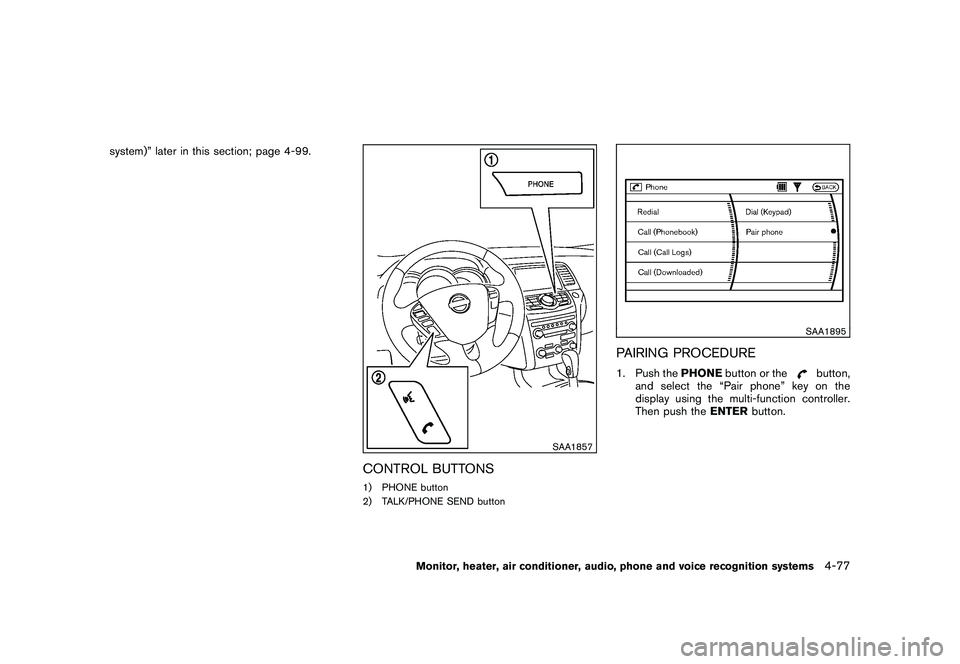
CONTROL BUTTONS1) PHONE button
2) TALK/PHONE SEND button
SAA1895
PAIRING PROCEDURE1. Push thePHONEbutton or the
button,
and select the “Pair phone” key on the
display using the multi-function controller.
Then push the ENTERbutton.
Monitor, heater, air conditioner, audio, phone and voice recognition systems
4-77
Page 250 of 425
Black plate (246,1)
Model "Z51-D" EDITED: 2009/ 8/ 3
SAA1572
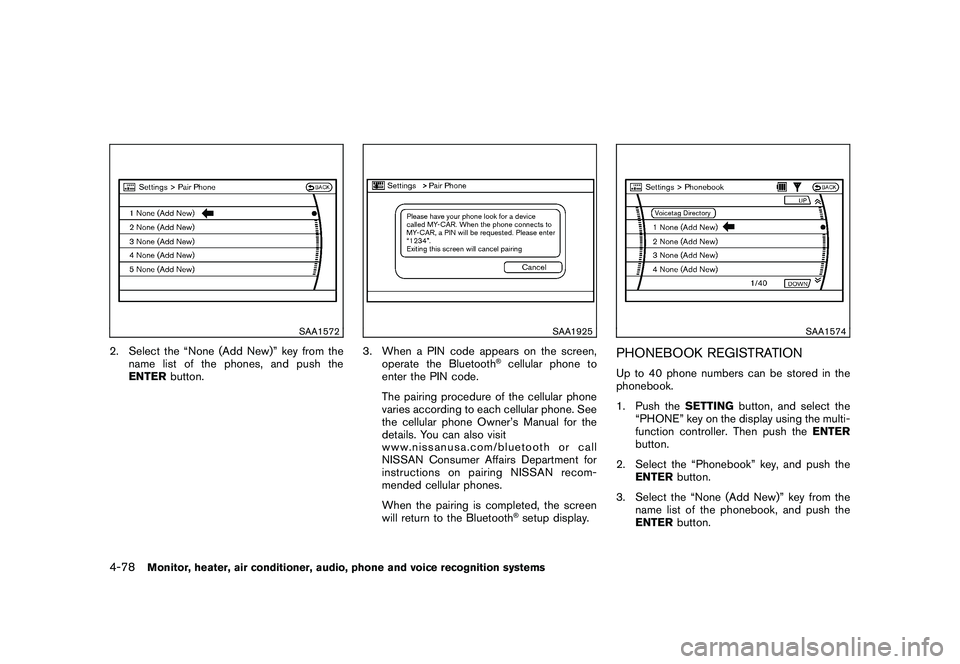
2. Select the “None (Add New)” key from thename list of the phones, and push the
ENTER button.
SAA1925
3. When a PIN code appears on the screen,
operate the Bluetooth
®cellular phone to
enter the PIN code.
The pairing procedure of the cellular phone
varies according to each cellular phone. See
the cellular phone Owner’s Manual for the
details. You can also visit
www.nissanusa.com/bluetooth or call
NISSAN Consumer Affairs Department for
instructions on pairing NISSAN recom-
mended cellular phones.
When the pairing is completed, the screen
will return to the Bluetooth®setup display.
SAA1574
PHONEBOOK REGISTRATIONUp to 40 phone numbers can be stored in the
phonebook.
1. Push the SETTINGbutton, and select the
“PHONE” key on the display using the multi-
function controller. Then push the ENTER
button.
2. Select the “Phonebook” key, and push the ENTER button.
3. Select the “None (Add New)” key from the name list of the phonebook, and push the
ENTER button.
4-78
Monitor, heater, air conditioner, audio, phone and voice recognition systems
Page 251 of 425
Black plate (247,1)
Model "Z51-D" EDITED: 2009/ 8/ 3
SAA1575
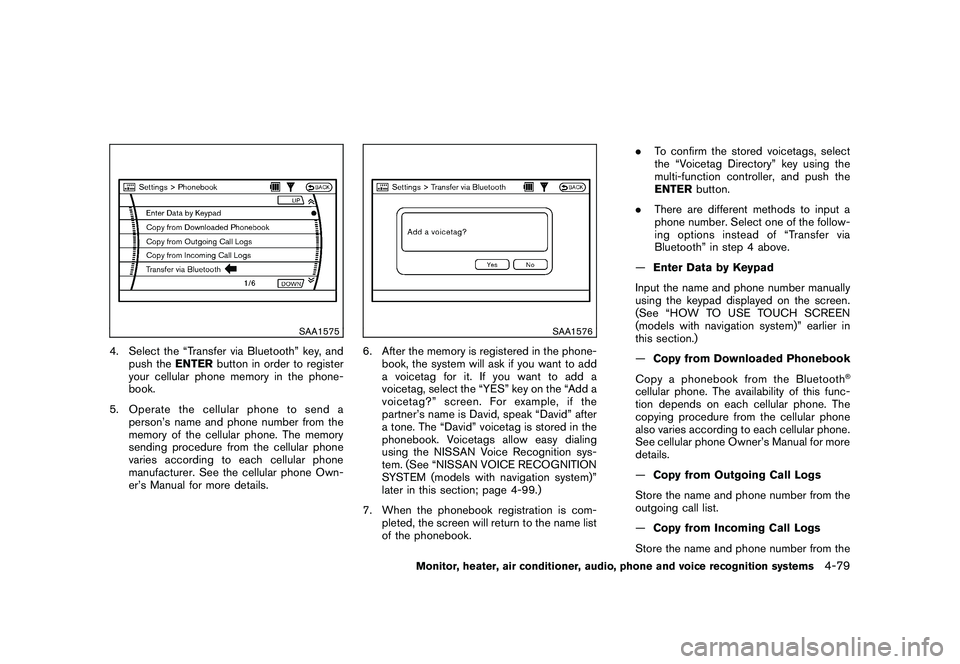
4. Select the “Transfer via Bluetooth” key, andpush the ENTERbutton in order to register
your cellular phone memory in the phone-
book.
5. Operate the cellular phone to send a person’s name and phone number from the
memory of the cellular phone. The memory
sending procedure from the cellular phone
varies according to each cellular phone
manufacturer. See the cellular phone Own-
er’s Manual for more details.
SAA1576
6. After the memory is registered in the phone-book, the system will ask if you want to add
a voicetag for it. If you want to add a
voicetag, select the “YES” key on the “Add a
voicetag?” screen. For example, if the
partner’s name is David, speak “David” after
a tone. The “David” voicetag is stored in the
phonebook. Voicetags allow easy dialing
using the NISSAN Voice Recognition sys-
tem. (See “NISSAN VOICE RECOGNITION
SYSTEM (models with navigation system)”
later in this section; page 4-99.)
7. When the phonebook registration is com- pleted, the screen will return to the name list
of the phonebook. .
To confirm the stored voicetags, select
the “Voicetag Directory” key using the
multi-function controller, and push the
ENTER button.
. There are different methods to input a
phone number. Select one of the follow-
ing options instead of “Transfer via
Bluetooth” in step 4 above.
— Enter Data by Keypad
Input the name and phone number manually
using the keypad displayed on the screen.
(See “HOW TO USE TOUCH SCREEN
(models with navigation system)” earlier in
this section.)
— Copy from Downloaded Phonebook
Copy a phonebook from the Bluetooth
®
cellular phone. The availability of this func-
tion depends on each cellular phone. The
copying procedure from the cellular phone
also varies according to each cellular phone.
See cellular phone Owner’s Manual for more
details.
— Copy from Outgoing Call Logs
Store the name and phone number from the
outgoing call list.
— Copy from Incoming Call Logs
Store the name and phone number from the
Monitor, heater, air conditioner, audio, phone and voice recognition systems
4-79
Page 252 of 425
Black plate (248,1)
Model "Z51-D" EDITED: 2009/ 8/ 3
incoming call list.
—Delete
Delete a contact that is registered in the
phonebook.
SAA1895
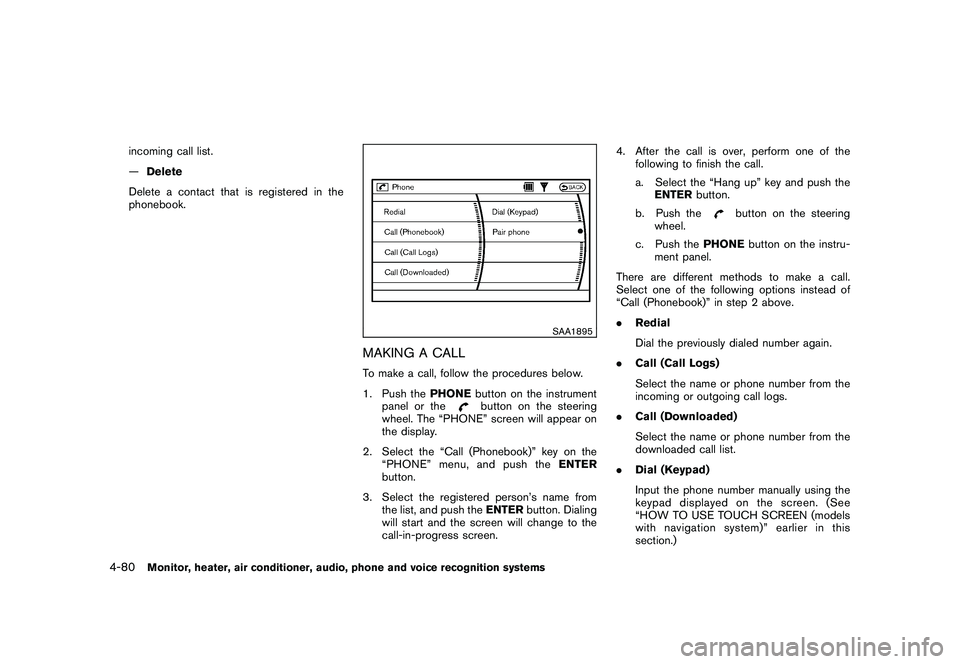
MAKING A CALLTo make a call, follow the procedures below.
1. Push the PHONEbutton on the instrument
panel or the
button on the steering
wheel. The “PHONE” screen will appear on
the display.
2. Select the “Call (Phonebook)” key on the “PHONE” menu, and push the ENTER
button.
3. Select the registered person’s name from the list, and push the ENTERbutton. Dialing
will start and the screen will change to the
call-in-progress screen. 4. After the call is over, perform one of the
following to finish the call.
a. Select the “Hang up” key and push theENTER button.
b. Push the
button on the steering
wheel.
c. Push the PHONEbutton on the instru-
ment panel.
There are different methods to make a call.
Select one of the following options instead of
“Call (Phonebook)” in step 2 above.
. Redial
Dial the previously dialed number again.
. Call (Call Logs)
Select the name or phone number from the
incoming or outgoing call logs.
. Call (Downloaded)
Select the name or phone number from the
downloaded call list.
. Dial (Keypad)
Input the phone number manually using the
keypad displayed on the screen. (See
“HOW TO USE TOUCH SCREEN (models
with navigation system)” earlier in this
section.)
4-80
Monitor, heater, air conditioner, audio, phone and voice recognition systems
Page 253 of 425
Black plate (249,1)
Model "Z51-D" EDITED: 2009/ 8/ 3
SAA1578
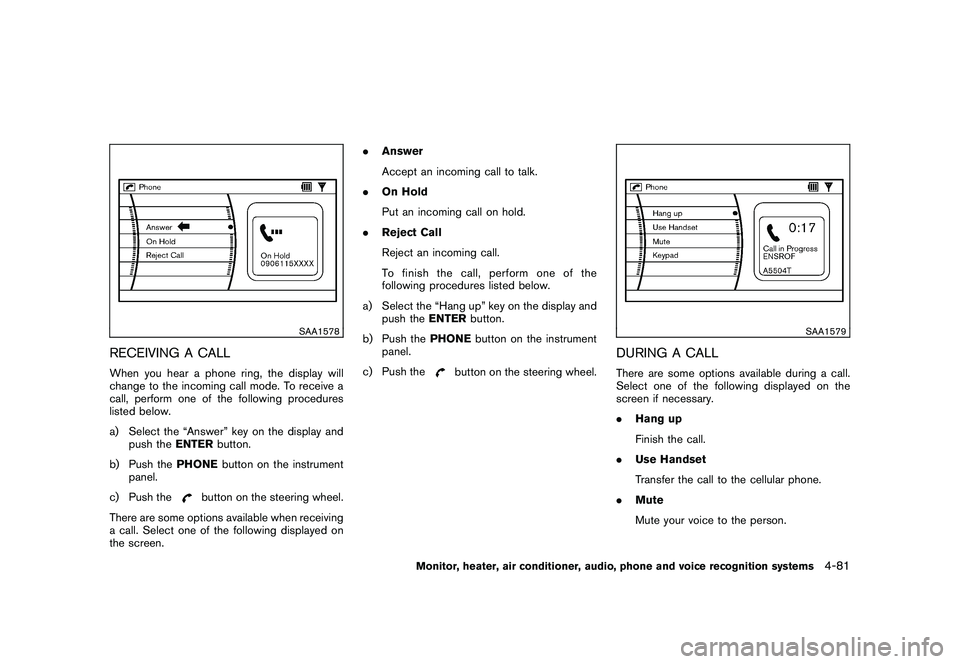
RECEIVING A CALLWhen you hear a phone ring, the display will
change to the incoming call mode. To receive a
call, perform one of the following procedures
listed below.
a) Select the “Answer” key on the display andpush the ENTERbutton.
b) Push the PHONEbutton on the instrument
panel.
c) Push the
button on the steering wheel.
There are some options available when receiving
a call. Select one of the following displayed on
the screen. .
Answer
Accept an incoming call to talk.
. On Hold
Put an incoming call on hold.
. Reject Call
Reject an incoming call.
To finish the call, perform one of the
following procedures listed below.
a) Select the “Hang up” key on the display and push the ENTERbutton.
b) Push the PHONEbutton on the instrument
panel.
c) Push the
button on the steering wheel.
SAA1579
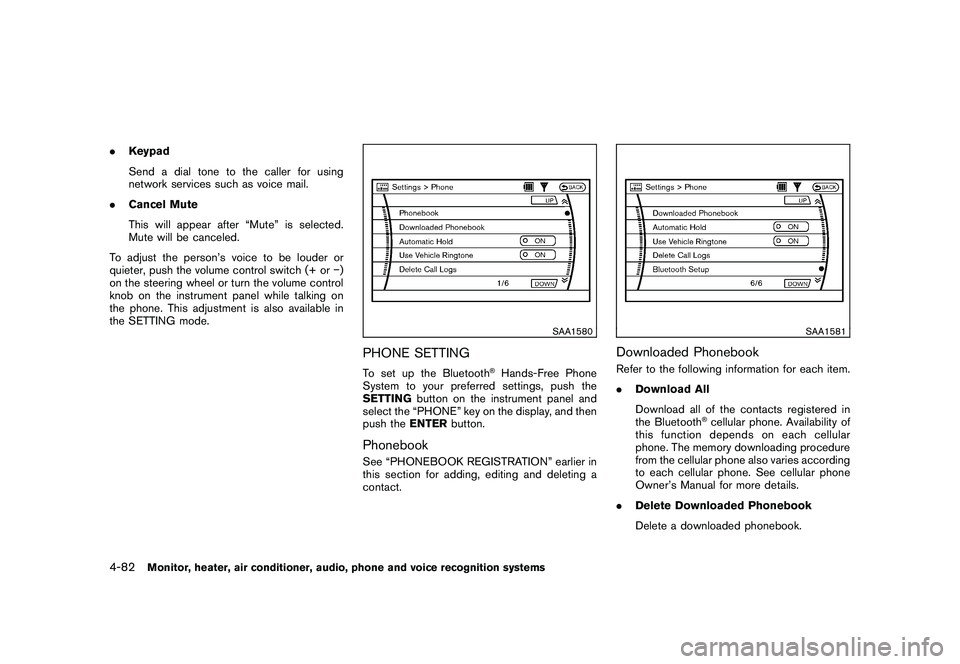
DURING A CALLThere are some options available during a call.
Select one of the following displayed on the
screen if necessary.
. Hang up
Finish the call.
. Use Handset
Transfer the call to the cellular phone.
. Mute
Mute your voice to the person.
Monitor, heater, air conditioner, audio, phone and voice recognition systems
4-81
Page 254 of 425
Black plate (250,1)
Model "Z51-D" EDITED: 2009/ 8/ 3
.Keypad
Send a dial tone to the caller for using
network services such as voice mail.
. Cancel Mute
This will appear after “Mute” is selected.
Mute will be canceled.
To adjust the person’s voice to be louder or
quieter, push the volume control switch (+ or )
on the steering wheel or turn the volume control
knob on the instrument panel while talking on
the phone. This adjustment is also available in
the SETTING mode.
SAA1580
PHONE SETTINGTo set up the Bluetooth
®Hands-Free Phone
System to your preferred settings, push the
SETTING button on the instrument panel and
select the “PHONE” key on the display, and then
push the ENTERbutton.
PhonebookSee “PHONEBOOK REGISTRATION” earlier in
this section for adding, editing and deleting a
contact.
SAA1581
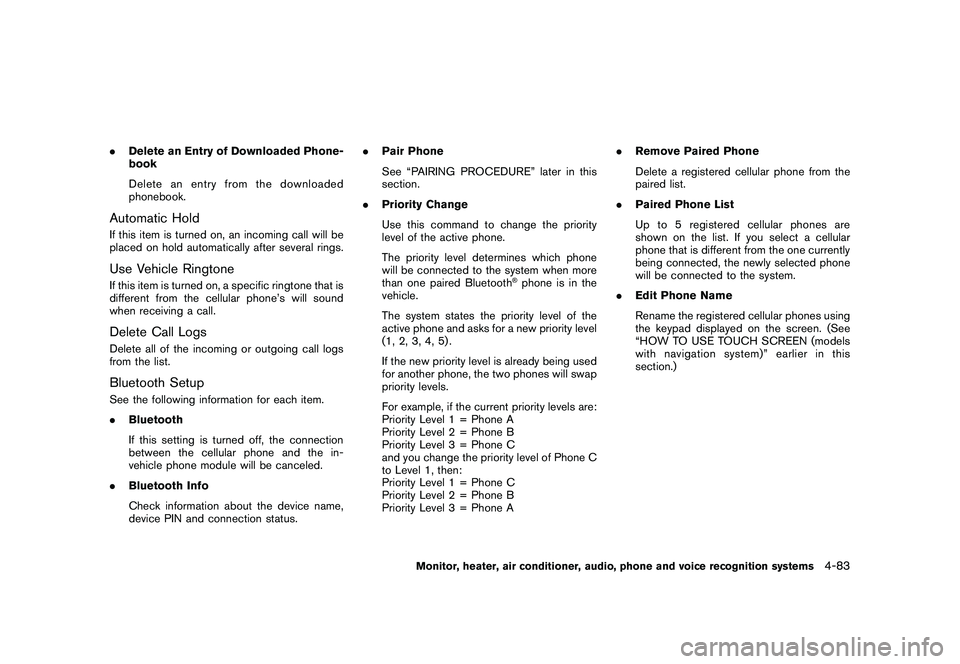
Downloaded PhonebookRefer to the following information for each item.
.Download All
Download all of the contacts registered in
the Bluetooth
®cellular phone. Availability of
this function depends on each cellular
phone. The memory downloading procedure
from the cellular phone also varies according
to each cellular phone. See cellular phone
Owner’s Manual for more details.
. Delete Downloaded Phonebook
Delete a downloaded phonebook.
4-82
Monitor, heater, air conditioner, audio, phone and voice recognition systems
Page 255 of 425
Black plate (251,1)
Model "Z51-D" EDITED: 2009/ 8/ 3
.Delete an Entry of Downloaded Phone-
book
Delete an entry from the downloaded
phonebook.Automatic HoldIf this item is turned on, an incoming call will be
placed on hold automatically after several rings.Use Vehicle RingtoneIf this item is turned on, a specific ringtone that is
different from the cellular phone’s will sound
when receiving a call.Delete Call LogsDelete all of the incoming or outgoing call logs
from the list.Bluetooth SetupSee the following information for each item.
.Bluetooth
If this setting is turned off, the connection
between the cellular phone and the in-
vehicle phone module will be canceled.
. Bluetooth Info
Check information about the device name,
device PIN and connection status. .
Pair Phone
See “PAIRING PROCEDURE” later in this
section.
. Priority Change
Use this command to change the priority
level of the active phone.
The priority level determines which phone
will be connected to the system when more
than one paired Bluetooth
®phone is in the
vehicle.
The system states the priority level of the
active phone and asks for a new priority level
(1, 2, 3, 4, 5) .
If the new priority level is already being used
for another phone, the two phones will swap
priority levels.
For example, if the current priority levels are:
Priority Level 1 = Phone A
Priority Level 2 = Phone B
Priority Level 3 = Phone C
and you change the priority level of Phone C
to Level 1, then:
Priority Level 1 = Phone C
Priority Level 2 = Phone B
Priority Level 3 = Phone A .
Remove Paired Phone
Delete a registered cellular phone from the
paired list.
. Paired Phone List
Up to 5 registered cellular phones are
shown on the list. If you select a cellular
phone that is different from the one currently
being connected, the newly selected phone
will be connected to the system.
. Edit Phone Name
Rename the registered cellular phones using
the keypad displayed on the screen. (See
“HOW TO USE TOUCH SCREEN (models
with navigation system)” earlier in this
section.)
Monitor, heater, air conditioner, audio, phone and voice recognition systems
4-83
Page 258 of 425
Black plate (254,1)
Model "Z51-D" EDITED: 2009/ 8/ 3
.Some cellular phones or other devices may
cause interference or a buzzing noise to
come from the audio system speakers.
Storing the device in a different location
may reduce or eliminate the noise.
. Refer to the cellular phone Owner’s Manual
regarding the telephone pairing procedure
specific to your phone, battery charging,
cellular phone antenna, etc.
. The antenna display on the monitor will not
coincide with the antenna display of some
cellular phones.
. Keep the interior of the vehicle as quiet as
possible to hear the caller’s voice clearly as
well as to minimize its echoes.
. If reception between callers is unclear,
adjusting the incoming or outgoing call
volume may improve the clarity.REGULATORY INFORMATION
FCC Regulatory information— CAUTION: To maintain compliance with
FCC’s RF exposure guidelines, use only
the supplied antenna. Unauthorized antenna,
modification, or attachments could damage
the transmitter and may violate FCC regula-
tions.
— Operation is subject to the following two conditions: 1) this device may not cause interference and
2) this device must accept any interference,
including interference that may cause un-
desired operation of the device
IC Regulatory information— Operation is subject to the following twoconditions: (1) this device may not cause
interference, and (2) this device must accept
any interference, including interference that
may cause undesired operation of the
device.
— This Class B digital apparatus meets all requirements of the Canadian Interference-
Causing Equipment Regulations.
Bluetooth trademark:
BLUETOOTH
®is a trademark
owned by Bluetooth SIG, Inc.,
U.S.A.
INITIALIZATIONWhen the ignition switch is pushed to the ON
position, NISSAN Voice Recognition is initia-
lized, which takes a few seconds. If thebutton is pushed before the initialization com-
pletes, the system will announce “Hands-free
phone system not ready” and will not react to
voice commands.
OPERATING TIPSTo get the best performance out of the NISSAN
Voice Recognition system, observe the follow-
ing:
. Keep the interior of the vehicle as quiet as
possible. Close the windows to eliminate
surrounding noises (traffic noises, vibration
sounds, etc.) , which may prevent the system
from recognizing voice commands correctly.
. Wait until the tone sounds before speaking a
command. Otherwise, the command will not
be received properly.
. Start speaking a command within 5 seconds
after the tone sounds.
. Speak in a natural voice without pausing
between words.GIVING VOICE COMMANDSTo operate NISSAN Voice Recognition, push
and release the
button located on the
steering wheel. After the tone sounds, speak a
command.
Thecommandgivenispickedupbythe
microphone, and voice feedback is given when
the command is accepted.
. If you need to hear the available commands
for the current menu again, say “Help” and
the system will repeat them.
4-86
Monitor, heater, air conditioner, audio, phone and voice recognition systems
Page 271 of 425
Black plate (267,1)
Model "Z51-D" EDITED: 2009/ 8/ 3
NISSAN Voice Recognition allows hands-free
operation of the systems equipped on this
vehicle in one of two modes, Standard Mode
or Alternate Command Mode.
In Standard Mode, commands that are available
are always shown on the display and announced
by the system. You can complete your desired
operation by simply following the prompts given
by the system. (See “NISSAN VOICE RECOG-
NITION STANDARD MODE” later in this section
for details.) In this mode, hands-free operation of
Audio, Air Conditioner and Display is not
available through NISSAN Voice Recognition.
For advanced operation, you can use the
Alternate Command Mode that enables the
operation of the display, audio, and air condi-
tioner through NISSAN Voice Recognition. (See
“NISSAN VOICE RECOGNITION ALTERNATE
COMMAND MODE” later in this section for
details.) When this mode is active, an expanded
list of commands can be spoken after pushing
the TALK
switch, and the voice command
menu prompts are turned off. Note that in this
mode the recognition success rate may be
affected as the number of available commands
and the ways of speaking each command are
increased.
For U.S. customers, the Standard Mode is
selected by default. For Canadian customers,
the Alternate Command Mode is the default
mode. To switch one mode to another, see each mode description later in this section.
To improve the recognition success rate when
Alternate Command Mode is active, try using the
Speaker Adaptation Function available in that
mode. Otherwise, it is recommended that
Alternate Command Mode be turned off and
Standard Mode be used for the best recognition
performance.
For the voice commands for the navigation
system, refer to the Navigation System Owner’s
Manual of your vehicle.
NISSAN VOICE RECOGNITION
STANDARD MODEThe following section is applicable when the
Standard Mode is activated. (This mode is
selected by default for U.S. customers.)
The Standard Mode enables you to complete
the desired operation by simply following the
prompts that appear on the display and also are
announced by the system. Hands-free operation
of Audio, Air Conditioner and Display systems is
not available in this mode.
SAA1566
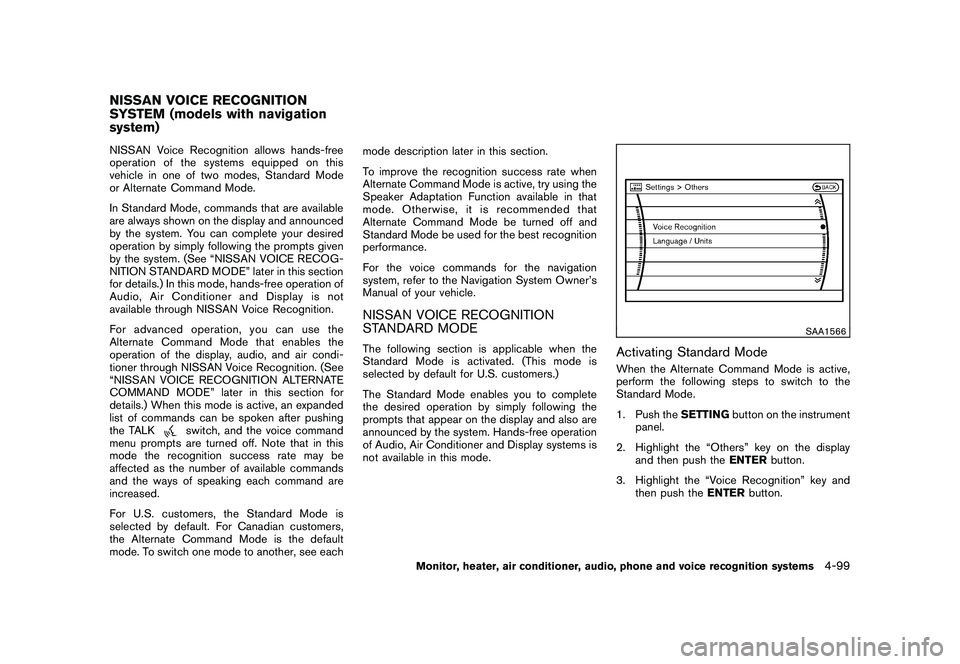
Activating Standard ModeWhen the Alternate Command Mode is active,
perform the following steps to switch to the
Standard Mode.
1. Push the
SETTINGbutton on the instrument
panel.
2. Highlight the “Others” key on the display and then push the ENTERbutton.
3. Highlight the “Voice Recognition” key and then push the ENTERbutton.
NISSAN VOICE RECOGNITION
SYSTEM (models with navigation
system)
Monitor, heater, air conditioner, audio, phone and voice recognition systems
4-99