wheel NISSAN MURANO 2010 Owner´s Manual
[x] Cancel search | Manufacturer: NISSAN, Model Year: 2010, Model line: MURANO, Model: NISSAN MURANO 2010Pages: 425, PDF Size: 3.62 MB
Page 194 of 425
Black plate (190,1)
Model "Z51-D" EDITED: 2009/ 8/ 3
SAA1898
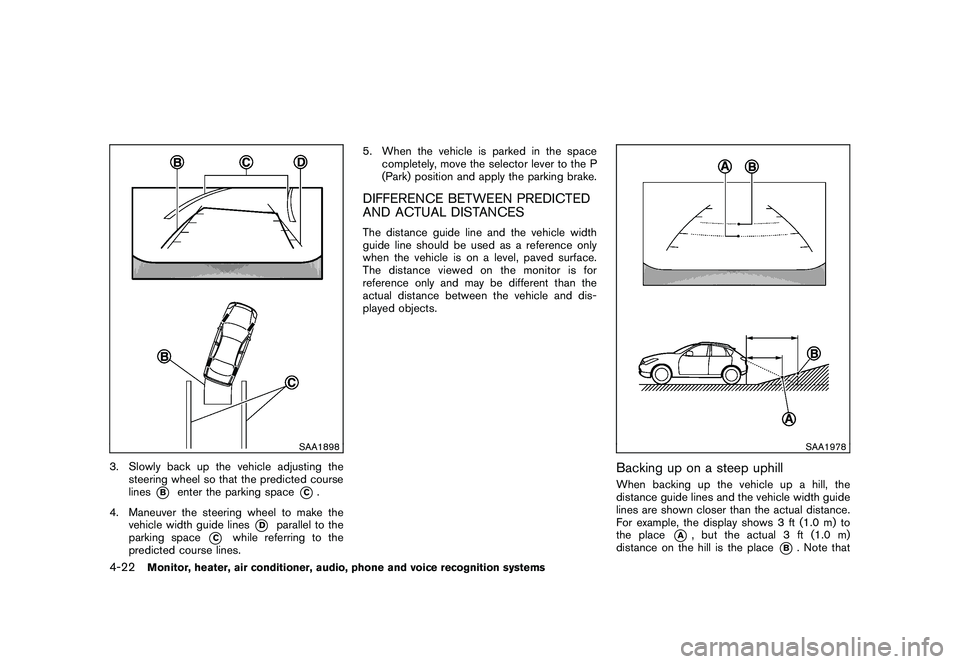
3. Slowly back up the vehicle adjusting thesteering wheel so that the predicted course
lines
*B
enter the parking space
*C.
4. Maneuver the steering wheel to make the vehicle width guide lines
*D
parallel to the
parking space
*C
while referring to the
predicted course lines. 5. When the vehicle is parked in the space
completely, move the selector lever to the P
(Park) position and apply the parking brake.
DIFFERENCE BETWEEN PREDICTED
AND ACTUAL DISTANCESThe distance guide line and the vehicle width
guide line should be used as a reference only
when the vehicle is on a level, paved surface.
The distance viewed on the monitor is for
reference only and may be different than the
actual distance between the vehicle and dis-
played objects.
SAA1978
Backing up on a steep uphillWhen backing up the vehicle up a hill, the
distance guide lines and the vehicle width guide
lines are shown closer than the actual distance.
For example, the display shows 3 ft (1.0 m) to
the place
*A
, but the actual 3 ft (1.0 m)
distance on the hill is the place
*B. Note that
4-22
Monitor, heater, air conditioner, audio, phone and voice recognition systems
Page 226 of 425
Black plate (222,1)
Model "Z51-D" EDITED: 2009/ 8/ 3
SAA1615
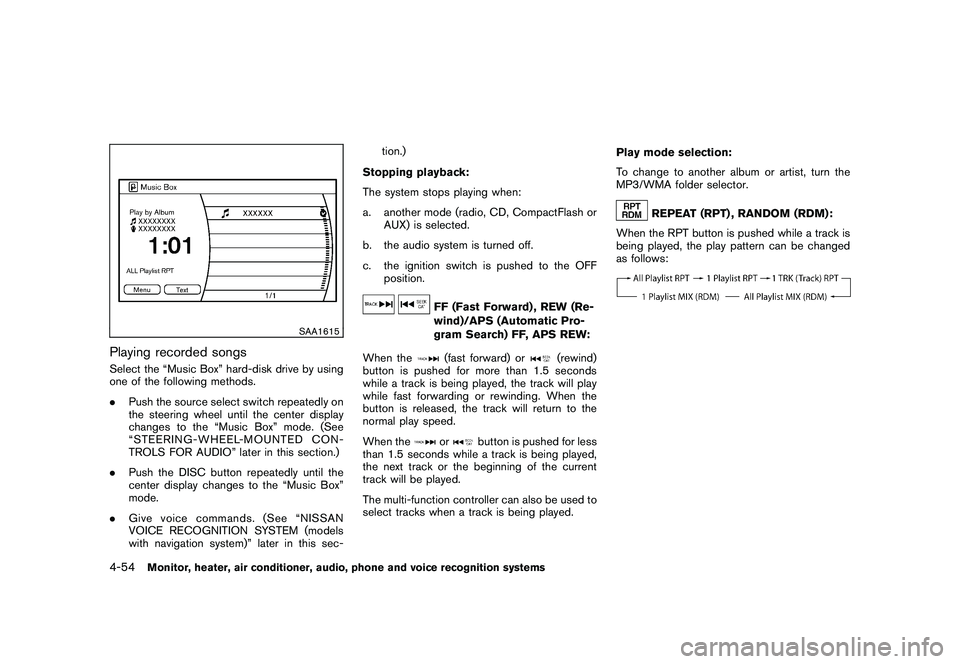
Playing recorded songsSelect the “Music Box” hard-disk drive by using
one of the following methods.
.Push the source select switch repeatedly on
the steering wheel until the center display
changes to the “Music Box” mode. (See
“STEERING-WHEEL-MOUNTED CON-
TROLS FOR AUDIO” later in this section.)
. Push the DISC button repeatedly until the
center display changes to the “Music Box”
mode.
. Give voice commands. (See “NISSAN
VOICE RECOGNITION SYSTEM (models
with navigation system)” later in this sec- tion.)
Stopping playback:
The system stops playing when:
a. another mode (radio, CD, CompactFlash or AUX) is selected.
b. the audio system is turned off.
c. the ignition switch is pushed to the OFF position.
FF (Fast Forward) , REW (Re-
wind)/APS (Automatic Pro-
gram Search) FF, APS REW:
When the(fast forward) or
(rewind)
button is pushed for more than 1.5 seconds
while a track is being played, the track will play
while fast forwarding or rewinding. When the
button is released, the track will return to the
normal play speed.
When the
or
button is pushed for less
than 1.5 seconds while a track is being played,
the next track or the beginning of the current
track will be played.
The multi-function controller can also be used to
select tracks when a track is being played. Play mode selection:
To change to another album or artist, turn the
MP3/WMA folder selector.
REPEAT (RPT) , RANDOM (RDM):
When the RPT button is pushed while a track is
being played, the play pattern can be changed
as follows:
4-54
Monitor, heater, air conditioner, audio, phone and voice recognition systems
Page 233 of 425
Black plate (229,1)
Model "Z51-D" EDITED: 2009/ 8/ 3
STEERING-WHEEL-MOUNTED CON-
TROLS FOR AUDIO
ENTER (models with navigation system)
or tuning (models without navigation
system) switchPush the switch upward or downward to select
a channel, track, CD or folder when they are
listed on the display.
Tune/Track:
RADIO
.Pushing DOWN “
”/UP “
” shorter
Next or previous preset channel
. Pushing DOWN “
”/UP “
” longer
Next or previous station
CD
. Pushing DOWN “
”/UP “
” shorter
Next track or the beginning of the current
track
. Pushing DOWN “
”/UP “
” longer
Disc change (When only one disc is loaded,
the 1st track of the disc will be selected.)
CD/CF (if so equipped) with MP3/WMA
. Pushing DOWN “
”/UP “
” shorter Next track or the beginning of the current
track
. Pushing DOWN “
”/UP “
” longer
Folder change (When the last folder on a
disc is playing, the next disc will be
selected.)
iPod
®(if so equipped)
. Pushing DOWN “
”/UP “
” shorter
Previous or next track (Start/Pause or Menu
can be selected when the ENTER button is
pushed.)
. Pushing DOWN “
”/UP “
” longer
Rewind or fast forward search
Music Box hard-disk drive audio system (if
so equipped)
. Pushing DOWN “
”/UP “
” shorter
Next track or the beginning of the current
track
. Pushing DOWN “
”/UP “
” longer
Playlist change (When the last playlist is
playing, the next playlist will be selected.)
ENTER switch operation:
You can also use the ENTER switch to select the
items on the usual setting menu screen. After selecting an MP3 folder using the up and
down switch, push the ENTER switch to
complete the selection.
While the display is in the NAVI, STATUS or
Audio setting screen, some audio functions can
also be controlled using the ENTER switch. The
function varies depending on if you push the
switch shorter (less than 1.5 seconds) or longer
(more than 1.5 seconds) .
BACK switch
Push this switch to go back to the previous
screen or cancel the selection if it is not
completed.Volume control switchesPush the upper (+) or lower (
) side switch to
increase or decrease the volume.SOURCE select switchPush the source select switch to change the
mode, Preset A, Preset B, Preset C, “iPod
®” (if
so equipped) , “Music Box” (if so equipped) , CD,
and CompactFlash (if so equipped) . If they are
not ready to function, those modes will be
skipped.
Monitor, heater, air conditioner, audio, phone and voice recognition systems
4-61
Page 252 of 425
Black plate (248,1)
Model "Z51-D" EDITED: 2009/ 8/ 3
incoming call list.
—Delete
Delete a contact that is registered in the
phonebook.
SAA1895
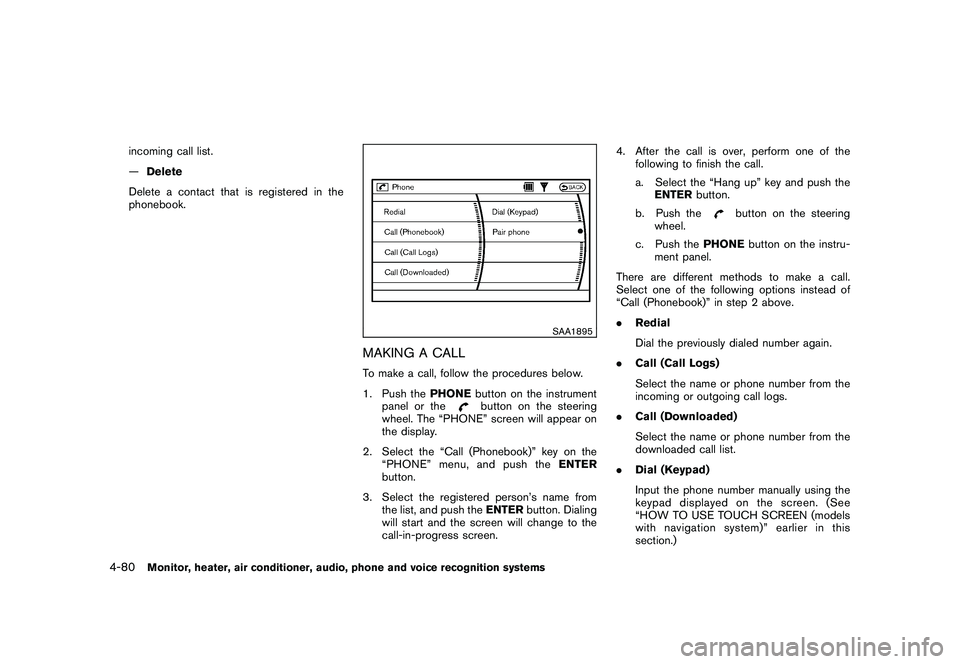
MAKING A CALLTo make a call, follow the procedures below.
1. Push the PHONEbutton on the instrument
panel or the
button on the steering
wheel. The “PHONE” screen will appear on
the display.
2. Select the “Call (Phonebook)” key on the “PHONE” menu, and push the ENTER
button.
3. Select the registered person’s name from the list, and push the ENTERbutton. Dialing
will start and the screen will change to the
call-in-progress screen. 4. After the call is over, perform one of the
following to finish the call.
a. Select the “Hang up” key and push theENTER button.
b. Push the
button on the steering
wheel.
c. Push the PHONEbutton on the instru-
ment panel.
There are different methods to make a call.
Select one of the following options instead of
“Call (Phonebook)” in step 2 above.
. Redial
Dial the previously dialed number again.
. Call (Call Logs)
Select the name or phone number from the
incoming or outgoing call logs.
. Call (Downloaded)
Select the name or phone number from the
downloaded call list.
. Dial (Keypad)
Input the phone number manually using the
keypad displayed on the screen. (See
“HOW TO USE TOUCH SCREEN (models
with navigation system)” earlier in this
section.)
4-80
Monitor, heater, air conditioner, audio, phone and voice recognition systems
Page 253 of 425
Black plate (249,1)
Model "Z51-D" EDITED: 2009/ 8/ 3
SAA1578
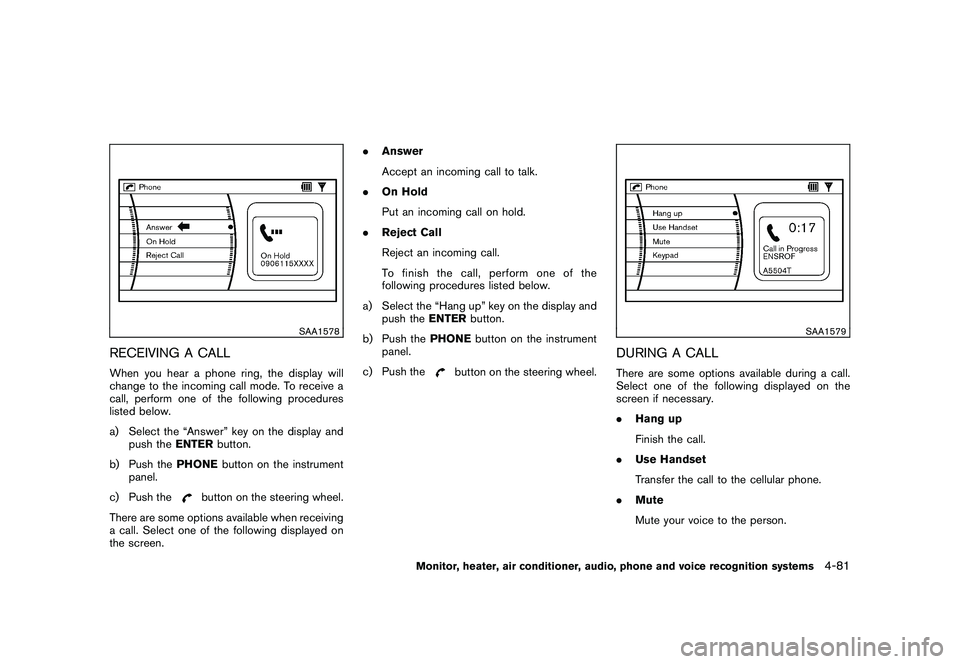
RECEIVING A CALLWhen you hear a phone ring, the display will
change to the incoming call mode. To receive a
call, perform one of the following procedures
listed below.
a) Select the “Answer” key on the display andpush the ENTERbutton.
b) Push the PHONEbutton on the instrument
panel.
c) Push the
button on the steering wheel.
There are some options available when receiving
a call. Select one of the following displayed on
the screen. .
Answer
Accept an incoming call to talk.
. On Hold
Put an incoming call on hold.
. Reject Call
Reject an incoming call.
To finish the call, perform one of the
following procedures listed below.
a) Select the “Hang up” key on the display and push the ENTERbutton.
b) Push the PHONEbutton on the instrument
panel.
c) Push the
button on the steering wheel.
SAA1579
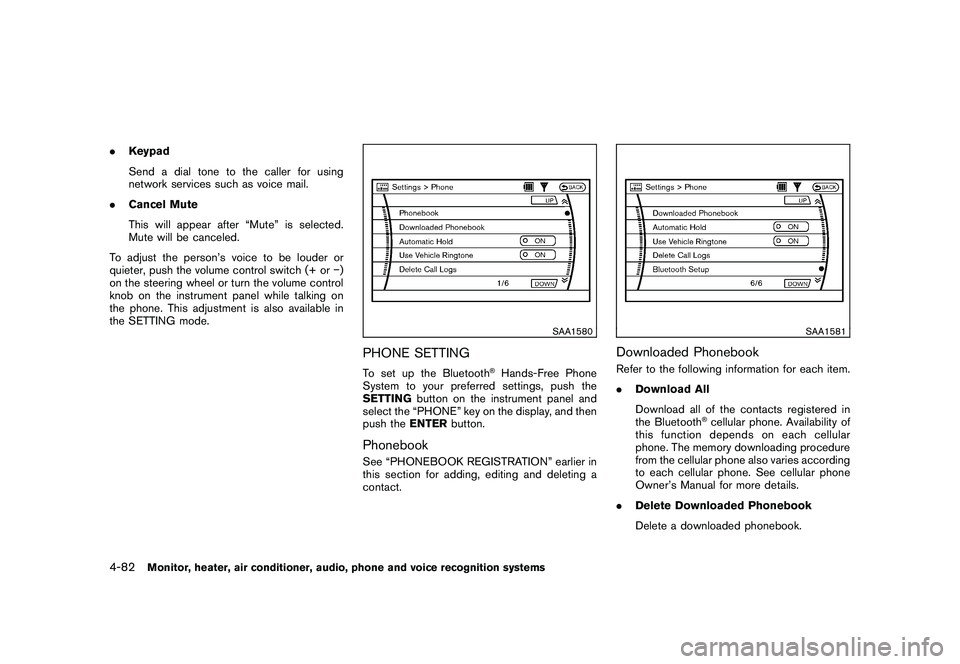
DURING A CALLThere are some options available during a call.
Select one of the following displayed on the
screen if necessary.
. Hang up
Finish the call.
. Use Handset
Transfer the call to the cellular phone.
. Mute
Mute your voice to the person.
Monitor, heater, air conditioner, audio, phone and voice recognition systems
4-81
Page 254 of 425
Black plate (250,1)
Model "Z51-D" EDITED: 2009/ 8/ 3
.Keypad
Send a dial tone to the caller for using
network services such as voice mail.
. Cancel Mute
This will appear after “Mute” is selected.
Mute will be canceled.
To adjust the person’s voice to be louder or
quieter, push the volume control switch (+ or )
on the steering wheel or turn the volume control
knob on the instrument panel while talking on
the phone. This adjustment is also available in
the SETTING mode.
SAA1580
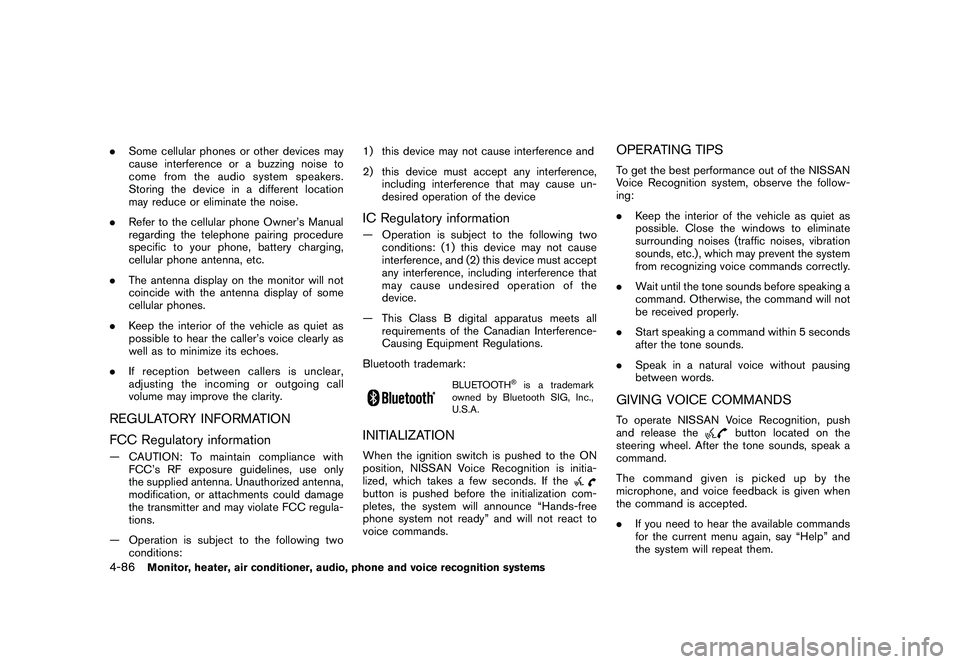
PHONE SETTINGTo set up the Bluetooth
®Hands-Free Phone
System to your preferred settings, push the
SETTING button on the instrument panel and
select the “PHONE” key on the display, and then
push the ENTERbutton.
PhonebookSee “PHONEBOOK REGISTRATION” earlier in
this section for adding, editing and deleting a
contact.
SAA1581
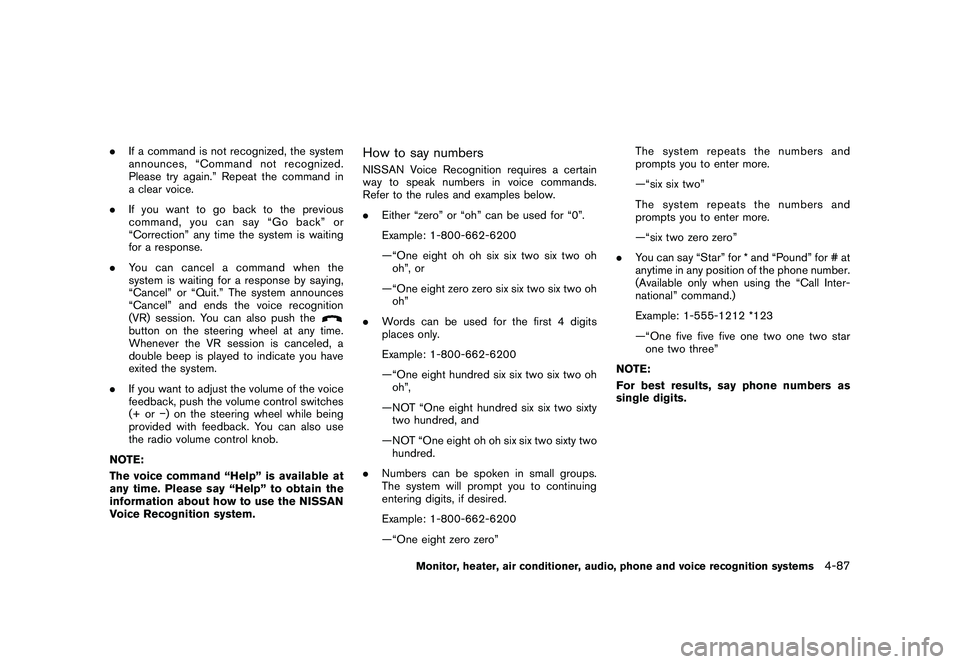
Downloaded PhonebookRefer to the following information for each item.
.Download All
Download all of the contacts registered in
the Bluetooth
®cellular phone. Availability of
this function depends on each cellular
phone. The memory downloading procedure
from the cellular phone also varies according
to each cellular phone. See cellular phone
Owner’s Manual for more details.
. Delete Downloaded Phonebook
Delete a downloaded phonebook.
4-82
Monitor, heater, air conditioner, audio, phone and voice recognition systems
Page 258 of 425
Black plate (254,1)
Model "Z51-D" EDITED: 2009/ 8/ 3
.Some cellular phones or other devices may
cause interference or a buzzing noise to
come from the audio system speakers.
Storing the device in a different location
may reduce or eliminate the noise.
. Refer to the cellular phone Owner’s Manual
regarding the telephone pairing procedure
specific to your phone, battery charging,
cellular phone antenna, etc.
. The antenna display on the monitor will not
coincide with the antenna display of some
cellular phones.
. Keep the interior of the vehicle as quiet as
possible to hear the caller’s voice clearly as
well as to minimize its echoes.
. If reception between callers is unclear,
adjusting the incoming or outgoing call
volume may improve the clarity.REGULATORY INFORMATION
FCC Regulatory information— CAUTION: To maintain compliance with
FCC’s RF exposure guidelines, use only
the supplied antenna. Unauthorized antenna,
modification, or attachments could damage
the transmitter and may violate FCC regula-
tions.
— Operation is subject to the following two conditions: 1) this device may not cause interference and
2) this device must accept any interference,
including interference that may cause un-
desired operation of the device
IC Regulatory information— Operation is subject to the following twoconditions: (1) this device may not cause
interference, and (2) this device must accept
any interference, including interference that
may cause undesired operation of the
device.
— This Class B digital apparatus meets all requirements of the Canadian Interference-
Causing Equipment Regulations.
Bluetooth trademark:
BLUETOOTH
®is a trademark
owned by Bluetooth SIG, Inc.,
U.S.A.
INITIALIZATIONWhen the ignition switch is pushed to the ON
position, NISSAN Voice Recognition is initia-
lized, which takes a few seconds. If thebutton is pushed before the initialization com-
pletes, the system will announce “Hands-free
phone system not ready” and will not react to
voice commands.
OPERATING TIPSTo get the best performance out of the NISSAN
Voice Recognition system, observe the follow-
ing:
. Keep the interior of the vehicle as quiet as
possible. Close the windows to eliminate
surrounding noises (traffic noises, vibration
sounds, etc.) , which may prevent the system
from recognizing voice commands correctly.
. Wait until the tone sounds before speaking a
command. Otherwise, the command will not
be received properly.
. Start speaking a command within 5 seconds
after the tone sounds.
. Speak in a natural voice without pausing
between words.GIVING VOICE COMMANDSTo operate NISSAN Voice Recognition, push
and release the
button located on the
steering wheel. After the tone sounds, speak a
command.
Thecommandgivenispickedupbythe
microphone, and voice feedback is given when
the command is accepted.
. If you need to hear the available commands
for the current menu again, say “Help” and
the system will repeat them.
4-86
Monitor, heater, air conditioner, audio, phone and voice recognition systems
Page 259 of 425
Black plate (255,1)
Model "Z51-D" EDITED: 2009/ 8/ 3
.If a command is not recognized, the system
announces, “Command not recognized.
Please try again.” Repeat the command in
a clear voice.
. If you want to go back to the previous
command, you can say “Go back” or
“Correction” any time the system is waiting
for a response.
. You can cancel a command when the
system is waiting for a response by saying,
“Cancel” or “Quit.” The system announces
“Cancel” and ends the voice recognition
(VR) session. You can also push the
button on the steering wheel at any time.
Whenever the VR session is canceled, a
double beep is played to indicate you have
exited the system.
. If you want to adjust the volume of the voice
feedback, push the volume control switches
(+ or ) on the steering wheel while being
provided with feedback. You can also use
the radio volume control knob.
NOTE:
The voice command “Help” is available at
any time. Please say “Help” to obtain the
information about how to use the NISSAN
Voice Recognition system.
How to say numbersNISSAN Voice Recognition requires a certain
way to speak numbers in voice commands.
Refer to the rules and examples below.
. Either “zero” or “oh” can be used for “0”.
Example: 1-800-662-6200
—“One eight oh oh six six two six two oh
oh”, or
—“One eight zero zero six six two six two oh oh”
. Words can be used for the first 4 digits
places only.
Example: 1-800-662-6200
—“One eight hundred six six two six two oh
oh”,
—NOT “One eight hundred six six two sixty two hundred, and
—NOT “One eight oh oh six six two sixty two hundred.
. Numbers can be spoken in small groups.
The system will prompt you to continuing
entering digits, if desired.
Example: 1-800-662-6200
—“One eight zero zero” The system repeats the numbers and
prompts you to enter more.
—“six six two”
The system repeats the numbers and
prompts you to enter more.
—“six two zero zero”
. You can say “Star” for * and “Pound” for # at
anytime in any position of the phone number.
(Available only when using the “Call Inter-
national” command.)
Example: 1-555-1212 *123
—“One five five five one two one two star
one two three”
NOTE:
For best results, say phone numbers as
single digits.
Monitor, heater, air conditioner, audio, phone and voice recognition systems
4-87
Page 260 of 425
Black plate (256,1)
Model "Z51-D" EDITED: 2009/ 8/ 3
SAA1858
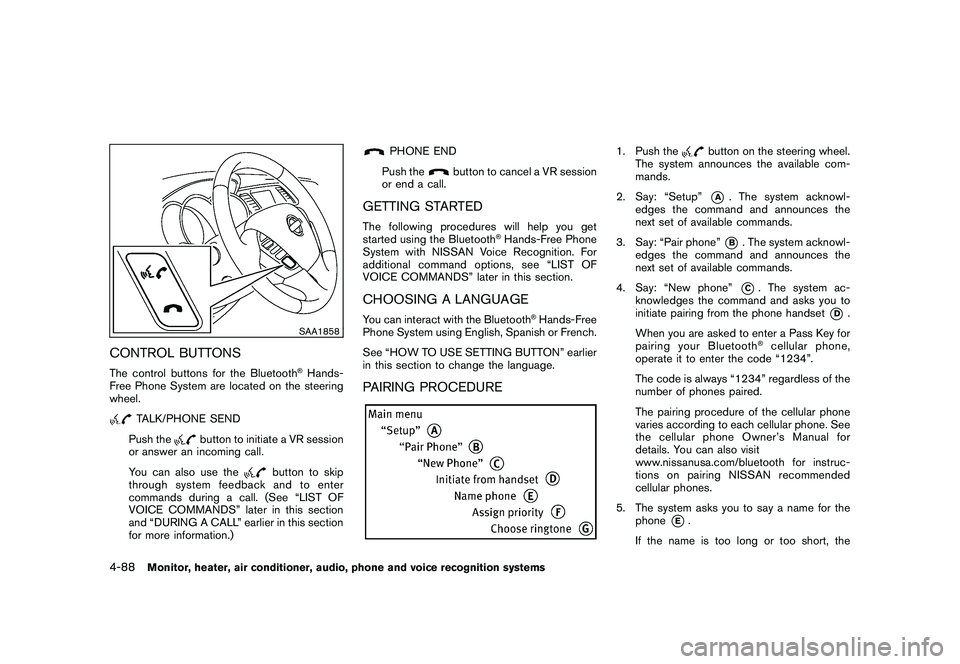
CONTROL BUTTONSThe control buttons for the Bluetooth
®Hands-
Free Phone System are located on the steering
wheel.
TALK/PHONE SEND
Push the
button to initiate a VR session
or answer an incoming call.
You can also use the
button to skip
through system feedback and to enter
commands during a call. (See “LIST OF
VOICE COMMANDS” later in this section
and “DURING A CALL” earlier in this section
for more information.)
PHONE END
Push the
button to cancel a VR session
or end a call.
GETTING STARTEDThe following procedures will help you get
started using the Bluetooth
®Hands-Free Phone
System with NISSAN Voice Recognition. For
additional command options, see “LIST OF
VOICE COMMANDS” later in this section.
CHOOSING A LANGUAGEYou can interact with the Bluetooth
®Hands-Free
Phone System using English, Spanish or French.
See “HOW TO USE SETTING BUTTON” earlier
in this section to change the language.
PAIRING PROCEDURE
1. Push the
button on the steering wheel.
The system announces the available com-
mands.
2. Say: “Setup”*A
. The system acknowl-
edges the command and announces the
next set of available commands.
3. Say: “Pair phone”*B. The system acknowl-
edges the command and announces the
next set of available commands.
4. Say: “New phone”*C. The system ac-
knowledges the command and asks you to
initiate pairing from the phone handset
*D
.
When you are asked to enter a Pass Key for
pairing your Bluetooth
®cellular phone,
operate it to enter the code “1234”.
The code is always “1234” regardless of the
number of phones paired.
The pairing procedure of the cellular phone
varies according to each cellular phone. See
the cellular phone Owner’s Manual for
details. You can also visit
www.nissanusa.com/bluetooth for instruc-
tions on pairing NISSAN recommended
cellular phones.
5. The system asks you to say a name for the phone
*E.
If the name is too long or too short, the
4-88
Monitor, heater, air conditioner, audio, phone and voice recognition systems
Page 261 of 425
Black plate (257,1)
Model "Z51-D" EDITED: 2009/ 8/ 3
system tells you, then prompts you for a
name again.
Also, if more than one phone is paired and
the name sounds too much like a name
already used, the system tells you, then
prompts you for a name again.
6. The system asks you to assign a priority level*F. The priority level determines which
phone is active when more than one paired
Bluetooth
®phone is in the vehicle. Follow
the instructions provided by the system or
see “SETUP” later in this section for more
information on changing priorities.
7. The system will ask if you would like to select a custom ringtone
*G
. Follow the
instructions provided by the system or see
“SETUP” later in this section for more
information on selecting ringtones.
MAKING A CALL BY ENTERING A
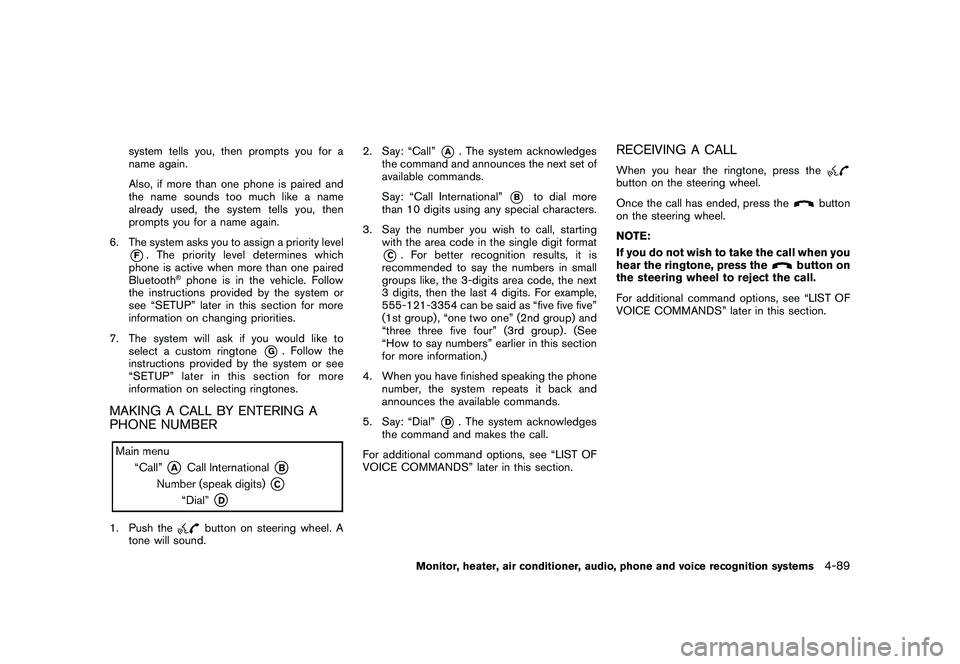
PHONE NUMBER1. Push the
button on steering wheel. A
tone will sound. 2. Say: “Call”
*A
. The system acknowledges
the command and announces the next set of
available commands.
Say: “Call International”
*B
to dial more
than 10 digits using any special characters.
3. Say the number you wish to call, starting with the area code in the single digit format
*C. For better recognition results, it is
recommended to say the numbers in small
groups like, the 3-digits area code, the next
3 digits, then the last 4 digits. For example,
555-121-3354 can be said as “five five five”
(1st group) , “one two one” (2nd group) and
“three three five four” (3rd group) . (See
“How to say numbers” earlier in this section
for more information.)
4. When you have finished speaking the phone number, the system repeats it back and
announces the available commands.
5. Say: “Dial”
*D
. The system acknowledges
the command and makes the call.
For additional command options, see “LIST OF
VOICE COMMANDS” later in this section.
RECEIVING A CALLWhen you hear the ringtone, press thebutton on the steering wheel.
Once the call has ended, press the
button
on the steering wheel.
NOTE:
If you do not wish to take the call when you
hear the ringtone, press the
button on
the steering wheel to reject the call.
For additional command options, see “LIST OF
VOICE COMMANDS” later in this section.
Monitor, heater, air conditioner, audio, phone and voice recognition systems
4-89