control unit NISSAN NAVARA 2005 Repair Workshop Manual
[x] Cancel search | Manufacturer: NISSAN, Model Year: 2005, Model line: NAVARA, Model: NISSAN NAVARA 2005Pages: 3171, PDF Size: 49.59 MB
Page 1625 of 3171

PRECAUTIONS
GI-3
C
D
E
F
G
H
I
J
K
L
MB
GI
PRECAUTIONSPFP:00001
DescriptionEAS001GG
Observe the following precautions to ensure safe and proper servicing. These precautions are not
described in each individual section.
Precautions for Supplemental Restraint System (SRS) “AIR BAG” and “SEAT
BELT PRE-TENSIONER”
EAS001GH
The Supplemental Restraint System such as “AIR BAG” and “SEAT BELT PRE-TENSIONER”, used along
with a front seat belt, helps to reduce the risk or severity of injury to the driver and front passenger for certain
types of collision. Information necessary to service the system safely is included in the SRS and SB section of
this Service Manual.
WARNING:
lTo avoid rendering the SRS inoperative, which could increase the risk of personal injury or death
in the event of a collision which would result in air bag inflation, all maintenance must be per-
formed by an authorized NISSAN/INFINITI dealer.
lImproper maintenance, including incorrect removal and installation of the SRS, can lead to per-
sonal injury caused by unintentional activation of the system. For removal of Spiral Cable and Air
Bag Module, see the SRS section.
lDo not use electrical test equipment on any circuit related to the SRS unless instructed to in this
Service Manual. SRS wiring harnesses can be identified by yellow and/or orange harnesses or
harness connectors.
Precautions for NATS (NISSAN ANTI-THEFT SYSTEM)EAS001GI
NATS will immobilize the engine if someone tries to start it without the registered key of NATS.
Both of the originally supplied ignition key IDs have been NATS registered.
The security indicator is located on the instrument panel. The indicator blinks when the immobilizer system is
functioning.
Therefore, NATS warns outsiders that the vehicle is equipped with the anti-theft system.
lWhen NATS detects trouble, the security indicator lamp lights up while ignition switch is in "ON" position.
This lighting up indicates that the anti-theft is not functioning, so prompt service is required.
lWhen servicing NATS (trouble diagnoses, system initialization and additional registration of other NATS
ignition key IDs), CONSULT-II hardware and CONSULT-II NATS software is necessary.
Regarding the procedures of NATS initialization and NATS ignition key ID registration, refer to CONSULT-
II operation manual, NATS.
Therefore, CONSULT-II NATS software (program card and operation manual) must be kept strictly con-
fidential to maintain the integrity of the anti-theft function.
lWhen servicing NATS (trouble diagnoses, system initialization and additional registration of other NATS
ignition key IDs), it may be necessary to re-register original key identification. Therefore, be sure to
receive all keys from vehicle owner. A maximum of four or five key IDs can be registered into NATS.
lWhen failing to start the engine first time using the key of NATS, start as follows.
1. Leave the ignition key in "ON" position for approximately 5 seconds.
2. Turn ignition key to "OFF" or "LOCK" position and wait approximately 5 seconds.
3. Repeat step 1 and 2 again.
4. Restart the engine while keeping the key separate from any others on key-chain.
Precautions Necessary for Steering Wheel Rotation After Battery DisconnectEAS001HY
NOTE:
lThis Procedure is applied only to models with Intelligent Key system and NATS (NISSAN ANTI-THEFT
SYSTEM).
lRemove and install all control units after disconnecting both battery cables with the ignition knob in the
²LOCK²position.
lAlways use CONSULT-II to perform self-diagnosis as a part of each function inspection after finishing
work. If DTC is detected, perform trouble diagnosis according to self-diagnostic results.
For models equipped with the Intelligent Key system and NATS, an electrically controlled steering lock mech-
anism is adopted on the key cylinder.
Page 1626 of 3171
GI-4
PRECAUTIONS
For this reason, if the battery is disconnected or if the battery is discharged, the steering wheel will lock and
steering wheel rotation will become impossible.
If steering wheel rotation is required when battery power is interrupted, follow the procedure below before
starting the repair operation.
OPERATION PROCEDURE
1. Connect both battery cables.
NOTE:
Supply power using jumper cables if battery is discharged.
2. Use the Intelligent Key or mechanical key to turn the ignition switch to the²ACC²position. At this time, the
steering lock will be released.
3. Disconnect both battery cables. The steering lock will remain released and the steering wheel can be
rotated.
4. Perform the necessary repair operation.
5. When the repair work is completed, return the ignition switch to the²LOCK²position before connecting
the battery cables. (At this time, the steering lock mechanism will engage.)
6. Perform a self-diagnosis check of all control units using CONSULT-II.
General PrecautionsEAS001GJ
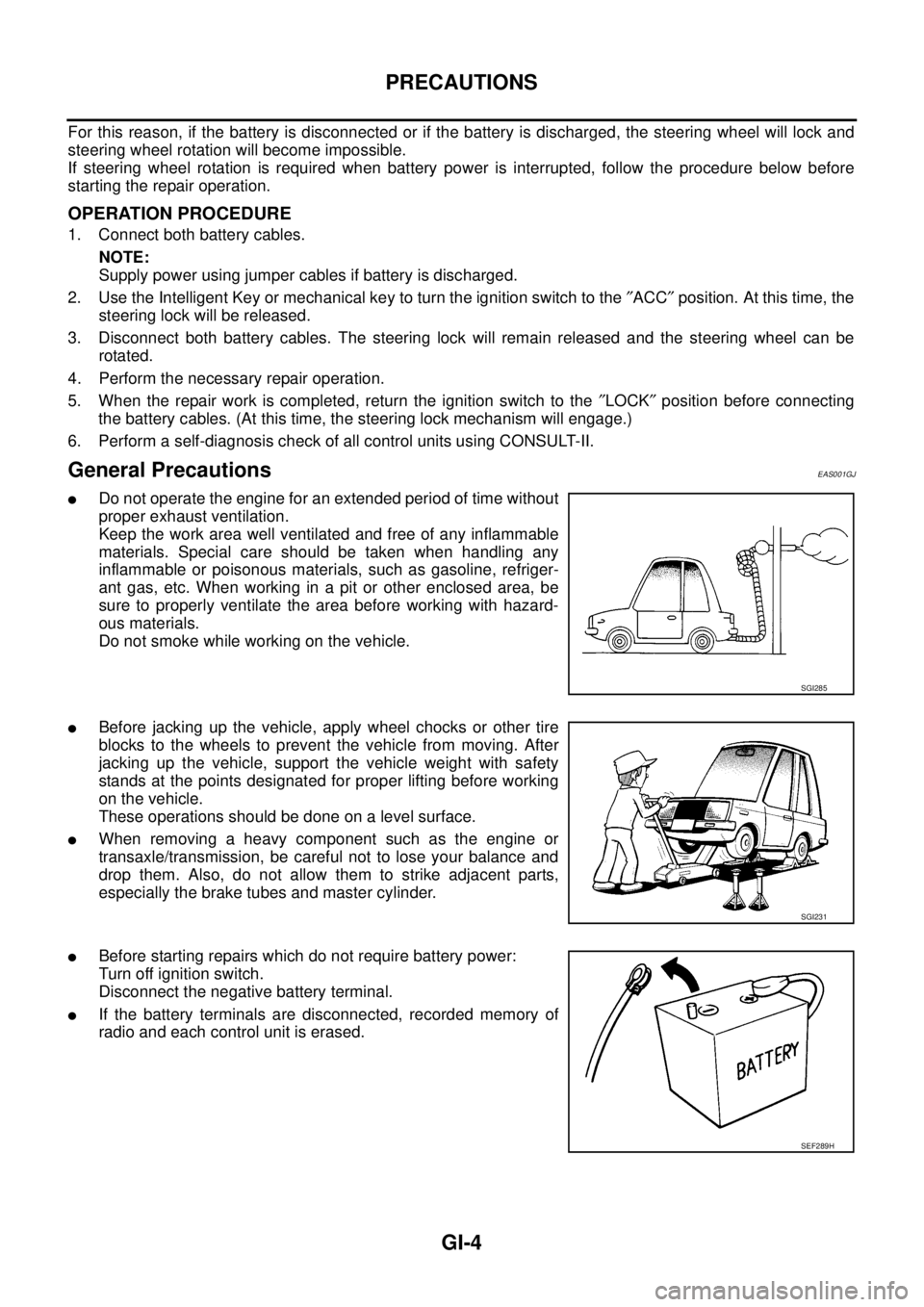
lDo not operate the engine for an extended period of time without
proper exhaust ventilation.
Keep the work area well ventilated and free of any inflammable
materials. Special care should be taken when handling any
inflammable or poisonous materials, such as gasoline, refriger-
ant gas, etc. When working in a pit or other enclosed area, be
sure to properly ventilate the area before working with hazard-
ous materials.
Do not smoke while working on the vehicle.
lBefore jacking up the vehicle, apply wheel chocks or other tire
blocks to the wheels to prevent the vehicle from moving. After
jacking up the vehicle, support the vehicle weight with safety
stands at the points designated for proper lifting before working
on the vehicle.
These operations should be done on a level surface.
lWhen removing a heavy component such as the engine or
transaxle/transmission, be careful not to lose your balance and
drop them. Also, do not allow them to strike adjacent parts,
especially the brake tubes and master cylinder.
lBefore starting repairs which do not require battery power:
Turn off ignition switch.
Disconnect the negative battery terminal.
lIf the battery terminals are disconnected, recorded memory of
radio and each control unit is erased.
SGI285
SGI231
SEF289H
Page 1653 of 3171
SERVICE INFORMATION FOR ELECTRICAL INCIDENT
GI-31
C
D
E
F
G
H
I
J
K
L
MB
GI
Control Unit Circuit Test
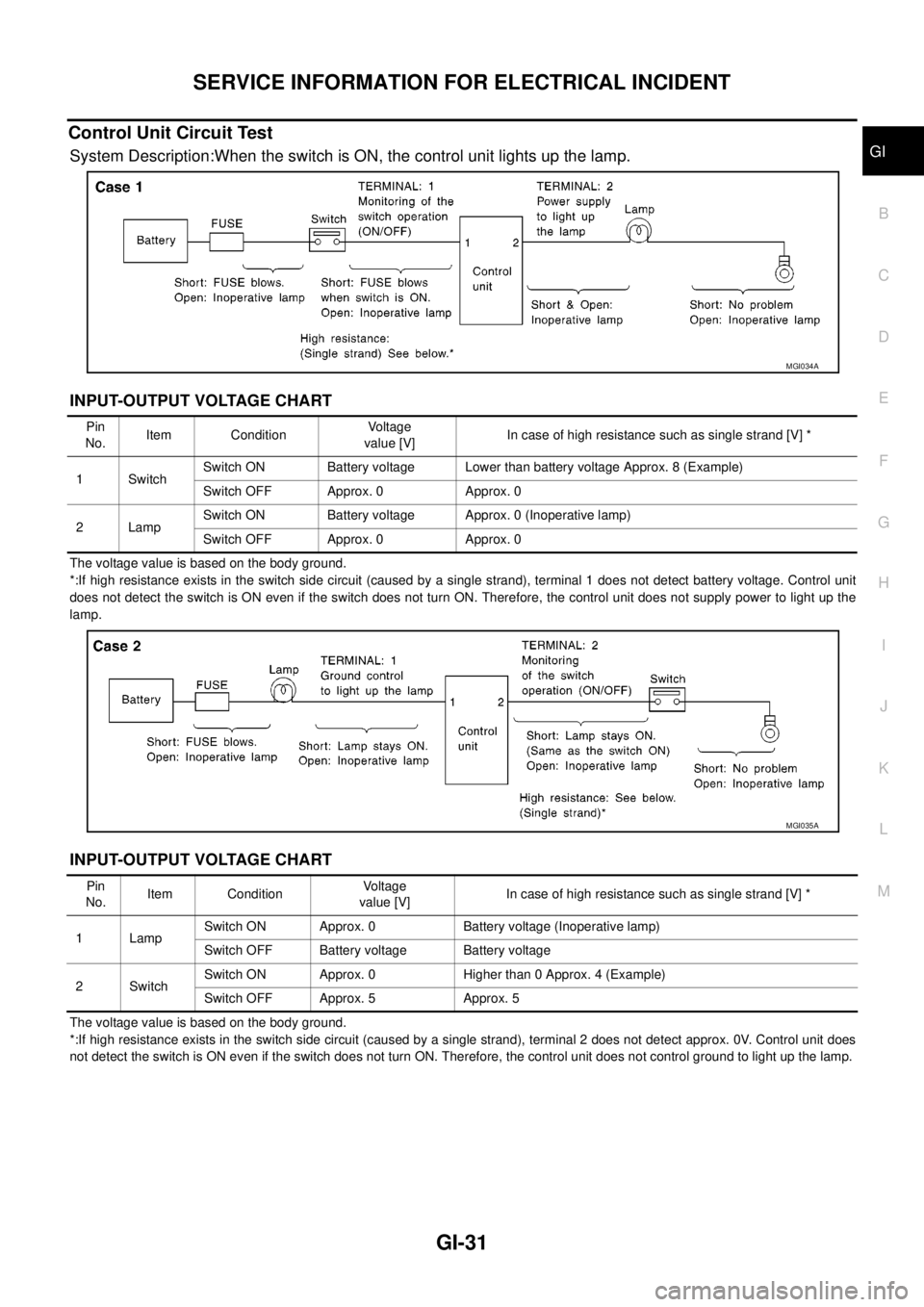
System Description:When the switch is ON, the control unit lights up the lamp.
INPUT-OUTPUT VOLTAGE CHART
The voltage value is based on the body ground.
*:If high resistance exists in the switch side circuit (caused by a single strand), terminal 1 does not detect battery voltage. Control unit
does not detect the switch is ON even if the switch does not turn ON. Therefore, the control unit does not supply power to light up the
lamp.
INPUT-OUTPUT VOLTAGE CHART
The voltage value is based on the body ground.
*:If high resistance exists in the switch side circuit (caused by a single strand), terminal 2 does not detect approx. 0V. Control unit does
not detect the switch is ON even if the switch does not turn ON. Therefore, the control unit does not control ground to light up the lamp.
MGI034A
Pin
No.Item ConditionVoltage
value [V]In case of high resistance such as single strand [V] *
1 SwitchSwitch ON Battery voltage Lower than battery voltage Approx. 8 (Example)
Switch OFF Approx. 0 Approx. 0
2LampSwitch ON Battery voltage Approx. 0 (Inoperative lamp)
Switch OFF Approx. 0 Approx. 0
MGI035A
Pin
No.Item ConditionVoltage
value [V]In case of high resistance such as single strand [V] *
1 LampSwitch ON Approx. 0 Battery voltage (Inoperative lamp)
Switch OFF Battery voltage Battery voltage
2SwitchSwitch ON Approx. 0 Higher than 0 Approx. 4 (Example)
Switch OFF Approx. 5 Approx. 5
Page 1654 of 3171
GI-32
SERVICE INFORMATION FOR ELECTRICAL INCIDENT
Control Units and Electrical Parts
EAS001H1
PRECAUTIONS
lNever reverse polarity of battery terminals.
lInstall only parts specified for a vehicle.
lBefore replacing the control unit, check the input and output and
functions of the component parts.
lDo not apply excessive force when disconnecting a connector.
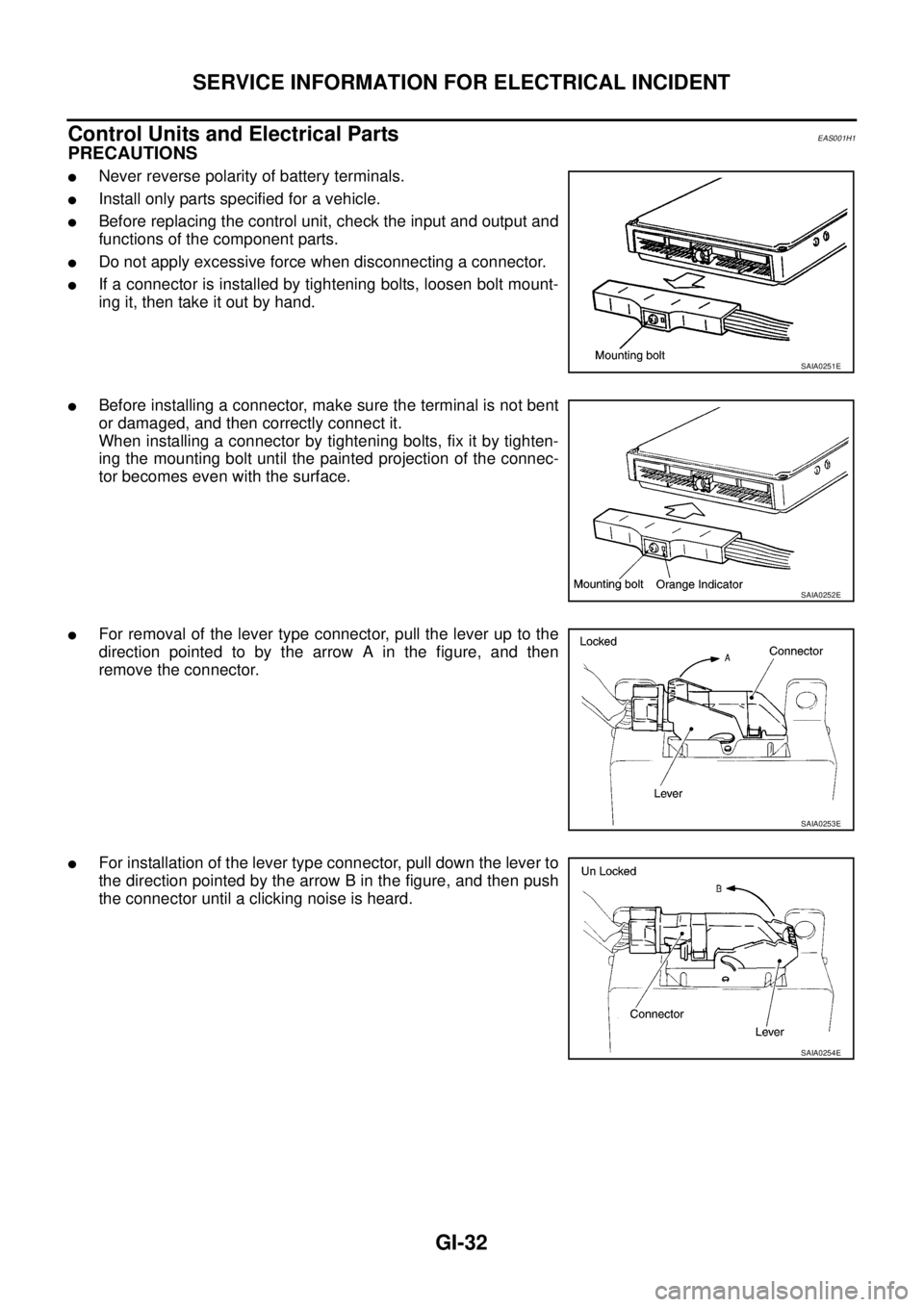
lIf a connector is installed by tightening bolts, loosen bolt mount-
ing it, then take it out by hand.
lBefore installing a connector, make sure the terminal is not bent
or damaged, and then correctly connect it.
When installing a connector by tightening bolts, fix it by tighten-
ing the mounting bolt until the painted projection of the connec-
tor becomes even with the surface.
lFor removal of the lever type connector, pull the lever up to the
direction pointed to by the arrow A in the figure, and then
remove the connector.
lFor installation of the lever type connector, pull down the lever to
the direction pointed by the arrow B in the figure, and then push
the connector until a clicking noise is heard.
SAIA0251E
SAIA0252E
SAIA0253E
SAIA0254E
Page 1655 of 3171
SERVICE INFORMATION FOR ELECTRICAL INCIDENT
GI-33
C
D
E
F
G
H
I
J
K
L
MB
GI
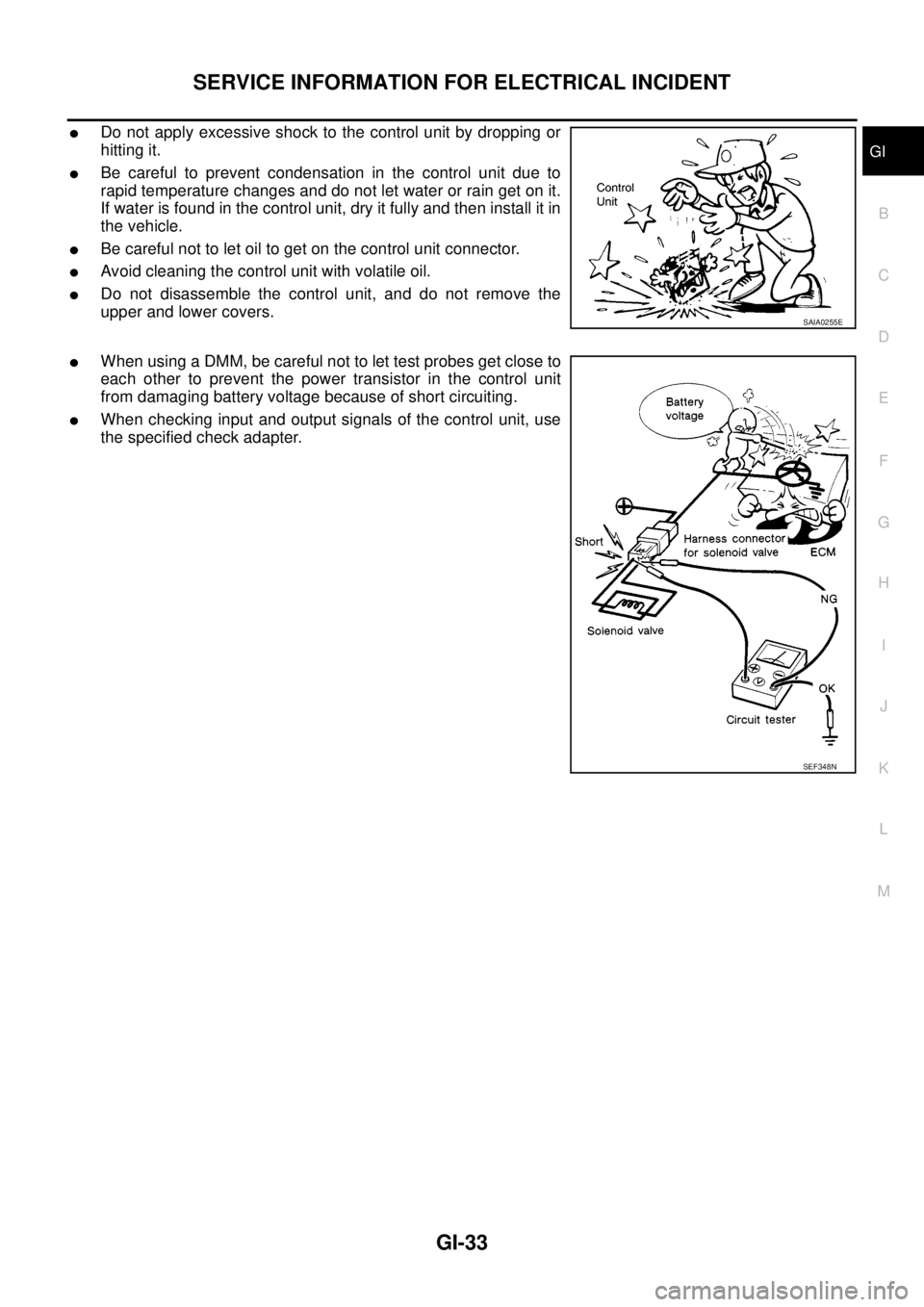
lDo not apply excessive shock to the control unit by dropping or
hitting it.
lBe careful to prevent condensation in the control unit due to
rapid temperature changes and do not let water or rain get on it.
If water is found in the control unit, dry it fully and then install it in
the vehicle.
lBe careful not to let oil to get on the control unit connector.
lAvoid cleaning the control unit with volatile oil.
lDo not disassemble the control unit, and do not remove the
upper and lower covers.
lWhen using a DMM, be careful not to let test probes get close to
each other to prevent the power transistor in the control unit
from damaging battery voltage because of short circuiting.
lWhen checking input and output signals of the control unit, use
the specified check adapter.
SAIA0255E
SEF348N
Page 1656 of 3171

GI-34
CONTROL UNIT CONFIGURATION PROCEDURE
CONTROL UNIT CONFIGURATION PROCEDURE
PFP:00000
DescriptionEAS001HD
Perform configuration and other appurtenant work in accordance with the procedures in the table after replac-
ing control unit shown below.
Part Replacement procedure Reference TableEAS001HA
1. Find and select a wok item code from the part replacement procedure reference table below.
2. If the replaced units matched the code table, select a work item code in end of the row.
3. Proceed to the work procedure page. (Refer toGI-36, "
Work Procedure")
Page 1657 of 3171

CONTROL UNIT CONFIGURATION PROCEDURE
GI-35
C
D
E
F
G
H
I
J
K
L
MB
GI
´: replace unitPARTS REPLACEMENT ITEM
Work item
code
ECM BCMIntelligent Key
unitIntelligent KeySteering lock
unit
VIHCLE CONDITION
WITH NATS
WITH INTELLIGENT KEY SYSTEM
´´´´´A
´´´´—B
´´´—´A
´´´—— B
´´—´´B
´´—´—B
´´——´C
´´——— C
´—´´´D
´—´´—D
´—´—´E
´—´—— E
´——´´D
´——´—D
´———´F
´———— F
—´´´´B
—´´´—B
—´´—´B
—´´—— B
—´—´´B
—´—´—B
—´——´C
—´——— C
——´´´D
——´´—D
——´—´E
——´—— E
———´´D
———´—H
————´F
WITHOUT
INTELLIGENT
KEY SYSTEM
´´G
´—F
—´C
WITHOUT
NATS
´´I
´—J
—´K
Page 1658 of 3171

GI-36
CONTROL UNIT CONFIGURATION PROCEDURE
Work Procedure
EAS001HB
NOTE:
The configuration procedure may differ according to the replaced unit, those always use the work item code to
determinate a appropriate procedure.
Work item code Confirmation procedure Refer page
A1.“Configuration” on CONSULT-II. (At ignition switch LOCK position.)GI-37, "
Configuration (BCM)"
2. Turn ignition switch ON with mechanical key. —
3. “C/U INITIALIZATION” on CONSULT-II. CONSULT-II operation manual NATS.
4. “REGIST I-KEY ID” on CONSULT-II. CONSULT-II operation manual NATS.
B1. “Configuration” on CONSULT-II. (At ignition switch LOCK position.)GI-37, "
Configuration (BCM)"
2. “STEERING LOCK RELEASE” on CONSULT-II. CONSULT-II operation manual NATS.
3. Turn ignition switch ON with mechanical key. —
4. “C/U INITIALIZATION” on CONSULT-II. CONSULT-II operation manual NATS.
5. “REGIST I-KEY ID” on CONSULT-II. CONSULT-II operation manual NATS.
C1. “Configuration” on CONSULT-II. (At ignition switch LOCK position.)GI-37, "
Configuration (BCM)"
2. “STEERING LOCK RELEASE” on CONSULT-II. CONSULT-II operation manual NATS.
3. Turn ignition switch ON with mechanical key. —
4. “C/U INITIALIZATION” on CONSULT-II. CONSULT-II operation manual NATS.
D1. “STEERING LOCK RELEASE” on CONSULT-II. CONSULT-II operation manual NATS.
2. Turn ignition switch ON with mechanical key. —
3. “C/U INITIALIZATION” on CONSULT-II. CONSULT-II operation manual NATS.
4. “REGIST I-KEY ID” on CONSULT-II. CONSULT-II operation manual NATS.
E1. Turn ignition switch ON with mechanical key. —
2. “REGIST I-KEY ID” on CONSULT-II. CONSULT-II operation manual NATS.
F Turn ignition switch ON with mechanical key. —
G1. “Configuration” on CONSULT-II.GI-37, "
Configuration (BCM)"
2. Turn ignition switch ON with mechanical key. —
3. “C/U INITIALIZATION” on CONSULT-II. CONSULT-II operation manual NATS.
H1. “STEERING LOCK RELEASE” on CONSULT-II. CONSULT-II operation manual NATS.
2. “C/U INITIALIZATION” on CONSULT-II. CONSULT-II operation manual NATS.
3. “REGIST I-KEY ID” on CONSULT-II. CONSULT-II operation manual NATS.
J1.“Configuration” on CONSULT-II. (At ignition switch ON position.)GI-37, "
Configuration (BCM)"
2. Erase the DTC (P1612) using CONSULT-II —
I “Configuration” on CONSULT-II. (At ignition switch ON position.)GI-37, "
Configuration (BCM)"
K Turn ignition switch ON with ignition key. —
Page 1659 of 3171
CONTROL UNIT CONFIGURATION PROCEDURE
GI-37
C
D
E
F
G
H
I
J
K
L
MB
GI
Configuration (BCM)EAS001Q6
DESCRIPTION
CONFIGURATION has two functions as follows:
lREAD CONFIGURATION is the function to confirm vehicle configuration of current BCM.
lWRITE CONFIGURATION is the function to write vehicle configuration on BCM.
CAUTION:
lWhen replacing BCM, you must perform WRITE CONFIGURATION with CONSULT-II.
lComplete the procedure of WRITE CONFIGURATION in order.
lIf you set incorrect WRITE CONFIGURATION, incidents will occur.
lConfiguration is different for each vehicle model. Confirm configuration of each vehicle model.
READ CONFIGURATION PROCEDURE
CAUTION:
If CONSULT-II is used with no connection of CONSULT-II CONVERTER, malfunctions might be
detected in self-diagnosis depending on control unit which carry out CAN communication.
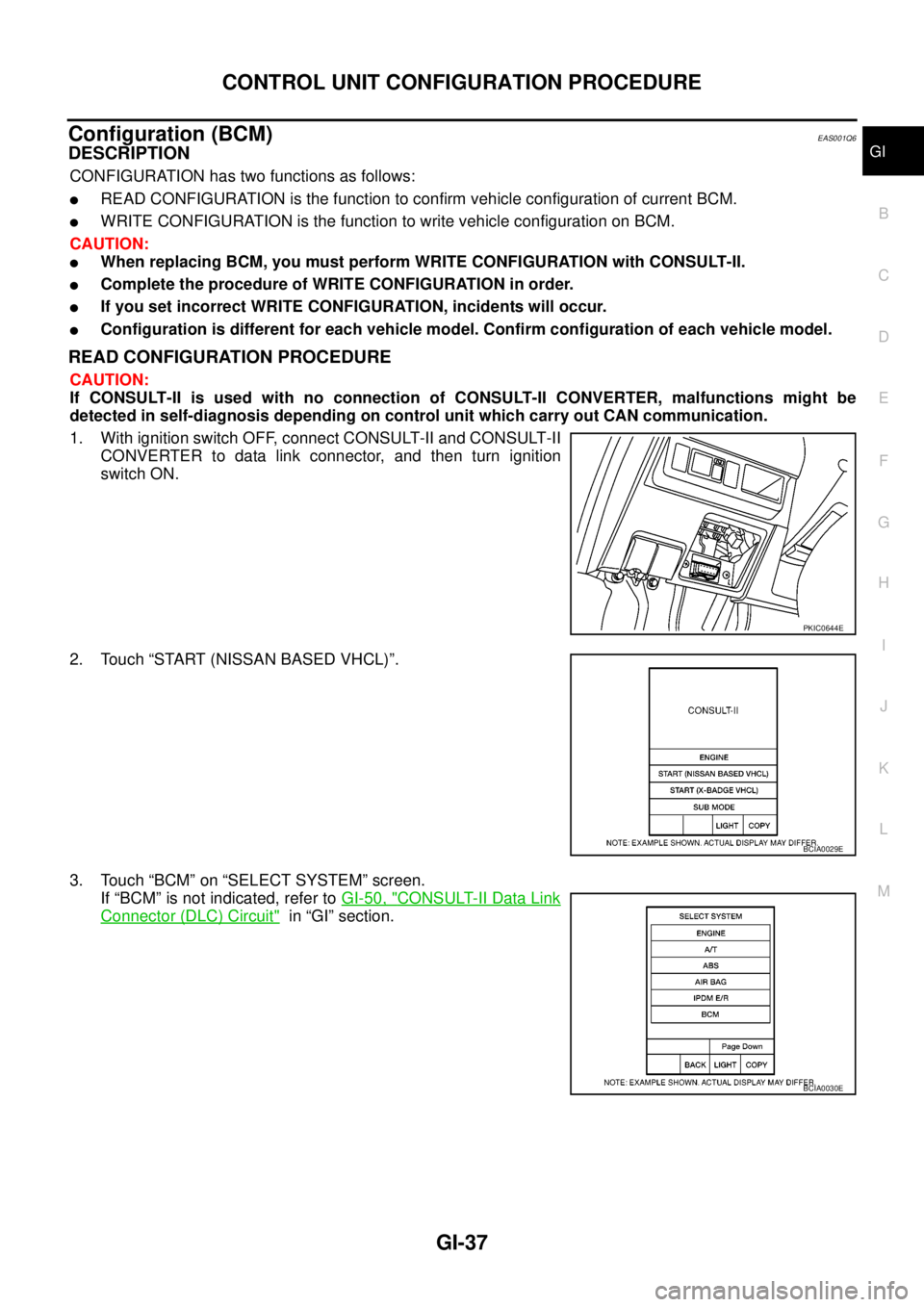
1. With ignition switch OFF, connect CONSULT-II and CONSULT-II
CONVERTER to data link connector, and then turn ignition
switch ON.
2. Touch “START (NISSAN BASED VHCL)”.
3. Touch “BCM” on “SELECT SYSTEM” screen.
If “BCM” is not indicated, refer toGI-50, "
CONSULT-II Data Link
Connector (DLC) Circuit"in “GI” section.
PKIC0644E
BCIA0029E
BCIA0030E
Page 1660 of 3171
GI-38
CONTROL UNIT CONFIGURATION PROCEDURE
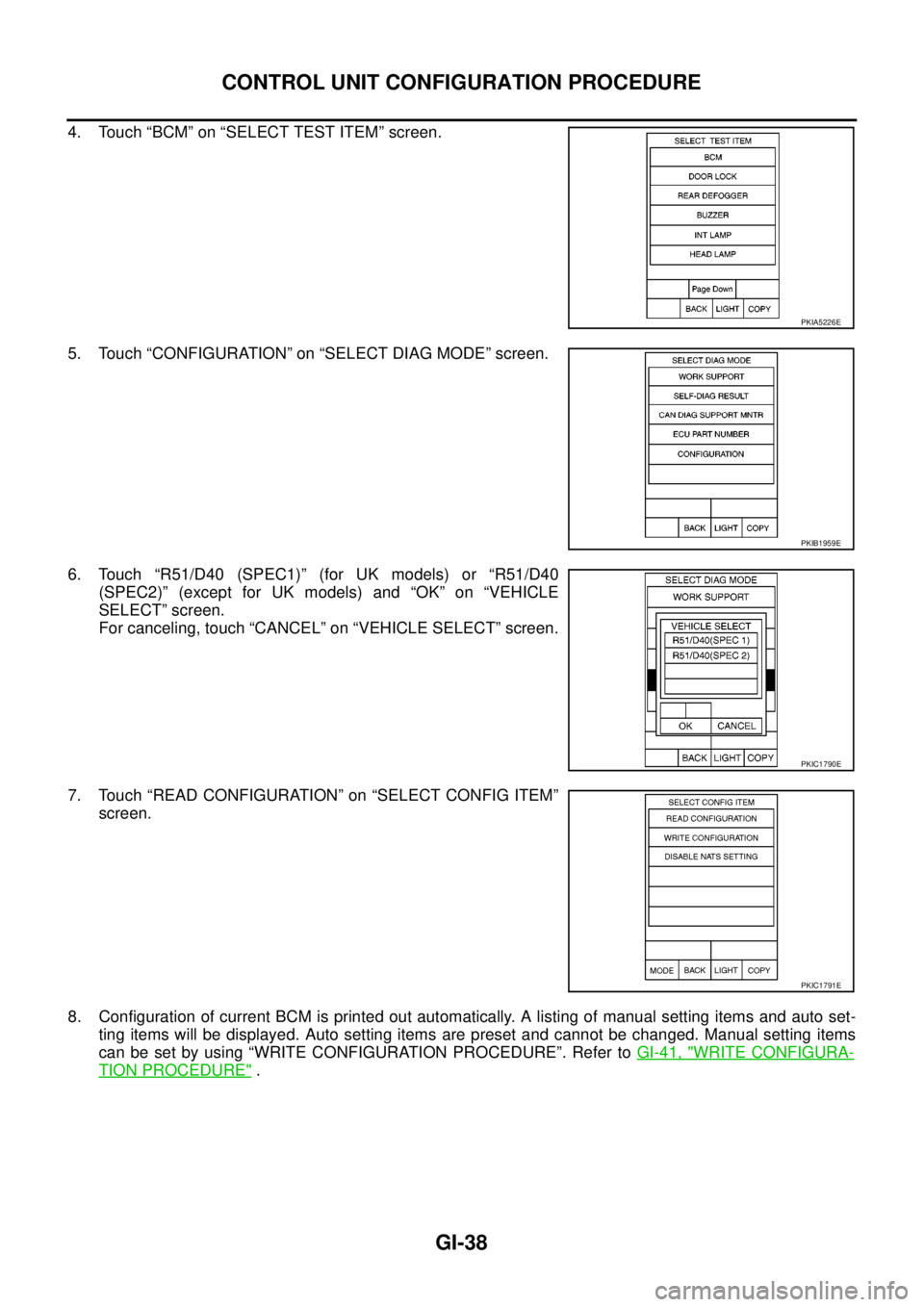
4. Touch “BCM” on “SELECT TEST ITEM” screen.
5. Touch “CONFIGURATION” on “SELECT DIAG MODE” screen.
6. Touch “R51/D40 (SPEC1)” (for UK models) or “R51/D40
(SPEC2)” (except for UK models) and “OK” on “VEHICLE
SELECT” screen.
For canceling, touch “CANCEL” on “VEHICLE SELECT” screen.
7. Touch “READ CONFIGURATION” on “SELECT CONFIG ITEM”
screen.
8. Configuration of current BCM is printed out automatically. A listing of manual setting items and auto set-
ting items will be displayed. Auto setting items are preset and cannot be changed. Manual setting items
can be set by using “WRITE CONFIGURATION PROCEDURE”. Refer toGI-41, "
WRITE CONFIGURA-
TION PROCEDURE".
PKIA5226E
PKIB1959E
PKIC1790E
PKIC1791E